
The Complete Guide to Smart Home Security in India
The umbrella guide to smart home security for Indian homes — what it really is (convenience, remote awareness and automation layered onto real security, not a replacement for it), the five layers of a system mapped to the whole library, and the two layers people skip: privacy and cybersecurity.
Smart home security is the most exciting corner of home protection and the most over-sold. The pitch is seductive: watch your gate from another city, unlock for family without a key, get a ping the moment a sensor trips, tell an assistant "goodnight" and have the whole house arm itself. All of that is real, and much of it genuinely helps. But the honest India reality is the part the box never mentions — a cloud camera is blind in a six-hour power cut, an app stops alerting when the broadband drops, a battery dies unnoticed, a vendor kills a server and your gadget becomes a paperweight, and a ₹-cheap no-name camera with a factory password quietly joins a botnet and becomes a hole in your own home.
This is the pillar for the smart-home-security section of the library — the umbrella that frames what "smart" adds, maps the five layers of a system to the deeper guides, and insists on the two layers people skip. It sits above a broad companion, the integrated security systems guide, which goes device-by-device through the connected layer; think of this page as the wider map and that one as the systems spoke. For the automation side of the house beyond security, see the smart home hub.
Scope & safety. This guide helps you plan, decide and coordinate — not do licensed work. Smart is convenience, remote awareness and automation layered onto real security, not a replacement for good doors, locks, sensors and, where it matters, monitoring. It must degrade gracefully and keep a non-smart fallback for anything that matters, because a cloud system goes dark in a power or internet cut. Every connected device is an attack surface and a data collector — cybersecurity and privacy are first-class, and the DPDP Act 2023 applies. Life-safety is never smart-only: a smart smoke ping is an add-on, not a certified fire-alarm system; never voice-unlock a door; a smart lock must never trap people in a fire. Mains wiring, electric locks, and certified fire, alarm and lift work are for licensed professionals — you specify and decide.
What smart home security actually is — and is NOT
Strip away the marketing and a smart security device does three things a dumb one cannot: it connects (to your network, a hub or a cloud), it notifies (pushes an alert in real time), and it can automate (act on a rule without you). Each is genuinely useful. Each is also a new dependency on power, connectivity or a battery.
So be clear about what smart home security is not. It is not a substitute for a solid door and frame, a real deadbolt, grilles where you need them, honest boundary treatment, or — for a home that genuinely warrants it — professional monitoring and a response plan. A smart lock on a flimsy door is theatre. A camera that only lives in the cloud protects nothing during the exact monsoon-night power cut an opportunist counts on. Smart is a layer of awareness and convenience on top of physical security done right — the fundamentals live in the ultimate guide to home security and, for whole buildings, the building security systems guide. Get those right first; then let smart make them convenient and aware.
The five layers, mapped to this library
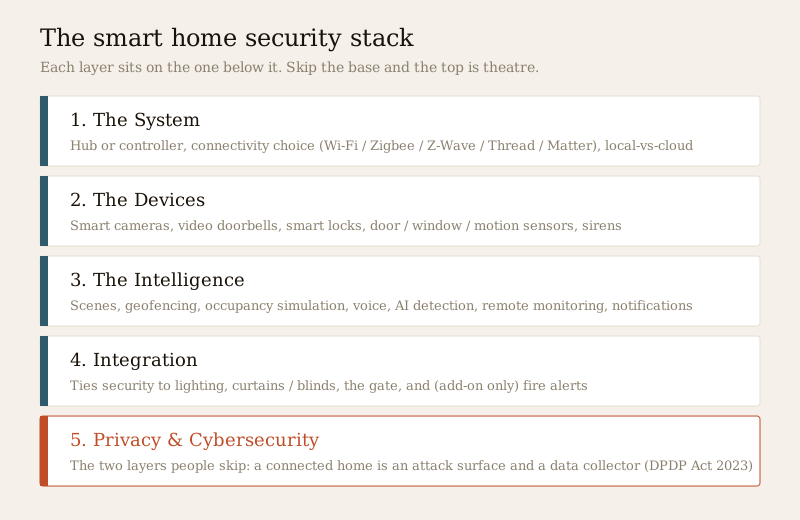
A smart security system is best understood as five layers stacked on one another. This pillar exists to map each layer to the guides that go deep — read this table as the index to the whole section.
| Layer | What it is | Go deeper |
|---|---|---|
| 1. The system | The hub or controller, the connectivity choice, and where the brain lives (local vs cloud) | Smart security hubs, integrated security systems |
| 2. The devices | Cameras, video doorbells, locks, sensors, sirens — the eyes, ears and hands | Smart CCTV, smart video doorbells, smart locks, smart sensors, smart sirens |
| 3. The intelligence | Scenes, geofencing, occupancy simulation, voice, AI detection, monitoring, alerts | Automation scenes, geofencing, occupancy simulation, voice control, AI CCTV, remote monitoring, notifications |
| 4. Integration | Tying security to lighting, blinds, the gate and (add-on only) fire | Home-automation integration, lighting integration, curtains & blinds, gate automation, fire-alarm integration |
| 5. Privacy & cyber | The two layers most buyers skip — the attack surface and the data trail | Smart security privacy, smart security cybersecurity |
Layer 1 — the system
Most smart security lives inside an ecosystem: a hub, app or platform that ties devices together. The two decisions that shape everything downstream are connectivity and where the brain lives.
Connectivity standards are not interchangeable, and the marketing rarely explains the trade-offs. Describe them by what they do, not by chasing version numbers:
| Standard | Character | Where it fits |
|---|---|---|
| Wi-Fi | High-bandwidth, mains-hungry, uses your home network directly | Cameras and doorbells that stream video |
| Zigbee / Z-Wave | Low-power mesh radios for small messages, need a hub | Sensors, locks and sirens on battery |
| Thread | Newer low-power mesh, no single hub bottleneck | Battery devices in a Matter setup |
| Matter | An interoperability layer over Wi-Fi and Thread, not a radio of its own | The cross-brand glue that fights lock-in |
Where the brain lives — local or cloud — decides how the system behaves when the internet drops. A local-first hub keeps deciding and recording on-site even offline; a cloud-first one is convenient but goes quiet when broadband does. For most Indian homes the honest answer is local-first for resilience with selective cloud backup so footage survives both an outage and the theft of the recorder. The smart security hubs guide and the integrated systems guide work this through in detail.
Layer 2 — the devices
The devices are the eyes, ears and hands. Choose each for what it must do, and remember that every one adds a power, connectivity or battery dependency:
- Smart cameras — live view, motion and person alerts, two-way talk. Prefer local recording so they still capture during an outage. See smart CCTV and, for smarter filtering, AI-powered CCTV and human/vehicle detection.
- Video doorbells — see and speak to a caller before opening. See smart video doorbells and doorbell cameras.
- Smart locks — keyless entry, remote lock and temporary codes. See the smart locks guide and deadbolt smart locks.
- Sensors — the tripwires that feed everything: door sensors, window sensors, motion sensors, glass-break sensors, and the umbrella smart sensors guide.
- Sirens and panic buttons — the noise that turns detection into deterrence: smart sirens, audible sirens and panic buttons.
Layer 3 — the intelligence
Intelligence is why you go smart at all — it closes the gaps humans forget. The patterns that earn their keep:
- Automation scenes — one "leaving home" action locks the door, arms the alarm and switches off appliances. See security automation scenes.
- Geofencing — the system arms as the last phone leaves a radius and disarms as you return, so nobody forgets. Keep a manual override for dead phones and guests. See geofencing.
- Occupancy simulation — lights and a radio play a lived-in pattern while you travel. A dark, silent house over a long festival break is the single biggest risk multiplier for Indian homes. See occupancy simulation.
- Voice control — convenient for scenes and status, but with a hard limit covered below. See voice-controlled security.
- AI detection — person-and-vehicle filtering cuts the alert fatigue of fifty motion pings a day. See AI-powered CCTV.
- Remote monitoring and notifications — watching and being told from anywhere, and where it matters, alarm monitoring services, remote access and control-room monitoring. See also remote security monitoring and smart notifications.
One caution runs through all of it: an alert is not a response. A notification you swipe away at 2 a.m. protects nobody. Pair smart alerts with a real plan — household, neighbours, RWA, guards, or a monitoring service.
Layer 4 — integration
Integration is what makes the system feel like one home rather than five apps. Tie security into:
- Lighting — a night motion event turns on the driveway and deters. See lighting integration, security lighting design and motion-activated lighting.
- Curtains and blinds — part of the occupancy story and privacy. See curtains & blinds integration.
- The gate — arriving home opens the gate as the alarm disarms. See gate-automation integration, motorised gate automation and automatic gate systems.
- Fire — as an add-on only. A smart smoke ping is a helpful nudge, never the system of record. See the caveat below, fire-alarm integration, and the certified world of addressable, wireless and voice-evacuation systems.
The wider recipe lives in security home-automation integration.
Graceful degradation: what still works when it all goes dark
Here is the uncomfortable truth about smart home security in India: a system that depends entirely on mains power and the internet can go completely dark exactly when you are most exposed. A power cut during a monsoon storm, or an outage while you travel, is precisely the moment an opportunist counts on. A wired grille does not care about the grid. A cloud camera does.
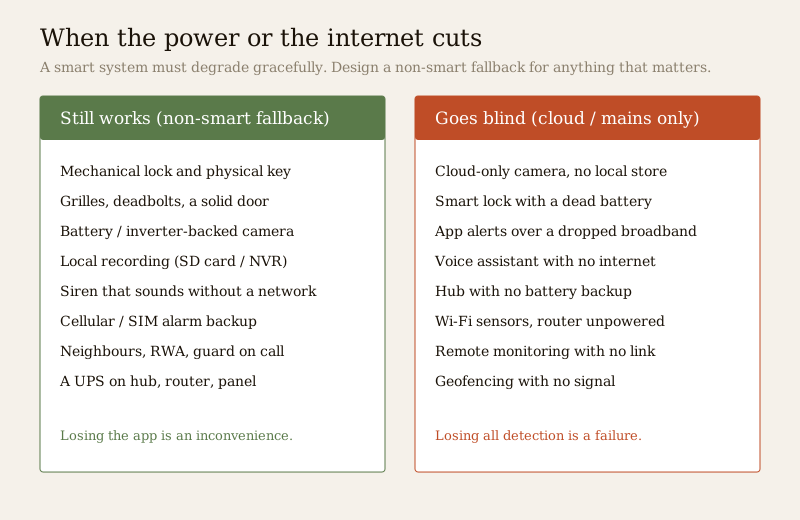
Design for three independent failures. Put the hub, router, key cameras and alarm panel on battery, inverter or UPS; prefer local recording so footage is captured even offline; and choose an alarm with a cellular/SIM backup that can still call or SMS when Wi-Fi is gone. Choose a smart lock with long battery life, a clear low-battery warning, and a mechanical key or thumb-turn so nobody is ever locked in. The principle is simple: your protection should degrade gracefully, not collapse. Losing the app is an inconvenience; losing all detection and recording is a failure. Assess your own weak points with the home security risk scorecard and read the resilience section of the integrated systems guide.
The two layers people skip: privacy and cybersecurity
A connected home is two things at once — an attack surface and a data collector — and both are easy to ignore until they bite. Every device is an internet-connected computer inside your home; a badly-secured one can be a bigger risk than the threat it was bought to counter. And a camera pointed at your living room is generating a continuous record of your family's private life, often stored on a server you do not control and cannot see.
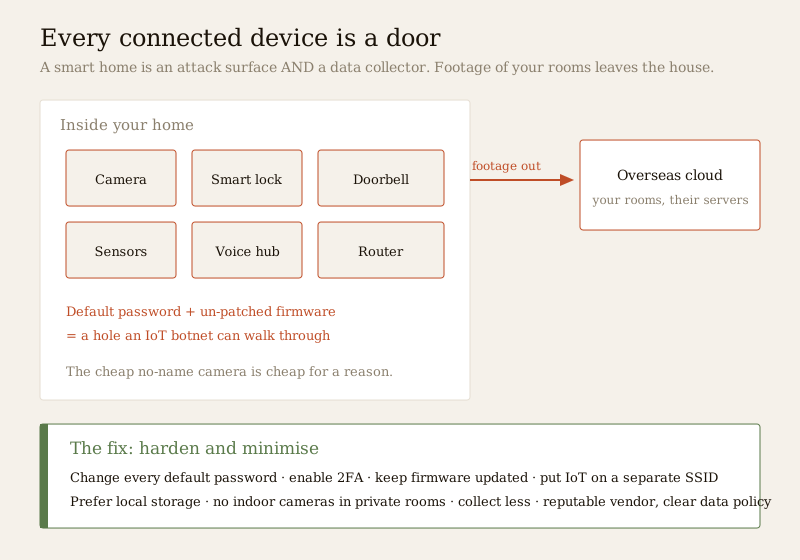
Cybersecurity — harden the attack surface. Change every default password to a strong, unique one; turn on two-factor authentication for the account that controls your home; keep firmware updated; and put cameras and IoT on a separate Wi-Fi network or guest SSID so a compromised gadget cannot reach your laptop and banking. Choose reputable vendors with a track record of updates. The full method is in the smart security cybersecurity guide and, for locks specifically, smart-lock cybersecurity.
Privacy — collect less, and honour the law. The DPDP Act 2023 governs personal data in India, and footage of identifiable people is personal data. Point cameras at entry points, not private spaces; do not put cameras in bedrooms and bathrooms; tell family, staff and guests that cameras exist; prefer local storage over an overseas cloud; and use privacy masking to blank neighbours' windows and public paths. Deep dives: smart security privacy, smart-lock privacy, and a structured privacy assessment.
The decision framework
Turn all of this into choices with five rules:
1. Decide what to make smart and what to keep dumb. Smart earns its place where awareness and automation genuinely help — the front door, the gate, key cameras, arming. The unbreakable core — a solid door, a real deadbolt, grilles — should stay stubbornly dumb, because dumb does not depend on a battery or a server.
2. Go local-first for resilience. Prefer systems that keep working and recording offline, with cloud as a backup rather than the whole brain.
3. Buy interoperability to avoid lock-in. Prefer Matter and open protocols (and cameras that speak ONVIF/RTSP to a standard recorder) so you are not trapped when a vendor raises prices or discontinues a product. Own your recordings.
4. Do the subscription math honestly. A "cheap" camera with a mandatory monthly cloud plan can cost far more over three years than a slightly dearer one that records locally. A system you rent stops the day you stop paying.
5. Sequence it. Harden the physical base first, add the highest-value smart pieces next, then automation you will actually use, with resilience built in from day one — not bolted on later.
The life-safety caveat — never smart-only
Two lines that are not negotiable. A smart fire alert is an add-on, not a certified system. A smart smoke sensor that pings your phone is a welcome nudge, but it is not a substitute for a professionally designed and commissioned fire-alarm system to the National Building Code (SP 7:2026) and local bye-laws. Do not let a gadget stand in for addressable or voice-evacuation systems where the building needs them. And never voice-unlock a door. A convenience that lets "hey assistant, unlock the door" work can be triggered by a shout through a window — voice is for scenes and status, never for opening a lock. A smart lock must also fail safe for fire escape: a mechanical override from inside, always. These are covered across voice-controlled security, smart locks and fire-alarm integration.
Key takeaways
- Smart is a layer, not a replacement. It adds convenience, remote awareness and automation on top of real security — good doors, locks, sensors and, where it matters, monitoring — never instead of them.
- Every smart feature buys a dependency on power, connectivity or a battery. Design the resilience so the system degrades gracefully and keeps a non-smart fallback for anything that matters.
- Understand it as five layers — system, devices, intelligence, integration, and the two most buyers skip: privacy and cybersecurity. This pillar maps each to a deeper guide.
- A connected home is an attack surface and a data collector. Change default passwords, enable 2FA, patch firmware, segregate the network, collect less, and honour the DPDP Act 2023.
- Choose local-first and interoperable. Prefer Matter and open standards, own your recordings, and do the subscription math before you commit.
- Life-safety is never smart-only. A smart fire alert is an add-on to a certified system; never voice-unlock a door; a smart lock must never trap anyone in a fire.
Where to go next
- The systems spoke and the automation hub: Integrated Security Systems and the Smart Home hub.
- The layers in depth: Smart Security Hubs, Smart Sensors, Automation Scenes, Geofencing and Occupancy Simulation.
- The two layers people skip: Smart Security Privacy and Smart Security Cybersecurity.
- The fundamentals underneath: Ultimate Guide to Home Security, the Security hub, the CCTV sub-hub, and for communities the gated-communities guide.
- Assess your home: Home Security Risk Scorecard, or browse all guides.
References
- Digital Personal Data Protection Act, 2023 (DPDP Act) — India's data-protection law governing personal data, including identifiable CCTV footage; verify the current text and notified rules before relying on it.
- National Building Code of India (SP 7:2026), Bureau of Indian Standards — fire and life-safety provisions relevant to certified fire-alarm systems, electric locks and egress; verify the current edition via the BIS catalogue.
- Matter, Thread, Zigbee, Z-Wave and Wi-Fi interoperability specifications — open and industry standards for smart-home connectivity; check current versions and device certification before relying on them.
- Local municipal building bye-laws and housing-society rules — govern CCTV in common areas, data handling and monitoring arrangements; check your city and society rules.
This is an educational overview for planning and decision-making. Electronic access control, electric locks, integrated fire and life-safety detection, and mains electrical work are qualified professional work — engage licensed professionals for design, installation and certification, and verify any standard's current status via the BIS catalogue before relying on it.
Export this guide
Related Guides — Deep-dive reading
Complete Guide to Security System Cybersecurity in India (2026): Protecting the Systems That Protect You
The cameras, locks, alarms and door phones you install to feel safer are internet-connected computers that can themselves be attacked, and an insecure one is worse than none. This pillar maps the whole attack surface — devices, network, accounts and data, operations — and points to every guide that hardens it.
SecuritySmart Security Hubs for Indian Homes: Choosing the Brain of the System
The hub is the controller at the centre of a smart security system — it speaks the device radios, runs the automations and links you to your phone. What it is, the connectivity choices explained plainly, and why local-over-cloud and backup power decide whether it survives an Indian power cut.
SecurityCCTV Remote Access in India (2026): Watch From Your Phone, Safely
How to view your own cameras from anywhere without leaving the front door open to the internet — change the defaults, use strong credentials and 2FA, keep firmware current, prefer the vendor's secure cloud relay or a VPN, segment the camera network, and treat footage as personal data.
SecurityRelated Tools — Try Free
Security Backup Power Calculator
Size a UPS/inverter and battery to keep CCTV, NVR, router and alarm running through a power cut — load, Ah, VA and cost.
Backup PowerAccess-Control Battery-Backup Calculator
Size the standby battery so an access system keeps running through a power cut, with an egress life-safety note.
Battery BackupHome Security Risk Scorecard
Score your home across six security layers — perimeter, entry points, lighting, detection, alarm and habits — and get a prioritised action plan.
Security Scorecard