
Smart Lock Privacy in India (2026): What Your Lock Knows and How to Keep It Minimal (DPDP)
A smart lock quietly collects fingerprints, a log of who opened your door when, and an app account tied to your identity. Here is what it knows and how to keep that data minimal and safe under the DPDP Act, 2023.
A mechanical lock keeps no diary. It does not know who you are, it does not remember who came and went, and it never phones home. A smart lock is different: to do its job it must collect and hold personal data about your household. Your fingerprint becomes a stored template. Every unlock becomes a line in an access log. Your identity, and sometimes your phone's location, sits in an app account. And some of it may live on a manufacturer's cloud in a data centre you will never see.
Smart lock privacy is the habit of understanding exactly what your lock knows about your household, and keeping that to the minimum you actually need — stored in the safest place, kept only as long as it is useful, and seen only by the people who should see it. This guide, part of the Studio Matrx smart locks and access control hub, applies India's Digital Personal Data Protection Act, 2023 (the DPDP Act) to the small, intimate case of a lock on your own front door. It is written for homeowners and families, not lawyers.
Scope & safety. This guide helps you plan how your household's data is collected and kept; it is educational, not legal advice. Fitting the lock, mains wiring and any fire-egress interlock are licensed jobs — see the installation requirements and fire-egress compatibility guides. Under the DPDP Act, 2023, biometrics, access logs and location are personal data — some of it sensitive; the practical rules below are about minimising and protecting it, and never trapping anyone behind a lock that must always keep a mechanical key override.
What a smart lock actually knows about you
Before you can protect data, you have to see it. A modern smart lock holds up to four distinct kinds of personal data, and they are not equally sensitive.
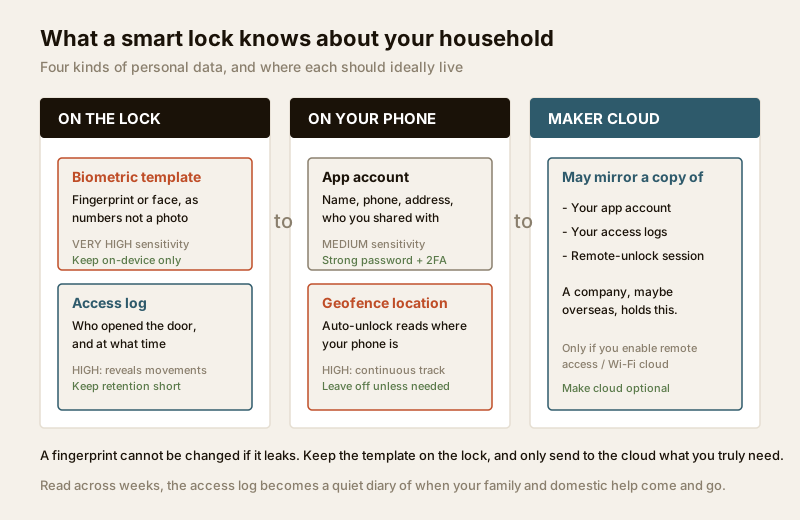
- Biometric templates (the most sensitive). When you enrol a fingerprint or a face on a fingerprint lock or a face-recognition lock, the device does not keep a photograph of your finger or face. It converts it into a mathematical template — a string of numbers describing the pattern. This is still biometric personal data, and biometrics are treated as especially sensitive because, unlike a PIN, you cannot change your fingerprint if it leaks. Where that template is stored is the single most important privacy decision, and we return to it below.
- The access log (a diary of your household). Every credential — a fingerprint, a PIN, a card, an app tap — leaves a timestamped entry: which user, which door, what time. Read across weeks, this audit trail is a quiet record of your family's movements: when the children get home from school, when a parent leaves for work, when the house is empty, when the domestic help arrives. Useful for security; revealing in the wrong hands.
- The app account (your identity, and maybe your location). App-controlled locks tie the lock to an account: your name, phone number or email, often the home address, and the list of people you have shared access with. If you enable geofence auto-unlock — the door unlocking as your phone nears home — the app is also reading your location. That is convenient, and it is also a continuous stream of where you are.
- What the maker's cloud stores. With a Wi-Fi lock or remote-access lock, some or all of the above is mirrored to the manufacturer's servers so you can see and control the lock from anywhere. That means a company — possibly overseas — holds a copy of your account, your logs, and the ability to route a remote-unlock command to your front door.
| Data a lock holds | How sensitive | Best place for it to live | If it leaks |
|---|---|---|---|
| Biometric template (fingerprint/face) | Very high — cannot be changed | On the lock itself (on-device) | Permanent; a biometric you can never reset |
| Access log (who opened when) | High — reveals movements | On the lock/hub; short retention | A map of your household's routine |
| PIN / access codes | Medium — changeable | On the lock; rotate periodically | Can be changed, but re-share needed |
| App account (name, phone, address) | Medium | Reputable provider, strong password + 2FA | Identity and home address exposed |
| Geofence location | High — continuous tracking | Off, unless you truly need it | A live trail of your whereabouts |
The DPDP Act, 2023, in plain terms for a home lock
The DPDP Act governs how personal data is handled in India. It is written for businesses ("Data Fiduciaries"), and a household using a lock at home is not running a company. But its core principles are exactly the right checklist for a family too — and if you employ domestic staff and enrol their biometrics, you are handling their personal data, which is where thinking like the Act genuinely matters.
Boiled down to what a homeowner can act on, the Act's spirit says: collect the minimum, be clear about why, keep it only as long as you need it, keep it secure, and let people know and control what is held about them. Applied to a lock, that becomes five habits.
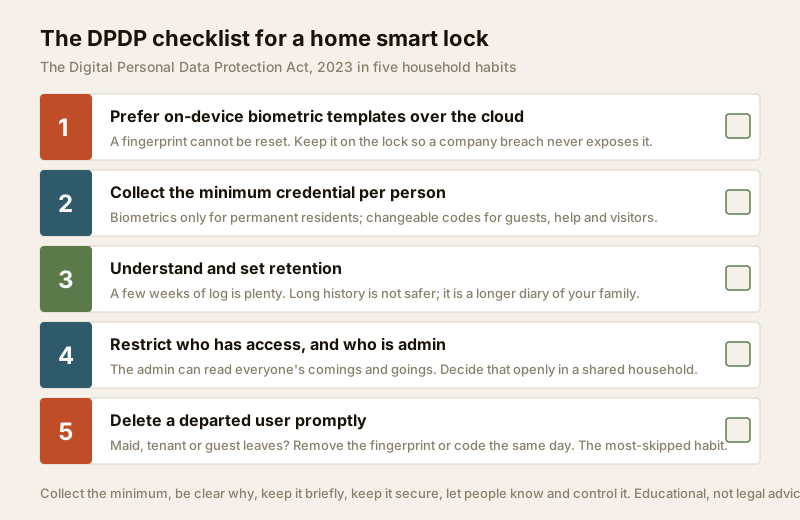
1. Prefer on-device biometric templates over the cloud
This is the highest-value privacy choice you can make. Ask, before buying, one question: does the fingerprint or face template stay on the lock, or is it uploaded to the maker's cloud? An on-device template never leaves the small chip in your door; even if the company is breached, your biometric is not in the pile. A cloud-stored template is a copy of your household's fingerprints sitting on someone else's server. Good biometric locks keep the template on-device and only sync non-biometric things (logs, settings) if you enable remote access. Where you can achieve the same security with a rotating PIN instead of a biometric, you avoid the sensitive-data question altogether.
2. Collect the minimum credential per person
Every person does not need every method. A resident family member may want a fingerprint for daily convenience; a visiting relative needs only a temporary PIN; the domestic help may be fine with a code that you can change, rather than an enrolled fingerprint. The less biometric data you enrol, the less you are responsible for protecting. Match the credential to the person's role and how long they will need it — a permanent, high-sensitivity biometric for a permanent resident; a low-sensitivity, changeable, time-limited code for everyone passing through.
3. Understand and set retention
The access log grows forever unless it does not. Many locks keep the last few hundred events; some cloud accounts keep far more. Decide how long you actually need the history — a few weeks is plenty for a home to investigate an incident — and, where the app allows, set the log to auto-purge older entries. Long retention is not "more secure"; it is simply a longer diary of your family for anyone who gets in. The same applies when you close the account or change locks: make sure old data is actually deleted, not just hidden.
4. Restrict who has access — and who is admin
There is a difference between someone who can open the door and someone who is an administrator who can see the whole log, add and remove users, and read everyone's comings and goings. In a joint family or a shared household, decide deliberately who holds admin. The person who can read the log can see when every other member came and went — a real privacy consideration between adults sharing a home, and one worth discussing openly rather than defaulting to whoever installed the app.
5. Delete a departed user promptly
When a maid leaves, a tenant moves out, a guest's stay ends, or a relationship changes — remove their credential the same day. A fingerprint or PIN that still works months after someone left is both a security hole and a privacy failure: their biometric is still sitting in your device, and they can still open your door. This is the single most-neglected habit with home locks. Make it routine: access ends, credential deleted, that evening.
| DPDP principle | What it means for a home lock | Your practical move |
|---|---|---|
| Data minimisation | Collect only what the door needs | Codes for temporary people; biometrics only for permanent residents |
| Purpose limitation | Use data only to run the lock | Do not enable geofence/location unless you truly want it |
| Storage limitation | Keep it only as long as useful | Set log retention short; delete on account closure |
| Security safeguards | Protect what you hold | Strong app password, 2FA, on-device templates, patched firmware |
| Consent & rights | People know and control their data | Tell staff before enrolling them; delete on request |
The household-dynamics angle: whose movements the log reveals
A home lock is not a neutral gadget in an Indian household — it sits inside real relationships. Two things deserve honest thought.
The log reveals movements, and households are not flat. The access trail shows when each person is home, out, or arriving. In a family that is usually benign. But it also means whoever holds admin can watch a spouse's, an adult child's, or a parent's pattern. Treat that access as you would treat reading someone's messages: agree who holds it and why, and do not use a lock's convenience to quietly surveil the adults you live with.
Consent for domestic staff biometrics. Enrolling a house-help's, cook's, driver's or nanny's fingerprint means you are collecting their sensitive personal data. The considerate — and DPDP-aligned — practice is to (a) tell them plainly what is being collected and why, (b) prefer a changeable PIN over a permanent biometric where it works just as well, (c) never share their data onward, and (d) delete it the day they stop working for you. Many families default to enrolling a fingerprint because it is easy; a personal code that you can rotate is usually kinder and just as secure, and it leaves you holding no biometric you have to guard.
Sharing access responsibly: keys with an expiry
One of the genuine advantages of a smart lock over a bunch of physical keys is that a shared digital key can expire. The privacy mistake is to hand out permanent access for a temporary need — the plumber, the weekend guest, the delivery, the relative visiting for a fortnight.
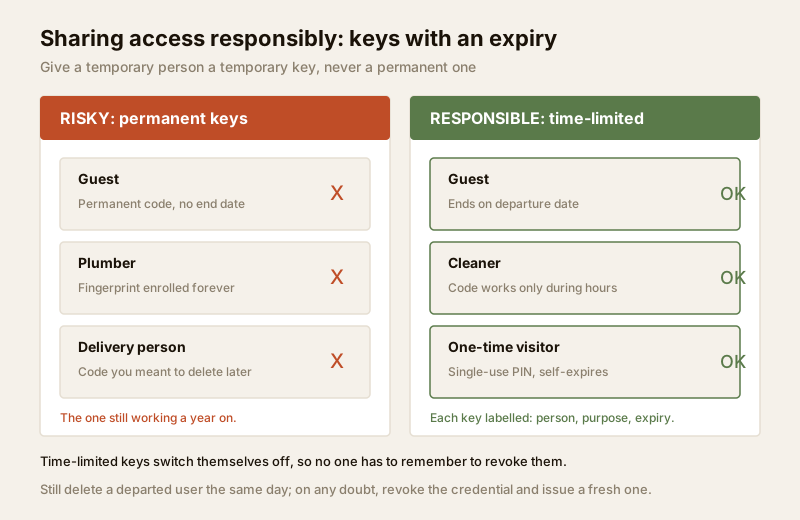
- Use time-limited or scheduled keys. Give a guest access that ends on their departure date; give the cleaner a code that only works during their hours; give a one-time visitor a single-use PIN. When the window closes, the door closes to them automatically — no one has to remember to revoke it.
- Never give a permanent key for a temporary person. A code you "meant to delete later" is the one still working a year on.
- Label who has what. Name each credential to a person, not "Guest 1 / Guest 2," so the log is meaningful and you can revoke the right one.
- On any doubt, revoke and re-issue. If a phone with the app is lost or a code may have been seen, delete it and issue a fresh one; see the remote-access lock guide for doing this from afar.
Sharing responsibly is itself a data-minimisation act: fewer live credentials means a shorter list of people who can open your door and a cleaner, more honest log.
What to check about a brand's data practices before you buy
Privacy is decided at the buying stage as much as the settings stage. Before you choose a lock — and the buying guide and selector tool help with the wider decision — read the maker's own material for these answers. If a brand cannot answer them clearly, that is itself an answer.
| Question to ask the brand | The privacy-friendly answer |
|---|---|
| Where is the biometric template stored? | On the device, never uploaded to the cloud |
| Is cloud/remote access optional? | Yes — the lock works fully offline if you skip it |
| Where are the servers, and under what law? | Stated plainly; India or a jurisdiction you accept |
| Can I set how long logs are kept? | Yes — configurable retention or auto-purge |
| Is there 2FA on the account? | Yes, and it is easy to enable |
| How do I fully delete my data / account? | A clear, documented deletion path |
| How are firmware security updates delivered? | Regular updates with a stated support period |
| Is my data ever sold or shared with third parties? | No — a clear privacy policy that says so |
Cross-check these against the technical hardening in the cybersecurity sibling guide: privacy (what is collected and kept) and security (how well it is protected) are two sides of the same coin, and a lock that is weak on one is rarely strong on the other.
When to bring in a professional. The privacy decisions here — what to enrol, how long to keep it, who is admin, when to delete — are yours to make and easy to act on in the app. Bring in a licensed installer for the physical fitting, the door compatibility and any emergency-access planning or fire-egress interlock, and an electrician for mains work via the electrical hub. If your household or a society is enrolling staff biometrics at any scale, treat it like the biometric access-control case: written notice, minimal collection, and a clear deletion process are not optional courtesies — they are the responsible baseline.
Key takeaways
- A smart lock holds four kinds of personal data — biometric templates, an access log of who opened when, an app account with your identity, and whatever the maker's cloud mirrors; the template is the most sensitive because you can never change a fingerprint.
- Keep biometric templates on-device, not in the cloud — this is the single highest-value privacy choice, and where a rotating PIN works as well, you avoid holding sensitive data at all.
- Apply the DPDP Act's spirit at home: collect the minimum credential per person, set short log retention, restrict who is admin, and delete a departed maid, tenant or guest's fingerprint or code the same day.
- Share access with an expiry — time-limited and scheduled digital keys switch themselves off, so a temporary person never keeps a permanent key.
- The log reveals your household's movements and enrolling staff means holding their sensitive data — decide admin openly among adults, tell staff before enrolling, and prefer a changeable code to a permanent biometric.
References
- Digital Personal Data Protection Act, 2023 (Ministry of Electronics and Information Technology, Government of India) — establishes personal-data principles of minimisation, purpose and storage limitation, security safeguards and the rights of individuals whose data is processed; the practical basis for the household habits in this guide.
- Manufacturer privacy policies and product datasheets — verify on the maker's own documentation where biometric templates are stored (on-device vs cloud), whether remote access is optional, server location, retention controls and the account-deletion path before purchase.
- National Building Code of India (SP 7), Bureau of Indian Standards, and local bye-laws for any life-safety, fire-egress or electrical aspect of a lock installation; verify the current edition via the BIS catalogue: https://www.services.bis.gov.in/
This is an educational overview of privacy good practice for home smart locks, not legal advice. For obligations under the Digital Personal Data Protection Act, 2023, or any specific situation, consult a qualified professional, and route physical installation, electrical and fire-egress work to licensed professionals.
Export this guide
Related Guides — Deep-dive reading
Fingerprint vs PIN Lock (2026): Which Keyless Entry Suits Your Indian Home?
A neutral head-to-head between the two most common keyless ways to open a smart lock in India — a fingerprint (biometric) and a PIN (code) — across convenience, everyday reliability in Indian conditions, who can use each, security, and privacy, ending in the honest verdict that you rarely have to choose.
SecurityComplete Guide to Security System Cybersecurity in India (2026): Protecting the Systems That Protect You
The cameras, locks, alarms and door phones you install to feel safer are internet-connected computers that can themselves be attacked, and an insecure one is worse than none. This pillar maps the whole attack surface — devices, network, accounts and data, operations — and points to every guide that hardens it.
SecurityFacial Recognition Privacy in India (2026): The Face Is Not Just Another Password
A face is biometric data you can never change if it leaks, and it can be captured without your cooperation. Before you enrol anyone's face into a lock, camera or entry system, understand the privacy duties, the consent it demands, and the alternatives you must always offer.
SecurityRelated Tools — Try Free
Electrical Safety & Load Audit
Home electrical audit — 10 categories, 65+ checkpoints across earthing, RCCB, MCB, wiring, switchboards, appliance circuits, DG/inverter backup.
Safety AuditSmart Lock Finder
Find the right smart lock — access methods, tier and must-haves like a mechanical override — for your door and budget.
Door ToolAccess-Control Schedule Generator
Build the time schedules that decide when each access group can enter — an editable list for your integrator.
Time Schedules