
Smart Video Doorbells in India (2026): The Doorbell You Answer on Your Phone
The app-first, self-contained end of the video-door-phone family: a Wi-Fi doorbell with a camera, two-way talk, motion alerts and a chime that you answer from your phone, with the honest India realities of Wi-Fi, power cuts and cloud fees.
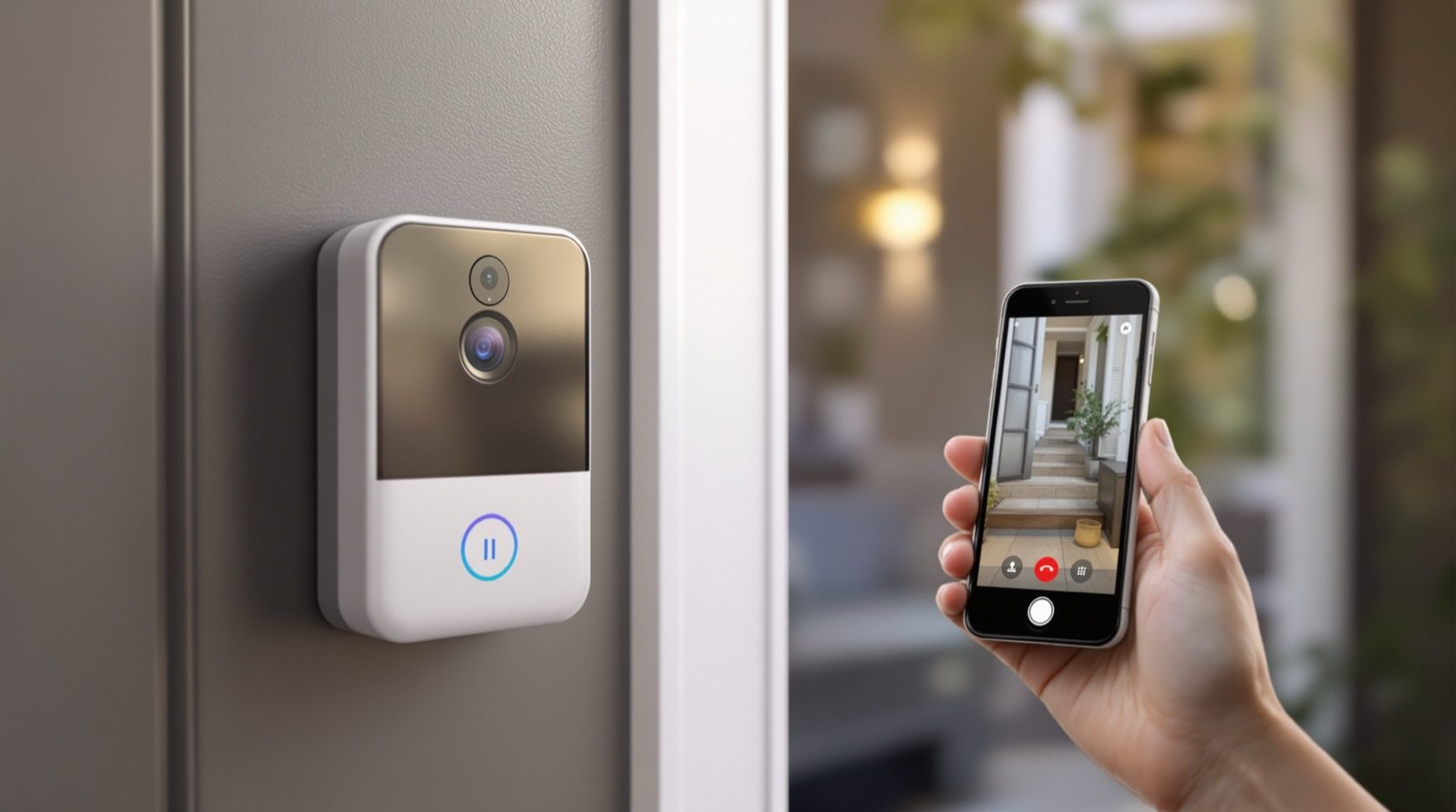
A traditional video door phone puts a screen on your wall and a camera at your gate, wired together, and you answer from that fixed monitor. A smart video doorbell takes the same idea and turns it inside out: the doorbell at the door is a small self-contained camera-and-intercom, and the "monitor" is your phone, wherever you happen to be. Press the button and it does not just ring a bell on the wall — it calls your phone, shows you who is there, and lets you talk to them, whether you are in the kitchen or at the office.
That is the shift this guide is about. Studio Matrx's video door phone hub covers the whole family; a smart video doorbell is the app-first, retrofit-friendly end of it — the "doorbell you answer on your phone." It suits a flat, a rental, or anyone who wants to swap an old dumb bell for something that talks to their phone in an afternoon, without pulling new cable across the house.
Scope & safety. This guide helps you decide whether a smart video doorbell is right for you and choose one well. Fitting a battery doorbell you can reach is a homeowner job; wiring one to your existing doorbell transformer, or adding a transformer, is a licensed electrician's job — see the electrical hub. Point the camera only at your own doorstep, never into a neighbour's home or a shared corridor. In an apartment, footage of a common area involves other residents; recorded video is personal data under the Digital Personal Data Protection Act, 2023. This is educational guidance, not legal advice.
What actually makes a doorbell "smart"
Any doorbell rings. A smart one adds a camera and a network, so a handful of features come together into one small device by the door:
- Wi-Fi and a mobile app. The doorbell joins your home Wi-Fi and pairs to an app on your phone. That app is your monitor, your recorder and your remote — the single most important thing to get right, because if Wi-Fi does not reach the door, nothing else works.
- A camera with two-way talk. A wide-angle lens sees the visitor and the doorstep; a mic and speaker let you talk to them. You can tell the courier to leave the parcel with the guard without opening the door — the app-first cousin of the two-way audio you find on CCTV.
- Motion alerts. A sensor (usually a PIR heat sensor) notices someone approaching and pings your phone even if they never press the button — so you see the person loitering, not just the person who rings.
- A chime. A separate plug-in chime unit inside the home rings out loud, the way a normal doorbell does, so you are not relying only on a phone notification. Some kits include it; on others it is an add-on.
- Clip storage — cloud or local. When motion or a press happens, the doorbell records a short clip. That clip lives either in the maker's cloud (usually on a monthly subscription) or on a local microSD card / home hub. This choice drives both your running cost and your privacy, and we come back to it.
- An optional indoor display. Some ecosystems add a small indoor screen or smart display that rings and shows the camera, for people who do not want to fish out a phone every time. It is optional — the phone is the default answer point.
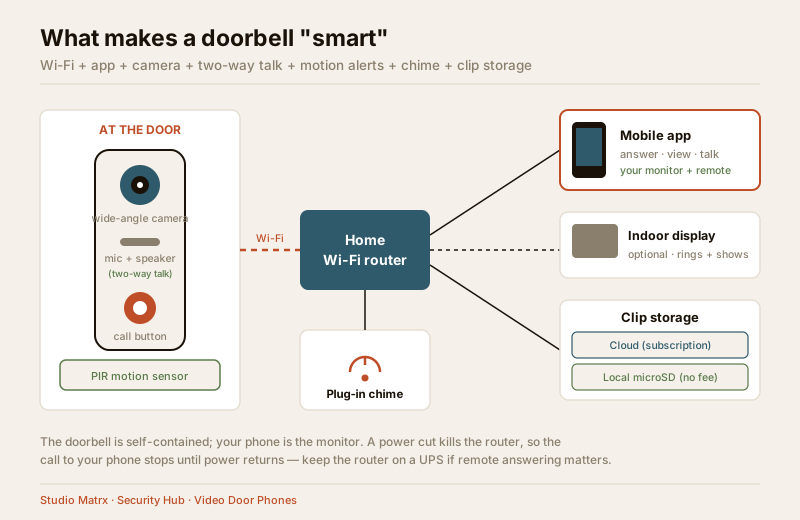
That bundle — Wi-Fi, app, camera, two-way talk, motion alerts, a chime and clip storage — is what separates a smart video doorbell from a plain bell on one side and from a wired wall-monitor system on the other.
It is an intercom you answer, not a CCTV camera
This distinction matters, because a smart video doorbell looks like a small camera and people confuse the two. Studio Matrx keeps two separate guides on purpose:
- The doorbell cameras guide frames the device as a CCTV-style camera — one more lens in a surveillance picture, recording the doorstep for later review.
- This guide frames the very same class of hardware as an entry intercom you answer — a chime rings, a call comes to your phone, and you have a two-way conversation with the person at the door and decide whether to let them in.
Both are true of the same box; they are just two lenses on it. If you care about recorded coverage of the doorstep, read the camera guide alongside this one. If you care about answering the door from your phone, you are in the right place.
The two power types: battery vs hardwired
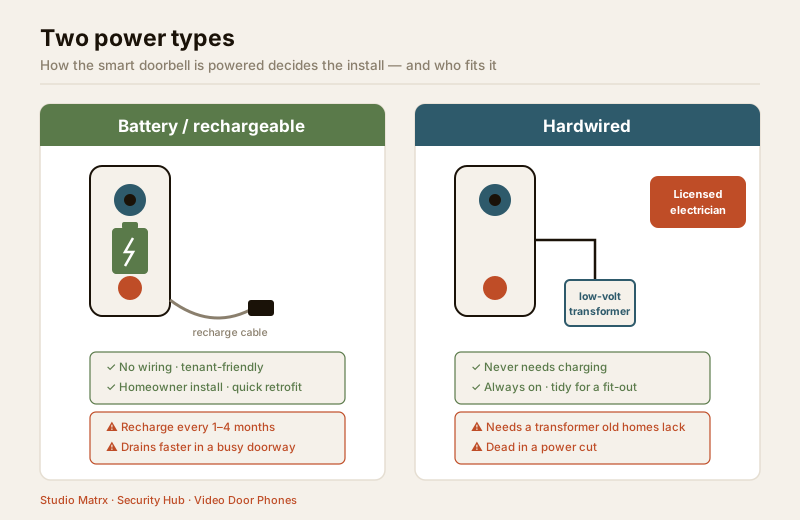
Every smart video doorbell is powered one of two ways, and this is the first practical fork in the decision.
| Battery / rechargeable | Hardwired | |
|---|---|---|
| How it is powered | A built-in rechargeable pack (or replaceable cells) you top up every 1–4 months | Wired to your existing doorbell wiring / a low-voltage transformer, so it never needs charging |
| Install | Peel, drill two screws, pair the app — a homeowner afternoon job | An electrician's job: it taps the doorbell transformer, and many old Indian homes have no doorbell transformer at all, so one must be added |
| Best for | Rentals, flats, anywhere with no wire at the door, quick retrofits | Owned homes, new fit-outs, anyone who never wants to think about charging |
| The catch | You must remember to recharge; cold/heavy-use months drain it faster; heavy motion traffic shortens life | Adds electrical work and cost; ties the doorbell to a fixed spot |
| In a power cut | Keeps working at the door — but see the Wi-Fi problem below | Transformer is dead, so the doorbell itself is off until power returns |
Battery models are why smart doorbells took off in flats and rentals: no wire, no landlord permission for cabling, no electrician. The trade is remembering to recharge — and in a busy doorway with lots of motion, that can be monthly.
Hardwired models solve the charging chore by drawing from your existing bell wiring or a small transformer. But that transformer connection is mains-adjacent low-voltage work: do not do it yourself. An old Indian home often has a simple bell with no transformer, so an electrician has to add one. If you are already rewiring or doing a fit-out, hardwiring is the tidy choice; as a bolt-on to a finished home, battery is far less disruptive.
The honest India realities
A smart video doorbell is genuinely convenient, but four things about Indian homes decide whether it delights you or frustrates you. Face them before you buy.
- Wi-Fi must actually reach the door. The doorbell sits at your main door or gate — often the far corner of the flat from the router, behind a thick wall. A weak signal there means dropped calls, laggy video and missed alerts. Test the signal at the exact mount spot with your phone first; you may need a mesh node or extender near the door. This is the number-one cause of "my smart doorbell is useless" complaints.
- A power cut kills the router — and your answering. The doorbell may run on battery, but the Wi-Fi runs on your router, and the router dies the instant the power does. During load-shedding, a battery doorbell can still ring its local chime and record to a local card, but the call to your phone will not go through until the router is back. If remote answering matters, put the router (and any hub) on a small UPS or inverter — the same backup thinking a good home security setup applies to any always-on device.
- Recurring cloud cost is real. Most brands keep your motion clips and let you scroll back through history only if you pay a monthly or yearly subscription. Without it, many doorbells still ring and show live video, but they keep little or no recorded history. Budget the subscription as an ongoing cost, or choose a model that records to a local microSD card / hub with no fee if you would rather not pay forever.
- It lives in Indian weather. The unit sits in 45°C summers, driving monsoon rain and dust. Check its weather rating (an IP rating, e.g. IP65) so rain and dust do not kill it, and prefer a shaded or eave-protected mount. Direct afternoon sun also cooks batteries and washes out the image — the same weatherproofing thinking that applies to any outdoor doorstep device.
| India reality | What it means | What to do |
|---|---|---|
| Wi-Fi at the door | Weak signal = dropped calls, missed alerts | Test at the mount spot; add a mesh node / extender |
| Power cut | Router dies, so no call to your phone | Put router + hub on a UPS/inverter |
| Cloud subscription | Recurring ₹ for clip history | Budget it, or pick a local-storage model |
| Heat, monsoon, dust | Battery cook, water ingress, washed image | IP-rated unit, shaded/eave mount |
Privacy: point at your own doorstep
A camera at the door watches a semi-shared space, so privacy is not optional — especially in a flat.
- Aim only at your own doorstep. The camera should see your door and the approach to it, not your neighbour's door, not into their window, and not straight down a shared corridor where everyone's comings and goings are recorded. Most apps offer a "privacy zone" or "activity zone" to mask parts of the frame — use it.
- In an apartment, the corridor is common area. The landing and corridor belong to all residents and, formally, the society. A camera trained on common space can attract objections and, depending on your society's rules, may need the RWA's or committee's consent. Keep the field of view tight to your own threshold; read the apartment security guide and coordinate with the RWA before pointing at anything shared.
- The footage is personal data. Recorded video of identifiable people is personal data under the Digital Personal Data Protection Act, 2023. Keep the app account on a strong unique password with 2FA, do not casually share clips of visitors, and be mindful that a cloud provider is holding that footage. If you rent, this is one more reason a battery model you can remove and reset when you leave is tenant-friendly.
- Renters: a battery doorbell needs no permission for wiring, but courtesy (and often the lease) still means you should not surveil neighbours. Point it at your own mat, and take it with you when you go.
Buying: what to check
Once you have decided a smart video doorbell fits (see the next section), these are the specs and terms that actually matter. Do not be dazzled by a big megapixel number alone.
| Check | Why it matters | Sensible baseline |
|---|---|---|
| Resolution | Sharp enough to recognise a face, read a courier's phone | 1080p (2MP) minimum; 2K is nicer |
| Field of view | See head-to-toe and a parcel on the ground | Wide, ~150°+; a tall "portrait" view helps for parcels |
| Night vision | Doorbells earn their keep after dark | Good IR night vision; a spotlight/colour-night mode is a bonus |
| Local vs cloud storage | Drives running cost and privacy | Prefer models offering local microSD/hub, not cloud-only |
| Subscription | The hidden recurring cost | Know the plan price and exactly what you lose without it |
| Package / person detection | Cuts false alerts from cars, cats, shadows | Person detection at least; package detection is handy |
| Power type | Decides install and who fits it | Battery for retrofit/rental; hardwired only with an electrician |
| Weather rating | Survives monsoon and heat | An IP rating (e.g. IP65) suited to an exposed door |
| Chime included? | You want an audible ring, not just a phone buzz | Confirm a chime is in the box or budget the add-on |
| Two-way talk quality | The whole point is a conversation | Clear, low-lag audio; echo cancellation |
A quick way to line your needs up against the classes is the video door phone type selector; if you are planning for a whole building rather than one flat, the apartment video door system planner is the better tool.
When a smart video doorbell is the right pick — and when it is not
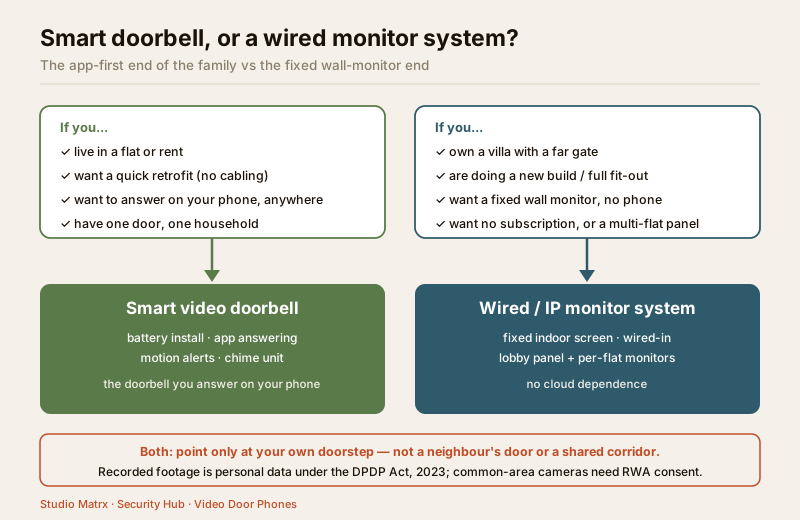
A smart doorbell is not automatically the best video door system; it is the best for certain situations. It is the app-first end of a spectrum whose other end is a fixed-monitor system. The rest of the family is worth knowing:
- Dedicated-monitor wireless kits — a doorbell paired to a proper indoor screen over a wireless link, no app required — are covered in the wireless video door phones guide. A smart doorbell is the app-first version of that idea.
- Wired and IP systems with a wall monitor, for owned homes and whole buildings, are covered in the wired and IP video door phone guides.
Here is the honest split:
| Choose a smart video doorbell when… | A wired / IP monitor system suits better when… |
|---|---|
| You live in a flat and want a tidy, app-answered door | You own an independent house or villa with a gate far from the door — see the villa guide |
| You rent and cannot pull cable or drill much | You are doing a new build or full fit-out and can run cable cleanly |
| You want a quick retrofit — swap the dumb bell in an afternoon | You want a fixed wall monitor the whole household uses without phones |
| You value answering from your phone, anywhere | You want a wired-in, no-subscription system that never depends on cloud |
| One door, one household | A multi-flat building needing a lobby panel and per-flat monitors — see the multi-apartment guide or apartment intercom systems |
If you are still weighing the whole family, step back to the complete video door phone guide or browse the video door phones sub-hub; for the bigger picture of securing a home, the ultimate home security guide puts a doorbell in context.
When to bring in a professional. Fitting a battery smart doorbell you can reach — mount, pair, aim — is a confident-homeowner job. Hand over any hardwiring to a doorbell transformer, adding a transformer, or mains-adjacent work to a licensed electrician (see the electrical hub); getting it wrong risks the device and your safety. For a whole building, or to integrate a doorbell with a lobby panel and per-flat monitors, bring in a security integrator and coordinate common-area cameras with the RWA, since the corridor is shared space and the footage is regulated personal data.
Key takeaways
- A smart video doorbell is the app-first end of the video-door-phone family — a self-contained Wi-Fi doorbell with a camera, two-way talk, motion alerts and a chime that you answer on your phone rather than from a fixed wall monitor.
- Power type is the first fork: battery/rechargeable is the tenant-and-flat-friendly quick retrofit; hardwiring to a doorbell transformer is an electrician's job and often needs a transformer that old Indian homes lack.
- Respect the India realities: Wi-Fi must reach the door, a power cut kills the router (and phone answering) so back up the router, cloud clip storage is a recurring cost, and the unit must be rated for monsoon, dust and heat.
- Privacy is non-negotiable — point only at your own doorstep, not a neighbour's door or a shared corridor; in a flat the corridor is common area needing RWA consent, and recorded footage is personal data under the DPDP Act, 2023.
- It is the right pick for a flat, a rental, a quick retrofit or phone answering; a wired or IP wall-monitor system suits an owned villa, a new fit-out, or a multi-flat building better.
References
- Digital Personal Data Protection Act, 2023 — recorded video of identifiable visitors is personal data; keep camera fields of view to your own doorstep, secure the app account, and obtain RWA/resident consent for any common-area coverage.
- Manufacturer specifications and datasheets — verify resolution, field of view, night-vision mode, IP weather rating, battery life, local-vs-cloud storage and the exact subscription terms on the maker's own datasheet before buying.
- National Building Code of India (SP 7), Bureau of Indian Standards, and the wiring code for any low-voltage doorbell-transformer or mains-adjacent work — engage a licensed electrician and verify the current edition via the BIS catalogue: https://www.services.bis.gov.in/
This is an educational overview, not legal advice. Any hardwiring to a doorbell transformer or mains-adjacent work is a qualified electrician's task, and common-area camera coverage in a society is governed by data-protection law and society rules — coordinate with your RWA and verify any standard's current status via the BIS catalogue before relying on it.
Export this guide
Related Guides — Deep-dive reading
How to Choose a CCTV Camera (2026): The Homeowner's Decision Guide for India
Cut through the spec-sheet noise and choose the right CCTV camera for each spot around an Indian home. What actually matters — sensor and low-light performance, lens and field of view, form factor, IP and IK ratings, honest smart features — and the marketing claims to ignore.
SecurityCCTV vs Video Door Phone: Which Does Your Home Need?
They look similar and get confused constantly, but a CCTV camera and a video door phone do different jobs — one watches the whole property and records, the other answers your door and controls who comes in. This guide settles CCTV vs video door phone for Indian homes: what each is for, where they overlap, real rupee costs, apartment versus villa relevance, and why most homes end up wanting both.
Smart HomeWireless Video Door Phones in India (2026): The Honest Guide
How wireless video door phones work, the two flavours (a dedicated RF kit or an app-first Wi-Fi door station), and the real India trade-offs on range, power, latency and subscriptions before you buy.
SecurityRelated Tools — Try Free
Apartment Video Door System Planner
Enter flats, entrances, floors and guard desk for a first-pass building intercom plan — door stations, indoor monitors, guard station, the right architecture and an indicative cost band.
Building PlannerVideo Door Phone Type Selector
Answer a few questions about your building, cabling, budget and internet and get the right video door phone — analog / wired / wireless / IP, single-home or multi-apartment, monitor or app.
Door Phone SelectorCCTV Camera Coverage & Count Calculator
Estimate how many CCTV cameras you need, the NVR channels, storage in TB for your retention period, and an indicative all-in cost with GST.
CCTV Calculator