
Smart Security Notifications in India (2026): Beating Alert Fatigue by Designing the Alert Layer
The single biggest reason smart security fails in a real home is not a weak camera or a cheap lock — it is alert fatigue. A system that pings you fifty times a day for a cat, a plant, a delivery and a neighbour's car trains you to swipe every alert away, so you miss the one that matters. The fix is to design notifications deliberately: tier alerts by severity, filter at the source, make each alert actionable, escalate to the right person, and keep a critical path that survives a phone on silent or an internet cut.
You bought the cameras, the door sensors, the smart lock and the hub. On day one the alerts felt reassuring. By week three your phone was buzzing fifty times a day — a passing cat, a plant swaying in the fan, the milk delivery, a neighbour reversing his car — and you had learned, without deciding to, that every buzz means nothing. So you swipe them all away. And the one night something real happens, that alert lands in exactly the same grey stack of noise you have trained yourself to ignore.
This is alert fatigue, and it is the single biggest reason smart security fails in real homes. Not a weak camera. Not a cheap lock. The notification layer. A system that cries wolf fifty times a day is worse than no system, because it teaches you to disbelieve it. The good news: this is a design problem, and design problems have solutions. This guide is about building the notification layer on purpose — so you get fewer, better, more useful alerts, and so the one that matters actually breaks through.
Scope & safety. Smart notifications are convenience and awareness, not a guarantee. A push alert depends on the internet, the vendor's cloud, and your phone being on, charged and in signal — all of which fail in an everyday Indian power cut or a dead-battery morning. Design so the system degrades gracefully: anything critical needs a non-smart fallback — an SMS or call path and a local siren that screams on its own, so you are never left silent-only. Notification content is also data: a snapshot on a lock screen can leak what is inside your home, and event logs are personal data under the Digital Personal Data Protection Act, 2023. A smart smoke or fire alert is a helpful add-on, never a substitute for a certified fire-alarm system (NBC, SP 7:2026), and mains or certified fire work belongs to licensed professionals. This is educational guidance, not legal advice.
Why fifty alerts is worse than five
Attention is a budget, and a small one. Every time your system pings you for something that turns out to be nothing, it spends a little of your trust. Spend it fifty times a day and you are bankrupt: you stop looking, or you mute the app, or you turn notifications off entirely — and now the expensive system on your walls is doing nothing, because the human it was built to warn has stopped listening.
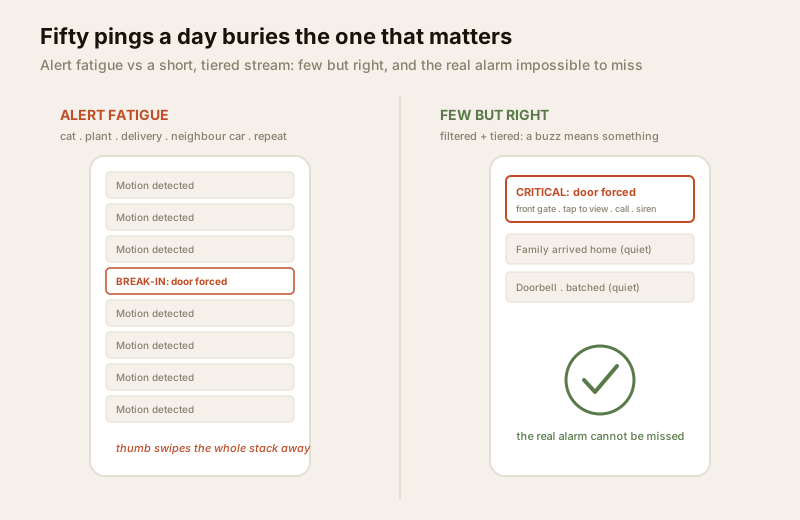
The fix is not "turn off notifications". It is to make the system earn each interruption. Two ideas do most of the work: fewer alerts (filter hard, so a notification means something happened worth knowing) and tiered alerts (not every event deserves the same buzz). A break-in and a delivery should not feel identical on your phone. Once they do, you have lost.
Tier alerts by severity
The heart of a good notification layer is a severity tier: every event is classified, and the tier decides how loudly it reaches you, through which channel, and whether it may interrupt your night. Three tiers are enough for most homes.
| Tier | Example events | Channel | Urgency & behaviour |
|---|---|---|---|
| Critical | Alarm triggered, door forced open while armed, panic button pressed, smoke/fire, glass broken | Push plus SMS/call, loud on the phone, overrides silent and Do-Not-Disturb, escalates if unanswered, sounds the local siren | Must break through. This is the one you never want to miss. |
| Important | Someone disarmed the system, a specific door opened when nobody should be home, a camera saw a person at the gate at 2am | Push, normal sound | Worth an immediate glance, but not a wake-the-house event. |
| Informational | General motion seen, a family member arrived home, the doorbell rang, a routine delivery | Quiet, batched or in-app only, easy to switch off | Nice to know. Should never buzz you at night or compete with the tiers above. |
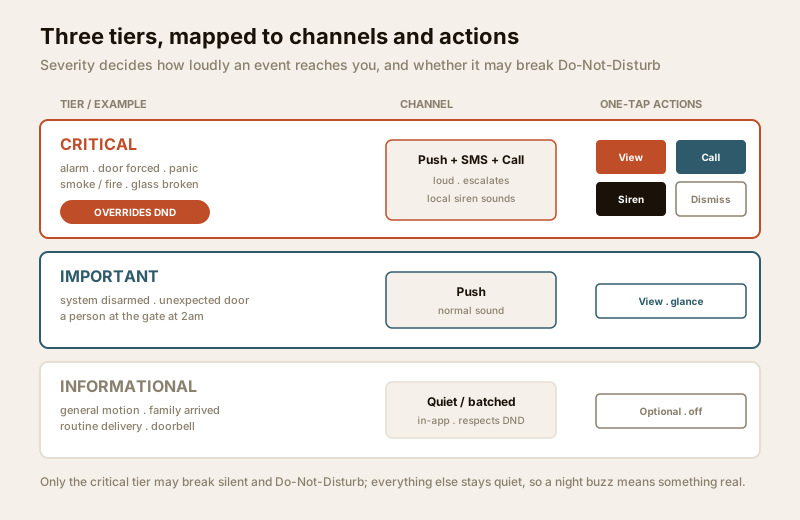
The discipline is to be honest about which tier each event belongs to. "Motion detected" is almost always informational — motion is everywhere. "Door forced while armed" is critical. Most systems ship with everything set to the same loud default; the single most valuable afternoon you will spend on your system is going through every alert type and demoting the noise. When you are done, a buzz from your phone carries meaning again.
Filter at the source: fewer, better alerts
Tiering decides how an alert reaches you. Filtering decides whether the alert should exist at all — and this is where the fifty-pings-a-day problem is actually solved. The goal is to stop the noise before it becomes a notification, at the device.
- Detect what matters, not any motion. Plain motion detection fires on a cat, a shadow, a swaying plant, headlights on the wall. Modern cameras can classify what they see — person and vehicle detection means the camera stays quiet for the cat and speaks up for the human. This one change removes most false pings. See AI-powered CCTV and the deeper human and vehicle detection guides for how this works and its limits.
- Draw activity zones. Tell the camera to watch your gate and doorway, not the public road or the neighbour's driveway. A zone that excludes the street kills the "every passing car" problem at the root.
- Tune sensitivity and cooldown. A cooldown (a quiet window after an alert) stops one event from firing ten times as a person walks across the frame. Sensitivity tuning trades a few missed edge cases for far fewer false alarms — usually the right trade for a home. Sensor-side placement and tuning is covered in the smart sensors guide.
Filtering at the source is more powerful than filtering on your phone, because a filtered event never wakes the cloud, never spends your data, and never trains you to ignore alerts. Fewer, better alerts is the whole game.
Make every alert actionable
A useless alert says "Motion detected". A useful alert answers three questions at a glance — what, where, and now what — without you having to open five screens.
A well-designed alert carries:
- What and where: "Person at the front gate", not just "Motion". The event and the location, in the notification itself.
- A snapshot or short clip: one look tells you delivery boy versus stranger. This is the difference between reacting and guessing (and it is also the privacy-sensitive part — more below).
- One-tap actions: straight from the notification — view the live camera, call a family member or the guard, trigger the siren, or dismiss. If acting on an alert takes ten taps, you will not act in the ten seconds that matter.
This is where notifications meet automation and scenes: a one-tap "trigger siren and turn on all lights" from a critical alert is a scene, and a good notification layer puts that scene one thumb-press away. An alert you can act on instantly is worth ten alerts you can only read.
Escalation: who gets what, and what if nobody answers
A single push to a single phone is a single point of failure. The phone is in another room, on silent, charging in the kitchen, or its owner is on a flight. Escalation is the answer: if the first attempt does not get through, the system tries harder and tries someone else.
Two dimensions to design:
- Who gets what. Informational alerts can go to the whole family (or nobody). Critical alerts should reach the person most able to act — and if the household has an elderly parent alone at home, the critical path should reach an adult child too, not only the person in the house.
- What if the first person does not respond. A critical alarm that goes unacknowledged should escalate: try the first person by push, then by SMS, then by call; then bring in a second person; and, where you use one, a professional monitoring service or alarm monitoring sits at the end of that chain. The principle: a critical event must not die in one unread notification.
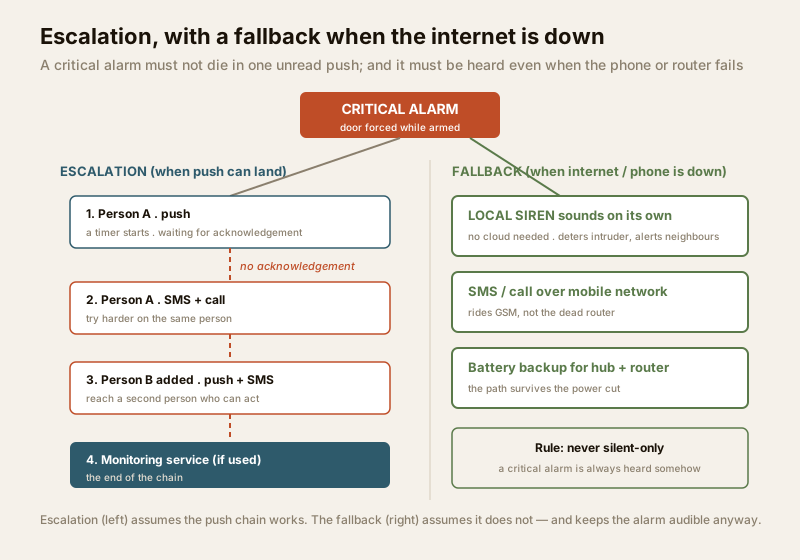
Keep the escalation humane: too aggressive and every false alarm calls five people at 3am, and you are back to fatigue at the household level. Tie escalation to the critical tier only, so it stays rare and stays believed.
The Do-Not-Disturb paradox
Here is the tension every homeowner feels. At night you want silence — you do not want the doorbell log or a passing-car ping waking you at 2am. But you absolutely do want to be woken for a break-in. If you solve this by putting your phone on silent or Do-Not-Disturb, you have silenced the one alert you cannot afford to miss.
The resolution is the tiering you already built: critical alerts must override silent and Do-Not-Disturb; everything else must respect it. On most phones this is a per-app or per-channel setting (a "critical alert" or "override Do-Not-Disturb" permission) that you grant only to your security app's critical channel. Done right, your night is quiet for the delivery and the cat, and loud for the forced door. Test it: put the phone on Do-Not-Disturb and trigger a test critical alert — if it does not break through, fix it before you rely on it.
Reduce false alarms at the root
Every false alarm you prevent is trust you keep. Filtering and tiering handle the software side; the physical side is placement and discipline, and it matters just as much:
- Placement. A motion sensor or camera aimed at a busy road, a swaying curtain near a fan, or a sunlit wall will cry wolf forever. Aim at the space you actually want protected, away from heat, traffic and moving foliage.
- Pets. Pets are the classic false-alarm engine. Use pet-immune sensors, activity zones and person detection so the family dog does not trip the alarm every evening.
- Weather and environment. Rain, insects on a lens, headlights and heat shimmer all fool a naive sensor. Person and vehicle classification, zones and cooldowns tame most of it.
This is not glamorous work, but it is the discipline that keeps the whole system credible. A system that never cries wolf is a system you believe on the night it matters.
The honest limits: never silent-only
The uncomfortable truth about push notifications: they are a chain of things that fail. A push must travel from the sensor, to the hub, to the vendor's cloud, over the internet, to a phone that is switched on, charged, in signal, and not on a Do-Not-Disturb that swallows it. In an Indian home, any link in that chain breaks on a normal day — a six-hour power cut takes the router down, the phone is charging in another room, the ISP has a bad afternoon, the vendor's server goes quiet.
So the rule is: anything critical must never be silent-only. Build the critical path with fallbacks:
- An SMS or voice-call fallback for critical alerts, riding the mobile network rather than the internet, so the alert can still land when the router is dead.
- A local siren that sounds on the hub or panel itself, without needing the cloud — see smart sirens. If everything digital fails, the house still screams, which both deters the intruder and alerts the neighbours.
- Battery backup for the hub and router where it matters, so the notification path survives the power cut rather than dying with it.
A push-only system is a fair-weather system. A well-designed critical path assumes the internet and the phone will fail, and makes sure the alarm is still heard when they do.
Privacy: what a notification can leak
The very things that make an alert useful — a snapshot, a clear "person at the front door", a name — can leak. A camera snapshot of your living room sitting on your lock screen is visible to anyone who glances at your phone on a table. Notification history stored in a vendor cloud is a log of when your home is occupied and who came and went — behavioural data under the DPDP Act, 2023.
Practical hygiene: hide sensitive notification content on the lock screen (show "Security alert" on the lock screen, reveal the snapshot only after you unlock); be deliberate about which alerts carry an image at all; and understand where your notification data and snapshots are stored and for how long. The smart-security privacy guide covers this in depth. A notification layer that leaks is a smaller version of the same mistake as an indoor camera on an overseas cloud.
Key takeaways
- Alert fatigue is the number-one killer of smart security. Fifty low-value pings a day train you to ignore the one that matters. The fix is designing the notification layer, not adding more hardware.
- Tier by severity. Critical (alarm, forced door, panic, smoke) must break through silent and Do-Not-Disturb and escalate; informational (general motion, arrivals, doorbell) should be quiet, batched or optional.
- Filter at the source. Person and vehicle detection instead of any-motion, activity zones, and sensitivity/cooldown tuning give you fewer, better alerts before they ever become notifications.
- Make alerts actionable. What, where, a snapshot, and one-tap actions — view, call, trigger siren, dismiss. An alert you can act on beats ten you can only read.
- Escalate the critical tier only. Push to SMS to call; the right person, then a second person if the first does not respond — without turning every false alarm into a 3am phone tree.
- Never silent-only. Push depends on internet and a live phone; a critical path needs an SMS/call fallback and a local siren, so the alarm is heard when the digital chain breaks.
- Mind privacy. Snapshots on a lock screen and cloud-stored notification logs leak occupancy and home interiors — hide sensitive content and know where it is stored.
Where to go next
- The pillar: the complete guide to smart-home security in India.
- Fewer, better alerts at the camera: AI-powered CCTV and human and vehicle detection.
- Tuning the sensors that generate alerts: smart sensors.
- One-tap responses to a critical alert: security automation and scenes.
- The screaming fallback when the cloud is down: smart sirens.
- Watching over the whole system, and the end of the escalation chain: remote security monitoring and alarm monitoring services.
- The brain that ties channels and rules together: smart security hubs.
- Keeping notifications from leaking: smart-security privacy.
- Check where your coverage and alerting have gaps: the home-security risk scorecard.
- Browse the whole security hub and the smart-home security section.
References
- Digital Personal Data Protection Act, 2023 (India) — obligations for personal and behavioural data, including notification logs and camera snapshots that reveal home occupancy.
- National Building Code of India (NBC), SP 7:2026, Bureau of Indian Standards — the reference for certified fire detection and life-safety alarm systems that a smart fire notification supplements but does not replace.
- Matter, Zigbee, Z-Wave, Thread and Wi-Fi — the connectivity standards over which devices report events to a hub before it dispatches notifications; verify current versions and device support at purchase.
- Bureau of Indian Standards (BIS) and Bureau of Energy Efficiency (BEE) — product safety and energy marks for mains-powered hubs, sirens and cameras; confirm certification on the specific product.
This guide is educational and reflects general good practice for designing security notifications in Indian homes; it is not legal, fire-safety or engineering advice. Device capabilities, phone notification behaviour, standards and regulations change — verify the current specification of any product and engage a licensed professional for mains-powered, certified fire, or life-safety work.
Export this guide
Related Guides — Deep-dive reading
Security Fire Alarm Integration in India (2026): Smart Alerts, Certified Systems, Fail-Safe Egress
The most important sentence a smart-home designer can say about fire is also the least profitable: a smart-home smoke sensor or fire notification is a helpful add-on, not a substitute for a certified fire-alarm system. This guide draws the line hard — life-safety detection and alarm belongs to the NBC-governed certified system — and then covers the genuinely useful, correctly-scoped automations the smart layer can add on a verified fire signal: unlock for egress, open the gate for the fire tender, light the escape path, stop the away-scene, and notify everyone loudly. All of it fail-safe. None of it in the way of the system that actually saves lives.
SecuritySmart Home Security Systems in India: CCTV, Sensors, Alarms & AI
How to think in layers — perimeter, entry, interior — and build a system that actually protects an Indian home: AI cameras, video door phones, door and glass-break sensors, alarms, panic buttons, gate automation, monitoring and DPDP-aware privacy, with real brands and rupee costs.
Smart HomeRemote Security Monitoring in India (2026): Watching and Responding From Anywhere
Watching your home from your phone is easy; making an alert lead to a real response is the hard part. The two honest models compared — self-monitoring by you and your family versus a paid professional monitoring centre — plus the secure tech behind remote access, the privacy stakes of a stranger watching inside your home, and why remote monitoring is only ever as good as the responder behind it.
SecurityRelated Tools — Try Free
Home Security Risk Scorecard
Score your home across six security layers — perimeter, entry points, lighting, detection, alarm and habits — and get a prioritised action plan.
Security ScorecardCross-Ventilation Analyzer
Estimate airflow and air changes per hour (ACH) from room size, window areas, layout, and local wind — with NBC 2016 Part 8 compliance check.
Ventilation CalculatorSecurity System Cost Estimator
Estimate the all-in capex with GST, annual running cost and 5-year total cost of ownership of a home or building security system.
Cost Estimator