
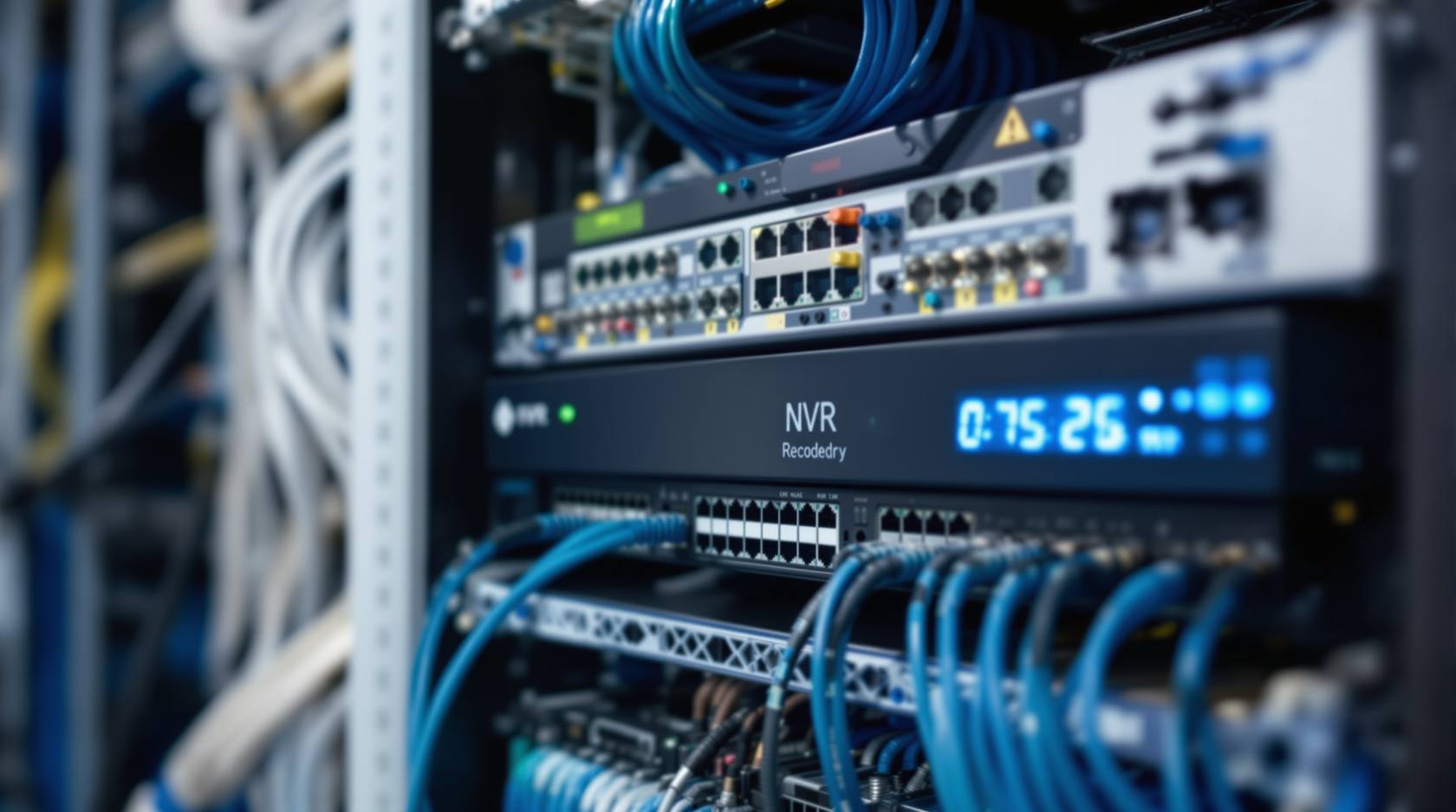
Complete Guide to Security System Cybersecurity in India (2026): Protecting the Systems That Protect You
The cameras, locks, alarms and door phones you install to feel safer are internet-connected computers that can themselves be attacked, and an insecure one is worse than none. This pillar maps the whole attack surface — devices, network, accounts and data, operations — and points to every guide that hardens it.
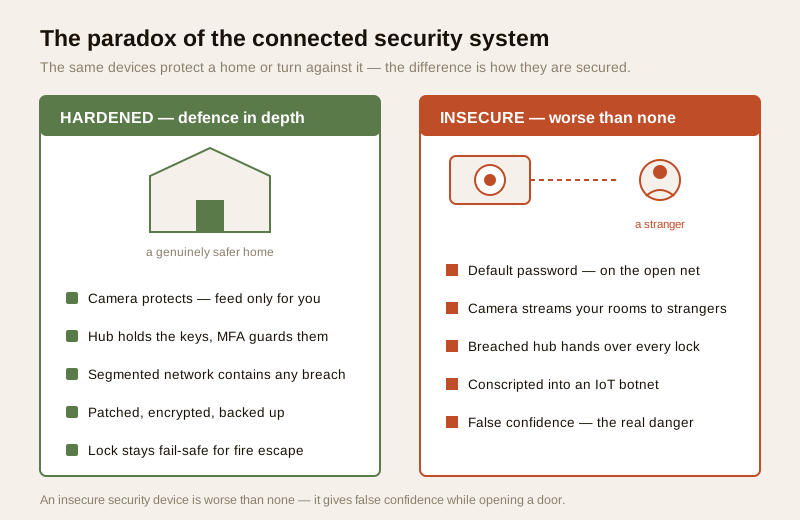
Here is the paradox at the heart of modern building security, and it is worth sitting with before you spend a rupee. Every camera, lock, alarm panel and video door phone you install to make a home or building safer is, underneath, an internet-connected computer. It runs software, it talks to an app, it usually phones a maker's cloud, and it shares a network with your phone, your laptop and everything else. Which means the very system bought to keep intruders out can, if it is left insecure, become the intruder's easiest way in. And this is the blunt, non-negotiable truth that threads through every guide in this section: an insecure security device is worse than none at all. A camera with no security still watches — but it watches you for a stranger. A breached hub still holds the keys — but now it hands every lock to whoever asked.
Security system cybersecurity is the strictly defensive discipline of protecting the security systems themselves from cyber attack — hardening the cameras, locks, alarms and door phones, the network they ride on, the accounts and data they hold, and the way they are backed up, disposed of and maintained over their life. This is the pillar for that work at Studio Matrx: it maps the whole attack surface and points you at the focused guide for each part. It is written for professionals, RWA committees and facility managers who own or run these systems — and everything here is about defence: how to secure, detect and respond, never how to attack. It sits inside the wider building security systems guide and complements the smart-home overview, smart security cybersecurity.
Scope & safety. This guide is strictly protective — it teaches how to harden systems you own and manage, and deliberately says nothing about how to attack, intercept or break into any device, account or network. Security systems hold sensitive personal data — footage, access logs, biometrics — which is personal data under the Digital Personal Data Protection Act, 2023; handle it lawfully and minimally. If a system is breached, India's national CERT (CERT-In) is the body to which cyber incidents are reported; treat any provider breach notice seriously. Life-safety is never defeated by a cyber control: a security lockdown or an electronic lock must never trap people in a fire — fail-safe egress always wins. The basics here suit an owner or RWA; engage a qualified IT or security professional for anything beyond them. This is educational guidance, not legal advice.
The paradox: a tool of safety that can be turned against you
A locked, un-connected building has one honest weakness — someone must physically break in, and you can see the wall, the gate, the guard. The moment you connect a security system, you add a second weakness that you cannot see, hear or feel: a network path an attacker can travel from anywhere on earth, at no risk to themselves. That is not a reason to avoid connected security — it is genuinely useful — but it is the reason cybersecurity is not an optional extra bolted on afterwards. It is part of the system's core function. A camera that is not hardened does not simply fail to help; it actively harms, because it does three things at once against the very people it was bought to protect.
First, it inverts surveillance: the feed meant for you streams to a stranger, turning your own eyes into theirs. Second, it opens the network: a compromised device is a foothold from which an attacker can reach your other systems. Third, it is conscripted — quietly enrolled into an IoT botnet that attacks other targets using your bandwidth, your electricity and your reputation, while the device keeps working so you never notice. The false confidence is the real danger. A family or a society that believes it is watched relaxes its ordinary caution — and if the watching system is wide open, every one of those relaxations becomes a leak.
The attack surface, mapped to the library
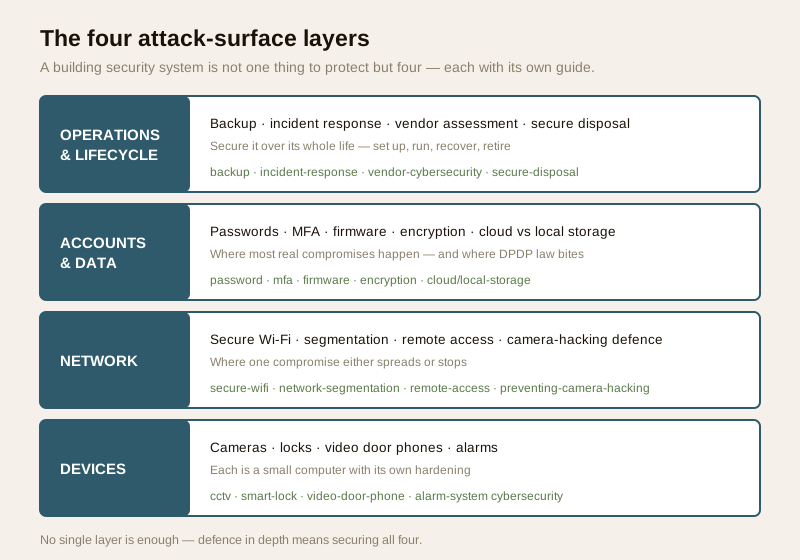
To secure a system you must first see it whole. A modern building security setup is not one thing to protect but four layers, each with its own weaknesses and its own hardening — and each with a dedicated guide in this section. Think of these four layers as the map of everything that follows; the rest of this pillar walks them in order, and every focused guide slots into one of them.
Layer 1 — The devices themselves
Every camera, lock, alarm panel and door phone is a small computer, and each family has its own hardening story. A cheap camera ships with a hardcoded password and firmware that will never be updated; a Wi-Fi lock is a computer on your door whose online account is, in effect, the key; a video door phone often carries a camera, a microphone and a network link at your most private threshold; an alarm panel that can be armed and disarmed over the internet is only as safe as the account that controls it. Each of these deserves its own focused treatment:
- Cameras and recorders — CCTV cybersecurity.
- Smart and networked locks — smart lock cybersecurity, building on the complete guide to smart locks.
- Video door phones — video door phone cybersecurity, beside the complete guide to video door phones.
- Alarms — alarm system cybersecurity, beside the complete guide to burglar alarms, app-based alarm systems and GSM alarm systems.
The common thread across all four: change every default credential, keep firmware current, prefer a reputable vendor whose security you can verify, and never expose a device raw to the internet.
Layer 2 — The network it rides on
No device is an island; they all sit on a network, and the network is where a single compromise either spreads or stops. A flat home or society network — where a cheap Wi-Fi bulb, the cameras, the NVR and the office laptop all share one Wi-Fi — means a breach anywhere is a breach everywhere. The defences here are structural: run current Wi-Fi encryption, put the untrusted and IoT devices on their own segment, and expose remote access only through hardened, authenticated paths rather than open ports. The focused guides:
- Secure Wi-Fi for security devices — the encrypted, updated foundation every device depends on.
- Network segmentation for IoT — separating cameras and gadgets so one hacked device cannot reach the rest.
- CCTV remote-access security — watching your building from afar without opening a raw door to the internet.
- Preventing camera hacking — the defensive checklist that keeps a camera yours.
Supporting infrastructure guides carry this further: internet and network readiness, the PoE switch and camera-network budget, and Wi-Fi CCTV cameras for the wireless case.
Layer 3 — The accounts and the data
Behind the devices sit the accounts that control them and the data they generate, and this is where most real-world compromises actually happen — not by clever hacking, but through a reused password or a login that was never protected. Two disciplines dominate: locking the accounts, and protecting the footage and logs both in transit and at rest. The focused guides:
- Security password management — unique, strong credentials per device and account, the single biggest win.
- Multi-factor authentication for security accounts — the second factor that defeats a stolen password.
- Firmware updates for security devices — closing known holes before they are used.
- Data encryption for security systems — protecting footage and logs in transit and at rest.
- Cloud storage security and local versus cloud security storage — where the data lives, and the trade-off between them.
This layer is where the law bites hardest. Footage, access logs and biometrics are personal data under the DPDP Act, 2023, so how they are stored, who can reach them, and how long they are kept are not just technical choices but legal duties — see smart security privacy and CCTV privacy masking.
Layer 4 — Operations and lifecycle
A system is not secured once and forgotten; it is secured over its whole life — set up, run, recovered when something goes wrong, and eventually retired. This is the layer most owners skip, and it is where old cameras leak footage from a scrapyard and un-tested backups fail at the worst moment. The focused guides:
- Security system backup — so a failure, ransomware or a wipe does not erase everything.
- Incident response planning — knowing, in advance, what to do the day something is compromised.
- Vendor cybersecurity assessment — vetting the installer and brand before they hold your keys, extending the security vendor and installer evaluation.
- Secure device disposal — wiping footage and credentials before a camera or DVR leaves your hands.
Defence in depth: no single control is enough
If you take one principle from this pillar, take this: no single control secures a system. A strong password does nothing against an un-patched firmware flaw. Perfect segmentation does nothing if the account has no second factor. Encryption protects the data in transit but not a device left on admin/admin. Real security comes from layering controls so that when one fails — and one always eventually fails — the next still stands. This is defence in depth, and it is why the four layers above are a checklist to complete, not a menu to pick from.
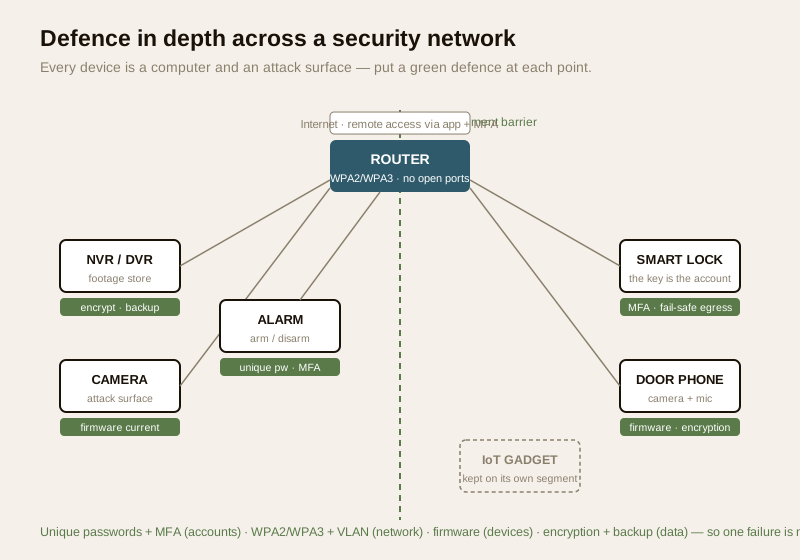
The practical shape of defence in depth for a building security system looks like this:
| Layer | The attack surface | The layered defence | Focused guide |
|---|---|---|---|
| Devices | Default passwords, stale firmware, no-name gear | Change defaults, patch, buy reputable, no raw internet exposure | CCTV / lock / VDP / alarm cybersecurity |
| Network | Flat Wi-Fi, open ports, weak encryption | WPA2/WPA3, segmentation/VLAN, secured remote access | Secure Wi-Fi, segmentation, remote-access |
| Accounts & data | Reused passwords, no MFA, unencrypted footage | Unique passwords, MFA, encryption, minimal cloud | Password, MFA, encryption, storage guides |
| Operations | No backup, no plan, leaky disposal | Backup, incident plan, vendor vetting, secure wipe | Backup, incident, vendor, disposal guides |
The India reality: default passwords on the open internet
None of this is abstract. Walk the honest scene in Indian homes and societies. A ₹-cheap, no-name cloud camera is bought and fitted in ten minutes, connected with the default password it shipped with — the same one the maker put on every unit in the batch — and its footage lives on an overseas server the buyer will never see. Vast numbers of such cameras sit on the public internet with well-known logins, indexed and searchable by anyone (the Shodan phenomenon), streaming living rooms and courtyards to strangers, and quietly drafted into IoT botnets of the Mirai style that attack other targets worldwide. The owner notices nothing; the camera keeps working, it simply works for someone else too.
The pattern repeats up the chain. The society NVR that nobody ever updated, still running the firmware it left the factory with years ago. The DVR still on admin/admin because the installer never changed it and the committee never knew to ask. The installer's laptop password reused everywhere, so one leak unlocks every site they touched. The app that phones home to an overseas server with no clarity on who can read the feed. The discarded old camera sold or scrapped with months of footage still on its card. Every one of these is a real, common failure — and every one is closed by an ordinary control from the four layers above. The lesson is not fear of connected security; it is caution about the cheapest option whose security you cannot verify, and discipline about the boring maintenance nobody enjoys.
The law and incident reporting: DPDP and CERT-In
A security system is a personal-data machine, so cybersecurity here is also a legal duty. Under the Digital Personal Data Protection Act, 2023, the footage, access logs and biometrics your system holds are personal data, and whoever decides how they are used carries obligations — to collect only what is needed, restrict who can reach it, keep it only as long as it serves a purpose, and handle breaches responsibly. For a society or a commercial building this is not a footnote; it shapes retention periods, access control, and what you may lawfully do with a camera feed.
When something does go wrong, India has a national body for it. CERT-In (the Indian Computer Emergency Response Team) is the national agency for cyber incidents, and cyber incidents are reportable to it — the details of what and when are set by its directions, which a qualified professional should confirm for your case. The practical takeaways for an owner: know that a reporting channel exists, do not treat a provider's breach notice as spam, and build the response path into your incident response plan before you need it, not during the crisis.
The life-safety rule: a cyber control must never trap people
One boundary overrides every cybersecurity choice: life-safety is never defeated by a cyber control. A security lockdown that seals doors against an intruder, an electronic lock that holds firm against tampering, a system that fails closed when the network drops — each is good security and can be lethal if it traps people inside a fire. The rule is absolute and it is the same one that governs the whole security hub: anything on an escape route must be fail-safe for egress, releasing to let people out even when it is locked against people coming in, and even when the power, the network or the cloud has failed. Design the cyber controls so that the worst cyber outcome is still a safe exit. When a smart lock's cybersecurity conflicts with a fire escape, the fire escape wins — every time. This is covered in depth in the smart lock cybersecurity and remote-access locks guides.
Who does what: owner and RWA versus a qualified professional
Not all of this needs a specialist, and it helps to be honest about the split. The basics belong to the owner, the RWA or the facility manager and need no expertise: changing every default password, turning on MFA, letting devices and the router update, buying from a reputable vendor, and asking the installer the right questions. Doing just those puts a building ahead of most.
The rest belongs to a qualified IT or security professional: designing network segmentation and VLANs, hardening remote access without opening ports, planning encryption and backup, running a real vendor cybersecurity assessment, and leading incident response when something breaks. The mistake to avoid is either extreme — an owner attempting deep network engineering unaided, or a committee assuming the installer has silently handled security they were never actually paid to handle. Agree explicitly who owns each layer, and get it in writing. Gauge where your gaps are with the home security risk scorecard and the security and privacy assessment.
The top-priority hardening shortlist
If you can only do a handful of things this week, do these — in order. They are the highest-value, lowest-effort defences across all four layers, and together they close the great majority of real-world compromises.
| Priority | Action | Layer | Effort |
|---|---|---|---|
| 1 | Change every default password — cameras, NVR/DVR, router, hub, app accounts — to a unique, strong one | Accounts | Easy — do first |
| 2 | Turn on multi-factor authentication on every security account that offers it | Accounts | Easy |
| 3 | Apply firmware updates to devices and especially the router; enable auto-update | Devices | Easy |
| 4 | Stop raw internet exposure — no open ports or port-forwards to a camera; use the vendor app with MFA | Network | Easy |
| 5 | Run WPA2/WPA3 Wi-Fi and put cameras and IoT on a separate segment/VLAN | Network | Moderate |
| 6 | Encrypt footage and prefer local or minimal-cloud storage you can vet | Data | Moderate |
| 7 | Set up a backup and write a short incident response plan | Operations | Moderate |
| 8 | Vet the vendor before they hold your keys, and securely wipe any device you retire | Operations | At purchase / disposal |
Retire and replace anything you cannot secure: an abandoned device whose vendor has stopped patching is a permanent, unfixable hole, and removing it is a security action, not waste.
Key takeaways
- The paradox is the whole point: the cameras, locks, alarms and door phones you install to be safer are internet-connected computers that can be attacked, and an insecure one is worse than none — it watches you for a stranger and hands over the keys while giving false confidence.
- The attack surface is four layers — devices, the network, accounts and data, and operations and lifecycle — and this library has a focused guide for each. Secure all four; that is defence in depth, because no single control is enough.
- The India reality is default-password devices on the open internet — the ₹-cheap camera on Shodan, the DVR on admin/admin, the society NVR nobody updated, the app phoning home overseas, the discarded camera still full of footage. Ordinary controls close every one.
- Security data is personal data under the DPDP Act, 2023, and cyber incidents are reportable to CERT-In — build both the legal and the reporting duty into how you run the system.
- Life-safety always overrides a cyber control: a lockdown or a lock must never trap people in a fire — fail-safe egress wins. Owners and RWAs handle the basics (passwords, MFA, updates); a qualified professional handles the rest.
Where to go next
- Start with your worst layer. Devices: CCTV, smart lock, video door phone, alarm cybersecurity.
- Network: secure Wi-Fi, network segmentation, remote access, preventing camera hacking.
- Accounts & data: passwords, MFA, firmware, encryption, cloud storage and local versus cloud.
- Operations: backup, incident response, vendor assessment, secure disposal.
- Zoom out to the building security systems guide, the smart security cybersecurity overview, and the security hub — plus the CCTV and smart-home sub-hubs. Gauge your gaps with the home security risk scorecard.
References
- Digital Personal Data Protection Act, 2023 — footage, access logs and biometrics held by security systems are personal data; collect minimally, restrict access, set retention, and handle breaches responsibly. Confirm current rules and any notified provisions before relying on specifics.
- CERT-In (Indian Computer Emergency Response Team) — India's national agency for cyber incidents and the body to which cyber incidents are reported; verify the current directions on reporting timelines and scope for your case with a qualified professional.
- Best-practice frameworks — NIST cybersecurity guidance, the OWASP IoT project and the CIS Controls describe device-hardening, segmentation, MFA and incident-response practice generically; review the current publications on the respective bodies' sites.
- Standard technologies referenced generically — WPA2/WPA3 Wi-Fi encryption, TLS/HTTPS, AES encryption, 2FA/MFA, VLAN segmentation, and ONVIF/RTSP for cameras; verify current versions and configuration against the relevant standards and your vendor's documentation.
- Manufacturer security documentation — before buying, verify a device's firmware-update history, whether it offers a local or offline mode, what data leaves for the maker's cloud, and how to report a security concern, on the vendor's own datasheet.
This is an educational overview, not legal advice, and it deliberately covers only how to harden security systems you own and manage — never how to attack any device, account or network. Life-safety and any certified fire, electrical or lift work remain qualified professional tasks; engage licensed and qualified professionals, and verify the current status of any law, direction or standard before relying on it.
Export this guide
Related Guides — Deep-dive reading
Smart Security Cybersecurity in India (2026): Hardening the Home That Watches Itself
Every connected security device is also a way in for an attacker, and an insecure smart camera or lock is worse than none because it gives false safety while exposing your home. This is the plain hardening checklist a homeowner can actually do: passwords, two-factor, updates, a wise buy, and a segmented network.
SecurityCCTV Cybersecurity in India (2026): Hardening Cameras, DVRs and NVRs Against Attack
The camera that watches your building is the most-attacked device in it. This professional guide is how to harden a CCTV system the defensive way: unique credentials, no needless internet exposure, a segmented camera network, current firmware, encrypted footage and reputable hardware.
SecurityCCTV Remote Access in India (2026): Watch From Your Phone, Safely
How to view your own cameras from anywhere without leaving the front door open to the internet — change the defaults, use strong credentials and 2FA, keep firmware current, prefer the vendor's secure cloud relay or a VPN, segment the camera network, and treat footage as personal data.
SecurityRelated Tools — Try Free
Home Security Risk Scorecard
Score your home across six security layers — perimeter, entry points, lighting, detection, alarm and habits — and get a prioritised action plan.
Security ScorecardSecurity Vendor Evaluation Scorecard
Rate a CCTV/security installer or guarding agency across eight weighted criteria for a hire / negotiate / walk-away verdict.
Vendor ScorecardCCTV Camera Coverage & Count Calculator
Estimate how many CCTV cameras you need, the NVR channels, storage in TB for your retention period, and an indicative all-in cost with GST.
CCTV Calculator