
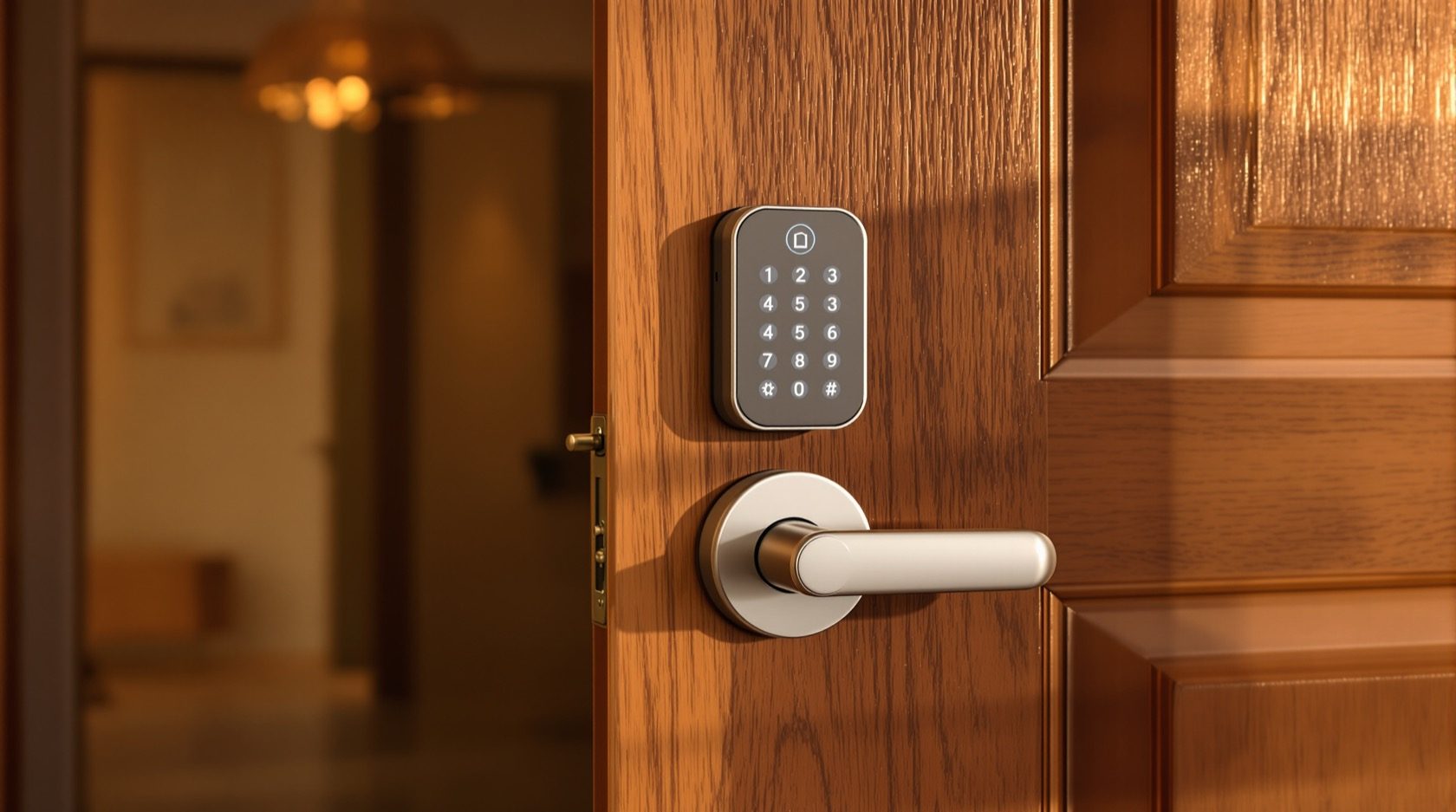
Smart Locks in India (2026): The Complete Guide to How They Work, How to Choose and How to Fit One Safely
The umbrella guide to smart locks for Indian homes: what a smart lock actually is, the credential that opens it, the lock body it lives in, and the safety, power and privacy calls every buyer must make.
For a few thousand years the front door had one interface: a key. You carried it, you could lose it, you could copy it, and if you handed it to the maid or the painter you had no idea how many copies came back. A smart lock changes that one thing. It replaces the metal key with a credential you either carry on your body, keep in your phone, or type from memory, and it keeps a record of who came and went. Everything else people find confusing about smart locks flows from that single idea.
This is the umbrella guide for the whole Studio Matrx smart locks and access control library. It is the map. It does not go deep on any one credential; instead it lays out the whole territory so you can see how the pieces fit, then points you to the detailed guide for whichever choice matters most to you. If you read only one page before you start shopping, read this one.
Scope & safety — read this first. This guide helps you plan, decide and coordinate. The actual fitting of the lock, any mains wiring, and any link to a fire-alarm or building system is a licensed job — door-hardware trade plus electrician, and a fire-safety consultant where an escape route is involved. Three rules never bend: a lock on a door people escape through must fail-safe (open on power loss or fire alarm) and must never block an escape route; a home door must always keep a mechanical key override; and the fitting, wiring and any fire interlock must be done by a licensed professional, never DIY. Biometric data and access logs are sensitive personal data under the Digital Personal Data Protection Act, 2023. This is educational guidance, not legal advice.
What a smart lock actually is
Strip away the marketing and a smart lock is an ordinary mechanical lock with three things bolted on: a way to read a credential, a small motor to throw the bolt, and a battery to power both. Some add a radio so a phone or hub can talk to them. That is the whole trick.
The important word is credential — the thing you present instead of a key. It might be your fingerprint, a four-to-eight-digit code you type, a card or fob you tap, a signal from your phone over Bluetooth or Wi-Fi, your face, or, on almost every good lock, a physical key kept as a backup. The credential is how you open the lock. Keep that word in your head; half of choosing a smart lock is choosing the credential.
The difference from a traditional lock is worth stating plainly, because it drives every trade-off that follows:
| Traditional lock | Smart lock | |
|---|---|---|
| What opens it | One physical key | A credential: finger, code, card, phone, face — often several, plus a backup key |
| Sharing access | Cut another key; no way to take it back | Grant a code or phone access; revoke it instantly and remotely |
| Record of entry | None | A log of who opened it and when (this is personal data) |
| Power | None needed | Needs a battery (or mains); plan for it going flat |
| Failure mode | Sticks, or you lose the key | Flat battery, dead motor, network down — so a mechanical override matters |
| Remote control | Impossible | With a Wi-Fi model, lock/unlock and get alerts from anywhere |
| What can go wrong | Physical picking, lost key | The above, plus it is a small networked computer that must be kept secure |
A smart lock is not automatically safer than a good deadbolt — a cheap one can be worse. It is more convenient and more manageable, and a well-chosen one is at least as secure. The job of this guide is to help you pick a well-chosen one.
The anatomy: what is inside the box
Every smart lock, whatever the brand, is built from the same handful of parts. Knowing them makes every product page readable.
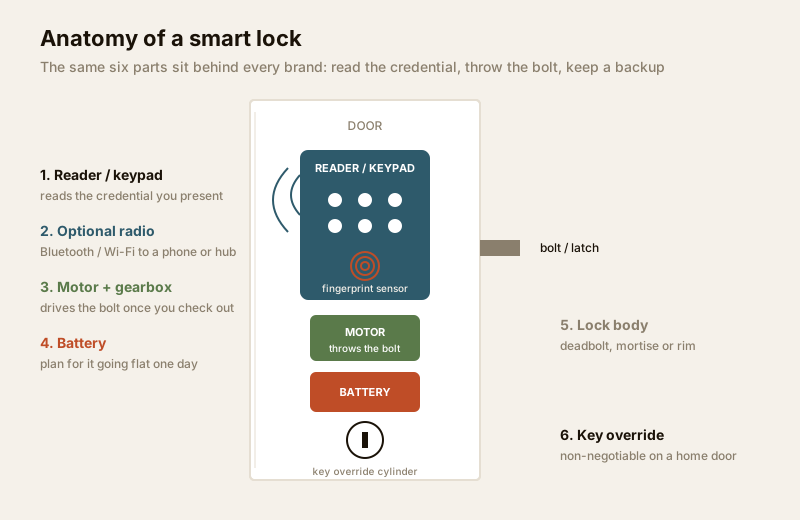
- The lock body and bolt — the mechanical part that actually holds the door shut: a deadbolt, a latch, or a full mortise mechanism sunk into the door edge. This is what a burglar meets. It is only as strong as the door and frame around it.
- The reader / keypad — the outside face that takes your credential: a fingerprint sensor, a number pad, a card-tap area, or a camera. On most Indian retrofit locks this sits in the outer handle-set.
- The motor and gearbox — a small electric motor that, once the credential checks out, drives the bolt open or shut. Its strength and quality decide how reliably the lock throws, especially on a slightly misaligned Indian door in the monsoon when the wood has swollen.
- The battery — usually four AA cells or a rechargeable pack inside the door. This is the single most important India detail: a smart lock is a battery device, and a flat battery is the number-one real-world failure. Good locks warn you for weeks and let you jump-start from a power bank at an emergency port.
- The optional radio — Bluetooth, Wi-Fi, Zigbee or Z-Wave, if the lock talks to a phone, a hub or the cloud. No radio means a standalone lock (simpler, more private, no remote control); a radio adds app control and alerts but also makes the lock a device on your network to be kept secure.
- The mechanical key override — a physical cylinder, hidden or visible, that opens the lock with a real key when the electronics are dead. On a home door this is non-negotiable. It is your way in when the battery dies, and part of your way out in an emergency.
If you understand these six parts, you can read any smart-lock listing and know what you are buying.
The two big questions every buyer faces
Almost every decision about a smart lock collapses into two questions. Get these two right and the rest is detail.
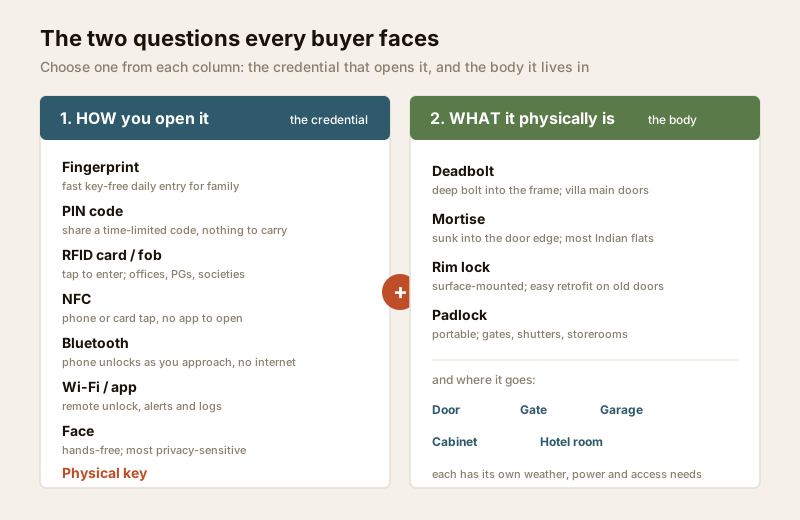
Question 1 — HOW you open it (the credential)
This is the choice most people mean when they say "which smart lock." Each credential has a personality, and most good locks combine two or three so you always have a fallback. Here is the map, with a link to the deep guide for each:
| Credential | How it works | Best for | Watch out for |
|---|---|---|---|
| Fingerprint | An optical or capacitive sensor matches your fingertip | Fast, key-free daily entry for family; no code to forget | Wet, dry, cut or elderly fingers can read poorly; it is biometric data — see fingerprint locks |
| PIN code | You type a numeric code on a keypad | Sharing time-limited access (a code for the cook, the plumber) with nothing to carry | Codes get shared and shoulder-surfed; change them; see PIN code locks |
| RFID card / fob | You tap a card or keychain fob on the reader | Offices, PGs, societies, kids and elders who prefer a tap | Cheap low-frequency cards can be copied — buy encrypted ones; see RFID locks |
| NFC | Your phone or an NFC card taps the reader | People who want the phone-as-key convenience without an app open | Phone must have NFC and charge; see NFC locks |
| Bluetooth | Your phone unlocks over a short-range radio as you approach | Hands-full arrivals; auto-unlock; no internet needed | Range and reliability vary; phone must be charged; see Bluetooth locks |
| Wi-Fi / app | The lock joins your home Wi-Fi for remote control and alerts | Letting someone in while you are away; entry alerts; logs | It is a network device — needs strong security and firmware updates |
| Face | A camera recognises your face | Truly hands-free entry | Most privacy-sensitive; lighting and angle matter; biometric data under DPDP |
| Physical key | A real key in a cylinder | The always-there backup on every home door | Keep it; store it off-site too |
The right answer is almost always a mix: a fingerprint or PIN for daily use, a shareable code for helpers, and a mechanical key as backup. A pure app-only lock with no keypad and no key is a poor choice for an Indian home where power and phones both fail. Use the smart lock selector tool to narrow the credential mix to your household.
Question 2 — WHAT it physically is (the lock body / form factor)
The credential is the software of the decision; the lock body is the hardware. This is where the lock goes and what shape it is, and it is decided as much by your existing door as by your taste. The main forms:
- Deadbolt — a solid bolt that throws deep into the frame, usually above a separate handle. Common on villa and independent-house main doors. Strong when the frame is strong.
- Mortise — a full lock mechanism sunk into a pocket cut in the door edge, combining latch and deadbolt in one handle-set. This is the dominant form on newer Indian flat doors and the one most smart handle-sets are built to replace.
- Rim lock — a lock body mounted on the surface of the door's inside face rather than sunk into it. Common on older doors and easy to retrofit without deep carpentry.
- Padlock — a self-contained portable lock for gates, shutters, storerooms and cycles; smart versions open by fingerprint or app.
- And where it goes — the same idea scales to the gate, the garage shutter, a cabinet or drawer, and, in a managed building, the hotel-style room lock. Each destination has its own weatherproofing, power and access-management needs.
These form factors each get their own detailed guide later in this library; for now the point is only that you must pick a body that fits your actual door. That is where India retrofit reality bites, below. (Because those form-factor guides are still being written, this pillar describes them in prose rather than linking them — check the sub-hub for what has published.)
The decision axes underneath
Beyond the two big questions, four axes quietly shape which product suits you. Skim these before you shop.
| Axis | Option A | Option B | How to decide |
|---|---|---|---|
| Credential mix | Single (fingerprint only) | Multi (finger + PIN + key) | Always favour a mix so a failed credential is never a lockout |
| Power | Battery (AA / rechargeable) | Wired to mains, battery backup | Battery for retrofit and most homes; wired for gates, high-traffic, or where a fail-safe interlock is needed — a licensed electrical job |
| Intelligence | Standalone (no radio) | App / cloud connected | Standalone is simpler and more private; connected gives remote control, alerts and logs but must be kept secure |
| Scale | Single home | Managed / multi-user access | A home wants a lock; a PG, office, society or rental wants an access-system with roles and audit — see the sub-hub |
Safety comes first — always
This is the most safety-critical topic in the whole Studio Matrx security library, so read this section even if you skip others. A lock's job is to keep the wrong people out; its duty is never to trap the right people in.
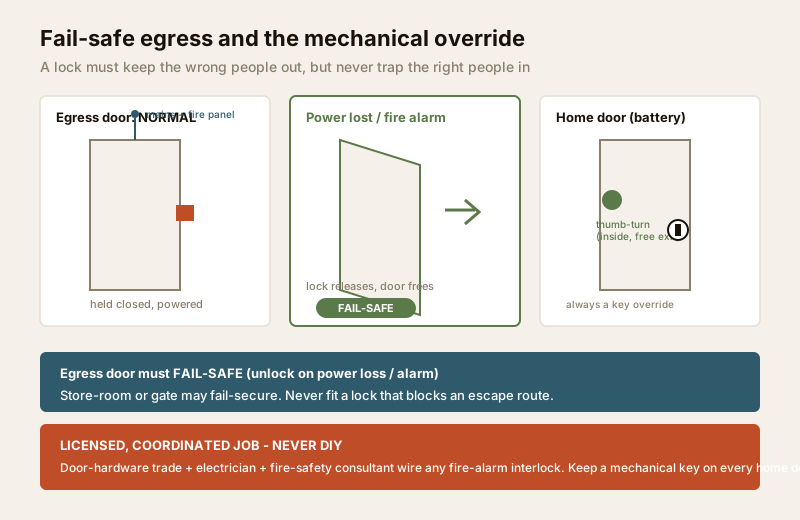
Fire egress and fail-safe vs fail-secure
Any door that people escape through in a fire — a flat's main door, a stairwell door, an office exit — must never delay or block escape. Two terms decide this:
- Fail-safe — on loss of power (or a fire-alarm trigger) the lock unlocks. Used on egress and fire-escape doors so no one is ever trapped by a dead lock. This is governed by the National Building Code and local fire rules.
- Fail-secure — on loss of power the lock stays locked. Fine for a store-room or a gate, wrong for an escape route.
The practical rules:
1. On a home flat door, the inside must always open freely with a single action — a thumb-turn or lever — with no code or app needed to get out. Check this on any lock before you buy.
2. Never fit a lock, or position a keypad or cable, so it obstructs or complicates an escape route.
3. Any electrically-held egress lock that must release on the fire alarm is a coordinated, licensed job: the door-hardware trade, an electrician, and a fire-safety consultant, wired to the alarm panel. This is never a homeowner DIY task.
4. On every home door, keep a mechanical key override and a spare key stored off-site. The electronics will fail one day; the key is your guaranteed way in.
Strictly a hardening guide
This library explains how locks work and how to choose and harden them. It will never explain how to defeat, pick, bump, shim, clone a card, or spoof a biometric — that helps a burglar, not you. Where a weakness matters to a buyer (cheap RFID cards can be copied, for instance), it is stated as a buying caution with a fix — buy encrypted cards — never as a method.
Networked locks are network targets
The moment a lock joins Wi-Fi or Bluetooth it becomes a small computer someone might attack. Treat it like one:
- A strong, unique password on the lock app and account — never the default.
- Two-factor authentication on the account.
- Firmware updates applied when the maker releases them.
- A reputable brand that actually ships security patches, over a no-name bargain that never will.
- A plan for power cut and dead battery, and always the mechanical override.
The smart home and security hubs cover the wider home-network hygiene this sits inside.
Biometrics and privacy — the DPDP duty
A fingerprint or face is sensitive personal data under the Digital Personal Data Protection Act, 2023, and so is an access log that records who entered when. If your household or building uses biometrics or logs, that carries duties:
- Consent and notice — tell people what is captured and why; get consent, especially from staff and tenants.
- Minimisation and retention — collect only what you need and do not keep logs forever.
- Who administers — one accountable person holds the admin rights, not "everyone."
- Deleting people — remove an ex-employee, former tenant or departed helper promptly and completely.
- On-device vs cloud — a lock that stores the biometric template on the device is generally more private than one that uploads it; prefer on-device where you can.
India realities that decide the choice
A smart lock that is perfect in a brochure can be wrong for an Indian home for very physical reasons. Weigh these before you spend.
- Power cuts and dead batteries. Locks run on batteries precisely so a power cut does not lock you out — but the battery itself dies. Choose a lock with a clear low-battery warning and an emergency jump-start port, and never one with no keypad and no key.
- Retrofitting an existing door. Most Indian flats have a mortise lock in a metal or wooden door; many older doors are cylindrical (a round hole through the door) or rim locks. A smart handle-set must match your door's cut-out, thickness and handing, or it will not fit. Measure before you buy, and expect a carpenter or the door-hardware trade to fit it — a badly fitted smart lock jams. The sub-hub covers retrofit measurement.
- Monsoon, dust, heat and humidity. Electronics on an outer gate or a west-facing door face rain, salt air near the coast, forty-plus-degree summers and dust. For anything exposed, insist on a proper weather rating and a brand that specifies it; keep the most sensitive electronics on inside doors.
- Apartment vs villa. A flat usually needs one good retrofit lock on the main door and must respect the building's fire rules and the RWA. A villa or independent house has a main door, a gate, maybe a garage and a back door — a small system, not one lock, and more exposure to weather. See the tailored apartment security and villa and independent-house security guides.
How this is different from a video-door-phone smart lock
One common confusion, worth clearing up. This library is about the lock itself — the credential, the body, the safety. A separate guide, pairing a smart lock to a video door phone, covers something narrower: linking a lock so you can see who is at the door on your VDP screen and release it from there. If you already have or want a video door phone, read that guide alongside this one — but the choice of lock, credential and safe fitting starts here.
When to bring in a professional. You can and should do the deciding: which credential mix, which form factor, which brand, and reading this and the sibling guides to shortlist. Hand the doing to licensed trades — the door-hardware fitter or carpenter to cut and mount the lock, an electrician for any mains wiring, and a fire-safety consultant plus both of them, coordinated, for any egress door that must release on the fire alarm. Never wire a fail-safe or fire-interlock lock yourself, never remove a mechanical override from a home door, and always test that the inside opens freely before you trust the lock.
Key takeaways
- A smart lock replaces the key with a credential you carry, type, tap, or store in your phone — the convenience and the whole trade-off flow from that one change.
- Two questions decide it: how you open it (the credential — fingerprint, PIN, RFID/NFC, Bluetooth, Wi-Fi, face, key) and what it physically is (the lock body — deadbolt, mortise, rim, padlock — and where it goes). Choose one from each, and favour a mix of credentials so a failure is never a lockout.
- Safety leads: an egress door must fail-safe and never block escape; a home door must always keep a mechanical key override; and any wiring or fire interlock is a licensed, coordinated job, never DIY.
- A networked lock is a network target — strong unique passwords, 2FA, firmware updates, a reputable brand, and a plan for power cuts and dead batteries. Biometrics and logs are sensitive data under the DPDP Act, 2023.
- India decides the details: plan for dead batteries, measure your mortise-or-cylindrical door before buying, respect monsoon and heat exposure, and treat a villa as a small system rather than one lock. Start with the selector tool and the sub-hub.
References
- Digital Personal Data Protection Act, 2023 — fingerprint, face and access-log data are sensitive personal data; observe consent, notice, minimisation, retention, accountable administration and prompt deletion, and prefer on-device biometric storage. Cited generically; not legal advice.
- Manufacturer specifications and datasheets — verify battery life and jump-start method, motor and lock-body type, weather/IP rating, radio and security features, firmware-update policy and the presence of a mechanical override on the maker's own datasheet before buying.
- National Building Code of India (SP 7), Bureau of Indian Standards, and local fire and municipal rules for fire-egress, fail-safe requirements and any electrical work; verify the current edition via the BIS catalogue: https://www.services.bis.gov.in/
- Studio Matrx credential guides — fingerprint, PIN code, RFID, NFC and Bluetooth locks — for the deep dive on each way of opening the lock.
This is an educational overview, not legal advice. Lock fitting, mains wiring and any fire-egress or fire-alarm interlock are qualified professional tasks — engage licensed trades, keep a mechanical override on every home door, and verify any standard's current status via the BIS catalogue before relying on it.
Export this guide
Related Guides — Deep-dive reading
Access Control Maintenance in India (2026): Readers, Locks and Fail-Safe Egress
How to keep a card, keypad, fingerprint or face access-control system reading reliably and locking securely — and, above everything, how to test that its doors still release on a fire alarm and on power loss, so an access-controlled door never becomes a life-safety trap.
SecurityFingerprint Locks in India (2026): How Biometric Door Locks Really Work, and Their Honest Limits
How a fingerprint sensor reads a finger and matches it to enrolled templates, the genuine appeal of nothing to carry, and the wet-finger, elderly, privacy and backup realities every Indian buyer must weigh before choosing one.
SecurityMulti-Factor Access Control in India (2026): Two-Factor Doors, Anti-Passback and Mantraps Done Right
What multi-factor access control means, the three factor categories, common two-factor combinations, and which high-security doors truly need them versus where a second factor just slows honest people down.
SecurityRelated Tools — Try Free
Video Door Phone Type Selector
Answer a few questions about your building, cabling, budget and internet and get the right video door phone — analog / wired / wireless / IP, single-home or multi-apartment, monitor or app.
Door Phone SelectorAccess-Control Battery-Backup Calculator
Size the standby battery so an access system keeps running through a power cut, with an egress life-safety note.
Battery BackupVideo Door Phone Feature Selector
Tick what you want the door phone to do — app, night vision, two-way audio, smart lock, access control or facial recognition — and get the features and integrations to spec, with the privacy and safety caveats.
Feature Selector