
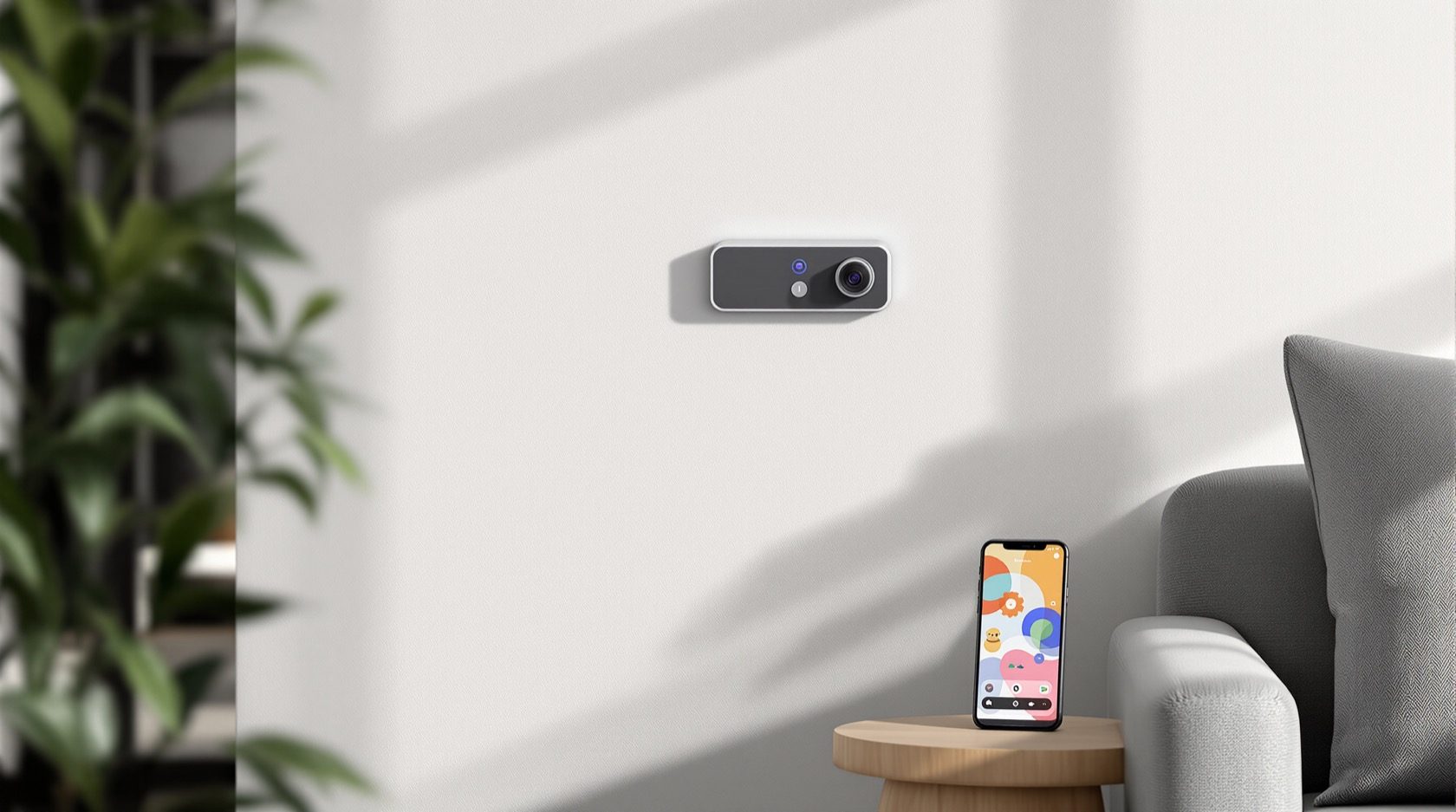
Smart Security Systems Guide for Indian Homes
The connected side of home security — smart cameras, locks, sensors, hubs and app alerts, and the automation that helps protect you. Clear-eyed about the trade-offs: what smart adds, what it can break, and how to build a system that still works in a power cut or internet outage.
Smart security is the most exciting — and the most over-sold — corner of home protection. A connected system can text you the moment a gate opens, let you watch your front door from another city, arm itself when you leave and unlock for family without a key. Done well, it turns a passive set of locks and grilles into something that talks to you. Done carelessly, it stacks new failure modes on top of the old ones: a camera that goes blind in a power cut, an app that stops alerting when the broadband drops, a cheap device with a default password that becomes a hole in your own home.
This guide is about the smart, connected layer specifically — how it works, where it genuinely helps, and the trade-offs you must design around. It sits alongside the broader ultimate guide to home security, which covers the physical and procedural fundamentals that smart devices should sit on top of, never replace. If you are choosing between products, also read the smart home security systems guide; for the privacy and data angle in depth, the smart home privacy and security guide is the companion to this one.
Scope & safety. This guide helps you plan, decide and coordinate smart security. Electronic access control, electric strikes and locks, integrated fire and alarm systems, and mains wiring for cameras and hubs are life-safety-critical — specify them, then have a licensed professional design, install and certify them. A smart lock or electric strike must never impede fire escape. Nothing here is a substitute for a site-specific assessment.
What "smart" actually adds
Strip away the marketing and a smart security device does three things a dumb one cannot: it connects (to your network, a hub or a cloud), it notifies (pushes an alert in real time), and it can automate (act on a rule without you). Each is genuinely useful, and each is a new dependency.
The building blocks of a connected home security system:
| Component | What it does | Smart advantage | The new dependency it adds |
|---|---|---|---|
| Smart camera (Wi-Fi/IP) | Watches an area, records, streams to phone | Live view anywhere, motion/person alerts, two-way talk | Needs Wi-Fi + power; cloud clip needs internet |
| Smart lock | Keyless main-door entry via PIN, fingerprint, app | Remote lock/unlock, access logs, temporary codes for staff | Battery-dependent; app access needs connectivity |
| Video door phone (smart) | See and speak to a visitor before opening | Answer the door from your phone, record callers | Wi-Fi + power; alerts need internet |
| Door/window & motion sensors | Detect opening or movement | Instant breach alerts, feeds automations | Battery + hub link; radio range limits |
| Smart alarm / hub | Ties sensors and siren together, arms/disarms | App control, schedules, geofencing, remote arm | Hub is a single point of failure if unbacked |
| Environmental sensors | Smoke, gas, water leak, glass-break | Life-safety alerts to your phone | Life-safety units must be professionally rated |
The pattern is clear: every smart feature is paid for with a dependency on power, connectivity, or a battery — often all three. That is not a reason to avoid smart security. It is the reason to design its resilience deliberately, which the rest of this guide is really about.
Hubs, ecosystems and app control
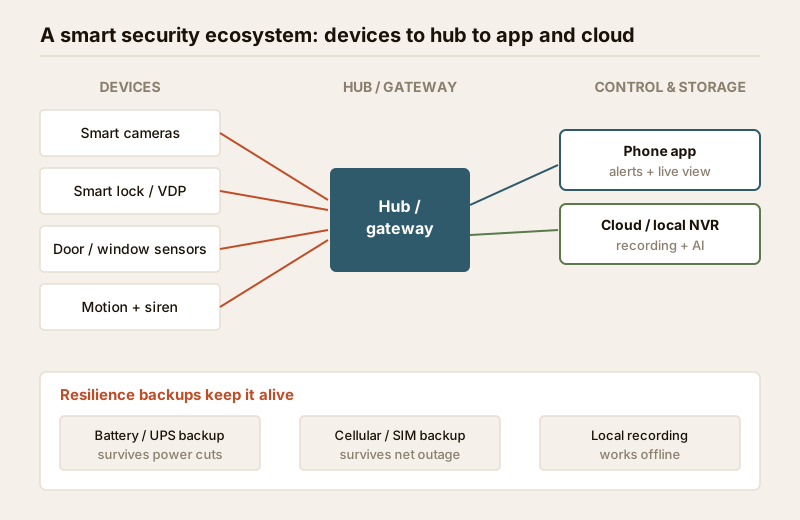
Most smart security lives inside an ecosystem — a hub or app that ties devices together. Broadly you will meet three models:
- Single-vendor kits — one brand's cameras, locks, sensors and app, designed to work together out of the box. Easiest to set up; hardest to escape later.
- Platform ecosystems — devices from many brands that speak a common language (the emerging Matter standard, or a voice-assistant platform) and share one app.
- Standalone devices — a Wi-Fi camera or lock with its own app, not tied to any hub. Cheapest to start; painful once you own five apps for five gadgets.
App control is the everyday face of all of this: one screen showing your cameras, the state of your alarm, the lock, and a feed of alerts. The convenience is real — arm the house from the airport, check a delivery, grant a plumber a one-time code. But two cautions belong here. First, an alert is not a response — a notification you swipe away at 2 a.m. protects nobody. Pair smart alerts with a real response plan (household, neighbours, RWA, guards) as covered in the emergency preparedness guide. Second, the app is a key to your home — protect the account with a strong, unique password and two-factor authentication.
Automation that genuinely helps security
The best reason to go smart is automation that closes the gaps humans forget. A few patterns earn their keep:
- Geofencing arm/disarm — the system arms automatically when the last phone leaves a set radius and disarms as you return, so nobody forgets to set the alarm. Keep a manual and a keypad override for guests and dead phones.
- Schedules — arm "night mode" (perimeter sensors on, interior off) every night automatically; switch outdoor cameras to alert-on-motion after dark.
- Occupancy simulation when away — lights, and sometimes a radio or TV, turn on and off in a lived-in pattern while you are travelling. A dark, silent house for a week is the single biggest risk multiplier for Indian homes over festivals and long holidays.
- Trigger chains — a gate sensor at night turns on the driveway lights and starts camera recording; a motion alert while "armed away" sounds the siren and pushes a clip.
- Smart-home integration — tying security into the wider smart home means one "leaving home" action locks the door, arms the alarm and switches off appliances together.
Automation is powerful precisely because it does not depend on memory. But every rule is only as reliable as the connectivity and power beneath it — which brings us to the part most buyers skip.
The resilience gap: power cuts and internet outages
Here is the uncomfortable truth about smart security in India: a system that depends entirely on mains power and the internet can go completely dark exactly when you are most exposed. A power cut during a monsoon storm, or an outage while you are travelling, is precisely the moment an opportunist counts on. A wired grille does not care about the grid. A cloud camera does.
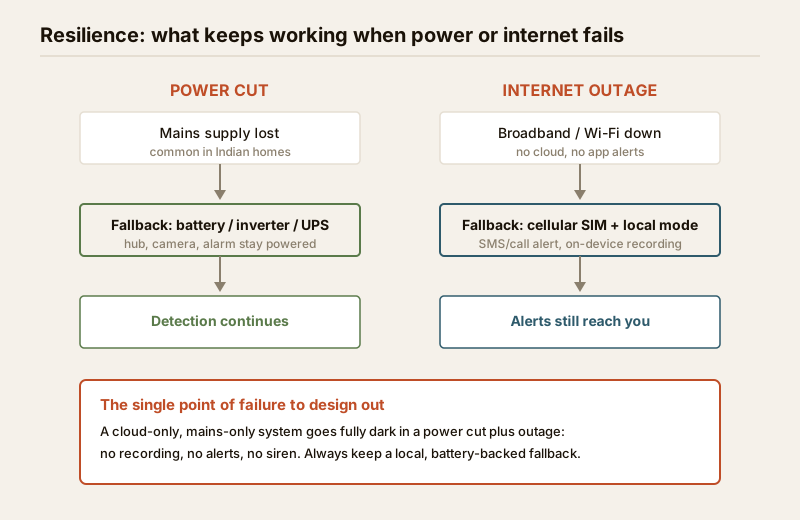
Design for three independent failures:
1. Power loss. Put the hub, router, key cameras and the alarm panel on a battery, inverter or UPS. Choose a smart lock with a long battery life and a clear low-battery warning — and one that still opens mechanically or with a physical key from inside for fire escape. Many Indian homes already run an inverter; make sure your security devices are on the backed-up circuit.
2. Internet loss. A cloud-only camera stops recording and alerting when broadband drops. Prefer devices with local recording (SD card or an on-site NVR) so footage is captured even offline, and an alarm panel with a cellular/SIM backup that can still send an SMS or call when Wi-Fi is gone.
3. Both at once. The worst case — storm cut plus outage — is real here. The only defence is a locally-powered, locally-recording layer: at minimum one battery-backed camera writing to local storage, and an alarm that can sound its siren without any network at all.
The design principle: your protection should degrade gracefully, not collapse. Losing the app is an inconvenience; losing all detection and recording is a failure. This resilience thinking is part of good layering generally — see the layered security design guide.
Cloud vs local: where footage and processing live
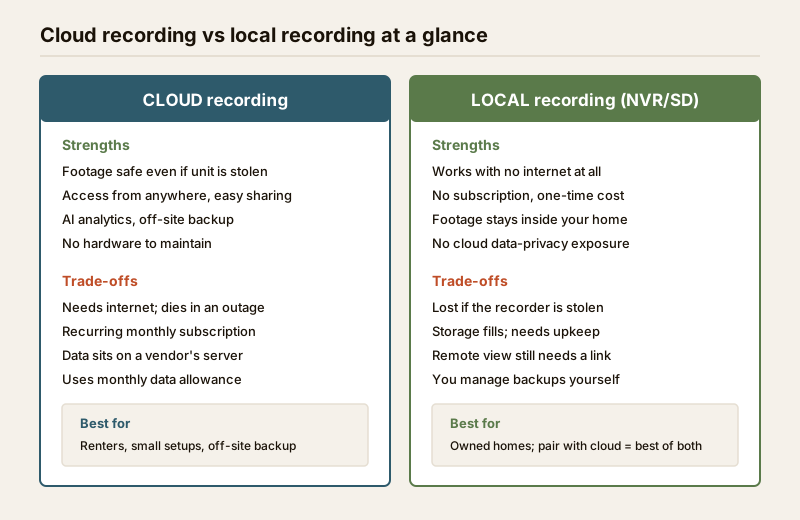
A recurring decision runs through every smart camera and recorder: does your video and processing live in the cloud, on a local device, or both?
| Factor | Cloud recording | Local recording (NVR / SD card) |
|---|---|---|
| Works without internet | No — needs a live connection | Yes — records fully offline |
| Survives device theft | Yes — footage is off-site | No — footage goes with the stolen unit |
| Ongoing cost | Recurring monthly/annual subscription | One-time hardware; no subscription |
| Where your data sits | On the vendor's servers | Inside your home, on your storage |
| Remote viewing | Built in | Needs a secure remote-access link |
| AI analytics (person/vehicle) | Usually strongest | Improving; depends on the recorder |
| Data usage | Continuous upload eats your allowance | Minimal until you view remotely |
For most Indian homes the honest answer is both: a local NVR or SD card as the always-works spine that survives an outage, plus selective cloud backup of important clips so footage is not lost if the recorder itself is stolen. That hybrid gives you offline resilience and off-site protection. Wired-vs-smart is a similar spectrum — a wired alarm loop is dumb but almost unbreakable; a smart wireless one is flexible but battery- and radio-dependent. Neither is "better"; the strongest homes use a wired, hardened core with smart layers on top, not smart instead of hard.
Privacy and data security of the devices themselves
A security device is only a benefit if it is not also a liability. Cameras, locks and hubs are internet-connected computers inside your home, and a badly-secured one can be a bigger risk than the threat it was bought to counter. The essentials — covered in full in the smart home privacy and security guide:
- Change every default password to a strong, unique one, and never reuse it. Default credentials are the number-one way cheap cameras get compromised.
- Turn on two-factor authentication for the app account that controls your home.
- Keep firmware updated — updates patch the security holes attackers rely on. Enable auto-update where the device offers it.
- Segregate the network — put cameras and IoT devices on a separate Wi-Fi network or guest SSID, away from your laptop and banking. A compromised camera then cannot reach the rest of your home.
- Choose reputable vendors with a track record of security updates and a clear data-handling policy. The cheapest no-name camera is cheap for reasons that surface later.
- Mind placement and dignity — indoor cameras in living spaces raise real privacy questions for family, staff and guests. Point them at entry points, not at private spaces, and tell people they exist.
Treat the devices' own security as part of the security system, not an afterthought. A camera you cannot trust is not a camera you should rely on.
Interoperability and avoiding lock-in
The quiet cost of smart security is lock-in — the day you want to add one sensor and discover it only works with the brand you already bought, or that leaving means replacing everything. Protect your future self:
- Prefer open standards. Devices supporting Matter or common protocols (and cameras that speak ONVIF/RTSP to a standard recorder) can move between apps and hubs.
- Avoid single-vendor everything unless the whole kit genuinely suits you. One app is convenient until that vendor raises subscription prices or discontinues a product.
- Own your recordings. A camera that only stores to its maker's cloud holds your footage hostage; one that also writes to local storage keeps you free.
- Check the subscription math. A "cheap" camera with a mandatory ₹300–500/month cloud plan costs far more over three years than a slightly dearer one that records locally.
Interoperability is not glamorous, but it is what lets a system grow with you instead of trapping you.
A sensible way to buy smart security
Sequence it so smart adds to a sound base rather than papering over a weak one:
1. Harden the physical base first. A smart lock on a flimsy door is theatre. Get the door, frame, grilles and boundary right (the ultimate guide covers this), then add smarts.
2. Start with the highest-value smart pieces — a smart video door phone and one or two well-placed cameras with local recording deliver the most protection per rupee.
3. Add automation you will actually use — geofenced arming and away-mode simulation earn their keep; niche gadgets gather dust.
4. Build resilience in from day one — battery/UPS backup and local recording are not upgrades to add later; they decide whether the system works when it matters.
5. Scope and cost it with the security system cost estimator and, for coverage, the CCTV camera coverage calculator before you buy.
When to bring in a professional
Plan and choose these yourself — but do not design, wire or certify them yourself:
- Electronic access control and electric locks — a badly installed electric strike can trap people in a fire; specify it, then use a licensed installer who ensures free egress.
- Integrated fire, smoke, gas and CO detection — life-safety-critical; must be designed and commissioned to the relevant national building code and local bye-laws, not bought as a DIY smart gadget.
- Mains wiring for cameras, hubs, gates and UPS backup circuits — use a licensed electrician (see the electrical hub).
- Whole-home integration and network segregation at scale — a competent installer or IT professional will set up the segregated network, secure remote access and reliable backups properly.
Your job is to set the brief, choose resilient and open systems, and coordinate. Their job is to make it safe, code-compliant and reliable.
Key takeaways
- Smart adds power and failure modes together. Every connected feature depends on power, connectivity or a battery — design the resilience, do not just buy the gadget.
- Never let it go fully dark. Battery/UPS backup, local recording and a cellular fallback keep detection alive through a power cut or internet outage.
- Cloud vs local is not either/or — a local spine that works offline plus selective cloud backup gives you resilience and off-site safety both.
- The device's own security is part of your security — strong unique passwords, 2FA, firmware updates, a segregated network and reputable vendors; see the smart home privacy guide.
- Avoid lock-in — prefer open standards, own your recordings, and check the subscription math before you commit.
- Smart sits on top of a hard base — harden the physical layer first, then let smart layers add convenience and awareness.
Where to go next
- The fundamentals underneath: Ultimate Guide to Home Security and the layered security design guide.
- Choosing products: Smart Home Security Systems and the wider smart home hub.
- Protecting the devices: Smart Home Privacy & Security.
- Plan for outages and response: Emergency Preparedness Guide.
- Scope and cost it: Security System Cost Estimator and the CCTV coverage calculator, or browse all guides.
References
- National Building Code of India (SP 7), Bureau of Indian Standards — fire and life-safety provisions relevant to electric locks, egress and integrated detection; verify the current edition via the BIS catalogue.
- Matter and ONVIF interoperability specifications — open standards for smart-home and IP-camera compatibility; check current version and device certification before relying on it.
- Local municipal building bye-laws and housing-society rules — govern CCTV in common areas, data handling and guard arrangements; check your city and society rules.
This is an educational overview for planning and decision-making. Electronic access control, electric locks, integrated fire and life-safety detection, and mains electrical work are qualified professional work — engage licensed professionals for design, installation and certification, and verify any standard's current status via the BIS catalogue before relying on it.
Export this guide
Related Guides — Deep-dive reading
Smart Home Security Systems in India: CCTV, Sensors, Alarms & AI
How to think in layers — perimeter, entry, interior — and build a system that actually protects an Indian home: AI cameras, video door phones, door and glass-break sensors, alarms, panic buttons, gate automation, monitoring and DPDP-aware privacy, with real brands and rupee costs.
Smart HomeComplete Guide to Security System Cybersecurity in India (2026): Protecting the Systems That Protect You
The cameras, locks, alarms and door phones you install to feel safer are internet-connected computers that can themselves be attacked, and an insecure one is worse than none. This pillar maps the whole attack surface — devices, network, accounts and data, operations — and points to every guide that hardens it.
SecurityCCTV Remote Access in India (2026): Watch From Your Phone, Safely
How to view your own cameras from anywhere without leaving the front door open to the internet — change the defaults, use strong credentials and 2FA, keep firmware current, prefer the vendor's secure cloud relay or a VPN, segment the camera network, and treat footage as personal data.
SecurityRelated Tools — Try Free
CCTV Cloud vs Local Cost Calculator
Compare cloud CCTV subscription against a local NVR + HDD — upfront, 5-year total, monthly fee and break-even.
Cloud vs LocalCCTV Camera Coverage & Count Calculator
Estimate how many CCTV cameras you need, the NVR channels, storage in TB for your retention period, and an indicative all-in cost with GST.
CCTV CalculatorSecurity Backup Power Calculator
Size a UPS/inverter and battery to keep CCTV, NVR, router and alarm running through a power cut — load, Ah, VA and cost.
Backup Power