
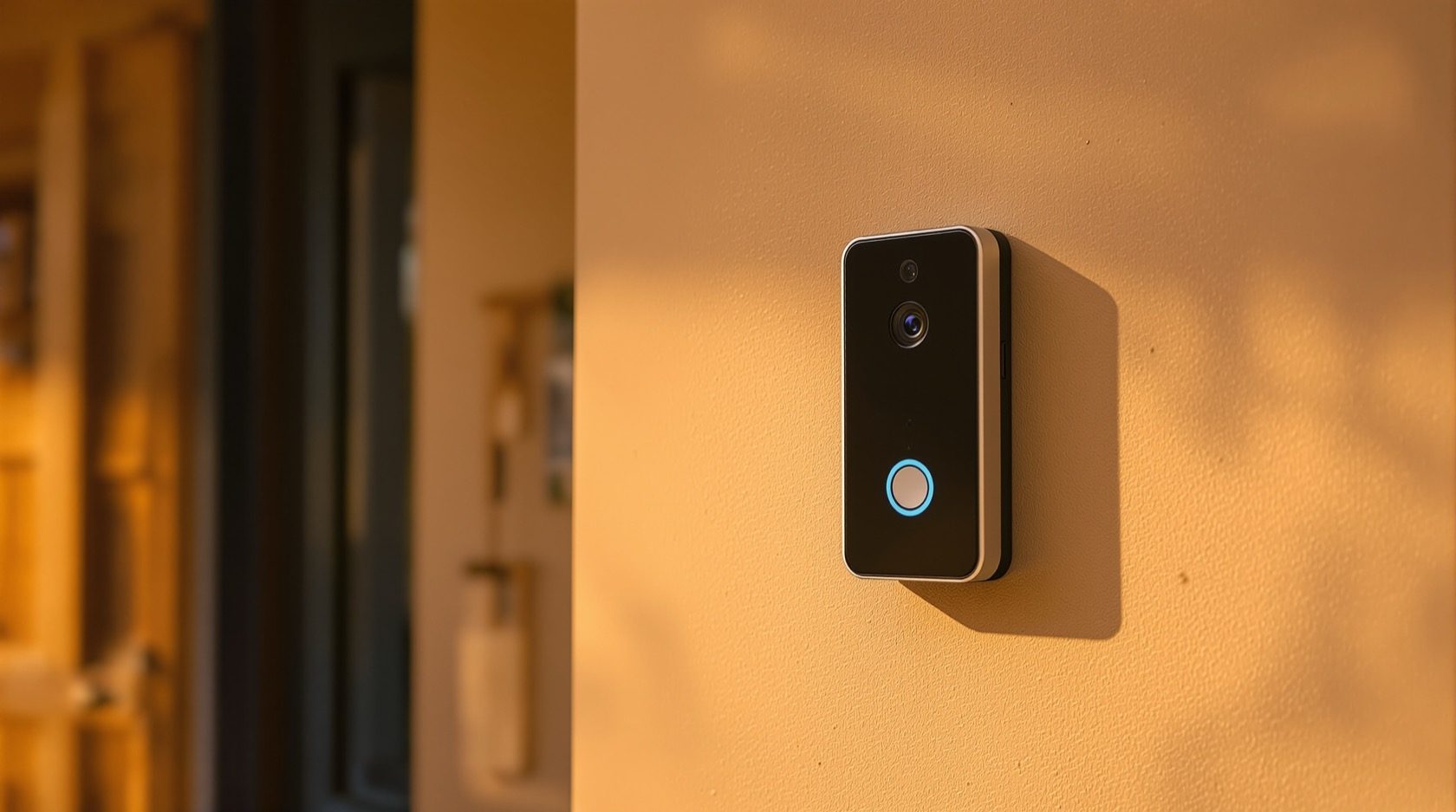
Doorbell Cameras in India: See and Speak to Whoever Is at Your Door
What a video doorbell is, what it does well, how it differs from the wired video door phone common in Indian flats, the wired-vs-battery and Wi-Fi realities of Indian homes, and the privacy points to get right at a shared doorway.
Someone presses your bell while you are at work, in the kitchen, or simply not keen to open the door to a stranger. A video doorbell turns that moment into a video call: you see who is there, hear them, and speak back — from your phone, wherever you are. It is often the first piece of security hardware a household actually enjoys using, because it solves an everyday problem, not just a rare one.
This guide is the focused explainer on doorbell cameras in Studio Matrx's CCTV hub. It sits beside the form-factor guides — dome, bullet and turret — but a doorbell is a different creature: a single, specialised camera for one spot, the front door, with a bell and a two-way intercom built in. For how the whole system records and connects, read how CCTV systems work first.
Scope & safety. This guide helps you choose and coordinate. You can pick the doorbell type and rough position yourself; the wiring into an existing chime or mains transformer, any work at the electrical board, and drilling into a shared wall are a licensed professional's (and often your society's) job. Aim a doorbell at your own doorway and approach only — not a neighbour's door or a shared corridor at large — and respect visitors, staff and the Digital Personal Data Protection Act, 2023.
What a video doorbell actually is
Strip away the marketing and a video doorbell is four things in one small unit mounted beside your entrance:
- A camera watching the door and the approach to it (usually a tall, narrow view so it catches a person head to toe, and often the floor where a parcel sits).
- A doorbell button that rings a chime — either a physical chime inside your home or a notification on your phone, or both.
- A two-way intercom — a microphone and speaker so you can hear and talk to whoever is there.
- A motion sensor and app link that push an alert to your phone when someone approaches, and usually store a short video clip you can review later.
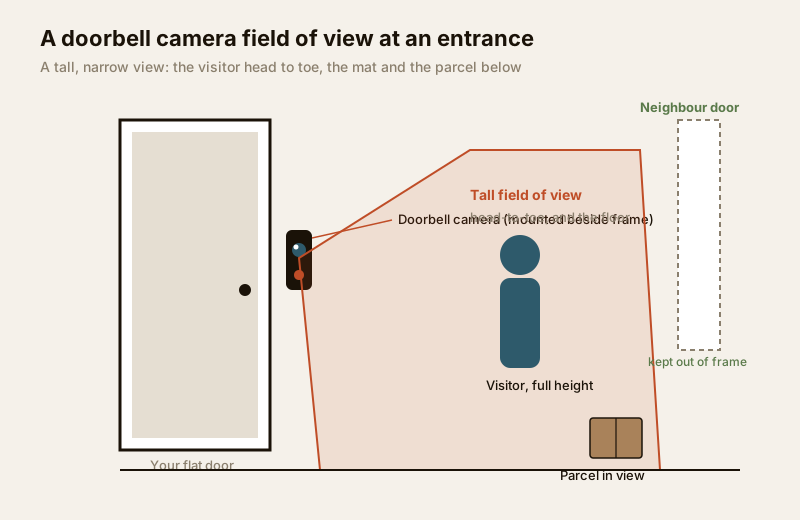
The camera itself is modest — one fixed lens, a tall field of view, night vision for a dim landing. What makes it useful is not resolution but presence at the one door everyone uses, tied to your phone.
What a doorbell camera is great at
A doorbell earns its keep on the ordinary, repeated moments rather than the dramatic ones.
- Answering the door without opening it. See and speak to a courier, a salesperson or an unfamiliar face while the door stays shut — worth the price alone when someone is home alone.
- Verifying deliveries and domestic help. Confirm a parcel arrived, and know when your maid, cook or the milk came and left — with a timestamped clip if you ever need to check.
- A package and porch view. The lens looks down the approach and often to the floor, so it watches over a parcel left at the door.
- A friendly, visible first layer. It is openly a camera — a mild deterrent — and the two-way audio lets you say "I can see you, how can I help?", which resolves most doorstep situations without confrontation.
- A record when you are away. Motion clips let you or a family member check who called while you are at the office or travelling.
What a doorbell is not: a whole-home CCTV system, a boundary or driveway camera, or a substitute for a proper lock. It watches one door. Pair it with the layers in the residential CCTV guide and the complete guide to CCTV systems.
| Aspect | What you get | Watch-out | Best fit |
|---|---|---|---|
| Two-way audio | See and speak without opening the door | Slight app lag on weak Wi-Fi | Answering visitors, couriers |
| Motion alerts | Phone buzzes when someone approaches | Over-alerting on a busy corridor | Flats, independent houses |
| Parcel / porch view | Watches a delivery at the door | Only the door, not the whole plot | Deliveries, domestic help logs |
| Cloud clips | Review who called, timestamped | Usually a paid subscription | Households who travel / work out |
| Deterrence | Openly a camera at the entrance | Not a lock or a boundary camera | A friendly first layer only |
| Night vision | Sees a dim landing at night | IR range is short (the doorway) | Poorly lit entrances |
How it relates to — and differs from — a traditional video door phone
Most Indian apartments already have a video door phone (VDP), the wired intercom system common in flats and gated societies: a camera-and-button unit at your flat door or the building gate, wired to a screen fixed on your wall inside. A doorbell camera does a similar job but answers to your phone instead. They are cousins, not the same thing — and in many homes they happily coexist.
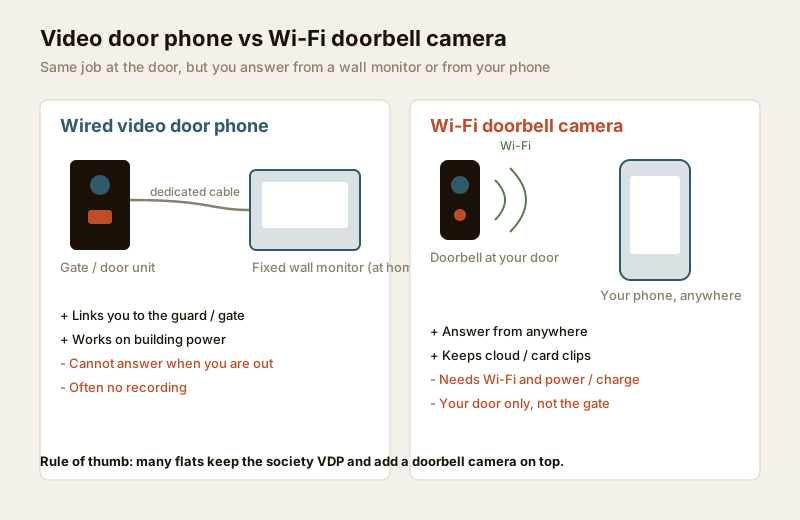
| Feature | Wired video door phone (VDP) | Wi-Fi doorbell camera |
|---|---|---|
| Answer from | Fixed monitor on your wall, at home | Your phone, anywhere with signal |
| Wiring | Dedicated cable to the indoor unit | Wi-Fi; wired to chime or battery |
| Recording | Often none, or a local snapshot | Cloud clips (usually subscription) or local card |
| Away from home | Cannot answer | Can see, speak and record |
| Society integration | Ties into the gate / guard intercom | Standalone, for your door only |
| Power cut / net down | Works if building power is on | Needs Wi-Fi (and power or battery) |
| Best role | Building-wide gate-to-flat intercom | Personal door answering + records |
The honest takeaway: in an apartment the VDP is your link to the guard and gate, while a doorbell camera is your personal, records-keeping, answer-from-anywhere layer at your own flat door — many households keep both. To see how the building's intercom, gate and guard systems fit together, read the building security systems guide.
The India considerations that decide which one to buy
The physics of Indian entrances, not the spec sheet, usually make the decision.
Wired vs battery — the first fork
A doorbell needs power. There are two routes, and the right one depends on what is already at your door.
- Wired doorbells draw from your existing bell wiring or a small transformer. They never run flat, but they need compatible low-voltage wiring at the door — which many Indian flats simply do not have at the flat door (the bell button is often just a switch on the mains, not the low-voltage supply these devices expect). Fitting one may mean an electrician and, often, society permission.
- Battery doorbells have a rechargeable pack and need no wiring at all — you screw them to the frame and connect to Wi-Fi. Perfect for renters and for doors with no wire, but you recharge every one to a few months (more often in a busy corridor that triggers constant motion), and heat can shorten battery life.
| Factor | Wired doorbell | Battery doorbell |
|---|---|---|
| Power | From bell wiring / transformer | Rechargeable pack |
| Wiring needed | Yes — often absent at Indian flat doors | None |
| Maintenance | Set and forget | Recharge every ~1–3 months |
| Renters | Harder (fixed wiring, permission) | Easy, removable |
| Reliability | Never runs flat | Can die if you forget to charge |
| Install | Electrician + likely society nod | DIY-mountable |
| Typical price (India) | ₹2,500 – ₹8,000 | ₹2,000 – ₹9,000 |
Wi-Fi reach to the door or gate
A doorbell is only as good as its signal. Your router sits deep inside the flat; the door — and certainly a compound gate — may be far, through thick walls. A weak signal means laggy video, missed alerts and dropped clips. Check the signal at the exact spot before buying; if it is weak, plan a mesh node near the entrance. A gate-mounted doorbell in an independent house is the hardest Wi-Fi case.
Weather, dust and heat
Indian entrances face monsoon spray, summer heat and dust. Favour a doorbell with an outdoor weather rating and a sheltered spot under an overhang. Direct afternoon sun degrades batteries; harsh backlight from a bright landing behind a visitor can silhouette their face — position matters.
Apartment door vs gate mounting, and society rules
On your own flat door you cover your own visitors — simple. On a shared landing or the society gate you stray into common area and other flats — both a privacy issue and a society matter. Most societies have rules about fixing things to common walls or pointing cameras into shared space, so ask your RWA or managing committee before drilling to avoid a forced removal later. The security guide for gated communities covers how societies handle shared-area cameras.
The privacy points to get right
A doorbell sits at the most sensitive boundary in the building — the line between your home and everyone else's. Getting the privacy right is not optional; it is what makes a doorbell a good neighbour rather than a grievance.
- Aim it at your own doorway and approach. The legitimate view is your door, your mat, and the path a visitor takes to reach you. That is it.
- Be mindful of a shared corridor and the neighbour's door. In a flat, your neighbour's door may be a metre away. A wide doorbell view can sweep their entrance and everyone who comes and goes — which is exactly what upsets neighbours and RWAs. Angle the camera down and toward your own door, and use any privacy-zone / masking feature the app offers to black out a neighbour's door or a stretch of shared corridor.
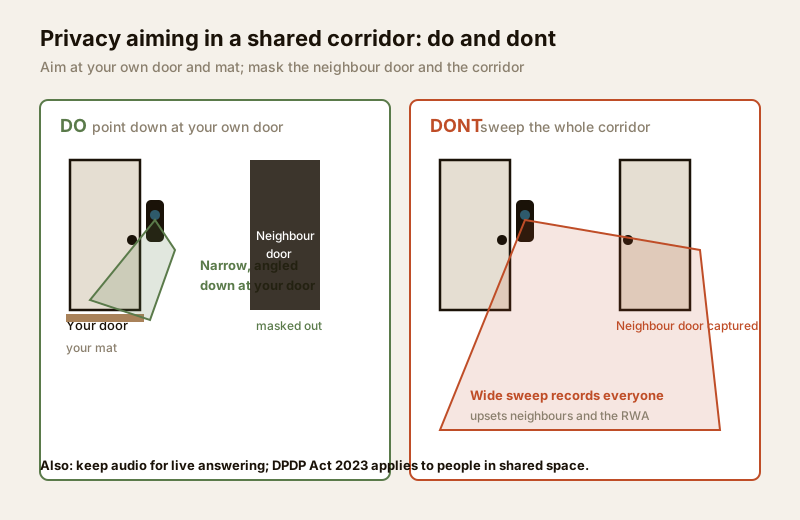
- Treat audio recording as extra-sensitive. Recording conversations in a shared corridor is more intrusive than video and more legally fraught. Keep two-way audio for live answering; think hard before continuously recording audio of people passing in common space, and check what your app records by default.
- Give notice. A small, visible sign that a doorbell camera is in use — and simply the fact that the device is openly a camera — is fair to visitors and domestic staff. Openness is both courteous and, under the DPDP Act, 2023, aligned with the idea of a known, legitimate purpose.
- Handle footage responsibly and think DPDP. Under India's Digital Personal Data Protection Act, 2023, video and audio of identifiable people is personal data. Collect only what you need for a genuine purpose (answering your door, security), do not over-retain clips, keep the app and cloud account secured with a strong password, and never post a neighbour's or a delivery person's footage publicly. For a structured walk-through of what your setup captures and whether it is proportionate, use the security and privacy assessment guide.
When to bring in a professional. You can choose the doorbell type, the mounting spot and the aim yourself. Bring in a licensed professional for wiring into an existing chime or transformer, any work at the electrical board, drilling into a shared or structural wall, and a mesh Wi-Fi node at the entrance. In an apartment, clear the mount and the camera's view with your RWA / managing committee first. Electrical work belongs to a licensed electrician — see the electrical hub.
Cloud subscription for clip history
The doorbell hardware is a one-time cost; the clip history usually is not. Most brands record motion and doorbell clips to the cloud, and store more than a day or two of history only on a paid subscription (commonly a few hundred rupees a month, or a discounted annual plan). Without it, you often get live view and only the most recent events. Some doorbells instead (or also) record to a local memory card or a home hub, avoiding a subscription but keeping footage only on that device.
Before you buy, check: What do I get free? What does history cost per year? Is there a local-storage option? Factor the recurring fee into the real cost. You can ballpark a whole entrance-and-home setup, subscriptions included, with the security system cost estimator.
India price bands and buying notes
Treat these as ballparks to sanity-check a quote, not fixed rates.
| Item | Typical range (₹) | Notes |
|---|---|---|
| Entry battery video doorbell | ₹2,000 – ₹4,000 | Wi-Fi, app answering, basic clips |
| Mid battery / wired doorbell | ₹4,000 – ₹8,000 | Better night view, package view |
| Premium doorbell (head-to-toe view) | ₹8,000 – ₹13,000 | Tall FoV, sharp, privacy zones |
| Cloud clip subscription | ₹1,500 – ₹4,000 / year | Per device; check what free tier gives |
| Wi-Fi mesh node near entrance | ₹2,500 – ₹6,000 | If signal is weak at the door / gate |
| Professional install / wiring | ₹500 – ₹2,000 | Mounting, chime wiring, aim, test |
When buying, favour a doorbell with a tall (head-to-toe) field of view, a weather rating for outdoor use, privacy-zone masking, and either a local-storage option or an affordable clip plan. As with any connected camera, change the default password and keep the app and firmware updated — the same caution as the IP CCTV and smart CCTV guides.
Key takeaways
- A video doorbell is a camera, doorbell and two-way intercom at your entrance that pushes motion alerts to your phone and usually keeps cloud clips — a personal, records-keeping layer for the one door you use most.
- It shines at answering the door without opening it, verifying deliveries and domestic help, watching a parcel, and being a friendly visible first layer — not at covering a boundary or replacing a lock.
- It is a cousin of the wired video door phone common in Indian flats: the VDP links you to the gate and guard, while a doorbell answers from anywhere and keeps records — many homes keep both. See the building security systems guide.
- Wired vs battery, Wi-Fi reach, weather, and mounting spot decide which suits your door; battery is easy for renters, wired never runs flat, and a gate mount is the hardest Wi-Fi case.
- Get the privacy right: aim at your own door and approach, mask a neighbour's door and shared corridor, treat audio as extra-sensitive, give notice, and handle footage under the DPDP Act, 2023 — walk it through the security and privacy assessment.
- In an apartment, ask your RWA / society before mounting, and hand wiring, board work and height work to a licensed professional.
References
- Digital Personal Data Protection Act, 2023 — treat visitor and staff video and audio as personal data: aim only at your own doorway and approach, collect for a genuine purpose, avoid a neighbour's private space, give notice, and do not over-retain or publicly share footage.
- IEC 60529 (IP ingress rating) — the internationally recognised mark for a doorbell's weather and dust sealing; verify a product's stated rating on its datasheet before an outdoor mount.
- Your Resident Welfare Association / housing society bye-laws and managing-committee rules for fixing devices to common walls and pointing cameras into shared areas — confirm approval before installing.
- National Building Code of India (SP 7), Bureau of Indian Standards, and local municipal bye-laws for any electrical or life-safety aspect of an install; verify the current edition via the BIS catalogue: https://www.services.bis.gov.in/
This is an educational overview. Wiring, working at height, structured cabling and any electrical work are qualified professional tasks — engage licensed installers, clear apartment installs with your society, and verify any standard's current status via the BIS catalogue before relying on it.
Export this guide
Related Guides — Deep-dive reading
CCTV vs Video Door Phone: Which Does Your Home Need?
They look similar and get confused constantly, but a CCTV camera and a video door phone do different jobs — one watches the whole property and records, the other answers your door and controls who comes in. This guide settles CCTV vs video door phone for Indian homes: what each is for, where they overlap, real rupee costs, apartment versus villa relevance, and why most homes end up wanting both.
Smart HomeHow to Choose a CCTV Camera (2026): The Homeowner's Decision Guide for India
Cut through the spec-sheet noise and choose the right CCTV camera for each spot around an Indian home. What actually matters — sensor and low-light performance, lens and field of view, form factor, IP and IK ratings, honest smart features — and the marketing claims to ignore.
SecuritySecurity Privacy Assessment for Indian Homes
Getting the privacy side of home security right: camera placement ethics and limits, notice and consent, the extra caution audio demands, and treating footage as personal data you store, retain and delete responsibly under India's DPDP Act 2023 direction.
SecurityRelated Tools — Try Free
Apartment Video Door System Planner
Enter flats, entrances, floors and guard desk for a first-pass building intercom plan — door stations, indoor monitors, guard station, the right architecture and an indicative cost band.
Building PlannerCCTV Cloud vs Local Cost Calculator
Compare cloud CCTV subscription against a local NVR + HDD — upfront, 5-year total, monthly fee and break-even.
Cloud vs LocalVideo Door Phone Type Selector
Answer a few questions about your building, cabling, budget and internet and get the right video door phone — analog / wired / wireless / IP, single-home or multi-apartment, monitor or app.
Door Phone Selector