
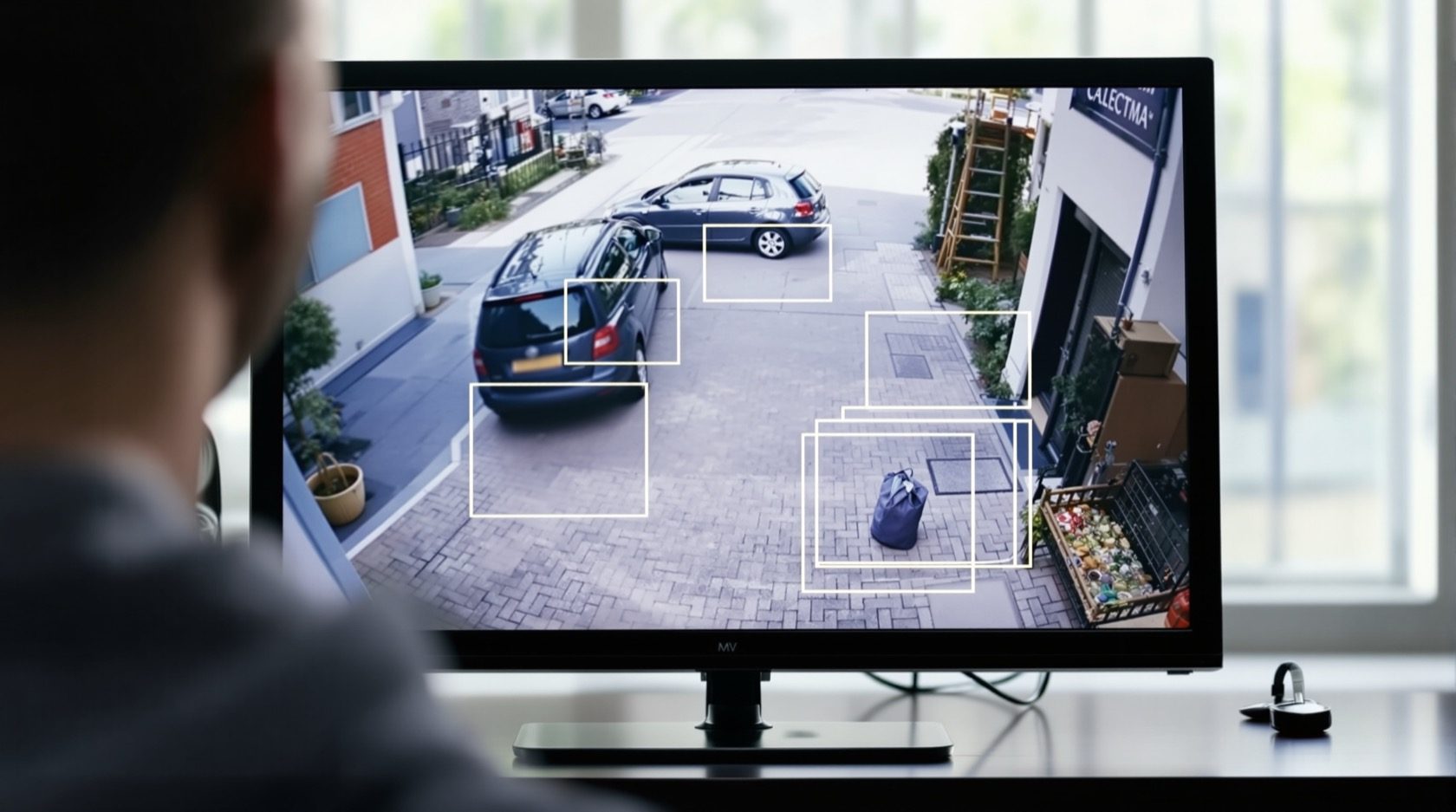
AI-Powered CCTV in India: What the Analytics Really Do
What AI-powered CCTV actually means, which analytics are genuinely useful at a home, and how to weigh the cost, accuracy limits and privacy of features like facial recognition before you buy.
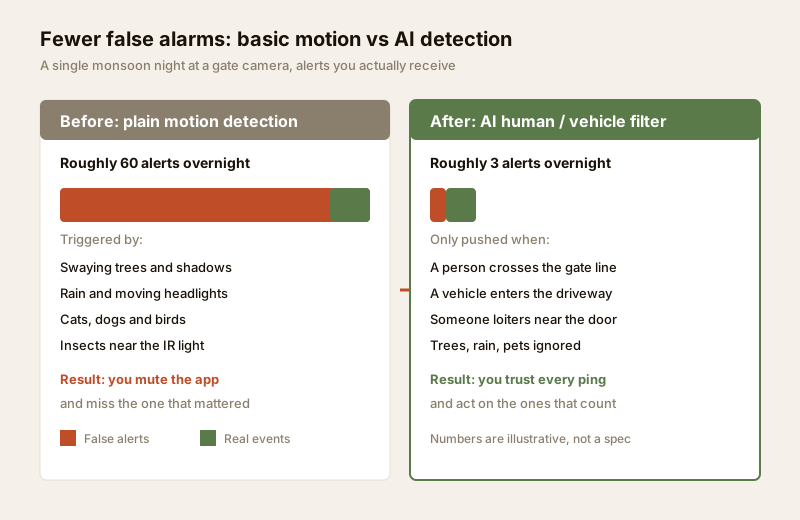
"AI-powered" is the sticker on almost every camera box now, and most of the time it means very little. But underneath the marketing there is a genuinely useful shift: modern cameras and recorders can understand what they are seeing, not just detect that pixels changed. That is the difference between sixty useless alerts on a rainy night and three that actually matter.
This guide is the honest explainer on AI analytics in Studio Matrx's CCTV hub. It sits beside the consumer-focused smart CCTV guide — read that for app-based Wi-Fi cameras and the "smart home" category — while this one goes deeper on the analytics themselves: what helps, what to be careful with, and where facial recognition crosses into territory that a home should think very hard about.
Scope & stance. This guide helps you understand and choose analytics, then coordinate a professional install. It is strictly for defending your own property — cameras never belong in bathrooms, bedrooms or changing areas, and analytics must respect neighbours, staff and visitors under the Digital Personal Data Protection Act, 2023. Mains-electrical and structured cabling belong to licensed professionals.
What "AI-powered" actually means
An ordinary camera does motion detection: it compares one frame to the next and shouts whenever enough pixels change. A tree, a shadow, rain, a cat, a moth near the infrared light — all of it trips the alert. It cannot tell a burglar from a butterfly.
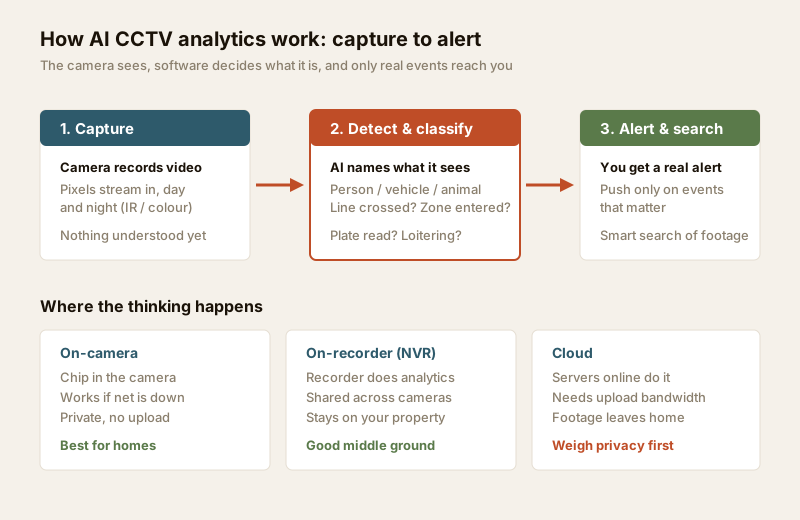
An AI-powered system runs the picture through a trained model that has learned what a person, a vehicle, an animal and other objects look like. So instead of "something moved", it can say "a person crossed the gate line at 2:14 am". That single capability — classifying what moved — is the foundation everything else is built on.
Where the AI actually runs — and why it matters
The same feature behaves very differently depending on where the analysis happens. This is the first real decision.
| Where AI runs | How it works | Strengths | Watch-outs |
|---|---|---|---|
| On-camera (edge) | A chip inside the camera classifies in real time | Works even if internet is down; nothing uploaded; instant; private | Costs more per camera; the camera's model is fixed at what it ships with |
| On-recorder (NVR) | The NVR runs analytics across all its camera feeds | One brain shared by many cameras; footage stays on your property; upgradeable | Needs an AI-capable NVR; heavier recorder; still a local box to maintain |
| Cloud | Video is sent to servers online that do the analysis | Newest, most powerful models; smart search across everything | Needs real upload bandwidth; footage leaves your home; ongoing subscription; privacy exposure |
For an Indian home, on-camera or on-recorder AI is usually the right default: it keeps footage on your property, works through the power and internet cuts that are a fact of life here, and carries no monthly fee. Cloud AI is powerful but means your family's video travels to someone else's servers — weigh that against the privacy assessment before you enable it. India's asymmetric broadband (fast download, slow upload) also makes continuous cloud analytics of several cameras genuinely painful; check your line with the network readiness guide.
The analytics that are genuinely useful
Not every "AI feature" earns its place. These are the ones that actually improve a home system, in rough order of value.
| Feature | What it does | How useful at home | Caveat |
|---|---|---|---|
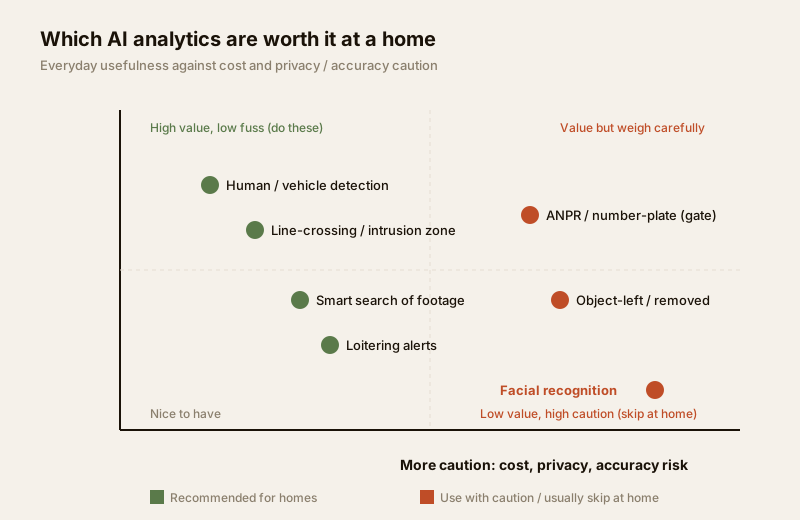
| Human vs vehicle detection | Alerts only on people or vehicles, ignores trees / animals / rain | Very high — kills the false-alarm flood | Can miss at odd angles or in heavy rain / fog |
| Line-crossing / intrusion zone | Fires when someone crosses a drawn line or enters a marked area | Very high — targets the gate, boundary, driveway | Needs sensible setup so it does not trip on the road outside |
| Smart search of footage | Find "all people" or "all vehicles" in hours of recording in seconds | Very high — turns an all-night review into a minute | Only as good as the classification; verify the clip |
| Loitering detection | Flags someone lingering near a door or gate beyond a set time | High — catches casing before a break-in | Tune the dwell time or it nags on normal waiting |
| ANPR / number-plate reading | Reads and logs vehicle plates at a gate | Useful at a gated home / shop entrance | Needs a dedicated well-lit angle; plate data is personal data |
| Object-left / object-removed | Alerts if a bag is left or an item disappears | Situational — more a shop / lobby feature | False-trips in busy scenes |
| Facial recognition | Tries to identify who a person is by matching faces | Low at home; high caution | Accuracy limits, bias, and heavy privacy / consent duties (see below) |
Why the false-alarm cut is the real prize
Ask anyone who has lived with a plain motion camera and they will tell you the same thing: within a week they muted the notifications, because the phone buzzed all night for wind and cats. A muted camera is a camera you are no longer watching. The single most valuable thing AI does at a home is make the alerts trustworthy again — so you act on every one instead of ignoring all of them.
The second prize is investigation speed. When something does happen, smart search means you type "people, between 1 am and 5 am" and see six clips instead of scrubbing through eight hours of empty driveway. For anyone who has ever tried to find a moment in yesterday's footage, that alone can justify AI.
Facial recognition — the honest, cautious view
Facial recognition is the feature marketing pushes hardest and the one a home should be most careful with. It tries to answer "who is this person" by matching a face against a stored list. Be clear-eyed about it.
Accuracy is not perfect — and it fails unevenly.
- Real-world accuracy drops sharply with angle, distance, low light, masks, helmets, glasses and motion — exactly the conditions an outdoor gate camera lives in.
- Study after study has found face-matching is less accurate for some groups than others — measurable bias by skin tone, age and gender. A false match is not a harmless glitch; it can wrongly flag an innocent visitor, a delivery worker or a neighbour.
- It confidently returns a name even when it is wrong. That false confidence is dangerous if anyone treats the result as proof.
The privacy and legal weight is real. A face is sensitive personal data. Running recognition at a home means you are building a biometric database of everyone who walks past — family, domestic staff, delivery riders, neighbours, guests. Under the Digital Personal Data Protection Act, 2023, personal data must be collected for a lawful, specific purpose with a proper basis, and people generally have a right to know and to be protected from misuse. A casual home face-recognition list sits uncomfortably against those principles, and it exposes you to real duties and liabilities if that data leaks.
Our stance: for the overwhelming majority of homes, facial recognition is not worth it. Human-vs-vehicle detection plus line-crossing gives you almost all the security benefit — knowing someone is where they should not be — without trying to identify who, and without the accuracy, bias and privacy problems. If you have a specific, lawful reason to consider it (a family business gate, for example), treat it as a professional, documented decision: minimise who is enrolled, get consent, keep data on-premises and secured, and set a short retention. Never point recognition at a public road or a neighbour's property. Think of these cameras as guarding your boundary, not cataloguing people.
How AI-powered differs from "Smart CCTV"
These two terms overlap and get used loosely, so it is worth separating them.
- Smart CCTV (the consumer category covered in the smart CCTV guide) usually means app-connected convenience: Wi-Fi cameras, phone notifications, two-way talk, cloud clips, works-with-your-smart-home. The "smart" is mostly about connectivity and ease.
- AI-powered means the analytics — the camera or recorder actually understanding the scene: person vs vehicle, line-crossing, smart search, plate reading.
The two often ship together (a smart Wi-Fi camera with person detection), but they are not the same thing. A cheap smart camera may have crude or cloud-locked "AI"; a wired professional IP CCTV system may have powerful on-camera analytics with no consumer app at all. When you read a spec, separate "how do I view it" (smart / connectivity) from "what can it understand" (AI / analytics) — you are paying for both, and they are judged differently.
What AI costs you — beyond the sticker
AI features are not free, in money or in effort.
| Cost | What it looks like | Note |
|---|---|---|
| Higher hardware price | AI cameras / NVRs cost more than plain ones | Often ₹1,000 – ₹4,000 more per camera for on-edge AI |
| Cloud subscription | Monthly / yearly fee for cloud analytics + storage | Recurring; adds up across cameras — size it with the cloud vs local calculator |
| Bandwidth | Cloud AI needs steady upload | India's slow upload can choke several streams |
| Setup and tuning | Drawing lines, zones, dwell times correctly | A bad setup gives you false alarms again |
| Privacy / data duty | More data, more sensitive data to protect | Especially plates and faces — a leak is your liability |
The honest trade is: AI buys you far fewer false alarms and much faster investigation, in exchange for more cost, imperfect accuracy, and more data to look after. For most homes the first two features (human/vehicle + line-crossing) are worth it many times over; the exotic ones rarely are.
When to bring in a professional. Decide which analytics you want and why — that is the part you own. Then have a licensed installer position the cameras at the right height and angle for detection to work, draw the lines and zones sensibly (so they cover your boundary, not the public road), set retention, and lock down the network. Any mains-electrical or structured-cabling work is a qualified professional's job — see the electrical hub. Get the placement wrong and even the best AI produces noise.
Planning AI analytics well
1. Start from what each camera must achieve. A gate camera needs person + vehicle detection and a crossing line; a driveway may want ANPR; a garden may need nothing more than human detection. Don't buy a feature you won't tune.
2. Prefer on-camera or on-recorder AI for privacy and power-cut resilience; reserve cloud for where you genuinely need it and your upload can carry it.
3. Say no to facial recognition at home unless you have a specific lawful reason and will treat it as a documented, consented, minimised-data decision.
4. Draw zones to cover your property only. Mask out the neighbour's door and the public road — it cuts false alarms and respects privacy and the DPDP Act.
5. Set a sensible retention and secure the recorder; plan it with the security data storage planning guide.
6. Put the recorder and network on backup power so a cut is not a blind spot — see the backup power calculator.
For the wider picture of how cameras sit inside a whole layered system — alarms, access and resilience — see the building security systems guide and the smart security systems guide.
Key takeaways
- "AI-powered" that matters = the camera understanding what it sees (person / vehicle / plate), not just detecting motion. Most of the value is real; some of the marketing is not.
- The genuinely useful home analytics are human/vehicle detection, line-crossing / intrusion zones, smart search and loitering — they slash false alarms and speed up investigation.
- Where the AI runs decides privacy and resilience: prefer on-camera or on-recorder so footage stays home and works through power/internet cuts; weigh cloud carefully.
- Facial recognition at a home is usually not worth it — accuracy is imperfect and biased, false matches harm real people, and it carries heavy DPDP-Act privacy and consent duties. Guard your boundary, don't catalogue people.
- AI buys fewer false alarms and faster investigation at the cost of more money, imperfect accuracy and more data to protect — pick the two or three features that earn it, and route the install to a professional.
References
- Digital Personal Data Protection Act, 2023 — collect personal data (including faces and number plates) only for a lawful, specific purpose; position cameras to cover your own property and shared areas, minimise and secure the data, and set a defined retention.
- Independent evaluations of face-recognition systems have repeatedly documented accuracy that varies with lighting, angle and demographic group, and measurable bias across skin tone, age and gender — treat any match as a lead to verify, never as proof.
- National Building Code of India (SP 7), Bureau of Indian Standards and local municipal bye-laws for any structural, electrical or life-safety aspect of an install; verify the current edition via the BIS catalogue: https://www.services.bis.gov.in/
This is an educational overview. Analytics setup, structured cabling and any mains-electrical work are qualified professional tasks — engage licensed installers, respect the DPDP Act and neighbours' privacy, and verify any standard's current status via the BIS catalogue before relying on it.
Export this guide
Related Guides — Deep-dive reading
CCTV Human Vehicle Detection (India 2026): Human & Vehicle AI Alerts, Fewer False Alarms
How AI object classification alerts you only on people and vehicles - cutting the flood of false alarms that plain motion creates - where the AI runs (edge, NVR-side or cloud), its real limits, and the extra privacy weight of person-detection.
SecurityLocal Storage vs Cloud CCTV in India (2026): Where Your Footage Should Live
A homeowner's honest head-to-head on where CCTV footage is kept — on a hard disk in the recorder at home, or uploaded to a per-camera cloud plan — across cost, theft resilience, internet dependence, retention, remote access and DPDP privacy, ending in a clear which-suits-whom, with hybrid usually the smartest answer.
SecuritySecurity Privacy Assessment for Indian Homes
Getting the privacy side of home security right: camera placement ethics and limits, notice and consent, the extra caution audio demands, and treating footage as personal data you store, retain and delete responsibly under India's DPDP Act 2023 direction.
SecurityRelated Tools — Try Free
CCTV Cloud vs Local Cost Calculator
Compare cloud CCTV subscription against a local NVR + HDD — upfront, 5-year total, monthly fee and break-even.
Cloud vs LocalCCTV Camera Coverage & Count Calculator
Estimate how many CCTV cameras you need, the NVR channels, storage in TB for your retention period, and an indicative all-in cost with GST.
CCTV CalculatorSecurity Backup Power Calculator
Size a UPS/inverter and battery to keep CCTV, NVR, router and alarm running through a power cut — load, Ah, VA and cost.
Backup Power