
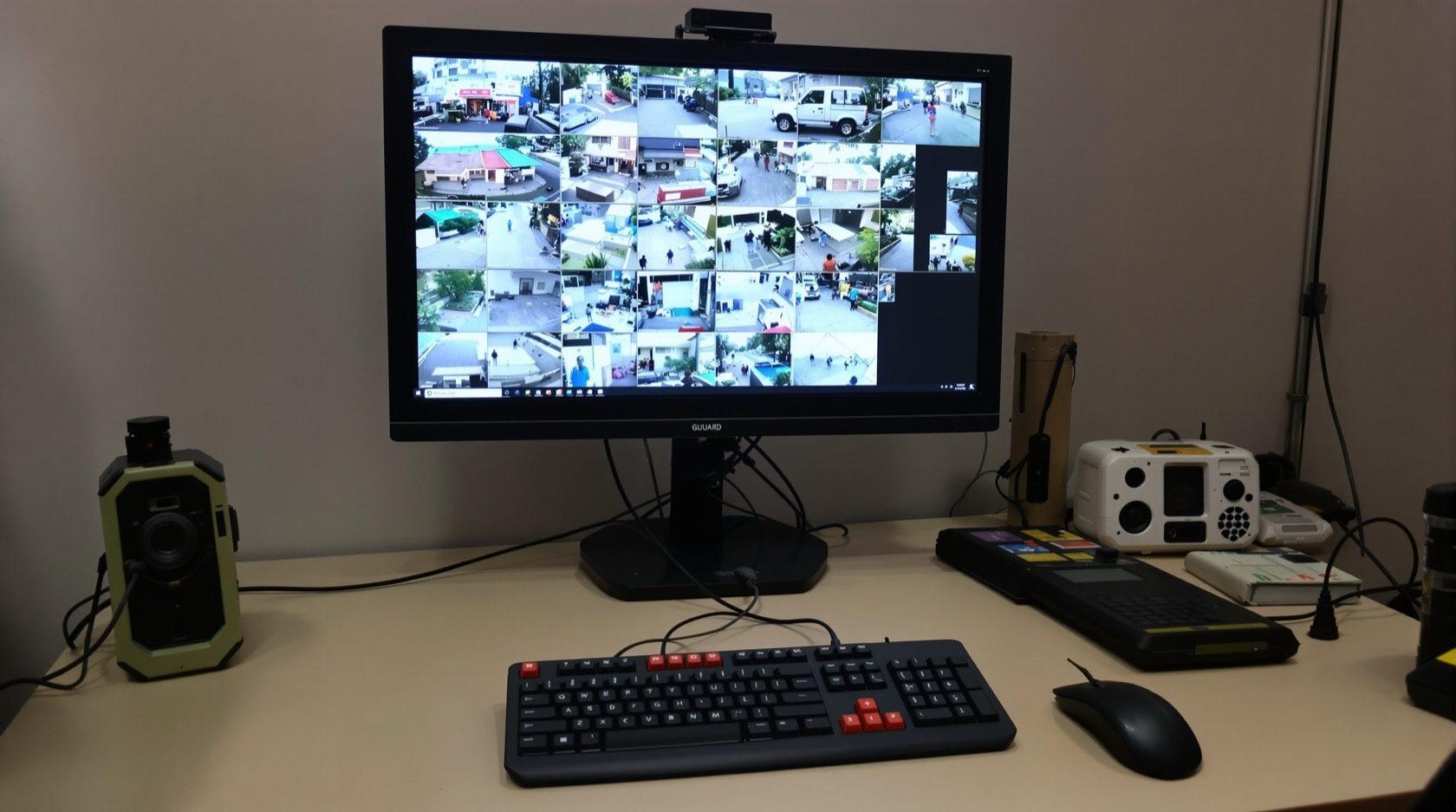
CCTV Control Room and Monitoring in India (2026): Who Actually Watches
The honest truth about home CCTV monitoring — a viewing station, mobile alerts, who watches the monitor, live vs review-after-the-fact, multi-camera layout, and guard-desk etiquette with resident privacy for a society.
Every CCTV pitch ends with the same picture: a wall of screens, someone watching intently, nothing missed. Reality is quieter. In almost every Indian home, and in most small societies, nobody is watching the CCTV live. The footage is recorded, and it is looked at after something happens — a missing courier, a scraped car, a late-night doorbell. That is not a failure. It is what home CCTV is actually for, and understanding it changes how you set up your cctv control room and monitoring so it does the job you really need.
This guide is the who-watches-it piece in Studio Matrx's CCTV hub. It is about the viewing side — the monitor or app, the alerts, the multi-camera layout, and, for a society, the guard desk. It is the go-live companion to commissioning and testing, which proves the system works, and handover and documentation, which gets you the passwords and app access you will use here.
Scope & privacy. This guide helps you plan and run the monitoring. Mounting screens, running cabling and any mains-electrical work belong to licensed professionals. Recorded footage is personal data under the Digital Personal Data Protection Act, 2023 — watch and store only your own property and shared areas for a legitimate purpose, keep signage up, and never point a monitor or camera at a bathroom, bedroom or a neighbour's private space. This is not legal advice.
The honest truth: most home CCTV is reviewed, not watched
Sit with this before you spend on screens. A camera system does three jobs, and only one of them needs a live watcher:
- Deter — a visible camera discourages the opportunist. This works whether or not anyone is watching.
- Alert — a motion or person alert on your phone tells you now that something moved. This needs a notification, not a monitor.
- Record and review — the footage is there to look back at after an event. This is what you will actually use, ninety-nine days out of a hundred.
For a family home, live monitoring is a fantasy — nobody sits and stares at a grid all day, and you should not build your setup as if they will. Design instead for fast alerts and easy review: a phone that pings when someone approaches the gate, and footage you can scrub through in a minute when you need it. Spend the money on good camera placement (see camera placement) and reliable recording, not on a screen no one looks at.
A society or a shop is different. There, a guard or a shopkeeper is often present anyway, so a monitor in their line of sight adds real value — not because they watch it constantly, but because a glance catches the obvious, and the screen sits ready for the moment something is reported.
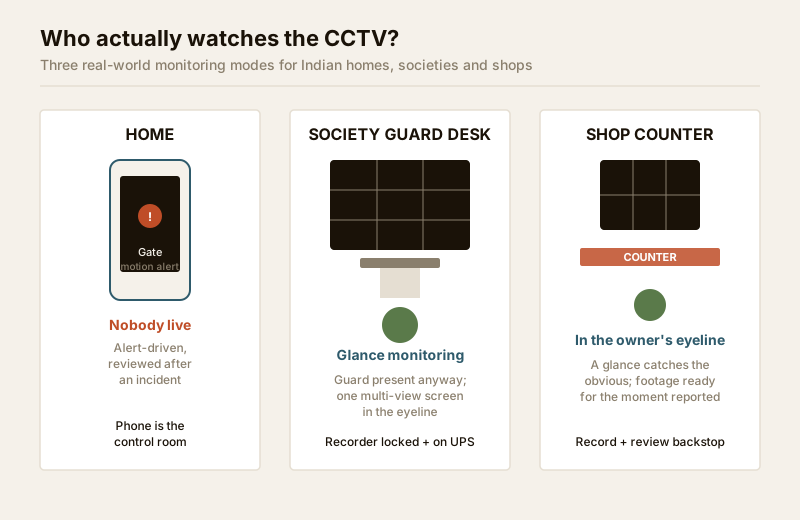
Live vs review-after-the-fact — decide what you are building
Be honest about which mode fits, because it changes what you buy and where you put it.
| Monitoring mode | Who does it | What it needs | Realistic for |
|---|---|---|---|
| Live watching | A dedicated guard/operator on shift | A monitor in constant view, wall mount, good chair | Large gated community gate, commercial premises |
| Glance monitoring | A guard/shopkeeper present for other work | One monitor in their eyeline, multi-view grid | Society guard cabin, shop counter, clinic reception |
| Alert-driven | The owner, on a phone, when pinged | Mobile app, tuned motion/person alerts | Almost every home |
| Review-only | The owner, after an incident | Recorder + app playback, correct retention | Every system, as the fallback |
Most homes land on alert-driven with review as the backstop — no fixed monitor at all. Most societies land on glance monitoring at the guard desk plus review. Only a genuinely staffed gate justifies a live-watching control room. Match the spend to the mode: a home does not need a wall of screens, and a society guard cabin does not need a video wall — one clear multi-view monitor is plenty.
The home setup: your phone is the control room
For a home, the "control room" is your phone, backed by the recorder in a cupboard. Get four things right and you have everything you realistically need.
- The app, set up properly. Add every camera to one app, name them plainly (Gate, Porch, Backyard, not CAM-03), and confirm you can view live and play back recordings. This is set up at handover — insist the installer walks you through playback and export before they leave.
- Alerts that are useful, not noise. Raw motion alerts fire on every passing crow, wind-blown plant and headlight sweep, and you will mute them within a week. Tune them: use person/vehicle detection where the camera supports it, draw detection zones so the road outside is ignored, and set a sensitivity that catches a person at the gate but not a moth on the lens. See motion detection and, for smarter person/vehicle filtering, video analytics.
- Remote viewing, done safely. Viewing from your phone away from home means the recorder is reachable over the internet — the single biggest security risk in the whole system. Use the manufacturer's proper cloud/P2P app with a strong unique password and 2FA; never port-forward the recorder onto the open internet. This is important enough to have its own guide: remote access security.
- A quiet-hours plan. Decide when alerts should reach you and when they should stay silent, so the system does not train you to ignore it. Many people run alerts only for the gate and perimeter at night, and leave interior cameras on record-only.
An optional small monitor in a study or utility area, showing a live grid, is a nice-to-have for a home — pleasant to glance at, useful during a delivery or a party — but it is genuinely optional. The recorder and the app do the real work.
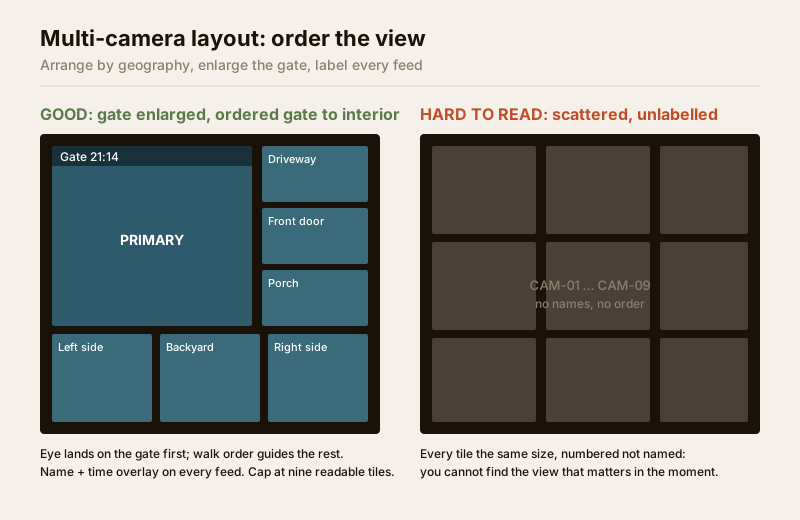
Multi-camera layout: arranging the view
Whether on a phone grid, a home monitor or a guard-desk screen, how you arrange the cameras decides how fast you find what you need. A random grid of unlabelled feeds is useless in the moment that matters.
- Order by geography, not by camera number. Lay the tiles out to roughly match the walk from the gate inward — gate, driveway, front door, then sides and back. The eye then knows where to look without reading labels.
- Give the important views more pixels. Most recorders let you set a layout where the gate or main entrance gets a large tile and the rest sit smaller around it. Put your highest-value view where the eye lands first.
- Keep the grid readable. A 3-by-3 (nine-camera) grid on a modest monitor is about the limit before each feed is too small to make out a face. Beyond that, split into scenes or pages rather than shrinking everything.
- Label every feed, on screen. The recorder can overlay a name and timestamp on each camera. Set these correctly at commissioning — a feed labelled "Backyard 21:14" is worth ten unlabelled ones when you are handing footage to anyone.
For the wider logic of how many cameras and where, the coverage planning guide and the placement planner tool size the scheme; this guide is only about how you view what they capture.
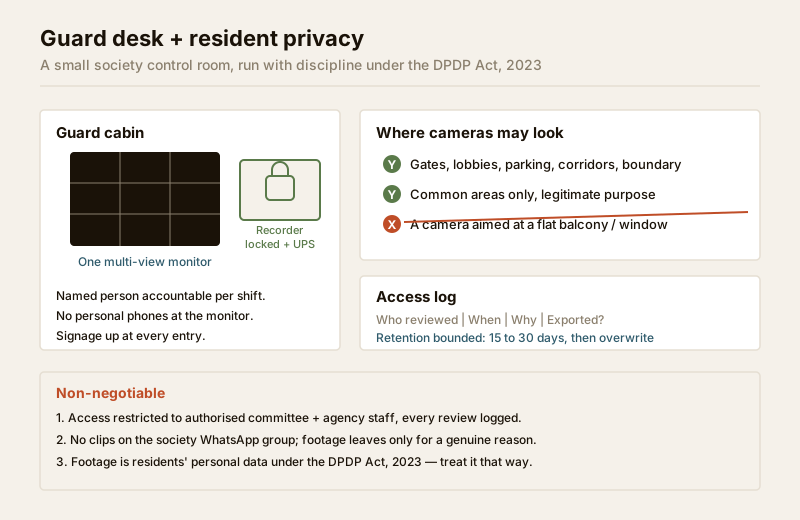
The society guard desk: a small control room done right
A gated community or apartment block is where a real, if modest, cctv control room makes sense — usually a monitor in the guard cabin, sometimes a small dedicated room off the gate. This is where monitoring meets people, and it must be run with discipline and respect. It sits alongside the wider gate-and-visitor picture in the gated communities security guide.
What the guard desk needs
- One clear multi-view monitor in the guard's eyeline, showing the gate, boundary and common areas — not a wall of screens no one can track.
- The recorder secured in a locked cabinet or the room, not sitting exposed on the desk where it can be unplugged, stolen or tampered with. Put it on a UPS so a power cut does not blind the gate.
- A named person accountable per shift, and a simple logbook for who reviewed footage, when, and why.
Guard-desk etiquette and resident privacy — non-negotiable
The society is watching its own residents, and that trust is easily broken. The DPDP Act, 2023 treats this footage as residents' personal data. Set rules and put them in writing:
- Cameras cover common areas only — gates, lobbies, parking, corridors, boundary. Never inside flats, and never angled at a specific balcony, window or door to snoop on one household.
- Access is restricted and logged. Only authorised committee members and the security agency's named staff can view or export footage, and every review is logged with a reason. Guards do not casually scroll through neighbours' comings and goings.
- No phones at the footage. Guards must not photograph or record the monitor on personal phones, and clips are never shared on the society WhatsApp group. Footage leaves the system only for a genuine reason (an incident, a police request) through the committee.
- Signage stays up. Visible "CCTV in operation" signs at entries are both courtesy and part of lawful, transparent monitoring — see CCTV signage.
- Retention is bounded. Keep footage only as long as the committee agreed (commonly 15–30 days), then let it overwrite. Indefinite hoarding of residents' movements is neither necessary nor respectful.
Alert tuning: the setting people get wrong
Because alerts are the monitoring for most homes, getting them right matters more than any screen. A checklist to run through in the app:
| Setting | Get it wrong and... | Get it right by... |
|---|---|---|
| Detection type | Every crow and headlight pings you | Use person/vehicle detection where available |
| Detection zones | The public road triggers all night | Mask out roads, neighbours, swaying plants |
| Sensitivity | Too high spams; too low misses a person | Test at the gate day and night; tune to catch a person |
| Schedule | Interior cameras ping during normal home life | Alert on perimeter at night; interiors record-only |
| Which cameras alert | Nine cameras all buzzing is noise | Alert on 2–3 high-value views; record the rest |
| Push vs siren | A local siren annoys neighbours needlessly | Phone push for awareness; reserve sirens for real intrusion |
Tune these in the first week, then again after a month once you see what actually triggers. A system that pings usefully twice a week is watched; one that pings forty times a day is muted and might as well not exist.
When to bring in a professional
When to bring in a professional. Decide your monitoring mode, alert rules and layout yourself — those are owner choices. Hand to a licensed installer the mounting of any monitor or guard-cabin screen, cabling, the secure siting of the recorder, and mains/UPS wiring; anything at the mains board is a licensed electrician's job (see the electrical hub). For a society, have the security agency and committee put the access, logging and retention rules in writing before go-live, and treat the recorder as remote-access-hardened equipment, not a desktop PC. If in doubt about lawful monitoring of residents or staff, take professional legal advice — this guide is educational only.
Key takeaways
- The honest truth: most home CCTV is reviewed after an event, not watched live — build for fast alerts and easy review, not for a wall of screens.
- For a home, your phone is the control room: one app, plainly named cameras, tuned person/vehicle alerts, and remote viewing secured with a strong password and 2FA.
- Arrange any multi-camera layout by geography, enlarge the gate/entrance tile, cap a monitor at about nine readable feeds, and label every feed with name and time.
- A society guard desk is a real small control room: one clear monitor, a locked recorder on UPS, a named accountable person, and strict access logging.
- Resident privacy is non-negotiable — common areas only, no snooping on flats, no phones at the monitor, no WhatsApp sharing, signage up, and bounded retention under the DPDP Act, 2023.
References
- Digital Personal Data Protection Act, 2023 — CCTV footage of identifiable people is personal data; monitor and retain only your own property and shared areas for a legitimate, transparent purpose, with access controlled and bounded retention.
- Manufacturer app and recorder documentation — configure detection type, zones, sensitivity, schedules and multi-view layouts per your specific NVR/DVR and camera models before relying on alerts.
- National Building Code of India (SP 7), Bureau of Indian Standards, and local municipal bye-laws for any structural, electrical or life-safety aspect of a monitor or control-room install; verify the current edition via the BIS catalogue: https://www.services.bis.gov.in/
This is an educational overview and not legal advice. Mounting, cabling and any electrical work are qualified professional tasks — engage licensed installers, put a society's monitoring and retention rules in writing, and verify any standard's current status via the BIS catalogue before relying on it.
Export this guide
Related Guides — Deep-dive reading
CCTV Remote Access in India (2026): Watch From Your Phone, Safely
How to view your own cameras from anywhere without leaving the front door open to the internet — change the defaults, use strong credentials and 2FA, keep firmware current, prefer the vendor's secure cloud relay or a VPN, segment the camera network, and treat footage as personal data.
SecuritySecurity Privacy Assessment for Indian Homes
Getting the privacy side of home security right: camera placement ethics and limits, notice and consent, the extra caution audio demands, and treating footage as personal data you store, retain and delete responsibly under India's DPDP Act 2023 direction.
SecuritySmart Security Notifications in India (2026): Beating Alert Fatigue by Designing the Alert Layer
The single biggest reason smart security fails in a real home is not a weak camera or a cheap lock — it is alert fatigue. A system that pings you fifty times a day for a cat, a plant, a delivery and a neighbour's car trains you to swipe every alert away, so you miss the one that matters. The fix is to design notifications deliberately: tier alerts by severity, filter at the source, make each alert actionable, escalate to the right person, and keep a critical path that survives a phone on silent or an internet cut.
SecurityRelated Tools — Try Free
CCTV Placement Planner
Pick your property and zones to get a prioritised, zone-by-zone checklist of which camera goes where and how to mount it.
Placement PlannerCCTV Placement Compliance Checker
A quick DPDP-grounded privacy and safety self-check for where a camera is pointed — flags the items to fix.
ComplianceVisitor Access Planner
Size visitor handling at a gate or reception — lanes needed at peak and the temporary-pass pool.
Visitor Flow