
Security Automation Scenes for Indian Homes: One-Tap Routines That Actually Keep You Safe
A scene bundles many security actions into one tap or one automatic trigger — arm-away, goodnight, vacation, panic. This guide covers the scenes worth building, how they get triggered, and the design discipline that keeps the security-critical parts reliable when the convenience frills fail.
You leave for work and, in the rush at the door, you lock up, glance at the alarm panel, wonder for a second whether you actually armed it, and drive off half-sure. A scene exists to end that half-sureness. It is a single named routine — you will also see it called an automation or a routine — that bundles a whole group of security actions and runs them together: lock the doors, arm the sensors, set the cameras to record, put the lights on an away pattern, and tell you clearly that it is done. One tap, or one automatic trigger, and the house is secured the same correct way every time, rather than depending on whether a tired human remembered each step.
That is the promise, and it is a real one. But a scene is also where smart security is most seductive and most easily got wrong. A routine that dims the lights beautifully but quietly fails to arm the alarm because one bulb was offline is not a convenience — it is a security hole that looks exactly like safety. This guide is about building scenes that keep the security-critical parts reliable, that always tell you the true armed state, and that degrade gracefully when the network or the power does what it routinely does in India. It is a companion to the pillar, the complete guide to smart home security, and sits within the smart home security section.
Scope & safety. Smart is convenience, not a guarantee. A scene must degrade gracefully and have a simple non-smart fallback for anything that matters — a scene that half-runs in a power or internet cut cannot be the only thing standing between your family and an open door. Every connected device in the chain is an attack surface and a data collector; the DPDP Act 2023 applies wherever footage or logs touch a cloud. Life-safety is never smart-only: a smart fire notification is an add-on to a certified fire-alarm system, never a replacement, and no scene should ever voice-unlock a door or trap anyone inside during a fire. Mains wiring, certified fire and lift work are licensed professional jobs — you specify and decide.
What a "scene" actually is
Strip away the marketing words and a scene is just a saved list of actions that run as a group. Instead of tapping the lock, then the alarm, then the camera setting, then the lights one by one, you save that sequence once and call it "Arm Away". After that, one tap — or one automatic condition — runs the whole list.
Three things make a scene worth having:
- Consistency. The house is secured the same complete way every single time. Human memory skips steps, especially when you are late or distracted; a scene never forgets to arm the back sensor.
- Speed. Ten actions collapse into one gesture. The easier it is to secure the house, the more often people actually do it.
- Context. A scene can do the right things for a situation — arm everything when you leave, but only the perimeter at night so you do not trip the alarm on a trip to the kitchen.
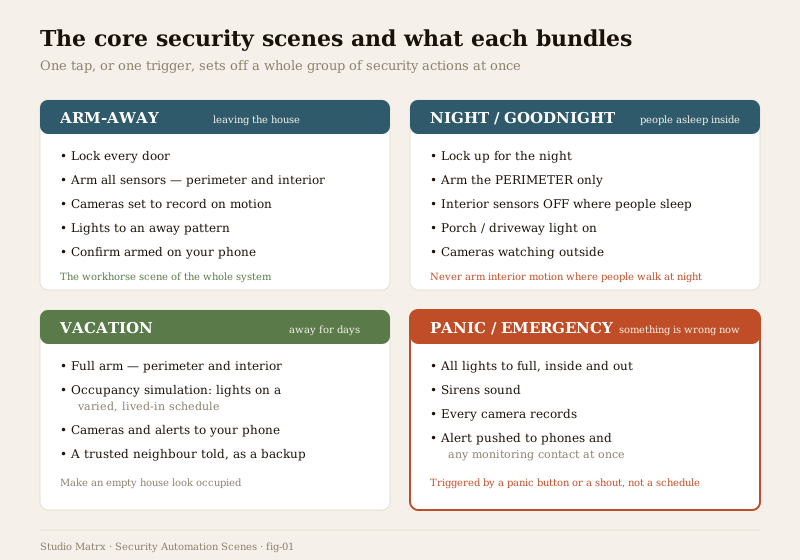
The rest of this guide walks the scenes worth building, then the harder questions: how they get triggered, and how to keep them trustworthy.
The core security scenes worth building
You do not need dozens. A handful of well-designed scenes covers almost every household.
Arm-Away — the workhorse
This is the one you will use most, and the one to get right first. When you leave the house, Arm-Away should:
- Lock every external door — and check they report locked, not merely send the command.
- Arm all sensors, perimeter and interior, since nobody is home.
- Set cameras to record on motion, so anything that happens while you are out is captured.
- Put lights on an away pattern rather than dead-dark — a house that looks lived-in deters more than one that is obviously empty.
- Confirm the armed state on your phone, so you drive off knowing, not guessing.
The sensors and locks it acts on are covered in smart sensors, door sensors, motion sensors and the complete guide to smart locks; the lighting side in security lighting integration.
Night / Goodnight — arm around your sleep
The night scene is where the perimeter-versus-interior distinction earns its keep. At bedtime you want the outside guarded but the inside free to move, because people are home and will walk to the bathroom or the kitchen. So Goodnight should:
- Lock up for the night.
- Arm the perimeter — doors, windows, gate, boundary — so a break-in from outside is detected.
- Leave interior motion sensors OFF in the areas where people sleep and move, so you do not trip your own alarm at 2am.
- Turn on a porch or driveway light at low level for both deterrence and safe movement.
- Keep outdoor cameras watching.
Getting the interior/perimeter split wrong is the single most common reason people abandon night arming — either they trap themselves and set off false alarms, or they over-correct and arm nothing at all.
Disarm-Home — arriving, with a caveat
The mirror of Arm-Away: as you arrive, disarm the alarm, unlock the door, and bring the lights up. Genuinely convenient — but this is the scene to design most cautiously, because anything that automatically unlocks a door is a security decision, not a lighting one. An auto-unlock that fires purely on your phone being nearby can be tricked by a stolen or spoofed phone, and a scene that shouts "welcome home" while flinging the bolt is a gift to anyone watching. The safer pattern is to have arriving turn on lights and disarm interior sensors, but keep the unlock as a deliberate act — a code, a fingerprint, a specific tap — rather than something that happens on its own. Convenience is not worth an unlocked door.
Vacation — look occupied, arm fully
When the house is empty for days, the job flips: you want it both fully armed and looking lived-in. A vacation scene should hold a full arm — perimeter and interior — and drive occupancy simulation: lights (and perhaps a radio or blinds) on a varied, believable schedule so the house does not read as an obvious empty target night after night. Set the cameras and alerts to your phone, and — the non-smart fallback — tell a trusted neighbour, because no automation replaces a human who can walk over. The simulation craft is its own topic: see occupancy simulation.
Panic / Emergency — everything, now
The panic scene is the opposite of a schedule — it fires when something is wrong this second, from a panic button or a hard-pressed widget, never from a clock. It should, all at once:
- Throw every light to full, inside and out — an intruder loses the dark; you can see.
- Sound the sirens.
- Start every camera recording.
- Push an alert immediately to household phones and any monitoring contact.
The devices behind it are covered in smart sirens, audible sirens and panic buttons. Because it is a life-safety-adjacent scene, its trigger must be as local and dependable as you can make it — a physical button beats an app buried three taps deep in an emergency.
Welcome / Delivery — the small convenience one
A lighter scene for the doorbell moment: when a delivery arrives or a guest is expected, bring up the porch light, start the doorbell camera recording, and — if you choose — speak through it. Useful, low-stakes, and a good example of a scene that is pure convenience: if it fails, nothing about your security is weakened, which is exactly how the frills should be built.
How scenes get triggered
A scene is only as good as what sets it off. There are five common triggers, and the choice matters because some are dependable and local while others lean on the cloud or on chance.
| Trigger | How it fires | Best used for | Watch-out |
|---|---|---|---|
| Manual tap | A button in the app, on a wall panel, or a physical keyfob | Any scene — the reliable baseline | Only works if someone remembers; keep it as the fallback, not the only path |
| Time of day | A clock — "arm the perimeter at 11pm" | Night arming, vacation lighting | Fixed times are predictable; vary them and treat as a safety net, not the sole arm |
| Geofence | Your phone crossing a boundary around home | Arm-Away when the last phone leaves | Depends on phone location and usually the cloud; can lag or misfire |
| Sensor event | A device state — "gate opens after dark, start recording" | Reactive lighting and recording | Great for reactions; less suited to the primary arm decision |
| Voice | A spoken command to an assistant | Convenience scenes, hands-full moments | Handy, but a shout through a window can trigger it — never wire voice to unlock or disarm |
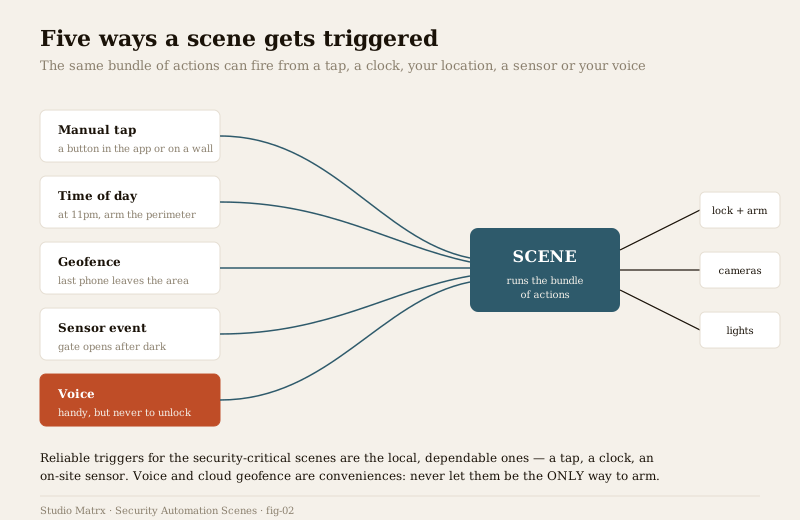
Two of these deserve their own treatment because they are powerful and easy to over-trust. Geofencing — arming when the last family phone leaves the area — is the most elegant way to run Arm-Away, but it rides on phone location and often a cloud service, so it lags, misfires when a phone dies, and should always sit alongside a manual and a time-based backup: see geofencing home security. Voice is genuinely useful for hands-full convenience, but it is the least private and least trustworthy trigger for anything critical — a passer-by can shout it, and it depends on a listening cloud assistant, which is why you never let a voice command unlock or disarm: see voice controlled security.
The rule of thumb: for the security-critical scenes, favour the triggers you can depend on — a tap, a clock, a local sensor — and treat geofence and voice as convenient additions, never the single path to being armed.
The design discipline: keep the critical parts reliable
Here is the heart of the matter, and the thing most home-automation tutorials skip. A scene mixes two kinds of action, and they must not be treated as equals:
- Security-critical actions — lock the doors, arm the sensors, start recording. These must succeed, or the scene has failed at its actual job.
- Convenience frills — mood lighting, music, blinds, a spoken greeting. Nice to have; harmless if they fail.
The classic mistake is to build one long chain that treats them all the same: dim lights, then play music, then lock doors, then arm sensors. If step two hits an offline bulb and the chain stalls, the lock and the arm never run — and worst of all, nothing tells you. The lights did something, the app looks normal, and you walk out of an unlocked, unarmed house convinced you secured it. A scene that fails to arm because a convenience device was offline is a security hole dressed as safety.
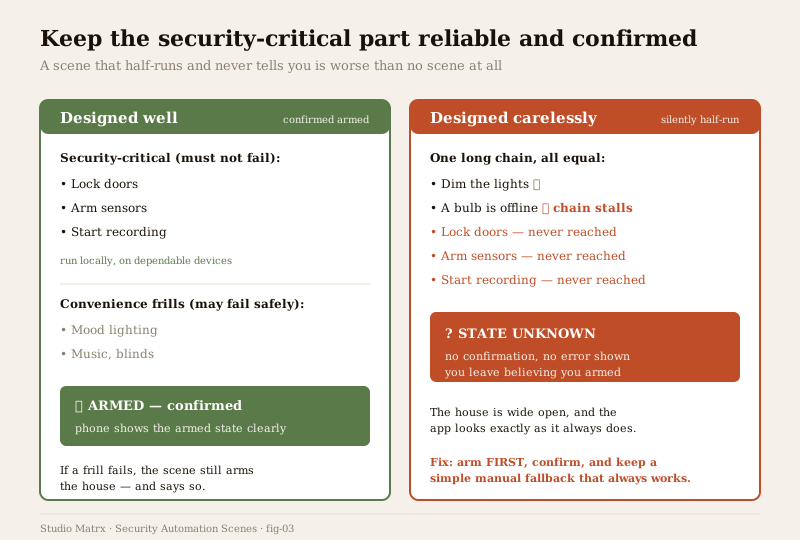
The discipline that fixes this:
1. Run the security-critical actions first, and independently. Lock and arm before you touch a single frill, so a decorative failure can never block the essential part.
2. Keep the critical actions local and on dependable devices. The arm decision should live on a local hub, not wait on a distant server — more on that below and in smart security hubs.
3. Confirm, do not assume. The scene must check that doors report locked and sensors report armed, and tell you the real state — not just fire commands into the void.
4. Let frills fail safely. If a bulb is offline, the scene should still arm the house and report success on the part that matters, noting the frill separately.
5. Test every scene, then test it again after any change. Run it, watch each action land, and re-run it whenever you add a device — a scene you built six months ago may quietly depend on a gadget you have since moved.
6. Keep a simple manual fallback. A physical key alongside the smart lock, a panel button that arms directly, a siren that can sound locally. Graceful degradation means the worst a scene failure costs you is convenience, never safety. This is the whole design ethos of smart security hubs.
The arming-state clarity problem
Everything above converges on one non-negotiable: you must always KNOW whether you are armed. The most dangerous state a security system can be in is not "disarmed" — it is "you think it is armed and it is not." A half-run scene creates exactly that, silently.
So a well-built scene closes the loop. After it runs, it should show an unambiguous armed/disarmed state — a clear banner, a light on a panel, a push that says "Armed — all doors locked" or, honestly, "Could not arm: back door offline." Ambiguity is the enemy. If the app cannot tell you the true state, the scene is not finished, however pretty the lighting looks. Design every security scene to end in a confirmation, and treat any scene that cannot confirm as broken until it can.
Interior versus perimeter arming — do not trap yourself
Worth stating on its own because it trips up so many households. Perimeter sensors watch the boundary — doors, windows, gate. Interior sensors watch movement inside — motion detectors in rooms and hallways. When you are out, you arm both. When you are home and asleep, you arm the perimeter but leave interior motion off in the areas people use, or you will set off your own alarm on a midnight walk to the kitchen — and after a couple of 2am false alarms, people simply stop arming at night, which is the real loss.
Building this split correctly into your Arm-Away and Goodnight scenes is what makes night arming something you will actually keep using, rather than a feature you disable in frustration within a week.
The honest limits: cloud lag, offline failure, keep arming local
The threads that run through all smart security run hardest through scenes, because a scene is a sequence and every step is a chance to fail.
- Cloud automations lag or fail offline. A scene that routes its logic through a distant server will stutter or die the moment the broadband wobbles — an everyday event in much of India, and often precisely when a storm has also cut the power. If your Arm-Away runs in the cloud, a monsoon outage can leave you unable to arm at the exact moment you most want to.
- So keep the critical arming local. The lock-and-arm core should execute on a local hub that keeps working through an internet cut, using the cloud only for remote access and notifications — not as the thing the arm depends on. See smart security hubs.
- Power cuts take the brain down. A hub and router on the mains die in an outage and take every scene with them; put them on a UPS or inverter. Battery sensors and locks hold their own, so the mains-fed brain is what to back up first.
- Batteries, firmware and subscriptions. A scene silently depends on every device in it being alive, patched and paid-for. A dead sensor battery or a lapsed subscription can hollow out a scene without any obvious sign — another reason to test regularly and keep a manual fallback.
None of this means "do not automate." It means automate with your eyes open: put the essential, security-critical actions on the most reliable, local path you can build, and let the cloud and the conveniences ride on top where their failure costs you nothing that matters.
Who gets notified when a scene runs
A scene should not run in silence. When Arm-Away fires, the household should know the house is armed; when the panic scene fires, everyone who can help should know instantly; when a scene fails to arm, that is the most important notification of all. Design each scene's notifications deliberately — who is told, on what event, and with enough clarity to act — and beware alert fatigue: fifty motion pings a day trains people to ignore the one that mattered. The craft of notifying the right people about the right events without drowning them is covered in smart security notifications.
The core scenes at a glance
| Scene | Key actions | Typical trigger | Interior sensors |
|---|---|---|---|
| Arm-Away | Lock doors, arm all sensors, cameras record, away lights, confirm armed | Geofence (last phone leaves) + manual + time backup | Armed — nobody home |
| Night / Goodnight | Lock up, arm perimeter, porch light, cameras on | Manual tap or time of day | OFF where people sleep |
| Disarm-Home | Disarm interior, lights up — unlock kept deliberate | Manual / arrival, unlock by code or fingerprint | Disarmed |
| Vacation | Full arm, occupancy simulation, alerts on, neighbour told | Manual on leaving, then time-based simulation | Armed — full |
| Panic / Emergency | All lights full, sirens, all cameras record, alert everyone | Panic button or hard-pressed widget — never a clock | N/A — all-hands |
| Welcome / Delivery | Porch light, doorbell camera records, optional intercom | Doorbell event or manual | Unchanged |
Run your overall exposure through the home security risk scorecard to see which scenes close the gaps that matter most in your home.
Key takeaways
- A scene is a saved bundle of security actions run as a group by one tap or one trigger — it gives consistency, speed and the right actions for a situation, so the house is secured the same correct way every time.
- Build a handful of well-designed scenes: Arm-Away (the workhorse), Goodnight (perimeter-only arming), Disarm-Home (with unlock kept deliberate), Vacation (full arm plus occupancy simulation), Panic (everything, now) and a light Welcome/Delivery scene.
- Choose triggers by dependability — a tap, a clock and local sensors for the security-critical scenes; treat geofence and voice as conveniences, never the only way to arm, and never voice-unlock a door.
- Keep the security-critical actions reliable and separate from the frills — run lock-and-arm first, locally; let a decorative failure never block the essential part; test every scene and keep a simple manual fallback.
- Always know your armed state — a scene must confirm what it did; "you think it is armed and it is not" is the most dangerous state, and a silent half-run creates exactly that.
- Split interior and perimeter arming so you guard the boundary at night without tripping your own alarm — and keep the critical arming local, because cloud automations lag or die in the power and internet cuts India sees weekly.
Where to go next
- The pillar: Complete Guide to Smart Home Security and the smart home security section.
- The brain that runs scenes reliably: Smart Security Hubs.
- What scenes act on: Smart Sensors, Motion Sensors, the Complete Guide to Smart Locks and Security Lighting Integration.
- Triggers in depth: Geofencing Home Security and Voice Controlled Security.
- Specific scenes: Occupancy Simulation, Smart Sirens and Panic Buttons.
- Being told when a scene runs: Smart Security Notifications.
- The wider home-automation hub: Smart Home. Assess your exposure: Home Security Risk Scorecard, or browse all security guides.
References
- Matter, Thread, Zigbee, Z-Wave and Wi-Fi — smart-home connectivity and interoperability standards that scenes run over; describe device behaviour in outline and verify current versions and real device certification against the standards bodies before relying on any specific claim.
- Digital Personal Data Protection Act, 2023 (India) — governs personal data, including home footage, occupancy patterns and automation logs processed on a cloud service; check obligations for the platform you choose.
- National Building Code of India (SP 7), Bureau of Indian Standards — fire and life-safety provisions relevant to any scene touching smart fire notification or electric locks; verify the current edition via the BIS catalogue, and treat certified fire and egress systems as licensed professional work.
This is an educational overview for planning and decision-making. Security automation scenes are a convenience layer, never a substitute for a hardened physical base or certified life-safety systems, and no scene should ever trap a person during a fire or unlock a door on voice alone. Mains electrical work, integrated fire and lift systems, and electronic access control are qualified professional work — engage licensed professionals for design, installation and certification, and verify any standard's current status via the BIS catalogue before relying on it.
Export this guide
Related Guides — Deep-dive reading
Geofencing Home Security in India (2026): Convenience Without the Trap
A geofence is a virtual boundary around your home; your phone crossing it can arm the alarm as the last person leaves and light the place up as you arrive. This guide explains the genuinely useful security uses, and the honest caveats: never let a phone's location alone unlock your door, never make a geofence the only thing that arms your home, and treat continuous family tracking as sensitive data.
SecuritySecurity Fire Alarm Integration in India (2026): Smart Alerts, Certified Systems, Fail-Safe Egress
The most important sentence a smart-home designer can say about fire is also the least profitable: a smart-home smoke sensor or fire notification is a helpful add-on, not a substitute for a certified fire-alarm system. This guide draws the line hard — life-safety detection and alarm belongs to the NBC-governed certified system — and then covers the genuinely useful, correctly-scoped automations the smart layer can add on a verified fire signal: unlock for egress, open the gate for the fire tender, light the escape path, stop the away-scene, and notify everyone loudly. All of it fail-safe. None of it in the way of the system that actually saves lives.
SecuritySecurity Lighting Integration for Smart Homes in India (2026): Making Light an Active Part of the Response, Not Just a Fixture
How to wire smart lighting into the security system so a sensor or camera can light an intruder for the camera to see, the alarm can throw every light full-on, and away-mode can fake occupancy — all built on a reliable base that keeps working when the hub, the network or the power drops.
SecurityRelated Tools — Try Free
Access-Control Battery-Backup Calculator
Size the standby battery so an access system keeps running through a power cut, with an egress life-safety note.
Battery BackupHome Security Risk Scorecard
Score your home across six security layers — perimeter, entry points, lighting, detection, alarm and habits — and get a prioritised action plan.
Security ScorecardSecurity Backup Power Calculator
Size a UPS/inverter and battery to keep CCTV, NVR, router and alarm running through a power cut — load, Ah, VA and cost.
Backup Power