
Smart Security Privacy in India: The System That Watches You More Than Any Burglar
A smart security system spends every hour of every day watching your family, your staff and your routines — and that footage and data, not a burglar, is the long-term risk most buyers never think about. Where cameras belong and where they must never go, where your video actually goes, what a smart home learns about you, your rights under the DPDP Act 2023, and the honest practice for keeping it all yours.
You buy a smart security system to watch for the one intruder who might come. What you actually install is a system that watches you — your family, your domestic staff, your guests, your comings and goings, your faces and your daily routine — every hour of every day, whether or not anyone ever tries to break in. The burglar is a rare, brief event. The surveillance of your own household is continuous and permanent. And the footage and data it produces, sitting on a server somewhere, is the risk almost nobody weighs when they compare cameras on price and pixels.
This is the uncomfortable truth at the heart of a smart home, and it deserves a whole guide. It is a companion to the pillar, the complete guide to smart home security, and one of the two finale pieces of the smart home security section — the other being smart security cybersecurity, its inseparable twin. Cybersecurity is about keeping strangers out of your system; privacy is about what your system is allowed to know, keep and share about the people inside your home. You need both.
Scope & safety. Smart is convenience, not a guarantee, and privacy is a first-class concern, not an afterthought. Every connected camera, microphone and sensor is a data collector, and the moment footage or a log touches a cloud, the Digital Personal Data Protection Act, 2023 (DPDP Act) applies. Your domestic staff, your guests and your children have privacy rights too. A camera is never a substitute for a hardened physical base or certified life-safety systems, and a smart lock must never trap anyone in a fire. Mains wiring and certified fire and lift work are for licensed professionals — you specify and decide. Cite frameworks generically and verify the current position before you rely on it.
The camera that faces inward is the one to worry about
Outdoor cameras watch your gate, your compound, the street. Uncomfortable in their own way, but their subject is mostly the public edge of your property. The camera that changes your home is the one pointed inward — at the rooms where your family lives. It is the most useful for catching a genuine indoor intrusion, and by far the most invasive, because its subject is the private life of the people you love.
So start with the lines that are not negotiable.
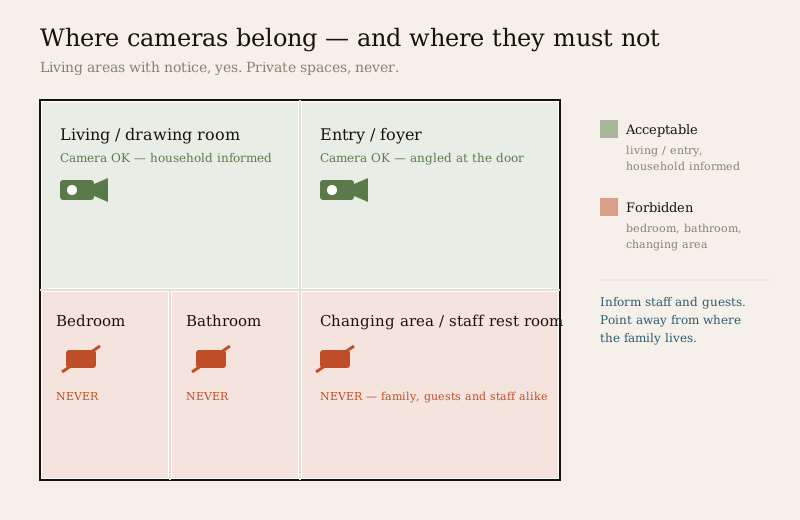
- Never in a bedroom, bathroom, changing area or any place of undress. There is no security case that justifies it and no household member — child, elderly parent, guest or staff — should ever be recorded there. Treat this as an absolute, not a preference.
- Living areas and entries only with the household's knowledge. An indoor camera in the drawing room or by the front door can be legitimate — but everyone who lives in or regularly enters the home should know it is there and roughly what it does. Hidden indoor cameras corrode trust and, once footage lands on a cloud, put you on the wrong side of the DPDP Act's expectation that people know their data is being collected.
- Point away from the private, toward the perimeter. Angle an indoor camera to cover a door or a valuables area, not the sofa where the family spends its evenings. Where a device supports it, use privacy masking to black out zones that should never be recorded — the technique is covered in CCTV privacy masking.
- Give people camera-free space. Even in a household that accepts cameras, there should be rooms and times that are unwatched. Constant recording of the people you live with is not security; it is surveillance of your own family.
The "watch the maid, watch the nanny" question — handled honestly
Many indoor cameras in India go up for one unspoken reason: to keep an eye on domestic staff — the cook, the maid, the nanny, the driver, the attendant caring for an elderly parent. It is worth being honest about this rather than pretending otherwise, because it is where the ethics and the law bite hardest.
Domestic workers and guests have privacy rights. That does not mean you can never have a camera where staff work — a camera covering a front door, a common living area or a valuables cupboard can be legitimate. It means a few things follow:
- Inform them. Tell your staff, plainly, that there are cameras and where they are. Covert recording of the people who work in your home is both a breach of trust and, once it hits a cloud, a data-protection problem. Informed is the whole difference between a reasonable security measure and secret surveillance.
- Never in their private spaces. If staff have a room, a bathroom or a rest area, those are off-limits exactly as your family's are. The bright line does not move for the people who work for you.
- A nanny-cam over a child is watching the child too. Framing it as "watching the carer" does not change that a small human is being continuously recorded. Keep it to common areas, keep it known, and keep the footage tightly held.
The same courtesy extends to guests. A friend staying over, or a relative visiting, is entitled to know there are cameras in the living space and to expect none where they sleep or change. "It is my house" is true; it does not suspend the dignity of the people in it.
Where your footage actually goes — cloud versus local
Here is the question no salesman volunteers: when your camera records your living room, where does that video physically end up? For a great many cheap and convenient smart cameras, the honest answer is a server you do not own, run by a company you did not vet, possibly in another country entirely. Your footage leaves your home the moment it is captured.
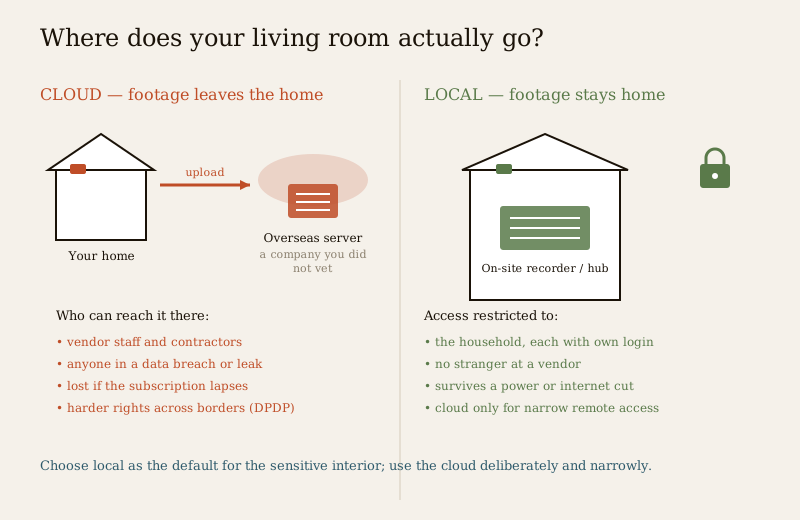
That matters for reasons most buyers never consider until it is too late:
- People at the vendor can, in principle, see it. Cloud footage is stored and processed on someone else's computers. Depending on the company's practices, staff, contractors or support engineers may be able to access streams and recordings. You are trusting not just a brand but everyone it employs and everyone it outsources to.
- Breaches and leaks happen. Cloud camera services have, as a category, suffered breaches, mis-configured storage and incidents where one customer briefly saw another's feed. When footage of your home lives on a shared platform, its safety is only as good as that platform's worst day.
- Cross-border storage complicates your rights. If the server sits overseas, your recourse when something goes wrong is murkier, and the DPDP Act 2023 places conditions on how personal data is handled and transferred. You cannot exercise rights over data you cannot even locate.
- The subscription is a leash. Cloud recording usually rides on a monthly fee. Miss it, or let the vendor discontinue the plan, and your history can simply vanish — the footage was never really yours to begin with.
The alternative is local-first. Keep recording and processing inside the home — on a local recorder or the storage attached to a smart security hub — and let the cloud, if you use it at all, do only the narrow job of letting you check in remotely. Footage that never leaves the house cannot be viewed by a stranger at a vendor, cannot be swept up in that vendor's breach, and cannot be held hostage to a lapsed subscription. It also survives the power and internet cuts that black out cloud-only cameras — the resilience argument and the privacy argument point the same way. How remote viewing can be done without surrendering your archive is the subject of remote security monitoring.
None of this makes reputable cloud services unusable. It means you should choose local as the default for the sensitive interior, use the cloud deliberately and narrowly, and always know which server your living room is sitting on.
The always-listening problem: voice assistants
A smart home increasingly listens as well as watches. Voice assistants and voice-enabled security controls sit in your living space waiting for a wake word, and a device that waits for a wake word is, by definition, always listening for it. Depending on the product and its settings, snippets of what it hears may be recorded, sent to a cloud and — in some cases — reviewed by humans to improve the service.
For a family this means casual conversation, a child's chatter, a private argument can, in the wrong configuration, become a recording on a distant server. And for security specifically there is a sharper danger: do not wire voice to anything that unlocks a door. A shout through an open window can trigger a wake word; a "hey, unlock the front door" is a command a stranger can issue. The convenience is not worth the exposure. The full case is made in voice-controlled security; for privacy, the rules are simple:
- Keep always-listening devices out of bedrooms and private spaces.
- Learn where the recordings go, turn off human review where the option exists, and delete voice history on a schedule.
- Mute the microphone when you want a genuinely private conversation — a hardware mute, where the device has one, is the honest kind.
- Never let a voice command open a lock.
What a smart home actually learns about you
Cameras and microphones are the obvious collectors. But a fully connected home quietly assembles something more revealing than any single clip: a detailed portrait of your life. Consider what the sensors and logs know between them.
| What it collects | What it reveals |
|---|---|
| Door and motion logs, arm/disarm times | When the house is empty, when you sleep, your daily rhythm |
| Camera footage and doorbell events | Faces of everyone who lives in or visits your home |
| Smart-lock access records | Who comes and goes, and exactly when — family, staff, visitors |
| Occupancy and presence signals | Whether anyone is home, room by room, right now |
| Voice history | Fragments of conversation, and what you ask for |
| App and account data | Your identity, location, devices and habits |
Individually each looks harmless. Together they are a map of your family's existence — a map that is valuable to advertisers, useful to a burglar who obtains it, and damaging if it leaks. This is why the guiding principle of good smart-home privacy is data minimisation: capture only what security genuinely needs, and no more. A system that records everything "just in case" is not more secure; it is a bigger liability with a larger blast radius when something goes wrong.
Your rights under the DPDP Act 2023
India's Digital Personal Data Protection Act, 2023 is the law that governs personal data — and footage of identifiable people, access logs and voice recordings are personal data. When you engage a vendor whose cloud stores or processes that data, the framework gives you rights and gives them duties. In outline, and to be verified against the current text and rules:
- Consent and purpose. Personal data should be collected for a clear, stated purpose with consent, not gathered indiscriminately.
- Data minimisation. Only data necessary for that purpose should be collected — the legal echo of the design principle above.
- Your right to access and correction. You can generally ask what is held about you and have errors corrected.
- The right to erasure. You can ask for your personal data to be deleted when it is no longer needed for the purpose it was collected for.
- Retention limits. Data should not be kept indefinitely; it should be deleted once the purpose is served.
- The vendor's duties. A company handling your data must protect it, use it only for the stated purpose, and account for how it is processed.
Two practical consequences for a homeowner. First, you have leverage — you can and should ask a prospective vendor where footage is stored, who can access it, how long it is kept and how you delete it, and treat evasive answers as a reason to walk away. Second, the people your cameras record have these rights against you where you are the one deciding how their data is used — another reason to inform staff and guests and to hold footage no longer than you need. Verify the Act's current provisions and rules before relying on any specific point; the law is real and the direction is settled, but the detail is what governs.
Sharing footage: the society WhatsApp group and the law
The privacy risk does not end with storage. It escalates the moment you share a clip — and in urban India the temptation is everywhere: the society or RWA WhatsApp group, the "look at this suspicious person" forward, the doorbell clip of whoever walked past your gate.
Pause before you post. A few realities:
- Do not publish or humiliate. Forwarding a clip of a "suspicious" person to a group of hundreds can defame someone who did nothing wrong, expose them to a mob, and land you in legal trouble. A delivery agent, a lost visitor, a person of a different background walking through — a grainy frame and a caption can destroy a reputation. If you genuinely suspect a crime, the footage goes to the police, not to a broadcast list.
- Your doorbell sees your neighbours and the street. A video door phone or doorbell camera records the public path, the neighbour's gate, passers-by. Aim it at your own entrance, use masking to exclude what you do not need, and do not turn a doorbell into a surveillance feed on the whole lane — the etiquette and the law are set out in video door phone privacy.
- Access logs are personal too. A smart lock's record of who entered and when is sensitive data about your household and staff; sharing it around is a breach of their privacy, not a bit of gossip.
- Consent is not yours to give for others. Sharing footage of an identifiable person, especially children or staff, on a public or semi-public group is exactly the kind of processing the DPDP Act frames around consent and purpose. "It was on my camera" is not the same as "I may publish it."
The etiquette is simple and old-fashioned: keep footage private, use it for the purpose you collected it for, hand genuine evidence to the authorities, and never make a stranger a spectacle.
Children, family and the people who cannot consent
A smart home records the people least able to object. Children grow up on camera; an elderly parent under a "care" camera loses privacy in the name of safety; a spouse's movements become loggable. Weigh it deliberately. A camera watching a baby's room for safety is a decision made for a child who cannot yet consent — keep such footage local, tightly held and deleted on a schedule, and retire the camera when the reason for it passes. Family members who can speak for themselves deserve a say in being recorded in shared spaces. Surveillance inside a family is a relationship as much as a technology; treat consent and dignity as things you owe the people you live with, not obstacles to route around.
The practice: minimise, secure, share responsibly
Principles are only worth what you do with them. Here is the honest working practice, and it maps directly onto the security privacy assessment you should run before and after you build.
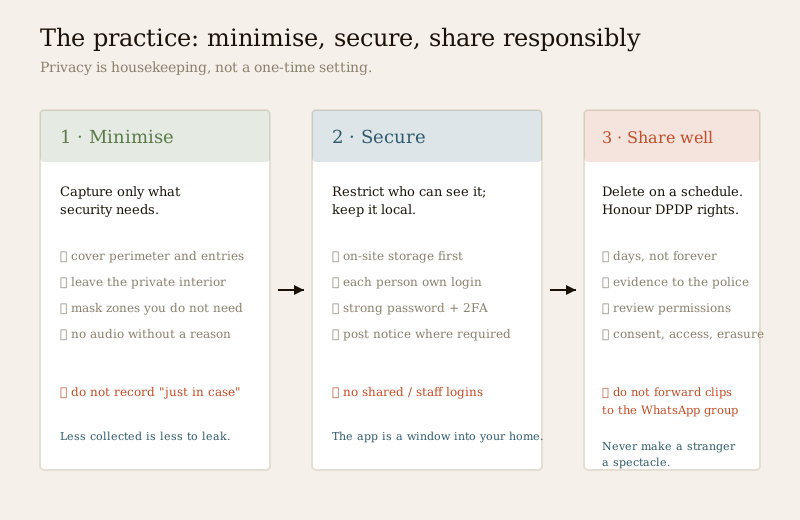
1. Minimise — capture only what security needs. Every camera and microphone you do not install is a privacy risk you never have to manage. Cover the perimeter and the entries; leave the private interior alone. Use masking to exclude zones. Do not record audio unless you have a reason and know the law on it. Less collected is less to leak.
2. Local-first — keep it home. Prefer on-site storage and processing for the sensitive interior; use the cloud narrowly and deliberately for remote access, knowing which server your footage sits on. Footage that never leaves the house is footage a stranger can never see.
3. Restrict who can log in. The camera app is a window into your home — treat it like your bank. Do not share one login around the family or, worse, with staff; give each person their own account with only the access they need, and remove access the day someone leaves the household. Strong, unique passwords and two-factor login are the baseline. This ties directly to smart security cybersecurity, where access control is covered in full — privacy and cybersecurity are the same problem seen from two sides.
4. Post notice where required. Where cameras cover areas others use — staff, visitors, a shared entrance — a visible notice that recording takes place is both courteous and, in spirit, what a consent-based law expects. It converts secret surveillance into an informed arrangement.
5. Delete on a schedule. Footage is a liability that grows with age. Decide how long you actually need recordings — days, not forever — and let old footage overwrite or delete automatically. The less history you hoard, the less there is to lose in a breach and the closer you sit to the DPDP principle of not keeping data past its purpose.
6. Review permissions regularly. Who can see your cameras? What has each device's app quietly been granted? Which old cloud account still holds a year of your living room? Review it. Revoke what is stale. Close accounts you no longer use. Privacy is not a one-time setting; it is housekeeping.
Do this and the do/don't table below stops being advice and becomes habit.
| Do | Don't |
|---|---|
| Keep indoor cameras to living areas and entries, with the household informed | Put a camera in any bedroom, bathroom or changing area — ever |
| Inform staff and guests that cameras exist and where | Record the people who work in or visit your home covertly |
| Prefer local storage for the sensitive interior | Default your living-room footage to an unknown overseas cloud |
| Give each person their own login with least access | Share one camera password around the family or with staff |
| Delete footage on a schedule and minimise what you capture | Hoard years of recordings "just in case" |
| Hand genuine evidence to the police | Forward a "suspicious person" clip to the society WhatsApp group |
| Ask a vendor where data goes, who sees it, how to delete it | Assume the vendor is careful because the brand looks polished |
| Mute mics and keep voice out of private rooms | Wire a voice command to unlock a door |
Key takeaways
- The system watches you more than any burglar ever will. The continuous surveillance of your own household — and the footage and data it produces — is the real long-term risk, not the rare intruder.
- Some places are off-limits, full stop. No cameras in bedrooms, bathrooms or changing areas; indoor cameras only in living areas and entries, with everyone who lives in or enters the home informed — staff and guests included.
- Know where your footage goes. Cloud video can be seen by vendor staff, caught in breaches and held on overseas servers; local-first storage keeps it home, private and resilient.
- A smart home builds a portrait of your life from cameras, locks, sensors and voice. Minimise what you collect, and remember the DPDP Act 2023 gives you rights — consent, access, erasure, retention limits — and gives the people you record rights against you.
- Do not make a stranger a spectacle. Keep footage private, hand real evidence to the police, and never forward a "suspicious person" clip to a broadcast group.
- Practise it: minimise, keep it local, restrict logins, post notice, delete on a schedule, review permissions. Privacy is housekeeping, not a one-time setting — and it is the same problem as cybersecurity, seen from the inside.
Where to go next
- The pillar: Complete Guide to Smart Home Security and the smart home security section.
- Its twin: Smart Security Cybersecurity — keeping strangers out of the system that this guide keeps honest about what it knows.
- The privacy-sensitive devices: CCTV Privacy Masking, Video Door Phone Privacy, Smart Lock Privacy and Voice-Controlled Security.
- Keeping footage home: Smart Security Hubs and Remote Security Monitoring.
- The wider picture: Building Security Systems Guide and the Security Guide for Gated Communities.
- Assess it: run the Security Privacy Assessment and the Home Security Risk Scorecard, or browse all security guides.
References
- Digital Personal Data Protection Act, 2023 (India) — the governing law for personal data, including home footage, access logs and voice recordings processed by any service; verify the current provisions and notified rules on consent, purpose, data minimisation, retention, and the rights of access and erasure before relying on any specific point.
- Matter, Thread, Zigbee, Z-Wave and Wi-Fi — smart-home connectivity standards that determine whether a device processes locally or via a cloud; describe device behaviour in outline and verify a product's real data-handling before you buy.
- National Building Code of India (SP 7), Bureau of Indian Standards — fire and life-safety provisions relevant to any camera, lock or integration near an escape route; verify the current edition via the BIS catalogue, and treat certified fire and egress systems as licensed professional work.
This is an educational overview for planning and decision-making. A smart security system is a convenience layer that collects data about your household; it is never a substitute for a hardened physical base or certified life-safety systems, and privacy and cybersecurity are first-class concerns, not afterthoughts. The DPDP Act 2023 is real law — verify its current provisions and rules before relying on specifics. Mains electrical work, integrated fire and lift systems, and electronic access control are qualified professional work — engage licensed professionals for design, installation and certification, and verify any standard's current status via the BIS catalogue before relying on it.
Export this guide
Related Guides — Deep-dive reading
Complete Guide to Security System Cybersecurity in India (2026): Protecting the Systems That Protect You
The cameras, locks, alarms and door phones you install to feel safer are internet-connected computers that can themselves be attacked, and an insecure one is worse than none. This pillar maps the whole attack surface — devices, network, accounts and data, operations — and points to every guide that hardens it.
SecuritySecurity Privacy Assessment for Indian Homes
Getting the privacy side of home security right: camera placement ethics and limits, notice and consent, the extra caution audio demands, and treating footage as personal data you store, retain and delete responsibly under India's DPDP Act 2023 direction.
SecurityCCTV Remote Access in India (2026): Watch From Your Phone, Safely
How to view your own cameras from anywhere without leaving the front door open to the internet — change the defaults, use strong credentials and 2FA, keep firmware current, prefer the vendor's secure cloud relay or a VPN, segment the camera network, and treat footage as personal data.
SecurityRelated Tools — Try Free
Home Security Risk Scorecard
Score your home across six security layers — perimeter, entry points, lighting, detection, alarm and habits — and get a prioritised action plan.
Security ScorecardCCTV Camera Coverage & Count Calculator
Estimate how many CCTV cameras you need, the NVR channels, storage in TB for your retention period, and an indicative all-in cost with GST.
CCTV CalculatorCCTV Cloud vs Local Cost Calculator
Compare cloud CCTV subscription against a local NVR + HDD — upfront, 5-year total, monthly fee and break-even.
Cloud vs Local