
Smart Security Cybersecurity in India (2026): Hardening the Home That Watches Itself
Every connected security device is also a way in for an attacker, and an insecure smart camera or lock is worse than none because it gives false safety while exposing your home. This is the plain hardening checklist a homeowner can actually do: passwords, two-factor, updates, a wise buy, and a segmented network.
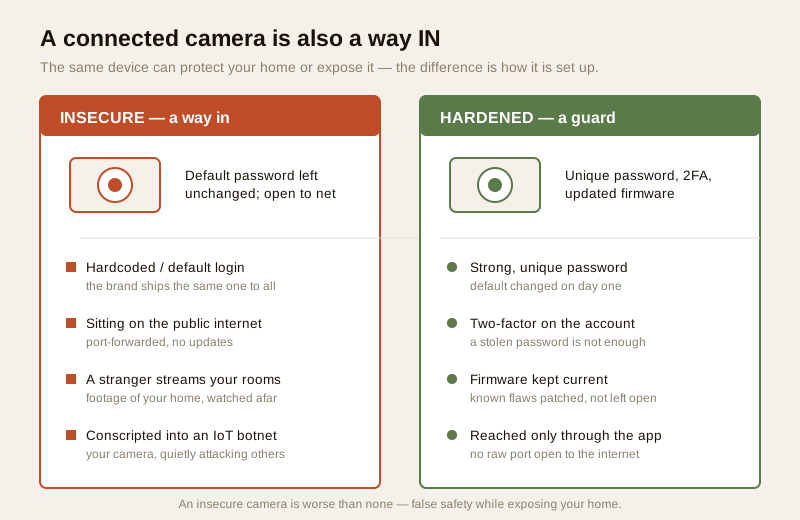
The day you connect a camera, a lock or a hub to your home Wi-Fi, you gain a genuinely useful thing — and you also open a door. Every connected security device is a small computer that talks to an app, often to a maker's cloud, and sits on the same network as your phone and your laptop. That door is worth having if you keep it hardened. Left open, it becomes the very thing it was meant to stop: a way IN for an attacker. And here is the blunt, non-negotiable truth of this whole subject — an insecure smart camera or lock is worse than none at all, because it gives you a false sense of safety while quietly exposing your home to the world.
Smart security cybersecurity is the plain, defensive habit of hardening your own connected devices so convenience never becomes exposure. This guide is strictly about protecting what you own — a checklist any homeowner can follow — and it says nothing about attacking anyone's devices. It closes the smart-home section of Studio Matrx's security hub, sitting beside the pillar guide to smart home security and its twin, the smart security privacy guide.
Scope & safety. Smart is convenience, not a guarantee: a cloud camera is blind in a power or internet cut, batteries die, subscriptions lapse, and a hub failure can take the whole system down — so smart security must degrade gracefully and keep a non-smart fallback for anything that matters. Cybersecurity and privacy are first-class here, not afterthoughts: every connected device is an attack surface, and device data is personal data under the Digital Personal Data Protection Act, 2023. Life-safety is never smart-only — a smart smoke alert is an add-on, not a substitute for a certified fire-alarm system (see NBC / SP 7:2026), and a smart lock must never trap anyone in a fire. Mains wiring and certified fire or lift work stay with licensed professionals. This is educational guidance, not legal advice.
Why an insecure device is worse than no device
A locked-but-not-connected home has one honest weakness: someone must physically break in. A poorly secured smart home adds a second, invisible one — and unlike the first, you cannot see it, hear it or feel a draught from it. The camera you fitted to feel safer can, if it is exposed, do three things at once against you: stream your rooms to a stranger, hand an attacker a foothold on your network, and get quietly enrolled into a botnet that attacks other people using your bandwidth and your electricity.
The false-safety problem is the real danger. A family that believes it is watched relaxes — leaves a spare key habit, tells the app who is home, trusts the notifications. If that system is wide open, every one of those comforts becomes a leak. That is why the honest first rule is not buy more devices; it is secure the ones you have, or do not connect them at all.
The India reality: the cheap no-name cloud camera
Walk through the honest scene. A cheap, no-name cloud camera is bought for a few hundred rupees, fitted in ten minutes, and connected with the password it shipped with — the same hardcoded or default password the maker put on every unit in the batch. Its footage lives on an overseas server the buyer will never see, reachable from anywhere, and its firmware will likely never be updated because the brand has already moved on to the next batch under a new name.
That device is not hypothetical. Great numbers of such cameras sit on the public internet with well-known default logins, indexed and searchable, streaming living rooms and courtyards to anyone who cares to look. Many are silently drafted into IoT botnets — the Mirai-style phenomenon, in which vast swarms of poorly secured cameras, routers and gadgets are commandeered to attack targets elsewhere. The owner notices nothing. The camera keeps working; it simply works for someone else too.
The lesson is not fear of smart cameras — a well-chosen, well-hardened camera is a fine thing. It is caution about the cheapest option whose security you cannot verify. Spending a little more on a reputable AI camera with a real update history is itself a security decision.
The hardening checklist a homeowner can actually do
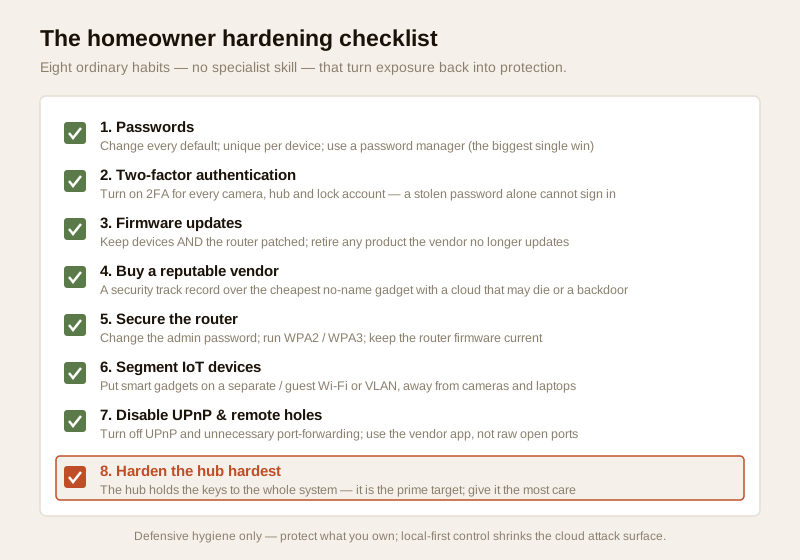
None of what follows needs a specialist. It is a short list of ordinary habits, and doing even the first two puts you ahead of most homes. Work down it once when you set up, then revisit every few months.
1. Passwords — the single biggest win
Change every default password the moment a device is set up — camera, hub, lock, router, app account. Then make each one unique and strong: a long passphrase used only for that device or account, so a leak on some unrelated shopping site can never hand a stranger your camera feed. Remembering dozens of unique passwords by hand is impossible, which is exactly why a password manager exists — it generates and stores them so you only remember one. If you do a single thing from this guide, do this one.
2. Two-factor authentication
Turn on two-factor authentication (2FA) for every camera, hub and lock account that offers it. With 2FA, a correct password is not enough on its own — a second code (from an app or SMS) is needed too. On a security account this is not optional hygiene; it is the biggest upgrade after unique passwords, because it defeats the most common attack: a password stolen or guessed from somewhere else.
3. Firmware updates — devices and especially the router
Connected devices are software, and software gets security fixes. Let cameras, hubs and locks apply firmware updates (or enable auto-update), and keep the apps and your phone's operating system current. The device people forget is the router — it is the front gate every other device passes through, and an un-patched router undermines everything behind it. An abandoned or discontinued device whose vendor has stopped patching is a liability: once no more fixes ship, every newly found flaw stays open forever. Retiring such a device is a security action, not waste.
4. Buy wisely
Much of a device's real security is decided before you install it, at the moment you pick the brand. Prefer a reputable vendor with a genuine security-update track record over the cheapest no-name gadget. A cheap unknown device may carry a backdoor, may phone home to a cloud you cannot vet, and may be bricked the day that cloud is switched off. Ask whether older models still get updates and whether there is a clear way to report a security concern.
5. The router and network — segregate your IoT
The network is where a single compromise either spreads or stops. Four moves cover most of the risk:
- Change the router's admin password from the factory default — the classic, most-exploited gap.
- Run WPA2 or WPA3 encryption on your Wi-Fi, never an open or outdated network.
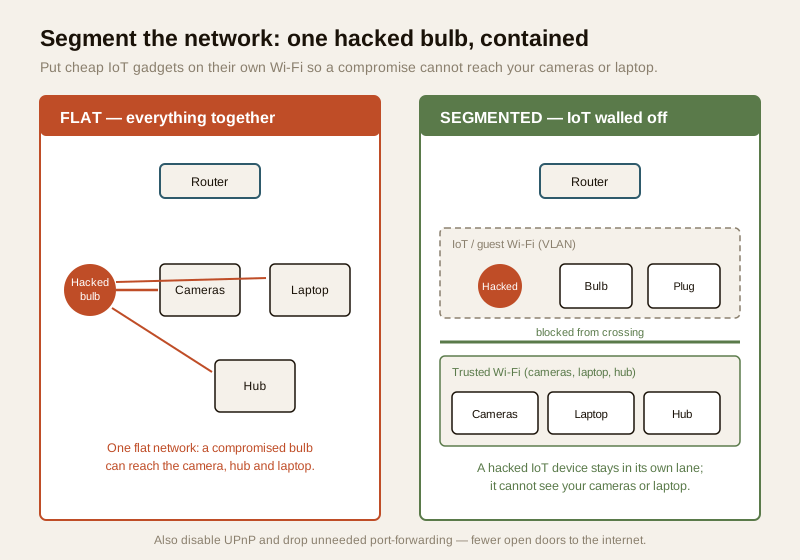
- Segregate IoT devices onto a separate or guest Wi-Fi (or a VLAN) if your router supports it, so a hacked bulb or plug cannot reach your laptop, your cameras or your hub. This is the move that turns a whole-home breach into a contained one.
- Disable UPnP and drop unnecessary remote access or port-forwarding. UPnP lets devices punch their own holes in your firewall; closing it, and removing any port-forward you did not deliberately need, shrinks the number of open doors facing the internet.
6. Harden the hub hardest
If your system has a smart security hub, treat it as the prime target, because it is. The hub holds the keys to the whole system — it can arm and disarm, unlock doors, and see every sensor — so a compromised hub is a compromised home. Give it your strongest unique password, keep 2FA on, apply its firmware updates first, and place it on the trusted side of your segmented network. Everything the earlier steps ask of a camera, ask twice of the hub.
7. Remote access, done securely
Watching your home from work is one of the best reasons to go smart — and one of the easier things to do carelessly. The safe way is through the vendor's own app and secured cloud with 2FA, not by opening a raw port on your router so a camera is reachable directly from the internet. The discipline is the same across cameras and monitoring: see CCTV remote-access security and remote security monitoring for the detail.
8. The smart-lock cyber angle
A Wi-Fi or app-controlled lock is a computer on your door, and its online account is, in effect, the key. It deserves the same care as any camera account and a little more: a strong unique password, 2FA, current firmware, and — crucially — a non-networked mechanical backup so a cyber problem can never lock you out. The full treatment is in the dedicated smart lock cybersecurity guide.
Local-first control shrinks the attack surface
The more of your system that works locally, on your own network, the less of it depends on a distant cloud that can be breached, subpoenaed, or simply switched off. A device that records and alerts locally — or that keeps working when the internet drops — exposes far less than one whose every frame travels to an overseas server. Connectivity standards such as Matter, Zigbee, Z-Wave and Thread are designed for local device-to-hub control rather than round-trips to a cloud, which is part of why a hub-based, local-first setup is both more robust in a power or internet cut and smaller as an attack surface. Local-first is not anti-cloud; it is cloud-minimal, and minimal is safer.
| Hardening step | What it defends against | How hard |
|---|---|---|
| Change every default password; unique per device | Mass scans for known factory logins; credential reuse | Easy — do first |
| Password manager | Password reuse across accounts | Easy, one-time setup |
| Two-factor authentication | A stolen or guessed password alone | Easy — turn on now |
| Firmware updates (devices + router) | Known, already-patched flaws left open | Easy; enable auto-update |
| Retire abandoned / unpatched devices | Permanent unfixable holes | Occasional decision |
| Reputable vendor over no-name | Backdoors, dead clouds, bricked devices | At purchase |
| Change router admin password; WPA2/WPA3 | The most-exploited default gap | Easy, one-time |
| Segregate IoT onto guest Wi-Fi / VLAN | A hacked bulb reaching your cameras or laptop | Moderate; router-dependent |
| Disable UPnP; drop port-forwarding | Self-opened firewall holes facing the internet | Easy, one-time |
| Harden the hub hardest | A single point that owns the whole system | Ongoing |
If a device is compromised: what to do
Suppose the worst — a camera acting oddly, a login alert you did not make, a device you no longer recognise on the network. Stay calm and work the recovery in order:
1. Change the passwords on that device and its account immediately, from a device you trust, and turn on 2FA if it was off.
2. Factory-reset the device to clear any attacker's settings or added access, then set it up fresh with a new unique password.
3. Update the firmware to the latest version before trusting it again — the flaw that let them in may already be patched.
4. Check who has access: read the account's user list and any shared logins or linked apps, and revoke anything you do not recognise.
5. Look wider: if one device was open, review the router (admin password, firmware, port-forwards) and any other device on the same network.
There is also a legal dimension. Under the Digital Personal Data Protection Act, 2023, the footage, logs and account data your devices hold are personal data. If a service you use suffers a breach, the provider has obligations around notifying affected users — so take any such notice seriously, change the relevant passwords, and do not ignore it as spam.
Vendor lock-in and the cloud-shutdown risk
One quiet risk deserves naming because it is not about hackers at all. A device that works only through one maker's cloud is hostage to that maker's business. If the company folds, is acquired, or simply decides to end-of-life the product, the app can stop working and the device can be bricked — a perfectly good camera or lock turned into a paperweight the day the server dies. This is common enough with cheap smart gadgets to plan around. Favour devices that keep a local or offline mode, prefer open standards where you can, and treat a cloud-only, single-vendor lock-in as a cost — both to your resilience and, since the shutdown takes your history and settings with it, to your security.
Cyber and privacy are two sides of one coin
Hardening keeps attackers out; privacy governs what the device does with your data even when everything works. They are inseparable: the same indoor camera that a weak password exposes to a stranger is also, in normal use, streaming your living room to a company's servers. Strong passwords and 2FA protect the account; minimising indoor cameras, choosing local recording, and reading what a device collects protect the data. Do both. The smart security privacy guide covers the second half in full, and the privacy-masking and integration guides show how the pieces fit.
Where does all this leave the homeowner? Not afraid of smart security — it is genuinely useful — but clear-eyed. Buy carefully, harden honestly, keep a non-smart fallback for anything that matters, and treat the network and the hub as the crown jewels. Do that and a connected home is a safer home. Skip it and you have paid for the illusion of safety while leaving the door ajar.
Key takeaways
- Every connected device is also a way in, and an insecure smart camera or lock is worse than none — it gives false safety while exposing your home. Secure what you have, or do not connect it.
- The India reality is the cheap no-name cloud camera with a hardcoded default password, sitting on the public internet, streaming to strangers and conscripted into Mirai-style IoT botnets. Prefer a reputable vendor whose security you can verify.
- The homeowner checklist works: unique strong passwords with a password manager (the biggest win), two-factor authentication, firmware updates for devices and the router, a wise buy, and a router hardened with WPA2/WPA3.
- Segregate IoT onto a separate Wi-Fi or VLAN, disable UPnP and unnecessary port-forwarding, and harden the hub hardest because it holds the keys to the whole system. Local-first control shrinks the cloud attack surface.
- If compromised, change passwords, factory-reset, update firmware and check who has access; device data is personal data under the DPDP Act, 2023. Beware cloud-only lock-in that can brick a device when the server dies.
Where to go next
- Start at the complete guide to smart home security — the pillar this section builds on — and browse the smart-home security sub-hub.
- Pair this with the smart security privacy guide and, for locks, the smart lock cybersecurity guide.
- Harden your remote access with CCTV remote-access security and remote security monitoring.
- See the whole home security picture in the building security systems guide, and gauge your gaps with the home security risk scorecard.
References
- Digital Personal Data Protection Act, 2023 — footage, access logs and account data held by connected security devices are personal data; keep collection minimal, restrict access, and take any provider breach notification seriously.
- Connectivity standards — Matter, Zigbee, Z-Wave, Thread and Wi-Fi (WPA2 / WPA3): review current specifications on the respective standards bodies' sites; local device-to-hub control reduces reliance on a distant cloud.
- Manufacturer security documentation — verify a device's firmware-update history, whether it offers a local or offline mode, and what data is sent to the maker's cloud, on the vendor's own datasheet before buying.
- National Building Code of India (SP 7:2026), Bureau of Indian Standards — for any fire or life-safety aspect of a smart device on an escape route or a smoke/fire alert; verify the current edition via the BIS catalogue: https://www.services.bis.gov.in/
- IoT botnets (Mirai-style) — a well-documented general phenomenon in which poorly secured internet-connected cameras, routers and gadgets are commandeered into large attack networks; the defence is the hardening checklist above.
This is an educational overview, not legal advice, and it deliberately covers only how to harden connected devices you own — never how to attack any device, account or network. Mains wiring and any certified fire or lift work are qualified professional tasks; engage licensed installers and verify any standard's current status via the BIS catalogue before relying on it.
Export this guide
Related Guides — Deep-dive reading
Complete Guide to Security System Cybersecurity in India (2026): Protecting the Systems That Protect You
The cameras, locks, alarms and door phones you install to feel safer are internet-connected computers that can themselves be attacked, and an insecure one is worse than none. This pillar maps the whole attack surface — devices, network, accounts and data, operations — and points to every guide that hardens it.
SecuritySmart Home Privacy & Cybersecurity in India: Locking Down Your Connected Home
Every camera, plug and speaker you add is another door into your home network — and another company holding data about your life. Here is how the attacks actually happen, and a plain-language hardening checklist that closes the doors for good.
Smart HomeCCTV Remote Access in India (2026): Watch From Your Phone, Safely
How to view your own cameras from anywhere without leaving the front door open to the internet — change the defaults, use strong credentials and 2FA, keep firmware current, prefer the vendor's secure cloud relay or a VPN, segment the camera network, and treat footage as personal data.
SecurityRelated Tools — Try Free
CCTV Cloud vs Local Cost Calculator
Compare cloud CCTV subscription against a local NVR + HDD — upfront, 5-year total, monthly fee and break-even.
Cloud vs LocalHome Security Risk Scorecard
Score your home across six security layers — perimeter, entry points, lighting, detection, alarm and habits — and get a prioritised action plan.
Security ScorecardSecurity Vendor Evaluation Scorecard
Rate a CCTV/security installer or guarding agency across eight weighted criteria for a hire / negotiate / walk-away verdict.
Vendor Scorecard