
Security Privacy Assessment for Indian Homes
Getting the privacy side of home security right: camera placement ethics and limits, notice and consent, the extra caution audio demands, and treating footage as personal data you store, retain and delete responsibly under India's DPDP Act 2023 direction.
A camera you install to protect your family also watches other people: the domestic worker who cooks in your kitchen, the delivery rider at your gate, the neighbour hanging washing on their balcony, the child walking home down the lane. Security done carelessly becomes surveillance done to others. This assessment helps you get the privacy side right — so your system is not only effective but lawful, proportionate and respectful of everyone it records.
It sits inside the Security Planning Prerequisites within the Home Security Hub, and it pairs with the technical planning in the security data storage planning guide. Think of it as a conscience check on the plan you built during your home security risk assessment: before you point a single lens, ask whether it earns its view.
Scope & safety. This is an educational planning guide, not legal advice. It is strictly defensive and privacy-respecting — it never explains how to defeat a measure or how to surveil anyone. India's Digital Personal Data Protection (DPDP) Act 2023 and general privacy expectations are cited generically to set direction; for a specific dispute or a commercial deployment, consult a qualified professional.
Why privacy is part of security, not opposed to it
It is tempting to treat privacy as a constraint that weakens security. The opposite is true. A camera aimed into a neighbour's bedroom does nothing for your safety, but it can earn you a complaint, a soured relationship, an RWA notice, or worse. A doorbell camera that records every word said at your gate can make ordinary visitors uneasy and expose you to legal sensitivity you never intended. Responsible placement — your property, your risks, minimal collection — is also more effective security, because it concentrates every camera on what actually protects you.
The rest of this guide is an assessment. Walk your setup against each section and score it honestly on the grid at the end.
Camera placement: where a lens may and may not point
The first and most important rule: cameras belong on your property, watching your property. Some places are absolutely off-limits; others demand care.
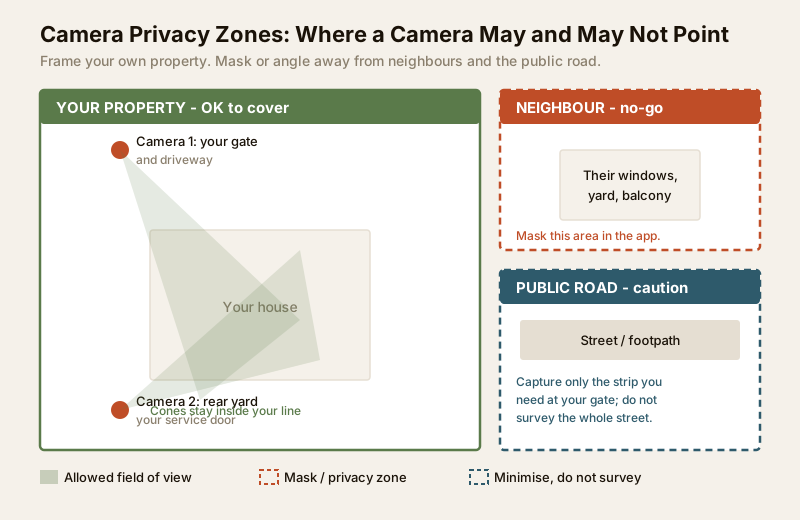
Never, under any circumstances:
- Bathrooms, toilets and changing areas — no camera, ever, for any reason. This is an absolute line.
- Bedrooms — private living space; a camera here is almost never justified and is deeply intrusive.
- Any space where a person has a clear expectation of privacy, including a domestic worker's rest area or a guest room.
Point away from, and mask:
- A neighbour's private windows, doors, balcony, yard or terrace. Your camera should not become their surveillance. Angle the lens down and inward, and use the camera app's privacy-zone masking to black out any part of the frame that catches their property.
- Shared corridors, stairwells and lobbies in apartments — these are the RWA's or society's decision, not an individual flat owner's. Raise it with the committee rather than installing your own.
Point carefully, minimise:
- The public road and footpath. Covering the small strip at your own gate is generally reasonable; turning your camera into a survey of the whole street is not. Capture the minimum you need to see who approaches your entrance.
The table below turns this into a placement rule you can check camera by camera.
| Location | May a camera point here? | Condition / good practice |
|---|---|---|
| Your gate, driveway, porch | Yes | Frame your own approach; angle to your property |
| Your rear yard, service door | Yes | Cover your own weak points; keep staff dignity in mind |
| Your boundary wall (inward) | Yes | Watch your side; avoid overshooting into neighbours |
| Public road at your gate | Minimise | Capture only the strip you need, not the whole street |
| Neighbour window / balcony / yard | No | Mask it out; re-angle so it never appears |
| Shared lobby / stairwell / lift | RWA decision | Raise with the society, do not self-install |
| Bathroom / toilet / changing area | Never | Absolute prohibition, no exceptions |
| Bedroom | Almost never | Only extreme, justified cases; avoid as a rule |
| Domestic worker rest area | No | Respect their private space entirely |
If you are still deciding where cameras go, plan coverage first with the CCTV camera coverage calculator and the blind spot identification assessment — good coverage of your own property rarely needs to spill onto anyone else's.
Notice and consent: tell people they are being recorded
Recording people without their knowledge is both discourteous and, increasingly, a legal expectation to avoid. The fix is simple and cheap.
- Post a visible CCTV notice at your gate and entrance — a small sign stating that the premises are under camera surveillance. This alone signals good faith and often deters intrusion.
- Tell your household — every adult who lives there should know where cameras are and are not.
- Inform domestic staff and regular help plainly and respectfully: where the cameras are, that there are none in their rest or changing areas, and why the system exists (property security, not monitoring their every move). This is about trust, not suspicion — see the dignity section below.
- Visitors and delivery agents are covered by the posted notice; a video door phone that shows it is recording is itself a form of notice.
Video door phone etiquette. A VDP or smart doorbell sits right at the boundary between your home and the public. Keep its field to your doorstep and the immediate approach, not deep into a neighbour's entrance opposite. Answer or acknowledge callers rather than silently recording them, and treat clips of visitors as the personal data they are.
Audio recording: treat it with extra caution
Video and audio are not equal in the eyes of privacy. Recording conversations carries stronger legal sensitivity than recording images, because capturing what people say — often without any expectation of being heard — is far more intrusive than a silent picture of a public approach.
Practical stance for a home:
- Default audio OFF on cameras and doorbells unless you have a clear, specific reason.
- Never place audio-capable devices where private conversations happen — living rooms full of guests, a worker's rest area, anywhere people speak freely.
- If a doorbell records two-way audio, understand it is recording your visitor's voice; keep such recordings brief, secured and un-shared.
- When in doubt, leave audio off. A silent camera that sees the gate does the security job; the microphone rarely adds safety and often adds risk.
Footage is personal data — handle it like a record about people
Every clip of an identifiable person is personal data about that person. India's DPDP Act 2023 reflects a clear direction of travel: personal data should be collected for a purpose, held securely, kept no longer than needed, and not shared casually. You do not need to be a lawyer to apply the spirit of it at home — you need a simple lifecycle discipline.
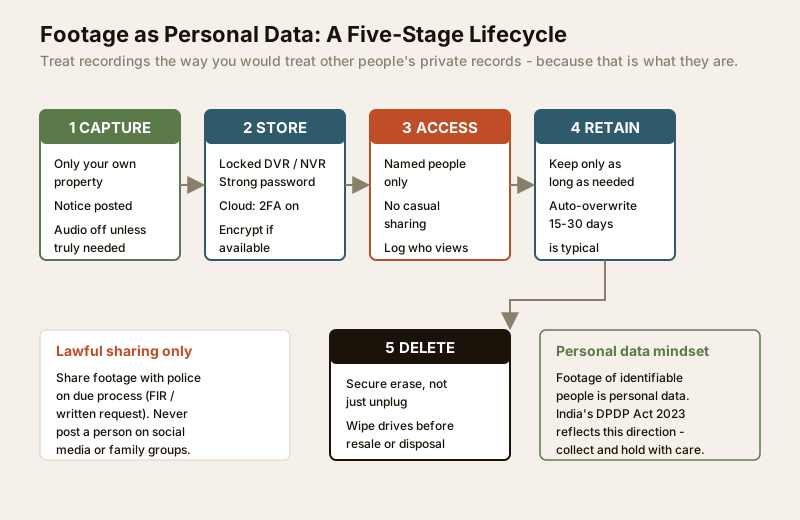
Capture only what your security purpose needs — your property, notice posted, audio off by default.
Store it securely. Do not leave a DVR or NVR on the factory password; do not expose a camera to the internet with default credentials. If footage goes to the cloud, turn on two-factor authentication and use a strong, unique password. Physical recorders should live in a locked spot — plan this alongside the security equipment room planning guide and the security data storage planning guide.
Access should be limited to named people in your household — not shared logins passed around, not casual viewing by anyone who asks. Know who can see the feed.
Retain only as long as you genuinely need it. Most home systems overwrite on a rolling basis; a retention window of roughly 15 to 30 days is a common, proportionate default. Keeping footage forever is not more secure, only more exposed.
Delete securely. When a drive is full it overwrites, which is fine — but before you sell, return or dispose of a recorder or memory card, wipe it properly rather than assuming a deleted file is gone.
Sharing deserves its own rule: hand footage to the police on due process — an FIR, a written or formal request — and keep a note of what you shared and when. Do not post a suspect, a worker, a delivery agent or a neighbour on social media or a residents' WhatsApp group. Naming and shaming can defame an innocent person and expose you to liability; let due process handle it.
The internet-connected camera deserves special mention. A cloud-connected or Wi-Fi camera adds a whole privacy surface: an account that can be breached, a vendor that holds your footage, an app that phones home. Before you rely on one, read the smart home privacy and security guide and treat the camera account with the same care as your bank login. Segregating cameras on the network is covered in the internet and network readiness guide.
Respecting the dignity of domestic workers
Domestic workers spend hours inside your home, often daily, and they are the people your cameras record most. Getting this right is both decent and practical.
- No cameras in their rest, changing or washing areas — the same absolute line as any private space.
- Tell them clearly where cameras are and what they are for, framed as household security, not personal monitoring.
- Do not narrate their every movement back to them or use footage to nitpick. A camera that watches the front door is security; a camera used to police a worker's tea break is surveillance of a person who cannot easily object.
- Keep their images as private as anyone else's — no sharing clips of staff on family chats or with agencies.
Treating the people who work in your home with this dignity is part of doing security responsibly, and it aligns with the same personal-data discipline you apply to everyone else on camera.
The privacy assessment: score your setup
Now assess. Walk each aspect and rate it Good, Partial, or Needs-fix. Any Needs-fix is a stop-and-correct item before your system runs.
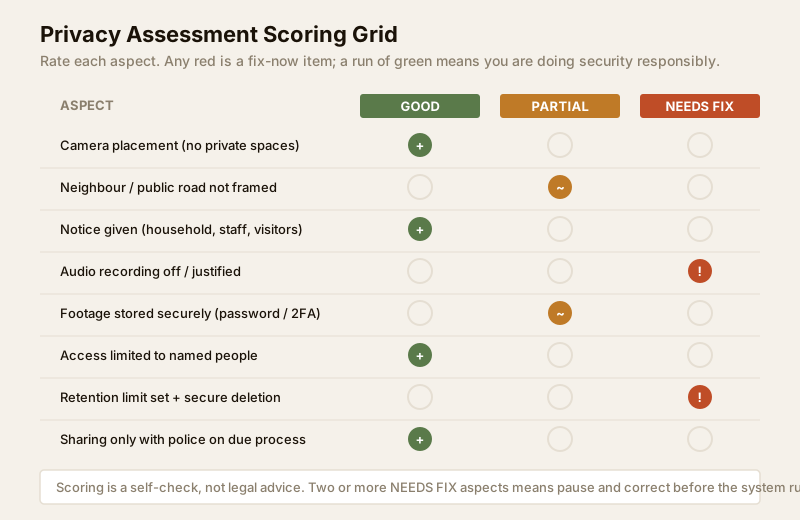
| Aspect | Good practice | Check |
|---|---|---|
| Camera placement | No lens in bathrooms, bedrooms or changing areas | Walk every camera view; confirm none catch a private space |
| Neighbour privacy | No neighbour window, yard or balcony in frame | Masked or re-angled; ask the neighbour if unsure |
| Public road | Only the strip at your gate, not the whole street | Trim the field of view to the minimum |
| Notice | CCTV sign posted; household and staff informed | Sign is visible at the gate; staff have been told |
| Audio | Off by default, justified if on | Confirm mic is disabled unless truly needed |
| Secure storage | Recorder / cloud password-protected, 2FA on cloud | No default passwords; recorder locked away |
| Access control | Only named household members can view | List who has access; remove old shared logins |
| Retention | A set limit, roughly 15-30 days rolling | Check the overwrite / retention setting |
| Secure deletion | Drives wiped before resale or disposal | Plan a wipe step; do not just delete files |
| Lawful sharing | Only with police on due process | No posting people online; keep a sharing note |
If two or more aspects land in Needs-fix, pause and correct them before you consider the system ready. A responsible setup should read mostly Good — that is the whole point of the assessment.
When to bring in a professional
Do this assessment yourself; you know your home and who is in it. But bring in qualified help when the privacy question becomes a legal or commercial one: a neighbour dispute over camera views, a home that doubles as a shop or office recording customers and employees, an RWA-wide CCTV deployment covering many households, or any situation where you are unsure whether the DPDP Act 2023 or another rule applies to you. A data-protection or legal professional can advise on notice, consent and retention for your specific case; a licensed installer should handle the mains-electrical and network side. This guide sets direction — it does not replace advice on a specific dispute.
Re-assess when things change
Privacy, like security, is not a one-time certificate. Re-run this assessment when you add or move a camera, switch to a new cloud provider or app, take on new domestic staff, or if a neighbour raises a concern. A quick annual pass alongside your home security risk assessment keeps the whole system both safe and respectful.
Key takeaways
- Cameras watch your property, not other people. Never in bathrooms, bedrooms or changing areas; mask neighbours; minimise the public road.
- Give notice. A visible CCTV sign plus a plain word to household and domestic staff turns silent recording into fair, good-faith security.
- Audio needs extra caution — it carries stronger legal sensitivity than video; default it off unless clearly justified.
- Footage is personal data. Capture minimally, store securely, limit access, set a 15-30 day retention, delete securely, and share only with police on due process — the DPDP Act 2023 direction applied at home.
- Respect domestic workers' dignity, treat internet-connected cameras as a real privacy surface, and re-assess whenever your setup or household changes.
Pair this with the security data storage planning guide and the smart home privacy and security guide, then browse the full security guides collection.
This is an educational planning guide and not legal advice. It is strictly defensive and privacy-respecting. References to the DPDP Act 2023 and privacy expectations are generic; verify how any specific law applies to your situation, and engage qualified professionals for disputes, commercial deployments or applicable statutory requirements.
Export this guide
Related Guides — Deep-dive reading
Video Door Phone Privacy in India (2026): Aiming, DPDP and Good Neighbours
A door phone films everyone who visits, waits or passes by. This guide covers where to point it, what the DPDP Act asks of you, how long to keep footage, and how to be a good neighbour.
SecurityWhere Not to Install CCTV in India (2026): The No-Go Zones
A camera is a powerful thing, and pointing it at the wrong place can turn a security measure into a serious intrusion. This is the plain, humane list of places a camera must never point, plus the borderline spots to think twice about.
SecurityCCTV Remote Access in India (2026): Watch From Your Phone, Safely
How to view your own cameras from anywhere without leaving the front door open to the internet — change the defaults, use strong credentials and 2FA, keep firmware current, prefer the vendor's secure cloud relay or a VPN, segment the camera network, and treat footage as personal data.
SecurityRelated Tools — Try Free
CCTV Camera Coverage & Count Calculator
Estimate how many CCTV cameras you need, the NVR channels, storage in TB for your retention period, and an indicative all-in cost with GST.
CCTV CalculatorApartment Video Door System Planner
Enter flats, entrances, floors and guard desk for a first-pass building intercom plan — door stations, indoor monitors, guard station, the right architecture and an indicative cost band.
Building PlannerFull-Room BOQ — Living, Bedroom, Kitchen, Bath
Room-wise BOQ across living, bedrooms, kitchen, utility, and bathrooms with line-item pricing.
Full-Room BOQ