
Voice-Controlled Security for Indian Homes: What Is Safe to Say, and What Is Not
Alexa, Google Assistant and Siri can make home security genuinely easier — arm the system on your way to bed, turn on the outdoor lights, ask whether the front door is locked. But some voice commands are dangerous, and a shout through a window can trigger them. The safe line, the honest limits, and the privacy of an always-listening microphone.
"Alexa, goodnight." The lights dim, the outdoor light comes on, the system arms, and you head to bed without touching a thing. Voice control is the friendliest face of a smart home, and for security it can be genuinely useful — hands full of groceries, an elderly parent who cannot reach a keypad, a quick "is the front door locked?" from the sofa. Used well, a voice assistant makes the safe, everyday security actions effortless, which means you actually do them.
But voice is also the smart home's most misunderstood control surface. A microphone that listens to the whole room cannot tell your voice from a shout through the window, a command played off a recording, or a line of dialogue from the television. So the single most important idea in this guide is a line: some security actions are safe to voice-control, and some are dangerous — and the dangerous ones are exactly the ones people are tempted to set up for convenience. Get the line right and voice is a gift, especially for accessibility. Get it wrong and you have wired a spoken password to your front door that anyone within earshot can say.
This guide sits within the smart home security section and is a companion to the pillar, the complete guide to smart home security.
Scope & safety. Voice control is convenience, not a security credential. Most home voice recognition is not a real authentication factor — treat it that way. Never voice-unlock a door or disarm your alarm without strong, separate verification, because a voice command can be shouted, recorded or triggered by a TV. Voice runs on always-listening microphones and usually the cloud: it is a live privacy surface (the DPDP Act 2023 applies to voice recordings) and it goes dead in a power or internet cut, so keep a physical and app fallback for anything that matters. A voice command must never be the only thing standing between a stranger and your locks or your life-safety. Mains wiring and certified fire and lift systems are licensed professional work — you specify and decide.
The safe zone: useful, low-risk voice actions
Start with the good news, because there is a lot of it. A large set of security actions are genuinely improved by voice, and none of them hand a stranger anything. The test is simple: an action is safe to voice-control if the worst a malicious or accidental trigger can do is a minor inconvenience — never open your home or switch off your protection.
- Arming on your way to bed or out the door. "Arm the system", or an "goodnight" scene that arms it along with the lights, is low-risk: the worst an unwanted trigger does is make the alarm more alert, which is the safe direction to fail.
- Turning on outdoor and security lighting. "Turn on the porch light" is pure convenience and a deterrent. Light coming on can only help you.
- Status checks — read-only questions. "Is the front door locked?", "are the windows closed?", "is the garage shut?" These tell you something without changing anything. A read-only query is one of the best uses of voice: it turns a nagging doubt into a two-second answer from the sofa.
- Viewing a camera on a smart display. "Show me the front door" on a screen-equipped speaker lets you glance at the gate without unlocking a phone — a genuinely useful check when the doorbell rings. (Mind the privacy of indoor cameras — more below.)
- Triggering a "goodnight" or "leaving" security scene. One phrase runs a whole safe routine — arm, lights on, doors confirmed locked (reported, not opened) — which is exactly how a well-designed scene should work. Building these safely is covered in security automation scenes.
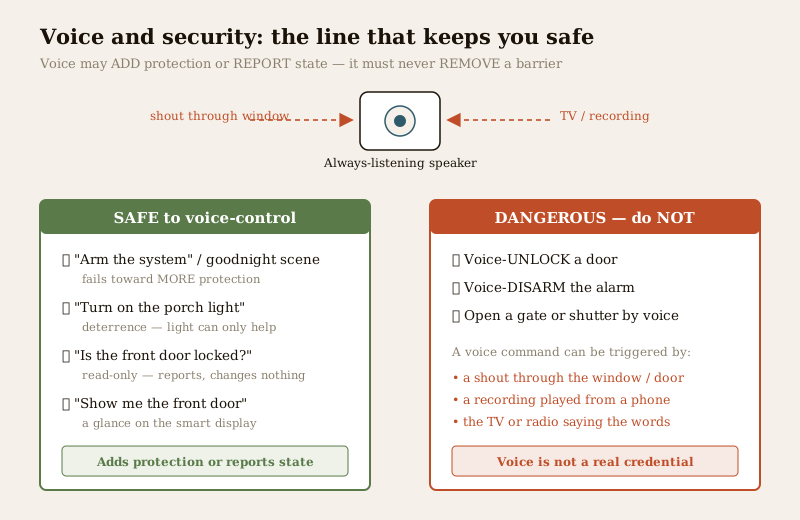
Notice the pattern in the green column above: every safe action either adds protection (arming, lighting) or only reports state (status checks, camera view). None of them removes a barrier. That is the whole safe zone in one sentence.
The danger zone: what you must never voice-control
Now the hard line, and it is worth putting bluntly. Do not enable voice unlocking of a door, and do not enable voice disarming of your alarm, unless it is behind strong, separate verification — and even then, be cautious. Here is why the temptation is a trap.
A home voice assistant listens to the room and acts on any voice that says the wake word and the command. It generally cannot verify who is speaking with anything like the confidence a real lock deserves. That means a "voice-unlock" command can be triggered by:
- A shout through the window or door. Someone standing outside your home, within earshot of the speaker, says the phrase. This is not hypothetical — it is the first thing anyone testing the weakness tries.
- A recording. A voice command played from a phone speaker can be enough. Your voice is not a secret; it is broadcast every time you speak in public.
- The television or radio. Assistants have been set off by voices from ads and news broadcasts saying wake words and commands. A door that a TV can open is not a locked door.
- A near-miss mishear. Assistants mishear. A command that unlocks on a fuzzy match is a command that can misfire.
The principle: voice is a convenience layer, not an authentication factor. A lock's job is to keep out people who are not authorised, and a spoken phrase that anyone in earshot can repeat fails that job at the first test. This is why serious platforms either refuse to voice-unlock at all, or gate it behind a spoken PIN — and even a spoken PIN, said aloud in a room, can be overheard or recorded. The lock-safety side of this is covered in the complete guide to smart locks: a smart lock must resist exactly this kind of casual, no-tools attack, and voice-unlock quietly undoes that.
Disarming is the same danger in a different shape. If "disable the alarm" works by voice alone, an intruder who has already triggered a sensor only needs to say the words to silence your protection. Arming by voice is safe; disarming by voice is not — because one fails toward more protection and the other fails toward none.
| Action | Voice-control it? | Why |
|---|---|---|
| Arm the system / "goodnight" scene | Yes — safe | Fails toward more protection; a stray trigger only makes the house more alert |
| Turn on outdoor / security lights | Yes — safe | Pure convenience and deterrence; light can only help |
| "Is the door locked?" / status check | Yes — safe | Read-only — reports state, changes nothing |
| View a camera on a smart display | Yes — with privacy care | Read-only glance; mind indoor-camera privacy |
| Unlock a door by voice | No — dangerous | A shout, a recording or a TV can trigger it; voice is not a credential |
| Disarm the alarm by voice | No — dangerous | Silences protection on a spoken phrase anyone in earshot can say |
| Open a gate / shutter by voice | No — dangerous | Same failure — a barrier removed by an overheard phrase |
If you take one thing from this guide, take the rule in that table: voice may add protection or report state freely; it must not remove a barrier.
Voice PINs and voice-match: helpful, but not a lock
Two features try to close the gap, and it is worth being honest about how far they go.
- A spoken PIN (say a code before the assistant acts) raises the bar over a bare command — an attacker now needs the number too. But a PIN said aloud in a room can be overheard, recorded once and replayed, or captured by a device already listening. It is a speed bump, not a wall.
- Voice-match / voice profiles try to recognise your voice specifically. This is a real improvement for personalisation — the assistant greeting the right family member — but as a security credential it is weak: voice-match systems can be fooled by good recordings or impersonation, and they are tuned to be forgiving so they do not annoy you, which is the opposite of what a lock needs. Treat voice-match as "probably you", never as "certainly and only you".
The takeaway is not that these are useless — it is that neither turns voice into a proper key. Use them to make convenient, low-stakes actions a little safer; do not let them talk you into voice-unlocking a door.
The honest limits: mishearing, the cloud, and outages
Voice control has three built-in weaknesses that matter for security, and pretending otherwise helps no one.
It mishears. Accents, background noise, a fan, children, the pressure-cooker whistle — assistants get commands wrong, and a security system that acts on a mishear is a liability. This is another reason the danger-zone actions must not be voice-only: a misheard arm is harmless; a misheard unlock is not.
It usually needs the cloud. Most mainstream voice assistants send what you say to a server to understand it, then send the answer back. That means two things. First, it is a privacy pipe (next section). Second, no internet, no voice — and in much of India the internet drops with the power. A voice command is exactly the control that vanishes in the storm-and-outage window an opportunist counts on.
It dies in an outage. The speaker is mains-powered and cloud-dependent. Cut the power or the broadband and your voice control is simply gone. This is the graceful-degradation thread that runs through all smart security: voice must never be the only way to operate anything that matters. Keep the physical control (a key, a keypad, a manual switch) and the app as fallbacks, so that when voice goes dark your security does not. The wider resilience picture — local processing, backup power, non-smart fallbacks — is in smart security hubs.
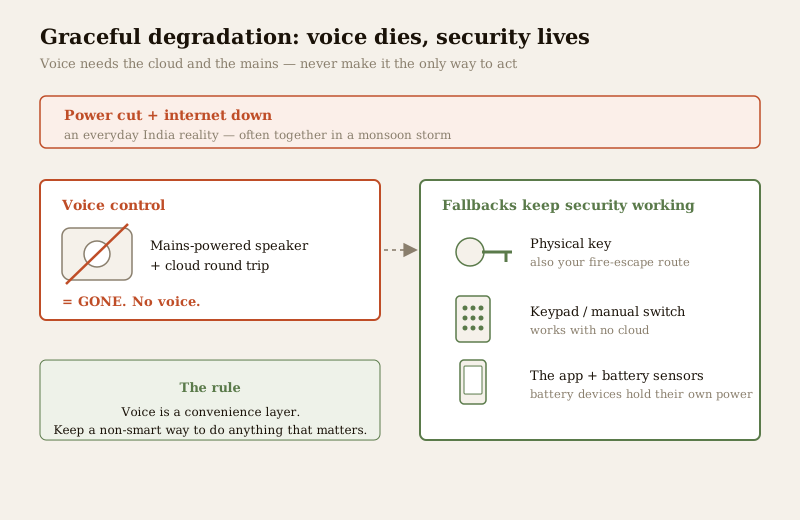
Prefer, where you can, an assistant or platform that keeps local voice processing for basic commands — some ecosystems can handle a subset of commands on-device without a round trip to the cloud. Local voice is better on both counts: it keeps working when the internet does not, and it keeps more of your speech off distant servers. Verify what any specific product actually does locally rather than trusting the marketing.
The always-listening microphone: a real privacy surface
Here is the part people forget the moment the speaker looks helpful. A voice assistant is a live microphone in your home, listening for its wake word — which means it is listening, in some fashion, all the time. For a security-conscious household that is a serious thing to invite in, and it deserves clear eyes.
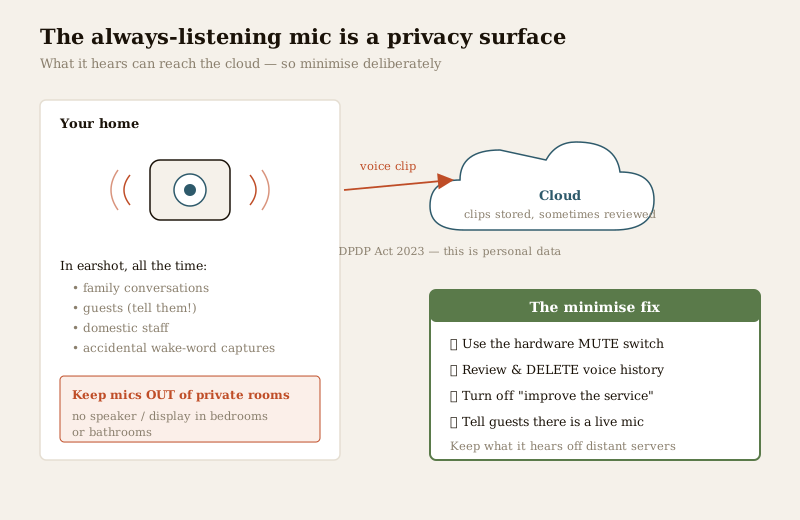
The concerns, stated plainly:
- Clips go to the cloud and can be stored. Snippets of what you say around the device may be recorded, sent to a server, and retained — sometimes to "improve the service", which can mean reviewed by people. Footage of your living room and recordings of your family's voices sitting on an overseas cloud is precisely the kind of data the DPDP Act 2023 treats as personal and worthy of protection.
- Who can hear. Other people in the home, guests, domestic staff — anyone can issue commands, and anyone's conversation near the device is in range. A guest should be told there is a listening device in the room; that is basic courtesy and, increasingly, an expectation.
- Accidental captures. Wake-word misfires mean the device sometimes records when you did not mean it to — a private conversation caught because the TV said something close to the wake word.
None of this means "never use one". It means minimise deliberately:
- Use the mute / mic-off switch on the device when you want genuine privacy — a hardware mute that physically cuts the mic is best. Mute during sensitive conversations.
- Review and delete your voice history in the assistant's app, and turn off "use my recordings to improve the service" where the option exists.
- Keep listening devices out of private rooms — bedrooms and bathrooms especially. A camera-and-mic smart display in a bedroom is a privacy liability that outweighs its convenience.
- Tell guests and household members there is an always-on microphone, so consent is informed.
The full data-handling and DPDP treatment — what is collected, where it goes, your rights, and how to run a home like the small data controller it now is — sits in smart security privacy.
The cyber angle: your assistant account is a master key
There is one more risk that follows directly from convenience. If your voice assistant controls your locks, lights, alarm and cameras, then the account behind that assistant is a master key to your home — and it is only as safe as its password and its second factor.
A compromised assistant account is not a small thing: whoever holds it can potentially see your camera feeds, learn your routines, and operate whatever devices you have linked. The defences are the ordinary but essential ones: a strong, unique password on the account; two-factor authentication turned on; caution about which third-party "skills" or integrations you grant, since each is another door into your setup; and keeping the assistant's firmware and app updated. This is exactly why you do not link the dangerous actions — an attacker who gets the account and finds voice-unlock enabled has been handed your front door. The full treatment of account hardening, network segregation and firmware hygiene is in smart security cybersecurity.
The accessibility upside — done safely
It would be wrong to end on fear, because voice control has a genuinely important benefit: accessibility. For an elderly parent who cannot cross the room to a keypad, a person with limited mobility, or someone with low vision, hands-free voice is not a gimmick — it is independence and dignity. Being able to say "turn on the lights", "is the door locked?", or "arm the house" from a chair or a bed can be the difference between managing alone and not.
The good news is that the entire safe zone is exactly the accessibility zone. Arming, lighting, status checks and viewing a camera — the actions that help a less-mobile person most — are also the low-risk ones. So you can hand someone real hands-free control of their security without touching the dangerous actions. Design it that way: give the person voice for everything that adds protection or reports state, and keep unlocking and disarming on a method that suits them but is not open to the whole room (a keypad code, a phone, a fob, a trusted carer). Accessibility and safety are not in tension here — the safe design is also the kind one.
If you are weighing how voice fits your overall setup, run your home through the home security risk scorecard — and note that leaving arriving-and-leaving automation to location rather than voice, via geofencing, sidesteps the mishear-and-overhear problem entirely for some routines.
Key takeaways
- Voice may add protection or report state — it must never remove a barrier. Arm, light and status-check by voice freely; do not voice-unlock a door or voice-disarm the alarm.
- Voice is not a credential. A command can be shouted through a window, played from a recording, or triggered by the TV, and assistants mishear. Most home voice recognition is not real authentication.
- Voice PINs and voice-match help but are not locks — a spoken PIN can be overheard or replayed; voice-match is tuned to be forgiving. Speed bumps, not walls.
- It needs the cloud and the mains, so it dies in an outage — keep a physical control and the app as fallbacks for anything that matters; prefer local voice where you can.
- An always-listening mic is a real privacy surface — clips can reach the cloud under the DPDP Act 2023; use the mute switch, review and delete history, keep mics out of private rooms, and tell guests.
- The account is a master key — strong password, 2FA, and cautious integrations; a compromised assistant with voice-unlock enabled hands over your door.
- Accessibility is the best reason to use it — and the safe zone is the accessibility zone, so you can give hands-free security without the dangerous actions.
Where to go next
- The pillar: Complete Guide to Smart Home Security and the smart home security section.
- Build safe voice routines: Security Automation Scenes and, for location-based arming, Geofencing for Home Security.
- The lock-safety side: Complete Guide to Smart Locks.
- Resilience, privacy and cyber: Smart Security Hubs, Smart Security Privacy and Smart Security Cybersecurity.
- The wider home-automation hub: Smart Home. Assess your exposure: Home Security Risk Scorecard, or browse all security guides.
References
- Alexa, Google Assistant and Apple Siri / HomeKit — mainstream voice-assistant platforms; the behaviours described (wake-word listening, cloud processing, voice-match, spoken PINs, local processing) vary by product and change over time, so verify what a specific device and account actually do before relying on it.
- Digital Personal Data Protection Act, 2023 (India) — governs personal data, including voice recordings and any home footage processed or stored on a cloud service; check the obligations and your rights for the assistant you use.
- Matter, Thread, Zigbee, Z-Wave and Wi-Fi — smart-home connectivity standards that voice platforms sit on top of; describe device behaviour in outline and verify current capabilities against the standards bodies before relying on any specific claim.
- National Building Code of India (SP 7), Bureau of Indian Standards — fire and life-safety provisions relevant to any electric lock or integrated life-safety notification; verify the current edition via the BIS catalogue, and treat certified fire and egress systems as licensed professional work.
This is an educational overview for planning and decision-making. Voice control is a convenience layer, never a security credential or a substitute for a hardened physical base and certified life-safety systems. Do not voice-unlock doors or voice-disarm alarms without strong separate verification. Mains electrical work, integrated fire and lift systems, and electronic access control are qualified professional work — engage licensed professionals for design, installation and certification, and verify any standard's current status via the BIS catalogue before relying on it.
Export this guide
Related Guides — Deep-dive reading
Geofencing Home Security in India (2026): Convenience Without the Trap
A geofence is a virtual boundary around your home; your phone crossing it can arm the alarm as the last person leaves and light the place up as you arrive. This guide explains the genuinely useful security uses, and the honest caveats: never let a phone's location alone unlock your door, never make a geofence the only thing that arms your home, and treat continuous family tracking as sensitive data.
SecuritySecurity Fire Alarm Integration in India (2026): Smart Alerts, Certified Systems, Fail-Safe Egress
The most important sentence a smart-home designer can say about fire is also the least profitable: a smart-home smoke sensor or fire notification is a helpful add-on, not a substitute for a certified fire-alarm system. This guide draws the line hard — life-safety detection and alarm belongs to the NBC-governed certified system — and then covers the genuinely useful, correctly-scoped automations the smart layer can add on a verified fire signal: unlock for egress, open the gate for the fire tender, light the escape path, stop the away-scene, and notify everyone loudly. All of it fail-safe. None of it in the way of the system that actually saves lives.
SecurityComplete Guide to Security System Cybersecurity in India (2026): Protecting the Systems That Protect You
The cameras, locks, alarms and door phones you install to feel safer are internet-connected computers that can themselves be attacked, and an insecure one is worse than none. This pillar maps the whole attack surface — devices, network, accounts and data, operations — and points to every guide that hardens it.
SecurityRelated Tools — Try Free
Smart Home Cost Calculator
13 device categories across 5 ecosystems (Apple HomeKit, Alexa, Google Home, Mi, Wipro). Live floor-plan that lights up as you add devices, per-room and per-category breakdown.
Smart Home CalculatorHome Security Risk Scorecard
Score your home across six security layers — perimeter, entry points, lighting, detection, alarm and habits — and get a prioritised action plan.
Security ScorecardAcoustic Privacy (STC) Visualizer
Indian healthcare acoustic visualizer — compare wall assemblies and noise sources, see received SPL after STC attenuation, and check FGI 2018 / IS 1950 / NABH speech-privacy compliance with live dual-canvas waveform.
Acoustic Tool