
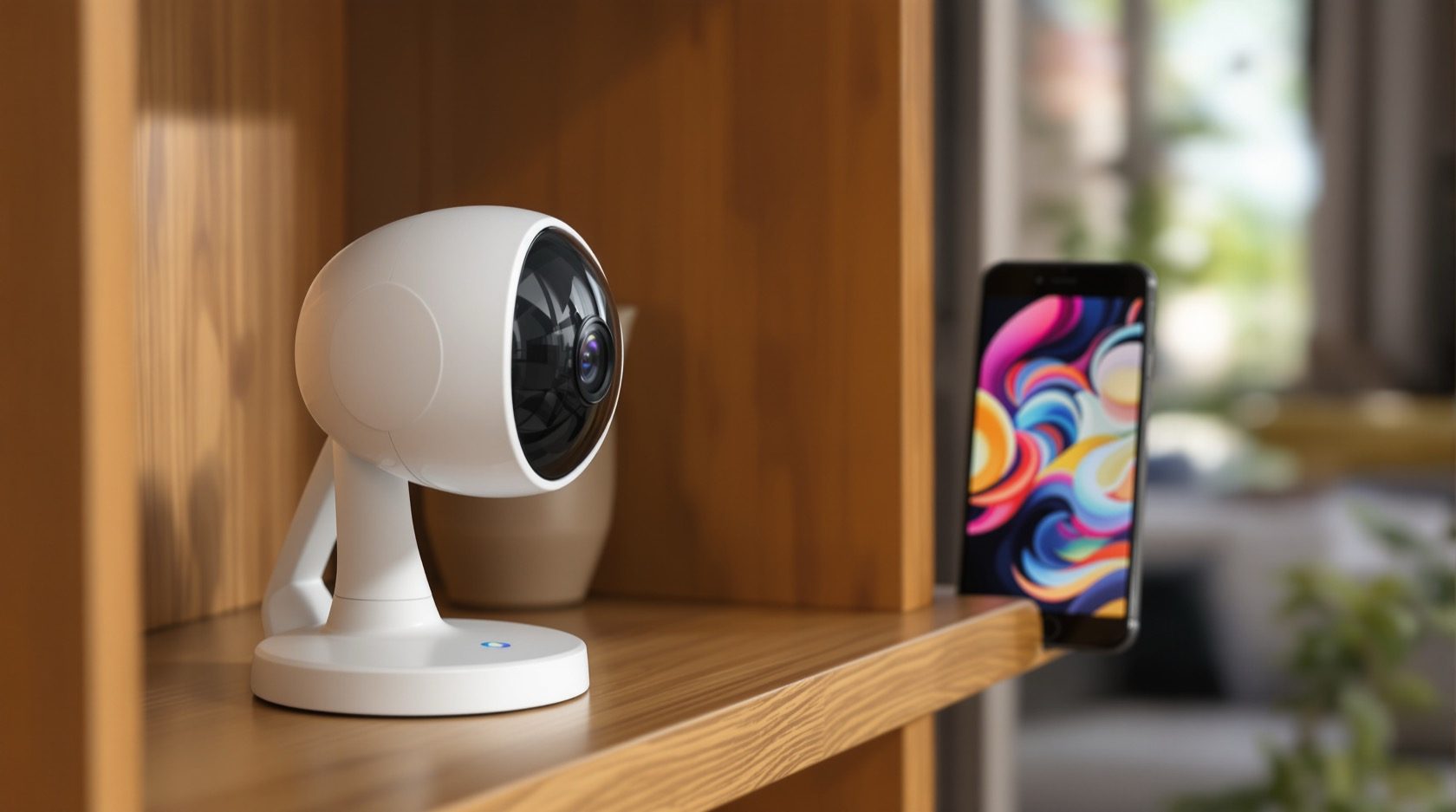
Smart CCTV in India: The App-First Camera, Explained
What actually makes a camera smart, why smart Wi-Fi cameras and video doorbells are so popular, and how to fit them into your smart home safely without mistaking convenience for real security.
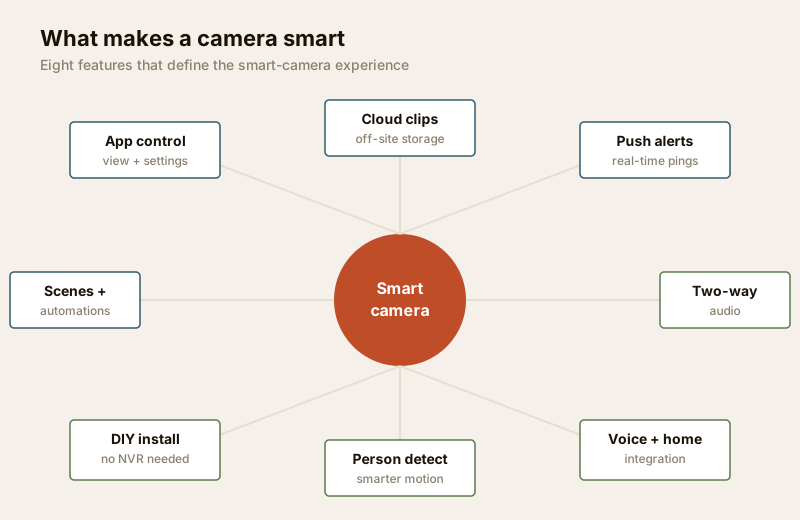
Walk into any electronics store or scroll any online sale and the cameras shouting loudest are smart CCTV — small, cheap Wi-Fi cameras and video doorbells you set up from an app in ten minutes, with instant phone alerts and a chirpy "Alexa, show me the front door". They have made home surveillance feel effortless. But "smart" describes a product experience — app-first, cloud-first, convenient — and that is a different thing from the serious, wired security backbone a property may actually need.
This is the focused explainer in Studio Matrx's CCTV hub. It is deliberately about the consumer smart-camera category and how it fits your smart home — not the analytics technology, which lives in the separate AI-powered CCTV guide. Read this to decide whether a smart camera is the right tool, and how to run it responsibly.
Scope & safety. This guide helps you understand, choose and coordinate. Cameras belong only over your own property and shared areas — never in bathrooms, bedrooms or changing spaces, and positioned to respect neighbours and household staff. Any mains-power or fixed-cabling work is a licensed professional's job.
What actually makes a camera "smart"
A plain camera records. A smart camera is built around your phone and the cloud from the first second. The intelligence and the experience live in an app and a maker's cloud service, not in a recorder box in a cupboard. Strip away the marketing and the smartness comes down to a handful of concrete features.
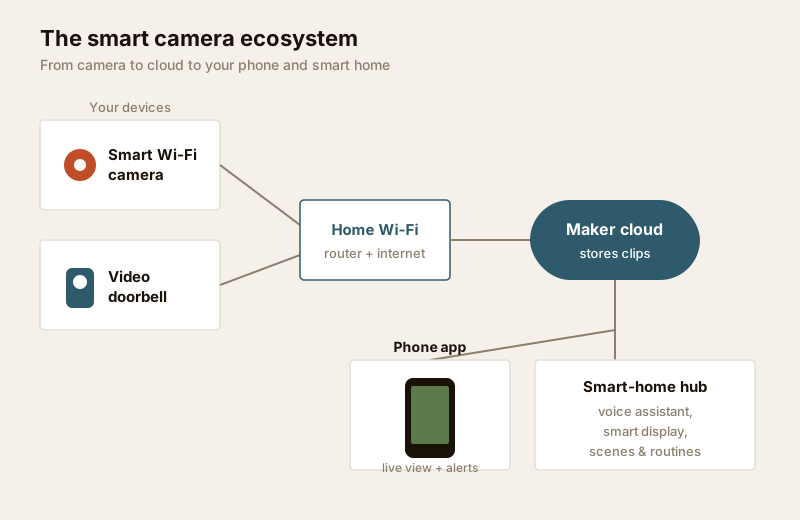
| Feature | What it means in daily use |
|---|---|
| App-first setup & control | Scan a QR code, join Wi-Fi, done in minutes. No NVR, no cabling, no installer visit. Everything — view, playback, settings — lives in one app. |
| Cloud by default | Clips are uploaded and stored on the maker's servers, so footage survives even if the camera is stolen or smashed. Full history usually needs a paid plan. |
| Real-time push notifications | The camera detects motion (or a person) and pings your phone in seconds, with a thumbnail — you react while it is happening, not the next morning. |
| Two-way audio | A built-in mic and speaker let you hear and speak through the camera — greet a courier, warn off a loiterer, talk to family. |
| Smart-home & voice integration | Works with Alexa, Google Home or a hub, so the feed shows on a smart display and reacts to routines and scenes. |
| Scenes & automations | "Arm when everyone leaves", "porch light on when the doorbell sees a person at night" — the camera becomes one trigger in a wider smart home. |
| Easy DIY install | Battery or single-plug power, magnetic or screw mounts. A tenant or first-time buyer can fit one in an afternoon and take it when they move. |
That last point is the whole appeal: cheap, quick, convenient, and no NVR. For renters, small flats, a nursery corner or a shop counter, a smart camera answers a real need without a project.
The popular forms
The category has settled into three shapes you will meet again and again in Indian homes.
- Smart Wi-Fi cameras. The workhorse — a small indoor or weatherised outdoor camera on your Wi-Fi, ₹1,500–₹5,000. Fixed view, motion alerts, night vision, a microSD slot and/or cloud.
- Smart video doorbells. A camera in the doorbell, so you see and speak to whoever is at the gate from anywhere — the single most-loved smart camera for flats and independent homes. Often battery-powered to dodge doorbell wiring, ₹3,000–₹9,000.
- Pan-tilt indoor cameras. A motorised indoor camera that swivels to cover a whole room from one point, often following motion. Popular for living rooms, nurseries and shop floors, ₹1,800–₹4,500.
The real cautions — plan for these before you buy
Smart cameras are genuinely useful, but the convenience hides four trade-offs that decide whether the camera protects you or quietly exposes you.
1. Cloud subscriptions for the full experience
The camera is cheap because the maker expects a recurring cloud plan. Without it you often get only live view and a few seconds of clips — the motion history, longer retention, person detection and rich alerts sit behind a subscription, typically ₹100–₹400 per camera per month. Over three years that can cost more than the camera itself, and multiplies with every camera. A microSD card in the camera stores footage locally for free, but it can be stolen with the camera and cards fail under constant writing. Before you commit to a brand, price the full lifetime — the cloud vs local cost calculator makes the subscription bill visible, and the cloud CCTV guide covers the storage choice in depth.
2. Privacy and account security are now on you
A smart camera streams your home to a company's servers and reaches you through an app account. That account is your security — if someone gets into it, they get into your cameras.
- Use a strong, unique password on the camera app account, never reused from other sites.
- Turn on two-factor authentication (2FA) wherever the app offers it — this is the single biggest protection against account takeover.
- Keep firmware updated — smart cameras get security patches, and an un-patched camera is a known doorway onto your Wi-Fi.
- Read what the app collects and where footage is stored, and choose a maker with a clear privacy stance; footage of your home and family is sensitive personal data under the DPDP Act, 2023.
- Place cameras honestly — cover your own space, respect neighbours and staff. Work through the privacy assessment before mounting anything, and the smart-home privacy & security guide for the wider connected-device picture.
3. Dependence on Wi-Fi, internet and power
A smart camera is only as reliable as three things you may take for granted. Wi-Fi — a weak signal at the gate means dropped clips and missed alerts, so check network readiness and remember uploads eat your (often smaller) broadband upload speed. Internet — if the line drops, cloud recording and remote view stop; a camera with a microSD card keeps recording locally through an outage, which is why local backup matters. Power — India's power cuts take a mains camera offline; battery cameras ride through but then need charging, and any fixed wiring is a licensed electrician's job (see the electrical hub).
4. Where smart cameras fit vs a proper CCTV backbone
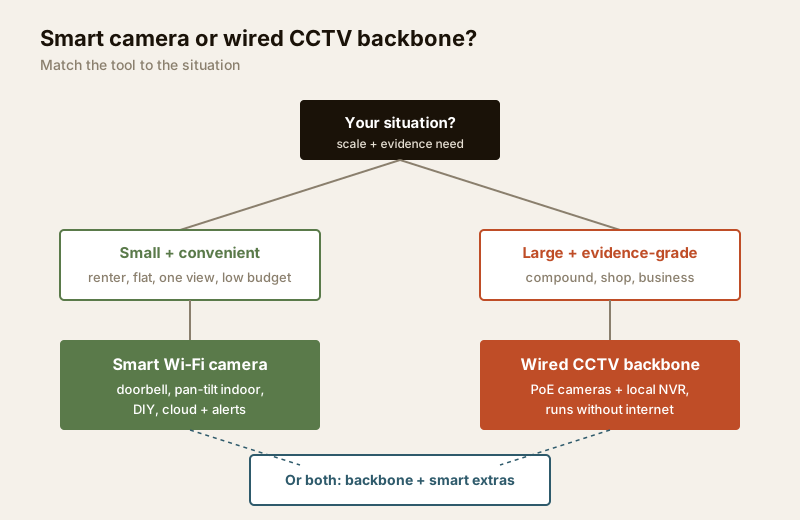
This is the honest heart of it. A smart camera is a point solution — one view, one plug, one app. A proper wired CCTV system (see IP CCTV) is an infrastructure: PoE cameras, a recorder, local storage that keeps running without internet or a subscription, and coverage designed as a whole. For a small flat, a nursery, a shop counter or a renter, smart cameras are the right, proportionate choice. For a large home, a compound, a business, or anywhere footage may be needed as serious evidence, a wired backbone is far more dependable — and you can add smart cameras around it for the convenient extras.
Smart consumer camera vs professional CCTV
| Factor | Smart consumer camera | Professional wired CCTV |
|---|---|---|
| Setup | DIY, app, minutes | Planned install by a professional |
| Cabling | None (Wi-Fi) or one plug | Structured PoE/coax cabling |
| Storage | Cloud (subscription) + microSD | Local NVR/DVR, no fee, owns the data |
| Runs without internet | Limited — cloud features stop | Yes — records locally regardless |
| Ongoing cost | Monthly cloud plan per camera | Mostly one-time; electricity + disks |
| Coverage | Point solution, few cameras | Designed whole-property coverage |
| Reliability for evidence | Good for convenience/alerts | Stronger, continuous, tamper-resistant |
| Best for | Renters, flats, nurseries, shop counters | Large homes, compounds, businesses |
| Portability | Take it when you move | Fixed to the building |
Neither wins outright — they answer different needs. Many well-set-up homes run both: a wired backbone at gate, doors and driveway for dependable coverage, plus a smart doorbell and a pan-tilt indoor camera for the convenient, talk-to-the-courier moments. For the four-block view of how cameras sit alongside alarms and access control, see the smart security systems guide.
Integrating with the wider smart home — responsibly
The joy of a smart camera is that it stops being a lonely gadget and becomes part of a home that reacts. Do it deliberately:
- Use automations that add safety, not surveillance. "Porch light on when a person is seen after dark" is helpful; a camera that narrates every family movement to a shared display is not.
- Keep cameras on a separate Wi-Fi network (a guest or IoT SSID) so a compromised camera cannot reach your laptops and banking.
- Mind who can see the feed. Shared smart displays and family accounts mean a bedroom-adjacent hallway camera can be watched by anyone in the house — place and share access thoughtfully.
- Prefer local processing where the maker offers it, so person-detection runs on the camera rather than uploading everything to the cloud.
When to bring in a professional. A single smart camera is genuinely DIY. But bring in a professional the moment you want fixed mains power or in-wall cabling (a licensed electrician), a whole-property design with wired cameras and a recorder (a CCTV installer), or network segmentation and a secure home network for many devices. Plan the intent yourself; hand the drilling, mains and structured cabling to qualified people.
Key takeaways
- "Smart" is a product experience — app-first setup, cloud by default, push alerts, two-way audio, voice and smart-home integration, easy DIY install — not a measure of security strength.
- The popular forms are smart Wi-Fi cameras, video doorbells and pan-tilt indoor cameras; the appeal is cheap, quick, convenient and no NVR.
- Plan for four cautions: recurring cloud subscriptions for full features, account/privacy security (strong password, 2FA, firmware updates), dependence on Wi-Fi/internet/power, and honest camera placement under the DPDP Act, 2023.
- Smart cameras are a point solution — right for renters, flats, nurseries and shop counters; a wired CCTV backbone is more dependable for large homes, compounds, businesses and evidence-grade needs. Many homes sensibly run both.
- Integrate with the smart home responsibly — a separate IoT network, thoughtful access, automations that add safety not surveillance.
References
- Digital Personal Data Protection Act, 2023 — footage of your home and family is personal data; capture only your own property and shared areas with a legitimate purpose, and secure the account and stored clips.
- Manufacturer privacy policies and app permissions — verify where footage is stored, who can access it, and whether local (on-device) processing is available before choosing a brand.
- National Building Code of India (SP 7), Bureau of Indian Standards, and local municipal bye-laws for any electrical or fixed-mounting aspect of an install; verify the current edition via the BIS catalogue: https://www.services.bis.gov.in/
This is an educational overview. Fixed mains power, in-wall cabling and whole-property CCTV design are qualified professional tasks — engage licensed installers and verify any standard's current status via the BIS catalogue before relying on it.
Export this guide
Related Guides — Deep-dive reading
Cloud CCTV in India: Footage That Survives a Stolen Recorder
How cloud-stored CCTV works, its genuine advantages for Indian homes and shops, the real trade-offs of subscriptions, upload bandwidth and third-party data, and why hybrid local-plus-cloud is usually the smart middle.
SecurityComplete Guide to Security System Cybersecurity in India (2026): Protecting the Systems That Protect You
The cameras, locks, alarms and door phones you install to feel safer are internet-connected computers that can themselves be attacked, and an insecure one is worse than none. This pillar maps the whole attack surface — devices, network, accounts and data, operations — and points to every guide that hardens it.
SecurityLocal Storage vs Cloud CCTV in India (2026): Where Your Footage Should Live
A homeowner's honest head-to-head on where CCTV footage is kept — on a hard disk in the recorder at home, or uploaded to a per-camera cloud plan — across cost, theft resilience, internet dependence, retention, remote access and DPDP privacy, ending in a clear which-suits-whom, with hybrid usually the smartest answer.
SecurityRelated Tools — Try Free
CCTV Camera Coverage & Count Calculator
Estimate how many CCTV cameras you need, the NVR channels, storage in TB for your retention period, and an indicative all-in cost with GST.
CCTV CalculatorSmart Home Cost Calculator
13 device categories across 5 ecosystems (Apple HomeKit, Alexa, Google Home, Mi, Wipro). Live floor-plan that lights up as you add devices, per-room and per-category breakdown.
Smart Home CalculatorCCTV Cloud vs Local Cost Calculator
Compare cloud CCTV subscription against a local NVR + HDD — upfront, 5-year total, monthly fee and break-even.
Cloud vs Local