
Complete Guide to Building Security Systems for Indian Homes
The systems reference — what CCTV, alarms, access control and backup power actually are, and how to choose between the options for an Indian home, flat or gated community.
Ask ten shops what security system you need and you will get ten quotes and no clarity. The confusion is not the products — it is that nobody explains what the categories are. Once you can name the four building blocks and know how to choose within each, every quote becomes readable and every salesperson becomes answerable.
This is the systems reference in Studio Matrx's security guide series (browse them all in the guides library): a plain-language map of the electronic and electromechanical kit that protects an Indian home. It sits alongside the complete home security guide, which frames the strategy, and the security risk assessment guide, which helps you work out what you actually need before you spend a rupee.
Scope & safety. This guide helps you understand and specify. Fire detection and alarm systems, electronic access control with electric locks, mains electrical work, and any structural perimeter (grilles, gates, safe rooms) are life-safety-critical and belong to licensed professionals — plan them, but have them designed, installed and certified by a qualified installer. Nothing here is a substitute for a site-specific design.
The four building blocks
Every home security setup, from a single camera to a gated-community control room, is assembled from four blocks:
1. Surveillance — cameras that see and record (CCTV).
2. Intrusion detection — sensors and an alarm that shout when a boundary is crossed.
3. Access and entry — who gets in, verified at the door or gate.
4. Resilience — the backup power and surge protection that keep the first three alive through a cut or a storm.
Most homes need something from all four. Buying only cameras is the most common mistake — a camera records a break-in; an alarm and a strong door try to stop it happening. Layer them.
Surveillance: CCTV that actually helps
A camera is only as useful as the footage it gives you at 2 a.m. in the rain. The choices that decide that are the camera body, the recorder, and how it is wired and stored.
Choosing the camera body
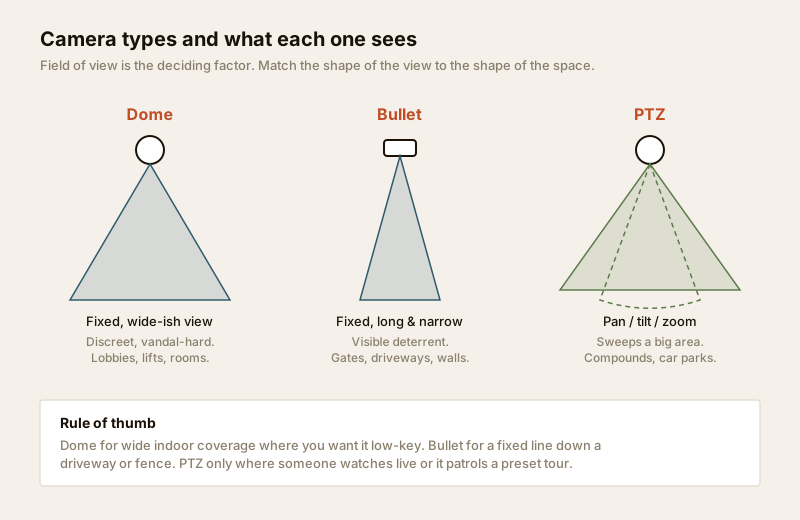
The three shapes you will be offered are dome, bullet and PTZ. They differ in the shape of the view and in how visible they are.
| Camera type | View | Best for | Visibility | Notes for India |
|---|---|---|---|---|
| Dome | Wide, fixed | Lobbies, lifts, indoor rooms, porches | Discreet, hard to knock off | Vandal-resistant housing; good all-rounder |
| Bullet | Long, narrow | Driveways, gates, compound walls, corridors | Obvious — a visible deterrent | Choose a deep sun-shield for glare and rain |
| PTZ (pan-tilt-zoom) | Sweeps a large area, zooms | Large compounds, car parks, society gates | Prominent | Only worth it if someone watches live or it runs a preset patrol |
| Turret / eyeball | Wide, fixed | Entrances, verandahs | Semi-discreet | Less IR glare-back than domes on rainy nights |
Beyond the body, three specs matter far more than the marketing megapixels:
- Resolution. 2MP (1080p) is the sensible floor for a home; 4MP or 5MP gives you the detail to read a face or a number plate at the gate. More resolution means more storage — budget for both together.
- Night vision. Almost every incident happens after dark. Infra-red (IR) range is quoted in metres — match it to the distance you are covering. For a coloured night image, look for "colour night vision" or "full-colour" cameras with a warm-light LED.
- Weatherproofing. Anything outdoors in India must handle dust and monsoon. Look for an IP66 (or higher) rating for dust and heavy rain. Indoor-only cameras used outside will fog, corrode and die in one monsoon.
The recorder: DVR vs NVR
The recorder is the box that stores footage. There are two families, and they are not interchangeable.
- DVR works with older analogue / HD-over-coax cameras, wired with coaxial cable and a separate power line. Cheaper kit, mature, fine for a basic 4-camera home.
- NVR works with IP (network) cameras, wired with a single network (LAN) cable per camera. Sharper, more flexible, and the modern default — especially with PoE (Power over Ethernet), where that one cable carries both power and video, so there is no separate adaptor at each camera.
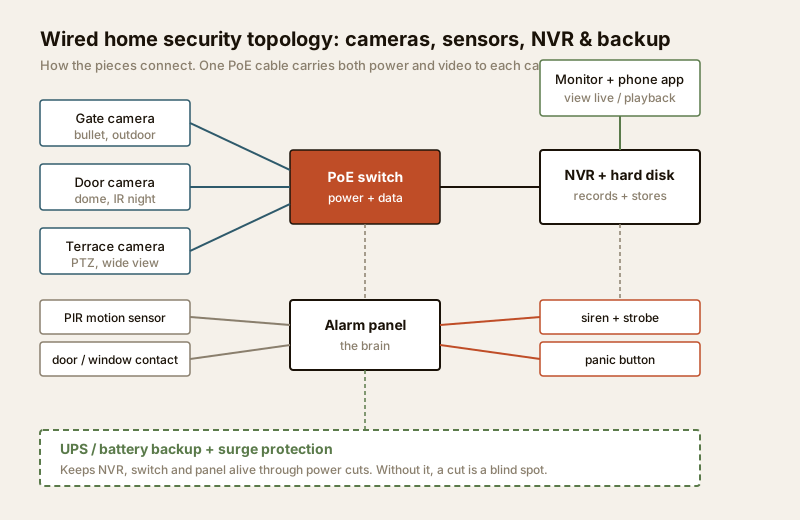
For most new installs, an NVR with PoE cameras is the cleaner choice: one cable per camera, tidier, and easy to expand. The topology above is the shape almost every wired system takes.
Storage and retention
Footage lives on a hard disk inside the recorder, sized for how many days you keep before it overwrites the oldest. A common ask is 15 to 30 days of retention. More cameras, higher resolution and 24x7 (versus motion-only) recording all eat disk faster. Two practical rules:
- Use a surveillance-grade hard disk rated for continuous writing — a desktop drive will fail early under 24x7 load.
- Decide local, cloud, or both. Local storage (disk in the recorder) is private and has no subscription, but a thief can carry the box away. Cloud storage survives that, but costs a monthly fee and needs reliable broadband. Many homes do both — local for everything, cloud for a few critical cameras.
Wired vs Wi-Fi cameras
| Wired (PoE / coax) | Wi-Fi / wireless | |
|---|---|---|
| Reliability | Very high — no signal drops | Depends on Wi-Fi strength |
| Install | Needs cabling (plan at construction) | Quick, minimal cabling |
| Power | From the cable (PoE) or a nearby point | Still needs a power point unless battery |
| Best for | New builds, permanent core cameras | Rentals, retrofits, a spare corner |
| Weak spot | Retrofit cabling is disruptive | Wi-Fi congestion, still needs mains power |
The honest answer for an owned home: wire the permanent cameras (gate, main door, terrace) and use Wi-Fi only for extras or where cabling is genuinely impossible. If you are building or renovating, run the cables now — see the security planning guide for new homes. For an existing home, the security upgrade guide covers retrofits without tearing up walls.
Intrusion detection: the alarm
Cameras watch; an alarm reacts. An intrusion system is a set of sensors reporting to a control panel that triggers a siren and alerts when armed.
The components:
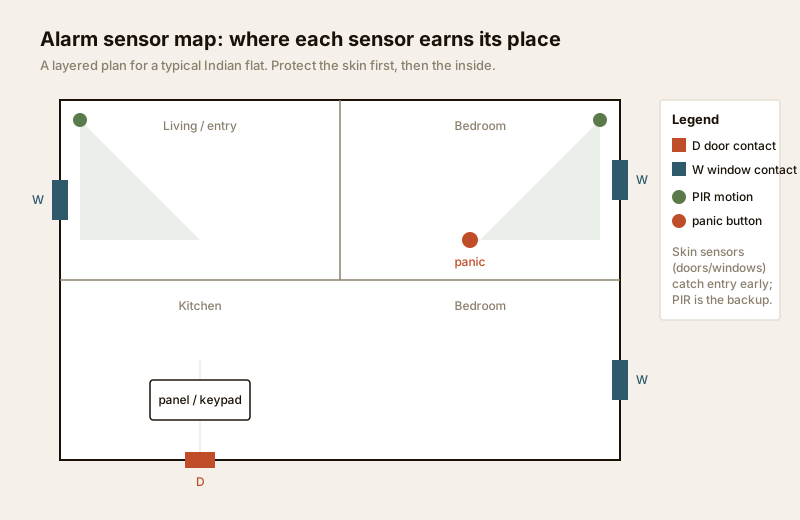
- Control panel — the brain. It arms/disarms, watches the sensors and decides when to sound the alarm. Often has a keypad and a phone app.
- PIR motion sensors — detect body heat moving across a room. The interior backstop. Pet-immune versions ignore small animals.
- Magnetic door/window contacts — two-part sensors that trip when a door or window opens. These protect the skin of the home and catch entry earliest, which is why they matter most.
- Glass-break and vibration sensors — hear the frequency of breaking glass or feel someone working on a shutter, grille or wall — useful on large windows and weak points.
- Siren and strobe — the loud, visible deterrent that ends most intrusions the moment it fires.
- Panic button — a fixed or wearable button that raises an alarm instantly, day or night, armed or not. A genuinely valuable addition for elderly residents living alone.
The design principle in the map above: protect the skin first (doors and windows), then use motion sensors as the interior backup. Someone who slips past a window contact still crosses a PIR. This is why the complete home security guide keeps returning to layers.
Access and entry management
This block decides who gets through the door or gate. Some of it is homeowner-friendly plug-in kit; some of it is life-safety-critical and must be professionally installed.
- Video door phones (VDP) — the Indian home staple. You see and speak to whoever is at the gate before opening. Modern units record snapshots, connect to your phone and pair with the society intercom.
- Smart locks — keypad, fingerprint, RFID card or app-operated locks for the main door. Convenient and good for controlling who has access (revoke a code instead of changing a lock). Choose one with a mechanical key override and a replaceable battery with a low-battery warning, so a flat battery never locks you out.
- Intercoms — wired or IP systems linking flats to the gate or security desk. In apartments this is usually a society-level system, not an individual buy.
- Gate automation — motorised sliding or swing gates operated by remote, keypad or phone. The motor and controller are electromechanical and should be installed by the supplier's technician, with manual release for power cuts.
- Biometric and RFID access — fingerprint or card readers on doors. At a homeowner level these are usually built into a smart lock; at a building or society level they become full access control systems.
Life-safety line. Where an electric or electromagnetic lock controls a door — especially a shared or main-entry door — it becomes life-safety-critical: it must fail-safe (unlock) on fire alarm and power loss so nobody is trapped, and it must be wired and certified by a licensed installer. This is not DIY territory. For the design of a full access system, see the access control system designer and price it with the access control cost estimator. Architects planning this into a building should read the security design guide for architects.
Monitoring: who is actually watching?
A system that alerts an empty phone is only half a system. There are two models:
- Self-monitored — the app on your phone sends alerts; you (or a family member) respond, call a neighbour, the guard or the police. No monthly fee, full control, but it depends entirely on someone seeing and acting on the alert.
- Central-station monitored — a professional monitoring service watches your alarms 24x7 and follows an agreed response (call you, call listed contacts, dispatch a response team). A monthly subscription, and worth it for homes left empty for long stretches or where nobody can respond quickly.
For most Indian homes, self-monitoring through the app is the starting point; a gated community or a frequently-empty home should look at central-station or the society's own manned control room. Coordinate with your RWA or society management — many gated communities already run CCTV at the gate and a manned desk you can plug into.
Resilience: power and standards
The block everyone forgets until the first power cut. In India, mains supply is not guaranteed, and a security system that dies with the lights is a system with a scheduled blind spot.
- UPS / battery backup. Put the NVR/DVR, the PoE switch or router, and the alarm panel on a UPS or an inverter circuit. Even a small UPS buys the hours that cover the typical evening cut. Alarm panels usually have their own rechargeable backup battery — check it is present and healthy.
- Surge protection. Monsoon lightning and grid spikes kill electronics. A surge protector on the security circuit is cheap insurance; mains-side protection is electrical work for a licensed electrician — see the electrical hub.
- Integration and standards. Keep it simple: pick systems that talk to a single app where possible, and treat "smart" integration as a convenience, not the security itself. For connecting this into home automation safely, the smart home hub and the smart home security systems guide cover the how, and the smart home privacy and security guide covers keeping the cameras themselves from becoming the weak point.
A systems selection matrix
Use this to match a setup to your home. Sizes are indicative starting points, not a spec — confirm against your own risk assessment.
| Home type | Surveillance | Intrusion | Access | Monitoring | Backup |
|---|---|---|---|---|---|
| 2BHK flat (gated) | 2–3 IP cameras (door, balcony, common if allowed) | Door/window contacts + 1 PIR + panic | Video door phone; smart lock optional | Self-monitored app | Small UPS on NVR + router |
| Independent villa | 4–8 cameras (gate, doors, perimeter, terrace) with PoE NVR | Full contacts + PIR + glass-break; siren | VDP + smart lock + gate automation | Self or central-station | UPS + surge; inverter circuit |
| Home left empty often | Cameras + cloud backup on critical feeds | Full alarm, professionally set | Smart lock with remote access | Central-station recommended | UPS + robust battery on panel |
| Gated community (RWA) | Gate PTZ + perimeter cameras, control room | Boundary sensors; guard-linked panic | Boom barrier, RFID/ANPR, VDP to flats | Manned control room | Genset + UPS on control room |
When to bring in a professional
Specify and plan yourself, but hand these to a licensed professional to design, install and certify:
- Fire detection and alarm — always. It is life-safety-critical and, in many buildings, legally required; design and certification are per the National Building Code fire and life-safety provisions and local municipal bye-laws.
- Electronic access control and electric/magnetic locks — they must fail-safe on fire and power loss; wrong wiring can trap people.
- Mains electrical work — the security circuit, surge protection at the board, and any new wiring.
- Structural perimeter — grilles, gates, safe rooms and their mounting.
A good installer will also do a site survey, right-size storage and backup, and hand over a system you understand. If you are still deciding scope, run the home security risk scorecard first — it turns a vague worry into a prioritised list.
Key takeaways
- Every setup is four blocks — surveillance, intrusion detection, access, and resilience. Buy across all four, not just cameras.
- For CCTV, the specs that matter are resolution, night vision (IR range) and weatherproofing (IP66+); the modern default is an NVR with PoE IP cameras, sized with a surveillance-grade disk for 15–30 days.
- Alarms protect the skin first (door/window contacts) with PIR motion as the interior backup; a panic button is a small addition with outsized value.
- Wire the permanent cameras; use Wi-Fi for extras. Put the recorder, network and panel on UPS and surge protection — a power cut must not be a blind spot.
- Fire alarm and electric access locks are life-safety-critical — plan them, but have them designed, installed and certified by a licensed professional.
References
- National Building Code of India (SP 7), Bureau of Indian Standards — fire and life-safety provisions relevant to detection, alarm and means of egress; verify the current edition via the BIS catalogue: https://www.services.bis.gov.in/
- Local municipal building bye-laws and your RWA / society security policy for CCTV, access control and gate management obligations.
This is an educational overview. Fire detection and alarm systems, electronic access control and electric locks, and mains electrical work are qualified professional tasks — engage licensed installers and verify any standard's current status via the BIS catalogue before relying on it.
Export this guide
Related Guides — Deep-dive reading
Smart Home Security Systems in India: CCTV, Sensors, Alarms & AI
How to think in layers — perimeter, entry, interior — and build a system that actually protects an Indian home: AI cameras, video door phones, door and glass-break sensors, alarms, panic buttons, gate automation, monitoring and DPDP-aware privacy, with real brands and rupee costs.
Smart HomeHow to Choose a CCTV Camera (2026): The Homeowner's Decision Guide for India
Cut through the spec-sheet noise and choose the right CCTV camera for each spot around an Indian home. What actually matters — sensor and low-light performance, lens and field of view, form factor, IP and IK ratings, honest smart features — and the marketing claims to ignore.
SecurityElectrical Safety for Security Systems in India (2026): Powering It Without Peril
A homeowner's guide to the power side of home and RWA security systems, CCTV, alarms, gates, access control and NVRs, done so it protects you instead of quietly becoming a shock or fire hazard. What makes a supply safe, what to insist on, and why the mains work belongs to a licensed electrician.
SecurityRelated Tools — Try Free
Security Backup Power Calculator
Size a UPS/inverter and battery to keep CCTV, NVR, router and alarm running through a power cut — load, Ah, VA and cost.
Backup PowerAccess-Control Battery-Backup Calculator
Size the standby battery so an access system keeps running through a power cut, with an egress life-safety note.
Battery BackupHome Security Risk Scorecard
Score your home across six security layers — perimeter, entry points, lighting, detection, alarm and habits — and get a prioritised action plan.
Security Scorecard