
Geofencing Home Security in India (2026): Convenience Without the Trap
A geofence is a virtual boundary around your home; your phone crossing it can arm the alarm as the last person leaves and light the place up as you arrive. This guide explains the genuinely useful security uses, and the honest caveats: never let a phone's location alone unlock your door, never make a geofence the only thing that arms your home, and treat continuous family tracking as sensitive data.
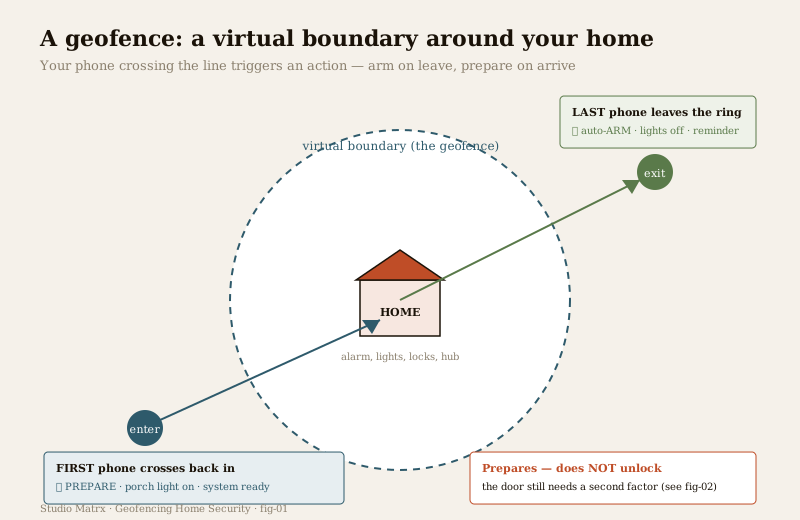
You pull out of the driveway, get halfway to work, and the small doubt arrives: did I arm the alarm? Did the garage shutter go down? For most Indian households the honest answer is that arming the system is a manual habit, and manual habits get forgotten on the mornings you are already late. Geofencing is the smart-home answer to exactly that gap. A geofence is a virtual boundary drawn around your home on a map; when your phone's location crosses that line, the system runs an action. The last family member drives out of the ring and the alarm arms itself. You cross back in at dusk and the porch light is already on, the system awake and ready. No forgetting, no fumbling for a keypad in the dark.
Used well, it is one of the most genuinely convenient tricks in a smart security system. Used carelessly, it is also one of the easiest ways to hand your front door to whoever is holding a phone. This guide is about getting the first without the second. It is a companion to the pillar, the complete guide to smart home security, and sits within the wider smart home security section.
Scope & safety. Smart is convenience, not a guarantee. A geofence is a helpful trigger with real failure modes, so it must degrade gracefully and never be the only thing that protects your home. The auto-unlock and auto-disarm side is genuinely risky — a phone is not a person, so location alone must never open your main door. Continuous location tracking of your family is sensitive personal data, and the DPDP Act 2023 applies wherever it is stored. A geofence is never a substitute for certified life-safety, and it must never voice- or location-unlock a door in a way that could trap someone in a fire. Mains wiring, certified fire and lift work are for licensed professionals — you specify and decide.
What geofencing actually is
Strip away the jargon and a geofence is just a circle (or a shape) on a map, centred on your home, with a chosen radius. Your phone's location app knows when you cross into or out of that shape, and it tells your smart-home platform: "this person has entered" or "this person has left." The platform then runs whatever automation you have attached to that event.
That is the whole idea, and its simplicity is the point. The geofence does not know why you crossed the line or who you really are — it only knows that a registered phone moved across a boundary. Everything sensible about geofencing, and everything dangerous about it, flows from that one limitation: the phone is a stand-in for the person, and sometimes the stand-in is wrong.
The genuinely useful security uses
Within its limits, geofencing does several things that make a home safer and life easier:
- Auto-arm when the last person leaves. This is the strongest use, and the safest one, because arming a home does not open anything — the worst case of an over-eager arm is a false alarm you clear, not an intruder let in. When the last registered phone crosses out of the ring, the system arms. The forgotten-to-arm problem simply disappears.
- Prepare the home as you arrive. As the first phone crosses back in, the porch and hall lights come on, the driveway light warms up, cameras pre-roll, and the alarm's entry delay stands ready. You walk up to a lit, welcoming house instead of fumbling at a dark door — a real safety benefit in itself, since a well-lit approach is a deterrent.
- Presence-based lighting. Lights that follow people — on as you arrive, off when the house empties — both save power and make an empty home look less obviously empty at the edges of the day. (For making a genuinely empty home look occupied over days away, that is a different technique; see occupancy simulation.)
- "You left the garage open" reminders. Because the geofence knows you have just driven off, it is the perfect moment to check the state of things and nudge you: the garage shutter is still up, a door sensor still reads open, a window is ajar. A reminder as you leave the ring is far more useful than discovering it at midnight.
Notice the pattern in the good uses: they either arm and secure (which is safe to automate) or they prepare and inform (lights, reminders, readiness). None of the safe uses open anything. That distinction is the heart of doing geofencing well.
The honest caveats
Geofencing is sold on convenience, and the convenience is real. But three caveats decide whether it makes your home safer or quietly weaker. These are not fine print — they are the whole design.
Caveat 1: auto-unlock and auto-disarm on arrival is the risky part
This is the one that matters most, so it is worth stating bluntly. The convenient dream — walk up and the door unlocks itself, the alarm disarms itself — is exactly the feature you should not build on geofence alone. The reason is simple: the geofence does not authenticate you, it detects your phone. Any of the following disarms your home the moment it crosses the line:
- a stolen or lost phone carried by whoever now has it;
- a spoofed or faked GPS location, which is not exotic — location can be simulated;
- a phone left in a parked car inside the ring, so the door thinks you are home when you are not;
- a handset lent to a child or a visitor who now trips the disarm without meaning to.
In every case the door opens for the phone, not for the person, with no PIN, no key and no second check. That is the failure that turns a convenience into a break-in.
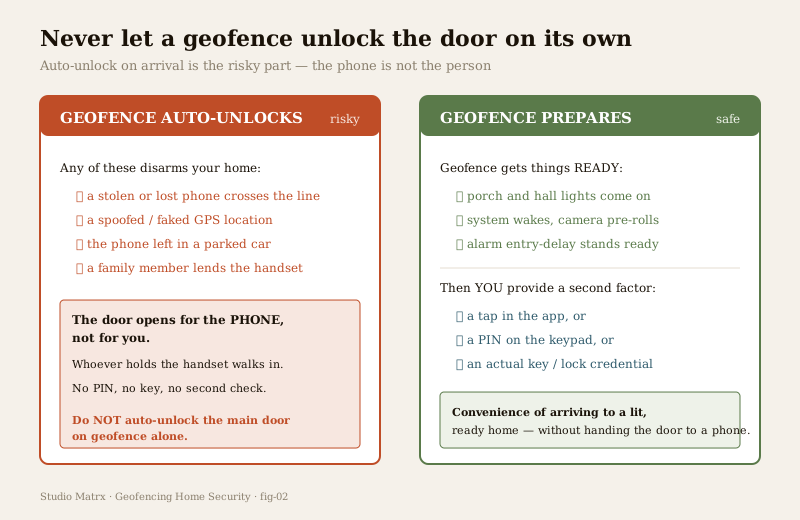
The fix keeps the convenience and removes the danger: let the geofence PREPARE, and require a second factor to UNLOCK or DISARM. As you arrive, the geofence lights the house, wakes the system and stands the entry delay ready — but the actual disarm needs a tap in the app, or a PIN on the keypad, or a real lock credential; and the door itself needs an actual key or lock credential to open. You still arrive to a lit, ready home. You simply do not hand the lock to a piece of glass in someone's pocket. The rule to carry away is absolute: never auto-unlock the main door on geofence alone. For how the lock layer itself should be chosen and hardened, see the complete guide to smart locks.
Caveat 2: reliability — a geofence can fire late, early, or not at all
The second caveat is that the trigger itself is not dependable. Phone location is an approximation stitched together from GPS, Wi-Fi and cell signals, and it drifts. The app that watches the boundary is at the mercy of the phone's operating system, which is ruthless about saving battery. So a geofence event can:
- fire early or late as the location estimate wanders near the boundary — sometimes it even fires twice;
- not fire at all because battery-saver mode has throttled background location to save power;
- never be sent because the operating system killed the app, the phone was off or out of signal, or the app was swiped away from the recents list.
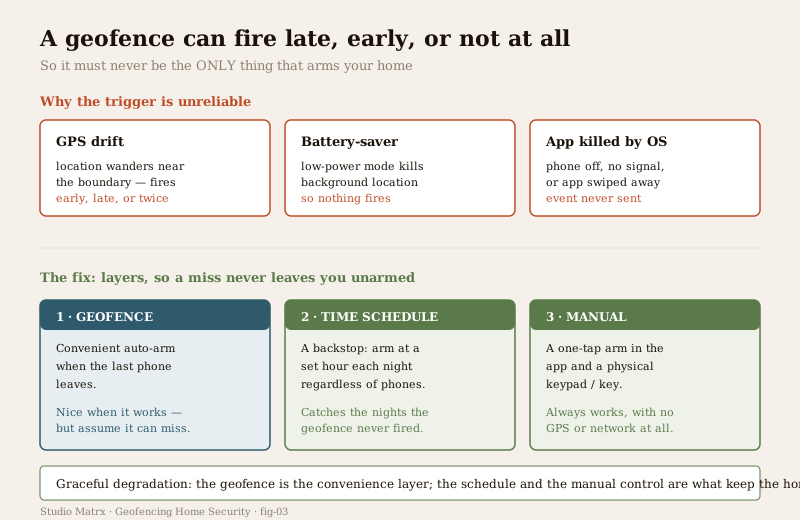
None of this means geofencing is useless — it means you must never make it the only thing that arms your home. Build it as the convenience layer on top of two dependable layers beneath:
1. A time-schedule fallback. Arm at a set hour every night regardless of where any phone is. This catches every night the geofence quietly failed to fire.
2. A manual control. A one-tap arm in the app and a physical keypad or key that work with no GPS and no network at all.
This is graceful degradation in practice: the geofence is nice when it works, the schedule catches the misses, and the manual layer always works. The same principle runs through every automation you build — design the scenes so a missed trigger costs you convenience, never protection. See security automation scenes for building these layered routines, and smart security hubs for why a local hub keeps the schedule and manual controls alive even when the internet is down.
Caveat 3: multi-person households
The last caveat is arithmetic. In a house with more than one person, "arm when I leave" is wrong — it would arm the system on the family while someone is still inside. The correct logic is:
- arm only when the LAST person leaves the ring, and
- prepare only when the FIRST person arrives back.
That only works if every family member's phone is enrolled in the system and reliably tracked. Miss one person's phone — a spouse whose battery-saver is on, a teenager who force-quit the app, a guest with no phone in the system — and the logic breaks: the house arms with someone home, or fails to arm when it should. This is another reason the schedule and manual fallbacks are non-negotiable, and a reason to keep the enrolled-phone list current as people, and phones, come and go.
The privacy dimension
Geofencing runs on continuous location tracking of your whole family, and that is sensitive personal data by any measure. Before you enable it, be clear-eyed about the questions it raises:
- Who holds the location history, and where? If the platform logs everyone's comings and goings to a cloud, that is a detailed record of your family's daily movements sitting on someone else's server. Prefer platforms that keep presence detection local where you can, and know what a cloud service retains where you cannot.
- The DPDP Act 2023 applies. Personal location data is exactly the kind of information the Digital Personal Data Protection Act governs. Know what the service collects, how long it keeps it and whether it is shared.
- Children's phones. Enrolling a child's phone for presence logic is also, unavoidably, tracking the child. Treat that deliberately, not as an accidental by-product of an automation.
- Consent within the household. Everyone whose phone is in the system is being tracked by it. That should be a shared, informed decision, not something one person switches on for the household.
The wider data-handling picture — what smart security systems collect and how to keep it in check — is covered in smart security privacy.
The cyber angle
There is one more risk that is easy to miss. Because a geofence account knows precisely when your home is empty and when it is occupied, a compromised account can watch your family's comings and goings — and an empty-house pattern is the single most valuable thing to a burglar. The account that controls your geofence is therefore worth protecting like the keys it effectively is: a strong, unique password, two-factor login, and the same hygiene you would give any account that guards your home. The full treatment — default passwords, firmware, network segregation, account hardening — is in smart security cybersecurity.
Do and don't
| Do | Don't |
|---|---|
| Use the geofence to auto-arm when the last phone leaves | Auto-unlock or auto-disarm the main door on geofence alone |
| Let arrival prepare the home — lights, readiness, cameras | Treat the phone as proof of who is arriving |
| Require a second factor (app tap, PIN, key) for the actual unlock | Skip the second factor because it is "less convenient" |
| Keep a time-schedule fallback and a manual control | Make the geofence the only thing that arms the home |
| Enrol every household phone and keep the list current | Assume one person's phone represents the whole family |
| Prefer local presence detection; know what a cloud retains | Ignore that continuous tracking is DPDP-governed personal data |
| Harden the account — strong password, two-factor login | Reuse a weak password on the account that knows when you are out |
| Assume the geofence can fire late, early, or not at all | Trust battery-saver-throttled location for anything critical |
Key takeaways
- A geofence is a virtual boundary; your phone crossing it triggers an action. Its safe, strong uses are auto-arming when the last person leaves, preparing the home as you arrive, presence-based lighting and "you left it open" reminders.
- Auto-unlock and auto-disarm on arrival is the risky part. A lost, spoofed or left-behind phone can disarm the home. Let the geofence PREPARE, but require a second factor — app tap, PIN, or real key — to unlock or disarm, and never auto-unlock the main door on geofence alone.
- A geofence is unreliable as a trigger — GPS drift, battery-saver and the OS killing the app mean it can fire late, early, or not at all. Never make it the only thing that arms your home; keep a time-schedule fallback and a manual control.
- Multi-person households need the LAST-out / FIRST-in logic, which only works when every family phone is enrolled and tracked.
- Continuous family tracking is sensitive data. Know who holds the location history, mind children's phones, and remember the DPDP Act 2023 applies.
- The account is a target. A compromised geofence account reveals exactly when your home is empty — harden it like the key it is.
Where to go next
- The pillar: Complete Guide to Smart Home Security and the smart home security section.
- Build it safely: Security Automation Scenes, Smart Security Hubs and the Complete Guide to Smart Locks.
- Related presence tricks: Occupancy Simulation and Voice-Controlled Security.
- The data and account side: Smart Security Privacy and Smart Security Cybersecurity.
- Assess your exposure: Home Security Risk Scorecard, or browse all security guides.
References
- Digital Personal Data Protection Act, 2023 (India) — governs personal data, including the continuous location history that geofencing collects for every enrolled family member; check what your platform collects, retains and shares.
- Matter, Thread, Zigbee, Z-Wave and Wi-Fi — smart-home connectivity and interoperability standards that the presence and automation layer runs over; describe device behaviour in outline and verify current versions and real device certification before relying on any specific claim.
- National Building Code of India (SP 7), Bureau of Indian Standards — fire and life-safety provisions relevant to any electric lock or automated door in an escape route; verify the current edition via the BIS catalogue, and treat certified fire and egress systems as licensed professional work.
This is an educational overview for planning and decision-making. Geofencing is a convenience layer, never a substitute for a hardened physical base, a dependable manual arm, or certified life-safety systems, and it must never unlock a door on location alone. Mains electrical work, integrated fire and lift systems, and electronic access control are qualified professional work — engage licensed professionals for design, installation and certification, and verify any standard's current status via the BIS catalogue before relying on it.
Export this guide
Related Guides — Deep-dive reading
Security Fire Alarm Integration in India (2026): Smart Alerts, Certified Systems, Fail-Safe Egress
The most important sentence a smart-home designer can say about fire is also the least profitable: a smart-home smoke sensor or fire notification is a helpful add-on, not a substitute for a certified fire-alarm system. This guide draws the line hard — life-safety detection and alarm belongs to the NBC-governed certified system — and then covers the genuinely useful, correctly-scoped automations the smart layer can add on a verified fire signal: unlock for egress, open the gate for the fire tender, light the escape path, stop the away-scene, and notify everyone loudly. All of it fail-safe. None of it in the way of the system that actually saves lives.
SecurityComplete Guide to Security System Cybersecurity in India (2026): Protecting the Systems That Protect You
The cameras, locks, alarms and door phones you install to feel safer are internet-connected computers that can themselves be attacked, and an insecure one is worse than none. This pillar maps the whole attack surface — devices, network, accounts and data, operations — and points to every guide that hardens it.
SecurityThe Complete Guide to Smart Home Security in India
The umbrella guide to smart home security for Indian homes — what it really is (convenience, remote awareness and automation layered onto real security, not a replacement for it), the five layers of a system mapped to the whole library, and the two layers people skip: privacy and cybersecurity.
SecurityRelated Tools — Try Free
Home Security Risk Scorecard
Score your home across six security layers — perimeter, entry points, lighting, detection, alarm and habits — and get a prioritised action plan.
Security ScorecardAccess-Control Schedule Generator
Build the time schedules that decide when each access group can enter — an editable list for your integrator.
Time SchedulesDoor Security Rating Calculator
Score your main door out of 100 across leaf, frame, lock and hardware — and see the top upgrades.
Security Tool