
CCTV Privacy Masking in India (2026): Blanking Out What You Must Not Record
How privacy zones black out the parts of a scene a camera must never capture — a neighbour's window, a balcony, a public road, an ATM PIN pad — the right way to be a good neighbour and to meet the DPDP Act, 2023.
CCTV privacy masking is the feature that lets you paint a solid block over part of a camera's view so that area is never recorded, never seen on the live feed, and never stored — even though the camera is physically pointed at it. It is the polite, lawful, and often necessary answer to a simple problem: your camera, aimed at your own gate, unavoidably also sees a slice of your neighbour's balcony, a stretch of the public road, or the ATM keypad next to your shop counter. A privacy mask blanks that slice out.
This guide sits in Studio Matrx's CCTV hub as the dedicated explainer on privacy zones. It is a protective, privacy-first feature — the right way to be a good neighbour — and it pairs directly with the CCTV privacy and consent assessment, where you decide what should be masked, and the audio recording guide, which covers the separate and legally sensitive question of sound.
Scope & stance. This guide helps you plan and brief an installer to configure privacy zones correctly. It is privacy-first and defensive throughout. Cameras belong only on your own property and shared areas — never bathrooms, bedrooms or changing areas — and must be positioned to respect neighbours and the spirit of the Digital Personal Data Protection (DPDP) Act, 2023. This is educational information, not legal advice — for your specific situation, consult a lawyer.
What a privacy mask actually is
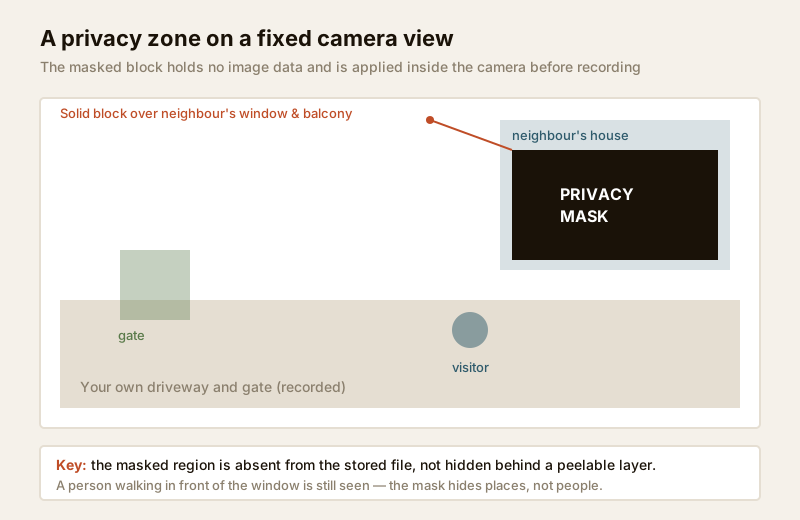
A privacy mask (also called a privacy zone or a masking block) is a shape — usually a rectangle — that the camera or recorder overlays on the video so that whatever is behind it is replaced by a solid colour, blur or mosaic. The masked region carries no image data: it is not dimmed or hidden behind a layer you can peel back, it is simply not there in the recording.
Two things make it powerful, and two things make it easy to get wrong:
- It is applied at the source. On a properly designed system the mask is burned in at the camera (or, on some systems, at the NVR/DVR) before the footage is written to disk. That means the private area is absent from the stored file, not merely covered on your screen.
- It is a fixed shape on the frame, not on the object. A basic static mask covers a region of the picture. If a person walks in front of the masked window they are still visible; the mask only hides the window itself. Masking is about places, not people.
Why you would mask — the good-neighbour and DPDP case
Indian plots sit close together. A camera on your gate pillar, angled to read faces and number plates, will very often also catch a corner of the house next door — a first-floor window, a terrace where the family sits in the evening, a balcony. Your neighbour has a reasonable expectation that their private indoor and terrace life is not being recorded onto someone else's hard drive. Masking that corner is how you keep your own coverage while removing theirs.
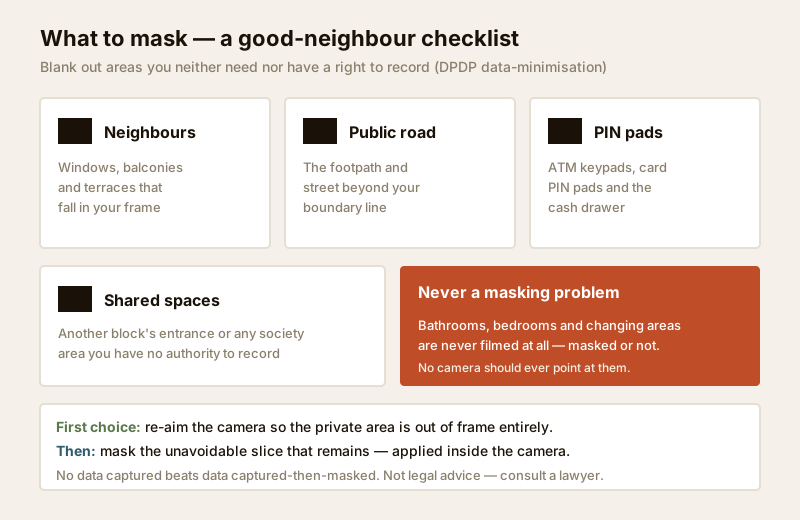
The principle behind the DPDP Act, 2023 is data minimisation: collect only what you actually need for your stated purpose. If your purpose is watching your own driveway, the neighbour's window is data you neither need nor should hold. A privacy mask is the cleanest technical way to honour that. Common things worth masking:
- A neighbour's window, balcony or terrace that unavoidably falls in frame.
- The public road or footpath beyond your boundary, where passers-by have no reason to be recorded in detail.
- An ATM keypad, a card-payment PIN pad, or a cash drawer near a shop counter camera — you want to see the counter, not people's PINs and card numbers.
- A shared-society space you have no authority over, such as another block's entrance.
- A window into your own private rooms if an outdoor camera happens to overlook one.
Deciding exactly which of these apply to your property is the job of a walk-round privacy audit — the security privacy assessment guide gives you the checklist, and for shared plots the gated-community security guide covers the society-level etiquette and consent side.
Static masking vs PTZ position-linked masking
There are two families of privacy mask, and the difference matters when you choose a camera.
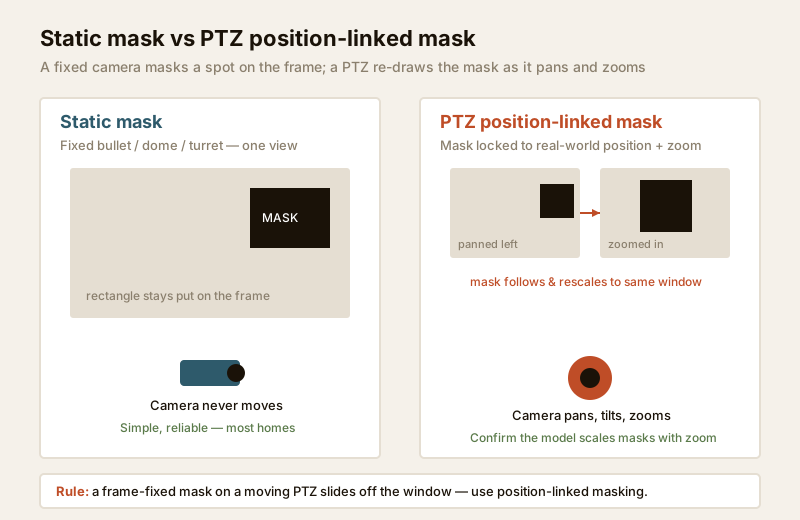
Static masking is for fixed cameras — a bullet, dome or turret that always looks in one direction. Because the view never moves, a rectangle drawn on the frame always covers the same real-world spot. This is simple, reliable, and what most homes need. You draw the box once during setup and it stays put.
PTZ position-linked masking is for a PTZ camera that pans, tilts and zooms. Here a mask fixed to the frame would be useless — as the camera swings, the frame rectangle would slide off the window it was meant to hide and land on empty driveway. A capable PTZ instead links the mask to the real-world coordinates and zoom level: the camera's processor knows where it is pointing, and it re-draws the mask to keep covering the same physical window as the lens moves and magnifies. When you buy a PTZ specifically to protect a scene with sensitive areas, confirm the model supports 3D position-linked privacy masks that scale with zoom — a cheaper PTZ may only offer static masks that break the moment it moves.
| Aspect | Static mask (fixed camera) | PTZ position-linked mask |
|---|---|---|
| Used on | Bullet, dome, turret — one fixed view | PTZ cameras that pan, tilt, zoom |
| How it tracks | Fixed rectangle on the frame | Locked to real-world position + zoom |
| When camera moves | N/A — it does not move | Mask follows and rescales with the lens |
| Setup effort | Draw the box once | Define zones across the pan/tilt range |
| Failure mode | Rare — only if the camera is knocked | Mask drifts if the camera loses calibration |
| Best for | Almost every home and shop | Large compounds using a moving PTZ |
Where the mask is applied — and why it matters
Not all privacy masks are equal, and the difference is where in the chain the blanking happens.
| Where applied | What it protects | Notes |
|---|---|---|
| In the camera (on-sensor / on-encoder) | Strongest — masked area is absent from the recorded stream and every export | Preferred. The private data is never stored anywhere. |
| In the NVR / DVR (recorder overlay) | Masks the recording and playback the recorder produces | Good, but confirm exports and sub-streams also carry it. |
| In the viewing app only (display overlay) | Weakest — only hides it on that screen | Avoid relying on this; the underlying recording may still hold the private area. |
The order of preference is clear: mask in the camera if you can, because then the private area never becomes stored data in the first place — which is exactly what data minimisation asks for. A mask that exists only in the phone app, hiding the area on your screen while the full unmasked scene sits on the hard drive, gives you the appearance of privacy without the substance. When you brief an installer, ask specifically: is the privacy zone applied in the camera, and is it present in exported clips and every stream, not just the live view?
How to verify a privacy mask actually works
A mask you have not checked is a mask you cannot trust. After setup, verify it properly:
1. Check the live view — the masked block should sit exactly over the sensitive area, with a little margin so a bit of camera drift will not expose an edge.
2. Check a recording, not just live — play back stored footage covering that area and confirm the block is present in the recording, not only on the live screen.
3. Export a clip and open it elsewhere — download a snippet to a phone or PC and confirm the masked area is still black there. If the mask vanishes on export, it was only a display overlay and your stored data is unprotected.
4. Check every stream — many cameras send a high-resolution main stream and a lower-resolution sub-stream. Confirm the mask is present on both.
5. Re-check after any camera move — if a camera is bumped, re-aimed or serviced, the real world behind a static mask shifts; re-verify the zone still lines up.
6. Re-verify for PTZ across positions — pan and zoom the camera through its range and confirm the mask stays locked on the sensitive area at every stop.
For a fixed camera on a home, points 1 to 3 are the essential ones. Build this check into the wider walk-round in the privacy and consent assessment so masking, signage and camera aim are all reviewed together.
Masking is a last resort — aim the camera right first
An important honesty: the best privacy zone is the one you never need, because you aimed the camera so it did not see the private area in the first place. Masking is a corrective tool for the slice you cannot avoid, not a licence to point a camera anywhere and paint over the awkward bits.
So the order of work is:
- Re-aim or re-position first. Tilt the camera down, narrow the lens, or move it a few centimetres so the neighbour's window falls outside the frame entirely. No data captured beats data captured-then-masked.
- Then mask what genuinely remains. Use a privacy zone for the unavoidable residue — the corner of a balcony you cannot design out.
- Never film prohibited areas at all. Bathrooms, bedrooms, changing rooms and the like are not a masking problem — no camera should be pointed at them in any circumstance, masked or not.
This ordering keeps you firmly inside the data-minimisation principle and makes for a system that is genuinely respectful, not just cosmetically so.
A note on the law and ethics
Legal & ethics caution — not legal advice. Recording people engages privacy law. In India the DPDP Act, 2023 frames how personal data (which footage of identifiable people is) should be collected and handled — with an emphasis on collecting only what your stated purpose needs. Privacy masking is a direct, good-faith way to practise that minimisation: you keep your own coverage and drop everyone else's private space. Post clear notice that recording is in progress, keep footage only as long as you need it, restrict who can view it, and do not point cameras at others' private areas or shared spaces you have no authority over. This is general information only — for your specific situation, consult a qualified lawyer.
When to bring in a professional
Deciding what to mask — the neighbour's window, the road, the PIN pad — is a judgement you make yourself with the privacy assessment checklist. Configuring the masks reliably, confirming they are applied in the camera and survive export, and calibrating position-linked masks on a PTZ is fiddly camera-menu and network work best done by a competent installer. And the physical side — mounting or re-aiming a camera at height, running cabling, and anything at the mains board — is licensed-professional work; see the electrical hub. Brief the installer with your masking list, then have them set it up and prove it works with you watching a played-back recording.
Key takeaways
- A privacy mask blanks out part of a camera view so that area is never seen, recorded or stored — the right way to keep your coverage while respecting a neighbour's window, a public road or an ATM keypad.
- It is the practical expression of the DPDP Act, 2023 principle of data minimisation: collect only what your purpose needs.
- Static masks suit fixed bullet, dome and turret cameras; PTZ position-linked masks follow a moving PTZ camera and must be confirmed to scale with zoom.
- Prefer a mask applied in the camera so the private area never becomes stored data — and verify it by checking a played-back recording and an exported clip, not just the live view.
- Masking is a last resort: aim the camera to avoid the private area first, never film bathrooms or bedrooms at all, and treat the whole review as part of the privacy and consent assessment. This is not legal advice — consult a lawyer for your situation.
References
- Digital Personal Data Protection Act, 2023 — the guiding framework for handling personal data in India; apply data-minimisation by capturing only your own property and masking areas you have no need or right to record. Consult a qualified lawyer for advice on your situation.
- Manufacturer specification sheets — confirm whether a camera or recorder applies privacy masks in-camera, whether masks survive export and appear on all sub-streams, and (for PTZ) whether masks are position-linked and scale with zoom, before ordering.
- National Building Code of India (SP 7), Bureau of Indian Standards, and local municipal bye-laws for any structural, electrical or life-safety aspect of an install; verify the current edition via the BIS catalogue: https://www.services.bis.gov.in/
This is an educational overview and not legal advice. Camera re-aiming at height, cabling and any electrical work are qualified professional tasks — engage licensed installers, and consult a qualified lawyer on the privacy-law aspects of your specific situation.
Export this guide
Related Guides — Deep-dive reading
Public Footpath Camera Restrictions in India (2026): Your Camera, the Public's Street
You can put a camera on your own gate, but the footpath and road outside are public space full of people who never agreed to be filmed. Here is how to point your camera fairly, capture the least public space you need, and stay a good neighbour.
SecurityIndoor CCTV for Indian Homes and Shops: Coverage With Privacy
What indoor cameras are actually for, where they belong (and the rooms where they never do), how to choose and place them for full coverage, and how to stay lawful and respectful under the DPDP Act.
SecuritySecurity Privacy Assessment for Indian Homes
Getting the privacy side of home security right: camera placement ethics and limits, notice and consent, the extra caution audio demands, and treating footage as personal data you store, retain and delete responsibly under India's DPDP Act 2023 direction.
SecurityRelated Tools — Try Free
CCTV Camera Coverage & Count Calculator
Estimate how many CCTV cameras you need, the NVR channels, storage in TB for your retention period, and an indicative all-in cost with GST.
CCTV CalculatorCCTV Camera Type Selector
Answer five questions and get the right camera form factor — dome, vandal dome, bullet, turret or PTZ — with reasons.
Camera SelectorCCTV Placement Compliance Checker
A quick DPDP-grounded privacy and safety self-check for where a camera is pointed — flags the items to fix.
Compliance