
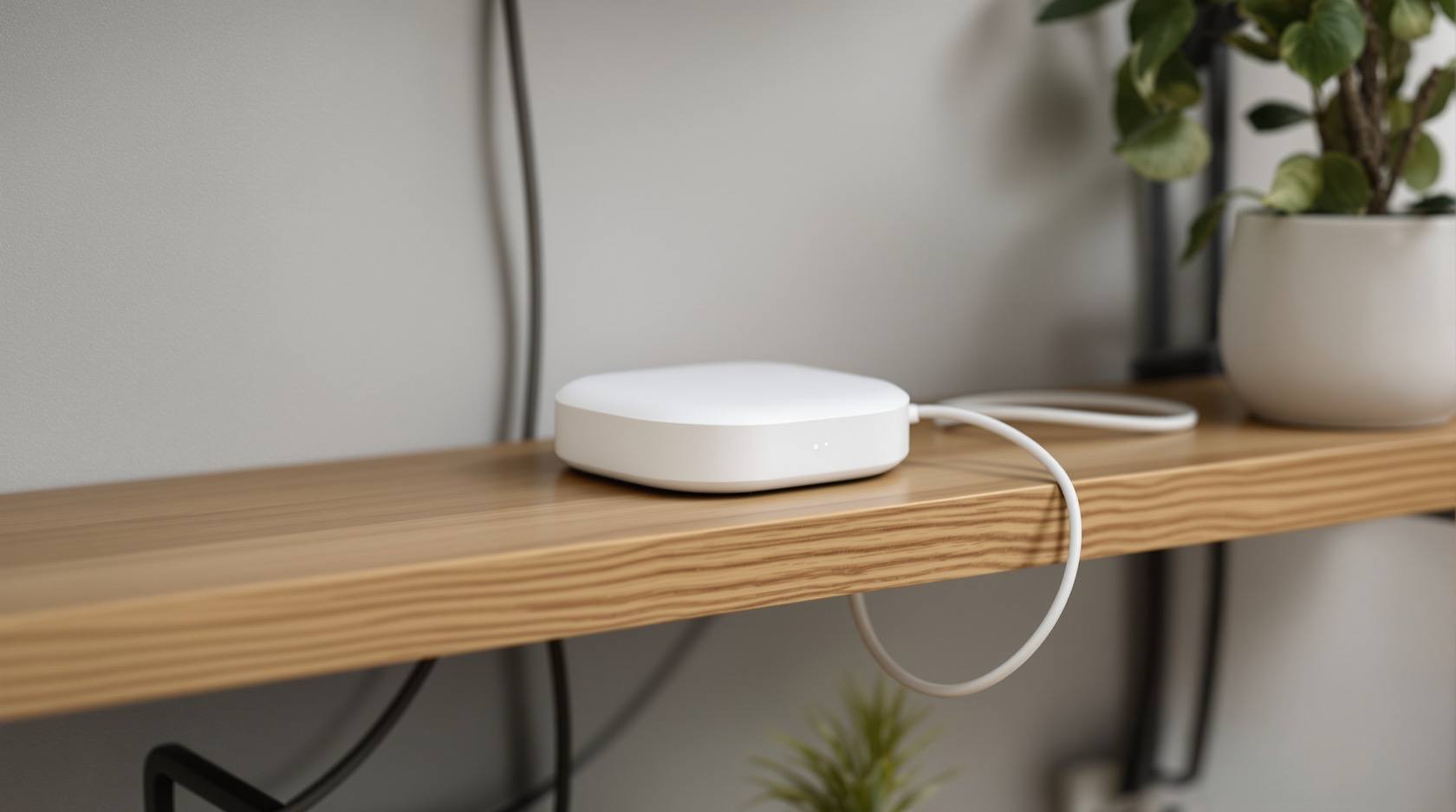
Smart Security Hubs for Indian Homes: Choosing the Brain of the System
The hub is the controller at the centre of a smart security system — it speaks the device radios, runs the automations and links you to your phone. What it is, the connectivity choices explained plainly, and why local-over-cloud and backup power decide whether it survives an Indian power cut.
Every smart security system has a centre — one device that ties the loose parts together and makes them behave as a system rather than a drawer of gadgets. That device is the hub (you will also see it called a bridge, a gateway or a controller). It is easy to overlook while shopping, because the cameras and locks are the exciting bits. But the hub is the single most consequential choice you make. Pick it well and everything else slots in and keeps working when the grid does not. Pick it carelessly and you have built a system that goes blind in a power cut, alerts nobody when the broadband drops, or quietly becomes the one weak point an attacker needs.
This guide is about that brain — what it does, the connectivity choices behind it in plain language, and the two decisions that matter most for security in India: local versus cloud, and what happens when the power goes off. It is a companion to the pillar, the complete guide to smart home security, and sits within the wider smart home security section.
Scope & safety. Smart is convenience, not a guarantee. A hub adds capability and new failure modes — it must degrade gracefully and have a non-smart fallback for anything that matters. Its own security and your data are first-class concerns (the DPDP Act 2023 applies whenever footage or logs touch a cloud). A hub is never a substitute for certified life-safety: a smart fire notification is an add-on to a proper fire-alarm system, never a replacement, and a smart lock must never trap anyone in a fire. Mains wiring, certified fire and lift work are for licensed professionals — you specify and decide.
What a hub actually is, and why it matters
A hub does four jobs that the individual devices cannot do alone:
- It speaks the radios. Your door sensor might talk one wireless language, your lock another, your camera a third. The hub is the translator that lets them coexist and, crucially, act on each other.
- It runs the automations. "When the last phone leaves, arm the alarm"; "if a gate sensor trips after dark, turn on the driveway light and start recording." Those rules live and execute on the hub, not on any one gadget.
- It holds the state. The hub knows whether the house is armed, who is home, which door is open. It is the memory the whole system reasons from.
- It is your bridge to the outside. It connects to your phone so you can see alerts and control things, and — if you choose — to a cloud service for access from anywhere.
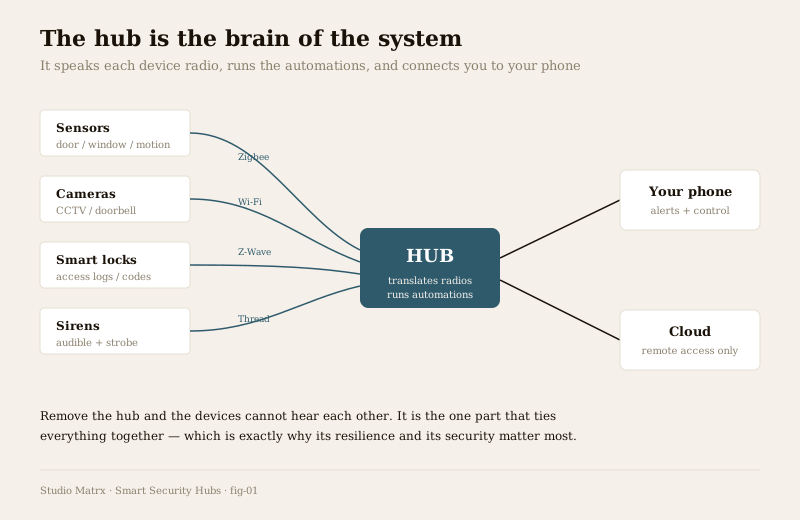
Remove the hub and the devices cannot hear one another. A sensor still senses, but nothing acts on it. That centrality is the whole point — and, as we will see, the whole risk.
The connectivity choices, explained plainly
Devices reach the hub over different wireless standards. You do not need to be an engineer, but you should understand the trade-offs in outline, because they shape range, battery life and how freely you can mix brands. The picture below is qualitative — treat any specific range or version claim from a seller with caution and verify it against current documentation.
| Standard | Needs a hub? | Character in plain terms |
|---|---|---|
| Wi-Fi | No | Each device joins your router directly. Simple to start, but every camera and sensor now loads your Wi-Fi and is its own thing to secure. Congestion and battery drain grow as you add devices. |
| Zigbee | Yes | A low-power mesh: battery devices sip power, and mains-powered devices relay signals for one another, extending reach around the home. Needs a hub to coordinate the mesh. |
| Z-Wave | Yes | Similar low-power mesh idea to Zigbee, on a different radio band, also relaying to extend range. Again hub-based. Known for broad interoperability within its own ecosystem. |
| Thread | Often via a border router | A newer low-power mesh built for reliability and self-healing; devices route for each other. Reaches the wider network through a Thread border router, often built into a modern hub or speaker. |
| Matter | Uses a hub/controller | Not a radio but an interoperability layer running over Wi-Fi and Thread. Its purpose is that devices from different brands work together under one app — the industry push against vendor lock-in. |
Two practical takeaways. First, low-power mesh standards (Zigbee, Z-Wave, Thread) exist because battery sensors cannot afford Wi-Fi's power appetite — they trade a little complexity (a hub) for long battery life and better whole-home reach as devices relay for each other. Second, Matter and Thread are the direction of travel: the promise that a sensor you buy next year will work with the hub you buy today, regardless of brand. That promise is still maturing, so verify real compatibility for the specific devices you intend to buy rather than trusting a logo on the box.
For what these radios connect to the hub, see smart sensors, smart CCTV and the complete guide to smart locks.
The decision that matters most: local versus cloud
This is where a security hub is different from a convenience gadget, and where most buyers get it wrong. Ask one question before anything else: when the internet drops, does the hub keep thinking, or does it go dumb?
- A local hub processes automations, arms and disarms, and records on-site. If the broadband fails, it carries on — you simply lose the ability to check in remotely from your phone until the line returns. The cloud, if used at all, is only for that remote access.
- A cloud-dependent hub sends everything to a server and waits for instructions back. Cut the internet and it goes blind: automations stop, alerts do not reach you, and in many cases nothing is recorded. The app spins on a blank screen.
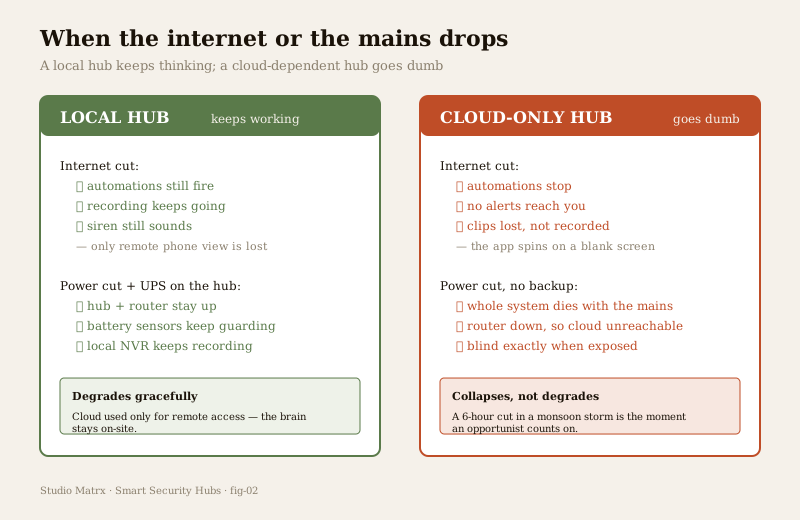
In India this is not an edge case — it is a weekly reality. A monsoon storm that takes down the power often takes the broadband with it, and that is precisely the window an opportunist counts on. A security system that collapses the moment the connection wobbles is not a security system; it is a fair-weather convenience. The design principle is simple: prefer local processing, and let the cloud add remote access rather than being the thing everything depends on. Losing the app is an inconvenience; losing all detection and recording is a failure.
Power cuts: the hub needs backup or the whole thing dies
Connectivity is only half of resilience. The other half is power. A hub is a small always-on computer — cut its electricity and every automation, every bit of local recording, every armed state goes with it. And the hub is usually plugged into the same router that all of this depends on, so a mains cut can take out the brain and its link to your phone at once.
The fix is unglamorous and non-negotiable: put the hub and the router on backup power — a UPS, or the inverter circuit many Indian homes already run. Size it for the outages you actually get, not a token few minutes. Note the useful asymmetry: battery-powered sensors and locks keep their own power through a cut and keep guarding; it is the mains-fed hub and router that are the weak link, so those are what you back up first. A local hub on a UPS, feeding a local recorder, with battery sensors around it, is a system that stays awake through the exact storm-and-outage combination that a cloud-and-mains-only setup sleeps through.
Single vendor versus an open hub
Hubs come in two broad philosophies, and the choice shapes how free you will be later.
| Single-vendor ecosystem | Open platform (e.g. Home Assistant, open hubs) | |
|---|---|---|
| Setup | Easiest — one brand, one app, designed to fit together | More effort; you assemble and configure it |
| Device choice | Limited to what the brand blesses | Very wide; mixes brands and standards |
| Local control | Varies — some are cloud-leaning | Strong; local-first is a core design goal |
| Lock-in risk | High — leaving means replacing much of it | Low — you own the platform and your data |
| Longevity risk | The vendor can discontinue it or kill the server | You control updates and the server yourself |
| Suits | Someone who wants it simple and tidy | Someone who wants control, privacy and resilience |
A single-vendor kit is genuinely the right answer for many households — it is simple, supported and coherent. But go in with eyes open: the day the vendor raises subscription prices, drops a product line, or shuts down the cloud service, an app-and-cloud-bound system can stop working through no fault of yours. An open hub trades setup effort for independence — local control, no forced subscription, and the freedom to mix devices and to keep running even if any one company disappears. Neither is "correct"; match the hub to how much control and resilience you want to own yourself.
Whichever you choose, favour standards like Matter so you keep the option to move — owning your automations and your recordings is what stops a hub from holding your home hostage.
The hub is a single point of failure — and a prime target
Centrality cuts both ways. Because the hub ties everything together, it is the single point of failure: if it dies, the coordinated system dies with it. And because it holds the keys to everything — the lock codes, the camera feeds, the armed state — it is the prime cyber target. A compromised hub is far more dangerous than a compromised gadget: it is the master key.
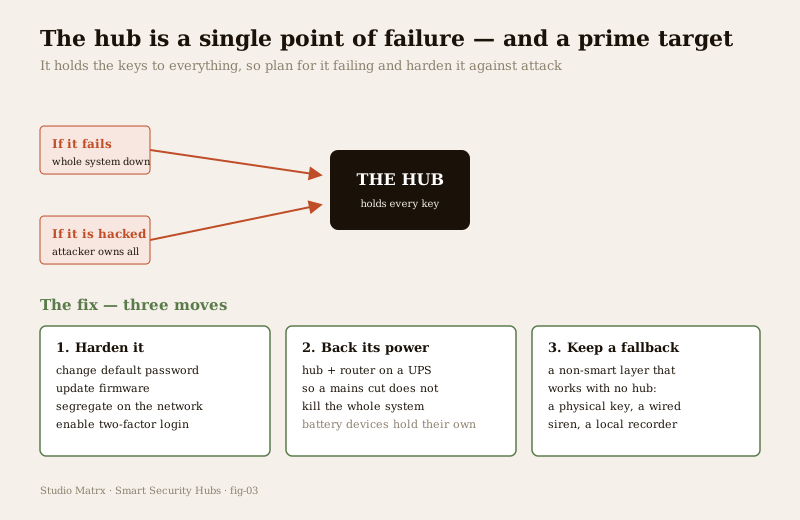
You cannot make a hub immortal, so you plan for both risks deliberately. Three moves:
1. Harden it. Change the default password to a strong, unique one the day you install it — default credentials are the single most common way cheap devices get taken over and swept into botnets. Turn on two-factor login for the account that controls your home. Keep firmware updated; those updates patch the holes attackers rely on. And segregate it — put the hub and IoT devices on a separate network or guest SSID, away from your laptop and banking, so a compromised device cannot reach the rest of your digital life. This is covered in depth in smart security cybersecurity; the data-handling and DPDP side, wherever a cloud is involved, in smart security privacy.
2. Back its power. As above — a UPS on the hub and router so a mains cut does not silence the whole system.
3. Keep a fallback. Anything that truly matters should have a non-smart layer that works with no hub at all: a physical key alongside the smart lock (also your fire-escape route), a siren that can sound locally, a recorder that captures to on-site storage. Graceful degradation means the worst a hub failure costs you is convenience, not safety.
Choosing a hub: how to actually decide
Work through four questions in order:
- What devices will it run? Start from the sensors, cameras and locks you want and confirm the hub genuinely supports their standards — Wi-Fi, Zigbee, Z-Wave, Thread or Matter as the case may be. Buying the hub first and hoping is how people end up with two apps and a drawer of incompatible gadgets.
- How much resilience do you need? If outages are frequent where you live — and in much of India they are — insist on local processing and plan the backup power from day one. Treat cloud-only as a red flag for anything you rely on.
- What is your privacy stance? If keeping footage and logs off distant servers matters to you, lean local and open; if convenience outweighs it, a reputable single-vendor cloud hub is a fair choice — just know where your data goes and that the DPDP Act 2023 governs it.
- How much do you want to own versus outsource? An open platform gives control and longevity for effort; a single-vendor kit gives simplicity for dependence. Be honest about which you will actually maintain.
Run your overall exposure through the home security risk scorecard before you commit, and let the answers — not the shiniest box — pick the hub.
How the hub interacts with monitoring
A hub decides what happens inside your home; monitoring decides who responds when something does. The two connect through the hub's bridge to the outside. A well-chosen hub can push an alert to your phone, and — for those who want a human in the loop — feed a professional service. The honest caveat is the same graceful-degradation thread: if that link runs only over broadband, an outage severs it, which is why an independent path (a cellular fallback on the alarm layer) matters for anything you are counting on. The design of that response layer is covered in alarm monitoring services and remote security monitoring; how the hub ties into wider home automation, in security home automation integration.
Key takeaways
- The hub is the brain — it speaks the device radios, runs the automations, holds the state and bridges you to your phone. It is the most consequential single choice in a smart security system.
- Understand the radios in outline — Wi-Fi needs no hub but loads your router; Zigbee, Z-Wave and Thread are low-power meshes that need a hub and relay for range; Matter is the interoperability push against lock-in. Verify real compatibility, do not trust a logo.
- Local beats cloud for security — a local hub keeps automations and recording alive through an internet cut; a cloud-only hub goes dumb. Use the cloud for remote access, not as the thing everything depends on.
- Back its power — a hub on the mains dies in a power cut and takes the system with it. Put the hub and router on a UPS or inverter; battery devices hold their own.
- Plan for it as a single point of failure and a prime target — harden it (change defaults, update firmware, segregate the network, enable 2FA), back its power, and keep a non-smart fallback.
- Match the hub to your devices, resilience and privacy — single-vendor for simplicity, open platform for control and longevity; neither is universally right.
Where to go next
- The pillar: Complete Guide to Smart Home Security and the smart home security section.
- What the hub connects: Smart Sensors, Smart CCTV and the Complete Guide to Smart Locks.
- Securing the hub: Smart Security Cybersecurity and Smart Security Privacy.
- Tying it together and responding: Security Home Automation Integration, Alarm Monitoring Services and Remote Security Monitoring.
- The wider home-automation hub: Smart Home. Assess your exposure: Home Security Risk Scorecard, or browse all security guides.
References
- Matter, Thread, Zigbee and Z-Wave — smart-home connectivity and interoperability standards; describe device behaviour in outline and verify current versions and real device certification against the standards bodies before relying on any specific claim.
- Digital Personal Data Protection Act, 2023 (India) — governs personal data, including any home footage or logs processed on a cloud service; check obligations for the service you choose.
- National Building Code of India (SP 7), Bureau of Indian Standards — fire and life-safety provisions relevant to any integrated smart fire notification or electric lock; verify the current edition via the BIS catalogue, and treat certified fire and egress systems as licensed professional work.
This is an educational overview for planning and decision-making. A smart security hub is a convenience layer, never a substitute for a hardened physical base or certified life-safety systems. Mains electrical work, integrated fire and lift systems, and electronic access control are qualified professional work — engage licensed professionals for design, installation and certification, and verify any standard's current status via the BIS catalogue before relying on it.
Export this guide
Related Guides — Deep-dive reading
CCTV Remote Access in India (2026): Watch From Your Phone, Safely
How to view your own cameras from anywhere without leaving the front door open to the internet — change the defaults, use strong credentials and 2FA, keep firmware current, prefer the vendor's secure cloud relay or a VPN, segment the camera network, and treat footage as personal data.
SecurityComplete Guide to Security System Cybersecurity in India (2026): Protecting the Systems That Protect You
The cameras, locks, alarms and door phones you install to feel safer are internet-connected computers that can themselves be attacked, and an insecure one is worse than none. This pillar maps the whole attack surface — devices, network, accounts and data, operations — and points to every guide that hardens it.
SecurityGeofencing Home Security in India (2026): Convenience Without the Trap
A geofence is a virtual boundary around your home; your phone crossing it can arm the alarm as the last person leaves and light the place up as you arrive. This guide explains the genuinely useful security uses, and the honest caveats: never let a phone's location alone unlock your door, never make a geofence the only thing that arms your home, and treat continuous family tracking as sensitive data.
SecurityRelated Tools — Try Free
Security Backup Power Calculator
Size a UPS/inverter and battery to keep CCTV, NVR, router and alarm running through a power cut — load, Ah, VA and cost.
Backup PowerAccess-Control Battery-Backup Calculator
Size the standby battery so an access system keeps running through a power cut, with an egress life-safety note.
Battery BackupHome Security Risk Scorecard
Score your home across six security layers — perimeter, entry points, lighting, detection, alarm and habits — and get a prioritised action plan.
Security Scorecard