
Security Home Automation Integration in India: Planning Smart Home + Security Safely
How to plan a clean, safe integration between your security system and a smart home — the genuine wins of one app and smart automations, the life-safety lines you must never cross, and a local-first, standards-based way to wire it all together.
A smart home promises a tempting picture: one app for the cameras, the alarm, the locks and the lights; the house arming itself as you drive away; lights that snap on when something moves at the gate. Done well, integration genuinely raises both convenience and security. Done carelessly, it does the opposite — it makes your safety depend on a hub, a router and a cloud login, any of which can fail at the worst moment.
This is a planning guide. It sits in the Section-B planning track and complements, rather than repeats, the master smart security systems guide (which covers the devices and technologies) and the smart home hub (which covers automation broadly). Here we answer one question: given that you want a smart home, how do you integrate security into it safely — deciding what to connect, what to automate, and what to deliberately keep independent? Start, as always, from your home security risk assessment so the automation serves real risks rather than gadget lust.
Scope & safety. This is a defensive planning guide. It never describes how to defeat any measure. The governing rule throughout: life-safety and core security must be able to work on their own — fire detection, escape from inside, and a basic alarm must never depend on a hub, the internet or a cloud account. Mains electrical, electric locks, alarm and fire wiring are qualified work: specify it, then have a licensed electrician or installer fit and certify it.
The genuine benefits — what integration actually buys you
Integration is worth doing when it removes friction or adds a layer you would not otherwise have. The honest wins:
- One app, one pane of glass. Cameras, video door phone, alarm state, locks and lights in a single interface, so you actually check them instead of ignoring five separate apps.
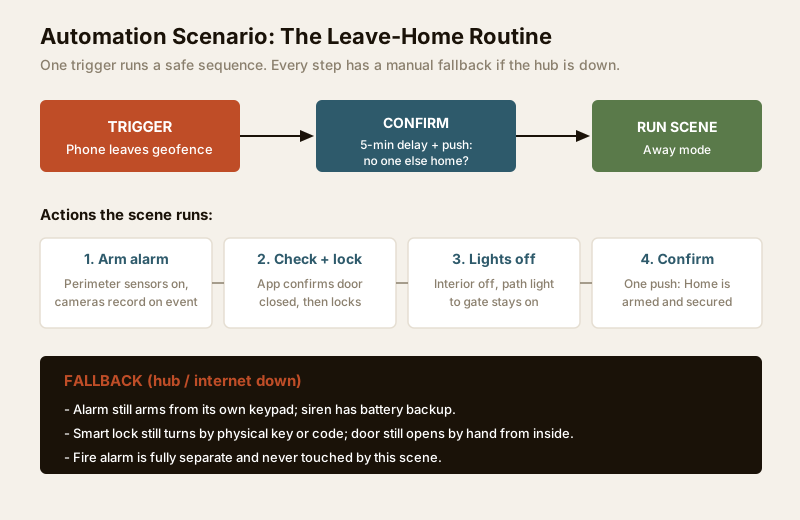
- Automations that raise security. The house can do things you would forget to. Arm-on-leave by geofencing, lights that respond to motion or to an alarm event, a porch light that comes on at dusk automatically.
- Occupancy simulation. While you travel, lights and a radio follow a believable pattern so the home looks lived-in — a real deterrent against the opportunistic burglary that targets visibly empty houses during festival trips.
- Faster, richer notifications. A push with a camera snapshot when the gate sensor trips tells you far more than a bare siren, and lets you verify before you escalate to the RWA guard or police.
- Event-linked recording and lighting. A motion or alarm trigger can start camera recording and flood the area with light at the same instant, turning three separate devices into one coordinated response.
None of this changes the physics of your locks and grilles. Integration is a force-multiplier on measures you already have — never a substitute for them.
Integration opportunities — and the caution that comes with each
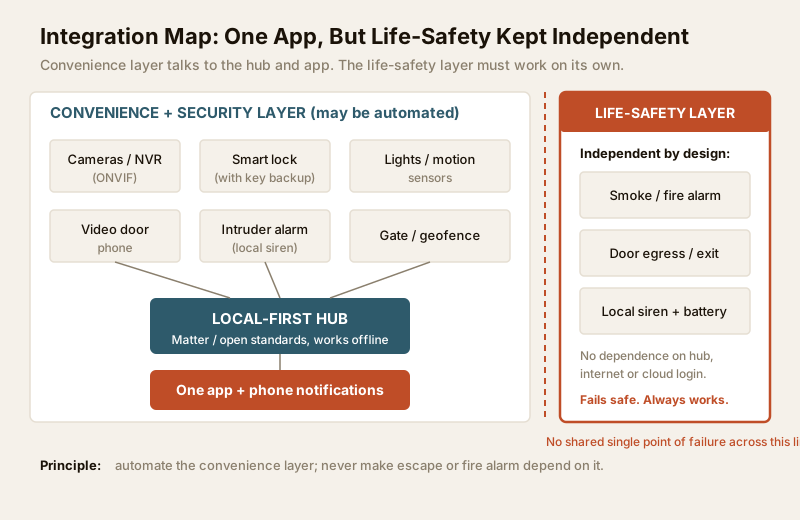
Every worthwhile automation carries a matching caution. Plan both columns together, never just the left one.
| Security function | Automation opportunity | Benefit | Caution to plan for |
|---|---|---|---|
| Intruder alarm | Arm/disarm by geofence or scene | Never left unarmed by mistake | Add a confirm delay; keypad must still arm if hub is down |
| Cameras (ONVIF) | Motion event triggers record + push snapshot | Verify before escalating | Recording must run to a local NVR even if cloud is offline |
| Smart lock | Auto-lock on leave; remote let-in | No more wondering if you locked up | Must keep a physical key/code; never auto-unlock for strangers |
| Lighting | Motion + alarm-linked flood lighting | Deters and reveals an intruder | Manual switches must still work; keep one path light on |
| Occupancy | Away-mode lights/radio simulation | Home looks lived-in on trips | Vary the pattern; a fixed 7pm-on-daily is an easy tell |
| Video door phone | Ring + snapshot to phone | Answer the gate from anywhere | Do not let it become the only way to admit help/family |
| Gate / access | Log entries; alert on after-hours open | Accountability for staff and visitors | Store logs responsibly under the DPDP Act 2023 |
The non-negotiables — what to keep independent and fail-safe
This is the heart of safe integration. Some things must keep working when everything smart has failed — no power to the hub, no internet, cloud account locked out. Design these to fail safe (fail into the safe state) and to run on their own.
| Function | Keep it independent because | How to fail safe |
|---|---|---|
| Fire / smoke detection | A life-safety alarm must sound even in a total outage | Standalone detectors with their own battery; not gated by a hub |
| Escape from inside | People must always get out, instantly, without an app | Door egress by simple thumb-turn/handle from inside; never auto-locked shut |
| Basic intruder alarm | An alarm that only works online is not an alarm | Local siren + battery backup; arms from its own keypad |
| Core lock function | You must enter/leave without the network | Physical key or offline code on every smart lock |
| Emergency lighting | You need to see during a power cut | A torch and a battery/inverter path light, independent of scenes |
The single most important rule: a security or life-safety device must never have the hub, the router or a cloud login as its only path to working. If losing your broadband or a firmware update could trap someone inside or silence the fire alarm, the design is wrong. When in doubt, keep the human in the loop and the device stand-alone.
The real cautions of connecting everything
Beyond life-safety, integration has three quieter risks worth planning around.
Added attack surface. Every connected device, hub and cloud account is another door someone could try. A cheap camera with default credentials, or a lock exposed to the open internet, can become the weak link. Reduce it: change default passwords, keep firmware updated, buy from vendors who patch, and prefer devices that work locally rather than phoning home. Your network readiness plan is where this is enforced.
Privacy and data. Cameras, door logs and occupancy data are sensitive personal data under the DPDP Act 2023. Cloud recording means your footage lives on someone else's servers. Prefer local storage where you can, understand what each app uploads, and treat access logs of domestic staff with the same care — plan this in the privacy and data-storage assessment.
Fragile dependencies. The failure mode to fear is the one-outage-disables-everything house: a single hub, app or company whose downtime leaves you locked out, blind and unarmed. Avoid it by keeping the life-safety layer separate (above), choosing a local-first hub that works offline, and not betting your whole home on one proprietary ecosystem that could be discontinued.
How to plan a clean integration
1. Choose interoperable standards, not silos. Favour Matter for smart devices (lights, locks, sensors) and ONVIF for cameras, so kit from different brands talks to one hub and you are not trapped if one company folds. Open standards protect the investment far better than a single-brand ecosystem.
2. Pick a local-first hub. The hub should run your automations on the local network, so the leave-home scene, the motion lights and the alarm still work when broadband is down. Cloud is a convenience for remote access, not the spine of the system.
3. Segregate the network. Put cameras and IoT devices on a separate VLAN or guest network from your phones and laptops, so a compromised gadget cannot reach your personal data. This is a core outcome of the internet and network readiness plan — plan it before you buy.
4. Design scenes with confirmation and fallback. A good automation has a safety net. The leave-home scene should include a short confirm delay (in case someone is still home), and every step must have a manual path: the alarm arms from its keypad, the lock turns by key, the lights switch by hand.
5. Decide what NOT to automate. The most mature integration plan is as much about restraint as connection. Use a simple test on every function.
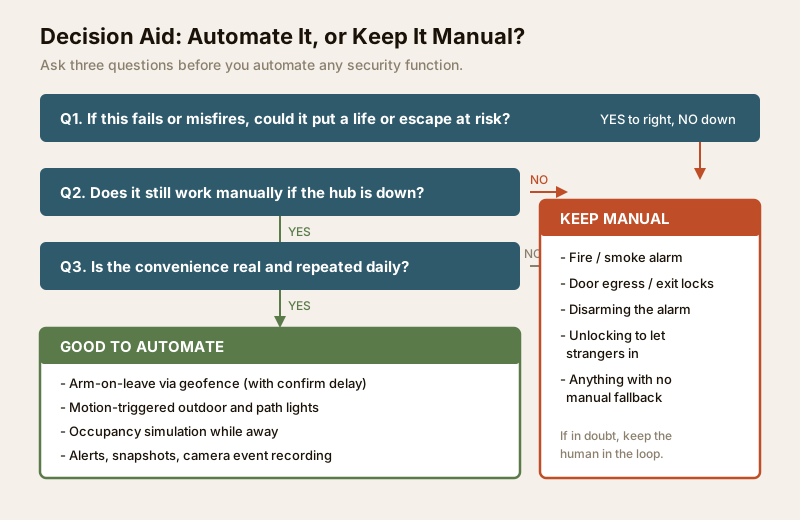
Run each candidate through three questions:
1. If it fails or misfires, could it put a life or an escape route at risk? If yes, keep it manual (fire alarm, egress locks).
2. Does it still work manually if the hub is down? If no, either add a fallback or do not automate it.
3. Is the convenience real and repeated daily? If it is a party trick you will use twice, the added attack surface is not worth it.
Good candidates to automate: arm-on-leave, motion and alarm-linked lighting, occupancy simulation, and notifications. Keep manual: fire detection, egress, disarming the alarm, and admitting strangers.
Integration planning checklist
Work through this before you commit to a system:
- Anchor to risk. Every automation maps to a real weakness from your risk assessment, not to a product you liked.
- Standards first. Devices are Matter / ONVIF compatible; the hub is local-first and works offline.
- Life-safety carved out. Fire alarm, egress and a basic siren are proven to work with the hub and internet switched off.
- Network segregated. Cameras and IoT on their own VLAN; strong unique passwords; firmware auto-updates on.
- Local storage preferred. Camera footage records locally; you know exactly what each app sends to the cloud.
- Every scene has a fallback. Manual key, keypad and switch paths tested and documented for the family.
- No single point of failure. No one hub, app or account whose outage leaves you blind, locked out or unarmed.
- Power planned. Hub, router, NVR and alarm on backup power per your electrical backup assessment.
- Privacy handled. Footage and access logs stored and shared lawfully under the DPDP Act 2023.
When to bring in a professional
Do the planning yourself — the decisions above are yours to make. But hand the wiring and integration to qualified people wherever safety or mains power is involved: fire and alarm systems, mains electrical, electric and electronic locks, and structured cabling. Specify the standards you want (Matter, ONVIF, local-first, segregated network), then let a licensed electrician and a competent systems integrator install and certify it. For a whole-home build, fold this into the design early with the security planning guide for new homes; if you are shortlisting an installer, use the vendor and installer evaluation guide and its scorecard tool.
Sequencing and budget
Integration is a phase, not the first purchase. Get the physical security and detection right first, then layer automation on top. As rough Indian ranges to sequence spending: a capable local-first hub, from about Rs 6,000 to Rs 20,000; a mesh router with VLAN support, roughly Rs 8,000 to Rs 25,000; smart locks with key backup and a couple of smart bulbs, from Rs 10,000 upward. Use the security system cost estimator and read the security cost planning guide to place it within the whole project. Plan redundancy alongside it with the system redundancy guide, because integration and resilience are two sides of the same decision.
Key takeaways
- Integrate to multiply, not to replace. One app, smart automations and occupancy simulation genuinely help — but only on top of sound locks, grilles and detection.
- Life-safety stays independent and fail-safe. Fire detection, escape from inside and a basic alarm must work with the hub, router and cloud all down.
- Kill the single point of failure. Local-first hub, interoperable standards (Matter / ONVIF), and a segregated network so no one outage blinds or locks out the home.
- Automate by test, not by hype. If failure could risk a life, if there is no manual fallback, or if the convenience is not real and daily — keep it manual.
- Route wiring, mains and locks to licensed professionals, and plan the whole thing from your risk assessment outward.
Plan the rest of your build with the security guides collection, and if you are wiring a whole home, start from the smart home hub and the electrical planning guide.
This is an educational planning guide. It is strictly defensive and does not describe how to defeat any security measure. Fire, alarm, electrical, electronic-lock and cabling work is qualified professional work — engage licensed installers and verify any applicable National Building Code or municipal bye-law and DPDP Act 2023 requirement for your project.
Export this guide
Related Guides — Deep-dive reading
Security Fire Alarm Integration in India (2026): Smart Alerts, Certified Systems, Fail-Safe Egress
The most important sentence a smart-home designer can say about fire is also the least profitable: a smart-home smoke sensor or fire notification is a helpful add-on, not a substitute for a certified fire-alarm system. This guide draws the line hard — life-safety detection and alarm belongs to the NBC-governed certified system — and then covers the genuinely useful, correctly-scoped automations the smart layer can add on a verified fire signal: unlock for egress, open the gate for the fire tender, light the escape path, stop the away-scene, and notify everyone loudly. All of it fail-safe. None of it in the way of the system that actually saves lives.
SecurityCCTV Remote Access in India (2026): Watch From Your Phone, Safely
How to view your own cameras from anywhere without leaving the front door open to the internet — change the defaults, use strong credentials and 2FA, keep firmware current, prefer the vendor's secure cloud relay or a VPN, segment the camera network, and treat footage as personal data.
SecurityComplete Guide to Security System Cybersecurity in India (2026): Protecting the Systems That Protect You
The cameras, locks, alarms and door phones you install to feel safer are internet-connected computers that can themselves be attacked, and an insecure one is worse than none. This pillar maps the whole attack surface — devices, network, accounts and data, operations — and points to every guide that hardens it.
SecurityRelated Tools — Try Free
Security System Cost Estimator
Estimate the all-in capex with GST, annual running cost and 5-year total cost of ownership of a home or building security system.
Cost EstimatorSecurity Backup Power Calculator
Size a UPS/inverter and battery to keep CCTV, NVR, router and alarm running through a power cut — load, Ah, VA and cost.
Backup PowerHome Security Risk Scorecard
Score your home across six security layers — perimeter, entry points, lighting, detection, alarm and habits — and get a prioritised action plan.
Security Scorecard