
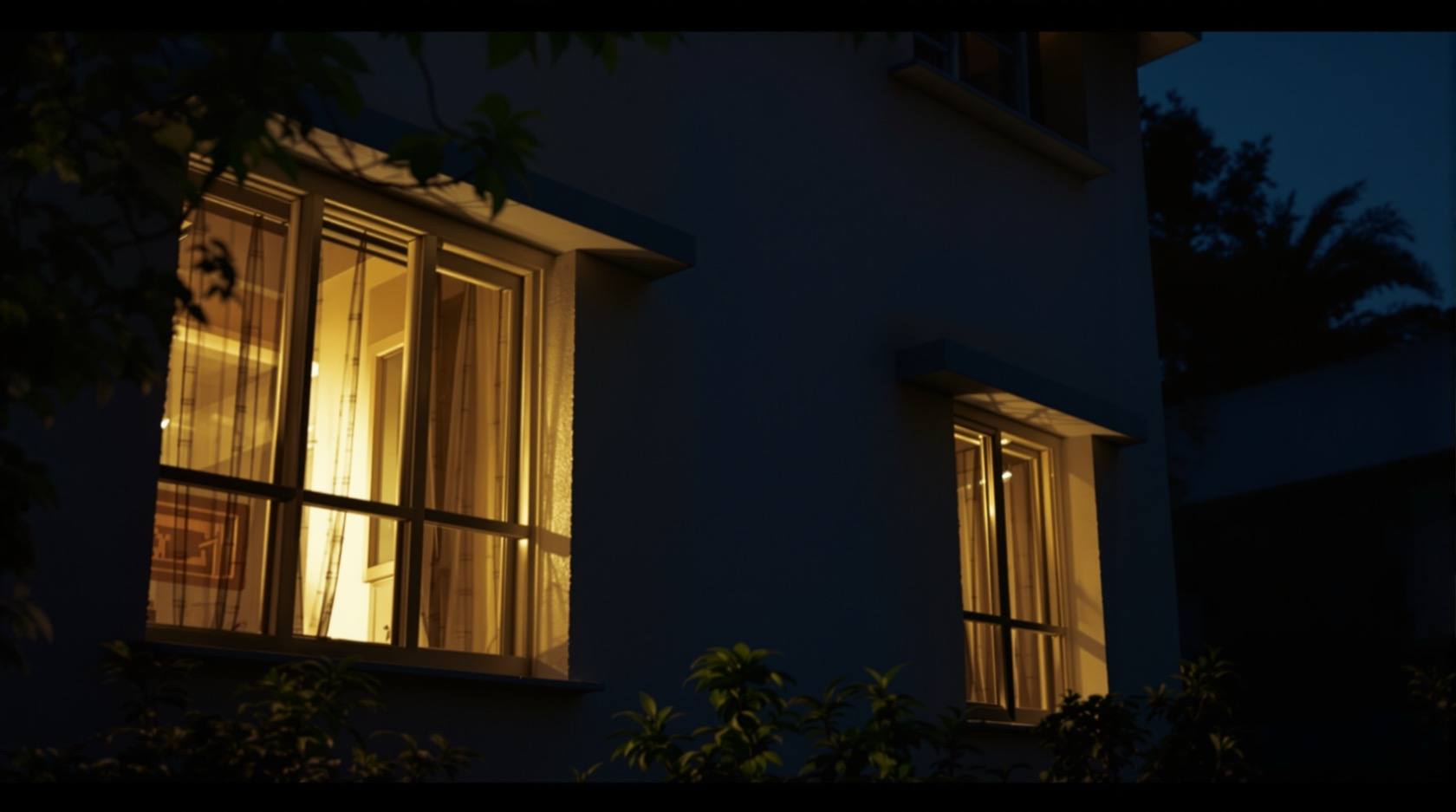
Occupancy Simulation in India (2026): Making an Empty Home Look Lived-In While You Travel — the Smart Way, Not the Cheap Timer
The oldest burglary deterrent, modernised. How smart scenes turn lights, a TV and the blinds on and off in a realistic, randomised pattern that mimics real life — and the non-light tells (piled post, a dead-shut curtain, the holiday photo you posted) that give an empty house away no matter how clever the lighting.
The oldest trick in home security is also the simplest: make a burglar believe someone is home. A house that is plainly empty — dark every night, curtains dead-shut for a week, post spilling from the letterbox, no car, no movement — is a target. A house that looks occupied is a problem the intruder would rather skip for the easier one next door. That is the whole idea behind occupancy simulation: while you are away on holiday, travelling for work, or the second home sits empty between visits, the house keeps up the appearance of a normal, lived-in evening — lights coming and going room to room, a television glowing behind a curtain, blinds that open in the morning and close at dusk — so that from the street nothing says "nobody home."
Your grandmother did a version of this with a single timer plug on the sitting-room lamp. It helped a little and it failed in a very specific way: the same lamp clicked on at exactly the same minute every single night, and off at the same minute, with everything else in the house pitch dark. To anyone watching for a couple of evenings — which is exactly what someone casing a house does — that mechanical regularity screams "timer, not people." Smart home technology fixes precisely this weakness. Done well, occupancy simulation is varied, randomised and spread across the house so it reads like real life. Done badly, it is just a more expensive version of the same tell. This guide is about doing it well, and — just as important — about the non-light tells that betray an empty house no matter how clever your lighting is.
This guide sits under the complete guide to smart home security pillar and is written to be honest: simulation is a deterrent that raises doubt, never a barrier. It buys you a skipped house, not a safe one. Pair it with real measures.
Scope & safety. This guide helps you plan and coordinate occupancy simulation as a defensive deterrent while your home is empty; it is strictly about looking lived-in, never about defeating anyone else's security. Smart is convenience, not a guarantee — a simulation that runs on a hub or the internet is dark the moment the power or network drops, which in India is an everyday event, so build it on local scenes with graceful degradation and a non-smart fallback for the lights that matter. Every connected device is an attack surface and a data collector under the Digital Personal Data Protection Act, 2023 — do not let the "vacation mode" itself leak that you are away. Life-safety is never smart-only: an away scene must never disable a certified fire-alarm, and a smart lock must never trap anyone or be voice-unlocked. Any mains wiring, motorised blind or lift work is licensed-professional work — you specify and decide. Verify any standard's current status before relying on it. Educational guidance, not legal or security-consulting advice.
Why an empty house is a target — and what simulation actually buys you
Most residential burglaries are opportunistic. Someone is looking for the easy house: unoccupied, unwatched, low risk of being seen or disturbed. Occupancy is the single biggest thing that puts them off, because an occupied house means a witness, a shout, a phone call, a confrontation — risk they would rather avoid. That is why the goal of simulation is not to stop an intruder (it cannot) but to change their read of the house during the scouting phase, so they cross you off the list before they ever try the gate.
Be clear-eyed about what this does and does not do:
- It works on the casual, opportunistic watcher. Someone drifting through the lane looking for a dark, dead house sees a lived-in one and moves on. This is the majority of the threat, and simulation genuinely helps here.
- It does not fool a determined, patient watcher. A person who has specifically targeted your home and is prepared to watch it properly over days will eventually notice that no actual human ever comes or goes — no one leaves for work, no car moves, no one takes the bin out, deliveries pile up. Against that, lighting theatre alone will not hold. Simulation raises doubt; it does not create certainty of occupation.
- It is one layer, not the plan. The honest posture is: simulation makes the house look occupied, real measures make it hard to enter and quick to detect. You need both.
Hold onto that framing for the rest of this guide: simulation is a deterrent that raises doubt, not a barrier.
The smart way vs the old timer-plug
The core skill of good occupancy simulation is making the pattern look like people, not a machine. Real households are irregular. Lights move around the house as people do — kitchen at dinner, a bedroom later, the landing on the way up, the bathroom for a few minutes, the sitting room for the evening's television. The times shift a little each night. Nothing is metronomic. Your job is to reproduce that texture, and the tell-tale you are fighting is regularity.
The single biggest tell is repetition: the same light at the same minute every night. A cheap timer switches one lamp on at 6:30:00 and off at 22:00:00, identically, forever. Two evenings of watching and it is obvious. So the first rule of smart simulation is vary and randomise — time, room and duration all jittered so no two evenings look the same.
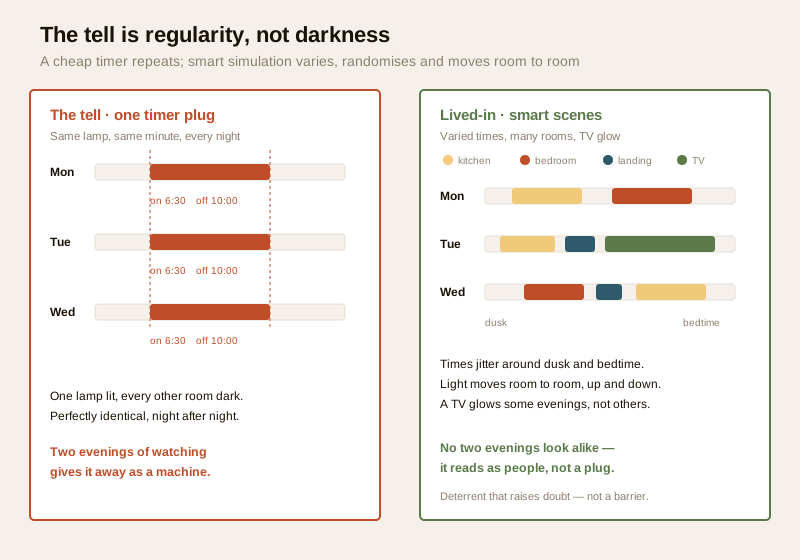
What smart scenes let you do that a timer never could:
- Randomise the times. A scene can fire a light at "around dusk, give or take twenty minutes" and turn it off "around bedtime, give or take half an hour," different each night, instead of the same clock minute. This alone kills the biggest tell.
- Follow dusk, not the clock. Evening lights should come on as the light actually fades, which drifts through the year — a scene tied to sunset (or a light sensor) looks natural where a fixed 6:30 does not. This is the same dusk-tracking logic behind security lighting integration and motion-activated security lighting; an occasional real motion trigger on an outdoor light adds genuine, un-fakeable irregularity.
- Move room to room. Instead of one lamp, sequence several: kitchen glows while "dinner" happens, then it goes off and a bedroom comes on, then the landing, then the sitting room. That movement of light through the house is the strongest lived-in signal there is.
- Add a television or radio. A TV's changing glow and flicker behind a curtain, or a radio audible faintly from the street, reads unmistakably as a person in for the evening. A smart plug or smart TV can run this on the away schedule.
- Work the blinds and curtains. A house whose blinds are open all day and closed every night looks lived-in; one whose curtains are dead-shut for a week looks abandoned. Motorised blinds on a day/night scene fix this — see security curtains and blinds integration. (If your blinds are manual, this is one job to hand a neighbour.)
- Occasional upstairs/downstairs movement. A brief landing or stair light, an upstairs bathroom light for a few minutes, a downstairs light going off as an upstairs one comes on — small touches that say someone moved through the house.
| Behaviour | Cheap timer plug | Smart occupancy simulation |
|---|---|---|
| Timing | Same minute on, same minute off, every night | Randomised around dusk/bedtime, different each evening |
| Reference | Fixed wall-clock time | Tracks actual sunset / a light sensor |
| Coverage | One lamp, everything else dark | Lights sequence room to room, up and down |
| Non-light cues | None | TV/radio glow, blinds open by day and shut by night |
| Irregularity | Perfectly, tell-tale regular | Jittered; can fold in a real motion trigger |
| The tell | Obvious after two evenings | Reads as a household after several |
A note on restraint: the goal is plausible, not a full house party. Every light in the building blazing from 6 p.m. to midnight is as unnatural as total darkness — real homes are mostly a room or two lit at a time. Keep it modest and moving.
The non-light tells that betray an empty house
Here is the part homeowners forget, and it is the part that most often gives the game away: you can have the cleverest lighting simulation in the lane and still be obviously empty, because the tells that matter most are not about light at all. A patient watcher barely looks at your lamps; they look at the signs of daily life that a house produces whether you think about them or not. Manage these or the simulation is theatre.
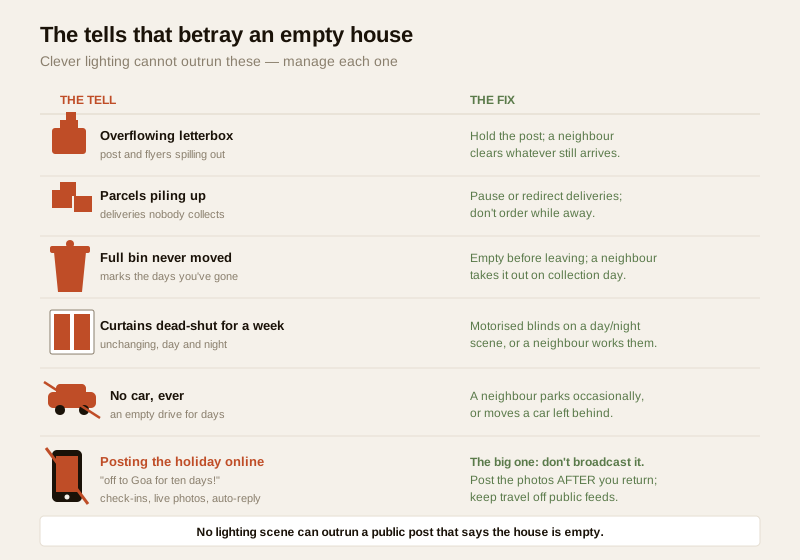
Work down the list and close each one:
- An overflowing letterbox. Post, flyers and newspapers spilling out is the classic "away" signal. Fix: hold the post/newspaper delivery for the period, and ask a neighbour to clear whatever still arrives.
- Uncleared deliveries and parcels piling up. Bags and boxes accumulating at the gate announce that nobody is collecting them. Fix: pause or redirect deliveries, avoid ordering things to arrive while you are away, and have a neighbour take in anything unexpected.
- A full bin never moved. A dustbin that is never put out or brought in, or that overflows, marks the days you have been gone. Fix: empty it before you leave and ask a neighbour to handle it on collection day.
- Curtains dead-shut for a week. Every curtain drawn tight, day and night, unchanging, is as much a tell as darkness. Fix: motorised blinds on a day/night scene, or a neighbour who opens and closes them.
- No car, ever. An empty driveway for days, or a car that never moves, reads as absence. Fix: if you can, have a neighbour park in your drive occasionally, or move a car left behind.
- An unkempt, abandoned-looking garden or entrance. Uncollected leaves, a plant obviously unwatered, a gate that never opens. Fix: ask someone to tidy the frontage and use the gate now and then.
- Social media announcing you are away. This is the big one, and it undoes everything else. A public post — "off to Goa for ten days!", a live holiday photo, a check-in at the airport, an auto-reply that says you are travelling — is a direct invitation to anyone who knows where you live. Fix: do not broadcast the trip. Post the holiday photos after you are back, keep travel plans off public feeds, and be wary of who can see your check-ins and your status. No lighting scene can outrun a public post that says the house is empty.
The uncomfortable truth is that most of these fixes are not smart-home features — they are a phone call to a neighbour and a little discretion. That is exactly why the next section matters: simulation only works inside a set of real, human measures.
Combining simulation with real measures
Occupancy simulation is the appearance of security. On its own it is a stage set. It earns its keep only when it sits inside measures that are actually real — things that harden the house, watch it, and put a real human in the loop. Think of simulation as the outermost, softest layer of several.
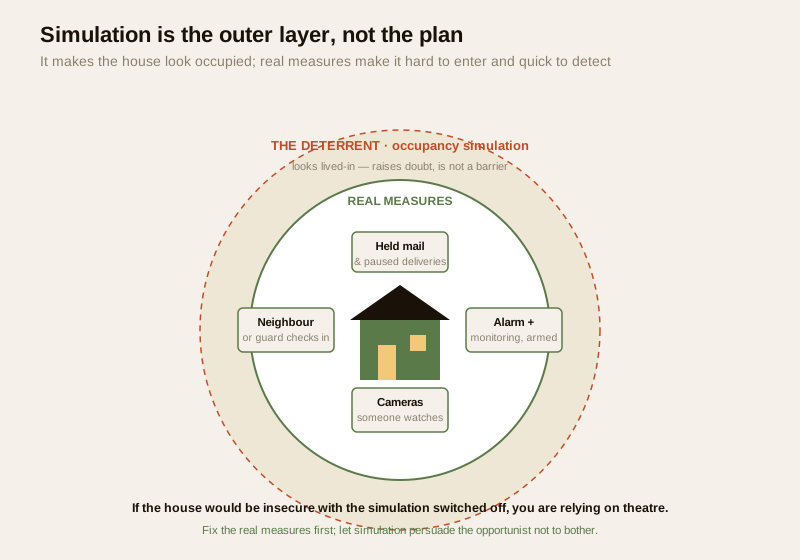
The real measures worth pairing with simulation:
- Hold mail and deliveries. Covered above, but it belongs here too: the single most effective "away" management step, and it is free.
- A neighbour, relative or society guard checking in. A trusted person who walks past, clears the gate, moves the bin, opens a curtain and would notice a forced door is worth more than any device. In a gated society, brief the security desk that you are away and ask for an eye on the flat — see security in gated communities. Leave them a contact number and, if you trust them, a key for genuine emergencies.
- Full alarm plus monitoring, armed while away. Simulation makes the house look occupied; an armed, monitored alarm means that if someone tries anyway, the attempt is detected and answered — a siren, an alert to you, and a response — instead of discovered when you return. "Away" is exactly the mode an alarm is built for.
- Cameras you actually watch. Recording footage nobody looks at deters no one and stops nothing in time. While away, cameras earn their place only if the alerts reach you (or someone) and are acted on — a person who checks the notification, looks at the clip, and calls the neighbour or the guard. Cloud cameras also carry the everyday India caveat: they are blind in a power or internet cut, so do not rely on them as the only watch.
- Ordinary hardening. Good locks engaged, windows secured, valuables out of sight, nothing signalling wealth or absence. Simulation on top of a genuinely hard-to-enter house is a strong combination; simulation on top of an unlocked back door is a decoration.
The rule of thumb: if the simulation were switched off tomorrow, would the house still be reasonably secure? If the honest answer is no, you are relying on theatre. Fix the real measures first; let simulation be the layer that persuades the opportunist not to bother in the first place.
The reliability caveat: don't let the simulation fail dark
Smart is convenience, not a guarantee, and an occupancy simulation is uniquely embarrassing when it fails — because a simulation that stops leaves the house conspicuously dark for the rest of your trip, which is worse than a simple timer that at least kept clicking. The failure modes are all everyday India:
- A power cut takes down the hub, the router and the lights together. When power returns, does the scene resume on its own, or does it need someone to log in and restart it?
- An internet or cloud outage breaks any simulation that depends on a cloud server to run the schedule — the lights just stop. And a vendor can kill the server entirely, leaving app-dependent scenes dead.
- A hub failure or a flat battery in a wireless switch silently drops part of the pattern.
The fix is to build the simulation to degrade gracefully rather than fail dark:
- Run scenes locally, not from the cloud. A schedule that lives on a local hub keeps running through an internet outage; one that depends on a distant server does not. Prefer local execution for the away schedule — the same principle behind smart security hubs and security automation scenes.
- Put the critical bits on backup power. The hub, router and a couple of key lights on an inverter or UPS line means a routine power cut does not black out the house and freeze the schedule.
- Make scenes auto-resume. Confirm the schedule restarts by itself after a power or network blip, without anyone logging in.
- Keep a non-smart fallback. Leave at least one plain timer plug on a lamp, or ask the neighbour to switch a couple of lights, so that even if the whole smart system dies, the house is not stark dark for a week. Graceful degradation means the fallback is dumb, local and reliable.
A simulation you cannot check on and cannot recover remotely is a liability. Make sure that if it breaks, it breaks safe — dimmer and simpler, not suddenly and completely dark.
The privacy and cyber note: don't let vacation mode leak that you are away
There is a quiet irony in occupancy simulation: the very system meant to hide that you are away can announce it. Guard against the tool leaking the secret:
- The "away" or "vacation" mode itself is sensitive information. If your away schedule, your geofence status, or your app's "I'm on holiday" toggle can be seen by anyone else — a shared family account, a leaky app, an over-broad automation that posts status — it tells them the house is empty. Keep it private.
- Every connected device is an attack surface. A no-name cloud camera or plug with a default password, or un-patched firmware, is a way in — and footage of your empty home on some overseas cloud is exactly the data you do not want exposed while you are away. Change default passwords, keep firmware updated, and prefer devices from vendors who patch. This is the ground covered in the smart-security privacy and cybersecurity guides for the section.
- Don't automate the leak. An away-mode that fires a public social post, an auto-reply, or a shared calendar event saying you are travelling defeats the whole exercise. Under the DPDP Act, 2023 your device data is personal data — but the practical point is simpler: silence about your absence is itself a security measure.
- Mind who can see the geofence. If your simulation is tied to phones leaving home (see geofencing for home security), make sure that "everyone's phone has left" signal is not visible or shareable beyond the household.
Key takeaways
- Occupancy simulation makes an empty home look lived-in so an opportunistic intruder crosses it off the list — it is a deterrent that raises doubt, not a barrier, and it does not fool a patient, determined watcher who sees no real people ever come or go.
- The cheap-timer tell is regularity: the same lamp at the same minute every night, everything else dark. The smart fix is to vary and randomise — times jittered around dusk and bedtime, lights sequencing room to room, a TV or radio glowing, blinds open by day and shut by night.
- The non-light tells matter most: an overflowing letterbox, uncleared parcels, a full bin, week-long dead-shut curtains, a motionless car, an unkempt garden — and above all a social-media post announcing you are away. Manage every one, and do not broadcast the trip.
- Simulation only works inside real measures: hold mail and deliveries, a neighbour or society guard checking in, a full alarm plus monitoring armed while away, and cameras someone actually watches. If the house would be insecure with the simulation switched off, you are relying on theatre.
- Build it to fail safe: run scenes locally, back up the hub and key lights, make schedules auto-resume, and keep a non-smart fallback so a power or internet cut does not leave the house conspicuously dark for your whole trip — and never let vacation mode itself leak that you are away.
Where to go next
- Complete guide to smart home security — the pillar that frames simulation as one part of a whole smart-security design.
- Geofencing for home security — using phones leaving and arriving to trigger away mode and the simulation automatically.
- Security automation scenes — how to build the local, randomised scenes that drive a believable simulation.
- Smart security hubs — the local brain that keeps the away schedule running through an internet outage.
- Security lighting integration and motion-activated security lighting — dusk-tracking evening light and the real motion triggers that add genuine irregularity.
- Security curtains and blinds integration — blinds that open by day and close by night so the house never looks dead-shut.
- Alarm monitoring services — the armed, monitored response that turns "looks occupied" into "is detected and answered."
- Security in gated communities — briefing the society desk and getting a real human eye on the flat while you are away.
- Home security risk scorecard — map where your own home is dark, unwatched, or over-relying on a single measure before you travel.
References
- Digital Personal Data Protection Act, 2023 (Government of India) — footage and status data from connected cameras, plugs and hubs, and any away/geofence signal, are personal data; keep credentials private, patch firmware, and do not let vacation mode broadcast your absence. Verify the current text and rules at the official source before relying on specifics.
- Matter, Zigbee, Z-Wave, Thread and Wi-Fi — the connectivity standards that let scenes run locally on a hub rather than depending on a cloud server; described generically here, verify the current capabilities of your own devices rather than trusting marketing versions.
- National Building Code of India, SP 7 : 2026 (Bureau of Indian Standards) — for any fire/life-safety touchpoint (an away scene must never disable a certified fire-alarm, and a smart lock must never trap occupants); verify the current edition via the BIS catalogue: https://www.services.bis.gov.in/
- General home-security practice on managing an empty home — holding mail and deliveries, a trusted key-holder or society guard, an armed monitored alarm, and discretion about travel plans — drawn from established, non-proprietary crime-prevention guidance; treat as principles to adapt to your own home, not guarantees.
This is an educational overview, not legal or security-consulting advice. Occupancy simulation is a defensive deterrent that raises doubt about an empty house; it is never a substitute for hardening, monitoring and a real human eye, and it is strictly about making your own home look lived-in, never about defeating any security measure. Mains wiring, motorised blinds and any fire/lift work are qualified professional tasks — you specify and decide, and engage a licensed professional. Verify any standard's current status via the BIS catalogue and the DPDP Act text before relying on them.
Export this guide
Related Guides — Deep-dive reading
Security Lighting Integration for Smart Homes in India (2026): Making Light an Active Part of the Response, Not Just a Fixture
How to wire smart lighting into the security system so a sensor or camera can light an intruder for the camera to see, the alarm can throw every light full-on, and away-mode can fake occupancy — all built on a reliable base that keeps working when the hub, the network or the power drops.
SecuritySecurity for People Living Alone in India (2026): Calm, Practical Habits When There Is No Second Person to Notice
Living alone is an ordinary and growing part of Indian life - the student in a new city, the working single, the elder whose children are abroad, the person after a separation. It does not call for fear. It calls for a few deliberate habits, because there is no second person in the home to notice trouble, raise the alarm, or catch an accident. This is calm self-reliance, layer by layer.
SecurityComplete Guide to Security System Cybersecurity in India (2026): Protecting the Systems That Protect You
The cameras, locks, alarms and door phones you install to feel safer are internet-connected computers that can themselves be attacked, and an insecure one is worse than none. This pillar maps the whole attack surface — devices, network, accounts and data, operations — and points to every guide that hardens it.
SecurityRelated Tools — Try Free
Security Backup Power Calculator
Size a UPS/inverter and battery to keep CCTV, NVR, router and alarm running through a power cut — load, Ah, VA and cost.
Backup PowerHome Security Risk Scorecard
Score your home across six security layers — perimeter, entry points, lighting, detection, alarm and habits — and get a prioritised action plan.
Security ScorecardCross-Ventilation Analyzer
Estimate airflow and air changes per hour (ACH) from room size, window areas, layout, and local wind — with NBC 2016 Part 8 compliance check.
Ventilation Calculator