
CCTV Remote Access in India (2026): Watch From Your Phone, Safely
How to view your own cameras from anywhere without leaving the front door open to the internet — change the defaults, use strong credentials and 2FA, keep firmware current, prefer the vendor's secure cloud relay or a VPN, segment the camera network, and treat footage as personal data.
Being able to open an app and see your gate, porch or shop from anywhere is one of the best reasons to own a modern camera system. But cctv remote access done carelessly is also how a private camera ends up watched by strangers — not because CCTV is inherently unsafe, but because a recorder left on its factory password and pushed straight onto the open internet is an easy, well-known target. The good news: making remote viewing safe is mostly a handful of settings you decide once, and it costs nothing extra.
This guide, part of Studio Matrx's CCTV hub, is strictly about protecting your own system so you can watch it from your phone with confidence. It is defensive only. It does not — and will not — explain how to reach anyone else's cameras; the whole point here is the opposite, keeping yours firmly yours.
Scope & safety. This is a planning and configuration guide, not legal advice. It covers software settings you or your installer control. Any mains-electrical work, structured cabling, conduit or working at height belongs to a licensed professional — see the sibling infrastructure guides below. Under the Digital Personal Data Protection Act, 2023, recorded footage of identifiable people is personal data: you are responsible for keeping it secure and for using it only for a legitimate purpose.
Why remote access needs a plan, not just an app
Every NVR, DVR and standalone camera ships with the same two weaknesses out of the box:
- A default (or blank) password that is printed in the manual and known to everyone.
- Services switched on — remote-view protocols, cloud sign-up, sometimes automatic router configuration — so it "just works" the moment you power it up.
That convenience is exactly the risk. A recorder that is reachable from the internet on its factory login is the digital equivalent of leaving your front door open with a sign giving the lock combination. The fix is not to avoid remote viewing — it is to close the easy doors and use a properly guarded one.
The three ways to watch from outside — and which to choose
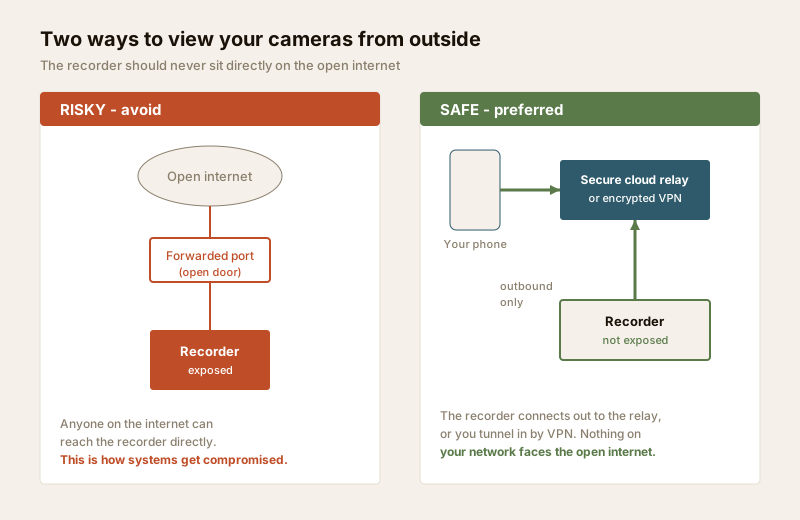
There are three broad routes to see your cameras when you are away. They are not equally safe.
| Method | How it works | Safety | Best for |
|---|---|---|---|
| Vendor secure cloud / relay app | The recorder makes an outbound connection to the maker's servers; your app connects to the same relay. No inbound door on your router. | Good — nothing on your network is directly exposed; depends on the vendor's security | Most homes and small shops |
| VPN into your home network | Your phone builds an encrypted tunnel to your router/VPN, then reaches the recorder as if you were at home | Best — the recorder is never on the public internet at all | Anyone comfortable with a slightly more technical setup, or a router that supports VPN |
| Port-forwarding the recorder | You open a "door" on your router that points the internet straight at the NVR | Avoid — this is the exposure that gets systems compromised | Effectively nobody, for a home |
The practical rule for an Indian home: prefer the vendor's secure cloud relay for simplicity, or a VPN for the strongest privacy, and avoid opening ports on your router. Both safe methods let the recorder stay invisible to the wider internet while you still get a live view over your Jio, Airtel or other broadband connection.
If you are choosing a recorder in the first place, the NVR vs DVR guide and the recorder selector cover which units have well-supported secure apps. For where footage lives and how cloud recording differs from on-site storage, see the cloud CCTV guide and the storage & HDD sizing guide.
Lock the front door first — passwords and 2FA
Before you enable any remote feature at all, close the obvious openings.
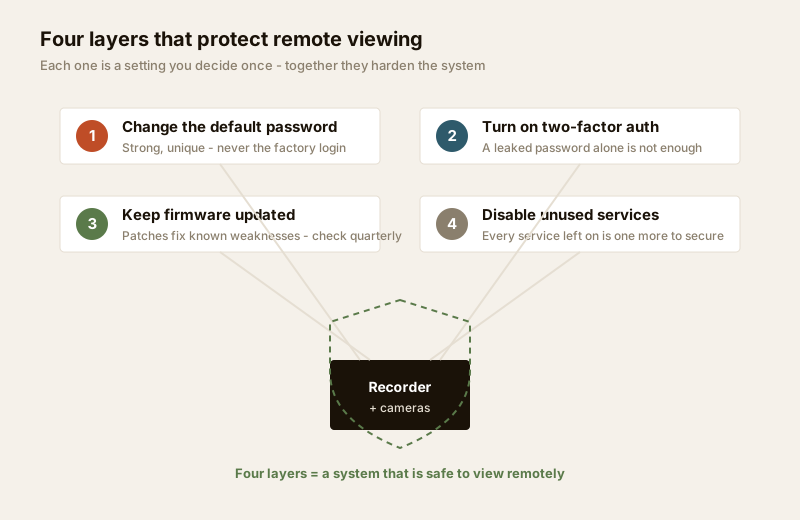
- Change every default password immediately — on the recorder, on each camera that has its own login, and on the mobile app account. Do this at commissioning, before the system ever touches the internet.
- Use a strong, unique password for the system — long, not reused from your email or bank, and different from the app account password. A password manager makes this painless.
- Turn on two-factor authentication (2FA) on the vendor app account wherever it is offered, so a leaked password alone is not enough to sign in.
- Create separate logins for family members instead of sharing one admin password, and remove access when someone no longer needs it (a departing tenant, a former staff member).
- Disable services you do not use. If the recorder offers old remote protocols, guest access or features you will never touch, switch them off — every service left on is one more thing to secure.
Keep the firmware current
The software inside cameras and recorders gets security fixes over time, just like a phone. An unpatched recorder can carry a known weakness for years.
- Update the recorder and camera firmware to the manufacturer's current release at install, and check periodically after that.
- Update the mobile app from the official app store, not from links sent over chat or email.
- Buy from makers who still support the model. A very cheap unbranded recorder that never receives an update is a poor foundation for anything you will expose to the internet, however indirectly. Prefer a reputable brand with a track record of security patches.
Set a reminder — a firmware check once a quarter, aligned with the twelve-monthly review you should already be giving the wider system, is enough for a home.
Segment the camera network
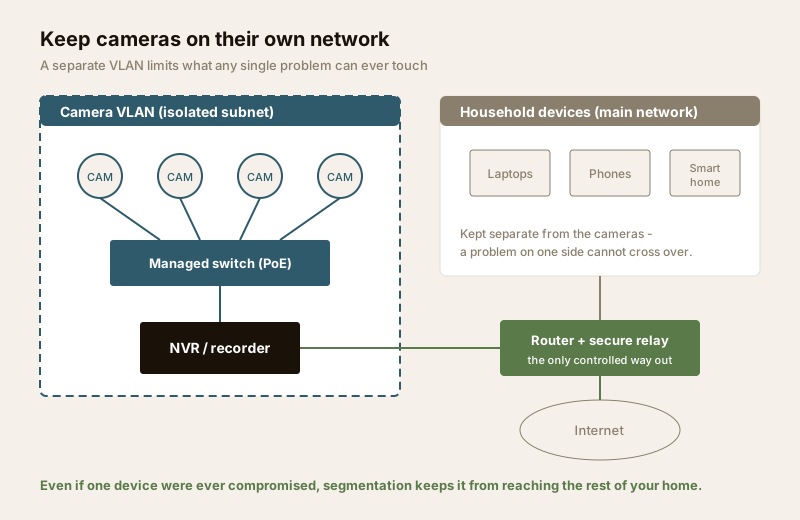
Cameras and recorders should not sit on the same flat network as your laptops, phones and smart-home devices. Putting them on a separate VLAN or subnet means that even if one device were ever compromised, it cannot easily reach the rest of your home network — and vice-versa.
- On an IP system, a managed switch lets you place the cameras and NVR on their own VLAN. This is a security and a bandwidth benefit — the camera traffic stays off your household Wi-Fi.
- Keep the camera VLAN's outbound internet access limited to what the secure app genuinely needs.
- Even on a simple home setup, a guest network for cameras is far better than nothing.
The switch, PoE and VLAN mechanics — how to size the switch and isolate the camera subnet — belong to the network switch & PoE budget guide, and you can lay out the ports and runs with the cabling & PoE planner. This guide only flags why segmentation matters for remote access: it shrinks what a problem can touch.
Make sure remote view survives a power cut
There is no point hardening remote access if the whole system goes dark the moment the power does — a real, frequent event across much of India. Remote viewing depends on three things staying alive: the recorder, the network switch, and the broadband router.
- Put the NVR, the PoE switch and the router on a UPS or inverter so a short outage does not knock you offline exactly when you might want to look.
- Size the runtime to bridge typical cuts in your area, not just a few minutes.
- Route surge protection and earthing to a professional — spikes and lightning are as much a threat to networking gear as an outage.
The runtime maths and what to protect are covered in the power supply & UPS guide and the backup-power calculator — do the sizing there rather than guessing here. For the broader mains picture, the security power-supply requirements guide and the electrical hub are the right references, and mains work is a licensed electrician's job.
Footage is personal data — treat it that way
Remote access means your footage travels beyond the four walls of your home. That raises a responsibility as much as a convenience.
- Cover only your own property and shared areas. Cameras must never point into a neighbour's private space, and never into bathrooms, bedrooms or changing areas.
- Limit who can watch remotely. The fewer people with a login, the smaller the risk.
- Keep footage no longer than you need it for its stated purpose, and delete old recordings on a sensible schedule.
- Secure the recordings themselves — the same strong password, 2FA and updates protect the stored footage, which under the DPDP Act, 2023 is personal data you are accountable for.
If you want a structured way to review these obligations for your own installation, the security & privacy assessment guide walks through them, and the building security systems guide sets remote access in the context of the whole system.
Do this / avoid this — the safe remote-access checklist
| Do this | Avoid this |
|---|---|
| Change every default password at commissioning | Leaving the factory or blank password in place |
| Use a strong, unique password + 2FA on the app | Reusing your email or bank password |
| Prefer the vendor secure cloud relay or a VPN | Port-forwarding the recorder to the open internet |
| Keep firmware and the app updated | Running an unsupported, never-patched recorder |
| Put cameras on a separate VLAN/subnet | One flat network shared with laptops and phones |
| Disable unused services and old protocols | Leaving every default service switched on |
| UPS the NVR, switch and router | Assuming remote view works through a power cut |
| Limit logins; remove access when it ends | One shared admin login handed around |
When to bring in a professional. You can and should decide these settings yourself — passwords, 2FA, which viewing method, who has access. But mains-electrical work, structured cabling, conduit and chasing, surge protection and earthing, and any working at height are for a licensed installer and electrician, and security cabling must never block fire egress or fire-fighting access. If VLAN configuration or a router VPN is beyond your comfort, a competent network installer can set it up once and hand you a system that is safe by default. For the internet and network groundwork behind remote view, see the internet & network readiness guide.
Key takeaways
- Remote viewing is safe when set up right — the risk is a factory password and an exposed recorder, not the idea of watching from your phone.
- Change every default password, use a strong unique one, and turn on 2FA before you enable any remote feature.
- Keep firmware and the app updated, and buy from makers who still support the model.
- Prefer the vendor's secure cloud relay or a VPN; avoid port-forwarding the recorder onto the open internet.
- Segment the camera network onto its own VLAN/subnet, and UPS the NVR, switch and router so remote view survives an Indian power cut.
- Footage is personal data under the DPDP Act, 2023 — cover only your own property, limit access, and secure the recordings. This is not legal advice.
References
- Digital Personal Data Protection Act, 2023 — recorded footage of identifiable people is personal data; secure it, limit access, and use it only for a legitimate purpose. Verify obligations against the current text before relying on them.
- Indian Computer Emergency Response Team (CERT-In) general guidance on securing internet-connected devices — change default credentials, update firmware, and avoid unnecessary internet exposure.
- Manufacturer security and firmware documentation for your specific recorder and cameras — the authoritative source for enabling 2FA, secure remote apps and updates on your model.
- National Building Code of India (SP 7), Bureau of Indian Standards, and local bye-laws for any structural, electrical or life-safety aspect of an install; verify the current edition via the BIS catalogue: https://www.services.bis.gov.in/
This is an educational overview and not legal advice. Configuration settings vary by manufacturer; cabling, mains-electrical work and working at height are qualified professional tasks — engage licensed installers and verify any standard's current status via the BIS catalogue before relying on it.
Export this guide
Related Guides — Deep-dive reading
Complete Guide to Security System Cybersecurity in India (2026): Protecting the Systems That Protect You
The cameras, locks, alarms and door phones you install to feel safer are internet-connected computers that can themselves be attacked, and an insecure one is worse than none. This pillar maps the whole attack surface — devices, network, accounts and data, operations — and points to every guide that hardens it.
SecurityCCTV Cybersecurity in India (2026): Hardening Cameras, DVRs and NVRs Against Attack
The camera that watches your building is the most-attacked device in it. This professional guide is how to harden a CCTV system the defensive way: unique credentials, no needless internet exposure, a segmented camera network, current firmware, encrypted footage and reputable hardware.
SecurityPreventing Camera Hacking in India (2026): A Homeowner's Protection Guide
The stories are real and frightening: families discovering a stranger had been watching, and even speaking, through their baby monitor or home camera. This defensive guide shows how to make sure it never happens to yours with a plain, layered protection checklist you can actually follow.
SecurityRelated Tools — Try Free
Security Cabling & PoE Planner
Estimate cable length, drops, PoE power budget, the right switch, conduit and cost for a CCTV/security cabling plan.
Cabling PlannerCCTV Camera Coverage & Count Calculator
Estimate how many CCTV cameras you need, the NVR channels, storage in TB for your retention period, and an indicative all-in cost with GST.
CCTV CalculatorCCTV Cloud vs Local Cost Calculator
Compare cloud CCTV subscription against a local NVR + HDD — upfront, 5-year total, monthly fee and break-even.
Cloud vs Local