
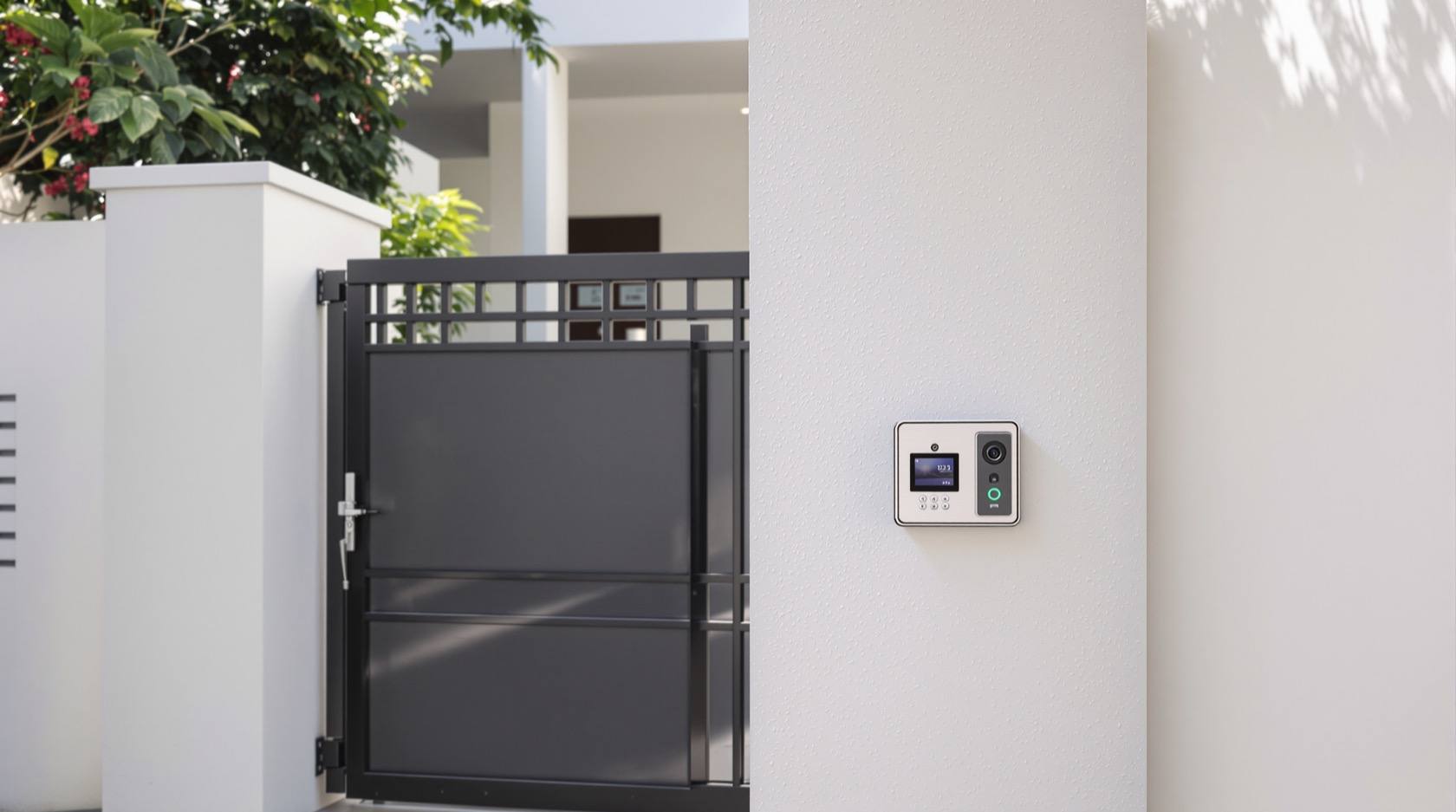
Security Gate Automation Integration in India (2026): Making the Entry One Coordinated Control Point
How to tie an automatic gate into the wider security and smart-home system so the entry becomes one coordinated point of access, camera, intercom and automation — with the honest limits, the convenience that is genuinely risky, and the safety and life-safety essentials you must never skip.
An automatic gate is the one moving barrier every vehicle and most visitors must pass, so it is the natural place to concentrate control. When you tie it into the wider security and smart-home system, the entry stops being a standalone motor and becomes a coordinated control point: a reader or camera decides who may enter, a camera and intercom let you see and speak to whoever is there, and the whole event flows into your alarm, notifications and scenes. Done well, integration makes the boundary both more convenient and better watched. Done carelessly, it turns your heaviest piece of machinery and your primary vehicle entry into a single soft target — one that a lost phone, a copied tag or a firmware exploit can swing open.
This is a planning and coordination guide for professionals and serious homeowners. It deliberately does not repeat the gate craft: the motor, leaf, rack, mounting and commissioning live in the motorised gate automation guide and the automatic gate systems guide; vehicle throughput and lane control live in the boom barriers guide; and the reader-and-credential layer lives in the gate access control guide. Here we answer one question: given a working automatic gate, how do you integrate it into your security system safely — so the entry is coordinated, verified, and never a trap or a back door.
Scope & safety. This is a defensive integration guide. It never describes how to defeat a gate, a reader or a system. Two rules govern everything below. First, an automatic gate is heavy machinery: it must have obstruction sensing with auto-reverse and a manual release that works in a power cut, and it must never block egress or the fire-tender lane. Second, smart is convenience, not a guarantee — a gate that only opens from a cloud app is dead in a power or internet cut, so every integration needs a non-smart fallback. Mains electrical, motor wiring and any life-safety interface is licensed work: specify it, then have a competent installer fit and certify it.
The gate as one coordinated control point
Think of the integrated gate as three layers stacked on the same event. A vehicle or person arrives; something decides whether to open (access); something lets you see and speak before it opens (camera and intercom); and the opening flows into the rest of the system (scenes and notifications). The figure below shows the four elements — access reader, camera, intercom and app — feeding one decision, with a deliberate rule written across it: verify, then open.
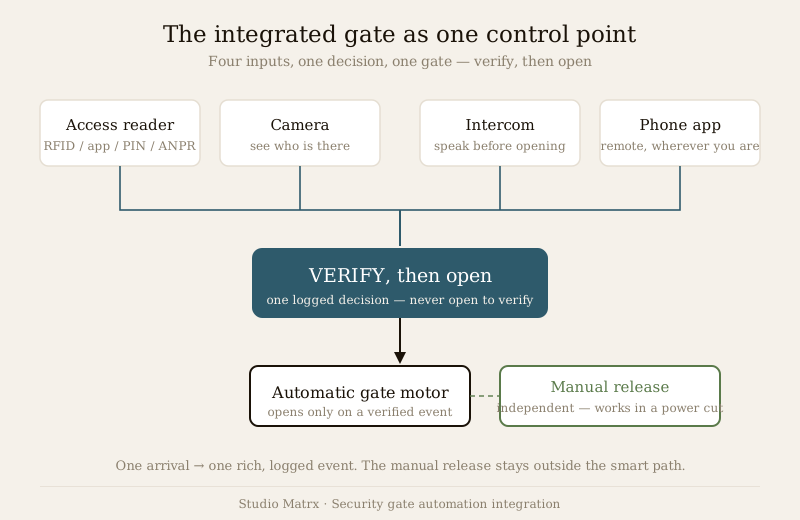
The value of consolidation is that a single arrival produces a single, rich, logged event instead of three disconnected ones. The risk is the mirror image: consolidate carelessly and one weak link — a shared PIN, an exposed camera stream, a gate controller on the open internet — compromises the whole entry. The sections that follow take the three layers in turn, then the two things you must get right regardless: the risky convenience, and the safety and life-safety essentials.
Layer one: gate plus access
The first job of integration is to let authorised vehicles and people open the gate without a guard pressing a button. The credential-and-reader engineering belongs in the gate access control guide; what matters here is how the entry method maps to the automation and where its honest limits are.
- RFID tags or windscreen stickers open the gate as a known vehicle drives up. Convenient for daily residents; the honest limit is that a tag authorises the vehicle, not the driver. A borrowed, stolen or transferred car carries its permission with it. See the RFID vehicle access guide.
- ANPR (number-plate reading) opens for a recognised plate, using the same ANPR camera integration you may already run for CCTV. It is friction-free, but like RFID it authorises a plate, not a person — and plates can be copied, muddied or swapped. Treat it as convenience plus a record, not as proof of identity.
- App or PIN puts the decision in a person's hands or a shared code. An app ties the open to a specific user account (better accountability); a shared PIN is only as good as how tightly it is held and how often it is changed.
The table sets out the honest trade-off so you specify by property, not by brochure.
| Entry method | What it actually authorises | Best for | The honest limit |
|---|---|---|---|
| RFID tag / sticker | The vehicle carrying the tag | Daily residents, staff vehicles | Tag travels with a lent or stolen car; no driver check |
| ANPR plate read | The number plate seen | High-volume, hands-free lanes | Plate can be copied or obscured; identifies plate, not person |
| App unlock | The logged-in user account | Residents who want accountability | Depends on phone security; fails in an internet cut |
| Shared PIN | Anyone who knows the code | Occasional, low-risk access | Spreads silently; must be rotated and never reused as a master |
The design rule across all of them: an authorised credential opens the gate, but the system should still see and record who actually came through. That is what the next layer adds.
Layer two: gate plus camera plus intercom
An access reader answers "is this credential allowed?" It does not answer "who is this, and do I want them in right now?" For visitors, deliveries and anyone without a resident credential, the integration you want is a call at the gate that reaches you wherever you are, shows you live video, and lets you open remotely — only after you have looked.
In practice a gate-mounted camera and a video intercom (or a smart doorbell serving the gate) push the call to an indoor panel and to the app together, so a call rings whether you are in the living room or across the city. You see the caller, speak to them, and if you choose, trigger the gate open from the same screen. The whole-system wiring of intercom, camera and door release sits in the building security systems guide, and the doorbell-camera side in the smart video doorbells guide.
The non-negotiable habit is sequence: verify before you open, never open to verify. A ring at the gate is a request, not an instruction. Look at the video, confirm the person and the reason, then release — and if the picture is dark, blocked, or the person steps out of frame, do not open. Remote convenience is exactly what makes a careless tap dangerous: it is as easy to buzz open a stranger from your office as a courier. The camera exists so that the ease of opening is always paid for with a look first.
Layer three: gate in scenes and notifications
Once the gate is on the system, its events become material for automation. The useful, low-risk ones:
- Gate-opened alert. A push notification (ideally with a camera snapshot) whenever the gate opens, so an open you did not expect reaches you immediately. Route it through your smart security notifications so it does not drown in alert fatigue.
- Auto-close after passage. The gate closes on its own a set interval after a vehicle clears the beam, so it is never left standing open by a distracted driver — a common real-world failure that quietly defeats the whole boundary.
- "Gate left open" reminder. If the gate stays open past a threshold, a reminder nudges you or the guard to check. This is the automation that catches the mundane lapse rather than the dramatic breach.
- Event linking. A gate open can start camera recording of the driveway and switch on entry lighting at the same instant, turning three devices into one coordinated response.
Build these as explicit, reviewable rules using the security automation scenes guide. The discipline is to automate the safe, reversible actions — alerting, recording, lighting, closing — and to keep opening a deliberate act. That distinction is the whole subject of the next section.
The risky convenience — geofence auto-open
Here is the single most tempting and most dangerous automation at an integrated gate, so it gets a bold line of its own.
Never auto-open the gate on location alone. Geofencing — the phone crossing a boundary near home — feels like the perfect welcome: the gate swings open as you arrive, no tag, no tap. But location is not a credential. A lost or stolen phone carried past the geofence, or a spoofed location, opens your entire compound to whoever holds it, with no person and no positive action in the loop. You have handed the gate to the phone, and the phone can be taken.
The safe pattern is a division of labour, shown in the figure: geofence prepares and notifies; a positive action or credential opens.
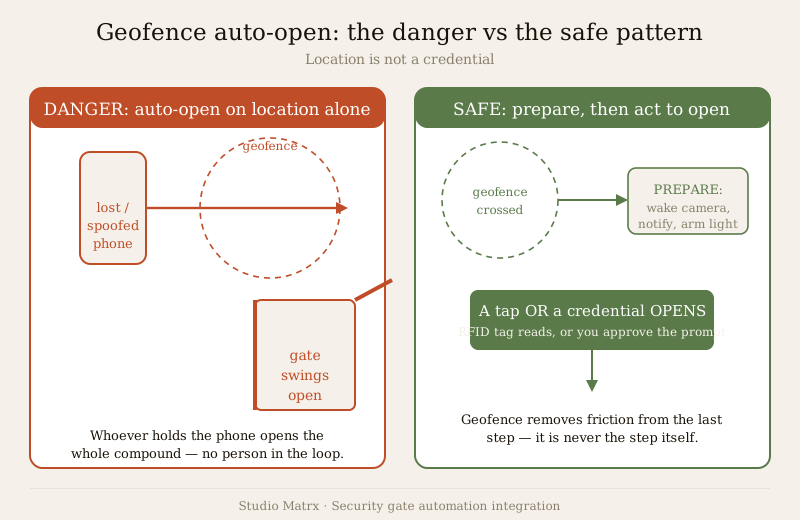
When your phone crosses the geofence, let the system wake up: pre-arm the camera, surface a one-tap "open gate" control on your lock screen, maybe turn on the driveway light. Then you tap, or your vehicle's RFID tag reads, or you approve the app prompt. The geofence removes friction from the last step without ever being the step itself. Read the full treatment in the geofencing home security guide before you enable any location-based rule.
The other convenience-borne risk at any automated gate is tailgating: one authorisation opens the gate, and a second vehicle or person slips through behind before it closes. An RFID open for a resident can admit an unknown car two lengths back; a pedestrian can walk in beside an opening leaf. Auto-close-after-passage with a properly placed safety beam narrows the window, but tailgating is ultimately a design and vigilance problem — in gated communities it is worth pairing the gate with a guard, a separate pedestrian gate, and the practices in the gated communities security guide.
The safety and life-safety essentials
An automatic gate is not a gadget; it is a heavy, powered leaf that moves near people, children, pets and vehicles, and it stands across the one route emergency services must use. These are not optional integration niceties — they are the reason a gate must never be "just an app". They are in bold because they are the lines you do not cross.
Obstruction sensing and auto-reverse are mandatory. The gate must detect anything in its path — a child, a pet, a bumper — and stop or reverse before it crushes. Safety beams (photocells) across the opening and force or current sensing on the motor are the standard means; commission and test them as covered in the automatic gate systems guide. A gate that closes on an obstruction is a machine that can injure, and no amount of smart integration excuses its absence.
A manual release must work in a power cut. Power cuts are an everyday Indian reality, and an automated gate with no manual override becomes a wall: it can trap residents inside their own compound and, far worse, block a fire tender or ambulance from getting in. Every automatic gate must have a clearly marked, tool-free manual release that a resident or guard can operate in the dark during an outage. This is a life-safety requirement, not a convenience.
The gate must never block egress or the fire-tender lane. Whatever else it does, the gate cannot become the thing that stops people getting out or emergency vehicles getting in. Coordinate the gate's fail behaviour with your fire strategy and the clear-lane requirements in the fire-tender access guide, and treat the National Building Code (SP 7:2026) access-way provisions as the floor, not a target.
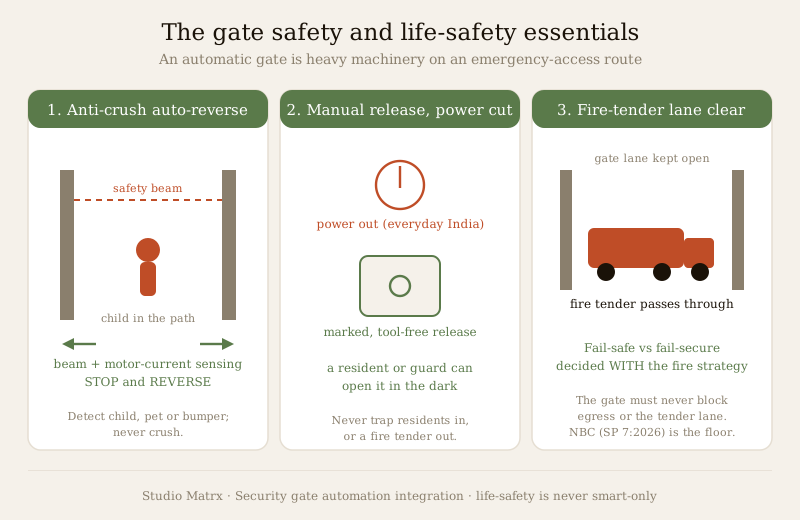
Two further decisions belong to the professional, and both must be made with the fire strategy, not against it:
- Fail-safe open versus fail-secure closed. On loss of power, does the gate default to open (fail-safe, favouring egress and emergency access) or stay locked (fail-secure, favouring perimeter security)? There is no universal answer: a single-family compound with a manual release may accept fail-secure because a person can always release it; a larger site on an evacuation route may need fail-safe on the main vehicle gate. Decide it per your fire and evacuation plan, document it, and make sure the manual release covers whichever way you choose.
- Backup power. The gate controller, and often the release-assist and the intercom, need backup power so the gate degrades gracefully rather than dying. Size and specify it with your electrical designer; do not assume the smart features carry themselves through an outage.
Cyber: the gate is now an attack surface
The moment the gate controller, its camera or its app touches the internet, the entry becomes something that can be attacked remotely, not just climbed. The failures are the ordinary ones: a controller left on default credentials, firmware that is never patched, a management app or cloud account with a weak, reused password, ports exposed straight to the internet. A ₹-cheap no-name gate controller with an admin password of "admin" is not a convenience; it is a remote-opening service you did not mean to run.
Treat the integrated gate exactly as you would any connected security device: change every default credential, keep firmware current, put gate and camera controllers on a segregated network rather than the family Wi-Fi, prefer local control paths over cloud-only ones so a vendor outage does not strand you, and use strong, unique account passwords with two-factor authentication where offered. The full method — segmentation, credentials, firmware discipline, DPDP-aware data handling — is in the smart security cybersecurity guide, and you should apply it before you connect the gate, not after an incident.
| Integration decision | The convenient default | The safer specification |
|---|---|---|
| Opening on arrival | Auto-open on geofence alone | Geofence prepares; a tap or credential opens |
| Remote visitor entry | Buzz open on the ring | Verify on video first, then release |
| Gate left open | Rely on the driver | Auto-close after passage plus a "left open" reminder |
| Power-cut behaviour | Whatever the installer defaults to | Fail mode chosen with the fire strategy; manual release tested |
| Controller on network | Default creds on family Wi-Fi | Changed creds, patched firmware, segregated network |
Where this sits in the wider system
The integrated gate is one node in a boundary that also includes fencing, lighting, cameras and detection. Plan it as part of the whole with the smart home security pillar and the perimeter security guide, and pressure-test how much your entry actually protects you with the home security risk scorecard. For an apartment complex or layout, the gated communities security guide covers the guard, visitor and multi-user dimensions that a single-home integration does not.
Key takeaways
- Integrate the gate into one coordinated control point — access, camera, intercom and app on a single verified event — but never let consolidation create a single soft target.
- A credential authorises a vehicle or a plate, not a person. RFID and ANPR are convenience plus a record; keep a camera and a look in the loop for anyone who matters.
- Verify before you open, never open to verify. Remote convenience is exactly what makes a careless tap dangerous.
- Never auto-open on geofence alone. Location is not a credential; a lost or spoofed phone opens the compound. Let the geofence prepare and notify — a positive action or credential opens.
- Safety and life-safety are non-negotiable: obstruction sensing with auto-reverse, a manual release that works in a power cut, and a gate that never blocks egress or the fire-tender lane. Decide fail-safe versus fail-secure with the fire strategy.
- A connected gate is an attack surface. Change defaults, patch firmware, segregate the network, and prefer local control over cloud-only.
Where to go next
- Build or fix the gate hardware itself with the motorised gate automation guide and the automatic gate systems guide.
- Get the credential-and-reader layer right with the gate access control guide, the RFID vehicle access guide and ANPR camera integration.
- Control high-throughput lanes and tailgating with the boom barriers guide.
- Wire the automation and alerts with the security automation scenes guide, the smart security notifications guide and the geofencing home security guide.
- Secure the whole system with the smart security cybersecurity guide, and keep the fire lane clear with the fire-tender access guide.
- Return to the smart home security hub and the security hub.
References
- National Building Code of India, SP 7:2026 (Bureau of Indian Standards) — access ways, fire-tender access and egress provisions relevant to gate and lane clearances.
- Digital Personal Data Protection Act, 2023 — for handling ANPR reads, camera footage and access logs generated at the gate.
- Connectivity and interoperability frameworks — Matter, Wi-Fi, Zigbee and Z-Wave — as generic standards for how gate, camera and hub devices communicate; confirm the current version and device support at specification time.
- Bureau of Indian Standards (BIS) and the Bureau of Energy Efficiency (BEE) — for verifying the current status of any product standard or rating claimed by a gate controller or reader.
This is an educational planning and integration guide. It is strictly defensive and does not describe how to defeat any gate, reader or security system. An automatic gate is heavy machinery on a life-safety access route: obstruction sensing, auto-reverse, a working manual release and a clear fire-tender lane are mandatory. Mains electrical, motor and life-safety interface work is qualified professional work — engage licensed installers, and verify any applicable National Building Code (SP 7:2026), municipal bye-law and DPDP Act 2023 requirement for your project.
Export this guide
Related Guides — Deep-dive reading
Complete Guide to Security System Cybersecurity in India (2026): Protecting the Systems That Protect You
The cameras, locks, alarms and door phones you install to feel safer are internet-connected computers that can themselves be attacked, and an insecure one is worse than none. This pillar maps the whole attack surface — devices, network, accounts and data, operations — and points to every guide that hardens it.
SecurityGeofencing Home Security in India (2026): Convenience Without the Trap
A geofence is a virtual boundary around your home; your phone crossing it can arm the alarm as the last person leaves and light the place up as you arrive. This guide explains the genuinely useful security uses, and the honest caveats: never let a phone's location alone unlock your door, never make a geofence the only thing that arms your home, and treat continuous family tracking as sensitive data.
SecuritySecurity Fire Alarm Integration in India (2026): Smart Alerts, Certified Systems, Fail-Safe Egress
The most important sentence a smart-home designer can say about fire is also the least profitable: a smart-home smoke sensor or fire notification is a helpful add-on, not a substitute for a certified fire-alarm system. This guide draws the line hard — life-safety detection and alarm belongs to the NBC-governed certified system — and then covers the genuinely useful, correctly-scoped automations the smart layer can add on a verified fire signal: unlock for egress, open the gate for the fire tender, light the escape path, stop the away-scene, and notify everyone loudly. All of it fail-safe. None of it in the way of the system that actually saves lives.
SecurityRelated Tools — Try Free
Gate Access Planner
Size a vehicle gate or boom barrier — lanes needed at peak and the right credential speed (RFID, ANPR, manual).
Gate FlowHome Security Risk Scorecard
Score your home across six security layers — perimeter, entry points, lighting, detection, alarm and habits — and get a prioritised action plan.
Security ScorecardVisitor Access Planner
Size visitor handling at a gate or reception — lanes needed at peak and the temporary-pass pool.
Visitor Flow