
Solibri Model Checking: Solibri 26.9, BIM Rule Checks, and IFC, BCF and IDS Explained
A plain explanation of BIM model checking for Indian architects, interior designers and students: what Solibri does, what its 2026 releases added, how its editions and prices changed, and what the openBIM standards IFC, BCF and IDS actually are.
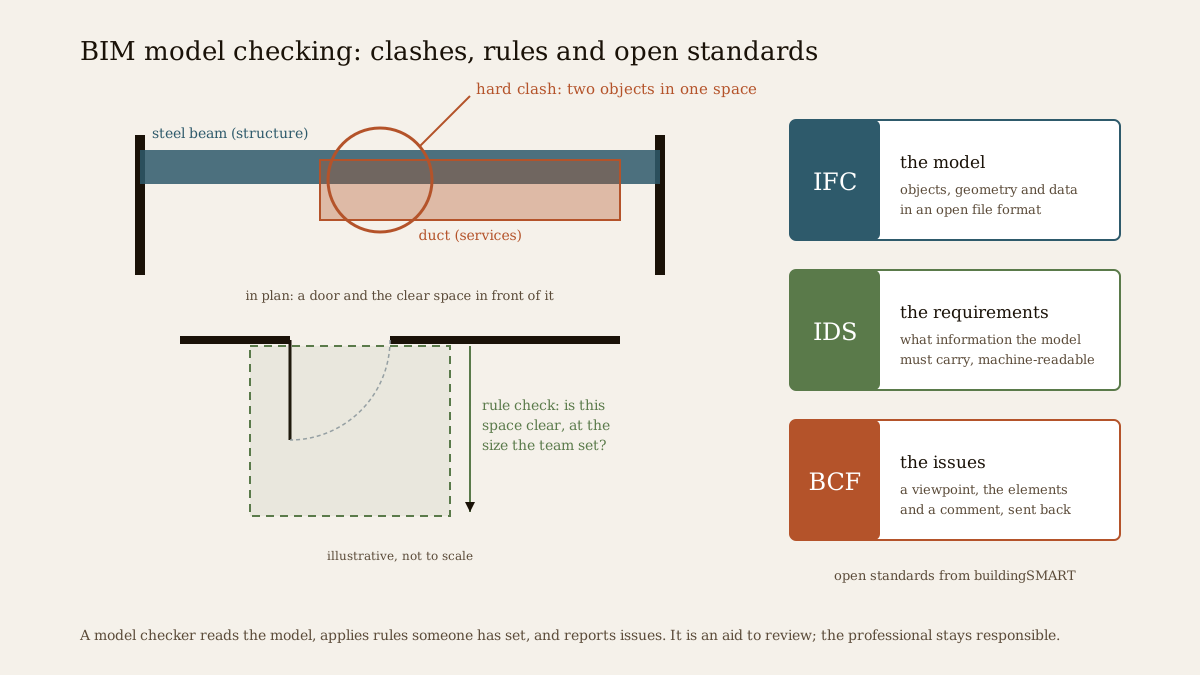
A building model can look finished and still be wrong. A duct can run straight through a beam; a door can open into a space too small to turn a wheelchair; a hundred walls can carry no fire rating because someone exported the wrong property set. None of this shows in a render. It shows up on site, as rework and delay, or later, when a facility manager opens the handover model and finds it empty.
Model checking is the habit, and the software, that catches these problems while they are still cheap to fix. Solibri, from the Finnish company of the same name, is one of the best-known tools for it. This guide explains what model checking is, what Solibri does, what its 2026 releases added, how its editions and prices changed this year, and, just as importantly, what the open standards behind it (IFC, BCF and IDS) actually are. Those standards matter even if you never buy Solibri.
This guide describes third-party software and open standards as of November 2026. Features and figures come from Solibri's own release notes, store and product pages, and from buildingSMART, and are marked as vendor claims where they are the vendor's own. Prices are listed prices and may change. It is not a compliance guide: no software decides whether a building meets Indian codes, and the professional of record remains responsible. Studio Matrx has no commercial relationship with any company named here.
What model checking is, and why it matters
In a BIM project each discipline builds its own model: the architect, the structural engineer, the services (MEP) engineers, sometimes the interior designer and the facade consultant. Model checking means opening those models together, or one at a time, and testing them against rules. For a short definition, see the model checking entry in our BIM glossary. The rules fall into five broad families:
| Kind of check | What it asks | Typical example |
|---|---|---|
| Clash detection | Do two objects occupy the same space, or crowd each other's clearance? | A duct through a beam; a pipe with no room for insulation |
| Data quality | Does every object carry the information it should, in the right form? | Doors without a fire rating; spaces without names or areas |
| Rule and design checks | Does the geometry meet a rule the team has set? | Door clear space, ramp gradient, corridor width, travel distance to an exit |
| Code-type checks | Do the values reflect a building code, once someone has mapped it into rules? | Escape-route lengths or accessible-route widths configured from a code |
| Handover data | Is the model ready for the owner to operate the building? | Equipment carrying the asset data a facility team needs |
Clash detection is the best known, and our free BIM Technology and Clash Detection lesson explains hard, soft and workflow clashes. But the quieter data checks are often more valuable: a model is a database as much as a shape, and every schedule, quantity and handover file built from bad data inherits the error.
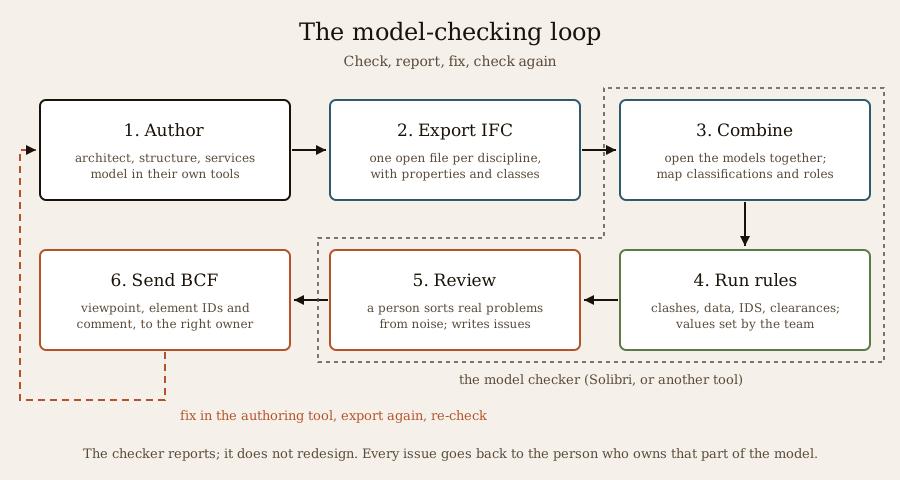
The loop matters more than any single run. A checker that produces 4,000 "issues" nobody reads is worse than useless. Good practice is to run checks at agreed stages, have a person sort real problems from noise, send each real issue to the person who owns that part of the model, and check again after the fix.
Solibri in one paragraph
Solibri was founded in 1999 in Helsinki, Finland, and built its product around IFC, the open BIM file format, rather than around one design program. The Nemetschek Group, which also owns Archicad, Vectorworks, Allplan and Bluebeam, announced it was acquiring Solibri in December 2015, and Solibri continues as its own brand. The desktop application runs on Windows 10 and 11 and on macOS (Ventura or later). It opens IFC models (and, in the Essential tier and above, native Revit models), combines them, runs rule-based checks, records issues and exchanges them through BCF. The current feature release is Solibri 26.9.0, released on 29 September 2026, followed by a 26.9.1 update on 17 November 2026. Since 2025 Solibri has released roughly every quarter, with versions named by year and month (25.6, 25.9, 25.12, 26.4, 26.6, 26.9).
What is new in Solibri's 2026 releases
2026 was an unusually busy year for Solibri: a new product lineup, a stream of accessibility rules, point-cloud checking, more IDS tooling, automation and a first AI assistant. The table summarises the main items from Solibri's own release notes.
| Release | Date | Headline changes (vendor release notes) |
|---|---|---|
| 25.12.0 | 17 Dec 2025 | New rules for accessible clear areas around objects (#248), component visibility (#250) and accessible route compliance (#252); tactile indicators in the stair rule; first georeferencing support; private or local BCF and CDE connections for high-security projects |
| 26.4.0 | 13 Apr 2026 | New product tiers (Starter, Essential, Advanced, Premium) replacing Office, Site, Anywhere and CheckPoint; WebChecker (beta) for IFC checking in a browser; PDF and SVG export from the 3D view; live measurement; pre-release E57 point-cloud import; more IFC entities; rule upgrades for parking ratios, accessible routes, ramps and doors |
| 26.6.0 | 30 Jun 2026 | AI Assistant (beta, Premium only); point-cloud checking with clash, clearance and matching rules (Premium); IfcAlignment for infrastructure; result customisation (rename results, set severity) carried into BCF, Excel and PDF exports; IDS rule upgrades; six new interface languages |
| IDS Editor | 14 Jul 2026 | Standalone IDS Editor with an IDS Validator (beta), XML preview and revision history, available to Solibri customers through Solibri Center |
| 26.9.0 | 29 Sep 2026 | Superrun, a drag-and-drop workflow builder (Premium, 300 tokens per run); deeper accessible door, ramp and stair rules; a property rule that tells a missing property from an empty one; classification drag-and-drop into filters and takeoffs; the vendor claims a 3D view 50 to 100 per cent faster |
| 26.9.1 | 17 Nov 2026 | The AI Assistant can build or edit Superrun workflows from plain-language instructions (beta, Premium); fixes to several accessibility and IDS rules; BCF 3.0 reports warn about missing issue titles; offline licensing for Starter; security updates |
Two patterns stand out: a year of deeper accessibility rules (doors, ramps, stairs, routes, clear space around toilets and washbasins), and almost every major new feature gated to the Advanced or Premium tier, with automation metered by tokens.
Editions and pricing in 2026
On 13 April 2026, with version 26.4.0, Solibri replaced its old lineup. Solibri Office, Site, Anywhere and CheckPoint became legacy products, no longer sold to new customers; existing customers stay supported under their contracts. The most visible casualty was Solibri Anywhere, the free viewer that many students and consultants used to open IFC files and read issues. Free Anywhere users who update to 26.4.0 or later lose that free entitlement; Solibri points them to Starter instead, and older installations of 25.12.1 continue to work.
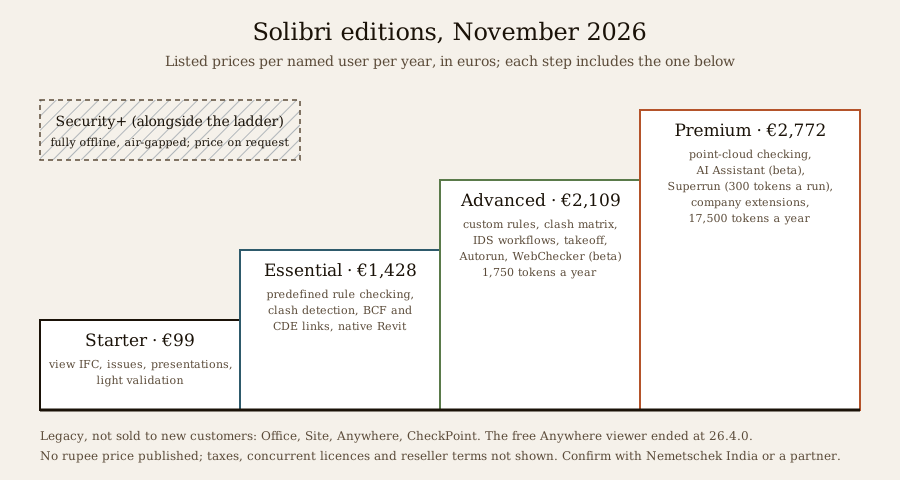
| Edition | Listed price (per named user, per year) | What it adds |
|---|---|---|
| Starter | €99 | IFC viewing and federation, issues, presentations, property review, lightweight validation |
| Essential | €1,428 | Native Revit federation, predefined rule-based checking, structured clash detection, BCF issue management, CDE integrations |
| Advanced | €2,109 | Custom rule creation, clash-matrix control, IDS workflows, quantity and information takeoff, Autorun, WebChecker; 1,750 tokens a year |
| Premium | €2,772 | Point-cloud checking, the AI Assistant, Superrun, company extensions, extended IDS and compliance reporting; 17,500 tokens a year |
| Security+ | On request | Fully offline, air-gapped, controlled updates, for government and defence-type environments |
Prices are those shown on Solibri's online store in November 2026, yearly, for named licences; the store also has monthly and concurrent options whose prices it did not display. Extra tokens are sold in packs (5,000 for €250, 10,000 for €450, 25,000 for €750); they are charged only for successful runs and pooled across an organisation. All sales are now subscriptions. Since September 2026, named licences must be reserved to a specific person by the organisation's admin, with a limited number of reassignments a year.
No rupee price is published. Solibri's contact page routes Indian enquiries to Nemetschek India, and Nemetschek India lists reseller partners. Expect GST, exchange rates and reseller terms to change the real cost, and ask for a written quote.
How a check actually works
Whatever the tier, a Solibri check follows the same shape.
1. Open and federate. You open one or more IFC models (and, from Essential up, native Revit files). Each model is assigned a discipline, so the software knows which is architecture and which is structure. Since 26.6.0, teams can define their own disciplines.
2. Classify. Classifications sort components into groups that rules can target: by discipline, by element type, or by a project's own coding system. Since 26.9.0 classification rows can be dragged straight into filters and takeoff definitions, and colour the model automatically.
3. Load a ruleset. A ruleset (a .cset file) is a collection of rule templates, each with a number and parameters. You do not write code: you choose a template and set its values. Examples from Solibri's documentation and release notes include rule #1 General Intersection (clash detection), #245 Clash Detection Matrix (discipline against discipline), #230 Property rule, #244 IDS Validation, #208 Accessible Door, #207 Accessible Ramp, #210 Accessible Stair, #252 Accessible Route Compliance, #235 Number of Components (for counts such as parking ratios) and #179 Escape Route Analysis. Essential runs predefined rulesets; creating and editing your own rules starts at Advanced.
4. Run the check and review. Results are grouped by rule and severity. A person then decides which are real. Since 26.6.0, Advanced and Premium users can rename results and set their severity (info, alert, error) so that the language of the report suits the project.
5. Record issues. Real problems become issues, gathered in presentations: each slide holds a saved view, the components involved and a comment. This is what gets sent to the design team.
6. Exchange through BCF. Issues leave Solibri as BCF, either as a file or live through a "BCF Live" connection to an issue server or common data environment. Solibri's help lists integrations with services such as Aconex, BIMcollab, Bimplus, BUILD 365 and Catenda, and 26.6.0 added ACCA usBIM and KISS-BIM. On the other side, Archicad's "Solibri Connection" add-on imports BCF issues so the architect sees each problem in place. Solibri itself notes that its link to Autodesk Forma Issues is a custom connection, not BCF.
7. Take off information. Information Takeoff (ITO), from Advanced up, extracts quantities and properties into tables and Excel: door schedules, areas, counts, anything the model carries. It is also a good way to see whether data is present at all.
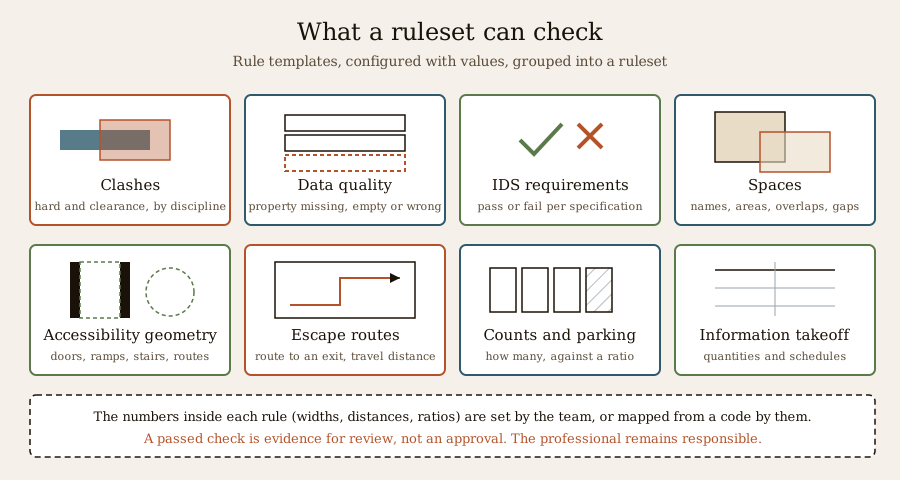
The key point is in the figure's footnote. A rule is only as good as the values someone puts into it. Solibri's accessible door rule, for example, ships with a default check depth of 850 mm (per the 26.4.0 notes). That default is Solibri's starting point, not an Indian requirement. A team checking an Indian project has to decide which values apply and enter them, and somebody qualified has to own that decision.
Point clouds and the browser
Two newer strands are worth knowing. Point-cloud checking (Premium, from 26.6.0) compares a laser scan (E57, LAS or LAZ files) with the model to find clashes, clearance problems and deviations between what was designed and what was built; our Reality Capture and Scan-to-BIM course explains scanning itself. WebChecker, still labelled beta, checks an IFC file in a browser against Solibri's built-in "Model Health" check or an uploaded ruleset and exports PDF or BCF. It is included in Advanced and Premium, not offered free.
The openBIM standards, explained plainly
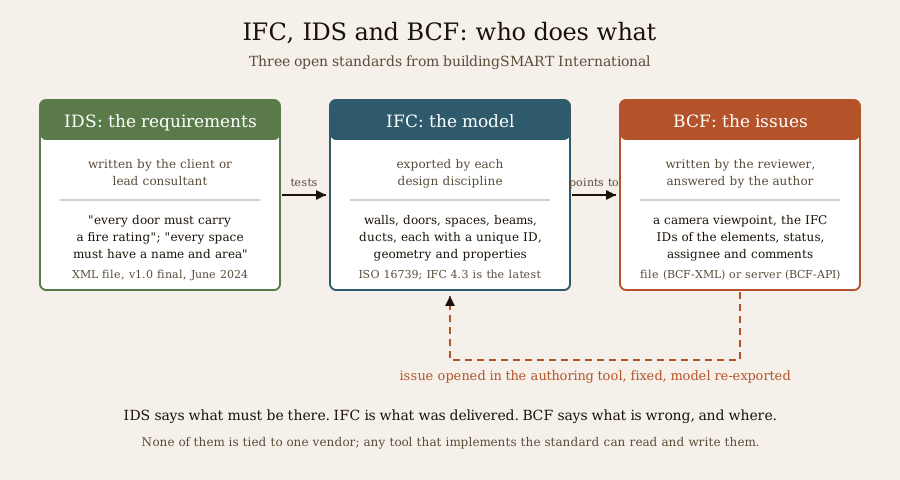
Solibri is built on three open standards published by buildingSMART International, the not-for-profit body behind openBIM. They are not Solibri's property; any tool can implement them. Understanding them is useful whether you use Solibri, another checker or none at all.
IFC: the model
IFC (Industry Foundation Classes) is an open file format for building models. An IFC file describes objects (walls, doors, slabs, spaces, beams, ducts, equipment), their geometry, their relationships (this door is in this wall, on this storey) and their properties. Each object has a unique identifier, called a GUID, which is what lets a later issue point at exactly the right door.
IFC is an international standard, ISO 16739. Its latest version, IFC 4.3, extends the schema to infrastructure such as roads, railways, bridges and alignments; buildingSMART announced in 2024 that it had been approved and published by ISO as ISO 16739-1:2024. Many tools still exchange IFC 2x3 or IFC 4, so agree the version with your project team before anyone exports. Solibri added support for more IFC 4.3 entities, including alignments, during 2026.
Two cautions. IFC is only as good as the export: careless mapping produces generic "proxy" objects with no useful data. And IFC is for exchange, not editing; you fix problems in the authoring tool and export again.
BCF: the issues
BCF (BIM Collaboration Format) is the open format for exchanging issues about a model, without sending the model itself. A BCF issue (called a topic) typically holds a camera viewpoint, the GUIDs of the elements concerned, a title, a status, an assignee and a thread of comments. It comes in two forms: BCF-XML, a zipped file you can email or upload, and BCF-API, a web interface through which tools talk to an issue server directly. The current version is BCF 3.0, released in 2021.
Its value is that reviewer and author need not use the same software. A checker raises an issue in Solibri; the architect opens it in Archicad, Revit or another tool, sees the exact element and view, fixes it and marks it resolved. Unlike a screenshot in a messaging group, the issue stays linked to the element and keeps its history.
IDS: the requirements
IDS (Information Delivery Specification) is the newest of the three. It is a machine-readable XML file that states which information a model must contain, and which values are acceptable: for example, "every door must have a fire rating property", or "every space must have a name and a net floor area". buildingSMART approved IDS 1.0 as a final standard in June 2024.
Before IDS, such requirements lived in PDFs and spreadsheets, and checking them meant building rules by hand. Now the client or lead consultant writes them once, and any IDS-capable tool can test an IFC model and report pass or fail. Solibri does this through its IDS rule (#244) and its own IDS Editor and Validator; open-source tools can too, as the alternatives below show.
Put simply: IDS says what must be there, IFC is what was delivered, and BCF says what is wrong and where. For a fuller treatment, our free Building Information Modelling course covers IFC, CDEs and information requirements in depth, and the Automated Compliance and Rules-as-Code course explains how rules are turned into checks, and where human judgement must stay.
Alternatives
Solibri is not the only checker. The table is a short, fair orientation, not a full comparison; we did not test these products, and their editions and prices change often, so check each vendor's current terms.
| Tool | What it is mainly for | Notes |
|---|---|---|
| Autodesk Navisworks | Model federation and clash detection, with construction sequencing | Long the default for clash coordination in Revit-centred teams |
| BIMcollab | BCF-based issue management, with a model checker and viewer | One of the issue servers Solibri can connect to |
| Revizto | Issue tracking and coordination across 2D and 3D | Brings sheets and models into one issue list |
| Dalux | Model viewing, issues and field tools for site | Often used by contractors on site; check current plans |
| Trimble Connect | Common data environment and model viewer | Links with Trimble's Tekla and SketchUp tools |
| IfcOpenShell / IfcTester | Open-source IFC toolkit; IfcTester authors IDS files and checks IFC models against them | Free; reports to the console, HTML, JSON or BCF; suits technically confident users |
| BIMvision | IFC viewer | Free viewer; checking features are limited, so confirm current plug-ins and terms |
Solibri's distinctive strengths, by the evidence above, are its long rule-template library (especially for accessibility, spaces and escape routes), its IDS tooling and its openBIM-first design. Its weaknesses for a small Indian practice are cost, the end of the free viewer and the gating of custom rules and automation to the upper tiers.
What this means in India
Who checks models. In India, rule-based model checking is mostly found on large and complex projects: airports, metro and railway stations, hospitals, data centres, large commercial and institutional buildings, and the work of Indian BIM service firms who model and coordinate projects for clients abroad. Public clients are pushing in the same direction. The Central Public Works Department (CPWD) has published BIM guidelines, and metro rail corporations have used BIM on major projects; reports on the exact scope and thresholds of national mandates conflict, so read the BIM requirements in your project's tender documents. Our lesson on India's BIM story sets out the policy background, and the wider BIM reference for Indian students covers tools and careers.
Codes. The National Building Code of India 2016 has been withdrawn; the active edition is SP 7:2026, which the Bureau of Indian Standards lists as the National Building Construction Standards 2026, alongside state and city building bye-laws. Our research found no Indian ruleset for Solibri: no NBC or bye-law ruleset from Solibri, Nemetschek India or a reseller. Solibri's code-type rules are templates; to use them against Indian requirements, a firm would configure its own ruleset (custom rules start at the Advanced tier) and take responsibility for every value in it.
Read the results with care. No tool, Solibri included, certifies that a building complies with Indian codes. A rule check is an aid: it finds candidates for a human to review, quickly and consistently. A passed check means "no problems found by these rules, with these values, in this model", nothing more. The architect, engineer and other professionals of record remain responsible for compliance, and approval comes from the authority, not the software. For the human side of accessibility, read our guide to accessible home design in India.
Practical advice.
- Agree the IFC version, the classification system and the property sets with the team before modelling, not before submission.
- Ask clients for their information requirements as an IDS file where they can produce one; it turns a vague "BIM deliverable" into something checkable.
- Use BCF rather than screenshots for issues, whichever tools you use.
- If you are a student, learn the standards first. IFC, BCF and IDS will outlast any one product, and the free tools that implement them are enough to practise on.
What Studio Matrx offers. The free Matrx Design Suite on Studio Matrx is a design tool for Indian homes, not a model checker. It exports IFC4 and imports IFC, so a model drawn in it can be opened in Solibri or any IFC viewer, and it has a few simple built-in checks of its own, such as room sizes and an accessibility check, worded as guidance rather than compliance. It does not yet exchange BCF or read IDS files.
The AI question
Solibri's AI Assistant, introduced as a beta for Premium users in 26.6.0, is a chat panel inside the desktop app. Solibri says it can navigate results, query components, help set up and adjust rules, run checks and work with issues; 26.9.0 added "@" references to model items, and 26.9.1 lets it build Superrun workflows from plain-language instructions, also in beta. Solibri states that the assistant works only on the open model, results and session, with the user's permission, and "does not access external data or browse the internet". That is the vendor's description; we have not tested it. Separately, Solibri's legacy cloud product added natural-language search for elements ("walls on the second floor") in April 2026.
Two cautions apply to any AI in model checking:
1. The numbers should come from the model, not the language model. The safe design is AI that interprets your question and then runs a real query or rule, so that every figure can be traced back to an element. An AI that "estimates" an answer is not a check.
2. Check before you send. A fluent answer is easy to accept. Spot-check it against the actual results before it goes into a coordination report, a client email or a submission.
For AI across the design workflow, see our guide to AI architecture software.
Related guides
The companion guides on Archicad 30, Vectorworks 2027 and Bluebeam Revu cover the authoring and PDF-review tools on either side of a model check; SDS2 and steel detailing shows where clash checks meet steel fabrication.
Key takeaways
- Model checking tests BIM models for clashes, missing or wrong data, design rules and handover readiness. The loop (check, review, issue, fix, re-check) matters more than any single run.
- Solibri, founded in Finland in 1999 and part of the Nemetschek Group since an acquisition announced in December 2015, is a leading IFC-based checker. Its current feature release is 26.9.0 (29 September 2026), updated to 26.9.1 on 17 November 2026.
- In April 2026 Solibri moved to Starter (€99), Essential (€1,428), Advanced (€2,109) and Premium (€2,772) per named user per year, plus Security+ on request; the free Anywhere viewer ended at 26.4.0. No rupee price is published.
- Custom rules, IDS workflows and takeoff start at Advanced; point clouds, the beta AI Assistant and token-metered Superrun automation are Premium.
- IFC is the open model format, BCF carries issues, and IDS states information requirements in machine-readable form. All three come from buildingSMART and work across vendors.
- No Indian ruleset was found. The active edition of the national code is SP 7:2026; any code-type check must be configured and owned by the professional, and a passed check is an aid, not an approval.
References
1. Solibri — Release notes index (accessed 20 November 2026). solibri.com
2. Solibri — Solibri 26.9.1 release notes, 17 November 2026. solibri.com
3. Solibri — Solibri release notes, September 2026 (26.9.0), 29 September 2026. solibri.com
4. Solibri — Solibri release notes, June 2026 (26.6.0), 30 June 2026. solibri.com
5. Solibri — Solibri release notes, April 2026 (26.4.0), 13 April 2026. solibri.com
6. Solibri — Solibri 25.12.0 release notes, 17 December 2025. solibri.com
7. Solibri — Solibri IDS Editor release notes, July 2026. solibri.com
8. Solibri — Solibri Store, plans and token packs (accessed 20 November 2026). store.solibri.com
9. Solibri — Our offerings. solibri.com
10. Solibri — Legacy products. solibri.com
11. Solibri — New reserved license model for Solibri named subscriptions, 14 September 2026. solibri.com
12. Solibri — Solibri AI-powered assistant. solibri.com
13. Solibri Help — Integrations available in Solibri. help.solibri.com
14. Solibri — Solibri acquired by Nemetschek, December 2015. solibri.com
15. Graphisoft — Archicad 30 Help: Solibri Connection. help.graphisoft.com
16. buildingSMART International — BIM Collaboration Format (BCF). buildingsmart.org
17. buildingSMART International — BIM Collaboration Format (BCF) 3.0. buildingsmart.org
18. buildingSMART International — IFC 4.3 documentation. ifc43-docs.standards.buildingsmart.org
19. buildingSMART International — Newsletter, April 2024 (IFC 4.3 published by ISO as ISO 16739-1:2024). comms.buildingsmart.org
20. buildingSMART International — Information Delivery Specification (IDS) repository. github.com
21. Construction Management — Information Delivery Specification paves the way for openBIM (IDS 1.0 final standard, June 2024). constructionmanagement.co.uk
22. IfcOpenShell — IfcTester: IFC model auditing tool with support for IDS. pypi.org
23. Nemetschek India — Partner directory. nemetschek.in
24. Bureau of Indian Standards — standards catalogue (check the current edition of SP 7, the National Building Code of India). standardsbis.bsbedge.com
Last verified 20 November 2026. Software versions, editions, prices and claims change with each release; confirm with each vendor. This guide explains software and standards only. Design, coordination and compliance with Indian codes and bye-laws remain the responsibility of the qualified professionals of record and the approving authority.
Export this guide
Related Guides — Deep-dive reading
Vectorworks 2027: Architect, Landmark, Spotlight and Design Suite Explained
A plain guide for Indian architects, landscape architects, interior and event designers, and students: what the Vectorworks family does, what the 2027 release adds (including its AI tools), what it costs where prices are known, the free student licence, and how it compares with Archicad, Revit, SketchUp and AutoCAD.
Design Software & ToolsArchicad 30 BIM Software Guide: What's New, Editions, AI Features and How It Compares
A plain explanation of Graphisoft's Archicad for Indian architects, interior designers and students: what the program does, what the October 2026 release adds, what the Studio, Collaborate and Max editions include, how its beta AI tools work, and how it compares with Revit, Vectorworks and Allplan.
Design Software & ToolsBluebeam Revu 21 and Bluebeam Max: PDF Markup, Review and Quantity Take-off Explained
A plain explanation of the PDF tool many contractors and consultants live in: what Bluebeam Revu does, what Revu 21.11 and the AI-focused Bluebeam Max add, what the plans cost, how a calibrated take-off works step by step, and what it means for drawings and BOQs in Indian practice.
Design Software & ToolsRelated Tools — Try Free
Cross-Ventilation Analyzer
Estimate airflow and air changes per hour (ACH) from room size, window areas, layout, and local wind — with a minimum window-area check (NBC-based; check SP 7:2026 and local bylaws).
Ventilation CalculatorBefore & After Studio
Generate AI before-and-after renders to preview how your redesign could look.
DesignAIAccessible Door Checker
Check a door against wheelchair-accessibility guidance — clear width, threshold, handle and closer force per RPwD 2021.
Compliance Tool