
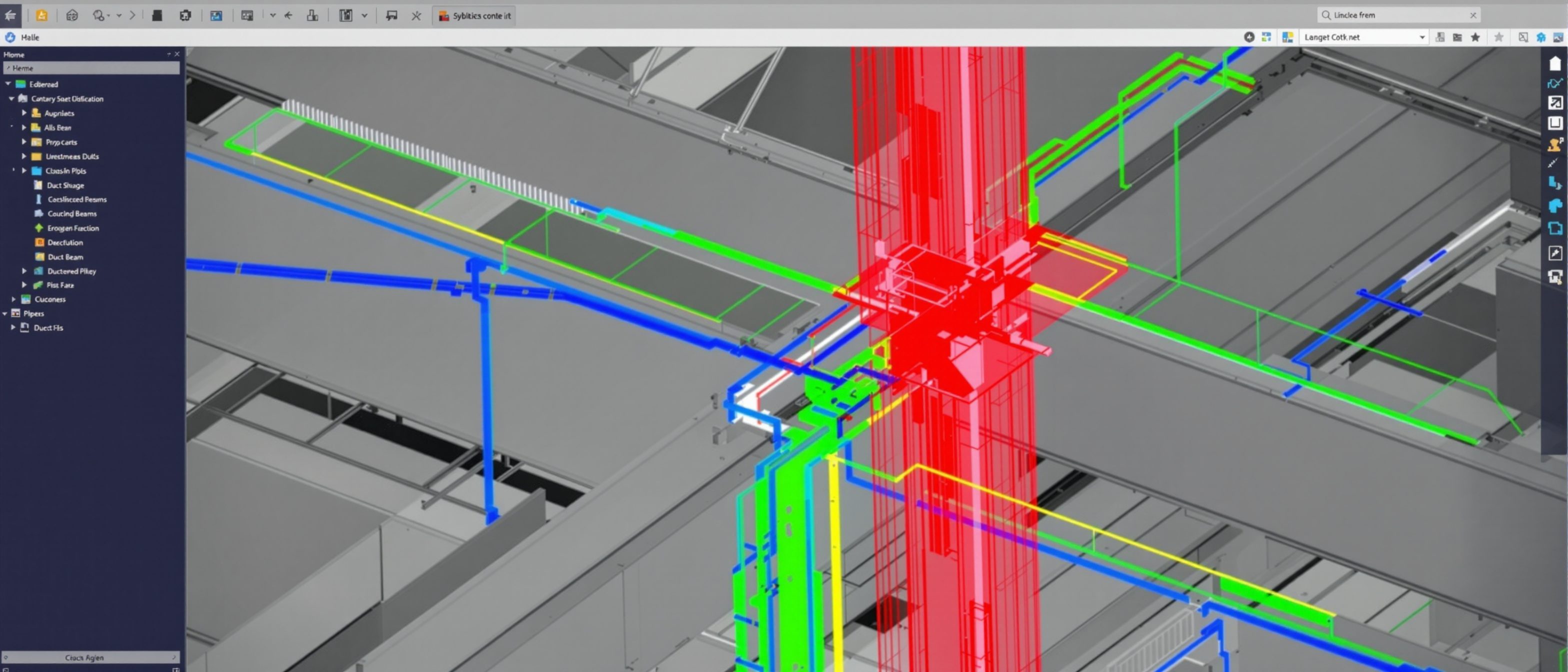
BIM Technology & Clash Detection
The toolbox, openBIM, and finding clashes before site.
BIM runs on a family of tools and one of its most valuable powers. Learn the BIM software ecosystem — authoring, coordination and analysis tools — and the open standard IFC that moves a model between them without lock-in; and the signature capability of BIM-based management — automated clash detection, which finds the hard, soft and workflow clashes between disciplines on screen, days before they would be an expensive problem on site. Try the clash-type explorer.
Learning objectives
By the end of this lesson, you will be able to — mapped to the course outcomes for BIM-Based Construction Management:
Review the BIM software ecosystem — authoring, coordination, analysis.
Explain IFC and openBIM interoperability.
Explain automated clash detection and its types.
Explain why finding clashes in the model saves cost on site.
The BIM toolbox & openBIM
Disciplines model in different authoring tools, federate in coordination tools, and exchange via IFC (openBIM) without lock-in — the skill is coordinating models, not standardising on one app.[1, 3]
Authoring, coordination, analysis
BIM is delivered by a family of TOOLS. AUTHORING tools (Revit, ArchiCAD, Tekla) are where each discipline MODELS its part — architecture, structure, services. COORDINATION tools (Navisworks, Solibri, BIM 360) COMBINE those models into a federated whole and check them. ANALYSIS tools read the model for energy, structure, cost and more. No single tool does everything, and the disciplines model in different software — which is exactly why exchange between them matters. MISCONCEPTION→correct: 'BIM means everyone uses one program' — disciplines use different authoring tools; the skill is COORDINATING and EXCHANGING their models, not standardising on one app.[1]
Clash detection
Clash detection federates every discipline's model and finds conflicts automatically — hard (collision), soft (clearance) and workflow (timing) — turning a costly site stoppage into a quiet click-and-fix.[1]
Find it on screen, not on site
The most celebrated power of BIM-based coordination is CLASH DETECTION. Combine (federate) every discipline's model and the software automatically finds where elements CONFLICT — a beam through a duct, a pipe with no room for its valve, two trades in the same place at the same time. Catching these in the MODEL, days before construction, turns a costly site stoppage, rework and dispute into a quiet click-and-fix. MISCONCEPTION→correct: 'coordination is checking drawings by eye' — humans miss clashes that automated detection across a federated 3D model catches in seconds; clash detection is one of BIM's clearest, measurable wins.[1]
Explore clash types
Pick a clash type — hard, soft (clearance) or workflow — and read what it is and an example, and see why soft and workflow clashes cause real problems with no geometry overlapping.
Types of clash · pick one
Hard clash
What it is: Two objects physically occupy the SAME space — a direct geometric collision.
Example: A structural beam passing straight through an air-conditioning duct.
Soft and workflow clashes (clearance and timing) cause real site problems with no geometry overlapping.
At a glance
| Aspect | Detail | Note |
|---|---|---|
| Authoring | Revit, ArchiCAD, Tekla | Each discipline models |
| Coordination | Navisworks, Solibri | Federate + clash-check |
| IFC / openBIM | Open, vendor-neutral exchange | Data outlives any vendor |
| Hard clash | Objects collide | Beam through duct |
| Soft / workflow | Clearance / timing conflict | No geometry overlap needed |
Key terms
Where a discipline models its part (Revit, ArchiCAD, Tekla).
Where models are federated and checked (Navisworks, Solibri).
The open, vendor-neutral standard that moves a model between tools.
Every discipline's model combined into one for checking.
Automatically finding conflicts between elements in the model.
Geometric collision / clearance violation / time-sequence conflict.
Studio task
For a typical ceiling void packed with a beam, a duct, a pipe and a cable tray, describe one hard clash, one soft (clearance) clash and one workflow clash that clash detection might find. Then explain in two sentences why catching these in the model is cheaper than catching them on site.
Self-assessment
1. Automated clash detection is valuable mainly because it —
2. IFC (openBIM) exists to —
3. A 'soft' clash is —
Recap
References & further reading
- [1]Sacks, Eastman, Lee & Teicholz, BIM Handbook — BIM tools, coordination and clash detection.
- [2]Autodesk Navisworks / Solibri documentation — federated models and clash detection types.
- [3]buildingSMART — Industry Foundation Classes (IFC) and openBIM.
Further reading
- Sacks, Eastman, Lee & Teicholz — BIM Handbook.
- Karen Kensek — Building Information Modeling.
- buildingSMART — IFC / openBIM documentation.
Sources gathered and fact-checked June 2026. Published values vary by source, sample and method — treat as indicative and confirm against the cited standard before structural use.
The author
Amogh N P
Architect, interior designer, and creative polymath. Studio Matrx began in his notebooks — his vision of design made honest, useful, and open to everyone. Its Academy is written and taught in his memory, and free, forever.
More about Amogh →