
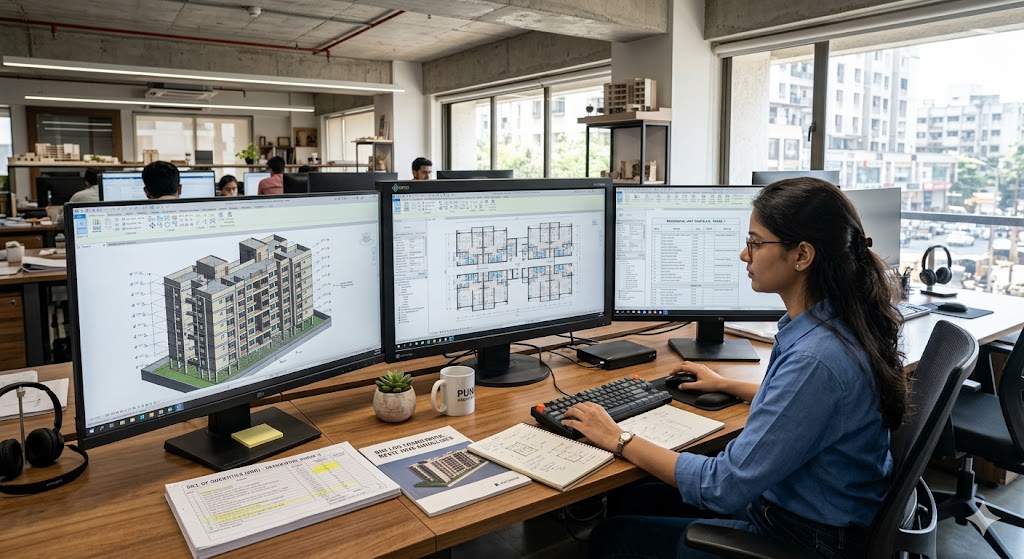
BIM for Indian Architecture Students — A Working Reference
Revit + ArchiCAD + Snaptrude + Vectorworks · LOD Framework · Indian Adoption · 12-Month Path & Six Career Levels
BIM is not 3D CAD. It is object-based modelling — where walls are walls (with type, material, fire rating, cost), doors are doors (with hardware, swing, code) and the model carries data + relationships across the entire building lifecycle from concept to facilities management.
This guide is the working reference for Indian B.Arch and M.Arch students taking up BIM. It covers what BIM actually is, the four major tools as of 2026, the LOD framework, Indian adoption status sector by sector, a 12-month learning path, and six career levels.
BIM is the strongest single hiring filter in Indian architecture today. Get genuinely fluent in Revit (or ArchiCAD/Snaptrude as secondary) and you have 30,000+ job listings across India open to you, plus international mobility. Stay surface-level and you're competing for the same shrinking pool of generalist drafter roles.
This is a 6-month-refresh guide. Tool versions, pricing, and AI-aided BIM features evolve fast. Last verified: May 2026 · Next verify: November 2026.
New to Revit itself? Start with the hands-on Revit Beginner's Tutorial — the interface, the Category→Family→Type→Instance hierarchy, your first model and a 12-week path — then return here for the BIM discipline, standards and collaboration. For complementary toolchain depth see Parametric Architecture in India, Architectural Visualization in India, Architecture Software Learning Path. For drawing fundamentals see Architectural Drawing Representation Fundamentals.
What BIM Actually Is
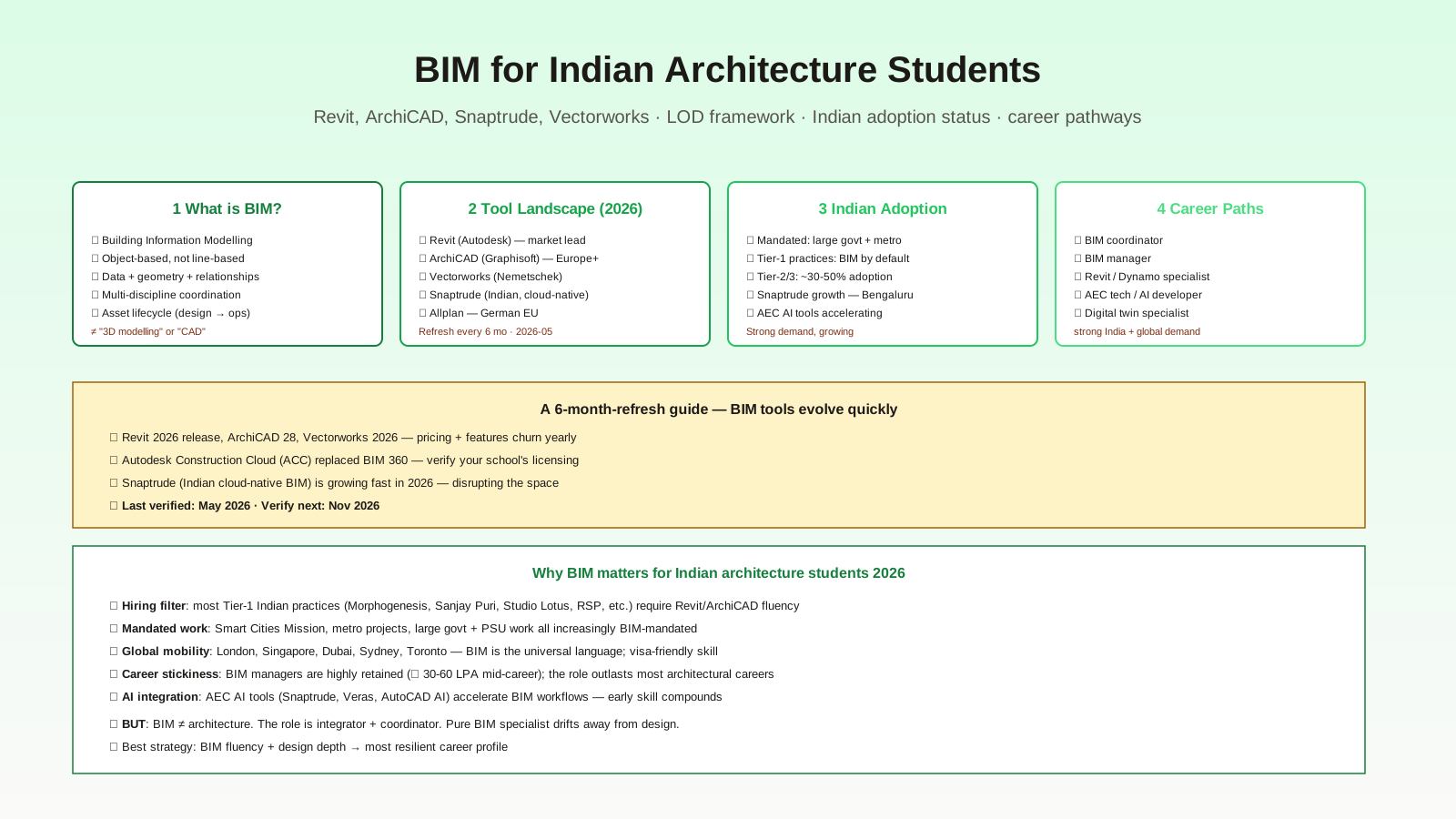
Five things define BIM as a methodology distinct from CAD:
1. Object-based, not line-based — walls are walls, not just two lines on a drawing. Each object has properties (type, layers, fire rating, cost, etc.).
2. Data + geometry + relationships — change a wall and connected floors, ceilings, doors, windows update automatically. Drawings derive from the model.
3. Multi-discipline coordination — architectural model coordinates with structural, MEP, fire, landscape models via clash detection.
4. Asset lifecycle — model carries through design → construction → handover → operations → renovation → demolition (LOD 500 standard).
5. Standards-based collaboration — ISO 19650, IFC, COBie — vendor-neutral data exchange formats.
What BIM is NOT
- "3D modelling" or "CAD"
- A drawing tool you happen to learn after AutoCAD
- A style choice ("we work in BIM" should mean "we work to BIM methodology" not "we use Revit")
- A replacement for design judgment
- Only for large complex buildings (small residential projects benefit too)
The misframing that hurts students most: treating Revit as "just a 3D drafting tool." Revit is one of several tools that implement BIM methodology. The methodology — properties, relationships, lifecycle data — matters more than the specific software.
The Tool Landscape — Four Major BIM Tools 2026
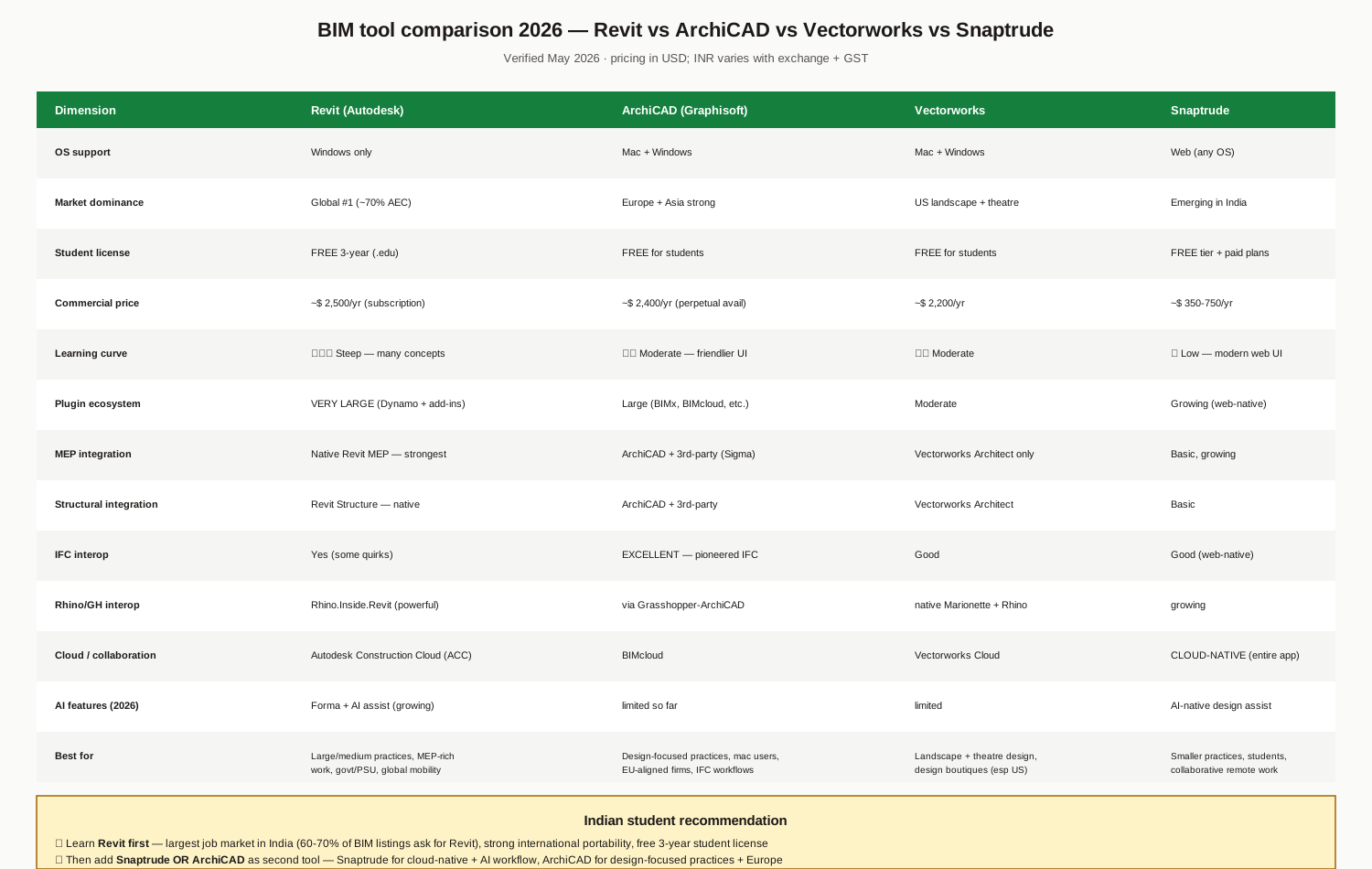
Revit (Autodesk)
- Market: ~70% of global AEC BIM market; ~60-70% of Indian BIM job listings
- OS: Windows only
- Student: FREE 3-year .edu license
- Commercial: ~$ 2,500/year subscription
- Strengths: Largest plugin ecosystem (Dynamo + thousands of add-ins), strongest MEP integration (Revit MEP native), Revit Structure native, deep integration with Autodesk Construction Cloud
- Weaknesses: Steep learning curve, Windows-only, subscription cost
- Best for: Large/medium practices, MEP-rich work, government/PSU work, global mobility
ArchiCAD (Graphisoft / Nemetschek)
- Market: Strong in Europe, Asia (Japan particularly); ~15-20% global share
- OS: Mac + Windows
- Student: FREE for students
- Commercial: ~$ 2,400/year (perpetual license still available in some markets)
- Strengths: Mac users, design-focused UI, IFC pioneer (best IFC interop), BIMx for mobile review
- Weaknesses: Smaller plugin ecosystem, weaker MEP integration than Revit
- Best for: Design-focused practices, Mac users, EU-aligned firms, IFC-heavy workflows
Vectorworks (Nemetschek)
- Market: Strong in US landscape + theatre design; niche but loyal
- OS: Mac + Windows
- Student: FREE for students
- Commercial: ~$ 2,200/year
- Strengths: Landscape + theatre tools, design boutiques, integrated Marionette (visual scripting) and Rhino interop
- Weaknesses: Moderate market share in commercial building, limited MEP
- Best for: Landscape architecture, theatre/event design, design boutiques
Snaptrude (India-born, cloud-native)
- Market: Emerging in India 2026; growing fast in SME and education segments
- OS: Web (any OS — browser-based)
- Student: FREE tier + paid plans
- Commercial: ~$ 350-750/year (varies by tier)
- Strengths: Cloud-native (entire app browser-based), AI-native design assist, modern UI, collaborative by default, India-team developed
- Weaknesses: Less plugin maturity, smaller community, evolving feature set
- Best for: Smaller practices, students, collaborative remote work, AI-aided workflows
Indian student recommendation
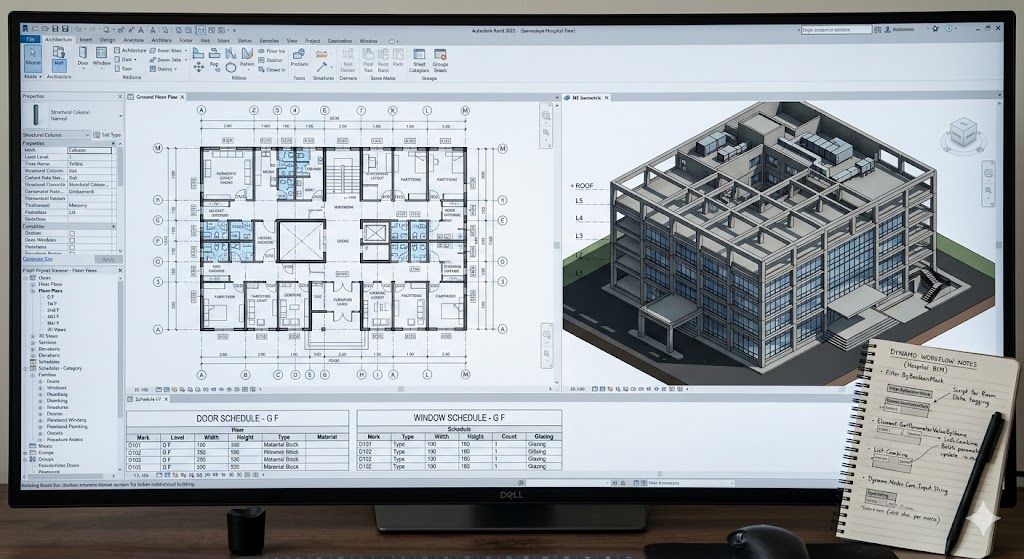
Learn Revit first — largest job market in India, free 3-year student license, strongest international portability. Then add a secondary tool:
- Snaptrude if you want cloud-native + AI-native workflow + lower commercial cost
- ArchiCAD if you're targeting design-focused practices, mac users, or European mobility
The LOD Framework
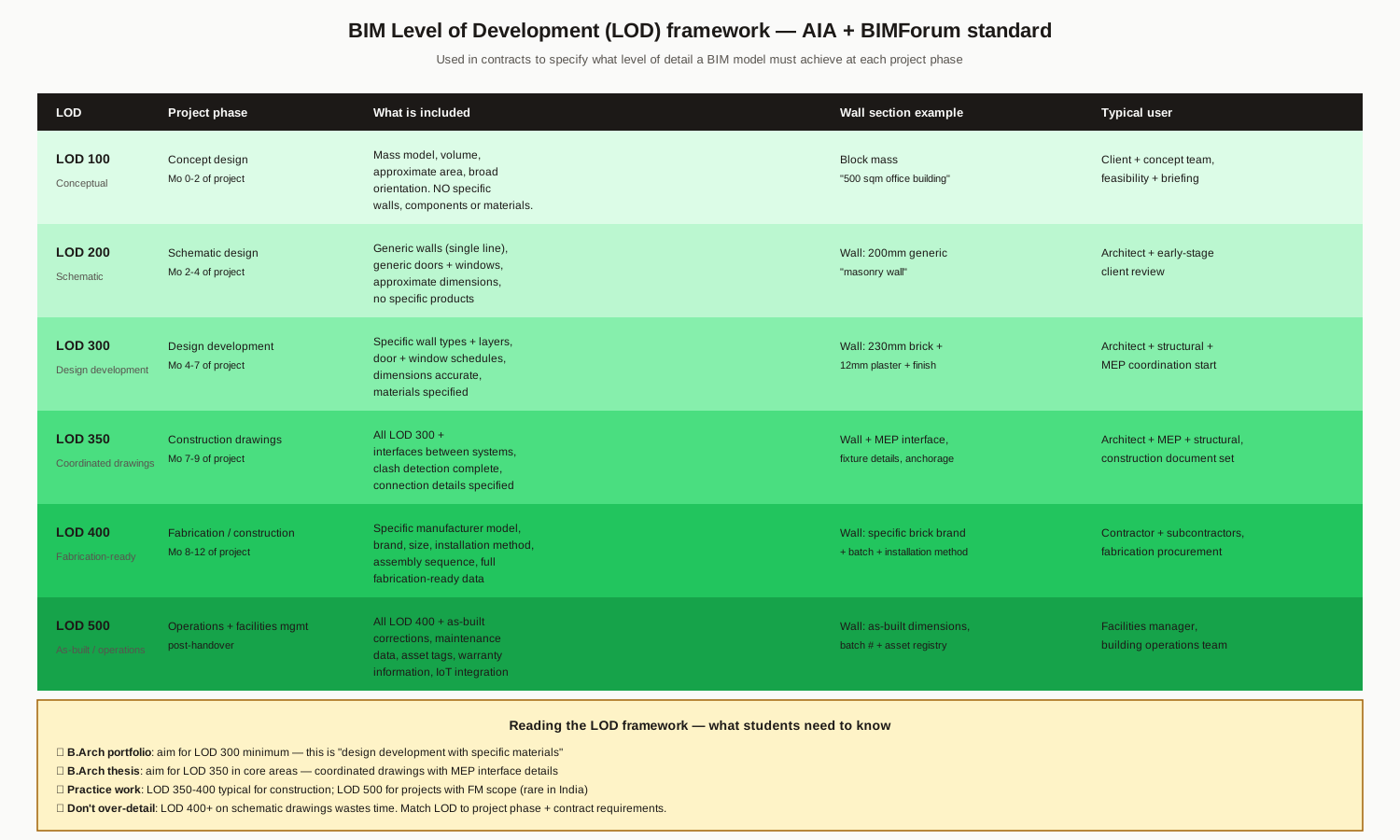
LOD = Level of Development. AIA + BIMForum standard. Used in contracts to specify the level of detail a BIM model must achieve at each project phase.
| LOD | Phase | What's in | Wall example |
|---|---|---|---|
| 100 | Conceptual | Mass model, volume | Block mass "500 sqm office" |
| 200 | Schematic | Generic walls, approximate dimensions | "200mm masonry wall" |
| 300 | Design development | Specific wall types + layers, accurate dimensions | "230mm brick + 12mm plaster + finish" |
| 350 | Coordinated drawings | LOD 300 + interfaces, clash detection complete | Wall + MEP interface, fixture details |
| 400 | Fabrication-ready | Specific manufacturer, brand, install method | Specific brick brand + batch + install method |
| 500 | As-built / operations | LOD 400 + as-built corrections, asset tags | As-built dimensions, batch # + asset registry |
What students need to know
- B.Arch portfolio: aim for LOD 300 minimum — "design development with specific materials"
- B.Arch thesis: aim for LOD 350 in core areas — coordinated drawings with MEP interface details
- Practice work: LOD 350-400 typical for construction; LOD 500 for FM-scope projects (rare in India)
- Don't over-detail: LOD 400+ on schematic drawings wastes time. Match LOD to project phase + contract requirements.
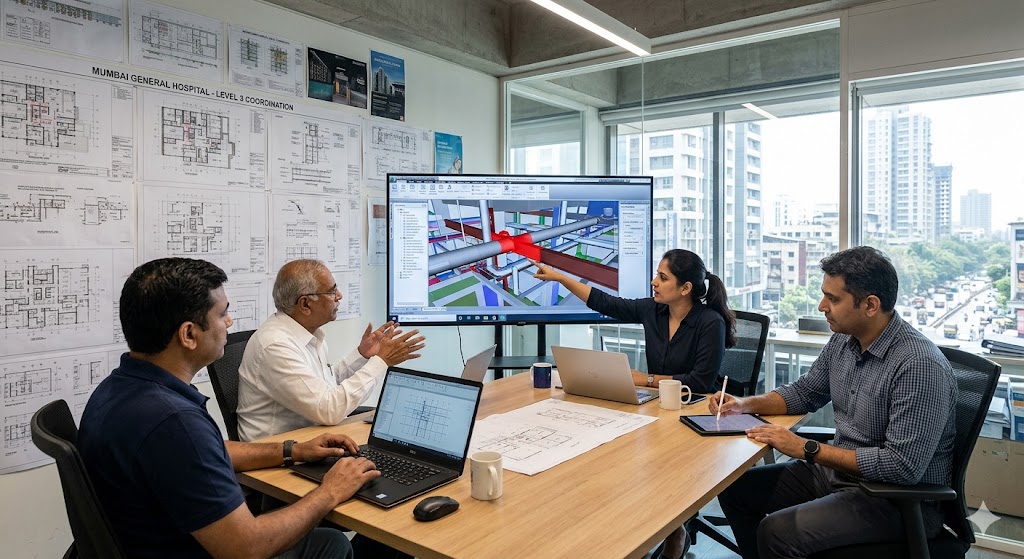
Indian BIM Adoption — Sector by Sector
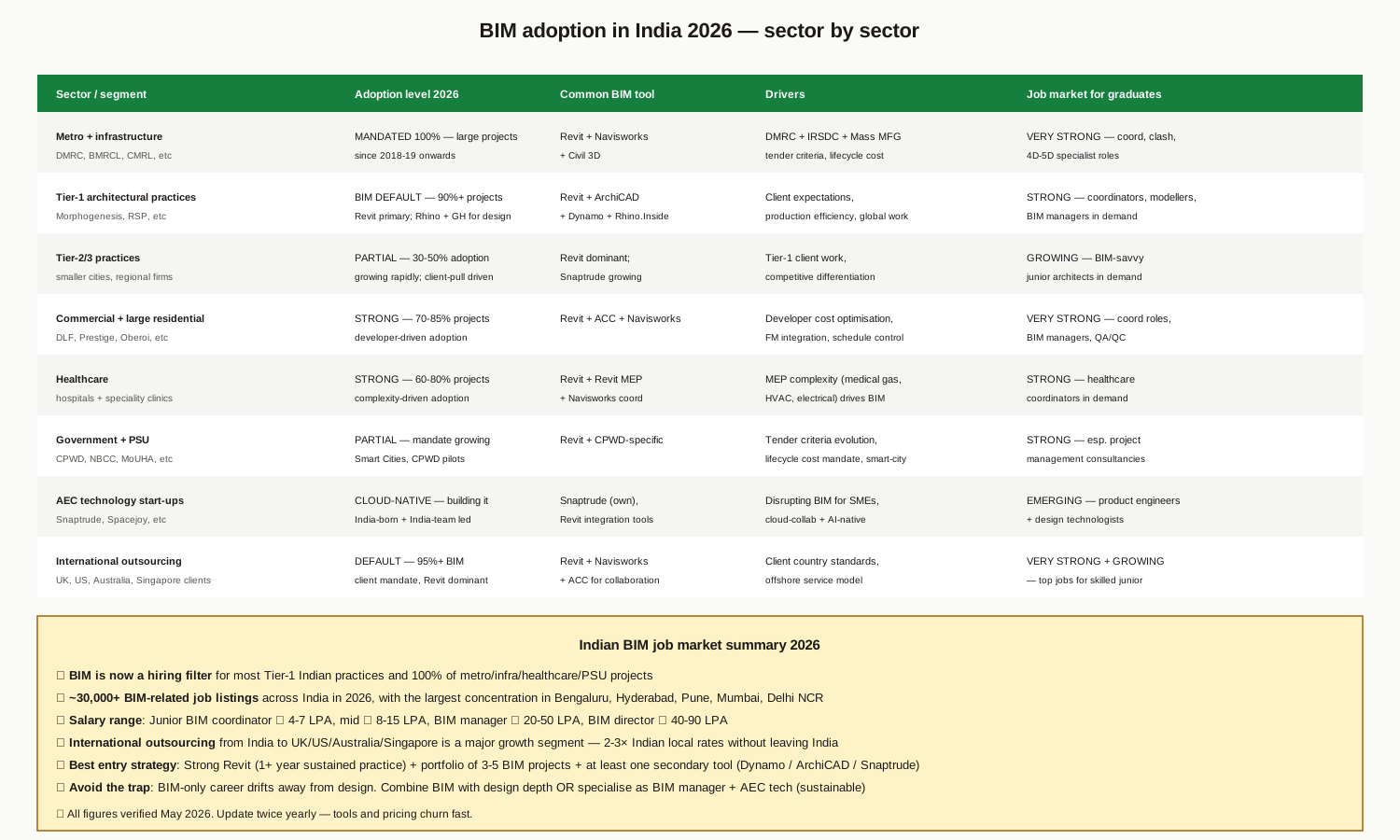
Where BIM is mandated or default (2026)
- Metro + infrastructure (DMRC, BMRCL, CMRL): 100% BIM mandated for large projects since 2018-19
- Tier-1 architectural practices (Morphogenesis, RSP, Sanjay Puri, Studio Lotus, etc.): BIM default for 90%+ of projects
- Commercial + large residential (DLF, Prestige, Oberoi, etc.): Strong adoption — 70-85% of projects
- Healthcare: Complexity-driven — 60-80% of projects (MEP coordination requirements)
- International outsourcing: 95%+ BIM (client country mandates)
Where BIM is growing
- Tier-2/3 practices: 30-50% adoption, growing rapidly (client-pull driven)
- Government + PSU (CPWD, NBCC, MoUHA): Mandate growing — Smart Cities Mission, CPWD pilots
- AEC tech start-ups: Building cloud-native BIM (Snaptrude India-led)
Indian BIM job market 2026
- ~30,000+ BIM-related job listings across India in 2026
- Concentration: Bengaluru, Hyderabad, Pune, Mumbai, Delhi NCR
- Largest growth segment: International outsourcing work (UK, US, Australia, Singapore clients) — 2-3× Indian local rates from India
- Salary range: Junior BIM coordinator ₹ 4-7 LPA, mid ₹ 8-15 LPA, BIM manager ₹ 20-50 LPA, BIM director ₹ 40-90 LPA
The 12-Month Learning Path
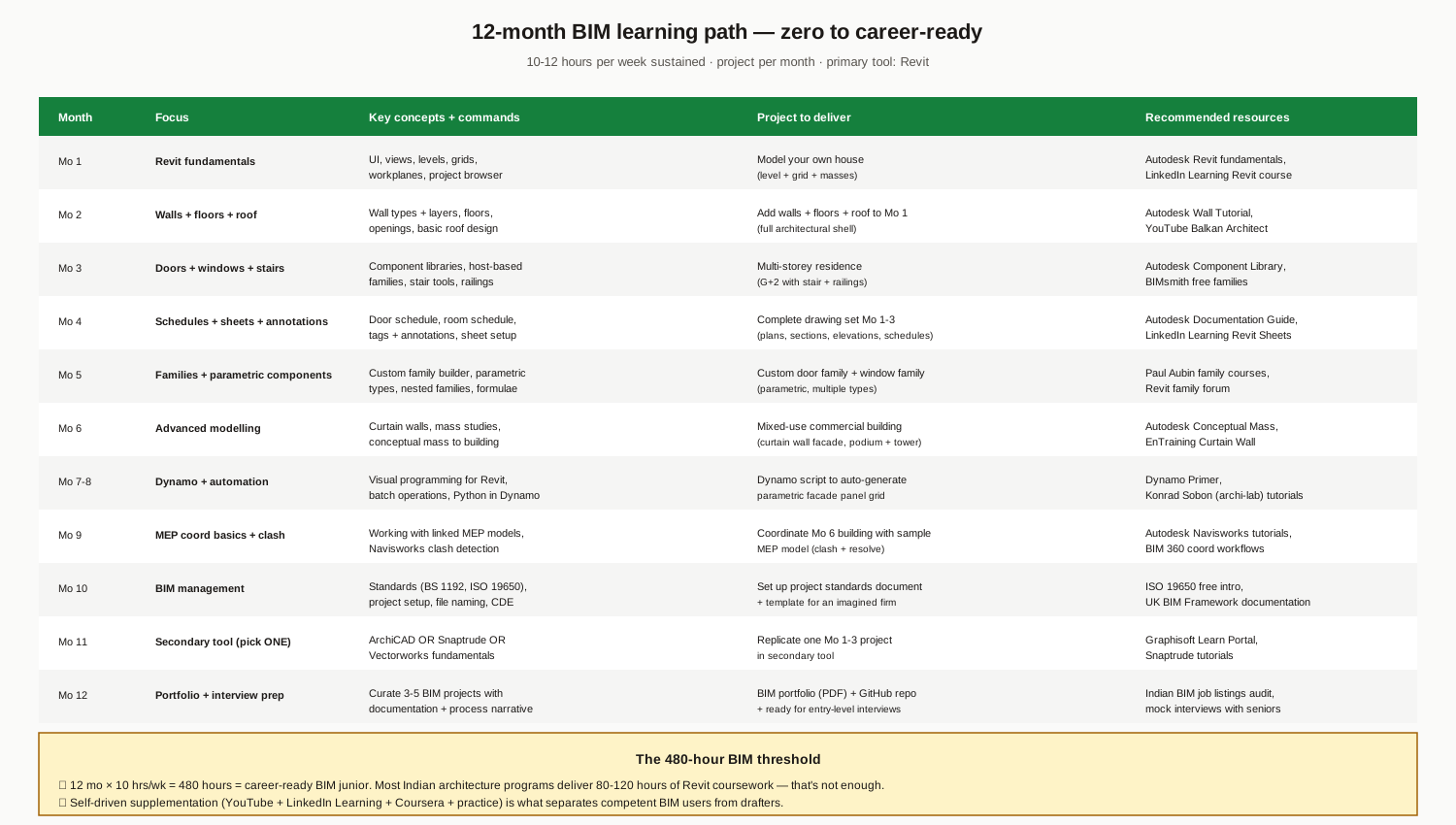
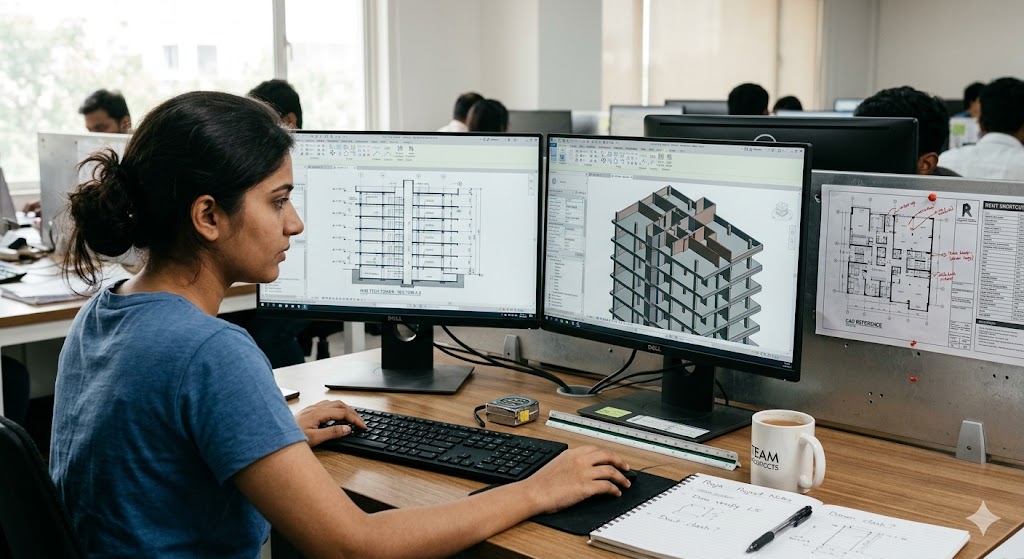
12 months, 10-12 hours per week sustained, project per month, primary tool: Revit.
Critical 480-hour threshold
12 months × 10 hours/week = 480 hours = career-ready BIM junior. Most Indian architecture programs deliver 80-120 hours of Revit coursework — that's not enough. Self-driven supplementation (YouTube + LinkedIn Learning + Coursera + practice) is what separates competent BIM users from drafters.
Project per month rule
You don't learn BIM by watching tutorials. You learn it by building. Project per month, deliverable end of month, no exception. The 12 projects across the year become your BIM portfolio.
Hardware
Revit is GPU + RAM heavy. Minimum: 16GB RAM, dedicated GPU with 6GB+ VRAM, SSD. Recommended: 32GB RAM, RTX 3060+ or equivalent for serious work. Don't skimp here.
Free vs paid learning
Free: official Autodesk tutorials, YouTube (Balkan Architect, Aussie BIM Guru, Konrad Sobon archi-lab for Dynamo), Dynamo Primer, ISO 19650 free intro.
Paid: LinkedIn Learning ($300/yr), Coursera BIM Specialisation ($350), Autodesk official certifications ($150-300), Paul Aubin courses on Revit Families.
Six Career Levels
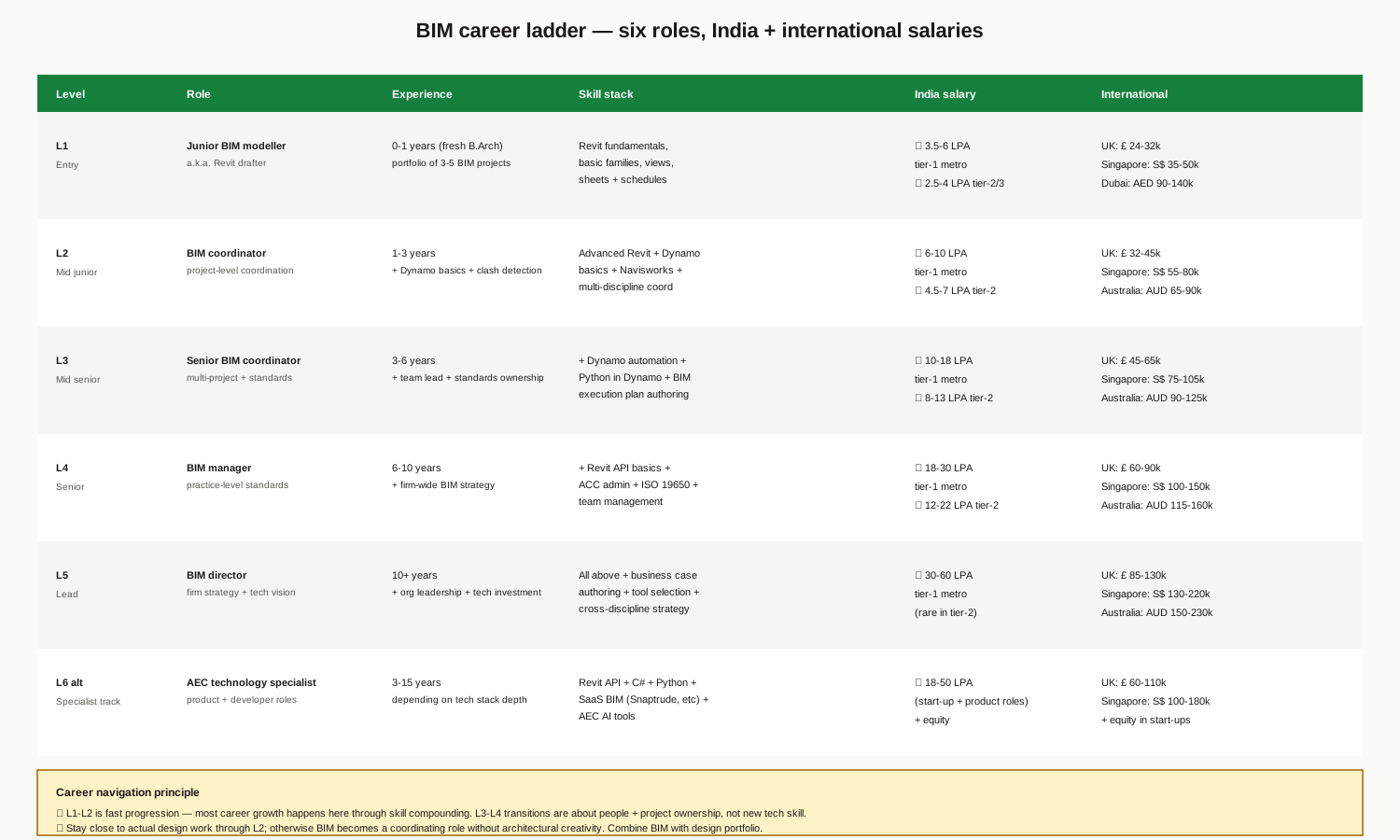
| Level | Role | Experience | India salary (2026) | International |
|---|---|---|---|---|
| L1 | Junior BIM modeller | 0-1 yrs | ₹ 3.5-6 LPA tier-1 | UK £24-32k, SG S$35-50k |
| L2 | BIM coordinator | 1-3 yrs | ₹ 6-10 LPA | UK £32-45k, SG S$55-80k |
| L3 | Senior BIM coordinator | 3-6 yrs | ₹ 10-18 LPA | UK £45-65k, SG S$75-105k |
| L4 | BIM manager | 6-10 yrs | ₹ 18-30 LPA | UK £60-90k, SG S$100-150k |
| L5 | BIM director | 10+ yrs | ₹ 30-60 LPA | UK £85-130k, SG S$130-220k |
| L6 alt | AEC tech specialist (start-up / product) | 3-15 yrs | ₹ 18-50 LPA + equity | UK £60-110k + equity |
Career navigation principles
- L1-L2 is fast progression — most career growth happens here through skill compounding. Master Revit + Dynamo + clash detection in this window.
- L3-L4 transitions are about people + project ownership, not new tech skill. Develop soft skills + project management.
- Stay close to actual design work through L2; otherwise BIM becomes a coordinating role without architectural creativity. Combine BIM with design portfolio.
- L6 alt (AEC tech) is the highest-growth track in 2026 — Snaptrude, Spacejoy, AEC AI start-ups need BIM-fluent engineers + designers.
International routes
- UK — strong demand, ISO 19650 mandate, Tier 2 visa accessible with Revit + 2-3 years experience
- Singapore — strong demand, BIM mandate from BCA, S Pass + Employment Pass routes
- Australia — strong demand, growing market, skilled visa pathway
- Dubai/UAE — BIM mandated for high-rise + government, very accessible
Six Common BIM Mistakes Students Make
1. Learning Revit without learning BIM. Watching tutorials without understanding methodology (LOD, IFC, properties, relationships) produces drafters not BIM-fluent architects. Read ISO 19650 intro early.
2. Project-less learning. Tutorials without a deliverable produce shallow skill. Build project per month — no exception.
3. Skipping families. Custom family creation is the hardest part of Revit and the most differentiating skill. Don't skip Mo 5 of the learning path.
4. Ignoring Dynamo. Dynamo + Python in Dynamo is what separates senior coordinators from juniors. Spend Mo 7-8 here even if it feels like programming.
5. Single-tool dependence. Learn one secondary tool (ArchiCAD or Snaptrude) — interview panels increasingly ask "what other tools have you worked with?"
6. Drifting away from design. Pure BIM career risk is becoming a coordinator without architectural creativity. Maintain a design portfolio alongside the BIM portfolio.
Pre-Career BIM Checklist
1. 480+ hours of cumulative Revit practice (confirmed by 5+ portfolio projects)
2. One secondary tool at competent level (ArchiCAD / Snaptrude / Vectorworks)
3. Dynamo + Python in Dynamo — at least one automation project demonstrated
4. Clash detection workflow — Navisworks fundamentals, one coordination project
5. ISO 19650 basics — read the free intro, understand CDE + BEP concepts
6. BIM portfolio — 5-10 projects in a clean PDF + GitHub for any scripts/Dynamo files
7. Certifications (optional but useful) — Autodesk Certified User Revit (entry level)
8. One advanced specialisation (pick one): MEP coordination depth / facade BIM / structural BIM / Revit API + dev / Snaptrude API + dev
Where to Go Next
- For Rhino + Grasshopper + parametric BIM integration: Parametric Architecture in India
- For visualization workflows on top of BIM: Architectural Visualization in India
- For drawing standards: Architectural Drawing Representation Fundamentals
- For broader software learning path: Architecture Software Learning Path
- For internship preparation: Architecture Internship Readiness in India, Internship Interview + Resume
- For career planning: Career Pathways After B.Arch
- For thesis applications: Architecture Thesis Topics in India
References
1. AIA + BIMForum (2024). Level of Development Specification. bimforum.org/lod
2. ISO 19650-1, -2, -3, -5. Organization and digitization of information about buildings and civil engineering works including BIM.
3. BS 1192:2007 + 1192-4:2014. Collaborative production of architectural, engineering and construction information.
4. Autodesk (2023-2026). Revit User Guide and Release Notes.
5. Graphisoft. ArchiCAD Documentation and Open BIM Resources.
6. buildingSMART International. IFC 4.3 + IFC for Infrastructure.
7. NIBS National Institute of Building Sciences. COBie (Construction Operations Building information exchange) standard.
8. Niti Aayog (2021). Need for BIM Adoption in India (policy paper).
9. CPWD (2022). CPWD BIM Guidelines for Government Construction.
10. Snaptrude documentation + product blog (2024-2026 updates).
Author's note: BIM is the most career-defining skill for Indian architecture graduates in 2026. The 480-hour threshold is genuine — most B.Arch programs deliver 100-150 hours of Revit, which produces drafters, not BIM-fluent architects. Self-driven practice through the 12-month path above produces what the market actually pays for. Combine BIM with design portfolio depth and you have the most resilient career profile in Indian architecture today.
Disclaimer: This guide reflects the BIM ecosystem in India as of 2026-05-21 and is refreshed every 6 months because tool versions, pricing, and AI-aided features evolve rapidly. Tool versions, license terms, and pricing should be verified directly with publishers (Autodesk, Graphisoft, Nemetschek, Snaptrude) before commitment. Salary benchmarks are 2026 indicative and shift with market conditions; AI-aided BIM tooling is reshaping junior compensation in late 2026 and beyond. Career pathway feasibility for international roles depends on visa policy, individual portfolio quality, and market timing. Studio Matrx, its authors and contributors are not responsible for career, learning, or hiring decisions made on the basis of this guide; consult faculty mentors, practising BIM managers, and dedicated BIM communities for individual guidance.
Interactive · BIM dimensions tower
3D · Geometry · Architect · structural · MEP engineers
What 3D adds
Spatial model — walls, slabs, beams, ducts, pipes coordinated in one federated file.
Typical artifacts
- ▸Federated Revit / ArchiCAD / Tekla model
- ▸Clash-detection reports (Navisworks / Solibri)
- ▸Coordinated sections & elevations
India adoption
Used on most large commercial and high-rise residential projects in India; ad-hoc on small residential.
Each higher dimension presupposes the lower ones — you cannot do 5D cost without a coordinated 3D geometry model. The tower fills bottom-up as scope expands.
Export this guide
Related Guides — Deep-dive reading
Revit for Architecture Students — A Beginner's Tutorial (India)
Why BIM differs from AutoCAD, the interface, the Category→Family→Type→Instance hierarchy, levels & grids, your first model, schedules & sheets, the free education licence & a 12-week path
Student FoundationsParametric Architecture in India — A Student's Working Reference
Rhino + Grasshopper, the Plugin Ecosystem, Indian Practitioners, a 12-Month Learning Path & Six Thesis Workflows
Student FoundationsDesigning Adaptable & Universal-Design Homes
Accessibility, Aging-in-Place, and the Multi-Stage Family — Code, Anthropometrics, and Plan-Stage Discipline for Indian Residential Architects
Room PlanningRelated Tools — Try Free
Healing View Impact Calculator
Evidence-Based Design dashboard quantifying the recovery impact of nature view + daylight factor on analgesic use, length of stay, and HCAHPS patient-experience uplift. Calibrated against Ulrich 1984 (Science), Park & Mattson 2008, and the CHD EBD evidence base.
EBD CalculatorMaterial Schedule Generator
Generate a room-wise finish schedule — walls, floors, ceilings, trim, and joinery by location.
Material ScheduleConcept Generator
Get 3 AI-generated design concepts for any room with style, materials, and cost estimate.
DesignAI