
Security System Backup in India (2026): Protecting the Footage and the Settings from a Single Point of Failure
A security system is only as good as its recovery. This professional guide covers what you must back up and why: the footage that is your evidence, and the config that took days to set up. It applies the 3-2-1 idea defensively — more than one copy, more than one medium, one off-site, and a restore you have actually tested.
Picture the morning after a break-in in an Indian home or society. The cameras did their job all night. Then the family goes to the cupboard to pull the clip for the police, and the recorder is gone — the intruder took it, or smashed it, precisely because it was the one box holding the evidence against them. Months of footage, and the proof of the very crime you wanted it for, vanish in the same moment. The system worked perfectly and protected nothing, because there was only ever one copy.
Security system backup is the defensive discipline of making sure your system can be recovered — its recordings and its settings — even when the one recorder dies, is stolen, is smashed, or is wiped by ransomware. It is the least glamorous part of a security install and the one most often skipped, and it is the difference between a system that gives you evidence and confidence and one that quietly gives you neither. This guide is written for the professional who specifies and maintains systems — installers, RWAs, facility managers and serious homeowners. It sits under the security-system cybersecurity pillar in the cybersecurity sub-hub.
Scope & safety. This guide helps you make a system you own or manage recoverable: what to back up, where, how often, and how to prove it works. It is strictly protective — it never explains how to attack, wipe or exfiltrate anyone's footage; threats such as theft of the recorder or ransomware appear only as things to design against. Recordings, access logs and event histories are personal data under the Digital Personal Data Protection Act, 2023, so a backup must be minimised and retained no longer than the footage it copies — do not let "backup" become an excuse to keep evidence forever. Report a serious compromise such as ransomware to India's national CERT (CERT-In). Any backup process must never disable live recording or a life-safety function; a copy is added protection, never a trade-off against detection. For anything beyond these basics, engage a qualified IT/security professional. This is educational guidance, not legal advice.
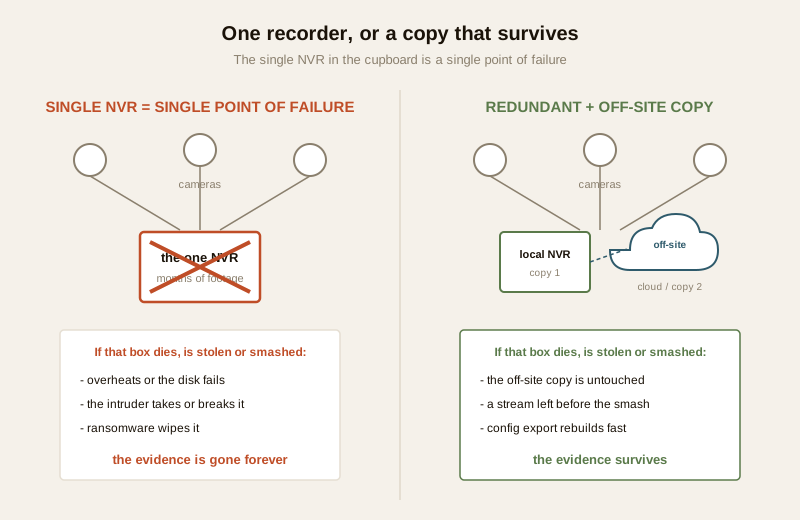
Why one recorder in a cupboard is a single point of failure
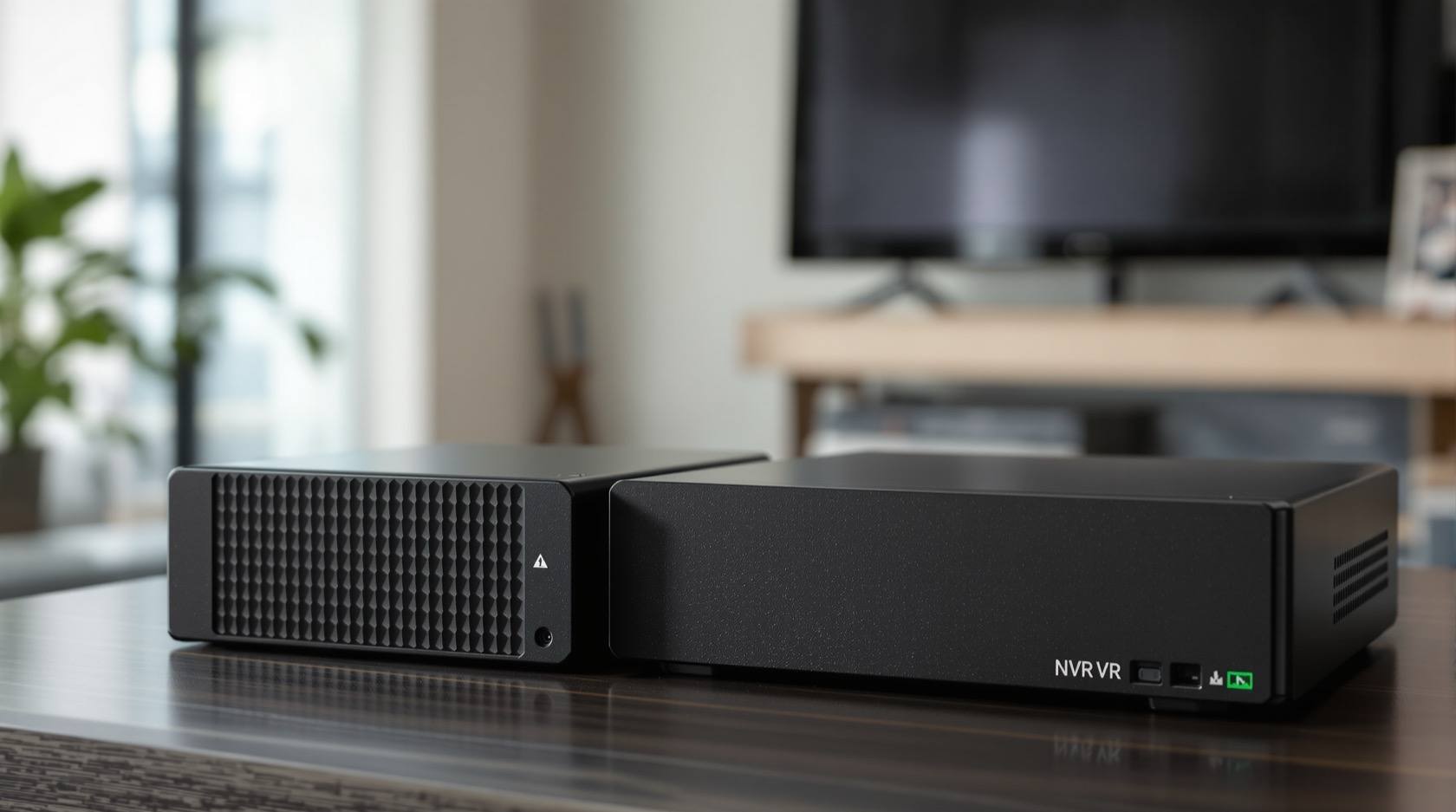
Most Indian installs — home, shop and even many societies — record to a single DVR or NVR sitting in a cupboard, a loft or a guard room. That one box is the whole system's memory, and it fails in ways that are entirely ordinary:
- It dies. Consumer recorders and their hard disks run hot, dusty and often on unstable power. A disk that has been quietly overwriting for two years fails one day, and the retained footage goes with it.
- It is stolen or smashed. The recorder is the obvious target for anyone who does not want to be recorded. An intruder who understands that the DVR holds the evidence will take it or destroy it — and a system whose only copy is on that box has just been defeated by the very event it existed to capture.
- It is wiped. A network-exposed recorder can be reached by ransomware or a malicious actor and its recordings encrypted or deleted. A breach elsewhere on the network can reach an un-segmented recorder.
- It is simply reset. A power event, a firmware update gone wrong, or a well-meaning "let's clear it and start fresh" can wipe both footage and settings in one action.
In every one of these, the loss is total precisely because there is only one copy. The fix is not a more expensive recorder; it is a second copy that does not share the first one's fate.
The two things you must back up (and the one people forget)
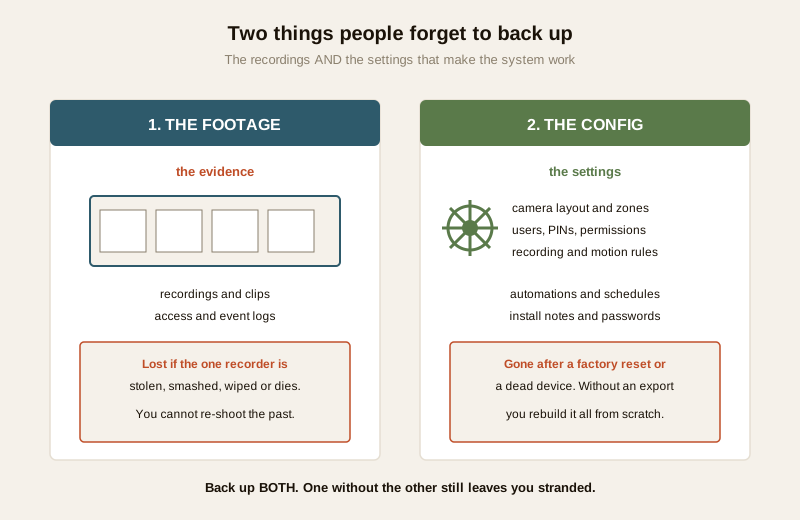
A security-system backup is not one thing. There are two distinct things to protect, and most people remember only the first — if they remember either.
1. The footage — your evidence. The recordings and the event/access logs are the reason the system exists. They cannot be re-created: you cannot re-shoot last Tuesday night. If the only copy is on the recorder, then losing the recorder loses the evidence, full stop.
2. The config — your setup. The camera layout, the privacy-masked zones, the motion and recording rules, the users and their PINs and permissions, the automations and schedules, and the install documentation and passwords. This took the installer days to get right. After a factory reset or a dead device, a system with no config export must be rebuilt from scratch — every zone re-drawn, every user re-added, every rule re-tuned — often badly, and often with defaults quietly left in place. Config is small, it changes rarely, and backing it up is cheap; skipping it is a self-inflicted wound.
Back up both. Footage without config means a painful, error-prone rebuild after the next reset; config without footage means you can rebuild the system but have no evidence. Neither alone is enough.
Redundant and off-site recording: the practice
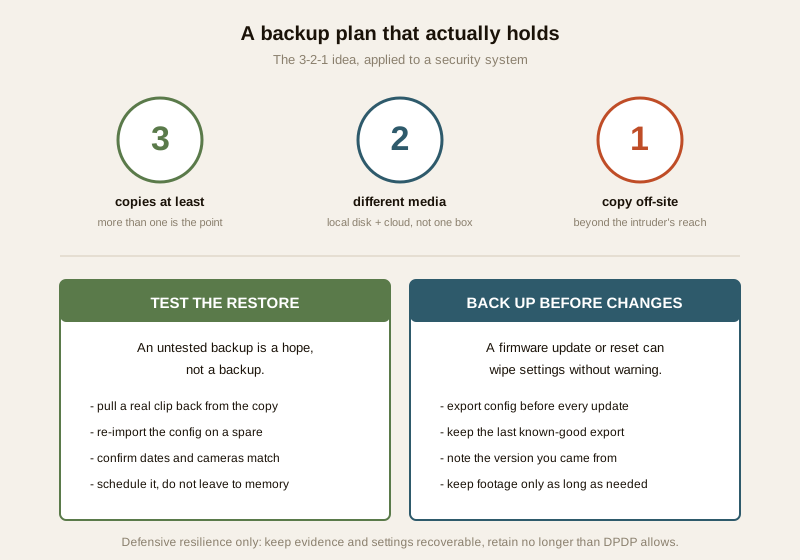
The professional answer is borrowed, generically, from IT disaster recovery: the 3-2-1 idea — keep more than one copy, on more than one kind of medium, with at least one copy off-site. You do not need enterprise kit to honour it; you need to stop relying on a single box. There are three practical ways to get a second copy, and they combine:
- Cloud plus local. The recorder keeps its full local recording, and a copy — continuous, or motion clips, or key events — is pushed to a reputable cloud service. The local copy gives you full-resolution retention without paying for endless cloud storage; the cloud copy is the off-site copy that survives the box being stolen. Weigh the trade-offs in local versus cloud and cloud storage security.
- Dual recording. Many systems can record to two destinations at once — for example the NVR plus a second recorder or a NAS, or the camera's own edge storage (an on-camera card) plus the NVR. Two independent recordings mean the loss of one is not the loss of the recording.
- Off-site or off-line copy. A periodic export to a separate disk kept in a different room or building, or a copy to a second site, gives you a medium and a location the first copy does not share. An off-line copy is also the one ransomware cannot reach, because it is not connected.
The point of all three is the same: no single event should be able to destroy every copy. A copy that shares the recorder's power, its network and its cupboard is not really a separate copy at all.
Protect the recorder from the intruder
The theft-or-smash case deserves its own defence, because it is specifically Indian-common and it defeats a naive backup. Two protections matter:
- Hide and physically secure the recorder. Do not leave the DVR/NVR on an open shelf next to the TV. Put it out of sight, in a locked enclosure or a secured room, so an intruder cannot simply grab the evidence on the way out. This is basic and it works.
- Stream a copy off-site as it records. The real answer to "they smashed the box" is that a copy has already left the building before the box was touched. If footage (or at least motion events) is streamed to a cloud or a second site continuously, then destroying the on-premises recorder no longer destroys the evidence — the moment that mattered was already safe elsewhere. This is why off-site is not just for disk failure; it is the specific defeat of the intruder who targets the recorder.
Together these mean the recorder can be dead, gone or in pieces and you still have both the evidence and a fast path to rebuild.
Back up the config — export after setup and after changes
Config backup is the cheap, high-value habit almost nobody does. Make it routine:
- Export the settings after commissioning, once the system is fully tuned, and store that export somewhere other than the recorder itself — a technician's secured drive, a documented cloud location, the vendor/installer handover pack.
- Re-export after any material change — a new camera, a re-drawn privacy zone, a new user, a changed rule. A stale config export rebuilds the system as it was months ago, not as it is now.
- Keep the install documentation and passwords securely. The camera map, the IP scheme, the account list and the credentials belong in a proper password manager or a secured document, not on a sticky note on the recorder. Losing the passwords can be as disabling as losing the config, because you cannot get back into your own system to restore it.
Back up before firmware updates
A firmware update is necessary security hygiene — an un-patched recorder is a real exposure — but an update is also one of the moments a system can lose its settings, or in a bad case its recordings. So the rule is simple and non-negotiable: export the config before you update, keep the last known-good export, and note the version you are updating from. If an update goes wrong or the new firmware behaves badly, a pre-update export lets you restore the known-good state instead of rebuilding blind. The same discipline applies before any factory reset or major reconfiguration.
Test restores: an untested backup is a hope, not a backup
This is the step that separates a real backup plan from a comforting story. A backup you have never restored from is an assumption, and assumptions fail exactly when you need them. Test it:
- Pull a real clip back from the cloud or off-site copy and confirm it actually plays, at the resolution and for the date range you expect.
- Re-import the config onto a spare or test device and confirm the cameras, zones and users come back as they should.
- Check the dates and coverage — a backup that silently stopped copying three months ago is worse than none, because you only discover the gap when you reach for footage that was never saved.
- Schedule the test. Put a restore drill on the maintenance calendar — quarterly is a reasonable habit — rather than trusting memory. The home-security risk scorecard can prompt this as part of an overall review.
Ransomware, failure and incident response
Backup is the backbone of resilience against both accidents and attacks. A recorder that is reachable from the internet can, in a bad case, have its recordings encrypted or deleted by ransomware — and the single most reliable recovery from ransomware is a clean, off-line or off-site copy the attack could not touch. This is why the off-line copy in the 3-2-1 idea matters beyond simple disk failure.
Tie backup into your incident response plan: if a recorder is compromised, wiped or stolen, the plan should say where the surviving copy is, who can restore it, and how to preserve what remains as evidence. Contain the affected device, preserve logs, restore from a known-good backup rather than trusting the compromised box, and report a serious ransomware or breach event to India's national CERT (CERT-In) as appropriate. A backup that is part of a written plan is worth far more than one that lives only in the installer's head.
A backup plan you can hand over
Write the plan down as a small table so anyone can run it, and so a departing installer does not take it with them. Fill in the specifics for the particular system.
| What to back up | Where it goes | How often | Tested how |
|---|---|---|---|
| Live footage (full) | Local recorder / NVR disk | Continuous | Quarterly playback check of a random clip |
| Footage copy (off-site) | Cloud or a second site | Continuous or daily | Quarterly: pull a clip back and confirm it plays |
| Off-line footage copy | Disconnected disk in another room/building | Weekly or monthly export | On each export: verify the file opens |
| System config / settings | Secured drive + documented cloud location | After setup and after every change | On import to a spare device; before each firmware update |
| Passwords & install docs | Password manager / secured document | On any credential or layout change | Confirm you can log in and locate the docs |
And the discipline around it, in one line each:
| Practice | Why it matters |
|---|---|
| More than one copy, one off-site | No single dead, stolen or ransomed box loses everything |
| Protect / hide the recorder | The intruder cannot grab the only evidence |
| Export config before every update | A reset or bad firmware cannot wipe your setup |
| Test the restore on a schedule | An untested backup is a hope, not a backup |
| Retain only as long as needed | DPDP: a backup is not a licence to keep footage forever |
Retention, DPDP and not over-keeping
A backup copies personal data, so it carries the same obligations as the original. Under the Digital Personal Data Protection Act, 2023, footage of identifiable people is personal data, and you should keep it only as long as there is a genuine need. A backup must not become a quiet archive that outlives its purpose: set the same retention on the backup copy as on the live recording, let old footage age out of the cloud or off-line copy on the same schedule, and be able to delete on request. The goal of backup is recoverability, not hoarding — enough copies to survive a failure, retained no longer than the evidence itself should be. See security and privacy assessment for how this fits the wider data picture, and remember that a discarded old recorder or disk still holding footage must be securely wiped before disposal.
When to bring in a professional. Choosing what to back up, setting a retention that matches the live recording, exporting config before updates, and running a quarterly restore test are yours to drive. Hand the dual-recording setup, the cloud/off-site integration, network segmentation of the recorder, and any ransomware-hardening to a qualified installer or IT professional, and make sure the backup process never interrupts live recording or any life-safety function. If a recorder shows signs of ransomware or tampering, treat it as an incident: isolate it, restore from a clean copy, preserve evidence, and report as appropriate.
Key takeaways
- A single NVR in a cupboard is a single point of failure. If that one box dies, is stolen, is smashed or is wiped by ransomware, the evidence is gone forever. The fix is a second copy that does not share the first's fate — not a costlier recorder.
- Back up two things, not one: the footage (the evidence you cannot re-create) and the config (the layout, zones, users, rules and passwords you would otherwise rebuild from scratch after a reset).
- Apply the 3-2-1 idea defensively — more than one copy, more than one medium, at least one off-site — via cloud-plus-local, dual recording, or an off-line export. Stream a copy off-site so smashing the recorder does not erase the evidence, and hide and secure the box itself.
- Export config before every firmware update or reset, keep the last known-good export, and store passwords and install docs securely and separately from the recorder.
- Test the restore on a schedule — an untested backup is a hope, not a backup — tie it to your incident-response plan for ransomware resilience, and retain backup footage no longer than DPDP allows.
Where to go next
- Start at the security-system cybersecurity pillar and the cybersecurity sub-hub.
- Decide where copies live: local versus cloud, cloud storage security and cloud CCTV.
- Harden the surrounding system: network segmentation, firmware updates, password management and secure device disposal.
- Plan for the bad day with incident response planning, gauge your exposure with the home-security risk scorecard, and return to the security hub.
References
- Digital Personal Data Protection Act, 2023 — footage, access logs and event histories are personal data; a backup carries the same retention and deletion obligations as the original, so set matching retention and do not over-keep.
- CERT-In (Indian Computer Emergency Response Team) — India's national incident-response body; treat a ransomware event, a wiped recorder or a suspected breach as a reportable cyber incident and follow current CERT-In guidance.
- NIST and CIS backup and recovery best-practice frameworks — general, vendor-neutral guidance behind the 3-2-1 idea (multiple copies, multiple media, one off-site) and tested restores; verify the current edition before relying on it.
- Manufacturer documentation for the specific recorder and cameras — verify how to export configuration, enable dual recording or edge storage, and push an off-site copy, on the maker's own guide before relying on any feature.
This is an educational overview, not legal advice, and it deliberately covers only how to make a system you own or manage recoverable — never how to attack, wipe or exfiltrate anyone's footage. Dual-recording, cloud integration and ransomware-hardening are qualified professional tasks; keep live recording and life-safety functions uninterrupted, retain backup footage no longer than needed under the DPDP Act, and verify any framework's current status before relying on it.
Export this guide
Related Guides — Deep-dive reading
CCTV Storage Maintenance in India (2026): Keeping the Footage There When You Need It
Surveillance storage is a wear item that fails silently. This professional guide covers checking disk health, verifying recordings actually exist for the full retention window, planning drive replacement before failure, keeping a spare, and holding an off-site backup so a dead or stolen recorder is not total loss.
SecurityComplete Guide to Security System Cybersecurity in India (2026): Protecting the Systems That Protect You
The cameras, locks, alarms and door phones you install to feel safer are internet-connected computers that can themselves be attacked, and an insecure one is worse than none. This pillar maps the whole attack surface — devices, network, accounts and data, operations — and points to every guide that hardens it.
SecurityCCTV Recording Failure in India (2026): Live View Works but Nothing Was Saved
You open the recorder to pull footage of an incident and there is nothing there, even though every camera shows a crisp live picture. A calm, ordered guide to why an Indian CCTV system records live but saves nothing, and how to fix it before the next incident.
SecurityRelated Tools — Try Free
CCTV Camera Coverage & Count Calculator
Estimate how many CCTV cameras you need, the NVR channels, storage in TB for your retention period, and an indicative all-in cost with GST.
CCTV CalculatorSecurity Vendor Evaluation Scorecard
Rate a CCTV/security installer or guarding agency across eight weighted criteria for a hire / negotiate / walk-away verdict.
Vendor ScorecardCCTV Cloud vs Local Cost Calculator
Compare cloud CCTV subscription against a local NVR + HDD — upfront, 5-year total, monthly fee and break-even.
Cloud vs Local