
Video Door Phone Cybersecurity in India (2026): Harden the Camera at Your Gate
A video door phone is a camera, a microphone and often a door-release at your entrance, wired to an app and a maker's cloud. This guide is how to harden your own unit: strong account with MFA, current firmware, a reputable vendor, a segmented network, a well-guarded door-release and honest privacy.
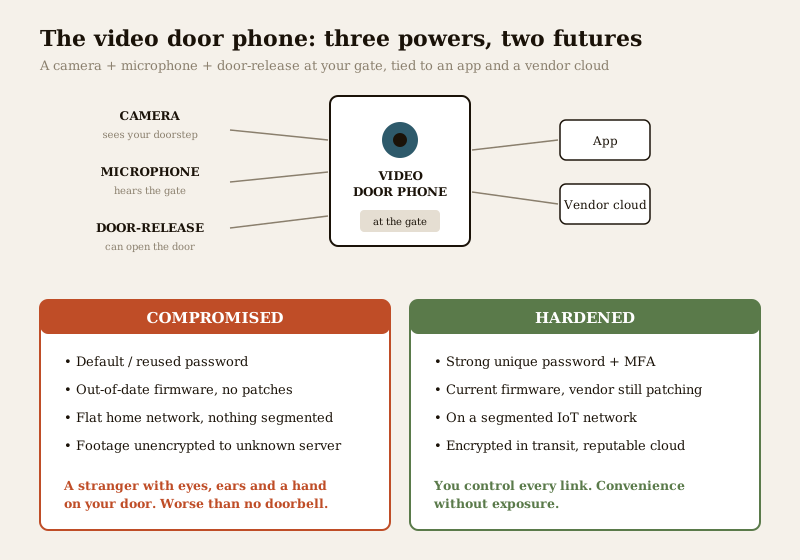
The intercom at an Indian doorstep used to be a simple buzzer. Today it is often a small internet-connected computer with a lens and a speaker, and that changes what it can do — for you and, if it is left insecure, against you. A modern video door phone (VDP) or smart doorbell watches your entrance, hears the conversation at your gate, keeps a record of every caller, and on many models can release the door latch from an app. That is genuinely useful: you can see who is at the gate from the office, let a verified courier in, and keep a log of visitors for a shared building. It also means a new, uncomfortable truth — a compromised doorbell is not a minor gadget problem. It is a stranger with eyes and ears at your front door, and on some units a hand on the latch.
Video door phone cybersecurity is the plain, defensive habit of hardening your own unit so that convenience never becomes exposure. This guide is strictly about protecting what you own — a checklist any homeowner can follow — and it deliberately says nothing about attacking, intercepting or defeating any device. It sits alongside the complete video door phones guide and the video door phone privacy guide, and it belongs to Studio Matrx's security-system cybersecurity pillar in the cybersecurity sub-hub.
Scope & safety. This guide helps you harden the account, app, firmware, network and door-release around a video door phone you own. It never explains how to hack, intercept or bypass any device — weaknesses appear only as things to fix and buying cautions. A VDP records callers, neighbours, the street and domestic staff, so its footage and logs are personal data under the Digital Personal Data Protection Act, 2023. If a device is compromised, India's national computer-emergency team, CERT-In, is the body to which serious incidents are reported. Life-safety always wins: a door-release must never trap anyone inside during a fire. This is educational guidance, not legal advice — engage a qualified installer or IT professional for anything beyond the basics.
Why an insecure doorbell is worse than no doorbell
A plain mechanical buzzer has one job and no online surface. A networked video door phone adds several surfaces that live entirely online: the app on your phone, the account those credentials protect, the firmware running inside the unit, the home Wi-Fi it rides on, the maker's cloud where footage may be stored, and — on lock-integrated models — a path to the door latch itself. None of this is a reason to avoid a good VDP. They are simply new things to keep tidy.
The honest, India-real framing is this. The weakest link is almost never some exotic flaw in the camera. It is a default or reused password, an account with no second factor, a unit whose firmware is years out of date, a cheap no-name doorbell whose vendor quietly stopped patching, or an app that phones home to a server you cannot see. Every one of those is something you control. An insecure doorbell is worse than none precisely because it gives false confidence while opening a door: it feels like security, but it can hand a stranger a live view of your doorstep — and, on the worst-case unit, the ability to trip the latch.
Credentials and the account: the first thing to fix
If you do only one thing from this guide, make it the account. Whoever signs into the doorbell's app can, in effect, see your doorstep and — on a lock-integrated unit — open your door. So the account deserves the same care as a physical key.
- Change every default at setup. A distressing number of cheap cloud doorbells and DVR-based VDP kits ship with a factory login like admin/admin or a printed default that the installer never changes. Change the device password and the account password to something new before the unit ever faces the internet. Leaving the default is the single most exploited gap in India's IoT landscape.
- Use a strong, unique password. Unique is the word that matters: a long passphrase used only for this account means a leak on some unrelated shopping site can never reach your doorbell. A password manager makes this painless — see security password management.
- Turn on multi-factor authentication (MFA). With MFA, even a correct password is not enough; a second factor (an authenticator app or SMS code) is needed too. On a device that sees your door and may open it, MFA is not optional hygiene — it is the single biggest upgrade you can make. Switch it on today; see multi-factor authentication for security devices.
- Do not share one master login. Add family members as their own named users rather than passing a password around, so you can remove one person without changing everyone's access. Review the user list every few months and revoke a departed tenant, an old maid, or a guest whose visit ended.
| Account habit | Why it protects the door | How often |
|---|---|---|
| Change all default passwords | Kills the most-exploited IoT gap before it is online | At install, before internet |
| Strong, unique password | A leak elsewhere can never reach your doorbell | Set once; change if a breach is reported |
| Multi-factor authentication | A stolen password alone cannot sign in | Turn on now; keep on |
| Named users, not a shared login | Remove one person without disrupting all | At every add/remove |
| Review + revoke access | Catches leftover ex-users and stale guests | Every 2 to 3 months |
Firmware and a vendor that keeps patching
A video door phone is software, and software gets security fixes. An un-updated unit is the online equivalent of a door left on the latch.
- Apply firmware updates. Let the app apply them (or enable auto-update), and check manually every few months in case an update is waiting. Firmware patches close security flaws inside the device itself; see firmware updates for security devices.
- Keep the app and phone current too. The doorbell's app and your phone's operating system carry their own fixes — keep both updated.
- Vendor longevity is a real India concern. A ₹-cheap cloud doorbell whose maker stops shipping patches, or one day switches off the cloud server it depends on, is a liability, not a bargain: no more security fixes, and possibly a unit that simply stops working when the server dies. Buying a reputable brand that still updates older models, and that has a clear way to report a security concern, is itself a security decision. Favour units that keep working offline (a local monitor, on-device storage) so a vendor's cloud outage never blinds your door entirely.
The cloud question: where your doorstep footage goes
A cloud-connected VDP sends footage of your entrance — and often the street, the lift lobby and everyone who passes — to the maker's servers. That is convenient for remote viewing, but it means video of your home now lives somewhere you cannot see. Part of cyber hygiene is simply asking, before you buy and after: where does this go, who can reach it, and is it protected in transit?
- Ask where the data is stored and who can access it. A reputable vendor is clear about the region its servers sit in, who inside the company can view footage, and how you delete your data. An obscure app that phones home to an unnamed overseas server, with no privacy summary, is a red flag — see cloud storage security.
- Insist on encryption in transit. Footage and app traffic should travel over an encrypted, HTTPS/TLS-protected connection so it cannot be read in the open. On-device or at-rest encryption of stored clips is a further plus; see data encryption for security devices.
- Weigh local storage against cloud. A VDP that also records to a local card or an in-home monitor keeps a copy under your roof and keeps working if the cloud fails. Many homeowners are best served by a reputable cloud for convenience plus a local copy for resilience — the trade-off is laid out in local versus cloud security storage.
| Cloud question to ask a VDP vendor | What good looks like | Red flag |
|---|---|---|
| Where is footage stored? | Named region, clear policy | "Somewhere in the cloud", unnamed server |
| Who can view it? | Only you and named, audited staff | No answer; broad staff access |
| Encrypted in transit? | HTTPS/TLS end to end | Plain, unencrypted streams |
| Can you delete it? | Self-service delete, stated retention | No delete; footage kept forever |
| Works if the cloud dies? | Local monitor or card fallback | Cloud-only, bricks on outage |
Put the doorbell on the right network
A Wi-Fi video door phone is only as private as the home network carrying it. Two moves cover most of the risk.
- Secure the Wi-Fi itself. Run the home network on WPA2 or WPA3 encryption, never open or outdated-security, and change the router's default admin password — routers ship with well-known factory logins. Keep the router's own firmware current too. See securing Wi-Fi for security devices.
- Segment the doorbell onto an IoT network. Put the VDP and other smart-home gadgets on a separate guest or IoT SSID/VLAN, kept apart from the phones and laptops that hold your banking and personal files. If a cheap connected device is ever compromised, segmentation stops it from reaching the rest of your home — see network segmentation for IoT. On a home router this is often as simple as enabling the guest network; in a larger building it is a job for the network installer.
The door-release: the one path you protect hardest
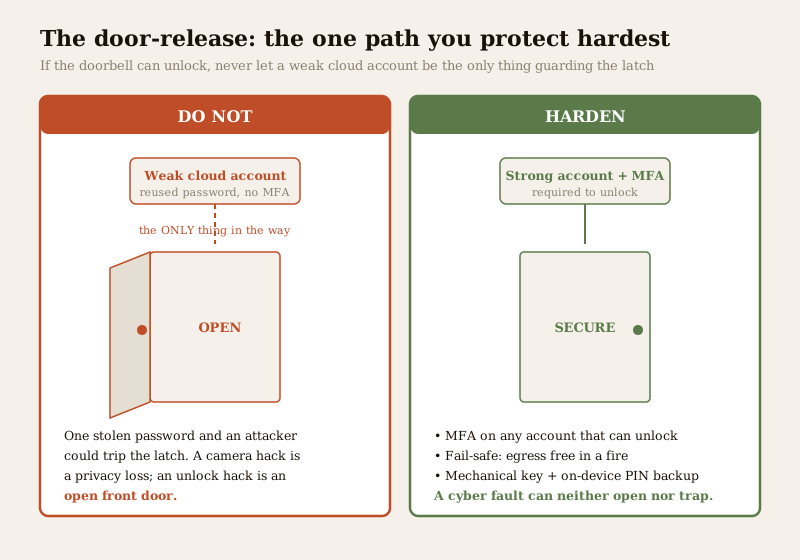
This is the section that matters most, so read it twice. If your video door phone can release the door latch — many integrated VDP-and-lock kits can — then that door-release is the single most dangerous power the device holds, and it must be protected harder than anything else. You must NEVER let a weakly secured cloud account be the only thing standing between an attacker and your door lock. A camera that is compromised is a privacy disaster; a door-release that is compromised is an open door.
Treat the unlock path as a physical key, and hold it to a higher bar than the rest of the unit:
- MFA is mandatory on any account that can unlock. If the app can open the door, the account behind it must have multi-factor authentication turned on — no exceptions. A password alone is not enough to guard a latch; see multi-factor authentication for security devices and the deeper smart lock cybersecurity guide.
- App-based unlock should fail-safe, never fail-open. A cyber problem, cloud outage or flat battery must never leave the door hanging unlocked, and it must never trap anyone inside during a fire. Egress always wins. Choose an integration that keeps a mechanical key override and an on-device PIN, so a network fault can neither lock you out nor swing the latch open — the full discipline is in the complete smart locks guide.
- Prefer separation of powers. Where you can, keep the viewing doorbell and the unlocking lock as separate, individually hardened systems rather than one cheap unit that both sees and unlocks through a single obscure cloud account. If they are combined, the whole combined account inherits the higher, lock-grade standard.
Privacy and the DPDP Act
A video door phone is a recording device pointed at a semi-public space. It captures callers, neighbours coming and going, delivery riders, domestic staff and, often, a slice of the street or a shared lobby. Under the Digital Personal Data Protection Act, 2023, that footage and the visitor logs are personal data, and you are handling other people's data as well as your own. Cyber hygiene and privacy are the same discipline here — the more tightly you secure the device, the less of that data can leak.
- Point it at your own threshold, not into others' homes. Aim the camera at your gate and approach, not into a neighbour's door, window or private space. The video door phone privacy guide and the wider smart-security privacy guide cover framing, notice and shared-building etiquette.
- Minimise and delete. Keep clips only as long as useful, set a sensible retention period, and delete footage of a departed visitor or staff member when there is no reason to hold it.
- Be honest with the people it records. A visible notice at the gate that a doorbell camera is in use is both courteous and, for shared and staff-facing recording, the responsible thing under the DPDP framing.
Remote access done securely
The whole appeal of a VDP is seeing your door from anywhere — but remote access is also the surface an attacker most wants. Do it through the maker's own hardened app and account, never by exposing the device directly to the internet.
- Use the official app and the vendor's secure cloud relay to view remotely, with a strong account and MFA. Do not open ("port-forward") the doorbell straight to the public internet, and do not rely on an obscure default remote-view service — the same care is set out for cameras in CCTV remote-access security.
- Only ever install the official app from the maker's genuine store listing, never a cloned or side-loaded copy. If an app asks for permissions that make no sense for a doorbell, treat it as a red flag.
- Sign out and revoke on lost phones. If a phone with the app is lost or sold, sign that device out of the account and, if in doubt, change the password — a session left signed in is a live window onto your door.
A hardening checklist for your video door phone
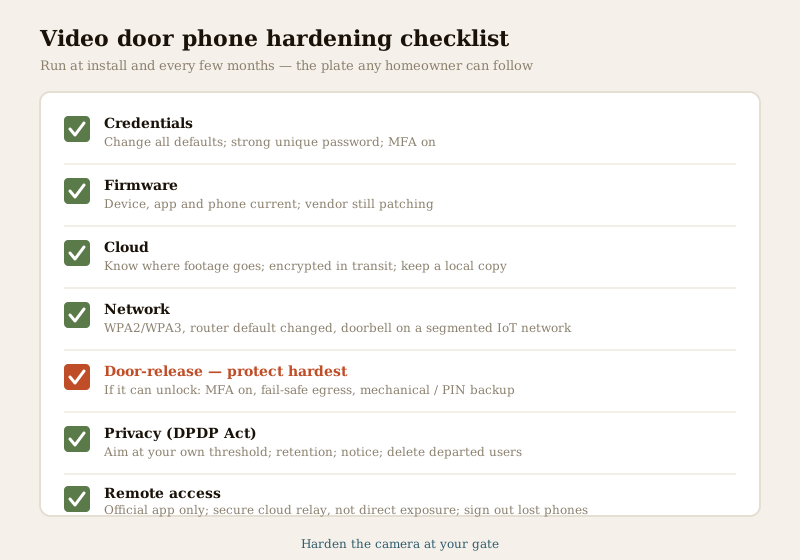
None of this is a one-time job; it is a light habit. Run this round when you install the unit and again every few months. To see where your whole setup stands, the home-security risk scorecard turns these into a quick self-check.
1. Credentials: all defaults changed; a strong, unique password; MFA turned on.
2. Firmware: device firmware, the app and the phone OS all current; vendor still shipping patches.
3. Cloud: you know where footage is stored, that it travels encrypted, and how to delete it; a local copy exists if you want resilience.
4. Network: Wi-Fi on WPA2/WPA3, router default password changed, doorbell on a segmented IoT network.
5. Door-release: if it can unlock, MFA is on, the design fails safe for egress, and a mechanical/PIN backup exists.
6. Privacy: aimed at your own threshold, sensible retention, a visible notice, departed users deleted.
7. Remote access: official app only, secure cloud relay not direct exposure, lost phones signed out.
Key takeaways
- A compromised doorbell is serious — it sees and hears your doorstep, logs every caller, and on lock-integrated units can open the door; an insecure VDP is worse than none because it gives false confidence while opening a real path in.
- Fix the account first: change every default, use a strong unique password, and turn on multi-factor authentication — this is the single biggest upgrade you can make.
- Keep it patched by a vendor that still patches, and mind the cloud: know where footage goes, insist on encryption in transit, and keep a local copy for resilience.
- Put the doorbell on a secure, segmented IoT network, and — if it can release the door, protect that path hardest: never let a weak cloud account be the only thing between an attacker and your latch; require MFA and a fail-safe design with a mechanical or PIN backup.
- Respect privacy under the DPDP Act, 2023 — it records callers, neighbours, the street and staff; aim it at your own threshold, minimise, delete, and give notice — and access it remotely only through the official app and secure cloud relay.
Where to go next
- The complete video door phones guide and the video door phone privacy guide for the full picture on choosing and living with a VDP.
- Security password management and multi-factor authentication for security devices for the account discipline this guide leans on.
- Firmware updates, securing Wi-Fi for security devices and network segmentation for IoT for keeping the device and network tidy.
- Cloud storage security, local versus cloud storage and data encryption for the cloud question.
- Smart lock cybersecurity, the complete smart locks guide and CCTV remote-access security for the door-release and remote-access disciplines — all under the security cybersecurity pillar and the security hub.
References
- Digital Personal Data Protection Act, 2023 — a video door phone's footage, visitor logs and any stored images of callers, neighbours and staff are personal data; minimise collection, restrict access, keep sensible retention, give notice, and delete data you no longer need.
- CERT-In (Indian Computer Emergency Response Team) — India's national body for reporting serious cyber incidents; if a doorbell account or device is compromised in a way you cannot resolve, this is the route for reporting, alongside the maker's official support.
- Manufacturer specifications and privacy summary — verify a unit's security-update history, where footage is stored, whether traffic is encrypted (HTTPS/TLS), whether it works offline, and what data goes to the maker's cloud, on the vendor's own datasheet before buying.
- General IoT hardening best practice (frameworks such as OWASP IoT and CIS benchmarks) — change defaults, patch firmware, segment the network, encrypt in transit, and enforce multi-factor authentication on any account that can control a door.
This is an educational overview, not legal advice, and it deliberately covers only how to harden a video door phone you own — never how to attack, intercept or bypass any device. A door-release must fail safe and keep free exit in a fire; physical fitting, mains wiring and any lock or egress interlock are qualified professional tasks. Engage licensed installers or a qualified IT professional, and verify any standard's current status before relying on it.
Export this guide
Related Guides — Deep-dive reading
Smart Security Cybersecurity in India (2026): Hardening the Home That Watches Itself
Every connected security device is also a way in for an attacker, and an insecure smart camera or lock is worse than none because it gives false safety while exposing your home. This is the plain hardening checklist a homeowner can actually do: passwords, two-factor, updates, a wise buy, and a segmented network.
SecurityComplete Guide to Security System Cybersecurity in India (2026): Protecting the Systems That Protect You
The cameras, locks, alarms and door phones you install to feel safer are internet-connected computers that can themselves be attacked, and an insecure one is worse than none. This pillar maps the whole attack surface — devices, network, accounts and data, operations — and points to every guide that hardens it.
SecurityCCTV Remote Access in India (2026): Watch From Your Phone, Safely
How to view your own cameras from anywhere without leaving the front door open to the internet — change the defaults, use strong credentials and 2FA, keep firmware current, prefer the vendor's secure cloud relay or a VPN, segment the camera network, and treat footage as personal data.
SecurityRelated Tools — Try Free
Lift Safety Audit Checklist
Interactive checklist that scores your home lift on safety devices, compliance and upkeep.
ChecklistSecurity Vendor Evaluation Scorecard
Rate a CCTV/security installer or guarding agency across eight weighted criteria for a hire / negotiate / walk-away verdict.
Vendor ScorecardCCTV Cloud vs Local Cost Calculator
Compare cloud CCTV subscription against a local NVR + HDD — upfront, 5-year total, monthly fee and break-even.
Cloud vs Local