
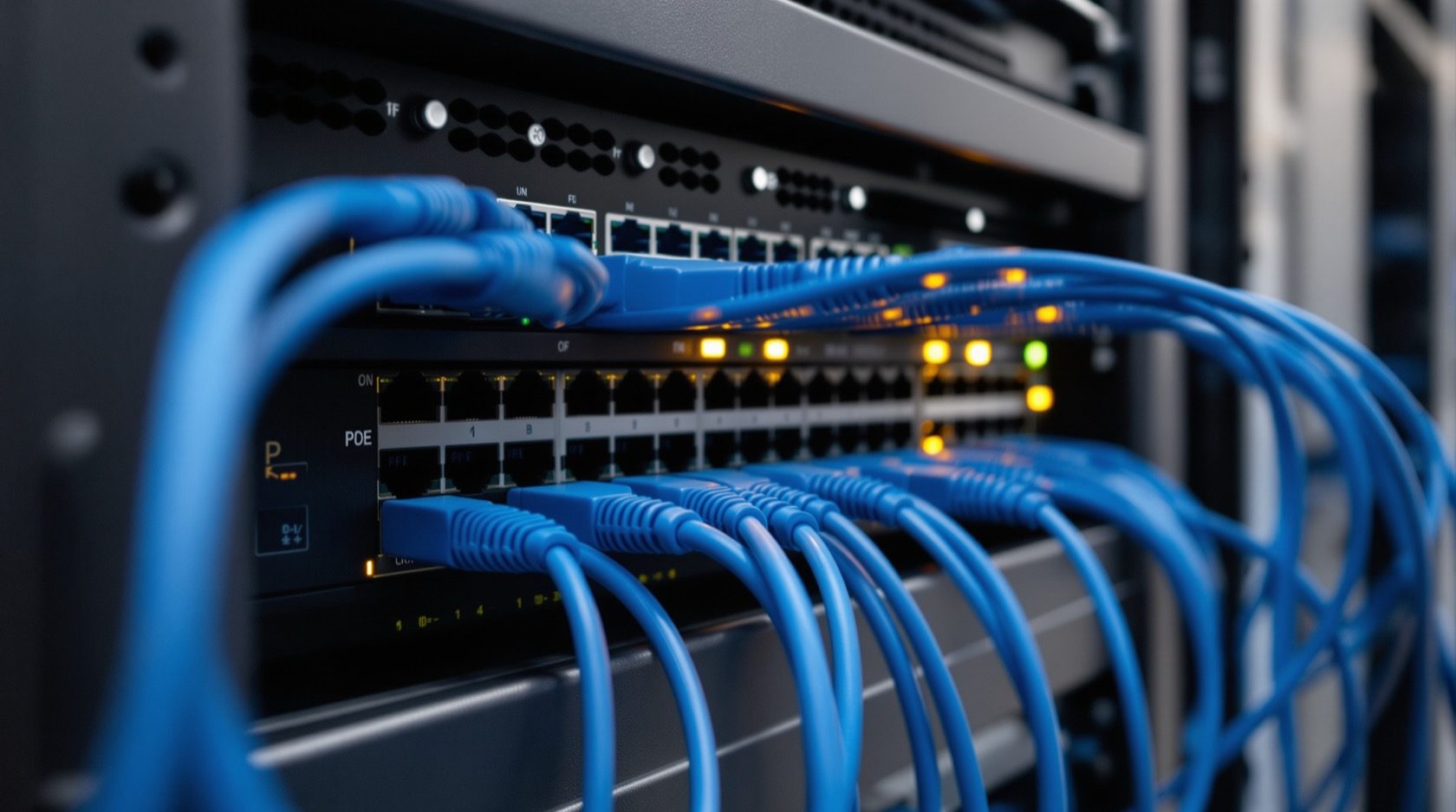
CCTV Network Switch and PoE Budget in India (2026): Sizing the Backbone
The switch is the spine of an IP CCTV system: PoE vs PoE+ vs PoE++ per port, the total watt budget against the switch's rated capacity, managed vs unmanaged, uplink to the NVR, and why the cameras belong on their own isolated VLAN.
Cameras get the attention, but the part that quietly decides whether an IP CCTV system is reliable is the cctv network switch — the box every camera cable lands on. It does two jobs at once: it carries the video data to the recorder, and on a Power-over-Ethernet (PoE) switch it also delivers electrical power back up the same cable to each camera. Get the switch wrong — too little power budget, no headroom, cameras sharing the home network — and the symptoms are maddening: cameras that reboot at night, choppy footage, or a home Wi-Fi that crawls whenever someone reviews recordings.
This guide is the network-and-power backbone explainer in Studio Matrx's CCTV hub. It stays in its lane: the switch, the PoE watt budget, and network isolation. The cable runs that feed it are covered in the CCTV cabling and wiring guide; the recorder those cables ultimately serve is in NVR vs DVR; and viewing it all safely from your phone is in secure remote access. To turn the numbers below into a specific port count and watt figure for your plot, use the security cabling and PoE planner.
Scope & safety. This guide helps you specify and supervise. The actual structured cabling, any conduit or chasing, the mains supply to the switch and NVR, and earthing/surge protection are licensed professionals' work — plan the topology here, have a qualified installer and electrician build it. Network hardware must never block a fire-escape route or fire-fighting access.
What a PoE switch actually does in a CCTV system
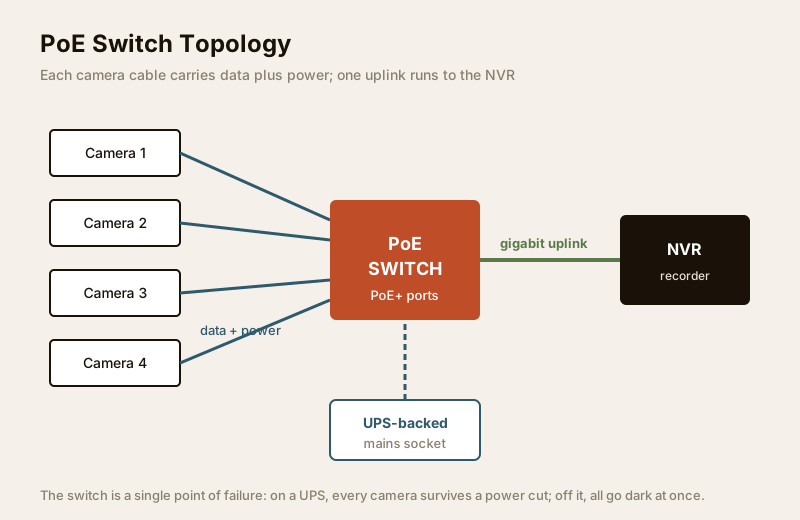
In a modern IP CCTV system, each camera is a small networked computer. It needs a data path to the recorder and it needs power. A PoE switch delivers both down one Cat5e/Cat6 cable, so there is no separate power adapter at each camera — a huge simplification when a camera sits on a compound wall 40 metres from the house.
Three things flow through the switch:
- Data — the video stream from each camera, aggregated and sent on to the NVR.
- Power — electrical watts pushed from the switch back up each cable to run the camera and its IR LEDs.
- Control — on a managed switch, the settings that isolate, prioritise and monitor that traffic.
Many home NVRs have a built-in PoE switch — the ports on the back of the recorder. That is neat for a small system, but the moment you outgrow those ports, or you want cameras spread across a large plot, a separate dedicated switch feeding the NVR over one uplink is the more flexible design. The rest of this guide assumes you may need that separate switch.
PoE, PoE+ and PoE++ — power per port
Not all PoE is equal. The standards define how many watts a single port can deliver, and a camera will only work reliably if the port can supply what it draws — especially at night, when the IR illuminators and any heater or pan-tilt motor pull their peak.
| Standard | Common name | Power at the port | Typically powers |
|---|---|---|---|
| 802.3af | PoE | ~15.4 W | Basic fixed cameras, low-IR indoor units |
| 802.3at | PoE+ | ~30 W | Most outdoor bullet/dome cameras with strong IR |
| 802.3bt Type 3 | PoE++ | ~60 W | PTZ cameras (pan-tilt-zoom motors), heaters |
| 802.3bt Type 4 | PoE++ | ~90-100 W | High-power PTZ, multi-sensor, plus other devices |
A note on the numbers: the port delivers more than the camera receives, because some power is lost as heat in the cable over a long run. That is why the port budget must sit comfortably above the camera's rated draw. For a typical Indian home mix of 4MP bullet and dome cameras, PoE+ (30 W) ports are the safe, versatile choice; reserve PoE++ for any PTZ (pan-tilt-zoom) camera on a large compound. For the camera side of PoE — how cameras draw power over the cable — see the PoE CCTV cameras guide. Verify each camera's PoE class on its spec sheet before you buy the switch — a PoE-only (15 W) switch will brown-out a hungry outdoor camera at night, causing the classic "camera reboots after dark" fault.
The PoE watt budget — the number people overlook
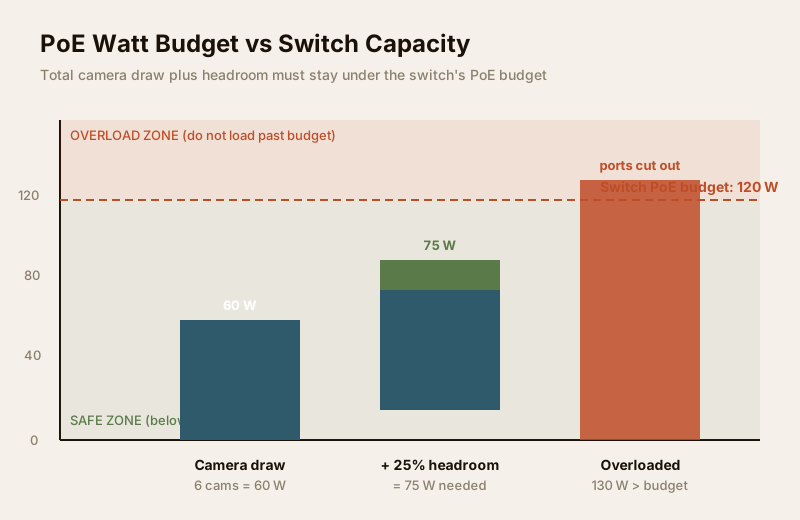
Here is the trap that catches most first-time buyers. A switch advertised as "8-port PoE+, 30 W per port" does not mean it can deliver 30 W on all eight ports at once. Each switch has a total PoE power budget — a single pool of watts shared across all ports. An 8-port PoE+ switch might have a budget of only, say, 65-120 W, not 8 × 30 = 240 W. Plug in eight power-hungry cameras and you overload the budget; the switch protects itself by cutting power to the last ports, and those cameras go dark.
The rule is simple and non-negotiable:
Sum of what every camera draws (with headroom) must be LESS than the switch's total PoE budget — not just less than the per-port rating.
Work it in three steps:
1. Add up camera draw. List each camera's rated PoE wattage from its spec sheet and add them.
2. Add headroom. Apply roughly a 20-25% margin on top, to cover cable loss on long runs, night-time IR peaks, and future cameras. A system that runs at 95% of budget has no room to grow and browns out on a cold, dark night.
3. Compare to the switch's rated PoE budget — the single "total PoE power" figure on the datasheet, not the per-port number.
For example, six 4MP cameras drawing ~8 W each is ~48 W; with 25% headroom that is ~60 W, so you want a switch with at least ~65-75 W of PoE budget, and ideally more so you can add a seventh camera later. Rather than doing this by hand, let the security cabling and PoE planner total the draw and headroom for your camera list and recommend a budget — that is exactly what it is built for.
Managed vs unmanaged — and why it matters here
Switches come in two broad flavours, and for CCTV the difference is more than a price line.
| Feature | Unmanaged switch | Managed switch |
|---|---|---|
| Setup | Plug-and-play, no config | Configured via web/app |
| VLANs (network isolation) | No | Yes — segment the cameras |
| Traffic priority (QoS) | No | Yes |
| Port monitoring / diagnostics | No | Yes — see which port fails |
| Price band (indicative) | ₹2,500 - ₹8,000 | ₹6,000 - ₹20,000+ |
| Best for | Small, simple, cameras behind an NVR's own ports | Larger systems, camera VLAN isolation, mixed home network |
A small system where every camera plugs into the NVR's own PoE ports can happily use the NVR as its switch and needs nothing more. But the moment you want to isolate the camera network — which you should, for the reasons below — or you have more cameras than NVR ports, a managed (or "smart"/"web-managed") switch is what lets you put the cameras on their own VLAN. Many mid-range switches labelled smart-managed give you VLANs and monitoring at a home-friendly price without full enterprise complexity.
The uplink — one cable carries every camera to the NVR
If cameras land on a separate switch, a single cable — the uplink — carries all their combined video to the NVR. That one cable must be wide enough for the total. This is where a gigabit (1000 Mbps) uplink matters: several 4MP/8MP camera streams add up quickly, and a slow 100 Mbps uplink becomes a bottleneck that stutters live view and playback.
- Use a switch with gigabit uplink port(s) and run the uplink on Cat6 for headroom.
- Keep the uplink run short and direct where you can; the ~90-100 m Ethernet limit applies to it too (see the cabling guide).
- For a large plot, a switch with an SFP fibre uplink lets the link exceed the copper distance limit — worth specifying when the switch sits far from the NVR.
The bandwidth each camera contributes depends on its resolution and bitrate; you do not need to derive it here — the CCTV storage and bitrate calculator already models per-camera throughput, which is the same figure that loads your uplink.
Isolate the camera network — bandwidth AND security
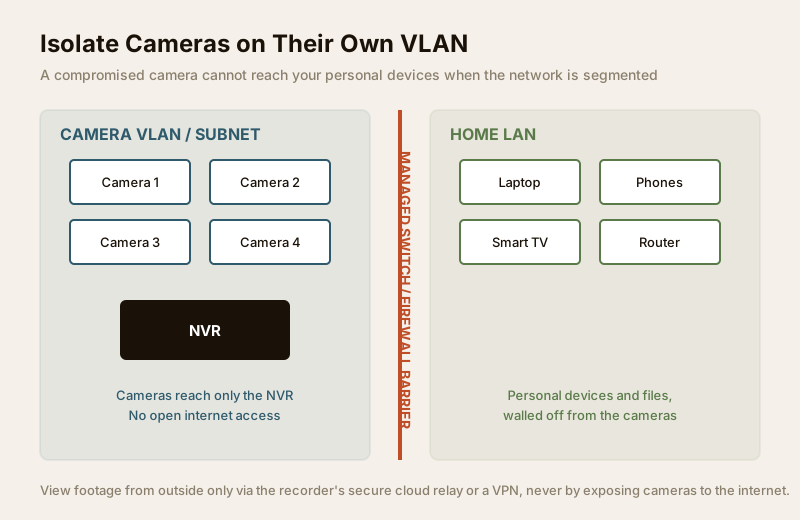
This is the single most important design decision in this guide, and it is both a performance and a security measure. Cameras should not sit on the same flat network as your laptops, phones and smart TV. Two reasons:
- Bandwidth. A dozen cameras streaming continuously is a lot of constant traffic. Kept on their own segment, that traffic never competes with your home Wi-Fi, video calls or streaming.
- Security. IP cameras are, historically, among the least-secure devices on a home network — cheap firmware, slow patches, default passwords. If a camera is compromised and it shares your main LAN, it is a foothold onto everything else. Put the cameras on a separate VLAN or subnet and they can talk to the NVR but are walled off from your personal devices and files.
The practical pattern for a home:
- Put all cameras and the NVR on a dedicated camera VLAN / subnet on a managed switch.
- Do not give the cameras open internet access. They should reach the NVR, and nothing else, unless a specific vendor cloud feature needs it.
- Reach the footage from outside the house through the recorder's secure cloud relay or a VPN, never by exposing cameras directly — the full defensive playbook is in the secure remote access guide.
This segmentation is the network half of the readiness picture covered in internet and network readiness for security. Treat all recorded footage as personal data under the DPDP Act, 2023, and secure the network that carries it.
Powering the switch itself through a power cut
A subtle point that Indian homes learn the hard way: the switch is a single point of failure. If the switch loses power in a load-shedding cut, every camera on it goes dark at once — even PoE cameras, because their power comes from the switch. So the switch, the NVR and the router must all sit on the same UPS/inverter if you want the system — and remote viewing — to survive an outage. Sizing that backup is its own topic, covered in the power supply and UPS guide and the security backup power calculator. Surge protection and earthing for that equipment are a licensed electrician's job; see the electrical hub.
Choosing your switch — a quick selection guide
| Your situation | Sensible switch choice |
|---|---|
| 4 cameras or fewer, all near the NVR | Use the NVR's built-in PoE ports — no separate switch needed |
| 5-8 cameras, want isolation | 8-port PoE+ managed switch, gigabit uplink, budget with 25% headroom |
| 8-16 cameras across a plot | 16-port PoE+ managed, generous total PoE budget, gigabit/SFP uplink |
| Any PTZ or heated camera | Ensure that port is PoE++ (60-90 W), and add its draw to the budget |
| Long run to the NVR (>90 m) | Add a fibre/SFP uplink or an intermediate switch |
| Small, simple, no isolation | Unmanaged PoE+ switch is fine and cheapest |
Common mistakes to avoid:
- Buying on port count alone. Check the total PoE watt budget, not just the number of ports.
- Ignoring headroom. A switch loaded to 95% browns out on the coldest, darkest night when IR peaks.
- A 100 Mbps uplink choking a stack of high-resolution cameras — insist on gigabit.
- Flat network. Cameras on the same subnet as your personal devices is both slow and a security risk.
- Switch off the UPS. Every camera dies with it in a power cut.
When to bring in a professional. You should specify the switch, PoE budget, VLAN plan and uplink — that is the owner/architect's job and this guide's purpose. Hand the structured cabling, terminations, any conduit or chasing, the mains supply to the switch and NVR, and all earthing and surge protection to a licensed installer and electrician. Never DIY the mains side or work at height. A correctly sized, isolated, UPS-backed switch is worth far more than extra cameras on a fragile network.
Key takeaways
- The network switch is the backbone of an IP CCTV system — it carries video to the NVR and, on a PoE switch, powers the cameras down the same cable.
- Match the PoE class to each camera: PoE+ (30 W) for most home cameras, PoE++ (60-90 W) for PTZ.
- The critical number is the switch's total PoE watt budget — sum every camera's draw, add ~25% headroom, and stay under it; do not buy on port count alone.
- Use a gigabit uplink to the NVR so many high-resolution streams do not bottleneck.
- Isolate the cameras on their own VLAN/subnet — for bandwidth and because a compromised camera must not reach your personal devices.
- Put the switch, NVR and router on one UPS, and route all cabling, mains and surge-protection work to licensed professionals. Size it all with the security cabling and PoE planner.
References
- IEEE 802.3af / 802.3at / 802.3bt — the Power-over-Ethernet standards defining PoE, PoE+ and PoE++ power levels; confirm a switch's and camera's PoE type on the manufacturer's datasheet before purchase.
- Digital Personal Data Protection Act, 2023 — recorded footage is personal data; secure the network that carries and stores it, and grant cameras only the access they need. This is educational information, not legal advice.
- National Building Code of India (SP 7), Bureau of Indian Standards, and local bye-laws for the electrical supply, earthing and surge protection feeding CCTV equipment; verify the current edition via the BIS catalogue: https://www.services.bis.gov.in/
This is an educational overview to help you specify and supervise. Structured cabling, mains-electrical work, earthing, surge protection and working at height are qualified professional tasks — engage licensed installers and electricians, and verify any standard's current status via the BIS catalogue before relying on it.
Export this guide
Related Guides — Deep-dive reading
CCTV Remote Access in India (2026): Watch From Your Phone, Safely
How to view your own cameras from anywhere without leaving the front door open to the internet — change the defaults, use strong credentials and 2FA, keep firmware current, prefer the vendor's secure cloud relay or a VPN, segment the camera network, and treat footage as personal data.
SecurityElectrical Safety for Security Systems in India (2026): Powering It Without Peril
A homeowner's guide to the power side of home and RWA security systems, CCTV, alarms, gates, access control and NVRs, done so it protects you instead of quietly becoming a shock or fire hazard. What makes a supply safe, what to insist on, and why the mains work belongs to a licensed electrician.
SecurityInternet and Network Readiness for Home Security in India
Before you buy a single camera, plan the network under it: enough upload bandwidth for cloud and remote viewing, wired PoE for the cameras that matter, a segregated IoT network so a hacked gadget cannot reach your laptop, and secure remote access that never exposes your DVR to the open internet.
SecurityRelated Tools — Try Free
PoE Power-Budget Calculator
Whether a PoE switch can power the connected cameras with cable-loss headroom, and how many devices it supports.
PoE BudgetSecurity Cabling & PoE Planner
Estimate cable length, drops, PoE power budget, the right switch, conduit and cost for a CCTV/security cabling plan.
Cabling PlannerCCTV Bandwidth Calculator
Total network bandwidth an IP CCTV system needs, camera-to-recorder on the LAN and the internet upload for remote viewing.
Bandwidth