
Cloud Storage Security for Security Systems in India (2026): Keeping Your Camera Footage Safe in the Cloud
When your camera and doorbell footage is stored in the cloud, its safety depends on two things you can influence: the vendor's cloud and your own account. This homeowner guide covers how to secure the account with MFA, insist on encryption, understand who can see your footage under DPDP, judge vendor risk, manage retention and deletion, and keep a local copy so you are never wholly dependent on the cloud.
The moment you tick "save clips to the cloud" on a camera or video doorbell, something quietly changes: recordings of the inside and outside of your home stop living only on a card in the device and start living on a company's servers, reachable from any phone that can sign in to your account. That is genuinely convenient — you can watch a clip from work, footage survives even if a burglar walks off with the camera, and there is nothing to swap or lose. But it also means the safety of that footage now rests on two things at once: the vendor's cloud, which you do not control, and your account, which you completely control. Get either wrong and the same footage that was meant to protect you becomes a window strangers can look through.
Cloud storage security is simply the set of sensible habits that keep cloud-stored footage safe — locking down the account, insisting on encryption, understanding who can see your recordings, judging whether the vendor is trustworthy, and keeping a local copy so you are never left with nothing. This guide is for homeowners and is strictly protective: it is about keeping your own footage safe, never about accessing anyone else's. It sits under the security-system cybersecurity pillar in the cybersecurity sub-hub, alongside the guides to cloud CCTV and remote security monitoring.
Scope & safety. This guide helps you protect footage you own that is stored in the cloud: your account, its encryption, its retention and a local backup. It never explains how to access, intercept or break into any cloud service or account — weaknesses are named only so you can close them on your own system. Your footage is personal data under the Digital Personal Data Protection Act, 2023 (DPDP), and the vendor holding it has duties too; if your account or the provider is breached, treat it as an incident, preserve what you can, and report to India's national CERT (CERT-In) as appropriate. For anything beyond these basics — a business system, biometrics, a serious breach — engage a qualified IT or security professional. This is educational guidance, not legal advice.
Your footage now lives in two places
Before the cloud, the security question was simple and physical: is the recorder locked away where a thief cannot grab it? With cloud storage, the picture splits in two, and both halves matter.
- The vendor's cloud is where the recordings actually sit. You are trusting the company to store them safely, encrypt them, keep their own staff from casually browsing them, and not lose them in a breach or when the business changes.
- Your account is the single key that unlocks all of it. Whoever can sign in to your camera app can watch your live feeds and your saved history. A weak or reused password is, in effect, a spare key to your home handed out online.
The reassuring part is that the half you control — the account — is also the half that most break-ins exploit, so a little discipline there closes most of the risk. The honest part is that the other half — the vendor — is a genuine trade-off you accept when you choose the cloud, and this guide will help you accept it with eyes open.
1. Secure the account: the key to all your footage
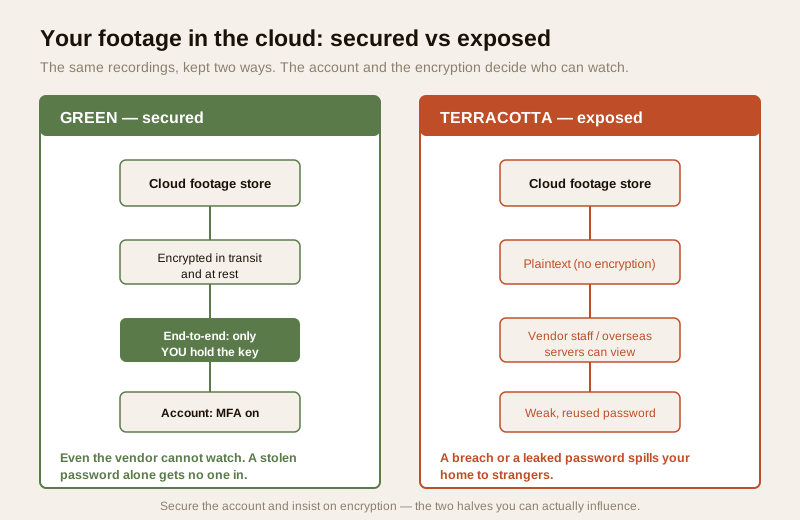
If you do only one thing from this guide, do this. The cloud account is not just a login — it is the master key to every recording the system has ever made and every live camera in your home. It deserves more care than the front-door key, because a key can only be in one place, but a leaked password can be used from anywhere in the world.
- Use a strong, unique password. The account should have a long passphrase used on no other site, kept in a password manager so you never have to reuse or remember it. The most common way home cameras get taken over is not clever hacking at all — it is a password that leaked from some unrelated website being tried on the camera app. A unique password breaks that chain completely. See password management.
- Turn on multi-factor authentication (MFA). With MFA, even someone who has your password cannot get in without a second factor — a code on your phone. On an account that unlocks live views of your home, this is the single biggest upgrade you can make, and it is usually two taps in the app's settings. See multi-factor authentication.
- Watch for unfamiliar logins. Good camera apps can show you recent sign-ins and active sessions, and can email you when a new device logs in. Glance at that list occasionally. A login from a device or place you do not recognise is your early warning; if you see one, change the password, sign out all other sessions, and turn on MFA if it was off.
- Never share the one login. If family need access, add them as their own named users where the app allows it, rather than passing around the single password. Then you can remove one person — a former tenant, a departed helper — without resetting everyone.
2. Encryption: in transit and at rest, and ideally end-to-end
Encryption is what makes footage unreadable to anyone who is not supposed to see it. There are three levels worth knowing, in plain terms.
- Encrypted in transit means the footage is scrambled while it travels from your camera up to the cloud, so it cannot be read as it crosses the internet. This is the baseline; look for a provider that uses standard secure transport (the same HTTPS/TLS that protects online banking).
- Encrypted at rest means the footage stays scrambled while it is sitting on the vendor's servers, so a stolen disk or a leaked storage bucket is not a plain video library. Reputable providers encrypt stored footage as a matter of course.
- End-to-end encrypted (E2EE) is the strongest and the one to prefer where offered: the footage is locked with a key that only you hold, so even the vendor's own staff cannot watch it. This directly answers the "who at the company can see my home?" worry, because the answer becomes "no one but me." The trade-off is that some cloud features (like the vendor's smart search or a lost-password recovery of old clips) may work differently under E2EE — read how the provider handles it.
You do not need to understand the mathematics. You need to read the provider's own security page and prefer, in order: a provider that encrypts in transit and at rest, and better still one that offers end-to-end encryption where only you hold the key. Our data-encryption guide explains these ideas in more depth. Treat a provider that cannot clearly say how it encrypts your footage as a red flag.
3. Who can see it: vendor staff, data residency and DPDP
This is the part homeowners think about least and should think about more. When your footage is in the cloud, the realistic list of people who could see it is longer than "just me":
- Vendor staff — support engineers or employees who can technically access stored footage, unless it is end-to-end encrypted. Good vendors restrict this tightly and log it; you have no way to verify that except their reputation and their policy.
- Whoever a breach reaches — if the provider is compromised, un-encrypted footage can spill to strangers. This has happened to large, well-known camera companies; it is not a hypothetical.
- Servers overseas — many low-cost cameras sold in India store footage on servers in another country and phone home to an app run from abroad. Your living room may physically sit on a disk on another continent, under another country's rules.
Where your data lives — data residency — matters for both privacy and law. Under the Digital Personal Data Protection Act, 2023, footage of identifiable people is personal data, and the company handling it has obligations about how it is stored, secured and used. Prefer providers that are clear about where footage is stored, that let you opt out of unnecessary sharing, and that publish a real privacy policy rather than a copied-and-pasted template. The smart-security privacy guide goes deeper into who-can-see-it and your rights; the practical takeaway is to favour vendors who treat your footage as the sensitive record it is.
4. Vendor risk: breaches, shutdowns and lock-in
Choosing the cloud is choosing to depend on a company, so the company itself is part of your security. Three risks are worth weighing honestly.
- Breaches happen to big providers too. A large brand is not a guarantee; well-resourced camera companies have suffered footage breaches. Encryption (especially end-to-end) and a strong, MFA-protected account are your defences even when the vendor slips.
- A vendor can vanish — or kill the free tier. Cameras are sometimes sold cheap because the money is in the subscription. A company can go out of business, get acquired, or simply announce that the free cloud tier is ending and history is now paywalled — and your footage or your ability to record can disappear with it. This "vendor shutdown" risk is real and rarely advertised at the point of sale.
- Lock-in. If a system stores footage only in a proprietary cloud with no way to export or record locally, you are tied to that company's continued goodwill and pricing. Prefer systems that also record locally or let you download your own footage.
Before you commit, do a quick track-record check on the vendor — how long it has been around, whether it patches its products, whether it has a clear way to report a security problem. Our vendor cybersecurity assessment guide gives a simple checklist for exactly this.
5. Retention and deletion: keep less, delete on purpose
More footage stored for longer is not more safety — it is more to leak. Data-minimisation is both good security and a DPDP principle: hold only what you actually need.
- Know how long clips are kept. Free and paid tiers differ enormously — some keep a rolling few days, others weeks or months. Find the number in the app so you know what history you actually have, and are not surprised to find last week's clip already gone (or, conversely, that a year of footage is sitting there).
- Delete what you do not need. Prune clips you have no reason to keep, especially anything that captured the inside of the home, visitors, or neighbours. The less that is stored, the less a breach can expose.
- Understand what "delete" really does. Pressing delete usually removes footage from your view immediately, but the provider may keep backups for a while before it is truly gone, and copies you downloaded to your phone or shared over chat live on independently. Do not assume "deleted" means "instantly erased everywhere." Read the provider's deletion policy, and clean up downloaded and shared copies yourself.
- Turn off recording where it is not wanted. Privacy zones, and simply not recording indoor spaces you have no need to, are the cheapest retention control of all — footage never made is footage never leaked.
6. Cloud vs local, and the hybrid answer
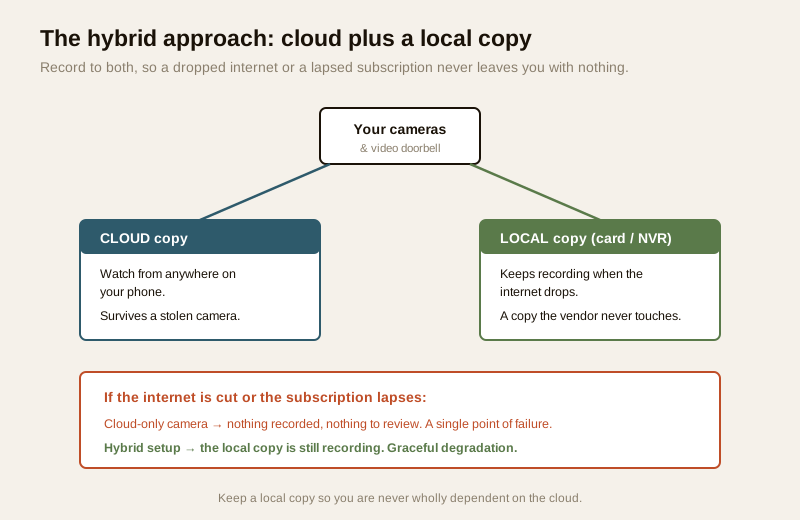
The most resilient homeowners do not choose cloud or local — they use both. Cloud storage survives the camera being stolen and lets you watch from anywhere; local storage (a card in the camera, or a network video recorder / NVR at home) keeps working when the internet drops or a subscription lapses, and keeps a copy the vendor never touches. Each covers the other's weakness.
The hybrid approach is the practical recommendation for anything you genuinely rely on: let the system record to the cloud for remote access and theft-resilience, and keep a local copy so that if the internet, the power, the subscription or the vendor fails, you are not left with nothing. This is graceful degradation — the system still does something useful when one part is down. A camera that goes blind the instant the broadband drops has a single point of failure; one that keeps recording to a local card or NVR does not.
The trade-offs are worth seeing side by side:
| Consideration | Cloud storage | Local storage (card / NVR) |
|---|---|---|
| Survives camera theft | Yes — footage is off-site | No — a stolen device takes its footage |
| Works when internet is down | No — needs connectivity | Yes — records locally |
| Works if subscription lapses | Often no — history may lock or stop | Yes — you own the drive |
| Remote viewing from anywhere | Yes, easily | Only if you add secure remote access |
| Who else could see it | Vendor staff / a breach, unless E2EE | Only whoever can reach the device |
| Ongoing cost | Usually a subscription | One-time hardware, plus upkeep |
| Best used as | Convenience + theft-resilience | The copy you always still have |
For a fuller side-by-side of the two models, see the local-versus-cloud guide; for keeping and testing that second copy, see the security-system backup guide.
7. Free vs paid cloud: read the terms
A free cloud tier is a fine place to start, but "free" usually buys you less on the things that matter here. Compared with a paid plan, a free tier often keeps footage for a shorter window, may offer weaker or no end-to-end encryption, can carry looser terms about how your data is used, and is the first thing a struggling vendor cuts. None of that makes free unusable — it makes it something to read carefully. Before you rely on a free tier, check the retention window, the encryption on offer, and what the terms say about how your footage may be used, and decide whether a modest paid plan buys you protections worth having. Whatever the tier, the account and encryption habits in this guide still apply.
If the worst happens: a breach
If you suspect your account has been accessed by someone else, or the provider announces a breach: change the account password to a new unique one immediately, turn on MFA if it was off, sign out all other sessions, and review recent logins. Delete footage you do not need to keep, and check whether the vendor is offering guidance. Because footage is personal data under DPDP, a serious compromise can be a reportable incident — preserve what evidence you can and follow current CERT-In guidance for reporting. For a business or a housing society, bring in a qualified professional rather than handling it alone.
A cloud-storage security checklist
Run through this once when you set up cloud storage, and glance back at it every few months. None of it is technical.
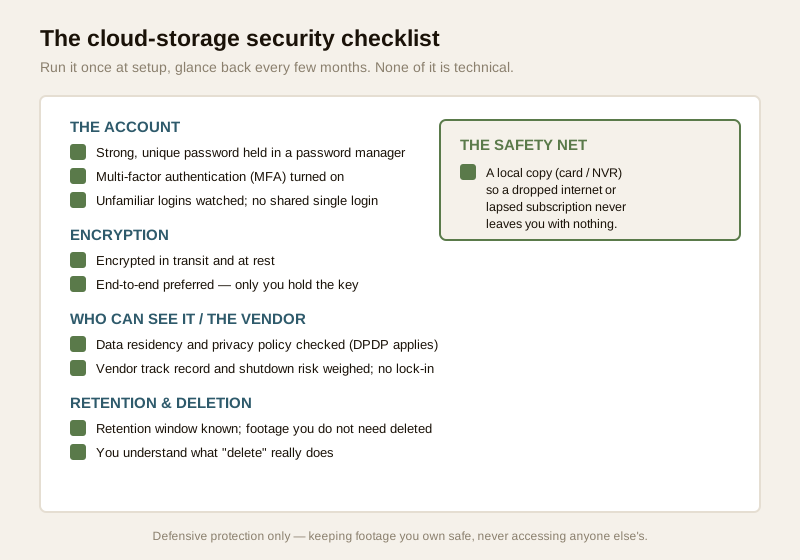
1. Account: strong unique password, MFA on, unfamiliar logins watched, no shared password.
2. Encryption: footage encrypted in transit and at rest; end-to-end preferred where only you hold the key.
3. Who can see it: data residency and privacy policy checked; footage treated as personal data under DPDP.
4. Vendor: track record and shutdown risk weighed; lock-in avoided; footage exportable or also stored locally.
5. Retention: retention window known; footage you do not need deleted; what "delete" really does understood.
6. Free vs paid: the free tier's retention, encryption and terms read before relying on it.
7. Local copy: a card or NVR keeps a copy so the internet, a lapsed subscription or a vendor failure never leaves you with nothing.
You can see where your overall setup stands with the home-security risk scorecard.
When to bring in a professional. Setting a unique password, turning on MFA, reading the retention and privacy terms, and adding a local card or NVR are all yours to do. Bring in a qualified IT or security professional for a business or housing-society system, for anything involving biometrics, or if you suspect a real breach that a password reset does not resolve — preserve logs and follow CERT-In guidance.
Key takeaways
- Cloud-stored footage depends on two things: the vendor's cloud and your account. You fully control the account, and it is where most break-ins happen — so a strong unique password plus multi-factor authentication closes most of the risk on its own.
- Insist on encryption. Prefer a provider that encrypts footage in transit and at rest, and better still one that offers end-to-end encryption where only you hold the key, so not even the vendor's staff can watch your home.
- Be honest about who can see it and where it lives. Footage may sit on overseas servers, be viewable by vendor staff, or spill in a breach — a real privacy and DPDP concern; favour vendors clear about data residency.
- Weigh vendor risk and manage retention. Breaches, shutdowns and lock-in are real; keep less footage, delete what you do not need, and know that "delete" is not always instant everywhere.
- Keep a local copy. A hybrid setup — cloud plus a card or NVR — means a dropped internet, a lapsed subscription or a failed vendor never leaves you with nothing.
Where to go next
- Start at the security-system cybersecurity pillar and the cybersecurity sub-hub.
- Lock down the essentials: password management, multi-factor authentication and data encryption.
- Weigh the storage choice: cloud CCTV, local versus cloud, security-system backup and remote security monitoring.
- Judge the people and privacy: vendor cybersecurity assessment and smart-security privacy.
- Gauge your overall exposure with the home-security risk scorecard, then return to the security hub.
References
- Digital Personal Data Protection Act, 2023 — camera footage of identifiable people is personal data; both you and the cloud provider have duties over how it is stored, secured, retained and deleted. Minimise what you keep and prefer providers clear about data residency.
- CERT-In (Indian Computer Emergency Response Team) — India's national incident-response body; treat an account takeover or a provider breach affecting your footage as a reportable cyber incident and follow current CERT-In guidance.
- NIST, OWASP IoT and CIS security best-practice frameworks — general, vendor-neutral guidance on account security, MFA, encryption, data retention and cloud hygiene; verify the current edition of any framework before relying on it.
- Provider security and privacy documentation — verify how a given service encrypts footage in transit and at rest, whether it offers end-to-end encryption, where it stores data, its retention window and its deletion policy, on the provider's own security page before relying on it.
This is an educational overview, not legal advice, and it deliberately covers only how to keep footage you own safe in the cloud — never how to access, intercept or break into any account or service. For a business or housing-society system, biometrics, or a suspected breach, engage a qualified IT or security professional, and verify any provider's current security claims and any framework's status before relying on them.
Export this guide
Related Guides — Deep-dive reading
Local versus Cloud Security for Security Systems in India (2026): Where Should Your Footage Live?
The most important cyber choice you make about a camera or alarm is where its footage and control actually live: on-site in your hands, in a vendor's cloud, or both. This even-handed guide weighs privacy, resilience in India's outages, convenience and cost, and shows why a hybrid design is often the safest home answer.
SecurityCCTV Remote Access in India (2026): Watch From Your Phone, Safely
How to view your own cameras from anywhere without leaving the front door open to the internet — change the defaults, use strong credentials and 2FA, keep firmware current, prefer the vendor's secure cloud relay or a VPN, segment the camera network, and treat footage as personal data.
SecurityLocal Storage vs Cloud CCTV in India (2026): Where Your Footage Should Live
A homeowner's honest head-to-head on where CCTV footage is kept — on a hard disk in the recorder at home, or uploaded to a per-camera cloud plan — across cost, theft resilience, internet dependence, retention, remote access and DPDP privacy, ending in a clear which-suits-whom, with hybrid usually the smartest answer.
SecurityRelated Tools — Try Free
CCTV Cloud vs Local Cost Calculator
Compare cloud CCTV subscription against a local NVR + HDD — upfront, 5-year total, monthly fee and break-even.
Cloud vs LocalCCTV Camera Coverage & Count Calculator
Estimate how many CCTV cameras you need, the NVR channels, storage in TB for your retention period, and an indicative all-in cost with GST.
CCTV CalculatorWindow Hardware Cost Calculator
Estimate window hardware cost — hinges, handles, locks, rollers and multipoint gears.
Window Calculator