
Incident Response Planning for Security Systems in India (2026): A Calm Playbook for When a Camera, Lock or NVR Is Breached
When (not if) a security system is hacked, stolen or fails, a plan written in advance turns panic into calm action. This professional guide gives a household and RWA incident playbook — detect, contain, eradicate, recover, review — plus a who-to-call list, evidence preservation, and the DPDP breach duty.
Most security-system disasters are not the breach itself — they are the ten confused minutes after it, when nobody knows who to call, whether to unplug anything, or what must not be deleted. A stranger's voice comes out of the nursery camera. The society's NVR is gone from the cupboard overnight. An email says "we have your footage" and names a price. In that moment, a household or an RWA either has a plan and works it calmly, or it improvises and makes things worse. Incident response planning is simply writing that plan down before the bad day, so the bad day becomes a checklist instead of a panic.
This professional guide is for the person who decides and coordinates — the serious homeowner, the RWA committee, the facility manager. It is strictly defensive: it prepares you to respond to an incident on a system you own or manage. It never explains how to attack anyone. It sits under the security-system cybersecurity pillar in the cybersecurity sub-hub, and it turns the whole hub's advice into one calm sequence of moves.
Scope & safety. This guide helps you prepare and run an incident response for a security system you own or manage — a camera, lock, alarm, hub or NVR that has been hacked, stolen, tampered with or has failed. It never explains how to breach, intercept or attack any system. Footage, access logs and biometrics are personal data under the Digital Personal Data Protection Act, 2023, and a breach of them carries duties; India's national CERT (CERT-In) is the body to report a serious cyber incident to. Preserve evidence for the police or an investigation — do not wipe logs or footage a case may need. Any life-safety control (a lock, a lockdown) must stay fail-safe for egress throughout an incident: a cyber response must never trap a person against a fire. For anything beyond the basics here — forensics, a confirmed breach, a legal duty — engage a qualified IT/security professional and take legal advice.
When, not if: why a plan beats panic
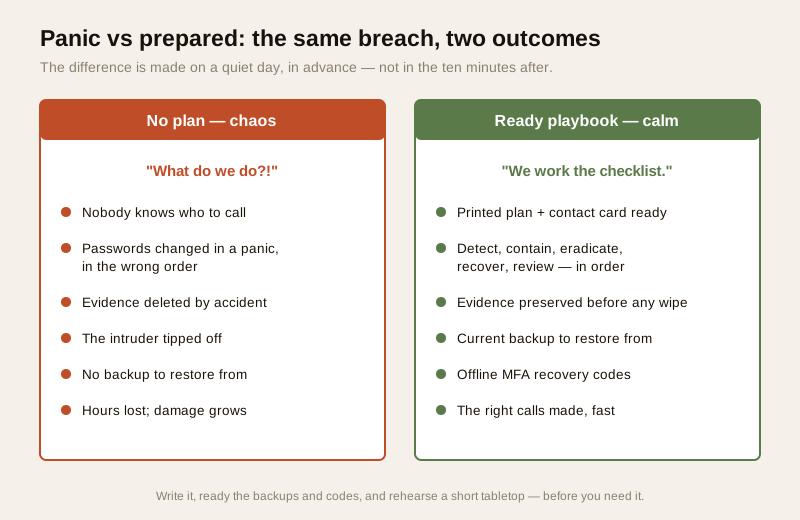
No system is unbreachable, and the honest posture is to assume that one day something will go wrong: a device is compromised, an account is taken over, hardware is stolen, or the whole thing simply fails at the worst moment. The value of a plan is not that it stops that day arriving — it is that when it arrives, you are calm. You know the first three moves, you know who to phone, and you know what you must not touch. A prepared household loses minutes; an unprepared one loses evidence, changes the wrong passwords in the wrong order, tips off the intruder, or deletes the very footage the police needed.
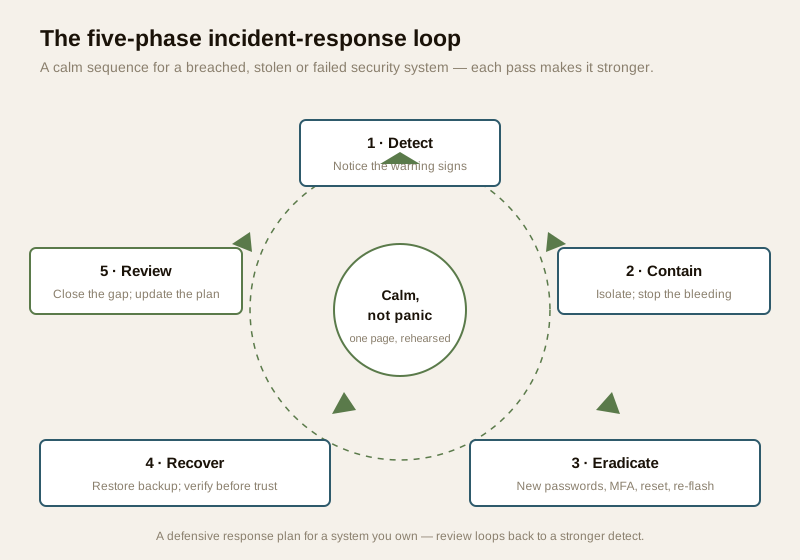
The frameworks that professionals use (from bodies such as NIST) all describe the same shape, and it reduces to five plain steps: detect, contain, eradicate, recover, review. You do not need the jargon. You need the sequence, written on one page, kept where you will find it, and rehearsed once so it is not the first time you read it.
What an incident actually looks like
Before the plan, know the signs. An "incident" for a home or building security system is any sign that the system is no longer only under your control, or that it has failed. In plain terms:
- A stranger seen or heard on your camera — an unfamiliar voice from a two-way camera, a lens that pans on its own, an indicator light on when nobody is watching.
- Unfamiliar logins or sessions — the app shows a device or location you do not recognise, or you are logged out unexpectedly. The preventing-camera-hacking guide lists these warning signs in detail.
- Footage or logs deleted — recordings that should exist are gone, or the log has a suspicious gap.
- Hardware stolen — the NVR or DVR taken from the cupboard, a camera or hub removed. This is both a theft and a data breach, because the device holds footage.
- A lock, gate or alarm behaving oddly — a smart lock unlocking at odd hours, a gate opening unbidden, an alarm disarming itself.
- A ransom or extortion message — an email or message claiming to hold your footage or account and demanding payment.
- A vendor breach notice — the maker or cloud provider emails to say their systems were breached and your account may be affected.
Any one of these starts the playbook. When in doubt, treat it as an incident and run the calm steps — over-reacting costs a little time; under-reacting can cost your evidence and your privacy.
The five-phase incident playbook
Here is the household and RWA playbook in plain words. Do them in order. The order matters: contain before you eradicate, and verify before you trust again.
1. Detect / identify
Confirm and record what you are seeing, and when. Note the time, the device, and the exact symptom. Take a photo or a screen recording of the evidence before you change anything — the unfamiliar login, the ransom message, the empty cupboard where the NVR stood. This first record is often the most useful thing an investigation ever gets. Identifying the scope early — one camera, or the whole account? — decides how wide you must contain.
2. Contain — stop the bleeding
Isolate the affected device from the network. The goal is to cut the attacker's or the malware's reach while you think. In practice that means: unplug the network cable of the affected NVR or camera, or block it on the router; if you cannot isolate one device, disconnect the internet at the router to buy quiet time; power down a device that is actively misbehaving only after you have preserved evidence and confirmed no life-safety function depends on it. Containment is about stopping things getting worse, not about fixing — that comes next. Never let containment lock a door against someone escaping a fire; egress must stay free.
3. Eradicate — remove the intruder's foothold
Once contained, remove every way back in. Do this from a clean, trusted device — a phone or laptop you are confident is not compromised — never from the affected system:
- Change ALL passwords, starting with the account email, then the security-system account, then the router and Wi-Fi. Assume anything reused elsewhere is also exposed. See password management.
- Turn on multi-factor authentication everywhere it is offered, so a stolen password alone can no longer get back in. See multi-factor authentication.
- Remove unknown users, sessions and shares — revoke every logged-in device, delete any user or "guest share" you did not create, and end active sessions.
- Factory reset and re-flash the affected device, then update it to the latest firmware before reconnecting, so any tampered software is wiped. See firmware updates.
Do not reconnect the device to your main network until this is done. A device brought back with the same password and old firmware is simply an invitation repeated.
4. Recover — rebuild and verify before you trust it
Now bring the system back carefully. Restore configuration from a known-good backup rather than trusting the possibly-tampered live settings; rebuild the device's setup from your written record; and verify integrity before you rely on it again — test that recording works, that the correct users (and only they) have access, that the app shows no strange sessions, and that alerts fire as they should. Watch it for a few days before declaring it trustworthy. Recovery is not "it's back online"; it is "it's back online and I have checked it is really mine."
5. Review — close the gap and improve the plan
When the dust settles, ask the one question that prevents the next incident: what let this happen? A default password never changed? Firmware years out of date? An NVR left where a thief could carry it out? Close that specific gap, then update the plan and the contact list with anything you learned. An incident you review is an incident that made you stronger; one you just recover from will likely repeat.
Who to call — prepare the list now
Half of a good response is knowing who to phone without hunting for numbers. Write this contact list today, keep a copy off the system (printed, and on a phone), and share it with whoever might be first to notice.
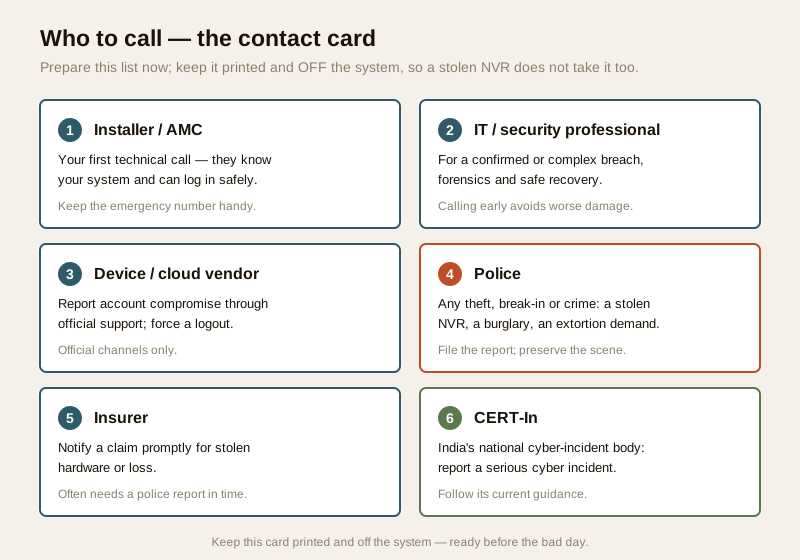
- Your installer / AMC provider — usually the first technical call. They know your system, can log in safely, and can dispatch someone. Keep the contract and the emergency number handy.
- An IT / security professional — for a confirmed breach, a ransom message, or anything a factory reset does not fix. Engaging one early is not an admission of failure; it is how you avoid making the damage worse. Choosing a vendor and installer with genuine security competence is what makes this call easy.
- The device or cloud vendor — report account compromise through official support only, so a fix and any forced logout can be applied at their end.
- The police — for any theft, break-in or crime: a stolen NVR, a burglary the camera caught, an extortion demand. File the report; it is also what your insurer and any legal duty will need. Preserve the scene.
- The insurer — notify a claim promptly for stolen hardware or consequential loss; they often require a police report within a set window.
- CERT-In (India's national cyber-incident body) — India's Computer Emergency Response Team is the national point to report a serious cyber incident; follow its current guidance on what and how to report.
Preserve evidence — do not wipe what an investigation needs
The instinct after a breach is to "clean everything" — reset, delete, start fresh. Resist it until you have preserved evidence. Do not wipe footage or logs that the police or an investigation may need. Before you factory-reset the affected device, export a copy of the relevant recordings, the event logs, the login history and the ransom or notice message, and store that copy somewhere separate and read-only. A theft of the physical NVR is doubly painful precisely because the evidence walked out with the hardware — which is itself an argument for off-device backup of footage. Preserve first, clean second. If a crime is involved, ask the police what they need before you alter the scene or the data.
The DPDP breach duty — footage and logs are personal data
A security system holds personal data: footage of identifiable people, access and arm/disarm logs, sometimes biometrics. Under the Digital Personal Data Protection Act, 2023, a breach of personal data is not just an IT problem — it can carry notification obligations. If a compromise or theft exposes footage or logs of residents, staff or visitors, an RWA or a business acting as the data steward may have a duty to notify the affected people and the authority as the Act and its rules require. You do not need to be a lawyer to prepare for this — you need to know the duty exists, keep a record of what data the system holds and who it concerns, and take legal advice promptly when a real breach occurs. Reporting a serious cyber incident to CERT-In and meeting any DPDP notification duty are two separate, parallel obligations; plan for both.
| Trigger | What it may require |
|---|---|
| Personal data (footage/logs) exposed or stolen | Assess the breach; notify affected people and the authority as the DPDP Act and its rules require |
| Serious cyber incident (hack, ransom, takeover) | Report to CERT-In per its current directions |
| Theft or crime | File a police report; preserve evidence and the scene |
| Insured hardware or loss | Notify the insurer, usually with the police report |
Treat the table as a checklist of who-may-need-to-know, not as legal advice — confirm the current DPDP rules and CERT-In directions, and take professional advice for a real breach.
The one-page incident playbook
Print this. Keep it where a first-responder in your household or committee will find it. This is the whole plan on a card.
| Phase | Action | Who |
|---|---|---|
| Detect | Note time, device, symptom; photograph/screen-record the evidence before touching anything | Whoever spots it |
| Contain | Isolate the device (unplug cable / block on router); disconnect internet if needed; keep egress fail-safe | You + installer |
| Eradicate | From a clean device: change ALL passwords, enable MFA, remove unknown users/sessions, factory-reset + re-flash the device | You / IT professional |
| Recover | Restore config from backup; rebuild; verify recording, users and alerts before trusting it; watch a few days | You + installer |
| Review | Find what let it happen; close that gap; update the plan and contact list | You / committee |
| Call | Installer/AMC · IT pro · vendor · police (theft/crime) · insurer · CERT-In (cyber) | Per the contact card |
| Preserve | Export footage, logs, login history, ransom message to read-only storage before any wipe | You |
| Notify | DPDP breach duty if personal data exposed; CERT-In for a serious incident | You / legal advice |
Do it in advance — write, ready, rehearse
A plan discovered mid-crisis is barely a plan. The work that makes the bad day calm is done on a quiet day:
- Write the plan and the contact list, and keep them printed and off the system (a thief who takes the NVR should not also take your only copy of who to call).
- Keep backups current, so recovery has something clean to restore from — see the backup guide.
- Keep MFA recovery codes safe and offline, so a locked-out account is recoverable.
- Practise it — a tabletop drill. Once, sit the household or committee down and talk through a scenario out loud: "the NVR is gone — what now, who calls whom, what do we preserve?" A ten-minute tabletop finds the gaps (nobody has the installer's number; nobody knows the router password) while they are cheap to fix. The first time you run the plan should not be the real time.
Tie all of this back to vendor choice: a maker with a good breach-response record — one that patches quickly, notifies honestly, and has real support — makes every phase easier. Weigh that when you buy, using the vendor cybersecurity assessment.
Key takeaways
- Assume when, not if. A plan does not stop a breach; it turns the ten panicked minutes after one into a calm checklist. Write it before you need it.
- Learn the five phases: detect, contain, eradicate, recover, review. Contain (isolate the device) before you eradicate (change all passwords from a clean device, enable MFA, reset and re-flash, remove unknown users); recover from a backup and verify before you trust it; then review to close the gap.
- Prepare the who-to-call list now — installer/AMC, an IT/security professional, the vendor, the police for any theft or crime, the insurer, and CERT-In for a serious cyber incident — and keep it printed and off the system.
- Preserve evidence: export footage, logs and messages to read-only storage before any wipe; do not delete what the police or an investigation may need.
- Know the DPDP breach duty: footage and logs are personal data, and a breach can carry notification obligations — take legal advice promptly. And rehearse the plan with a short tabletop drill.
Where to go next
- Start at the security-system cybersecurity pillar and the cybersecurity sub-hub.
- Prevent the incident: preventing camera hacking, password management, multi-factor authentication and firmware updates.
- Prepare to recover: keep a current security-system backup and choose well with the vendor cybersecurity assessment and installer evaluation.
- Gauge your overall exposure with the home-security risk scorecard, then return to the security hub.
References
- Digital Personal Data Protection Act, 2023 — footage, access logs and biometrics held by a security system are personal data; a breach can carry notification obligations to affected people and the authority. Confirm the current Act and rules, and take legal advice for a real breach.
- CERT-In (Indian Computer Emergency Response Team) — India's national cyber-incident response body; report a serious compromise (hack, ransom, account takeover) and follow its current reporting directions.
- NIST incident-response guidance and OWASP IoT / CIS best-practice frameworks — general, vendor-neutral guidance on the detect-contain-eradicate-recover-review lifecycle and IoT device hardening; verify the current edition before relying on it.
- Manufacturer and cloud-provider security and support documentation — verify how to report account compromise, force logouts, restore from backup and update firmware on the maker's own current documentation.
- Your installer/AMC contract, insurance policy and local police reporting procedure — keep the emergency contacts, claim-notification window and evidence-preservation requirements recorded in advance.
This is an educational overview, not legal advice, and it deliberately covers only how to prepare for and respond to an incident on a security system you own or manage — never how to attack any system. Confirm the current DPDP rules and CERT-In directions, keep any life-safety control fail-safe for egress throughout, preserve evidence for the authorities, and engage a qualified IT/security professional and legal advice for any confirmed breach.
Export this guide
Related Guides — Deep-dive reading
Complete Guide to Security System Cybersecurity in India (2026): Protecting the Systems That Protect You
The cameras, locks, alarms and door phones you install to feel safer are internet-connected computers that can themselves be attacked, and an insecure one is worse than none. This pillar maps the whole attack surface — devices, network, accounts and data, operations — and points to every guide that hardens it.
SecuritySecurity Device Hacked (2026): A Calm, Defensive Response Playbook
Think your CCTV camera, video doorbell, smart lock or NVR has been compromised? A calm, strictly defensive incident guide for Indian homeowners: read the real signs, then isolate, secure, update, reset, check, review and report — in that order.
SecuritySmart Security Cybersecurity in India (2026): Hardening the Home That Watches Itself
Every connected security device is also a way in for an attacker, and an insecure smart camera or lock is worse than none because it gives false safety while exposing your home. This is the plain hardening checklist a homeowner can actually do: passwords, two-factor, updates, a wise buy, and a segmented network.
SecurityRelated Tools — Try Free
Security Vendor Evaluation Scorecard
Rate a CCTV/security installer or guarding agency across eight weighted criteria for a hire / negotiate / walk-away verdict.
Vendor ScorecardCCTV Cloud vs Local Cost Calculator
Compare cloud CCTV subscription against a local NVR + HDD — upfront, 5-year total, monthly fee and break-even.
Cloud vs LocalCCTV Camera Coverage & Count Calculator
Estimate how many CCTV cameras you need, the NVR channels, storage in TB for your retention period, and an indicative all-in cost with GST.
CCTV Calculator