
Local versus Cloud Security for Security Systems in India (2026): Where Should Your Footage Live?
The most important cyber choice you make about a camera or alarm is where its footage and control actually live: on-site in your hands, in a vendor's cloud, or both. This even-handed guide weighs privacy, resilience in India's outages, convenience and cost, and shows why a hybrid design is often the safest home answer.
Before you compare brands, resolutions or price, there is a quieter decision that shapes the privacy and cyber-resilience of your whole system: where does the footage actually live? A camera or alarm either keeps its recordings and control on-site, in a box in your home that you own and manage, or it sends them up to a vendor's cloud that you sign into from an app, or it does a bit of both. That one architectural choice decides who can see your home, what happens when the internet drops, whether you pay every month, and where the cyber work lands. It is worth getting right on purpose rather than by accident of whatever the installer happened to stock.
Local versus cloud security is not a contest with a single winner. Local keeps your footage in your hands but hands you the security homework. Cloud makes remote access and off-site backup effortless but puts your home on someone else's server and asks for your trust and a subscription. This guide is even-handed and written for homeowners and RWAs deciding for a real building. It sits under the security-system cybersecurity pillar in the cybersecurity sub-hub, and it is strictly about protecting a system you own.
Scope & safety. This guide helps you choose and harden where your own security data lives; it never explains how to intercept, breach or attack any system or cloud. Neither local nor cloud is automatically "more secure" — each moves the risk somewhere and asks a different discipline of you. Camera footage, access logs and alarm records are personal data under the Digital Personal Data Protection Act, 2023; a vendor storing them for you is a data processor, so read what they promise. Treat any account takeover or vendor breach as an incident and report a serious one to India's national CERT (CERT-In). A cyber choice must never defeat life-safety: any lock or lockdown tied to your system must still fail-safe for egress. For anything beyond these basics, engage a qualified IT/security professional. This is educational guidance, not legal advice.
What "local" and "cloud" actually mean
Strip away the marketing and the two models are simple.
Local means the recording and the processing happen on-site, on hardware you own: an NVR or DVR in a cupboard, or an SD card inside the camera. The footage sits in your building. To watch it you go to the box, or you set up your own way to reach it. Nothing leaves your home unless you make it leave.
Cloud means the footage (or clips, or the live view) travels over your internet connection to a vendor's servers, and you watch it through their app from anywhere. The vendor stores it, secures their end, and updates the software. You are renting their infrastructure, usually for a monthly or yearly fee.
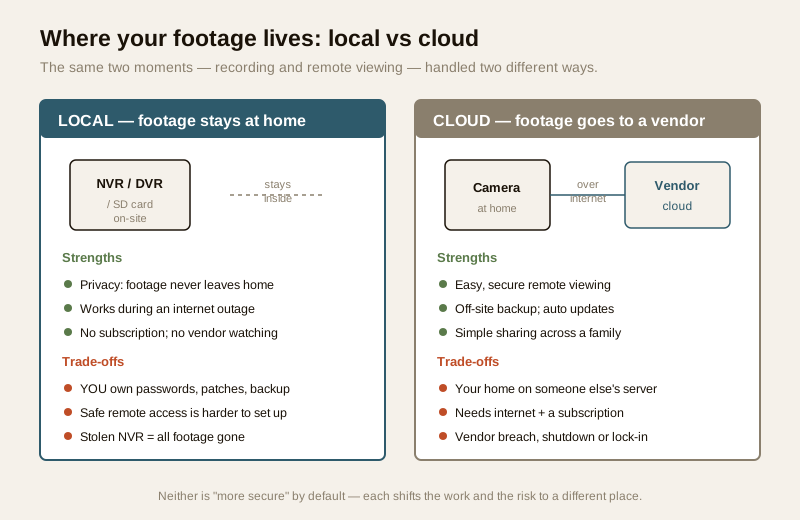
Most real systems are somewhere on a line between the two, and the middle of that line — hybrid — is where a lot of well-designed homes end up. The first figure lays the two pure models side by side.
The case for local: privacy, outage-resilience and no subscription
Keeping footage on-site has three real strengths, and they are the reasons privacy-minded homeowners and many RWAs lean this way.
- Privacy by design. Footage that never leaves the building cannot be read by a vendor, mined for analytics, or exposed in that vendor's breach. For a home — where the cameras see your family, your routines, your front door — that is a meaningful comfort. There is no third party watching, and no question of which country a copy of your living room is sitting in. See smart-security privacy and video-door-phone privacy.
- It keeps working when the internet fails. India's power and broadband are not always steady, and a local recorder does not care: the NVR keeps recording to its disk whether or not the link is up. This is graceful degradation — the system still does its core job when the extras fall away. A purely cloud camera, by contrast, may stop recording the moment the connection drops.
- No subscription, no vendor lock-in. Once the hardware is bought, local recording has no recurring cloud fee, and you are not tied to one company's continued existence or pricing.
The honest cost of all this is that the security work is now yours. Nobody else patches the NVR, changes the default password, or keeps a backup. If you leave the recorder on admin/admin — the classic India gap, a DVR still on factory credentials months after commissioning — local storage is a liability, not a shield. And a local-only system has a brutal single point of failure: if the one NVR is stolen in the very burglary it was meant to catch, or its disk simply fails, every recording is gone. That is precisely why a local base needs a backup plan — see security-system backup. Local's promise is real, but it is conditional on your discipline.
The case for cloud: remote access, off-site backup and automatic updates
The cloud model earns its popularity honestly. Its strengths map onto exactly the things a busy household finds hard.
- Effortless, safe remote viewing. Reaching a camera from your office or another city is genuinely difficult to do safely on a local-only setup; the vendor's cloud does it for you, through their app, without you exposing anything to the open internet. This is the single biggest reason people choose cloud. See remote security monitoring and CCTV remote access security.
- Off-site backup that survives a theft. Because a copy sits on the vendor's servers, a burglar who takes your camera or recorder does not take the footage with it. The evidence outlives the hardware.
- Automatic updates and less to manage. The vendor patches their software and often pushes firmware to the device, so an important class of security fix happens without you remembering to do it — a real benefit given how many local boxes never get updated. (Still verify the device itself keeps current — see firmware updates.)
- Easy sharing. Adding a spouse, a parent or a guard as a named viewer is a few taps, with the ability to revoke them cleanly later.
The honest costs are equally real. Your home now lives on someone else's server, which raises data-residency and trust questions the cloud-storage security guide treats in depth: where is it stored, who can access it, what is it used for. The system depends on the internet and a subscription — no connection or a lapsed plan can mean no recording and no access. And you inherit the vendor's fate: a breach of their cloud exposes your footage, a shutdown or a discontinued product can strand you, and proprietary formats create lock-in. With cloud, the discipline shifts from patching to account security and vendor choice — a strong unique password and MFA on the account, and a vendor you have reason to trust.
The hybrid sweet spot: local base, cloud on top
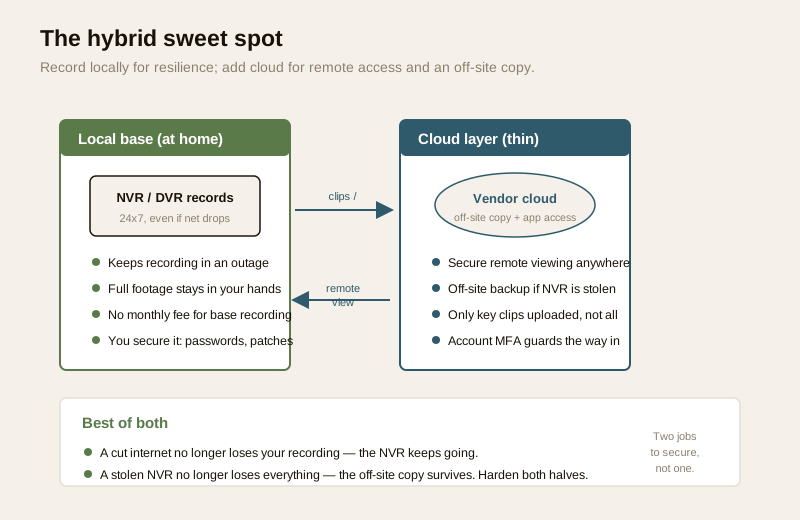
For many homes the honest answer is not to choose a side but to combine them, and modern systems increasingly support this directly. A hybrid design records locally on an NVR for resilience and privacy, and adds a thin cloud layer — for remote viewing, for pushing important clips off-site as a backup, or both. You get local's graceful degradation and cloud's convenience at once.
- The local base keeps recording through an internet outage and keeps your full footage in your hands, so a cut connection never loses the recording.
- The cloud layer gives you the app-based remote view and an off-site copy of the important clips, so a stolen or failed NVR never loses everything.
- You can often keep the cloud upload thin — only event clips or a low-bandwidth stream, not every second of every camera — which reduces both the data exposure and the bandwidth and cost.
The trade-off to be clear-eyed about: a hybrid system has two things to secure, not one. The local recorder needs its passwords, patches and physical safety; the cloud account needs its strong password and MFA. Done well, hybrid is genuinely the best of both; done carelessly, it doubles your neglected surfaces. The second figure shows the shape.
A comparison you can actually decide from
| Dimension | Local (on-site NVR/DVR/SD) | Cloud (vendor servers) | Hybrid (local base + cloud) |
|---|---|---|---|
| Privacy / data residency | Strongest — footage never leaves home | Weakest — your home on a vendor's server | Strong if cloud upload is thin and encrypted |
| Works in an internet outage | Yes — keeps recording locally | Often no — may stop without a connection | Yes — local base keeps recording |
| Safe remote access | Harder — you must set it up carefully | Easy — through the vendor app | Easy — via the cloud layer |
| Off-site backup if hardware stolen | No, unless you add one | Yes — copy is off-site | Yes — key clips are off-site |
| Automatic updates | You must apply them | Vendor handles their end | Split — vendor for cloud, you for the box |
| Recurring cost | None after hardware | Subscription | Usually a smaller subscription |
| Where the cyber work lands | Your patching & password discipline | Account security + vendor trust | Both — two surfaces to keep |
| Main failure mode | Stolen/failed NVR loses all footage | Vendor breach, shutdown or lock-in | Neglecting one of the two halves |
Read down the column that matches how you already lean, but do not stop at one row — the right choice usually balances several.
A decision framework: start from what you value most
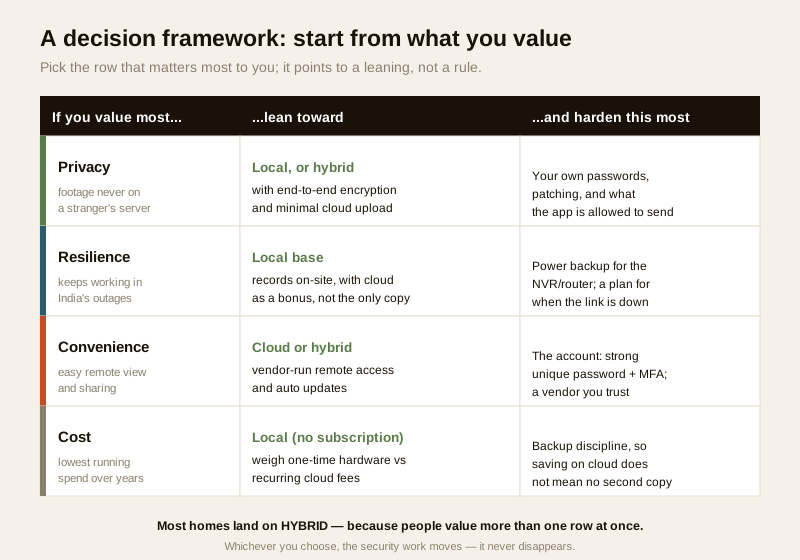
Rather than argue models in the abstract, start from what you most want the system to protect, and let that point you to a leaning. None of these is a hard rule; they are starting positions you then harden.
- If you value privacy most — footage never on a stranger's server — lean local, or a hybrid with end-to-end encryption and only minimal cloud upload. Then harden your own passwords, patching, and what the app is permitted to send out. See data encryption.
- If you value resilience most — it must keep working through India's outages — lean toward a local base that records on-site, treating cloud as a bonus rather than the only copy. Then harden power backup for the NVR and router, and have a plan for when the link is down. See electrical backup for security and network readiness.
- If you value convenience most — easy remote viewing and sharing — lean cloud or hybrid, and then harden the account above all: a strong unique password and MFA, and a vendor you have reason to trust. See password management and multi-factor authentication.
- If you value cost most — the lowest running spend over years — lean local with no subscription, weighing one-time hardware against recurring cloud fees. Then keep backup discipline, so saving on the cloud does not quietly leave you with no second copy at all.
Most homes value more than one of these at once, which is exactly why so many land on hybrid. The important truth underneath the whole framework: whichever you choose, the security work moves — it never disappears. The third figure lays the framework out.
The cyber trade-offs, side by side
The deepest point of this whole comparison is that local and cloud do not have more or less cyber risk — they have different cyber risk, and each asks a different discipline of you.
With local, your own hygiene is the whole game. No vendor is silently patching for you, so the burden of changing default passwords, applying firmware updates, and keeping a backup is entirely yours. The India-real failure here is the DVR left on admin/admin, exposed to the public internet and quietly conscripted into a botnet — an insecure security device that is worse than none, because it hands your feed to strangers while you feel protected. Local rewards discipline and punishes neglect. The essentials are password management, firmware updates, and putting the device on a segmented network behind secure Wi-Fi.
With cloud, account security and vendor trust are the whole game. You are not patching a box; you are guarding a login and choosing whom to trust with your footage. The failure here is the reused password with no MFA, so a leak on an unrelated website opens your camera feed to whoever bought the list; or the ₹-cheap app that phones home to an overseas server with unclear data practices. So multi-factor authentication on the account is non-negotiable, and the vendor's own security — do they encrypt in transit and at rest, where do they store, how do they secure their staff access — matters as much as your own. Read the cloud-storage security guide before you commit your footage to any cloud, and check that traffic is protected with encryption such as TLS/HTTPS.
Hybrid asks both disciplines at once. That is its price for combining the strengths: you keep the box patched and the account MFA-protected. Skip either and the weaker half is where you will be breached.
Life-safety and data: two lines that hold for any model
Two principles sit above the local-versus-cloud choice entirely.
Life-safety egress always wins. If any part of your system ties into a lock, mag-lock or lockdown, that interlock must always allow a free, mechanical way out on any escape route — whether the system is local, cloud or hybrid, and whether or not the internet is up. A cloud outage or a cyber problem must never trap a person fleeing a fire. Any such integration is a licensed job.
Footage is personal data wherever it lives. Under the Digital Personal Data Protection Act, 2023, your recordings and access logs are personal data whether they sit on your NVR or a vendor's cloud. On local storage, that means restricting who can view the box and wiping a drive properly before you discard it — see secure device disposal. On cloud storage, it means the vendor is a processor acting for you, so what they collect, how long they keep it, and who can see it are your responsibility to check. If a serious compromise occurs on either side — a stolen NVR, a vendor breach, an account takeover — treat it as an incident, preserve what you can, and report a serious one to India's national CERT (CERT-In).
Key takeaways
- The first cyber question is where your footage lives — on-site (local), on a vendor's server (cloud), or both (hybrid). That one choice shapes privacy, outage-resilience, cost and where the security work lands.
- Local gives privacy, works through outages, and has no subscription — but the patching, passwords and backup are all yours, and a single stolen or failed NVR can lose everything.
- Cloud gives easy remote access, off-site backup and automatic updates — but puts your home on someone else's server, depends on internet and a subscription, and ties you to the vendor's breaches, shutdowns and lock-in.
- Hybrid is often the sweet spot — a local base for resilience plus a thin cloud layer for remote access and off-site backup — provided you accept that you now have two surfaces to secure, not one.
- Decide from what you value most (privacy, resilience, convenience or cost), remember the work moves rather than disappears, and never let any cyber choice defeat fail-safe egress or your DPDP duty of care over the footage.
Where to go next
- Start at the security-system cybersecurity pillar and the cybersecurity sub-hub.
- Go deeper on the cloud side: cloud-storage security, smart-security privacy, remote security monitoring and CCTV remote access security.
- Build the shared fundamentals: password management, multi-factor authentication, firmware updates, data encryption, network segmentation, secure Wi-Fi and security-system backup.
- Gauge your overall exposure with the home-security risk scorecard, then return to the security hub.
References
- Digital Personal Data Protection Act, 2023 — camera footage, access logs and alarm records are personal data whether stored locally or in a cloud; a cloud vendor storing them acts as a processor for you, so minimise what is collected, restrict access, and confirm retention and deletion.
- CERT-In (Indian Computer Emergency Response Team) — India's national incident-response body; treat a stolen recorder, a vendor breach or an account takeover as a reportable cyber incident and follow current CERT-In guidance.
- NIST, OWASP IoT and CIS security best-practice frameworks — general, vendor-neutral guidance on device hardening, account security, encryption and update discipline that applies to both local and cloud models; verify the current edition before relying on it.
- Vendor security and privacy documentation — for any cloud or hybrid product, read where data is stored, whether it is encrypted in transit and at rest, who can access it, and the update and shutdown policy, on the maker's own materials before committing your footage.
- National Building Code of India (SP 7), Bureau of Indian Standards, and local fire and life-safety bye-laws for any system-linked lock, lockdown or escape-route interlock; verify the current edition via the BIS catalogue: https://www.services.bis.gov.in/
This is an educational overview, not legal advice, and it deliberately covers only how to choose and harden where a security system you own keeps its data — never how to intercept, breach or attack any system or cloud. Any system-linked door, lockdown or fire-egress interlock is a qualified professional task; engage licensed installers, keep egress fail-safe, and verify any standard's current status via the BIS catalogue before relying on it.
Export this guide
Related Guides — Deep-dive reading
Complete Guide to Security System Cybersecurity in India (2026): Protecting the Systems That Protect You
The cameras, locks, alarms and door phones you install to feel safer are internet-connected computers that can themselves be attacked, and an insecure one is worse than none. This pillar maps the whole attack surface — devices, network, accounts and data, operations — and points to every guide that hardens it.
SecurityCCTV Remote Access in India (2026): Watch From Your Phone, Safely
How to view your own cameras from anywhere without leaving the front door open to the internet — change the defaults, use strong credentials and 2FA, keep firmware current, prefer the vendor's secure cloud relay or a VPN, segment the camera network, and treat footage as personal data.
SecurityCloud CCTV in India: Footage That Survives a Stolen Recorder
How cloud-stored CCTV works, its genuine advantages for Indian homes and shops, the real trade-offs of subscriptions, upload bandwidth and third-party data, and why hybrid local-plus-cloud is usually the smart middle.
SecurityRelated Tools — Try Free
CCTV Cloud vs Local Cost Calculator
Compare cloud CCTV subscription against a local NVR + HDD — upfront, 5-year total, monthly fee and break-even.
Cloud vs LocalCCTV Camera Coverage & Count Calculator
Estimate how many CCTV cameras you need, the NVR channels, storage in TB for your retention period, and an indicative all-in cost with GST.
CCTV CalculatorHome Security Risk Scorecard
Score your home across six security layers — perimeter, entry points, lighting, detection, alarm and habits — and get a prioritised action plan.
Security Scorecard