
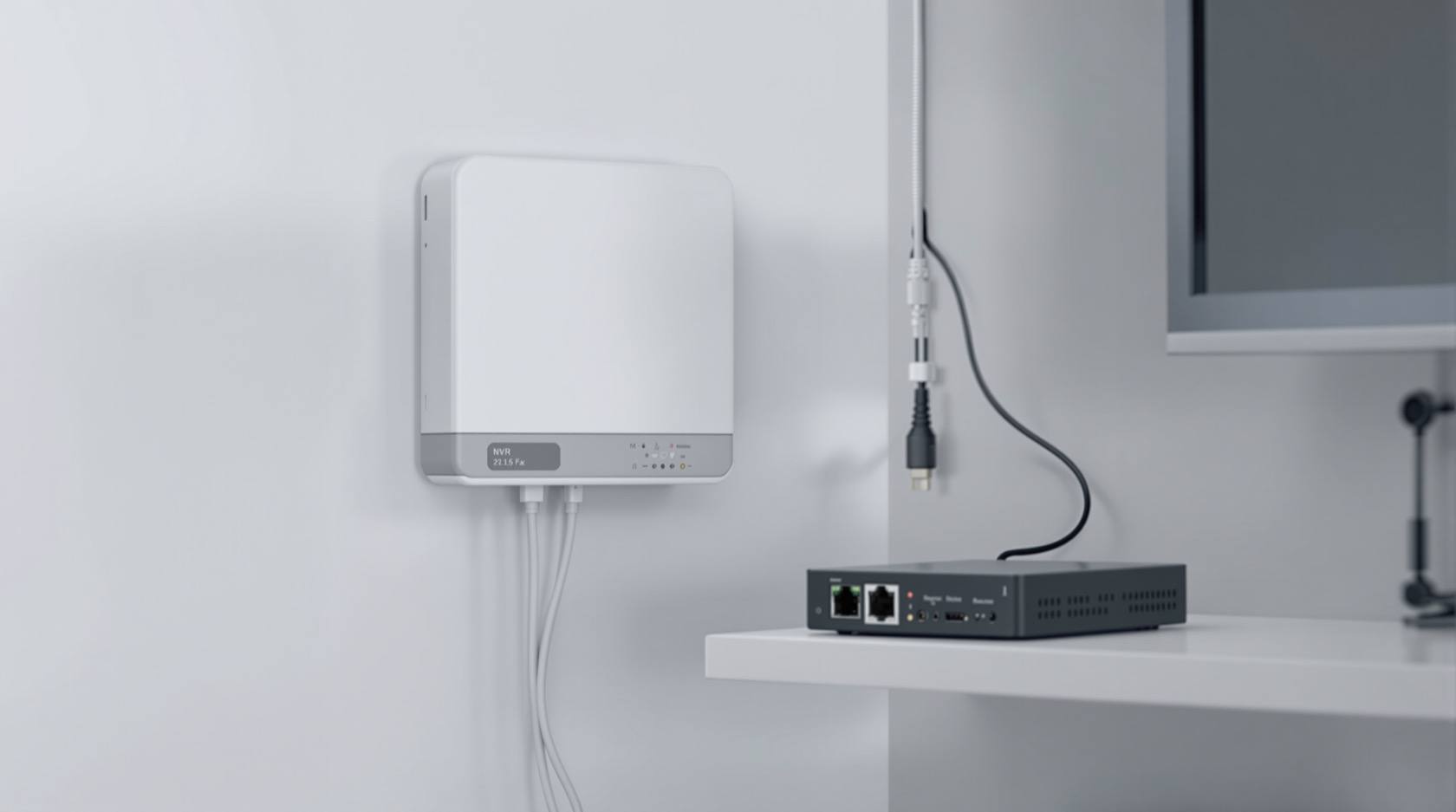
CCTV Cybersecurity in India (2026): Hardening Cameras, DVRs and NVRs Against Attack
The camera that watches your building is the most-attacked device in it. This professional guide is how to harden a CCTV system the defensive way: unique credentials, no needless internet exposure, a segmented camera network, current firmware, encrypted footage and reputable hardware.
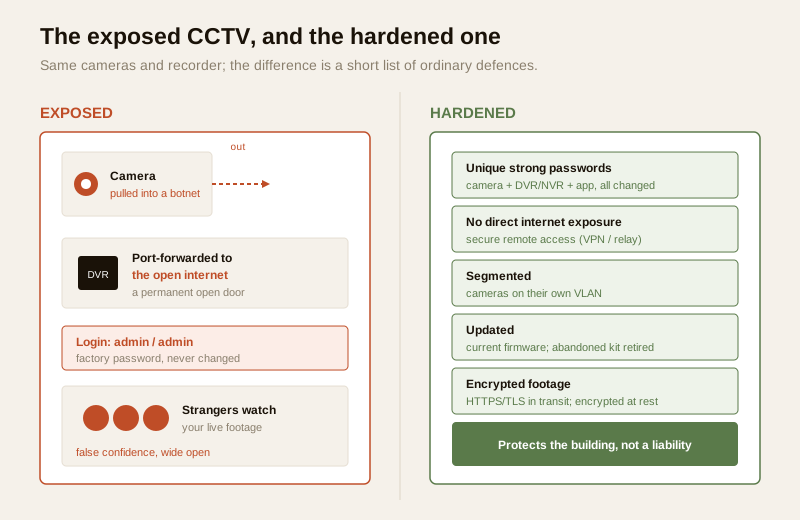
Of every connected device in an Indian building, the CCTV system is the one most likely to be attacked — and the one most likely to be sitting wide open. The reasons are not mysterious. There is an enormous installed base of inexpensive internet-facing cameras, DVRs and NVRs; a great many were commissioned in an afternoon and never touched again; and a depressing share still carry the exact factory login the installer typed in on day one. Two failure stories repeat across the country. In the first, a family or a shop discovers their live footage has been streaming to a stranger — sometimes indexed on a public device-search site, sometimes re-broadcast — because the camera was reachable from the internet with a default or blank password. In the second, the camera is quietly conscripted into a botnet: it still records for the owner, so nobody notices, while in the background it helps attack other people. Both are preventable, and both are the direct result of skipping a short list of ordinary hardening steps.
CCTV cybersecurity is the plain, defensive discipline of hardening your own surveillance system so it protects the building instead of becoming a liability on it. This guide is strictly protective — it is written for integrators, facility managers, RWAs and technically-minded owners who want to lock down a system they run, and it deliberately says nothing about attacking, intercepting or breaking into any camera. It sits inside the security cybersecurity hub alongside the pillar guide to securing your security systems, and it draws its whole camera-specific context from the CCTV knowledge hub.
Scope & safety. This guide helps you harden a CCTV system you own or manage. It never explains how to find, access, intercept or defeat any camera, recorder or stream — weaknesses are named only so you can close them. Footage, along with any face or number-plate it captures, is personal data under the Digital Personal Data Protection Act, 2023; treat it accordingly. If you suspect a system has already been compromised, India's national incident body CERT-In is the generic reference point for reporting. Anything beyond these basics — network re-architecture, penetration testing, a suspected active breach — belongs with a qualified IT or security professional. This is educational guidance, not legal advice.
Why CCTV is the most-attacked security device
A camera is not a camera in the way people picture it. Each modern IP camera is a small networked computer running an operating system, a web server and a video-streaming service; a DVR or NVR is a bigger one, often with a hard disk full of footage and a web portal for remote viewing. That makes a CCTV system a rich, always-on target that sits directly on the network — exactly what an opportunistic attacker or an automated scanning tool looks for.
Three things stack up to make it the single most-attacked device class in Indian buildings:
- Scale and price. Cheap no-name cameras and recorders sell in enormous volumes, and cost pressure often means thin security engineering — sometimes hardcoded accounts the owner cannot even see, let alone change.
- Direct internet exposure. To get "view it on your phone" working quickly, many installs simply forward a port on the router straight to the DVR. That publishes the recorder to the entire internet, where automated tools scan continuously for anything answering.
- Neglect after handover. The society NVR nobody ever updated, the shop DVR still on the factory login, the discarded old camera still holding footage — a CCTV system is commissioned once and then, too often, forgotten. Attackers rely on exactly that neglect.
The honest framing for a professional is that the weak link is almost never an exotic flaw. It is a default password, a needlessly exposed recorder, a flat network where a cheap camera can see the office PCs, or firmware that has not been updated since installation. Every one of those is something you control. The rest of this guide is the short, ordinary list that closes them.
1. Credentials: kill every default password
This is the highest-value step and the one most often skipped. A CCTV system has several separate logins, and every one of them must be changed from its factory setting to a strong, unique password:
- Every camera. Each IP camera has its own web login. On a multi-camera site it is tempting to leave them all on the default because "you only ever log into the NVR" — but a camera reachable on the network with a factory password is a foothold regardless.
- The DVR or NVR. The recorder is the crown jewel — it holds the footage and, often, the remote-access portal. Its admin account must have a strong, unique password, and any secondary or "user" accounts likewise.
- The mobile and desktop app / cloud account. The account you sign into from a phone can, in effect, watch everything. Give it the same care as the recorder itself, and turn on two-factor authentication (2FA/MFA) wherever the platform offers it — see multi-factor authentication for security systems.
Two habits complete the job. First, disable or rename unused default accounts rather than leaving dormant factory logins active. Second, do not reuse one password across the fleet — the installer's laptop password quietly reused on every camera, DVR and account is a classic single point of failure; if it leaks once, the whole system is open. Manage all of this the way the security password-management guide lays out: unique credentials, a password manager, and a record of what was changed at commissioning.
| Credential | Default-state risk | Hardened state |
|---|---|---|
| Each camera login | Factory password = a network foothold | Unique strong password per device (or a managed scheme) |
| DVR / NVR admin | Holds all footage + remote portal | Strong unique password; 2FA if supported |
| Secondary / operator accounts | Forgotten dormant logins | Least-privilege, or disabled if unused |
| Mobile / cloud app account | Can watch everything remotely | Strong unique password + MFA |
| Installer / vendor account | Shared password reused everywhere | Removed or rotated at handover |
2. Do not expose the system to the internet needlessly
The single biggest reason cameras leak is that the recorder was published to the open internet to make remote viewing easy. Avoid port-forwarding a DVR or NVR straight to the public internet. A forwarded port is a permanent open door that automated scanners find within hours, and it exposes the recorder's whole web interface — including its login page — to the entire world.
The defensive alternative is secure remote access rather than direct exposure. The CCTV remote-access security guide covers the options in depth, but the principle is simple: reach the footage through an encrypted, authenticated channel — a VPN into the site network, or the vendor's properly secured relay/cloud service — instead of pointing the internet at the recorder. If any remote path exists at all, it must ride on the secure Wi-Fi and network fundamentals in securing the Wi-Fi your security devices use: WPA2/WPA3 on wireless, the router's default admin password changed, and its firmware current. And keep a running inventory of what is reachable from where — the internet and network readiness assessment is the tool for confirming nothing is exposed that should not be.
3. Segment the cameras onto their own network
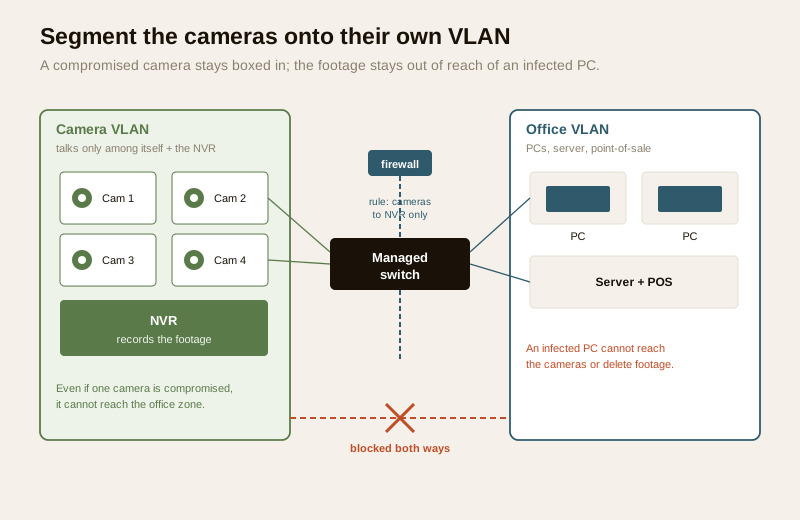
Even a fully-patched camera should be treated as a device that could be compromised — and the job of segmentation is to make sure that if one is, the damage stops at the camera. Put the cameras on their own network segment or VLAN, walled off from the office PCs, the point-of-sale, and the rest of the building's IT. Segmentation cuts both ways, and both directions matter:
- A hacked camera on an isolated segment cannot reach the office computers, servers or payment systems — it is boxed in.
- Conversely, a compromised office PC or a piece of malware cannot reach the cameras and recorder to tamper with or delete footage.
On a small site this can be as simple as a separate VLAN on a managed PoE switch with firewall rules that let the cameras talk only to the NVR and nothing else. On larger estates it becomes a deliberate network design. Either way the discipline is the same one set out in the network segmentation for IoT devices guide: cameras are IoT devices, they should live in their own zone, and that zone should have the minimum connectivity it needs to function and nothing more.
4. Firmware: patch it, and retire what the vendor abandons
Cameras and recorders run software, and that software gets security fixes. An un-updated device carries every flaw its maker has since patched. Two rules cover it:
- Keep camera and NVR/DVR firmware current. Check the maker's support page (or the recorder's built-in updater) on a schedule and apply updates in a maintenance window with stable power — a mid-update power loss on a recorder is best avoided, so pair this with the electrical-backup assessment. The full cadence for a mixed fleet is in the firmware-updates guide.
- Retire devices the vendor no longer patches. A camera or recorder that has reached end-of-support will never receive another security fix, and its known flaws stay open forever. Budget for replacement rather than running abandoned hardware indefinitely — an out-of-support device on the internet is a standing liability, and one of the most common ways old CCTV ends up in a botnet.
5. Encrypt the footage — in transit and at rest
Footage is sensitive; it should be protected both as it travels and where it is stored.
- In transit. Use HTTPS/TLS for every web and app connection to the cameras and recorder, so the login and the video are not sent in the clear. Where the system uses RTSP streams or ONVIF for interoperability, prefer the secured variants and authenticated access the platform provides, and keep those streams inside the segmented camera network rather than out on the open internet. (These are standard technologies — configure the secure mode your hardware supports; do not assume the factory default is the secure one.)
- At rest. Encrypt the stored footage where the platform allows it, so a stolen disk or recorder does not hand over a readable archive. The data-encryption guide covers the practical options, and for anything kept off-site the cloud storage security guide and cloud CCTV guide explain what to demand of a provider — encryption in transit and at rest, clear data-location terms, and access you control.
6. Buy reputable — and avoid hardcoded backdoors
Much of a system's real security is decided at purchase. A reputable maker with a genuine security-update track record does quiet work on your behalf for years; a no-name cloud camera may have shipped once and never been patched — and, worse, some cheap devices carry hardcoded accounts or backdoors the owner can neither see nor disable.
- Prefer brands with a real security-update history and a clear channel to report a vulnerability. This is as much a security decision as a picture-quality one — weigh it during vendor and installer evaluation.
- Be wary of no-name cloud-only cameras, especially very cheap Wi-Fi cameras that only work through an obscure maker's overseas server. If that app phones home to a server you cannot vet and offers no local recording fallback, you have tied your footage to a company you cannot see and cannot hold to account.
- Insist on the official app from the maker's own store listing, never a cloned or side-loaded copy, and treat unexpected permission requests as a red flag.
The wider set of buying-and-operating habits — what to look for, what to avoid, how the whole picture fits together — is collected in the preventing camera-hacking guide.
7. Footage is personal data: the privacy overlap
Hardening and privacy are two sides of one duty. Everything a CCTV system records — faces, number plates, who came and went — is personal data under the DPDP Act, 2023, and often sensitive. Securing the system is protecting that data, but two privacy-specific practices belong in every hardening plan:
- Minimise what you capture and keep. Mask or privacy-zone areas you have no business recording (a neighbour's window, a private interior), as the CCTV privacy-masking guide sets out, and keep footage only as long as you genuinely need it.
- Control who can view and export, and dispose safely. Restrict access to the recorder and app to named people, log exports, and when a camera or disk is retired, wipe the footage before disposal — a discarded recorder still holding an archive is a breach waiting to happen (see secure device disposal). The broader connected-camera privacy picture is in the smart-security privacy guide.
The CCTV hardening checklist
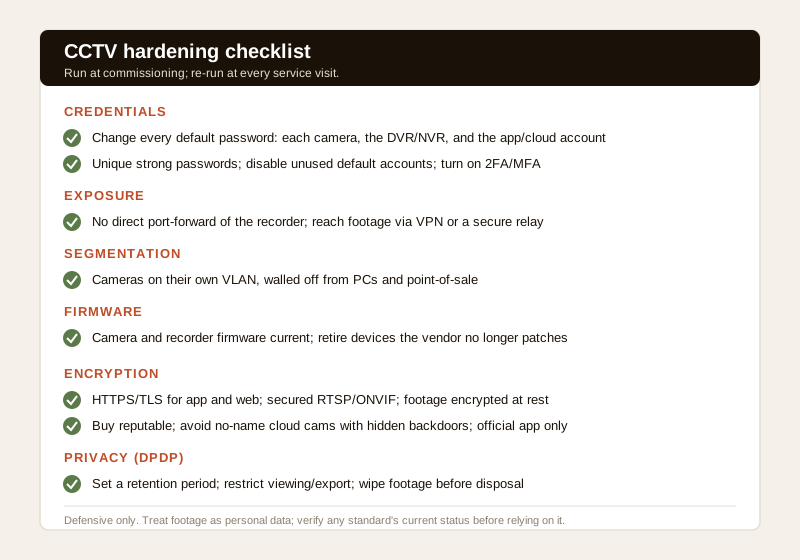
Run this at commissioning and re-run it at every service visit. Nothing here is a specialist task — it is ordinary care applied consistently.
| # | Hardening action | Why it matters |
|---|---|---|
| 1 | Change every default password — each camera, the DVR/NVR, and the app/cloud account | Removes the single most-exploited weakness |
| 2 | Use unique strong passwords; disable or rename unused default accounts | Stops one leaked password opening the whole fleet |
| 3 | Turn on 2FA/MFA on the app/cloud account | A stolen password alone cannot sign in |
| 4 | No direct port-forward of the DVR/NVR; use VPN or a secure vendor relay | Removes the open door scanners find |
| 5 | Put cameras on their own VLAN/segment, walled from PCs | Contains a compromised camera; protects the footage |
| 6 | Keep camera and recorder firmware current; retire end-of-support devices | Closes known flaws; no abandoned hardware online |
| 7 | HTTPS/TLS for app and web; secured RTSP/ONVIF; encrypt footage at rest | Protects login and video in transit and on disk |
| 8 | Buy reputable; avoid no-name cloud cams with hidden backdoors; official app only | Prevents un-patchable and back-doored hardware |
| 9 | Set a footage retention period; restrict viewing/export; wipe on disposal | Meets the DPDP duty over the data you hold |
| 10 | Record what was changed; re-check at every service visit | Turns a one-time setup into a maintained state |
Score your own site's exposure with the home-security risk scorecard, and use the security and privacy assessment to keep the whole system honest over time.
Key takeaways
- A camera is a networked computer, and CCTV is the most-attacked device in the building — cheap, internet-facing and often left on the factory login. The weakness is almost always ordinary: default passwords, needless exposure, a flat network, stale firmware.
- Kill every default password — on each camera, the DVR/NVR and the app/cloud account — with unique strong passwords, MFA on the account, and no shared installer password reused across the fleet.
- Do not port-forward the recorder to the open internet. Reach footage through a VPN or a properly secured vendor relay, on a hardened home/office Wi-Fi.
- Segment the cameras onto their own VLAN so a compromised camera cannot reach the PCs and a compromised PC cannot reach the footage; keep firmware current and retire hardware the vendor no longer patches.
- Encrypt footage in transit (HTTPS/TLS, secured RTSP/ONVIF) and at rest, buy reputable hardware over no-name cloud cams with hidden backdoors, and treat footage as DPDP personal data — minimise, restrict, and wipe on disposal.
Where to go next
- The big picture: the pillar guide to securing your security systems, and the security cybersecurity hub.
- Camera context: the CCTV knowledge hub, cloud CCTV, and Wi-Fi CCTV cameras.
- The building blocks: password management, multi-factor authentication, network segmentation for IoT, firmware updates, data encryption and secure remote CCTV access.
- Privacy: CCTV privacy masking and smart-security privacy.
References
- Digital Personal Data Protection Act, 2023 — CCTV footage, and any face or number-plate it captures, is personal (often sensitive) data; minimise collection, restrict access and export, set a retention period, and delete/wipe on disposal.
- CERT-In (Indian Computer Emergency Response Team) — India's national body for reporting and responding to cyber incidents; reference for a suspected compromise of a CCTV or recording system.
- OWASP IoT and CIS/NIST best-practice frameworks — generic, vendor-neutral guidance on hardening networked devices (unique credentials, no needless exposure, segmentation, patching, encryption); consult the current published version.
- Manufacturer security documentation — verify a device's security-update history, end-of-support date, supported TLS/HTTPS and secured RTSP/ONVIF modes, and any hardcoded-account advisories on the maker's own support pages before relying on them.
This is an educational overview for defenders, not legal advice, and it deliberately covers only how to harden a CCTV system you own or manage — never how to find, access or attack any camera or recorder. Network re-architecture, penetration testing and any suspected active breach are qualified professional tasks; engage a licensed IT/security professional, treat footage as DPDP personal data, and verify any standard's current status before relying on it.
Export this guide
Related Guides — Deep-dive reading
Complete Guide to Security System Cybersecurity in India (2026): Protecting the Systems That Protect You
The cameras, locks, alarms and door phones you install to feel safer are internet-connected computers that can themselves be attacked, and an insecure one is worse than none. This pillar maps the whole attack surface — devices, network, accounts and data, operations — and points to every guide that hardens it.
SecuritySmart Security Cybersecurity in India (2026): Hardening the Home That Watches Itself
Every connected security device is also a way in for an attacker, and an insecure smart camera or lock is worse than none because it gives false safety while exposing your home. This is the plain hardening checklist a homeowner can actually do: passwords, two-factor, updates, a wise buy, and a segmented network.
SecurityCCTV Remote Access in India (2026): Watch From Your Phone, Safely
How to view your own cameras from anywhere without leaving the front door open to the internet — change the defaults, use strong credentials and 2FA, keep firmware current, prefer the vendor's secure cloud relay or a VPN, segment the camera network, and treat footage as personal data.
SecurityRelated Tools — Try Free
CCTV Camera Coverage & Count Calculator
Estimate how many CCTV cameras you need, the NVR channels, storage in TB for your retention period, and an indicative all-in cost with GST.
CCTV CalculatorSecurity Vendor Evaluation Scorecard
Rate a CCTV/security installer or guarding agency across eight weighted criteria for a hire / negotiate / walk-away verdict.
Vendor ScorecardCCTV Cloud vs Local Cost Calculator
Compare cloud CCTV subscription against a local NVR + HDD — upfront, 5-year total, monthly fee and break-even.
Cloud vs Local