
Video Door Phones in India (2026): The Complete Guide
What a video door phone actually is, how it differs from a plain doorbell and a CCTV doorbell camera, its core parts, the big decisions, and who needs which in Indian apartments, villas and gated communities.
You are in the kitchen, the doorbell rings, and you have no idea who is standing at the gate. That single moment of uncertainty is what a video door phone removes. Instead of walking to the door blind, you glance at a small screen, see exactly who is there, talk to them without opening anything, and only then decide whether to let them in.
This is the pillar guide for Studio Matrx's video door phone library, part of the wider home security hub. Think of it as the map: it explains what a video door phone is, how it differs from the two things people confuse it with, what it is made of, and the handful of decisions that lead you to the right one. Every other guide in the library, the wired, wireless, IP and analog deep-dives, hangs off the choices introduced here.
Scope & safety. This guide helps you plan, decide and coordinate the right system, and brief whoever installs it. It does not teach you to defeat, bypass or tamper with any door phone, intercom or lock. The camera watches your own doorstep, so aim it at your entrance, not a neighbour's door or a shared corridor beyond your unit, because that footage is personal data under the Digital Personal Data Protection Act, 2023. Mains wiring, the doorbell transformer, strike-lock hardware and any work at height belong to a licensed electrician or the door-hardware trade, not to a DIY afternoon. This is educational guidance, not legal advice.
What a video door phone actually is
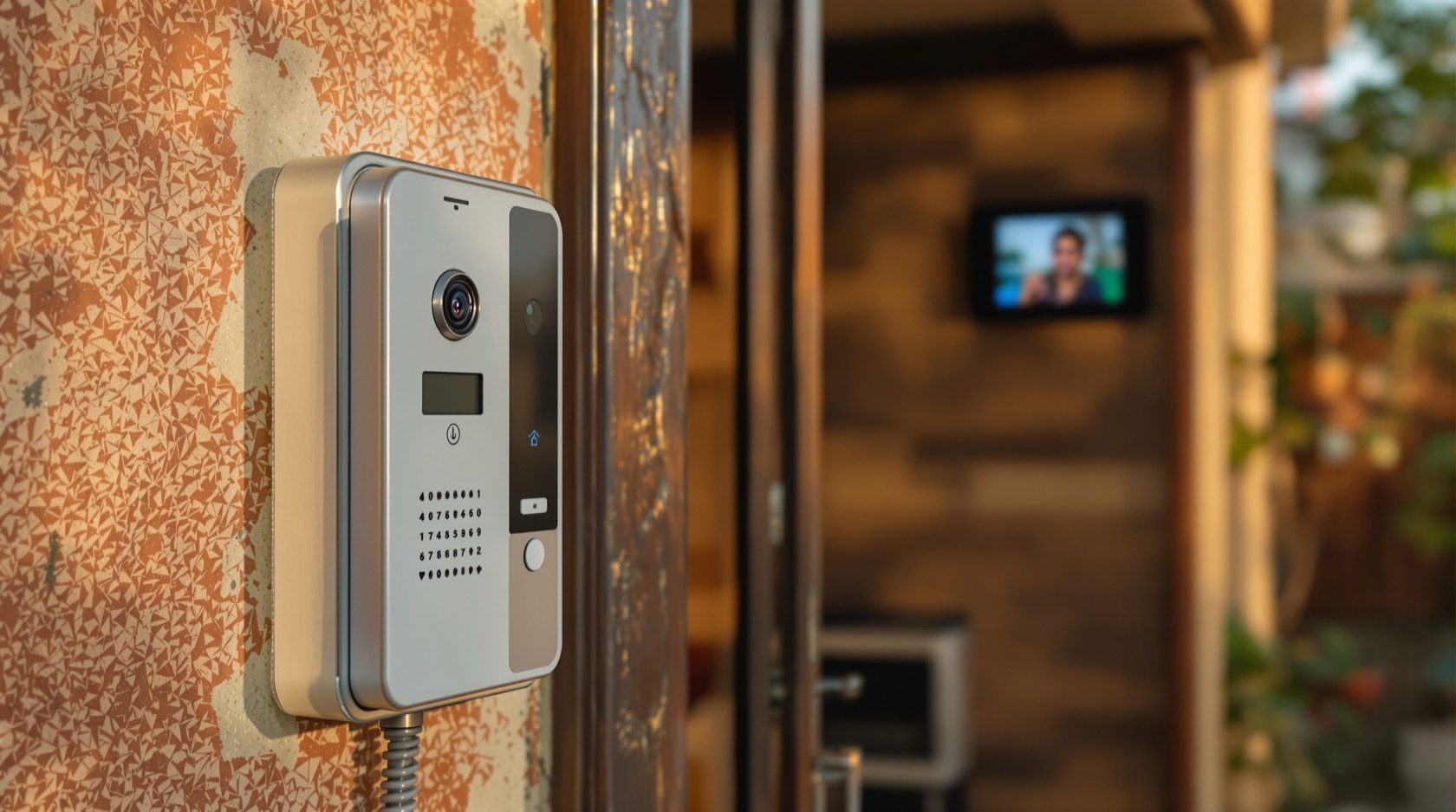
A video door phone (often written VDP, and also called a video intercom or video door station) is a two-way audio-and-video intercom for your entrance. A visitor presses a button on the outdoor unit; inside, a monitor lights up showing the visitor's face; you press a button to talk back; and, on many models, you press another to release an electric lock. The defining trait is the loop: you can both see and speak to the person before the door ever opens, and the conversation is answered from a fixed indoor monitor on your wall (and, increasingly, mirrored to a phone app).
That last detail is what separates it from the two devices people mix it up with.
Not a plain doorbell
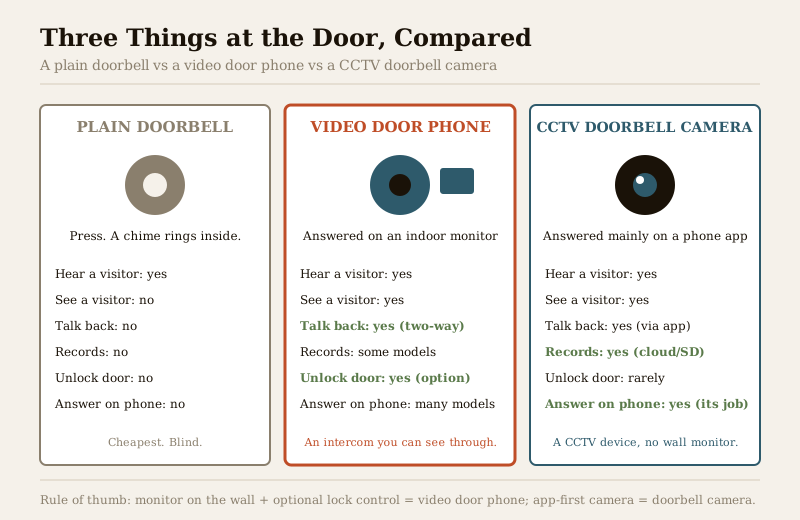
A plain doorbell is a button and a chime. It tells you someone is there; it tells you nothing about who. There is no picture, no voice, no record, and no way to answer without opening the door. A video door phone replaces that blindness with a face and a conversation.
Not (quite) a CCTV doorbell camera
This is the confusing one, because both show you the visitor. The difference is how you answer and what the device fundamentally is. A CCTV doorbell camera is a surveillance device: it is a camera that lives at your door, records to the cloud or a card, and you answer it mainly on your phone app. A video door phone is built around a wall monitor in your home and, very often, control of an entrance lock; the app is a bonus, not the whole product. If you want the full picture of the camera-style device, see the dedicated doorbell cameras guide in the CCTV hub, and the related notes on two-way audio and remote access. The short version:
| Plain doorbell | Video door phone | CCTV doorbell camera | |
|---|---|---|---|
| See the visitor | No | Yes | Yes |
| Talk to the visitor | No | Yes (two-way) | Yes (via app) |
| Answered on | Nothing | Indoor wall monitor (+ app on many) | Phone app |
| Releases an entrance lock | No | Yes (common option) | Rarely |
| Recording | No | Some models | Yes (its core job) |
| Best thought of as | A chime | An intercom you can see through | A CCTV camera at the door |
The core anatomy
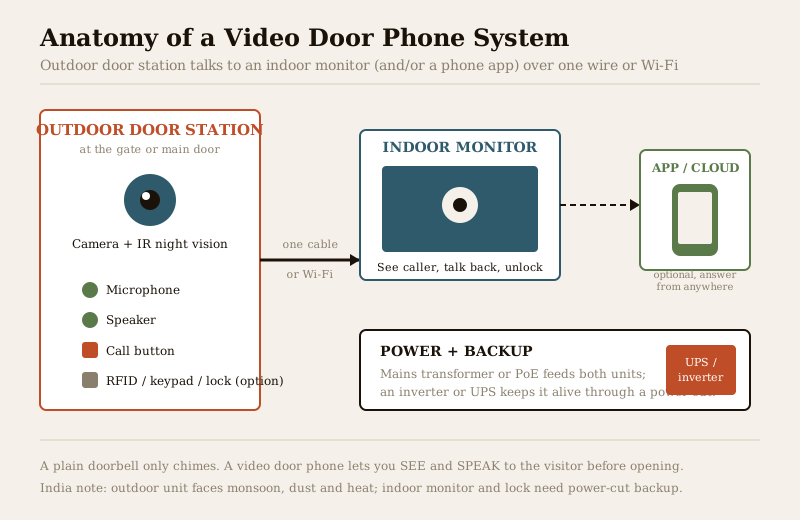
Whatever the brand or price, every video door phone is built from the same few parts. Understanding them makes every later decision easier, because each part maps to a choice.
- The outdoor door station. The unit at your gate or main door. At minimum it carries a camera (with infrared LEDs for night vision), a microphone, a speaker and a call button. Higher models add an RFID card or keypad reader and the wiring to control an electric lock or strike, so a resident can buzz the gate open from inside. This unit takes the full brunt of Indian weather, so its build and weather rating matter more than any other part.
- The indoor monitor(s). The screen inside your home, usually 4 to 7 inches, mounted near the entrance. It shows the caller, carries the talk-back button and the unlock button, and on better units records snapshots or clips of who called while you were out. Larger homes fit two or more monitors, one per floor, all answering the same door.
- Power. Both units need it. Simpler systems run off a small mains transformer wired by an electrician; IP systems often use Power over Ethernet (PoE), a single cable carrying both data and power. Because this is India, the power source that really matters is the backup, an inverter or UPS, so the system does not go dark during load-shedding (more on this below).
- The optional app and cloud. Many modern systems add a mobile app so you can answer the door from your office or another city, and some store clips in the cloud. This is a convenience layer on top of the monitor, not a replacement for it.
The big decisions (and where each leads)
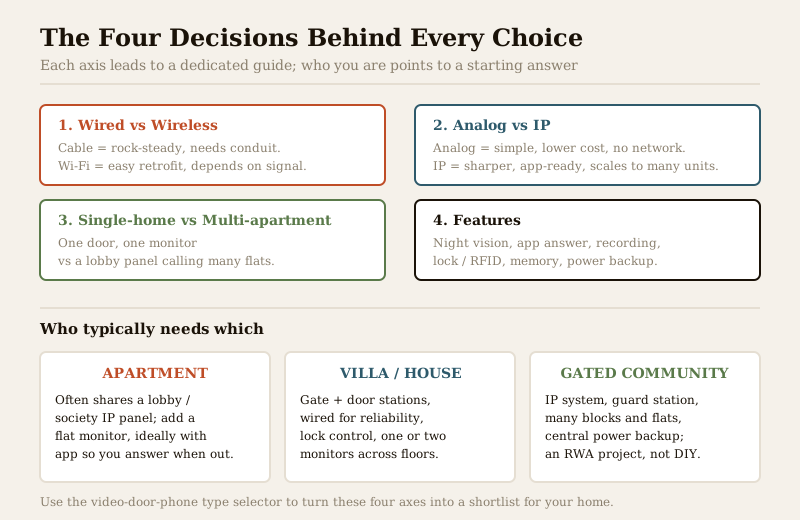
Choosing a video door phone is really answering four questions. Each one is a whole guide in its own right; this pillar introduces them and points you onward. The video door phone type selector turns your answers into a shortlist.
1. Wired or wireless?
A wired system runs a cable from the door station to the monitor. It is the most reliable choice, immune to Wi-Fi drop-outs and interference, and the default for new construction where a wall can be chased before it is plastered. The trade-off is the cabling itself, which is disruptive to add to a finished home. A wireless system talks over Wi-Fi, so it is far easier to retrofit, but it lives and dies by your signal strength at the gate, which is often the weakest spot in the house. Full comparison in the wired video door phones guide and the wireless video door phones guide.
2. Analog or IP?
An analog system is the traditional, self-contained kind: the door station and monitor speak a simple video signal to each other, nothing touches your home network, and it is cheaper and simpler to keep running. An IP system is a small networked computer at the door: sharper images, native app support, and the ability to scale to many units, at higher cost and complexity. The two map loosely onto small-home-simple versus feature-rich-and-scalable. See the analog video door phones guide and the IP video door phones guide.
3. Single-home or multi-apartment?
A single-home system is one door station answered by one or two monitors. A multi-apartment system is a different animal: a lobby or gate panel that can call any flat in the building, tied into a society's wider setup, usually IP, usually a project run by the builder or the RWA rather than an individual resident. If you live in a flat, you may be adding a monitor to a shared panel; if you run a society, you are specifying the whole backbone.
4. Which features?
Once the architecture is settled, features separate models: quality of night vision, whether there is an app and cloud, memory/recording of missed calls, RFID or keypad and lock control, the number of monitors supported, and, crucially in India, power-backup compatibility. Feature depth is where budgets stretch, so decide which of these you will actually use before paying for the rest.
Who needs which
The four axes above resolve differently depending on where you live.
| You live in | Typical starting point | Watch out for |
|---|---|---|
| Apartment / flat | Often a shared lobby panel; you add or upgrade the in-flat monitor, ideally IP with an app | What the society panel supports; do not clash with the shared system, see the apartment security guide |
| Villa / independent house | Gate + main-door stations, wired for reliability, lock control, one monitor per floor | Cable runs across a large plot; weatherproofing at an exposed gate, see the villa security guide |
| Gated community / society | A central IP system, guard station, many blocks, central power backup, an RWA project | Scale, maintenance contracts and privacy governance, see the gated community guide and building security systems |
Whichever you are, a video door phone is one layer of a whole-home approach; the ultimate home security guide sets it in context alongside cameras, alarms and locks.
India realities you cannot design around
Four things shape every Indian installation, and ignoring them is how a system disappoints.
- Power cuts. A door phone that dies with the evening load-shedding is worthless exactly when you might most want to check who is at the gate. Plan for backup from day one, either an inverter circuit feeding the transformer or a small UPS on the monitor and network gear. Confirm the current draw with the installer and size the backup accordingly; the electrical hub covers safe mains and transformer work, which is an electrician's job, not yours.
- Monsoon, dust and heat at the door station. The outdoor unit sits in driving rain, dust storms and forty-plus-degree summers. Look for a genuine weather rating (an IP-rated housing), a sun-and-rain shield, and an installer who seals the cable entry properly. A poorly sealed door station is the single most common early failure in Indian homes.
- The society / RWA case. In an apartment you rarely install in isolation; you tie into a shared panel, and the society sets the rules. Coordinate before buying so your monitor actually talks to the lobby, and so any recording respects other residents' privacy in shared spaces.
- Retrofit onto an existing doorbell. Many homes already have a wired doorbell and a chime. Some video door phones can reuse that existing wiring, which saves a lot of chasing walls, but compatibility varies by model and the existing wire gauge, so have an electrician confirm it rather than assuming. Where reuse is not possible, a wireless system is usually the least disruptive retrofit.
Buying and cost, in plain bands
Treat these as sanity-check ranges for 2026, not fixed prices; they move with brand, features, city and whether installation is included.
| Tier | Typical hardware (₹) | What you get |
|---|---|---|
| Entry analog, wired | ₹4,000 – ₹9,000 | One door station + one small monitor, two-way audio, basic night vision, no app |
| Mid-range, app-enabled | ₹9,000 – ₹20,000 | Better camera, memory/recording, phone app, sometimes lock control |
| Premium IP / smart | ₹20,000 – ₹45,000+ | Sharp IP video, multiple monitors, RFID/keypad, lock integration, cloud |
| Multi-apartment / society | Quoted per project | Lobby panels, per-flat monitors, guard station, central backup |
Budget separately for installation, the electrician's transformer/backup work, and any electric lock, which together can match or exceed the hardware cost, especially where cabling has to be chased into finished walls.
When to bring in a professional. You can and should do the planning, choose the model, decide placement and set privacy rules yourself. Hand over the mains and transformer wiring, the electric-strike or lock hardware, any cable run or mounting at height, and the society-panel integration to the right trade, a licensed electrician for power (see the electrical hub), the door-hardware trade for locks, and your installer or RWA for a shared system. Never point the camera at a neighbour's door or a shared corridor beyond your unit, keep app passwords private with two-factor authentication on, and, for a society system, agree in writing who may view footage under the DPDP Act.
Key takeaways
- A video door phone lets you see and speak to a visitor from an indoor wall monitor (and often a phone app) before opening the door; a plain doorbell only chimes, and a CCTV doorbell camera is an app-first surveillance device, so cross-check the doorbell cameras guide if you are unsure which you want.
- Every system is the same few parts, an outdoor door station, indoor monitor(s), power with backup, and an optional app; each part maps to a decision.
- Four decisions lead to the right unit: wired vs wireless, analog vs IP, single-home vs multi-apartment, and which features you will genuinely use, run them through the type selector.
- India realities dominate: plan power-cut backup from the start, weatherproof the door station against monsoon and heat, and coordinate with the society before buying in an apartment.
- Keep it private and safe: aim the camera at your own doorstep, treat footage as personal data under the DPDP Act, 2023, and route mains, lock and at-height work to licensed professionals.
References
- Digital Personal Data Protection Act, 2023 — door-camera footage is personal data; restrict the camera's field of view to your own entrance, keep app credentials private, and agree access terms in writing for any shared or society system.
- Manufacturer specifications and datasheets — verify the weather (IP) rating of the outdoor door station, the power/transformer requirement, monitor count supported and app/cloud terms on the maker's own datasheet before buying.
- National Building Code of India (SP 7) and relevant Bureau of Indian Standards wiring provisions for the doorbell transformer, backup circuit and any electric-lock wiring, which is a licensed electrician's work; verify the current edition via the BIS catalogue: https://www.services.bis.gov.in/
This is an educational overview, not legal advice. Mains and transformer wiring, electric-lock hardware, work at height and society-panel integration are qualified professional tasks — engage licensed electricians and installers, and verify any standard's current status via the BIS catalogue before relying on it.
Export this guide
Related Guides — Deep-dive reading
CCTV vs Video Door Phone: Which Does Your Home Need?
They look similar and get confused constantly, but a CCTV camera and a video door phone do different jobs — one watches the whole property and records, the other answers your door and controls who comes in. This guide settles CCTV vs video door phone for Indian homes: what each is for, where they overlap, real rupee costs, apartment versus villa relevance, and why most homes end up wanting both.
Smart HomeApartment Intercom Systems in India (2026): A Resident's Guide to Your Flat's Video Door Phone
How a building intercom actually works from inside your flat, audio versus video, what you can upgrade yourself versus the shared infrastructure the society controls, and Indian cost bands for a monitor replacement.
SecurityHow to Choose a CCTV Camera (2026): The Homeowner's Decision Guide for India
Cut through the spec-sheet noise and choose the right CCTV camera for each spot around an Indian home. What actually matters — sensor and low-light performance, lens and field of view, form factor, IP and IK ratings, honest smart features — and the marketing claims to ignore.
SecurityRelated Tools — Try Free
Video Door Phone Type Selector
Answer a few questions about your building, cabling, budget and internet and get the right video door phone — analog / wired / wireless / IP, single-home or multi-apartment, monitor or app.
Door Phone SelectorApartment Video Door System Planner
Enter flats, entrances, floors and guard desk for a first-pass building intercom plan — door stations, indoor monitors, guard station, the right architecture and an indicative cost band.
Building PlannerCCTV System Type Selector
Answer five questions and get the right CCTV setup — analog / IP / hybrid, wired / wireless, local / cloud — with reasons.
CCTV Selector