
WiFi CCTV Cameras in India: Wireless Home Security Buying Guide
How wireless (Wi-Fi) CCTV cameras really work, why they suit small homes and shops but not large plots or long perimeters, and how to plan bands, bandwidth and power so the feed does not drop.
WiFi CCTV cameras are the easiest security cameras to fall for. You buy one, plug it into a socket, scan a code in an app, and in minutes the living-room feed is on your phone — no drilling a data cable across the house, no recorder in a cupboard. For a small flat or a single shop, that convenience is genuinely the right answer. But the same wireless link that makes them so quick to set up is also the thing that lets them down when people ask too much of them.
This is the focused guide to the Wi-Fi (wireless data) form factor in Studio Matrx's CCTV hub. It sits alongside the other power-and-connectivity explainers — PoE, 4G/5G cellular, battery-powered and solar — and its whole job is to tell you honestly where Wi-Fi shines and where a wire will serve you far better.
Scope & safety. This guide helps you choose and plan a connectivity approach. Any mains-electrical work, mounting at height and cable routing belong to licensed professionals. A camera must never block a window, door or fire-escape route. Cameras belong only on your own property and shared areas — never bathrooms, bedrooms or changing areas — positioned to respect neighbours and the spirit of the DPDP Act, 2023. Wi-Fi is a data-transport choice, not a way to hide a camera — a wireless camera should be just as visible and just as lawfully placed as any wired one.
What "Wi-Fi CCTV" actually means
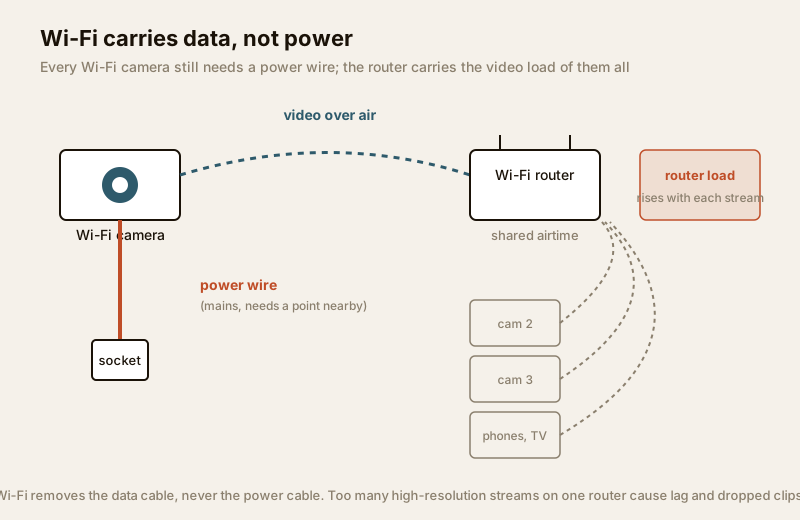
The label causes more confusion than almost any other in home security. Wi-Fi describes how the video travels, not how the camera is powered. A Wi-Fi camera sends its footage over your home wireless network — the same network your phone and TV use — instead of down a dedicated video cable. That is the only cable it removes.
It does not remove the power cable. Almost every fixed Wi-Fi camera still runs a thin lead to a mains socket or adaptor. If you want a camera with no wires at all, that is a battery or solar camera — a different form factor covered in the battery-powered guide and the solar-powered guide. Many battery cameras also use Wi-Fi for their data, which is where the "wire-free" muddle comes from. Keep the two ideas separate:
- Wi-Fi = how the data gets back (over the air vs down a cable).
- Battery / solar / mains = how the camera gets its power.
For the bigger picture of wireless security in general — including battery and cellular options — the wireless CCTV overview sets the scene, and the wired CCTV guide is the counterpoint worth reading before you commit.
2.4 GHz vs 5 GHz — the single most important choice
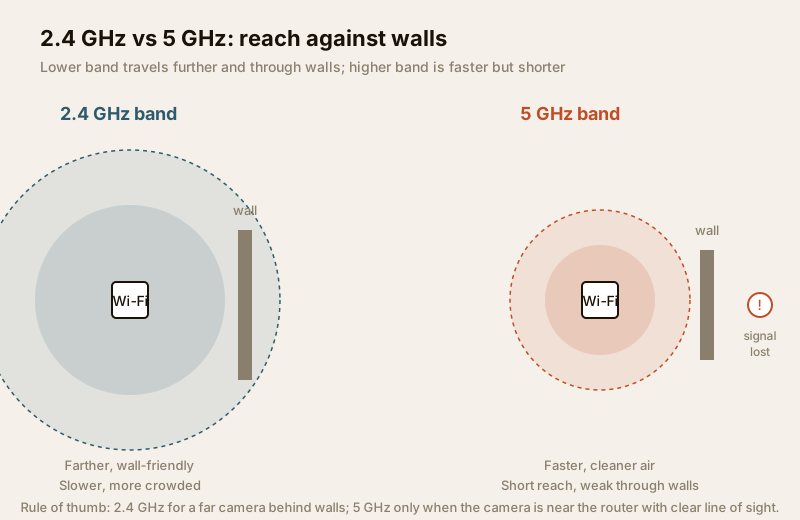
Home Wi-Fi runs on two frequency bands, and picking the wrong one is the most common reason a Wi-Fi camera "keeps going offline." They are a straight trade-off between reach and speed.
| Band | Reach & walls | Speed | Congestion | Best for a camera |
|---|---|---|---|---|
| 2.4 GHz | Travels farther, passes through walls and floors much better | Slower | Crowded — shared with neighbours' routers, microwaves, Bluetooth | A camera in another room or on a far wall |
| 5 GHz | Short reach, weakens sharply through walls | Faster, more bandwidth | Cleaner, less crowded air | A camera close to the router with clear line of sight |
The instinct is to grab the faster 5 GHz band. For a camera, that is usually wrong. A security camera does not need blazing speed — it needs a rock-steady link that survives walls and distance, and that is exactly what the older, slower 2.4 GHz band is good at. Reserve 5 GHz for a camera sitting almost within sight of the router.
What weakens a Wi-Fi signal in an Indian home:
- Walls and floors. Reinforced-concrete (RCC) slabs and brick walls — the norm here — eat wireless signal fast. A camera two rooms and a staircase away from the router is fighting a losing battle, especially on 5 GHz.
- Distance. Signal falls off quickly. The gate camera at the far end of a plot is almost always out of reliable Wi-Fi range.
- Interference and congestion. In an apartment block, dozens of routers, phones, smart TVs and microwaves crowd the 2.4 GHz band. The more devices, the more each one has to wait its turn — and video, which streams constantly, suffers first.
- Weather. Heavy monsoon and the humid air around it can nudge an already-marginal link over the edge into dropouts.
Bandwidth, router load and dropouts
A single camera is easy. The trouble starts when you add a second, a third, and expect them all to stream and record while the family streams video and works from home on the same router.
Each camera consumes bandwidth continuously — a 2MP camera might use a couple of megabits per second, a 4MP or 4K camera much more, especially at higher frame rates. Multiply that across several cameras plus phones, laptops and a TV, and a modest home router runs out of headroom. The symptoms are familiar:
- Lag — the live view is seconds behind reality.
- Stutter and pixelation — the picture freezes or blocks up.
- Dropped clips — a motion event records a broken or missing file, precisely when you needed it.
- Cameras "going offline" — the link is too weak or too congested to hold.
This is why Wi-Fi does not scale. Two or three cameras near a decent router is comfortable. Eight cameras across a large house, all in 4K, over Wi-Fi, is asking for trouble — that is a job for a wired PoE system, where each camera has its own dedicated cable carrying both power and data with none of the airtime contention. If your feeds already stutter, the internet and network readiness guide helps you size the network honestly before you add more cameras.
Practical bandwidth planning
| Setup | Typical link demand | Wi-Fi verdict |
|---|---|---|
| 1-2 cameras, 2MP, near router | Low | Comfortable on Wi-Fi |
| 3-4 cameras, 2-4MP, one floor | Moderate | Fine on a good dual-band router, cameras on 2.4 GHz |
| 6+ cameras, or any 4K across walls | High | Move to wired PoE; Wi-Fi will struggle |
| Remote recording to cloud | Adds upload load | Check your broadband upload speed, not just download |
Where Wi-Fi CCTV fits — and where it does not
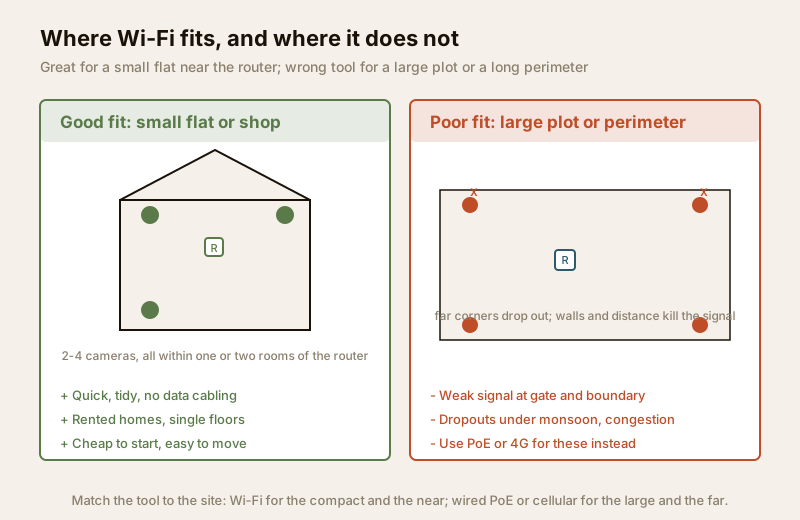
Play to the strength. Wi-Fi is the tool for the compact and the near: a place where the cameras sit close to the router, the count is small, and the appeal is a tidy, cable-light, movable setup.
Good fits:
- A 1-2 BHK flat or a rented home where drilling data cables through the walls is not worth it (or not allowed).
- A single shop or small office with two or three cameras all within a room or two of the router.
- Indoor cameras — a nursery-view in a living room, a shop counter — close to the access point.
- A quick, temporary or trial setup you may want to move or take with you.
Poor fits — reach for a wire or a SIM instead:
- Large houses and plots, where far corners, gates and boundary walls sit well outside reliable Wi-Fi range. Use PoE for the wired backbone.
- Long perimeters and society boundaries, where distance and walls defeat wireless every time.
- Sites with no broadband at all — a farm, a plot, an under-construction site. There, a 4G/5G cellular camera with its own SIM is the answer, not Wi-Fi.
- Busy 24x7 scenes needing continuous high-resolution recording, where dropouts are unacceptable — wired is safer.
For how Wi-Fi cameras fit into a whole-home scheme, and how they compare with wired and cellular approaches, see the complete guide to CCTV systems and how CCTV systems work. If most of your cameras are indoors and near the router, the residential CCTV guide helps you lay out the whole home.
India price bands (indicative)
Prices move with brand, sensor, resolution and season — treat these as ballparks to sanity-check a quote, not fixed rates.
| Item | Typical range (₹) | Notes |
|---|---|---|
| 2MP indoor Wi-Fi camera | ₹1,200 – ₹2,500 | Pan-tilt "smart" cameras; fine near the router |
| 3MP / 4MP Wi-Fi camera | ₹2,000 – ₹4,500 | Sharper; needs more bandwidth |
| Outdoor Wi-Fi camera (IP65/66) | ₹2,500 – ₹6,000 | For a porch or short range only |
| Dual-band mesh router / extender | ₹2,000 – ₹6,000 | Often the real fix for weak-signal cameras |
| microSD card (per camera, 64-256 GB) | ₹500 – ₹1,800 | Local recording so a dropout does not lose everything |
| Cloud subscription (per camera / year) | ₹1,000 – ₹3,000 | Optional; check upload cost against your plan |
Two India-specific notes. First, local recording matters more on Wi-Fi: put a microSD card in each camera (or record to a hub) so a momentary dropout or a power cut does not mean a missing clip — this pairs with putting the router and any recorder on a UPS, covered in the electrical backup assessment for security. Second, if cameras stream to the cloud, your broadband upload speed (usually far lower than download) is the real ceiling — check it before buying more cameras.
Getting a Wi-Fi camera setup right
A few decisions separate a reliable Wi-Fi setup from a frustrating one:
- Keep cameras near the router, ideally within a room or two and with as few walls between as possible. If a camera must sit far, add a mesh node or extender near it rather than hoping the signal reaches.
- Put far cameras on 2.4 GHz, close ones on 5 GHz. Many routers let you name the bands separately so you can choose.
- Do not overload one router. If several cameras plus the household already strain the network, that is the signal to move the cameras to a wired backbone.
- Record locally as well as to the cloud, so a dropout never means lost footage.
- Secure the camera: change the default password, keep firmware updated, and put cameras on a guest or separate network if your router supports it — a wireless camera on a weak password is a real risk. The internet and network readiness guide covers hardening the home network.
- Remember the power point. Because Wi-Fi is data-only, every camera still needs a socket within reach of its lead — plan that when you choose positions.
When to bring in a professional. You can plan positions and choose bands yourself. Bring in a professional for any mains-electrical work (a licensed electrician — see the electrical hub), for mounting outdoor cameras at height, and for designing the network if you are running more than a handful of cameras or seeing persistent dropouts. If a security integrator recommends switching part of the system to wired PoE, that advice is usually sound for anything beyond a small flat.
Key takeaways
- Wi-Fi CCTV describes how video travels — wirelessly to your router — not how the camera is powered; almost every one still needs a power wire to a socket.
- 2.4 GHz reaches farther and through walls; 5 GHz is faster but short-range. For most cameras, steady 2.4 GHz beats fast-but-fragile 5 GHz.
- Walls, distance, interference and congestion cause dropouts; each camera eats bandwidth continuously, and too many streams overload a home router.
- Wi-Fi suits small flats, single shops and indoor cameras near the router — not large plots, long perimeters, or heavy 24x7 recording.
- For big or far sites use wired PoE or a 4G/5G cellular camera; record locally, secure the network, and route mains work to a licensed professional.
References
- Digital Personal Data Protection Act, 2023 — position cameras to cover only your own property and shared areas with a legitimate purpose; a wireless data link never justifies covert or intrusive placement.
- Ingress Protection (IP) ratings — verify weatherproofing (IP65/66 or higher for any outdoor Wi-Fi camera) on the manufacturer's specification sheet before ordering.
- National Building Code of India (SP 7), Bureau of Indian Standards, and local municipal bye-laws for any structural, electrical or life-safety aspect of an install; verify the current edition via the BIS catalogue: https://www.services.bis.gov.in/
This is an educational overview. Mains-electrical work, mounting at height and network design are qualified professional tasks — engage licensed installers and verify any standard's current status via the BIS catalogue before relying on it.
Export this guide
Related Guides — Deep-dive reading
PoE vs Wi-Fi CCTV: Which Home Security Cameras Are Better?
One camera type runs power and video down a single Cat6 cable to an NVR and almost never drops out; the other clips to a wall in minutes and streams over your home Wi-Fi. This guide settles PoE vs Wi-Fi CCTV for Indian homes — reliability, video quality and bandwidth, cabling and power, retrofit versus new-build effort, NVR versus SD and cloud storage, hacking risk, real rupee costs, scalability and outdoor use — and gives a clear verdict for each kind of home.
Smart HomeComplete Guide to Security System Cybersecurity in India (2026): Protecting the Systems That Protect You
The cameras, locks, alarms and door phones you install to feel safer are internet-connected computers that can themselves be attacked, and an insecure one is worse than none. This pillar maps the whole attack surface — devices, network, accounts and data, operations — and points to every guide that hardens it.
SecurityWired vs Wireless CCTV in India (2026): Which One Should You Choose?
A cabled system on an NVR or DVR is rock-solid but needs drilling and runs; a Wi-Fi system goes up in an afternoon and is renter-friendly but leans on your router and power. An even-handed, India-grounded head-to-head that ends in a clear which-suits-whom verdict.
SecurityRelated Tools — Try Free
Apartment Video Door System Planner
Enter flats, entrances, floors and guard desk for a first-pass building intercom plan — door stations, indoor monitors, guard station, the right architecture and an indicative cost band.
Building PlannerCCTV Camera Coverage & Count Calculator
Estimate how many CCTV cameras you need, the NVR channels, storage in TB for your retention period, and an indicative all-in cost with GST.
CCTV CalculatorSecurity Backup Power Calculator
Size a UPS/inverter and battery to keep CCTV, NVR, router and alarm running through a power cut — load, Ah, VA and cost.
Backup Power