

Data Encryption for Security Systems in India (2026): Keeping Your Footage Unreadable to Strangers
Your security system holds some of your most sensitive data — video of your home and family, access logs, biometrics. Encryption is what keeps that data unreadable to anyone who intercepts it on the wire or steals the disk. This professional guide explains the two kinds in plain language — in transit and at rest — and the honest limits of both.
Think for a moment about what your security system actually knows. It has watched your front door for months. It knows when the children come home from school, when the house is empty, what the inside of your living room looks like, who visits and when. An access-control system holds a log of every entry, and maybe the fingerprint templates of everyone in the family. This is not ordinary data — it is a detailed, intimate record of how your household lives. Data encryption is the technology that keeps that record unreadable to anyone who is not supposed to see it: it scrambles the data into meaningless noise so that even if someone intercepts it travelling over Wi-Fi, or walks off with the recorder, what they get is gibberish rather than your life on video.
This guide is written for the professional, RWA office-bearer or serious homeowner who specifies and manages security systems, and it is strictly protective. It explains, in plain language, the two kinds of encryption every system should have — in transit and at rest — why they matter in the Indian context, and, just as importantly, their honest limits. It sits under the security-system cybersecurity pillar in the cybersecurity sub-hub, alongside CCTV cybersecurity and smart-security privacy.
Scope & safety. This guide helps you choose and enable encryption on a security system you own or manage. It never explains how to break, weaken or defeat any encryption — encryption appears here only as a protection to switch on. The footage, access logs and biometrics your system holds are personal data — often sensitive personal data — under the Digital Personal Data Protection Act, 2023, and encryption is one recognised safeguard for it; a serious breach may need to be reported to India's national CERT (CERT-In). Encryption is one layer among several: it works with strong passwords, MFA and access control, never instead of them. For anything beyond choosing and enabling the settings, engage a qualified IT/security professional. This is educational guidance, not legal advice.
What encryption actually does, in one plain idea
Encryption takes readable data — a video frame, a login, an access log — and, using a mathematical process and a secret key, turns it into scrambled output that looks like random noise. Anyone who obtains the scrambled version but not the key sees nothing useful. The right key turns it back into the original; the wrong key, or no key, leaves only gibberish. That is the whole idea. Everything else is about when the scrambling happens and who holds the key.
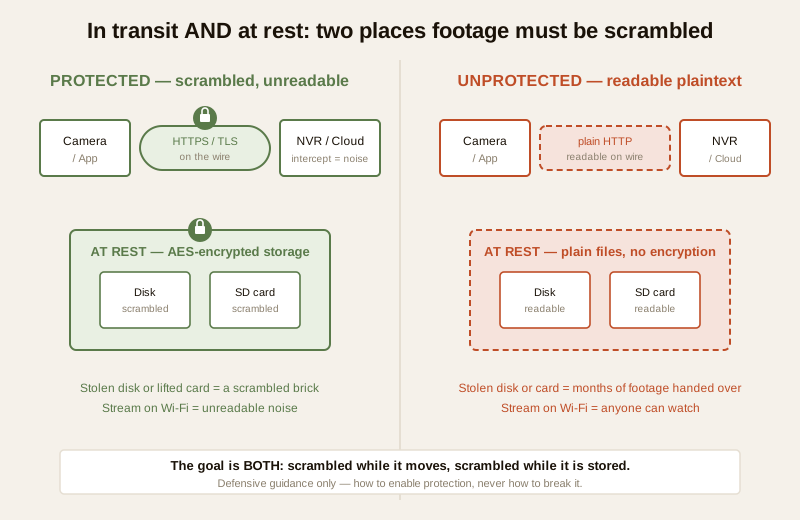
For a security system there are two distinct moments where your data is exposed, and each needs its own kind of encryption:
1. When the data is moving — a camera streaming to the recorder, the app pulling live video over the internet, footage uploading to the cloud. This is encryption in transit.
2. When the data is sitting still — recorded on the NVR or DVR hard disk, saved on a camera's SD card, or stored in a cloud account. This is encryption at rest.
A system can do one, both or neither. The goal is both, and the failure most people never think about is a system that does neither while feeling perfectly modern.
Encryption in transit: protecting data on the move
Every time your footage or a login leaves one device and crosses to another, it travels over something — your home Wi-Fi, the building network, the public internet. Along that journey it can, in principle, be read by anyone positioned on the path. Encryption in transit wraps that journey in a scrambled tunnel so that what crosses the wire is noise, not pictures.
The everyday name for this is HTTPS, and the technology underneath is TLS (Transport Layer Security). It is the same padlock that protects your banking and email. For a security system it shows up in a few places:
- The app and web access. When you open the mobile app or a browser to view your cameras, that connection should be HTTPS/TLS, not plain HTTP. The padlock in the browser, and an app that connects over a secured channel, mean your live view and your login are scrambled on the way. An app or portal that sends video or credentials in the clear is a genuine red flag — avoid it.
- The camera-to-recorder and camera-to-cloud streams. Reputable systems carry the video stream itself over a secured, encrypted channel rather than sending raw, readable frames across the network. This matters most for any camera reachable over the internet or riding shared building Wi-Fi.
- The cloud upload. If footage is backed up or streamed to a cloud service, the upload should be encrypted in transit so it cannot be captured mid-flight.
The India reality is that plenty of ultra-cheap cameras and apps were never built with this care — they phone home to an overseas server over channels that may not be properly secured, and some send more in the clear than anyone would guess. You do not need to test any of this yourself. You choose well by preferring devices and services that clearly state HTTPS/TLS for app and web access and secured (encrypted) streaming, and by treating a product that cannot say so as one to walk away from. See secure Wi-Fi for security devices for the network layer that carries all of this.
Encryption at rest: protecting data that is stored
The stream is only half the story. Your footage spends almost all of its life sitting still — recorded on a disk or a card, or parked in a cloud account. Encryption at rest scrambles that stored data so a stolen disk, a lifted SD card or a breached cloud account hands over noise instead of video.
This is where the most under-appreciated Indian risk lives. Picture the society NVR in an unlocked cabinet in the basement, holding months of footage of every resident's comings and goings — a thief who takes that box has, in plain form, a searchable record of the whole building. Picture the camera on the boundary wall whose SD card holds weeks of the street and the gate. Picture the old camera that was swapped out and thrown in a drawer — or sold — with its card still full of footage; that is exactly why secure device disposal matters. In every case, encryption at rest is what turns "they have our footage" into "they have a scrambled brick".
The technology here is usually described as AES-style encryption. In practice it means:
- Enable device or disk encryption where the recorder offers it. Many NVRs and some cameras have an option to encrypt the stored recordings or the disk. If it exists, turn it on, and record the recovery key somewhere safe — because encryption you cannot unlock is data you have lost.
- Prefer SD cards and recorders that support encryption when specifying, especially for cameras in exposed positions where the card could be physically removed.
- Use encrypted backups. Your backup copies of footage — the whole point of which is that they survive theft or failure of the main recorder — should themselves be encrypted, otherwise the backup becomes the easy target.
- Insist on encryption at rest from a cloud provider. A serious cloud CCTV service encrypts stored footage so that even a breach of its storage does not expose your video in readable form.
| Encryption in transit | Encryption at rest | |
|---|---|---|
| What it protects | Data while it is moving — camera to recorder, app view, cloud upload | Data while it is stored — NVR/DVR disk, SD card, cloud account |
| The threat it defeats | Someone reading the stream on the wire or over Wi-Fi | Someone stealing the disk/card, or breaching the cloud storage |
| The everyday technology | HTTPS / TLS; secured (encrypted) streaming | AES-style device, disk or storage encryption |
| How you get it | Choose apps/devices with HTTPS/TLS; avoid clear-text apps | Enable device/disk encryption; encrypted backups; encrypted cloud |
| The India failure it prevents | The cheap cam streaming your home over an insecure channel | The stolen society NVR or discarded SD card handing over months of footage |
The honest limits: encryption is not magic
This is the most important section in the guide, and the part that cheap marketing never tells you. Encryption is powerful, but it is not a force field, and treating it as one is how people end up exposed while feeling safe.
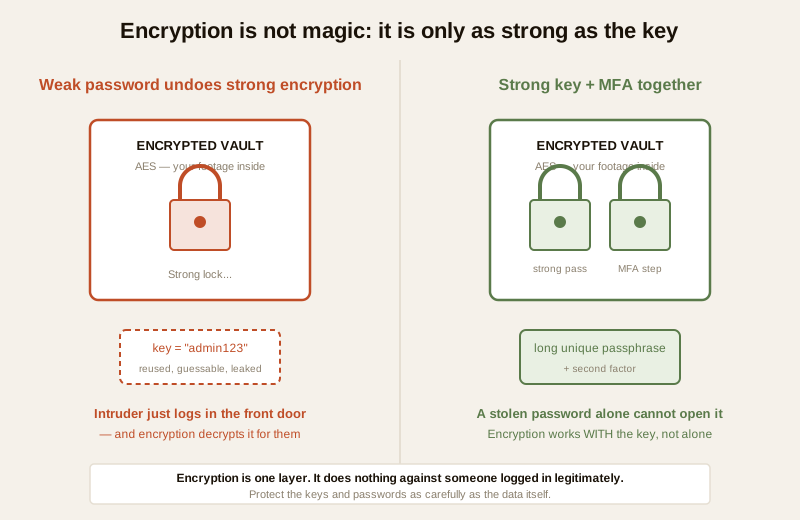
Encryption is not magic: it only helps if the keys and passwords protecting it are strong, and it does not stop someone who is logged in legitimately. Two limits follow from that, and both matter:
- A weak password on an encrypted account undoes the encryption. The strongest AES in the world protects your cloud footage — but if the account guarding it uses "admin123" or a password reused from a site that has since leaked, an intruder simply logs in the front door and the encryption dutifully decrypts everything for them. The lock is only as good as the key you put on it. This is why encryption lives or dies with password management and multi-factor authentication. MFA in particular means a stolen or guessed password alone is not enough to reach the decrypted data.
- Encryption does not stop a legitimate login. Encryption protects data from outsiders who intercept or steal it. It does nothing against someone who has valid access — an ex-employee whose login was never revoked, a shared password that spread too far, an installer who kept a copy of the credentials. For that, you need access control: named users, least privilege, and revoking access the day someone leaves. See smart-security privacy for how access and retention discipline complete the picture.
So the correct mental model is layers, not a single wall. Encryption works with passwords, MFA and access control, never instead of them. Turn encryption on — and then protect the keys and logins that unlock it as carefully as the data itself.
Who holds the key: end-to-end versus provider-managed
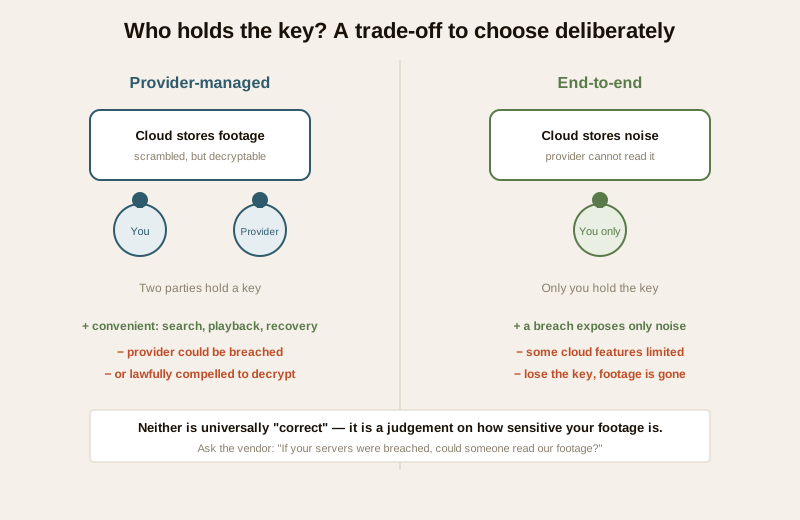
There is one more distinction worth understanding before you buy, because it decides who else can read your footage: who holds the decryption key.
- Provider-managed encryption. The cloud or device provider encrypts your footage, but the provider also holds (or can access) the key. This is common and convenient — it lets the provider offer features like thumbnails, search or web playback, and it lets you recover access if you forget your password. The trade-off is honest and unavoidable: a provider that can decrypt your footage is a party that could, in principle, be breached, or be compelled by a lawful order to hand it over. Your footage is only as private as the provider's own security and policies.
- End-to-end encryption. Here the footage is encrypted in such a way that only you — your devices, with your key — can decrypt it; the provider stores scrambled data it cannot read. This is the stronger privacy position: a breach of the provider exposes only noise. The trade-off, again honest, is that some cloud features may be limited, and if you lose your key or password, nobody — not even the provider — can recover your footage. There is no "forgot key" button by design.
Neither is universally "correct" — it is a qualitative judgement about how sensitive your footage is and how much recoverability you want. For most homes and societies, either is a large improvement over no encryption at all. What matters is that you know which one you have and that you make the choice deliberately, rather than discovering after a breach that a third party held the keys to your living room. Ask the vendor plainly: "If your servers were breached, could someone read our footage?" A vendor who cannot answer clearly is telling you something.
Encryption and the law: the DPDP Act 2023
Encryption is not only good practice — for anyone handling other people's footage it moves towards being an expectation. Under the Digital Personal Data Protection Act, 2023, the video, access logs and biometrics a security system holds are personal data, and biometrics and detailed footage of identifiable people are about as sensitive as personal data gets. The Act requires anyone who determines how such data is processed to protect it with reasonable security safeguards, and to have a duty to respond when there is a breach.
Encryption is one of the clearest, most widely recognised of those safeguards. For a society or a facility, this is very concrete: the RWA that runs cameras over common areas is handling every resident's personal data, and choosing systems that encrypt footage in transit and at rest — and keeping the keys and accounts protected — is a direct way of meeting the expectation to safeguard it. It also softens the blow of a breach: footage that was properly encrypted at rest, and whose keys were not exposed, is far less damaging if a disk is stolen than plain files would have been. If a serious breach does occur, treat it as an incident — contain it, preserve records, and follow current guidance from India's national CERT (CERT-In) on reporting. Keep only what you need, for only as long as you need it; encryption protects data best when there is less of it to protect.
What a homeowner or RWA can actually do
You do not need to understand the mathematics to be protected. The whole of practical encryption for a security system comes down to a short, doable list.
1. Choose devices and services that encrypt both ways. When buying, ask specifically: does the app and web access use HTTPS/TLS, is the streaming secured, and is stored footage encrypted at rest — on the device and in the cloud? Prefer products that say yes clearly; walk away from ones that cannot.
2. Turn encryption on. Where a recorder offers device or disk encryption, enable it. Where a cloud service offers or defaults to encryption, confirm it is on. Encryption that ships switched off protects nobody.
3. Encrypt the backups too. Make sure your backup copies of footage are encrypted, so the backup is not the soft target.
4. Protect the keys and passwords. This is the half people forget. A strong, unique password and MFA on every account that can decrypt your footage, keys recorded safely, and access revoked the day someone leaves. See password management.
5. Decide who holds the key. Know whether your cloud is provider-managed or end-to-end, and choose deliberately based on how sensitive your footage is.
6. Wipe before you discard. An encrypted-then-wiped disk or card is far safer to retire — see secure device disposal.
You can gauge where your overall setup stands with the home-security risk scorecard.
When to bring in a professional. Choosing devices that encrypt, enabling the settings, turning on MFA and protecting passwords are yours to drive. Recovering an account after a lost key, configuring encryption on a managed building network, integrating access-control biometrics safely, and handling a suspected breach are jobs for a qualified IT/security professional. If footage or an account behaves in a way a reset does not fix, contact the vendor's official support, preserve records, and treat a suspected breach as a reportable incident.
Key takeaways
- A security system holds intimate personal data — video of your family, access logs, biometrics — and data encryption is what keeps it unreadable to anyone who intercepts the stream or steals the disk.
- There are two kinds and you want both. Encryption in transit (HTTPS/TLS, secured streaming) scrambles data while it moves; encryption at rest (AES-style device, disk and cloud encryption) scrambles data while it is stored. Enable both; avoid apps or devices that send video in the clear.
- Encryption is not magic. It only helps if the keys and passwords protecting it are strong — a weak password on an encrypted account undoes it — and it does nothing against someone logged in legitimately. It works with passwords, MFA and access control, never instead of them.
- Know who holds the key. Provider-managed encryption is convenient but a provider that can decrypt your footage can be breached or compelled; end-to-end is stronger for privacy but offers no key recovery. Choose deliberately.
- The DPDP Act 2023 expects safeguards. For any society or facility, encrypting footage in transit and at rest — and protecting the keys — is a direct way to meet the duty to protect residents' personal data, and it limits the damage of a breach.
Where to go next
- Start at the security-system cybersecurity pillar and the cybersecurity sub-hub.
- Protect the keys that make encryption work: password management and multi-factor authentication.
- Secure the surrounding layers: CCTV cybersecurity, secure Wi-Fi for security devices, cloud storage security, security-system backup and secure device disposal.
- Understand the privacy picture in smart-security privacy, then gauge your exposure with the home-security risk scorecard and return to the security hub.
References
- Digital Personal Data Protection Act, 2023 — security-system footage, access logs and biometrics are personal (and often sensitive) data; the Act requires reasonable security safeguards, of which encryption is a recognised one, and creates duties around a breach. Verify current rules and any notified provisions before relying on them.
- CERT-In (Indian Computer Emergency Response Team) — India's national incident-response body; treat a footage or account breach as a reportable cyber incident and follow current CERT-In guidance.
- TLS/HTTPS and AES — widely used, vendor-neutral encryption technologies for data in transit and at rest respectively; described here generically. Confirm the specific protocols and current recommended configurations with your vendor and current best practice, as versions and settings change over time.
- NIST, OWASP IoT and CIS security best-practice frameworks — general, vendor-neutral guidance on encryption, key management, MFA and device hardening; verify the current edition before relying on it.
- Manufacturer and cloud-provider security summaries — confirm HTTPS/TLS for app and web access, secured streaming, encryption at rest on the device and in the cloud, and whether encryption is provider-managed or end-to-end, on the vendor's own documentation before specifying.
This is an educational overview, not legal advice, and it deliberately covers only how to choose, enable and protect encryption on a security system you own or manage — never how to weaken or defeat any encryption. Recovering lost keys, configuring encryption on managed networks, and handling a suspected breach are qualified professional tasks; engage licensed IT/security professionals and verify the current status of any law, standard or protocol before relying on it.
Export this guide
Related Guides — Deep-dive reading
Complete Guide to Security System Cybersecurity in India (2026): Protecting the Systems That Protect You
The cameras, locks, alarms and door phones you install to feel safer are internet-connected computers that can themselves be attacked, and an insecure one is worse than none. This pillar maps the whole attack surface — devices, network, accounts and data, operations — and points to every guide that hardens it.
SecuritySecure Device Disposal for Security Systems in India (2026): Wipe Before You Sell, Return or Bin It
The forgotten end-of-life risk: a security camera, NVR or DVR you sell on OLX, return, hand to a repair shop or give the kabadiwala still holds months of footage, saved Wi-Fi and account passwords, and a live link to your cloud account. This homeowner guide is the secure decommissioning checklist to run before any device leaves your hands.
SecurityCCTV Remote Access in India (2026): Watch From Your Phone, Safely
How to view your own cameras from anywhere without leaving the front door open to the internet — change the defaults, use strong credentials and 2FA, keep firmware current, prefer the vendor's secure cloud relay or a VPN, segment the camera network, and treat footage as personal data.
SecurityRelated Tools — Try Free
CCTV Cloud vs Local Cost Calculator
Compare cloud CCTV subscription against a local NVR + HDD — upfront, 5-year total, monthly fee and break-even.
Cloud vs LocalCCTV Camera Coverage & Count Calculator
Estimate how many CCTV cameras you need, the NVR channels, storage in TB for your retention period, and an indicative all-in cost with GST.
CCTV CalculatorHome Security Risk Scorecard
Score your home across six security layers — perimeter, entry points, lighting, detection, alarm and habits — and get a prioritised action plan.
Security Scorecard