
Remote-Access Locks in India (2026): Locking and Granting Entry From Anywhere
The smart locks that let you lock, unlock and grant entry from anywhere in the world — how the capability is built, the real Indian use cases, and the internet, power-cut and security requirements you must plan for first.
Your phone buzzes while you are at work in another part of the city, or on holiday two states away. The plumber is at your door; your mother has arrived early; a parcel needs handing in. With most smart locks you can do nothing but apologise. With a remote-access lock you open the app, check the live lock state, and let them in — from anywhere with a signal.
That capability — to lock, unlock and grant entry from beyond Bluetooth range, from literally anywhere in the world — is what separates a remote-access lock from an ordinary app-controlled lock that only reaches the door when your phone is a few metres away. It is genuinely useful. It is also the smart-lock feature that most deserves an honest reading of its requirements before you buy, because the same wire that lets you in from Mumbai is, in principle, reachable from the internet — and it stops working the moment your home loses power or broadband. This guide is part of the Studio Matrx smart locks and access control hub and the wider complete guide to smart locks in India.
Scope & safety. This guide helps you plan and choose; the actual door-hardware fitting, any mains wiring, and any fire-alarm interlock are licensed professionals' jobs. A remote-access lock must never be your only way in or out: keep a mechanical key override and at least one on-device credential (a PIN or fingerprint) on every home door, and never position or wire a lock so it can trap someone on an escape route — fire-egress doors must fail-safe under the National Building Code. Access logs and any biometrics are personal data under the Digital Personal Data Protection Act, 2023. This is educational guidance, not legal advice.
What "remote access" actually means
Every smart lock lets you operate it at the door. Remote access adds one specific power: control from outside the range of the door itself — from your office, from a train, from another country. Concretely, a remote-access lock lets you:
- Unlock or lock the door from the app, wherever you are.
- Check the current state — is it locked right now? Did the kids get home and lock up behind them?
- Grant entry on demand — press "unlock" to let in whoever is waiting.
- Issue and revoke access remotely — create a time-limited PIN for a guest, or cut off a departed helper's code, without going home.
- Receive live notifications — "front door unlocked at 4:12 pm," so you know the maid arrived or the door was left open.
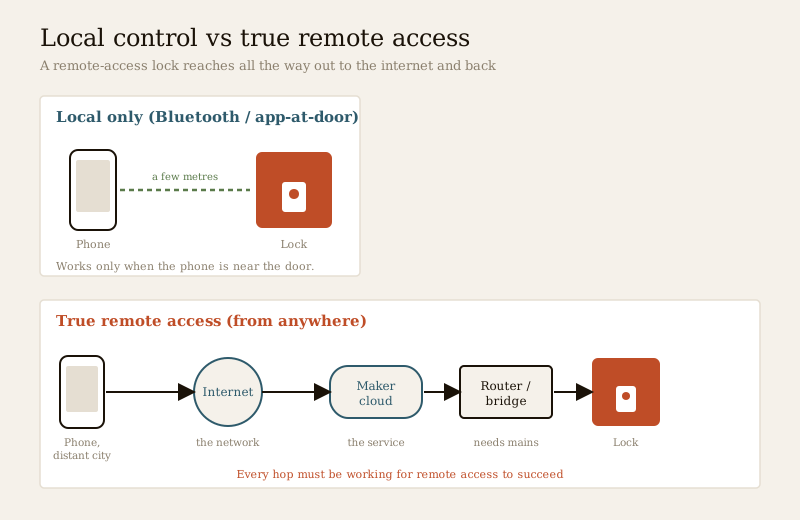
The distinction that trips people up: a plain Bluetooth or app lock talks only to a phone that is physically near it. Remote access means the lock has a path all the way out to the internet and back — and that path is the whole story of what follows.
How the capability is built — three ways to get there
A lock does not reach the internet by magic. There are three common architectures, and knowing which one a product uses tells you its real cost, reliability and battery life.
| How it connects | What sits at the door | Trade-offs | Read more |
|---|---|---|---|
| Wi-Fi built into the lock | The lock itself joins your home Wi-Fi | Simplest to buy; but Wi-Fi is power-hungry, so battery drains faster, and it needs strong Wi-Fi at the door | Wi-Fi locks |
| Bluetooth lock + Wi-Fi bridge/hub | A low-power Bluetooth lock plus a small plugged-in bridge indoors that relays to your router | Best battery life; the bridge does the internet work; but it is one more box that needs mains power and Wi-Fi | Bluetooth locks |
| Cellular module (SIM) | The lock or its hub has its own mobile-data SIM | Works without home broadband; useful for a remote gate or a second home with no Wi-Fi; adds a data subscription and depends on mobile coverage | — |
Most Indian smart locks in homes use one of the first two. A pure Wi-Fi lock is the least fuss to set up but can chew through batteries and struggles if the router is far from the door — see the Wi-Fi locks guide for antenna and coverage detail. The Bluetooth-plus-bridge design is why so many "app locks" ask you to buy a separate hub: the lock stays on frugal Bluetooth for daily use, and the bridge — always powered, always on Wi-Fi — is what makes remote access possible. The Bluetooth locks guide explains exactly why that bridge is needed. Cellular is the niche answer for a place with no fixed broadband at all.
The use cases Indian buyers actually want
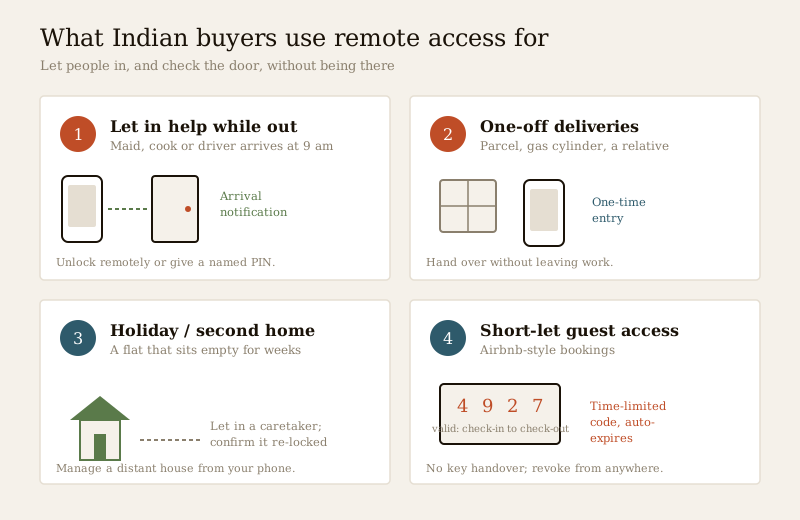
Remote access earns its keep in a handful of everyday situations. These are the ones that come up again and again:
- Letting in help and trades while you are out. The maid, cook or driver arrives at 9 am when you are already at the office; the plumber can only come on a weekday. Instead of leaving a key under a pot, you unlock remotely — or better, give them their own PIN — and get a notification when they arrive and leave.
- Deliveries and one-off visitors. A parcel, a gas cylinder, a relative dropping something off. You let them into the building lobby or hand over at the door without leaving work.
- The holiday or second home. A flat in the hills or a family house in your home town that sits empty for weeks. You can let in a caretaker, a cleaner before you arrive, or a repair person after a monsoon leak — and check it locked itself after they left.
- Short-let and guest stays. If you host on Airbnb-style platforms, a time-limited code that works only for the guest's booking window — created and revoked from your phone — replaces the awkward key handover entirely. This pairs naturally with the code discipline in the PIN-code locks guide.
- Peace of mind. Simply checking, from bed or from abroad, that the front door is locked — and locking it remotely if it is not.
Read this before you buy — the honest requirements
Remote access is the one smart-lock feature where the marketing and the reality diverge most. Four requirements decide whether it will actually work for you.
1. It depends on internet at BOTH ends
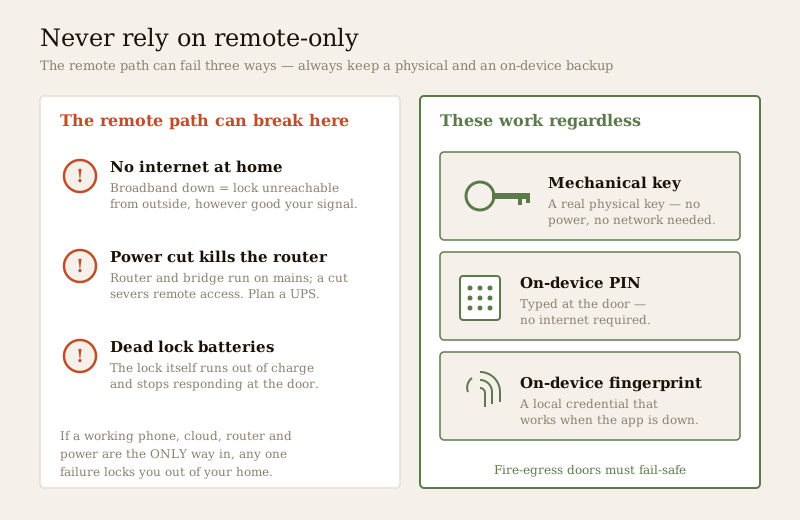
Remote access is a chain: your phone → the internet → the maker's cloud → your home router/bridge → the lock. Every link must be up. Your phone can have perfect signal, but if the home broadband is down, or the router lost power, the lock is unreachable remotely. In India that failure mode is common, not rare.
2. A power cut kills your router — plan a UPS
This is the requirement people forget. The lock itself runs on batteries, so a power cut does not lock you out at the door. But the router and any Wi-Fi bridge run on mains power — when the power goes, they die, and your remote access dies with them until power returns. If remote access matters to you (a second home, letting in help while away), put the router and bridge on a small UPS or inverter so a two-hour cut does not sever the link. Sizing a backup for network gear is a job to plan with an electrician — see the electrical hub. A cellular-SIM lock sidesteps the broadband dependency but still needs its own power and mobile coverage.
3. The security surface is real — and must be hardened
A lock reachable from your office is, by definition, reachable from the internet. That is not a reason to avoid remote access — it is a reason to do it properly. The discipline is the same one that governs remote CCTV access, and it is entirely defensive:
- A strong, unique password on the lock's app account — never reused from another site, never the default.
- Two-factor authentication (2FA) switched on, so a stolen password alone cannot open your door.
- Firmware kept up to date — updates patch security flaws; a lock left un-patched for years is the weak one.
- A reputable brand that publishes security updates and stores credentials sensibly, rather than the cheapest unbranded unit with an unknown cloud behind it.
- Mind who holds remote access. Every person you have shared the app or a code with can, in principle, open your door from anywhere. Keep the list short, and revoke a departed helper or ex-tenant immediately — the same day they leave, from your phone.
None of this is about how attacks work; it is the ordinary hygiene of putting anything on the internet. Choose a good brand, set a strong password, turn on 2FA, keep it updated, and control who is on the access list.
4. Never rely on remote-only
The single most important rule. Remote access is a convenience layered on top of the lock — never the only way it opens. Because the internet, the cloud, the router, the power and the batteries can each fail, every home door with a remote-access lock must also keep:
- A mechanical key override — a real, physical key that works with no power and no network.
- At least one on-device credential you can use at the door — a PIN or a fingerprint — so you get in even when the app or internet is down.
If the only way into your home is a working phone, a working cloud and a working router, then a dead battery, a network outage or a bad app update can lock you out of your own house.
Sharing access with family and help — the Indian reality
Most Indian homes see a steady flow of trusted people: domestic help, a cook, a driver, the building's delivery flow, visiting family. Remote-access locks handle this far better than a shared key, but only if you set them up thoughtfully:
- Give each person their own credential, not one shared code. A named PIN or app invite tells you who opened the door and when, and lets you revoke one person without disturbing the rest. The mechanics of good code practice are in the PIN-code locks guide.
- Use time windows. A maid's code that only works 8–11 am, a guest code that expires at checkout — this limits exposure without you having to remember to switch anything off.
- Revoke the moment someone leaves. A helper who moves on, a tenant who vacates, a guest who checks out — cut their access that day, from wherever you are. This is the whole point of remote control.
- Keep the access log private. Who came and went is personal data under the DPDP Act, 2023; do not share it casually, and understand whether your lock stores this in the cloud or on the device.
Where remote access fits with the rest of the system
A remote-access lock rarely stands alone. It usually sits alongside a way to see who is at the door and a broader security setup:
- Pair it with a video door phone or smart lock combination so you can see and speak to a visitor before you remotely unlock — the door-phone guide covers the pairing, this guide covers the lock's own remote capability.
- If you want the camera to recognise faces at the gate, that is the camera side, covered in the facial-recognition door phones and facial-recognition CCTV guides — distinct from the lock's own face-recognition or biometric credentials.
- Fold the lock into a wider smart home or smart security system, and for apartments follow the apartment security guide; villas and independent houses have their own security guide.
- Not sure which lock and connection suits you? The smart-lock selector narrows it down, and the smart-lock cost calculator sizes the spend including any bridge or subscription.
When to bring in a professional. Choosing the lock, the connection method, the app hygiene and who gets access is your call and this guide's job. Hand the door-hardware fitting, any mains wiring for a bridge or UPS, and any fire-alarm or egress interlock to a licensed installer or electrician — see the electrical hub. On any door people escape through, the lock must fail-safe and never block the route, which is a coordinated licensed job governed by the National Building Code. And never leave a former helper, tenant or guest with lingering remote access to your home.
Key takeaways
- Remote-access locks give you one specific power — to lock, unlock, check state and grant entry from anywhere — built via a Wi-Fi lock, a Bluetooth lock plus a Wi-Fi bridge, or a cellular SIM; see the Wi-Fi and Bluetooth guides for the how.
- It depends on internet at both ends. A home power cut kills the router and bridge and severs remote access even though the lock's own batteries are fine — plan a UPS or inverter for the router if remote access matters.
- The security surface is real, so harden it: a strong unique password, 2FA, firmware updates and a reputable brand are mandatory, and you must control and promptly revoke who holds remote access — the same defensive discipline as remote CCTV access.
- Never rely on remote-only. Always keep a mechanical key override and an on-device PIN or fingerprint so a network, cloud, power or battery failure never locks you out; fire-egress doors must fail-safe.
- For Indian homes, remote access shines at letting in help, deliveries and family while you are out, managing a holiday or second home, and giving short-let guests time-limited codes that you can revoke from anywhere — with access logs treated as personal data under the DPDP Act, 2023.
References
- Digital Personal Data Protection Act, 2023 — access logs and any stored biometric templates are personal data; apply consent, notice, minimisation and retention limits, understand cloud versus on-device storage, and delete a departed helper's or tenant's access promptly.
- Manufacturer specifications — verify the connection method (built-in Wi-Fi, Bluetooth-plus-bridge or cellular), battery life, remote-access subscription cost, 2FA support and firmware-update policy on the maker's own datasheet before buying.
- National Building Code of India (SP 7), Bureau of Indian Standards, and local fire and municipal bye-laws for the fire-egress, fail-safe and any electrical aspect of an install; verify the current edition via the BIS catalogue: https://www.services.bis.gov.in/
This is an educational overview, not legal advice. Door-hardware fitting, mains wiring for a bridge or UPS, and any fire-alarm or egress interlock are qualified professional tasks — engage licensed installers and electricians, and verify any standard's current status via the BIS catalogue before relying on it.
Export this guide
Related Guides — Deep-dive reading
Complete Guide to Security System Cybersecurity in India (2026): Protecting the Systems That Protect You
The cameras, locks, alarms and door phones you install to feel safer are internet-connected computers that can themselves be attacked, and an insecure one is worse than none. This pillar maps the whole attack surface — devices, network, accounts and data, operations — and points to every guide that hardens it.
SecuritySecurity for People Living Alone in India (2026): Calm, Practical Habits When There Is No Second Person to Notice
Living alone is an ordinary and growing part of Indian life - the student in a new city, the working single, the elder whose children are abroad, the person after a separation. It does not call for fear. It calls for a few deliberate habits, because there is no second person in the home to notice trouble, raise the alarm, or catch an accident. This is calm self-reliance, layer by layer.
SecurityAccess Control Maintenance in India (2026): Readers, Locks and Fail-Safe Egress
How to keep a card, keypad, fingerprint or face access-control system reading reliably and locking securely — and, above everything, how to test that its doors still release on a fire alarm and on power loss, so an access-controlled door never becomes a life-safety trap.
SecurityRelated Tools — Try Free
Access-Control Battery-Backup Calculator
Size the standby battery so an access system keeps running through a power cut, with an egress life-safety note.
Battery BackupCCTV Camera Coverage & Count Calculator
Estimate how many CCTV cameras you need, the NVR channels, storage in TB for your retention period, and an indicative all-in cost with GST.
CCTV CalculatorSecurity Backup Power Calculator
Size a UPS/inverter and battery to keep CCTV, NVR, router and alarm running through a power cut — load, Ah, VA and cost.
Backup Power