
App-Based Alarm Systems in India (2026): Control and Monitor From Your Phone
How app-based alarm systems let you arm, disarm and monitor from a smartphone over Wi-Fi, why they need internet and power at both ends, the honest trade-offs against GSM, and why cyber hygiene is now front-door security.
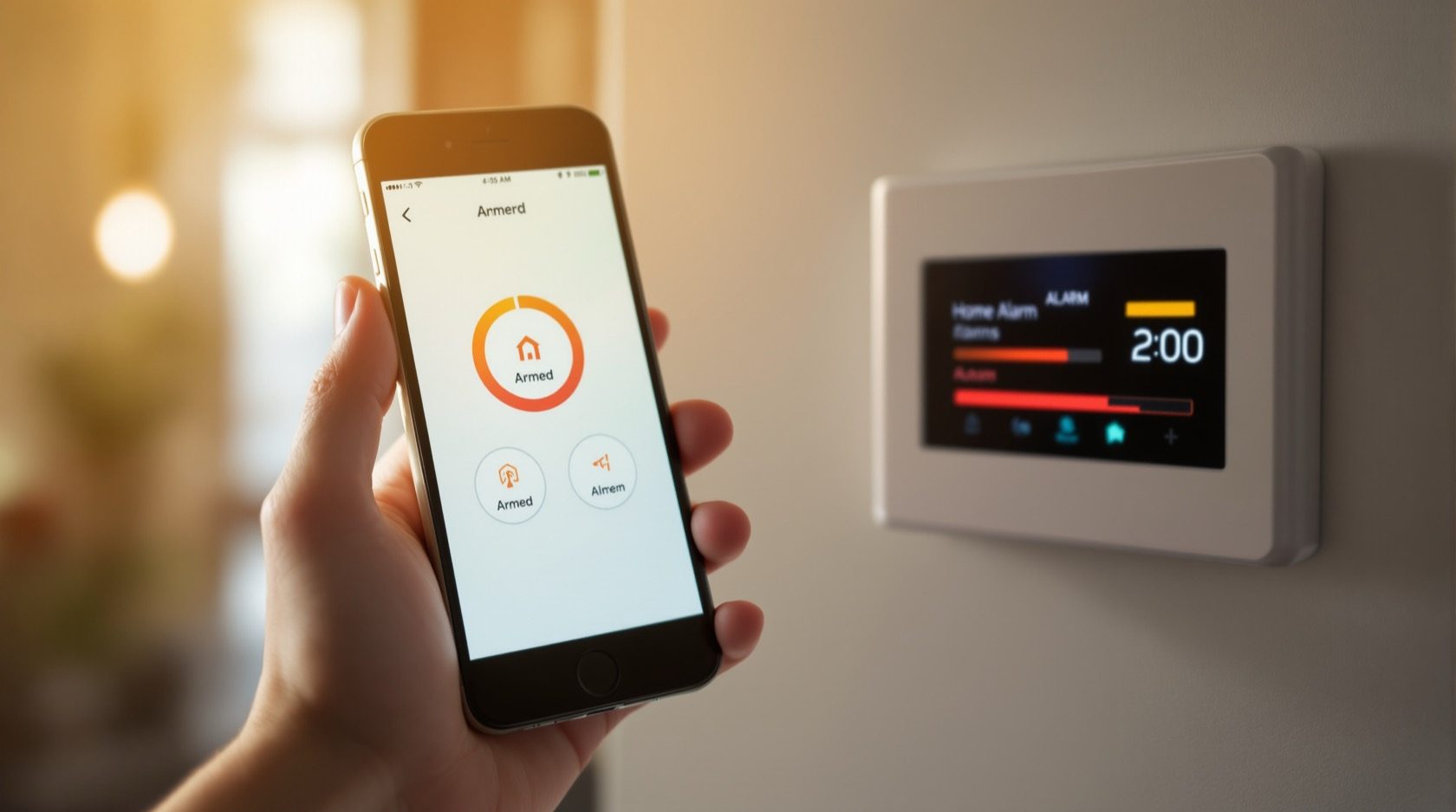
For years an Indian home alarm meant a keypad by the door and, at best, a GSM module that phoned you when it went off. App-based alarm systems change the relationship: the alarm talks to a smartphone app over your home Wi-Fi and the internet, so you can arm and disarm from anywhere, see at a glance whether the house is armed, get an instant push notification the moment a sensor trips, scroll the event log to see exactly what happened when, add or remove family members, and often watch a linked camera feed in the same app. It is the difference between a device that shouts into the street and a system you actually carry in your pocket.
That convenience is real and worth having. But an app-based alarm leans on things a plain siren does not — a live internet connection, mains power for the router, and a maker's cloud service that stays alive and updated. This guide, part of Studio Matrx's burglar alarm hub and its pillar guide, sets out what an app-based system does brilliantly, where it quietly fails in Indian conditions, how it compares with a GSM alarm, and why the security of your app account is now as important as the lock on your door.
Scope & the India reality. Almost every app-based alarm sold to Indian homes is self-monitored: the app alerts you and whoever you add to it — not the police. There is no formal verified-alarm-to-police auto-dispatch scheme in India. A real alert still needs a person — you, a family member, or a society guard — to check it and, if genuine, call the helpline (112 / Dial 100). Plan a realistic chain — loud siren plus neighbours and guard first, then police — not a false sense of automatic rescue. Choosing a paid monitoring service changes who watches, but the last mile to the police is still a phone call. This is educational guidance, not legal advice.
What an app-based alarm actually does
Strip away the marketing and an app-based alarm gives you a handful of genuinely useful powers that a keypad-and-siren system cannot:
- Arm and disarm from anywhere. Left for work and forgot to set the alarm? Do it from the office. Coming home? Disarm from the car so the siren never sounds. No more guessing.
- See live armed / disarmed status. The app shows the current state at a glance, so you never wonder whether the house is actually protected — the single most common source of anxiety with older systems.
- Instant push notifications on a trigger. The moment a motion sensor or door contact fires, your phone buzzes with a specific message — which zone, what time. No missed-call guesswork like a bare GSM dialler, where you see three missed calls and cannot tell what happened.
- A full event log. Every arm, disarm, and trigger is timestamped, so you can see that the maid disarmed at 9:10 and armed again at 13:00, or that the back door opened at 2 a.m.
- Shared access for family. Add your spouse, an adult child, or a trusted neighbour as a user; each gets their own login and their own alerts. Remove them just as easily.
- Linked CCTV in the same view. Many app-based alarms tie into cameras, so when the alert lands you can open the live feed and see whether it is a real intruder or the cat — visual verification before you escalate.
How the alert reaches you — and where it can break
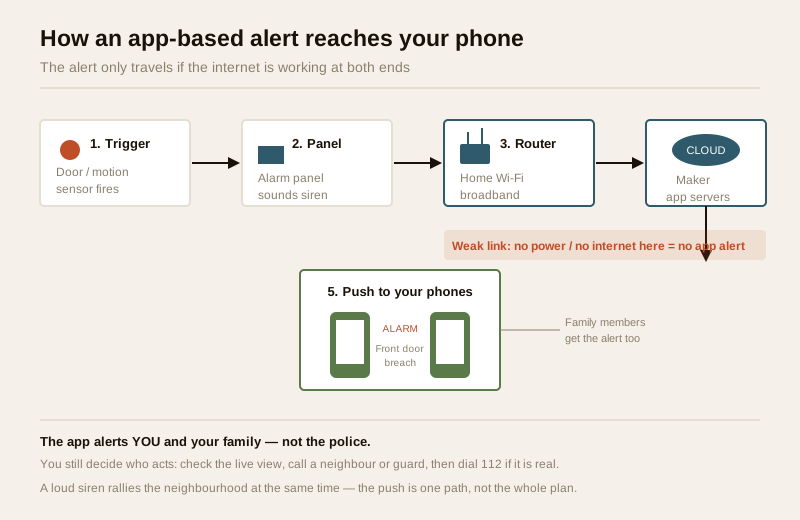
The magic and the weakness of an app-based system are the same thing: the alert travels over the internet. When a sensor trips, the panel sounds its siren locally and sends the event out through your home router, across your broadband, up to the alarm maker's cloud, which then pushes a notification down to every phone on the account. That round trip usually takes a second or two — brilliant when everything is up.
But look at that chain and count the things that must be working: the panel needs power, the router needs power and a live broadband link, the maker's cloud must be online, and your phone needs signal or Wi-Fi to receive the push. In Indian conditions, two of those links are fragile:
- A power cut kills the router. When the mains drops — as it does routinely across much of India — the broadband router goes dark within seconds. The panel may run on its own backup battery and still sound the siren, but with no router there is no internet, so the app alert never leaves the house. You are relying on the siren alone.
- Patchy or dropped broadband. Even with power, a flaky connection, an ISP outage, or an expired plan silently breaks the path. The system looks fine until the night it matters.
This is the honest trade-off against a GSM alarm, which sends its call or SMS over the mobile network and does not depend on your home broadband at all. Neither is strictly better — they fail in different situations. Which points to the single most important design decision below.
The best practice: an alarm that does BOTH app and GSM
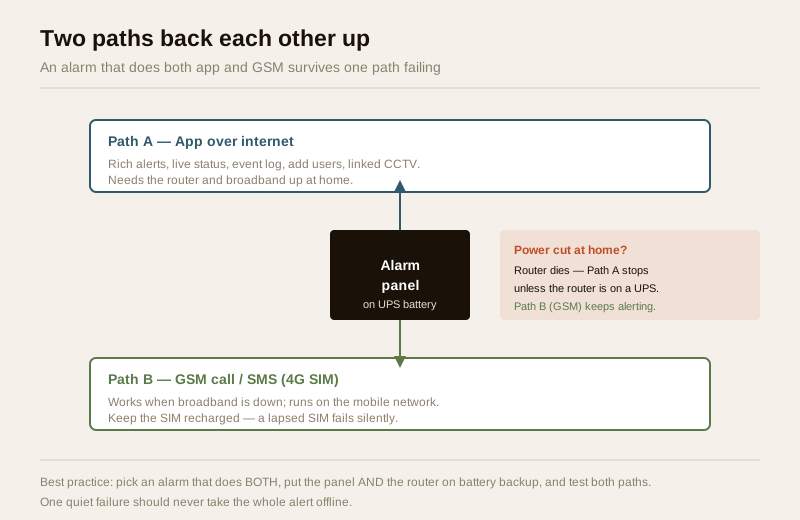
The strongest setup is not app or GSM — it is an alarm that does both, so one path backs up the other. When broadband is down or the power is out, the GSM module (with its own SIM) still fires a call or SMS. When you want rich alerts, remote arming and the event log, the app path gives you that. Two independent routes mean a single quiet failure never takes your whole alert offline.
Two practical steps make that resilience real:
1. Put the router on a small UPS or inverter. The panel almost certainly has a backup battery; the router usually does not. A modest battery backup on the router keeps the internet — and therefore the app alert — alive through a power cut. Without it, the app path dies with the lights.
2. Keep the GSM SIM recharged and on a 4G module. A prepaid SIM whose validity has lapsed disables the GSM fallback silently — one of the most common real-world gotchas in Indian alarms. With India's 2G networks being retired, insist on a 4G module so the fallback keeps working for years.
App vs GSM at a glance
| What matters | App-based (Wi-Fi / internet) | GSM (mobile network) |
|---|---|---|
| How it reaches you | Push notification via home broadband + cloud | Call / SMS over the mobile network |
| Alert detail | Rich: which zone, live status, event log, photos | Basic: a call or short SMS |
| Remote arm / disarm | Yes, from anywhere | Usually no (some by SMS command) |
| Shared family access | Yes, per-user logins | Limited to a stored call list |
| Linked CCTV | Often, in the same app | No |
| Survives home power cut | Only if router is on a UPS | Yes (panel battery + mobile network) |
| Survives broadband outage | No | Yes |
| Depends on maker's cloud | Yes — app / servers must stay alive | No |
| Ongoing cost | Broadband; sometimes an app / cloud subscription | SIM recharge / validity |
| Best role | Everyday control + rich alerts | Reliable fallback path |
The takeaway is not to pick a winner but to combine them: app for control and detail, GSM as the path that survives when the internet does not. For homes weighing wired versus wireless panels alongside this, the wireless and hybrid alarm guides cover the panel choice, and the burglar alarm selector helps match a system to your home.
Cyber hygiene: your app account is now a front door
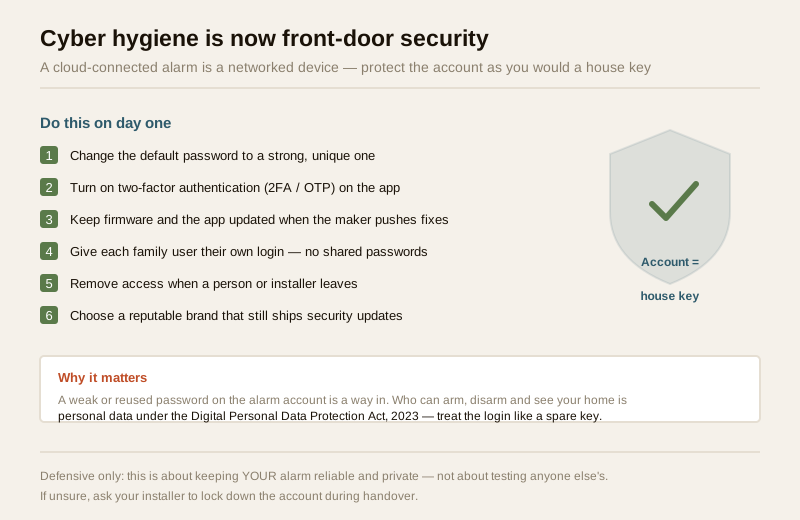
Here is the part that older alarms never had to worry about. An app-based alarm is a networked device tied to a cloud account, and the login to that account can arm, disarm, and show whether your home is occupied. Treat it exactly as you would a spare key. This is defensive housekeeping — keeping your system reliable and private — and it sits alongside the same discipline covered in the CCTV remote-access security guide.
- Change the default password to a strong, unique one the day it is installed. A factory default or a reused password is the way in.
- Turn on two-factor authentication (2FA / OTP) on the app if the maker offers it, so a password alone is not enough.
- Keep firmware and the app updated. Makers patch security flaws over time; an un-updated device is a standing hole. Do panel firmware carefully, ideally via your installer.
- Give each family member their own login rather than sharing one password, and remove access the moment someone — a former tenant, a departed help, an old installer — no longer needs it.
- Choose a reputable brand that still ships updates and whose cloud you can reasonably expect to stay alive for years. A cheap alarm from a maker that vanishes leaves you with an app that stops working.
Who can see and control your home is personal data under the Digital Personal Data Protection Act, 2023. Do not hand an installer standing remote access to your system without agreeing it in writing, and revoke it when the job ends.
The realistic response chain in India
Because the app alerts you and not the police, the value of an app-based system is in how quickly you can verify and act. A sensible chain looks like this:
| Step | Who acts | What happens |
|---|---|---|
| 1. Trigger | The system | Siren sounds locally; push notification goes to all phones |
| 2. Verify | You / family | Open the app, check the event log and any linked CCTV to see if it is real |
| 3. Rally help nearby | Neighbour / society guard | Call whoever is closest — the guard is often the practical first responder |
| 4. Escalate if genuine | You / guard | Call the police helpline (112 / Dial 100) with a verified report |
| 5. Optional: paid watch | Monitoring service | A subscription central station watches and calls on your behalf |
The reason verification matters is not just speed — it is credibility. Repeated false alarms waste a guard's and the police's time and erode the response you will get next time. The app's live view and event log are exactly what let you check before you escalate, which is one of an app-based system's quiet advantages. For homes that want a person watching around the clock, a professional monitoring service or police-response coordination adds a layer — but even then, the last mile to the police is a verified phone call, never an automatic dispatch. A silent alarm or panic button can feed the same app so a distress signal reaches your call list quietly.
When to bring in a professional. Deciding what you want the app to do, testing both paths, and managing your own account you can do yourself. Hand the SIM and network setup, the panel wiring and any mains or router-power work to a licensed installer and electrician — putting the router on a UPS and running the panel's backup battery are electrical jobs done right the first time. If you want a watched system, contract a reputable, verified monitoring provider in writing, and have the installer lock down your app account — strong password, 2FA, no lingering remote access — during handover.
Costs and the honest caveats
An app-based alarm's costs are mostly the ones you already have plus a few to watch:
- The panel and sensors — a one-time cost, similar to any wireless or hybrid system.
- Broadband — you likely already pay for it; the alarm rides on it. Patchy connections are the risk, not the bill.
- An app / cloud subscription — some makers charge a modest annual fee for cloud features, event history, or linked video; many are free. Check before you buy, and factor in that a maker who folds takes the cloud with it.
- The GSM SIM for the fallback path — a small recharge to keep valid.
The defining caveat is dependency: an app-based alarm is only as reliable as your power, your internet, and the maker's cloud. Design around all three — dual path, UPS on the router, a reputable brand — and you get the best of both worlds. Ignore them and you have a system that works beautifully in a demo and goes silent in a monsoon power cut. For the wider picture, see the smart security systems guide and the ultimate home security guide; RWAs should also read the gated-community and apartment security guides.
Key takeaways
- App-based alarm systems put control in your pocket — remote arm/disarm, live armed status, instant push alerts, a full event log, shared family access, and often linked CCTV in one app.
- The alert travels over the internet, so it needs power and broadband at both ends — a home power cut kills the router and stops app alerts unless the router is on a UPS.
- The best design does both app and GSM so one path backs up the other; keep the GSM SIM recharged on a 4G module, since a lapsed SIM fails silently.
- Cyber hygiene is now front-door security — strong unique password, 2FA, firmware and app updates, per-user logins, remove old access, and a reputable brand; the account is personal data under the DPDP Act, 2023.
- The app alerts you, not the police — India has no auto-dispatch scheme, so plan a real response chain (siren + neighbours + guard, verify, then dial 112), and use a monitoring service if you want a person watching.
References
- Digital Personal Data Protection Act, 2023 — data on who can arm, disarm and view your home is personal data; secure the app account, restrict who has access, and set any installer or monitoring provider's data terms in writing.
- Manufacturer specifications — verify on the maker's own datasheet that the panel supports both app and 4G-GSM paths, whether any cloud subscription applies, the app's 2FA support, and the firmware-update policy before buying.
- National emergency number 112 and police helpline Dial 100 — the official routes for reporting a verified intrusion; there is no automatic alarm-to-police dispatch in India, so a person must verify and call.
- National Building Code of India (SP 7), Bureau of Indian Standards — for the electrical and backup-power aspects of a panel and router install; verify the current edition via the BIS catalogue: https://www.services.bis.gov.in/
This is an educational overview, not legal advice. SIM, network, mains and router-power work are qualified professional tasks — engage licensed installers, contract only reputable verified monitoring providers, and verify any standard's current status via the BIS catalogue before relying on it.
Export this guide
Related Guides — Deep-dive reading
How to Choose a Burglar Alarm in India (2026): Sensors, Alerts and What Actually Matters
A homeowner's guide to selecting an intruder alarm that fits your flat, villa or shop and alerts you the way you want — matching the sensor mix, control panel and the big siren-versus-monitored decision to your real risk, and dodging the false-alarm traps that make people switch systems off.
SecurityComplete Guide to Building Security Systems for Indian Homes
The systems reference — what CCTV, alarms, access control and backup power actually are, and how to choose between the options for an Indian home, flat or gated community.
SecurityComplete Guide to Security System Cybersecurity in India (2026): Protecting the Systems That Protect You
The cameras, locks, alarms and door phones you install to feel safer are internet-connected computers that can themselves be attacked, and an insecure one is worse than none. This pillar maps the whole attack surface — devices, network, accounts and data, operations — and points to every guide that hardens it.
SecurityRelated Tools — Try Free
Security Backup Power Calculator
Size a UPS/inverter and battery to keep CCTV, NVR, router and alarm running through a power cut — load, Ah, VA and cost.
Backup PowerBurglar Alarm System Selector
Answer a few questions about your property, cabling, coverage, monitoring and power and get the right burglar alarm — wired / wireless / hybrid, self or professionally monitored — with the design non-negotiables.
Alarm SelectorApartment Video Door System Planner
Enter flats, entrances, floors and guard desk for a first-pass building intercom plan — door stations, indoor monitors, guard station, the right architecture and an indicative cost band.
Building Planner