
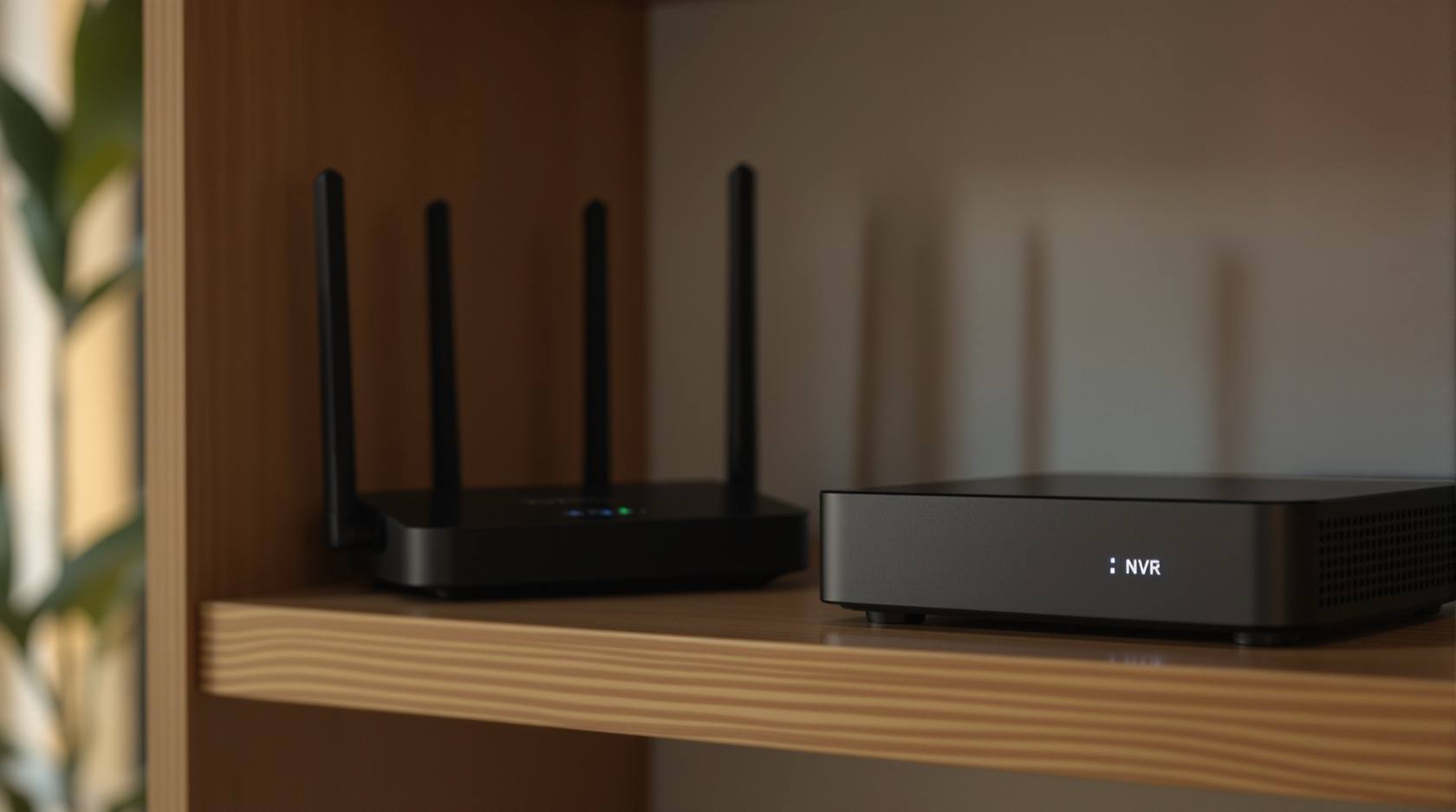
Firmware Updates for Security Systems in India (2026): Patch the Known Holes, Retire What Cannot Be Patched
Firmware is the software inside every camera, DVR, lock, hub and router — and keeping it current is one of the most neglected yet most important home defences. This guide shows homeowners how to update every device and the router, use automatic updates safely, install only authentic firmware, update without bricking, and retire abandoned end-of-life gear.
Every security device in your home runs on software. The camera, the DVR or NVR that records it, the smart lock on the door, the hub that ties it together, and the router everything connects through — each one has a small program built into it that makes it work. That built-in program is called firmware, and like any software it can contain security flaws. When a maker finds such a flaw, it fixes it and ships a firmware update. Installing that update is how you close a hole the maker has already found and fixed. Skipping it leaves the hole open — and once a fix is public, the fact that a hole existed is public too.
Firmware updates are, quite simply, one of the most neglected and most important defences in an ordinary Indian home. The society NVR that has not been touched in five years, the ISP router last patched on the day it was installed, the ₹-cheap camera whose maker has vanished — these are the everyday reality, and each is a device carrying flaws that were fixed long ago for everyone who bothered to update. This guide is strictly protective: it is about keeping your own devices current so the known holes are closed. It never explains how any flaw is exploited — only that keeping firmware current is how you shut the door. It sits under the security-system cybersecurity pillar in the cybersecurity sub-hub.
Scope & safety. This guide helps you keep firmware current on devices you own — cameras, recorders, locks, hubs and your router. It is defensive only: flaws are named as things to patch, never as things to exploit, and it contains no attack instructions. Updating a lock or a mains-powered recorder carries a small risk of bricking a device if power is interrupted mid-update, so update carefully and keep a config backup — see backup and recovery. A firmware or security update must never disable life-safety: a lock on an escape route must always fail-safe for egress. Your recorder's footage and access logs are personal data under the Digital Personal Data Protection Act, 2023; a device you retire may still hold that data — see secure disposal. Report a serious compromise to India's national CERT (CERT-In). For anything beyond these basics, engage a qualified IT/security professional. This is educational guidance, not legal advice.
What firmware is, and why updating it matters
Firmware is the software that lives inside a device rather than on your phone or computer. It is what makes a camera a camera — it runs the video, the network connection, the login page and the app link. Because it is software, it can have bugs, and some bugs are security bugs. A responsible maker keeps looking for these, and when one is found, releases a firmware update that fixes it.
Here is the plain logic of why this matters, framed defensively:
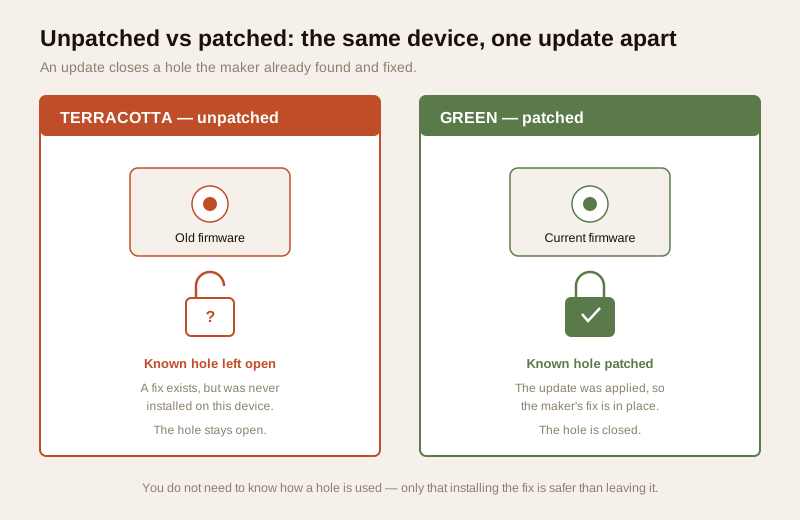
- An update patches a known hole. Vendors do not ship security updates for fun; each one closes a specific weakness they have found. Installing it removes that weakness from your device.
- An unpatched device stays open to holes that are already public. Once a fix is released, the existence of the hole is no longer a secret. A device that never took the fix is still carrying it. You do not need to understand how a hole is used to understand that closing it is safer than leaving it open.
- Neglect is the norm, not the exception. The uncomfortable India truth is that most home and society security gear is installed and then never updated again. The recorder hums away in a cupboard; nobody thinks about it until it fails. That silence is exactly the gap this guide closes.
So the whole of firmware hygiene is one sentence: keep the software in your security devices current, so the holes the makers have already fixed are fixed on your devices too.
The practice: update every device — and the router first
Firmware discipline is not hard, but it has to be complete. A single forgotten device undoes the effort spent on the rest. Here is the practice, in order of priority.
1. Update the router first — it is the gateway
Every camera, lock and hub in your home reaches the internet through one device: your router. That makes the router the single most important thing to keep patched, and — because it faces the whole internet — the most attacked. Yet the classic Indian home router is the one the ISP installed years ago and nobody has touched since.
- Log in to the router (its admin page or app) and check for a firmware update. Apply it.
- If your ISP manages the router, ask them whether it is kept updated, and whether a newer model is available if yours is old.
- Change the router's default admin password while you are there — see secure Wi-Fi for security devices.
2. Update every security device — leave nothing out
Go device by device: each camera, the DVR or NVR, every smart lock, the alarm panel, the video door phone, the hub. Open its app or web page and look for a firmware or software update. If one is offered, read the notes and apply it. The rule is simple: you cannot patch what you have forgotten you own, so the update round is only as good as your list of devices (more on that below).
3. Turn on automatic updates where it is offered and safe
Many good makers now offer automatic firmware updates. For most home devices — especially cameras and hubs — turning this on is the single easiest win, because it means the device patches itself without you remembering to. Turn it on where the vendor offers it. The one sensible caution: for a device where a mid-update failure could lock you out or brick it — some smart locks, some recorders — many people prefer to apply updates manually at a convenient time on stable power. Use auto-update as the default, and choose manual only where you have a specific reason.
The end-of-life problem — the one you must not ignore
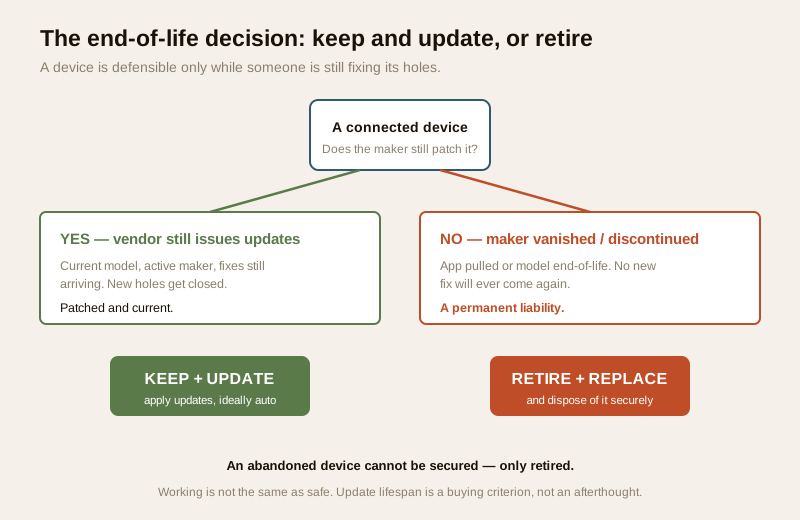
When a vendor stops issuing firmware updates for a device, that device becomes a permanent liability and should be retired and replaced. This is the most important paragraph in the guide, so it is in bold. A device only stays defensible for as long as someone is fixing its holes. The day that stops, every new hole found from then on stays open forever, because no fix will ever come.
Two very common Indian situations make a device end-of-life:
- The maker vanished. A cheap no-name camera bought from a marketplace, whose brand no longer exists and whose app has been pulled — there is nobody left to issue a fix. It will never be patched again.
- The model was discontinued. Even a known maker eventually declares an old model end-of-life and stops supporting it. From that date, it is frozen in whatever state it was in.
An end-of-life device is not made safe by being on your internal network, or by being old and "probably fine." It is a standing liability. The correct response is to retire it and replace it with a supported device, and to dispose of the old one properly — because it may still hold footage, logs or credentials. See secure device disposal, and when buying a replacement, check the maker's support and update record with the vendor cybersecurity assessment. A device's update lifespan — how many years the maker promises fixes — is a buying criterion, not an afterthought.
| Situation | Can it still be patched? | What to do |
|---|---|---|
| Maker still issues updates, current model | Yes | Keep and update — apply updates, ideally auto |
| Known maker, model recently discontinued | Only old fixes; no new ones | Plan replacement; treat as time-limited |
| No-name device, maker vanished / app pulled | No — nobody left to fix it | Retire and replace; dispose securely |
| Old device, "still works fine" but unsupported | No | Retire and replace — working is not the same as safe |
| New purchase, unclear update promise | Unknown — a red flag | Check the vendor's support record before buying |
Only ever install authentic firmware from the official vendor
Firmware is the deepest software in a device, so what you install matters as much as whether you install. The rule is absolute: only install authentic firmware from the official vendor. Get updates from the device's own app, the maker's official website, or the built-in update button — never from a random link, a forum download, or a "modded" or "custom" firmware promising extra features.
The reason is integrity. Firmware from an unofficial source cannot be trusted to be what it claims; installing it is handing the deepest control of your device to a stranger, which is a supply-chain risk you never need to take. Genuine updates come from the maker and, on a good device, are cryptographically signed so the device can verify them. Stick to official channels and you get the security fix without inheriting a new problem.
Update carefully — do not brick the device
Applying a firmware update is usually safe, but it is the one moment a device is genuinely fragile, because it is rewriting its own core software. A few simple habits keep an update from turning into a dead device:
- Read the release notes first. They tell you what the update fixes and whether anything changes. A security update is a good reason to apply promptly.
- Do not interrupt power mid-update. A camera, lock or recorder that loses power halfway through writing new firmware can be "bricked" — left non-functional. Update when power is stable; for battery devices, charge first; for a mains recorder, ideally have it on a UPS or at a time load-shedding is unlikely.
- Keep a config backup. Before a significant update, export the device's configuration if it allows it, so you can restore your settings if the update resets them. This ties directly into backup and recovery.
- Do one device at a time. Update, confirm it comes back healthy, then move on. That way a problem is isolated and easy to trace.
- If it fails, use the maker's recovery, not a random fix. A stalled update should be recovered through the vendor's official support and recovery tools — never a stranger's "unbrick" file, which reintroduces the authentic-firmware risk.
The India reality — the devices nobody updates
It helps to name the everyday situations this guide exists to fix, because recognising yours is half the battle:
- The society NVR nobody has updated in five years. It records dutifully in the guard room, but its firmware is frozen at install. Whoever manages the building should own a schedule to check it — an RWA-managed recorder is exactly the device that slips through.
- The ISP router last patched at install. It is the gateway for everything, faces the whole internet, and is the least-touched box in the house. Checking it is the highest-value five minutes you will spend.
- The ₹-cheap camera from a maker that has disappeared. It felt like a bargain; it is now an unpatchable liability. This is the classic end-of-life case, and the honest answer is to retire it.
- The smart lock with an update waiting that nobody applied because "it works." Working and safe are not the same thing.
None of this requires expertise. It requires a list and a habit — which is the last piece.
Inventory and schedule — you cannot patch what you forgot
Firmware hygiene depends entirely on knowing what you have. A device you have forgotten is a device you will never update. So the foundation of the whole practice is boring but decisive: an inventory and a schedule.
- Make an inventory. Write down every connected device: each camera, the recorder, every lock, the hub, the alarm panel, the video door phone — and the router. Note the maker, the model, and where you check for updates. This one list is what turns "I think it's fine" into "I know."
- Set a schedule. Pick a regular cadence — a quarterly reminder works well for most homes — to walk the list and check each device for updates. Auto-update handles many devices between checks; the scheduled walk catches the ones that do not auto-update and flags any device the maker has declared end-of-life.
- Combine it with the rest. Firmware is one layer of defence in depth. It works alongside strong unique passwords and password management, the secure Wi-Fi and router hardening in secure Wi-Fi for security devices, and the pillar's whole layered approach. No single layer is enough; firmware keeps the others from resting on flawed software.
A firmware-hygiene checklist
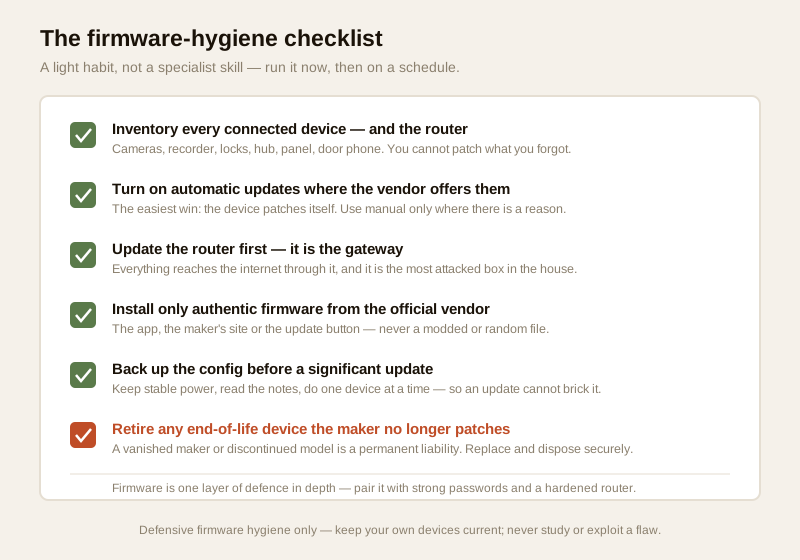
Run this once now, then revisit it on your schedule. It is a light habit, not a specialist skill.
1. Inventory: every connected device and the router listed, with maker, model and where updates are checked.
2. Router first: router firmware checked and updated; default admin password changed.
3. Every device: each camera, recorder, lock, hub, panel and door phone checked for an update.
4. Auto-update on: enabled wherever the vendor offers it and it is safe to.
5. Authentic only: every update taken from the official app, site or update button — never a modded or random file.
6. Update carefully: release notes read, power stable, config backed up, one device at a time.
7. End-of-life: any device the maker no longer patches is retired and replaced, and the old one disposed of securely.
8. Schedule: a recurring reminder set to walk the inventory and re-check.
9. Defence in depth: firmware paired with strong passwords and a hardened router.
10. Life-safety & data: no update ever leaves an escape-route lock unable to fail-safe; retired devices wiped of footage and logs.
You can gauge where your overall setup stands with the home-security risk scorecard.
When to bring in a professional. Making an inventory, turning on auto-update, checking the router, applying app-driven updates and retiring dead devices are all yours to do. Bring in a qualified IT or security professional for a building-scale estate of devices, for a society NVR that manages many cameras, for a recorder or lock that has bricked and needs recovery, and for any lock tied to an escape route where fail-safe egress must be preserved. If a device behaves strangely after an update in a way a proper reset does not fix, use the vendor's official support and treat a suspected compromise as a reportable incident.
Key takeaways
- Firmware is the software inside every security device — and updating it patches holes the maker already found and fixed. An unpatched device stays open to holes that are already public; keeping firmware current is one of the most neglected yet most important home defences.
- Update the router first — it is the gateway and the most attacked — then every device, leaving nothing out. Turn on automatic updates wherever the vendor offers them and it is safe to.
- The end-of-life problem is the one you must not ignore: when a vendor stops issuing updates, the device is a permanent liability and should be retired and replaced. A vanished maker or a discontinued model will never be patched again.
- Only install authentic firmware from the official vendor — never modded or random files — and update carefully: read the notes, keep stable power, back up the config, do one device at a time.
- You cannot patch what you forgot you own. Keep an inventory of every connected device and the router, check on a schedule, and pair firmware with strong passwords and a hardened router as part of defence in depth.
Where to go next
- Start at the security-system cybersecurity pillar and the cybersecurity sub-hub.
- Build the fundamentals alongside firmware: password management, secure Wi-Fi for security devices and backup and recovery.
- Handle the lifecycle right: assess a maker's update record with the vendor cybersecurity assessment, and retire old gear with secure device disposal.
- Gauge your overall exposure with the home-security risk scorecard, then return to the security hub.
References
- Digital Personal Data Protection Act, 2023 — a security recorder's footage and access logs are personal data; a retired or replaced device may still hold them, so wipe or securely dispose of it, and delete data you no longer need.
- CERT-In (Indian Computer Emergency Response Team) — India's national incident-response body; treat a device compromise, especially after a suspicious update, as a reportable cyber incident and follow current CERT-In guidance.
- NIST, OWASP IoT and CIS security best-practice frameworks — general, vendor-neutral guidance on patch management, update discipline, device inventory and end-of-life handling; verify the current edition of any framework before relying on it.
- Manufacturer firmware pages, release notes and support policies — check on the maker's own site how long a model is supported, whether updates are signed, and how to recover a failed update; verify a device's update lifespan before buying.
- National Building Code of India (SP 7), Bureau of Indian Standards, and local fire and life-safety bye-laws for any firmware-updated lock or control on an escape route; verify the current edition via the BIS catalogue: https://www.services.bis.gov.in/
This is an educational overview, not legal advice, and it deliberately covers only how to keep firmware current on devices you own — never how to exploit any flaw. Applying updates to a lock or recorder carries a small bricking risk; update on stable power with a config backup, keep any escape-route lock fail-safe, dispose of retired devices securely, and verify any standard's current status via the BIS catalogue before relying on it.
Export this guide
Related Guides — Deep-dive reading
Complete Guide to Security System Cybersecurity in India (2026): Protecting the Systems That Protect You
The cameras, locks, alarms and door phones you install to feel safer are internet-connected computers that can themselves be attacked, and an insecure one is worse than none. This pillar maps the whole attack surface — devices, network, accounts and data, operations — and points to every guide that hardens it.
SecurityCCTV Remote Access in India (2026): Watch From Your Phone, Safely
How to view your own cameras from anywhere without leaving the front door open to the internet — change the defaults, use strong credentials and 2FA, keep firmware current, prefer the vendor's secure cloud relay or a VPN, segment the camera network, and treat footage as personal data.
SecuritySmart Security Cybersecurity in India (2026): Hardening the Home That Watches Itself
Every connected security device is also a way in for an attacker, and an insecure smart camera or lock is worse than none because it gives false safety while exposing your home. This is the plain hardening checklist a homeowner can actually do: passwords, two-factor, updates, a wise buy, and a segmented network.
SecurityRelated Tools — Try Free
Access-Control Battery-Backup Calculator
Size the standby battery so an access system keeps running through a power cut, with an egress life-safety note.
Battery BackupNVR Channel Calculator
What size recorder a system needs with room to grow, plus a check on its incoming bandwidth.
NVR ChannelsApartment Video Door System Planner
Enter flats, entrances, floors and guard desk for a first-pass building intercom plan — door stations, indoor monitors, guard station, the right architecture and an indicative cost band.
Building Planner