
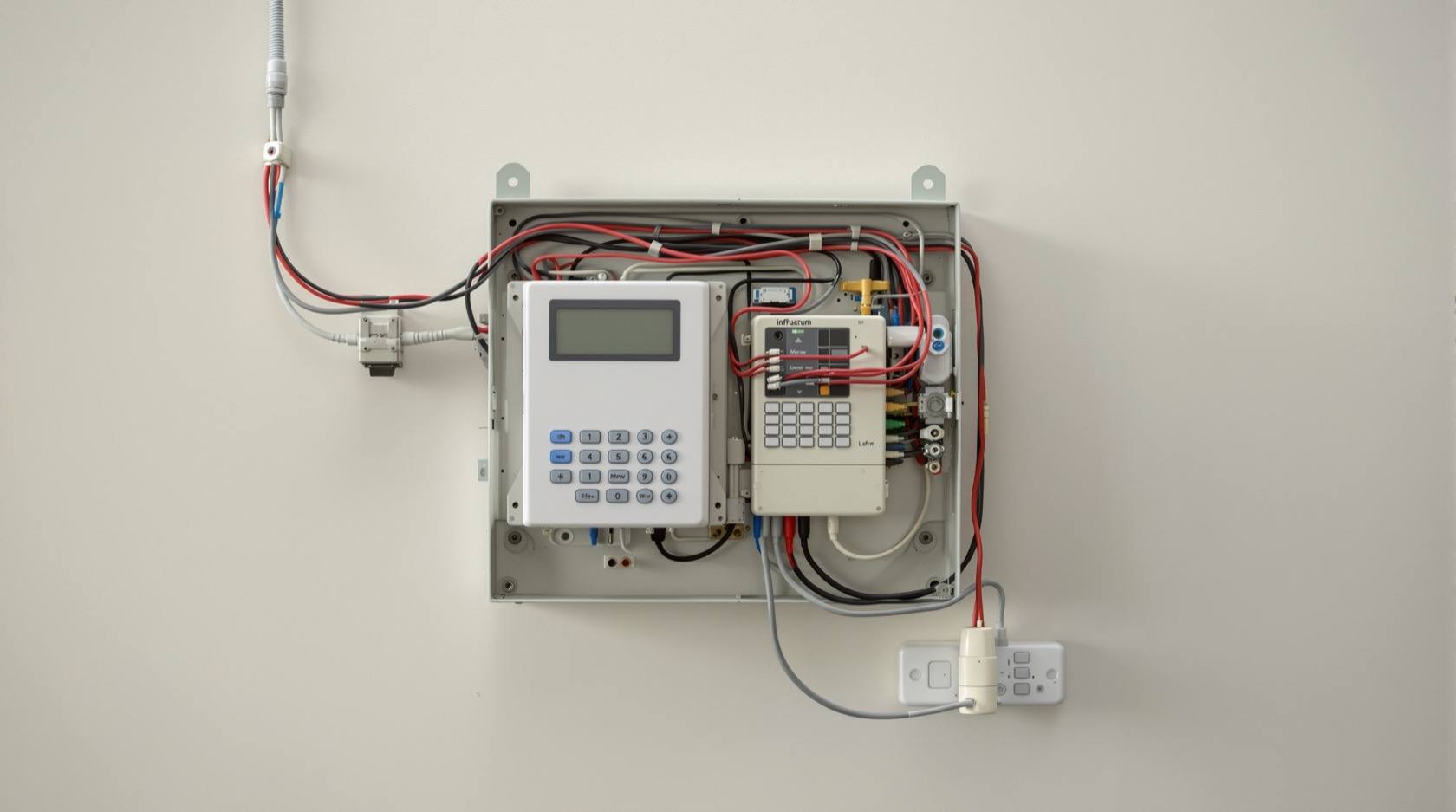
Alarm System Cybersecurity in India (2026): Protecting the Alert Path and the Arming Account
An intrusion alarm is only useful if it reliably detects and reliably delivers the alert. This professional guide hardens both cyber weak points defensively: the arming account and app, and the communication path — with backup paths, a local siren, encrypted supervised sensors, current firmware and a segmented network.
An intrusion alarm earns its keep in exactly two moments: when it detects something wrong, and when it delivers that alert to someone who acts. Everything else — the sensors, the keypad, the app, the monitoring contract — exists to make those two moments reliable. So when we talk about the cyber security of an alarm, we are really talking about protecting detection and delivery from being quietly defeated. A camera that gets hacked leaks your privacy; an alarm that gets defeated leaves you thinking you are protected when you are not. That false confidence is the specific danger here.
Alarm system cybersecurity is the defensive discipline of hardening your own alarm so its alert cannot be silenced and its arming cannot be taken over. This guide is written for the professional who specifies, installs and maintains systems — RWAs, facility managers and serious homeowners — and it is strictly protective. It never explains how to defeat an alarm; every weakness named below is named so you can close it. It sits under the security-system cybersecurity pillar in the cybersecurity sub-hub, alongside the complete burglar-alarms guide.
Scope & safety. This guide helps you harden an alarm you own or manage: the arming account, the app, the communication path, the sensors, the firmware and the network. It never explains how to bypass, jam, replay or attack any alarm — vulnerabilities appear only as things to specify against and fix. A cyber or lockdown control must never trap people: any alarm-linked door or lockdown must fail-safe for egress, so a fire or fault always leaves a free way out. Alarm logs, arm/disarm records and any resident data are personal data under the Digital Personal Data Protection Act, 2023; report a serious compromise to India's national CERT (CERT-In). For anything beyond these basics, engage a qualified IT/security professional. This is educational guidance, not legal advice.
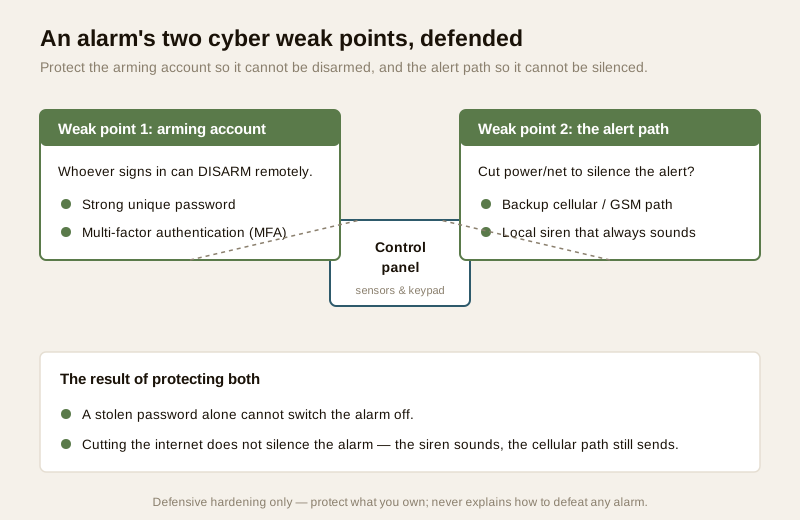
The two weak points: the arming account and the alert path
A traditional bells-only alarm had almost no cyber surface — it was wire, a battery and a siren. A modern connected alarm adds two things worth guarding above all others:
1. The arming account and app — whoever can sign in can, in effect, disarm the system. A weak alarm-app account is a way to switch the alarm off remotely, and it deserves the same care as a physical key to the panel.
2. The communication path — the route the alarm uses to raise the alert (to your phone, to a monitoring station, to the guard). If that path can be cut by simply pulling the power or the internet, the alarm can be silenced without ever touching a sensor.
Everything else in this guide supports those two. Get the account and the path right and you have closed the two failures that turn an alarm into expensive decoration.
Harden the arming account and app
For any app-based alarm, the account that arms and disarms the system is a control surface. Treat it exactly like the master key.
- Change every default first. The classic India gap is a panel or app still on admin/admin, or a keypad still on 1234, months after commissioning. Before the system is handed over, change the panel admin password, the installer code and the default user PINs. Leaving defaults is the single most common — and most avoidable — exposure.
- Use a strong, unique password. The arming account should use a long, unique passphrase used nowhere else, held in a password manager. A leak on an unrelated site must never reach your alarm. See password management.
- Turn on multi-factor authentication. If the app supports it, MFA means a stolen or guessed password alone cannot disarm the system — a second factor is required. On a disarm-capable account this is not optional hygiene; it is the biggest single upgrade. See multi-factor authentication.
- Give people named logins, not a shared password. Add the guard, the family and any staff as separate named users with their own credentials and their own PINs. That way you can revoke one person — a departed guard, an ex-tenant — without changing everyone's access, and the arm/disarm log actually tells you who acted.
- Review who can disarm, and revoke on departure. Every few months, read the user list. Any code or login belonging to someone who has left should be removed the day they leave. This is the digital equivalent of collecting the key.
| Account habit | Why it protects the alarm | Cadence |
|---|---|---|
| Change all defaults at commissioning | Removes the admin/admin and 1234 gaps | Before handover; verify quarterly |
| Strong, unique password | A leak elsewhere cannot reach the arming account | Set once; change if a breach is reported |
| Multi-factor authentication | A stolen password alone cannot disarm | Turn on now; keep on |
| Named users, not a shared login | Revoke one person cleanly; a real who-armed log | At every add/remove |
| Revoke on departure | The digital "take the key back" | The day someone leaves |
Be honest about the communication path
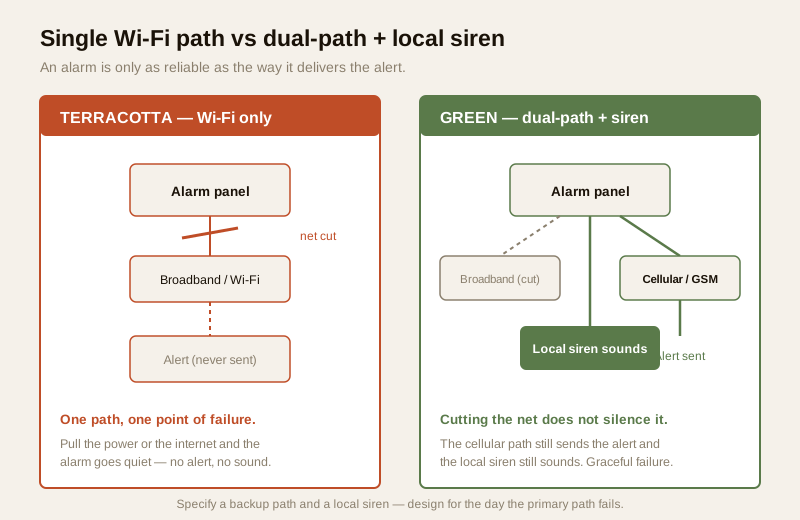
This is the heart of alarm cyber-resilience, and the place where cheap systems quietly fail. An alarm that reports only over home Wi-Fi or broadband has a single point of failure that anyone can reach: the power and the internet. Pull the ONT, trip the mains, or let the broadband simply drop, and a Wi-Fi-only alarm goes quiet with no alert sent. That is the classic "cut the internet, silence the alarm" weakness — and it is defeated not by cleverness but by design.
The defence is graceful degradation: the system must still do something useful when its primary path fails.
- Specify a backup communication path. A GSM/cellular alarm channel, independent of the household broadband, means that if the internet is cut the alert still goes out over the mobile network. A dual-path system (broadband plus cellular) is the professional standard for anything you actually rely on — the paths back each other up.
- Keep a local siren that sounds regardless. Even if every remote path is down, a loud local siren and strobe should still trigger on detection. Cutting the net must not equal a silent break-in. The local siren is the part no remote attacker can switch off by pulling a cable.
- Protect the power. A tamper-resistant enclosure and a healthy backup battery mean pulling the mains does not simply kill the panel — see electrical backup planning for security. Combine that with supervised comms and a cut line becomes an alert, not a silence.
- Use supervised monitoring. With a monitoring service or remote monitoring, a supervised path is polled regularly, so if the alarm stops checking in — because a line was cut — the monitoring station notices the silence itself and can respond. A path that fails loudly is far safer than one that fails quietly.
Specify wireless sensors that fail safely
Wireless sensors and key fobs are convenient and, done well, entirely trustworthy — but the quality gap between good and poor wireless is a cyber question, so specify for it. You do not need to understand any attack to buy well; you need to insist on the protective properties a serious system already has.
- Encrypted, rolling protocols. Reputable wireless alarm sensors and fobs use encrypted communication with rolling (changing) codes rather than a fixed, cleartext signal. Specify encryption as a requirement, not a nice-to-have.
- Supervised links. A supervised sensor checks in with the panel at regular intervals, so a sensor that goes quiet — a lost link, a removed device, a flat battery — is flagged as a fault rather than silently ignored. That supervision is what turns a missing signal into an alert.
- Anti-tamper design. Sensors, keypads and the panel should have tamper switches that trigger if a housing is opened or removed. Combined with supervision, tampering becomes visible.
The professional posture is simple: choose devices whose datasheets state encrypted, supervised and tamper-monitored operation, and treat a system that cannot demonstrate all three as a buying red flag. That is the whole of it — you protect by specifying the good properties, never by studying the bad ones.
Keep firmware current and choose a reputable vendor
An alarm panel, its hub and its app are software, and software gets security fixes. An un-updated panel is a door left on the latch.
- Apply firmware updates. Let the panel and app apply security updates, ideally on mains power with a healthy battery so a mid-update power loss is avoided. The firmware-updates guide sets out the cadence.
- Choose a vendor with a real update track record. A reputable maker patches older models for years; an unknown white-label panel may have shipped once and never been fixed. A clear way to report a security concern is itself a sign of a serious vendor — see installer and vendor evaluation.
- Prefer systems that work without the cloud. A panel that keeps detecting and sounding locally even when the maker's cloud is down is more resilient than one that is inert without it.
Segment the network and secure the Wi-Fi
The alarm rides on your network, so the network is part of its security.
- Put the alarm and its hub on a segmented network or VLAN. Network segmentation keeps the alarm's controller separated from general devices, so a compromised cheap gadget elsewhere cannot reach the panel. For any managed building this is standard practice, not a luxury.
- Run the Wi-Fi on WPA2 or WPA3, never open or outdated encryption, and change the router's default admin password — see secure Wi-Fi for security devices and network readiness.
- Keep the router itself patched. The whole system reaches the world through it, so it deserves the same firmware discipline as the panel.
Monitoring-service account security: who can disarm
If a central monitoring station or remote monitoring service can act on your system, that relationship is a control surface too.
- Define and limit who can disarm or cancel an alarm. Maintain a short, current list of authorised persons and pass-phrases, and review it whenever staff or residents change. A monitoring account is a way in; treat it accordingly.
- Insist on named operator access and audit logs from the monitoring provider, so every arm, disarm and cancellation is attributable. Ask how the provider secures its own remote access to your system, and prefer providers who use MFA and least-privilege internally.
- Agree a verification protocol — how the station confirms a real cancellation versus a coerced or spoofed one — so a phoned-in "stand down" cannot casually switch protection off.
| Path / surface | The risk it carries | The protective control |
|---|---|---|
| Arming account / app | Remote disarm by whoever signs in | Strong unique password + MFA; named users |
| Communication path | "Cut the net, silence the alarm" | Dual-path (GSM backup) + local siren + supervision |
| Wireless sensors / fobs | A quietly lost or spoofed signal | Encrypted, supervised, anti-tamper devices |
| Panel / app firmware | Un-patched known flaws | Regular updates; reputable vendor |
| Home / building network | A compromised device reaching the panel | Segmentation/VLAN + WPA2/WPA3 + router patched |
| Monitoring-service access | Unauthorised or spoofed disarm | Named operators, audit logs, verification protocol |
Life-safety and data: two lines you never cross
Two principles override every cyber control on an alarm.
Fail-safe egress always wins. Where an alarm ties into any lockdown, mag-lock or door control, the interlock must never be able to trap people. A fire, a fault or a cyber problem must always leave a free, mechanical way out on any escape route. A security control that could hold a door shut against a person fleeing is not a security control — it is a hazard. Any such integration is a licensed job, and life-safety code compliance is not negotiable.
Alarm data is personal data. Arm/disarm logs, event histories, video-verification clips and resident or staff lists are personal data — often sensitive — under the Digital Personal Data Protection Act, 2023. Collect only what you need, restrict who can view it, retain it only as long as useful, and delete a departed user's records. If a serious compromise occurs — an account takeover, a breached monitoring link — treat it as an incident: contain it, preserve logs, and report to India's national CERT (CERT-In) as appropriate. Good remote-monitoring hygiene treats these logs as the sensitive records they are.
An alarm hardening checklist
Run this at commissioning and revisit it every few months. It is a light habit, not a specialist skill.
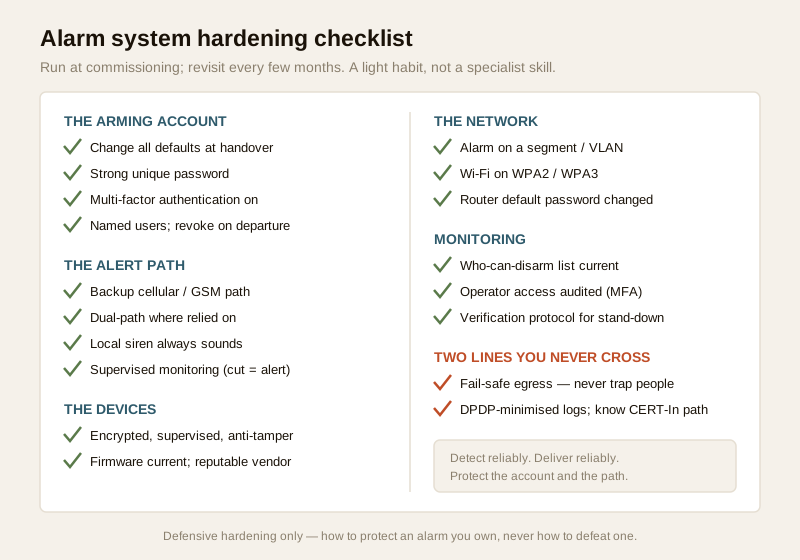
1. Defaults: every default password, installer code and keypad PIN changed at commissioning.
2. Account: strong unique password, MFA on, named users, ex-users revoked.
3. Alert path: a backup cellular path specified; dual-path for anything relied on.
4. Local siren: sounds on detection even if every remote path is down.
5. Supervision: monitoring is supervised so a cut line raises an alert, not silence.
6. Sensors: encrypted, supervised, anti-tamper — verified on the datasheet.
7. Firmware: panel and app current; vendor still ships updates.
8. Network: alarm on a segment/VLAN, WPA2/WPA3, router password changed.
9. Monitoring: who-can-disarm list current; operator access audited.
10. Life-safety & data: egress fail-safe; logs DPDP-minimised; incident-reporting path known.
You can gauge where a system stands overall with the home-security risk scorecard.
When to bring in a professional. Changing passwords, turning on MFA, reviewing users, specifying a backup path and requesting audit logs are yours to drive. Hand the mains wiring, the panel installation, any lockdown or mag-lock interlock, and every fire-egress interface to a licensed installer and electrician — a networked alarm must fail-safe and keep free exit, and that is not a DIY call. If an account or panel behaves strangely in a way a reset does not fix, contact the vendor's official support, preserve logs, and treat a suspected breach as a reportable incident.
Key takeaways
- An alarm has two cyber weak points: the arming account and the alert path. Harden the account with a strong unique password and multi-factor authentication so it cannot be disarmed remotely, and harden the path so it cannot be silenced.
- Be honest about the communication path. A Wi-Fi-only alarm can be silenced by cutting the power or internet; specify a backup cellular/GSM path (dual-path) and a local siren that always sounds, and use supervised monitoring so a cut line raises an alert.
- Specify wireless sensors that fail safely — encrypted, supervised, anti-tamper — and treat a system that cannot demonstrate all three as a red flag. You protect by specifying the good properties, never by studying attacks.
- Keep firmware current, choose a reputable vendor, and segment the network (VLAN + WPA2/WPA3 + changed router password) so a compromised device cannot reach the panel.
- Secure the monitoring relationship and never cross two lines: a defined who-can-disarm list with audit logs; fail-safe egress that no cyber control can defeat; and DPDP-minimised logs with a known CERT-In incident-reporting path.
Where to go next
- Start at the security-system cybersecurity pillar and the cybersecurity sub-hub.
- Build the fundamentals: password management, multi-factor authentication, firmware updates, network segmentation and secure Wi-Fi.
- Understand the alarm itself: the complete burglar-alarms guide, app-based alarms, GSM alarms, alarm monitoring services and remote security monitoring.
- Gauge your overall exposure with the home-security risk scorecard, then return to the security hub.
References
- Digital Personal Data Protection Act, 2023 — an alarm's arm/disarm logs, event histories, video-verification clips and user lists are personal (and often sensitive) data; minimise collection, restrict access and delete a departed user's records.
- CERT-In (Indian Computer Emergency Response Team) — India's national incident-response body; treat an account takeover or breached monitoring link as a reportable cyber incident and follow current CERT-In guidance.
- NIST, OWASP IoT and CIS security best-practice frameworks — general, vendor-neutral guidance on device hardening, segmentation, MFA and update discipline; verify the current edition of any framework before relying on it.
- Manufacturer specifications and the monitoring provider's security summary — verify encrypted and supervised wireless, dual-path/cellular backup, firmware-update history, and how the provider secures its own remote access, on the maker's own datasheet before specifying.
- National Building Code of India (SP 7), Bureau of Indian Standards, and local fire and life-safety bye-laws for any alarm-linked door, lockdown or escape-route interlock; verify the current edition via the BIS catalogue: https://www.services.bis.gov.in/
This is an educational overview, not legal advice, and it deliberately covers only how to harden an alarm you own or manage — never how to defeat, jam or attack any alarm. Mains wiring, panel installation and any fire-egress or lockdown interlock are qualified professional tasks; engage licensed installers, keep egress fail-safe, and verify any standard's current status via the BIS catalogue before relying on it.
Export this guide
Related Guides — Deep-dive reading
Complete Guide to Security System Cybersecurity in India (2026): Protecting the Systems That Protect You
The cameras, locks, alarms and door phones you install to feel safer are internet-connected computers that can themselves be attacked, and an insecure one is worse than none. This pillar maps the whole attack surface — devices, network, accounts and data, operations — and points to every guide that hardens it.
SecuritySmart Security Cybersecurity in India (2026): Hardening the Home That Watches Itself
Every connected security device is also a way in for an attacker, and an insecure smart camera or lock is worse than none because it gives false safety while exposing your home. This is the plain hardening checklist a homeowner can actually do: passwords, two-factor, updates, a wise buy, and a segmented network.
SecurityCCTV Remote Access in India (2026): Watch From Your Phone, Safely
How to view your own cameras from anywhere without leaving the front door open to the internet — change the defaults, use strong credentials and 2FA, keep firmware current, prefer the vendor's secure cloud relay or a VPN, segment the camera network, and treat footage as personal data.
SecurityRelated Tools — Try Free
Security Vendor Evaluation Scorecard
Rate a CCTV/security installer or guarding agency across eight weighted criteria for a hire / negotiate / walk-away verdict.
Vendor ScorecardBurglar Alarm System Selector
Answer a few questions about your property, cabling, coverage, monitoring and power and get the right burglar alarm — wired / wireless / hybrid, self or professionally monitored — with the design non-negotiables.
Alarm SelectorCPCB Compliance Checklist for STPs
Tick off CPCB/SPCB outlet standards, monitoring duties and record-keeping to score your sewage treatment plant's compliance readiness.
Checklist