
Preventing Camera Hacking in India (2026): A Homeowner's Protection Guide
The stories are real and frightening: families discovering a stranger had been watching, and even speaking, through their baby monitor or home camera. This defensive guide shows how to make sure it never happens to yours with a plain, layered protection checklist you can actually follow.
There is a particular kind of horror story that keeps coming back, from cities all over India and the world: a family sets up a home camera or a baby monitor for peace of mind, and later discovers that a complete stranger had been watching the feed for weeks — sometimes even talking to the child through the camera's own speaker. The camera meant to protect the home had quietly become a window into it. It is the exact opposite of what the family wanted, and it is entirely preventable.
That is what this guide is about. Preventing camera hacking is not some deep technical art; it is a short list of ordinary, layered habits that, done together, make your camera an extremely hard target and turn those horror stories into stories that happen to other people's cameras — the neglected ones. This is written for the ordinary homeowner, in plain language, and it is strictly protective: it never explains how a camera gets attacked as any kind of how-to. Every risk below appears only as "here is how to make sure this never happens to yours." It sits under the security-system cybersecurity pillar in the cybersecurity sub-hub, alongside the deeper CCTV cybersecurity guide.
Scope & safety. This guide helps you protect a camera you own — with passwords, MFA, updates, careful buying, safe remote access, segmentation, placement and watchfulness. It never explains how anyone breaks into a camera; every threat is named only so you can shut it out. Camera footage is personal data under the Digital Personal Data Protection Act, 2023; if you ever suspect a real compromise, treat it as an incident and report a serious one to India's national CERT (CERT-In). For anything beyond these basics, ask a trustworthy installer or IT person. This is educational guidance, not legal advice.
Why an insecure camera is worse than no camera
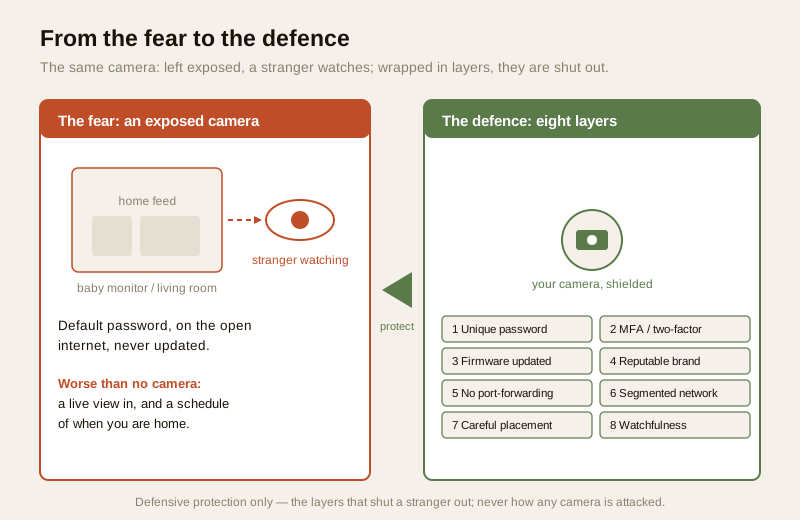
A camera you never installed can, at worst, do nothing. An insecure camera can do something far worse than nothing: it can give you a comforting little live feed on your phone while quietly streaming your living room, your child's room or your front door to someone you will never meet. It hands a stranger the two things a burglar or a stalker would most want — a view inside, and a schedule of when you are home.
The India reality behind the scary stories is depressingly ordinary. It is almost never a genius attacker. It is a ultra-cheap, no-name cloud camera bought online, plugged in, left on its factory-default password, and reachable from the open internet. It is a DVR still on admin/admin two years after the installer left. It is a camera whose maker shipped it once and never sent a single security update. None of that requires cleverness to exploit — and, just as importantly, none of it requires cleverness to prevent. The whole of this guide is turning those ordinary weaknesses into ordinary, closed doors.
The protection checklist, one layer at a time
No single habit below is the whole answer, and you do not need to be technical to do any of them. Think of them as layers: each one alone helps, and together they make your camera a target not worth anyone's time. This is defence in depth, in plain clothes.
1. Never use the default password
This is the single most important step, and the one the scary stories almost always come down to. A camera or DVR left on the password it shipped with — or on admin/admin, or 1234 — is effectively unlocked. The very first thing you do, before the camera ever faces the internet, is change the default password to a strong, unique one used nowhere else, and stored in a password manager so you never have to remember it.
If you ever hear that your camera brand or the app behind it has had a security breach, change that password again rather than assuming you were unaffected. A password is only as safe as the last day it was known to be secret. See password management for how to make and keep strong ones.
2. Turn on MFA so a stolen password is not enough
Even a strong password can leak — reused somewhere, phished, or spilled in a breach of some unrelated website. Multi-factor authentication (MFA / two-factor) on the camera's account means that a password alone is not enough to sign in: a second step (a code or an approval on your phone) is also required. So even if your password is stolen, the stranger still cannot get in. On the account that can watch your home, this is the highest-value switch you can flip. Turn it on the day you set the camera up — see multi-factor authentication.
3. Keep firmware updated, and retire cameras the maker abandons
A camera is a little computer, and its firmware is software that gets security fixes over time. A camera running years-old firmware is a door left on the latch. Turn on automatic updates if the app offers them, and otherwise check for updates every few months. Just as important: when a maker stops supporting a model — no more updates, ever — that camera is quietly becoming less safe every month. Plan to retire and replace cameras the vendor no longer supports, especially any that face the internet. The firmware-updates guide sets out a simple cadence.
4. Buy from reputable brands; be wary of ultra-cheap no-name cloud cameras
The frightening feeds almost always come from the cheapest end of the market: no-name cloud cameras that have, in the past, shipped with hardcoded backdoor accounts or default passwords that cannot even be changed, and with no update support at all. A camera that costs almost nothing and phones home to an unknown overseas server is not a bargain — it is a risk you have invited inside. Prefer an established brand with a clear security-update track record and a real way to report a problem. You are not paying for a logo; you are paying for someone who will fix a flaw when one is found. See vendor cybersecurity assessment and installer and vendor evaluation.
5. Do not expose the camera or DVR directly to the internet
This is the quiet mistake that turns a private camera into a public one. To watch from outside the home, people are sometimes tempted — or an installer takes a shortcut — to open the camera or DVR straight onto the internet by port-forwarding it on the router. That naive shortcut is exactly what puts cameras on the open internet where they get found. Do not do it. You do not need to. Use the vendor's own secure app, which connects safely without exposing the device, or a VPN into your home network so only you can reach the camera. The result is the same convenience — watch from anywhere — without leaving the front door open. See secure remote CCTV access and the deeper CCTV cybersecurity guide.
6. Put cameras on a segmented network
If a camera can talk to everything else in your home — your laptop, your phone, your other devices — then a problem with the camera becomes a problem for all of them, and vice versa. Network segmentation keeps your cameras and other smart gadgets on a separate slice of your network (often a "guest" or IoT network on the router) so they are walled off from your personal devices. It is a one-time router setting that quietly limits how far any single weak device can reach. And make sure the network itself is sound: run Wi-Fi on WPA2 or WPA3, never open, and change the router's own default admin password. See network segmentation for IoT and secure Wi-Fi for security devices.
7. Mind placement — privacy is a protection too
Some of the worst camera stories are not really "hacks" at all; they are cameras pointed where a camera should never be. The simplest privacy protection is placement. Never put a camera in a bedroom or a bathroom — the harm if that feed ever leaks is enormous, and no live view is worth it. For any indoor camera, prefer one with a physical privacy shutter or a genuine off / privacy mode, and use it when you are home so the camera simply is not looking when it does not need to be. A camera that is physically shuttered cannot leak a thing, no matter what. See smart-security privacy and, for the doorbell equivalent, video door phone privacy.
| Protection layer | What it stops | Do it |
|---|---|---|
| Unique strong password | An unlocked camera on a default/known password | Before it faces the internet; change again after any breach |
| MFA / two-factor | A stolen password alone getting in | Turn on the day you set up |
| Firmware current; retire abandoned models | A latch-open, unpatched camera | Auto-update on; replace unsupported cameras |
| Reputable brand | Hardcoded backdoors, never-patched no-names | Choose at purchase, not after |
| No direct internet exposure | A private camera made public | Vendor app or VPN; never naive port-forwarding |
| Segmented network | One weak device reaching everything | One-time router setting; WPA2/WPA3 |
| Careful placement + privacy shutter | The harm of a leaked private-room feed | No bedroom/bathroom cams; shutter when home |
| Watch for warning signs | A quiet, ongoing compromise | Know the signs; act fast (below) |
Watch for the warning signs — and know what to do
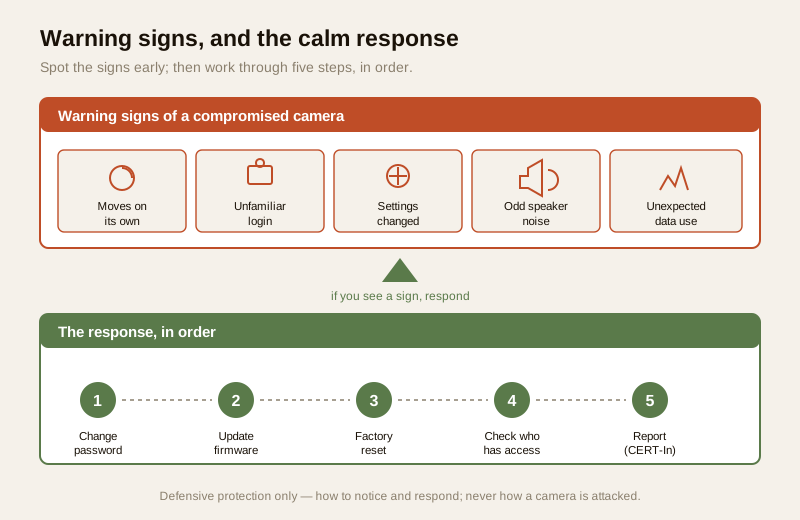
Most of the time, a well-protected camera simply works. But it pays to know the handful of signs that something may be wrong, so a problem is caught early rather than running for weeks. Treat these as prompts to check, not to panic.
- The camera moves on its own — a pan-tilt camera turning, tracking or pointing somewhere you did not send it.
- Unfamiliar logins or sessions — the app shows a sign-in you do not recognise, from a place or device that is not yours.
- Settings changed by themselves — the password stopped working, notifications were turned off, a new user appears, or recording was disabled.
- Odd lights or sounds — the camera's status light behaving strangely, or the two-way-talk speaker making noise when no one in the family is using it.
- Unexpected data use — a camera sending far more data than usual can be a hint that its feed is going somewhere it should not.
If you notice any of these, work calmly through this response, in order:
1. Change the password immediately to a new strong, unique one, and sign out all other sessions if the app allows it.
2. Update the firmware to the latest version.
3. Factory-reset the camera if anything still seems off, then set it up fresh with a new password and MFA.
4. Check who has access — review the account's user list and connected apps, and remove anything you do not recognise.
5. Report it — treat a real compromise as an incident: contact the vendor's official support, and for a serious breach, report to India's national CERT (CERT-In). See incident-response planning.
The law and reporting: DPDP and CERT-In
Two things are worth knowing so you act correctly if the worst ever happens. First, the footage from your cameras is personal data — of your family, your visitors, your staff, your neighbours — and it is protected under the Digital Personal Data Protection Act, 2023. That is a good reason to collect only what you need, keep it no longer than useful, and guard access to it. If you run cameras for a housing society or a shared building, that responsibility is larger, not smaller. Second, CERT-In — India's national Computer Emergency Response Team — is the body to which serious cyber incidents are reported. If you ever have real evidence that a camera or its account was compromised, treat it as a reportable incident: preserve what you can, and follow current CERT-In guidance. You will find the fuller version of both in the security-system cybersecurity pillar.
Your camera protection checklist
Keep this somewhere handy and run it whenever you add a camera, and once or twice a year on the ones you already have. It is a light habit, not a technical skill.
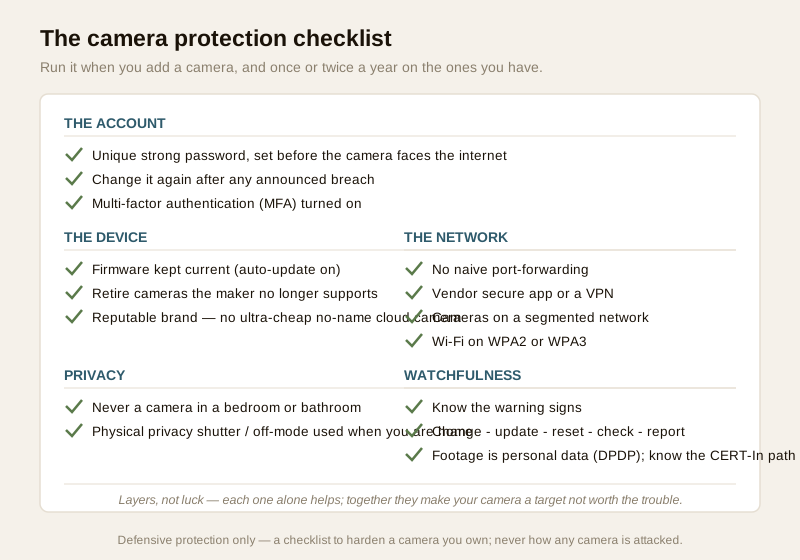
1. Password: default changed to a strong, unique one before the camera faces the internet; changed again after any announced breach.
2. MFA: two-factor turned on for the camera's account.
3. Firmware: auto-update on, or checked every few months; unsupported cameras retired.
4. Brand: a reputable maker with a real update track record; no ultra-cheap no-name cloud camera.
5. Exposure: no naive port-forwarding — remote viewing via the vendor's secure app or a VPN.
6. Network: cameras on a segmented / guest network; Wi-Fi on WPA2 or WPA3; router password changed.
7. Placement: never in a bedroom or bathroom; a physical privacy shutter or off-mode used when you are home.
8. Watchfulness: you know the warning signs and the change-update-reset-check-report response.
9. Data: you collect only what you need and know the CERT-In path for a serious incident.
You can gauge where your whole home stands with the home-security risk scorecard.
When to bring in help. Changing passwords, turning on MFA, updating firmware, choosing a good brand, using the vendor app and setting placement are all yours to do. If you are unsure how to set up a VPN, a segmented / guest network, or how to check whether a camera is exposed to the internet, ask a trustworthy installer or IT person to set it up once and show you — see installer and vendor evaluation. If a camera behaves strangely in a way a reset does not fix, contact the vendor's official support and treat a suspected breach as a reportable incident.
Key takeaways
- An insecure camera is worse than no camera — it gives a stranger a live view inside and a schedule of when you are home. The scary stories are almost always ordinary neglect: a default password on a cheap camera facing the open internet. Ordinary neglect is prevented by ordinary habits.
- Never use the default password, and turn on MFA. A unique strong password (changed again after any breach) plus two-factor means a stolen password alone can never open your camera. These two steps stop most of the horror stories on their own.
- Keep firmware current, retire abandoned models, and buy a reputable brand. Avoid ultra-cheap no-name cloud cameras that have shipped with hardcoded backdoors and no updates.
- Never expose the camera directly to the internet — no naive port-forwarding; use the vendor's secure app or a VPN — and put cameras on a segmented network so one weak device cannot reach everything.
- Placement is protection: never a camera in a bedroom or bathroom, and use a physical privacy shutter when you are home. Know the warning signs and the change-update-reset-check-report response, remember footage is personal data under DPDP, and know the CERT-In path for a serious incident.
Where to go next
- Start at the security-system cybersecurity pillar and the cybersecurity sub-hub.
- Build the fundamentals: password management, multi-factor authentication, firmware updates, network segmentation and secure Wi-Fi.
- Go deeper on cameras: the CCTV cybersecurity guide, secure remote CCTV access, smart-security privacy and vendor cybersecurity assessment.
- Prepare for the worst calmly with incident-response planning, gauge your exposure with the home-security risk scorecard, then return to the security hub.
References
- Digital Personal Data Protection Act, 2023 — camera footage of family, visitors and neighbours is personal data; collect only what you need, restrict access, and keep it no longer than useful.
- CERT-In (Indian Computer Emergency Response Team) — India's national incident-response body; treat a camera or account compromise as a reportable cyber incident and follow current CERT-In guidance.
- NIST, OWASP IoT and CIS security best-practice frameworks — general, vendor-neutral guidance on default-password removal, MFA, updates, segmentation and safe remote access; verify the current edition before relying on it.
- Manufacturer specifications and security pages — verify a camera's firmware-update track record, MFA support, a physical privacy shutter and a clear way to report a security concern on the maker's own materials before buying.
This is an educational overview, not legal advice, and it deliberately covers only how to protect a camera you own — never how anyone attacks, intercepts or breaks into a camera. For a VPN, network segmentation or a suspected breach, engage a trustworthy installer or IT professional, and report a serious incident to India's national CERT (CERT-In).
Export this guide
Related Guides — Deep-dive reading
CCTV Remote Access in India (2026): Watch From Your Phone, Safely
How to view your own cameras from anywhere without leaving the front door open to the internet — change the defaults, use strong credentials and 2FA, keep firmware current, prefer the vendor's secure cloud relay or a VPN, segment the camera network, and treat footage as personal data.
SecurityComplete Guide to Security System Cybersecurity in India (2026): Protecting the Systems That Protect You
The cameras, locks, alarms and door phones you install to feel safer are internet-connected computers that can themselves be attacked, and an insecure one is worse than none. This pillar maps the whole attack surface — devices, network, accounts and data, operations — and points to every guide that hardens it.
SecuritySmart Security Cybersecurity in India (2026): Hardening the Home That Watches Itself
Every connected security device is also a way in for an attacker, and an insecure smart camera or lock is worse than none because it gives false safety while exposing your home. This is the plain hardening checklist a homeowner can actually do: passwords, two-factor, updates, a wise buy, and a segmented network.
SecurityRelated Tools — Try Free
Security Vendor Evaluation Scorecard
Rate a CCTV/security installer or guarding agency across eight weighted criteria for a hire / negotiate / walk-away verdict.
Vendor ScorecardCCTV Placement Compliance Checker
A quick DPDP-grounded privacy and safety self-check for where a camera is pointed — flags the items to fix.
ComplianceApartment Video Door System Planner
Enter flats, entrances, floors and guard desk for a first-pass building intercom plan — door stations, indoor monitors, guard station, the right architecture and an indicative cost band.
Building Planner