
Secure Device Disposal for Security Systems in India (2026): Wipe Before You Sell, Return or Bin It
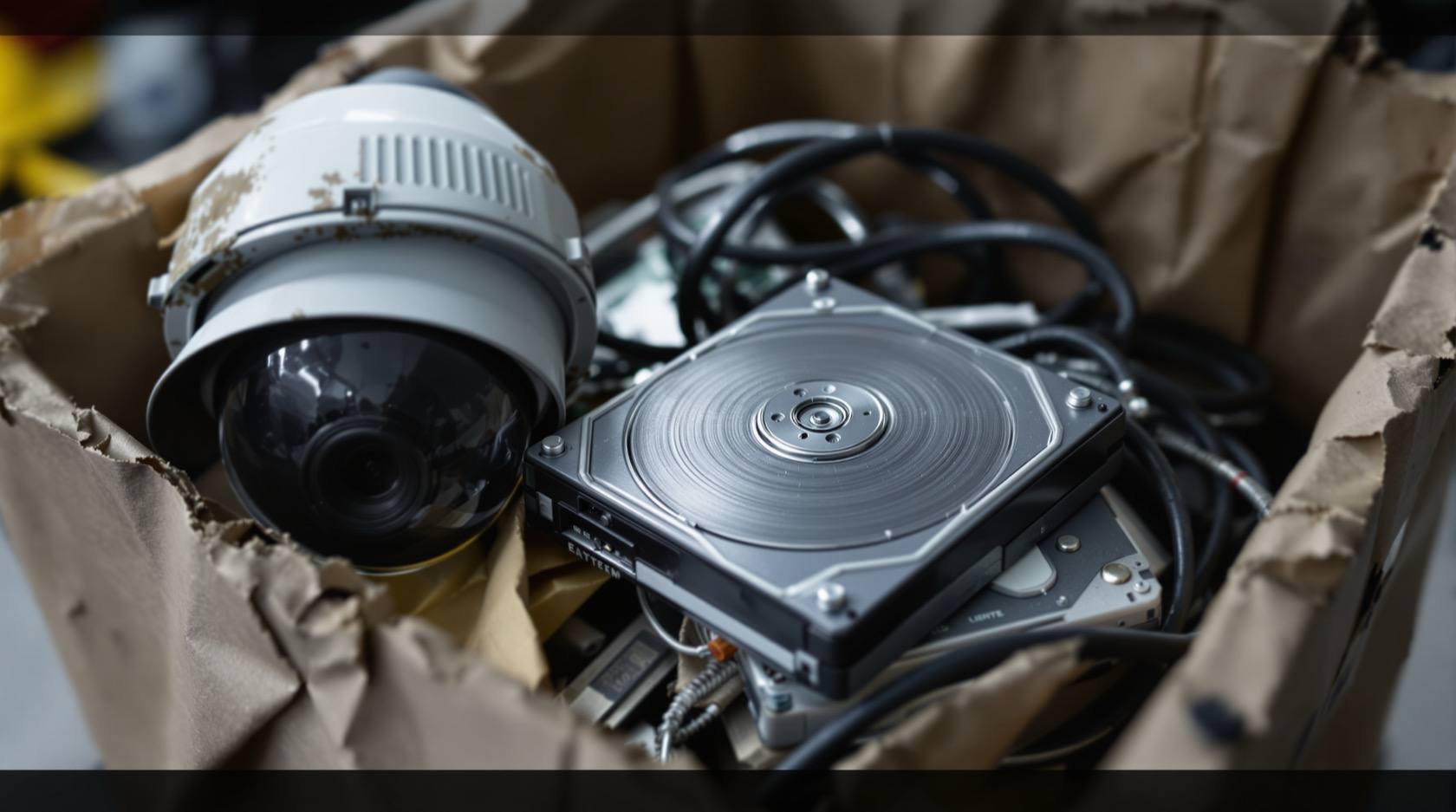
The forgotten end-of-life risk: a security camera, NVR or DVR you sell on OLX, return, hand to a repair shop or give the kabadiwala still holds months of footage, saved Wi-Fi and account passwords, and a live link to your cloud account. This homeowner guide is the secure decommissioning checklist to run before any device leaves your hands.
Most people plan the day a security device is installed. Almost nobody plans the day it leaves. Yet that second day is where a quiet, avoidable leak happens all over India: the old NVR listed on OLX with a year of footage still on its disk; the "dead" DVR handed to the kabadiwala, its drive intact; the glitchy camera dropped at a repair shop with your Wi-Fi password and cloud login still saved inside; the box returned to the seller without a single reset. The device stops being yours, but the data inside it does not stop being sensitive.
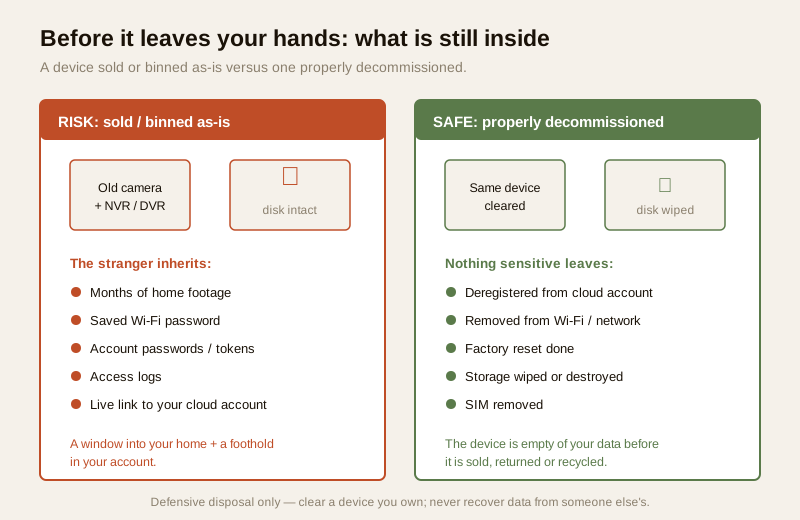
A security device is, by design, a recorder of private life. Before it changes hands it can hold months of footage of your home, your family and your routines; the saved Wi-Fi password and your account passwords; access logs of who came and went; and a live link to your cloud account and home network. Sell it, return it, gift it or bin it without clearing all of that, and you have handed a stranger a window into your home — and, through the network link, sometimes a foothold in your account. Secure device disposal is the discipline of closing that window before the device leaves your hands. This homeowner guide is the plain, do-it-in-order checklist to do exactly that. It sits under the security-system cybersecurity pillar in the cybersecurity sub-hub, and it is the piece most guides forget.
Scope & safety. This guide helps you safely retire a device you own — wipe it, deregister it and dispose of it so it cannot leak your data or your account to the next holder. It never explains how to extract data from someone else's discarded device; every risk named below is named so you can prevent it on your own kit. The footage, access logs and account data on a security device are personal data under the Digital Personal Data Protection Act, 2023 — you remain responsible for the personal data on a device you discard. If a device already left your hands with data on it, or an account behaves strangely after disposal, treat it as an incident (see incident-response planning) and, for a serious compromise, report to India's national CERT (CERT-In). For destroying enterprise-grade or many drives, or if unsure, use a qualified IT professional or a certified data-destruction service. This is educational guidance, not legal advice.
What is still inside a "finished" device
The core mistake is thinking a device that no longer works, or that you have "reset", is empty. It rarely is. A modern security device is a small computer, and it remembers far more than its live picture.
- Recorded footage. An NVR, DVR or camera with an SD card can hold weeks or months of recordings — the single most sensitive thing in the box. Pulling the power does not erase it; the disk keeps what it wrote.
- Saved Wi-Fi and account passwords. To connect, the device stored your Wi-Fi password and, often, tokens or credentials for your cloud account. A device that can still rejoin your network, or still sign in to your account, is a leak of both.
- Access logs and settings. Event histories, motion logs, door-open records for a linked lock or video door phone, and your configuration — names, schedules, contacts.
- A live link to your cloud account. This is the one people miss most. If you sell a camera still registered to your account, the buyer may end up inside your account view — or you inside theirs — until it is properly deregistered. The device is a key that is still cut to your lock.
The secure-disposal checklist, in order
Run these steps in order for any device that is about to be sold, returned, gifted, repaired, recycled or thrown away. Do not skip a step because the device "looks dead" — a dead device with a live disk is the classic leak.
1. Deregister it from your cloud account and remove it from your network
Do this before you reset, because a reset can sometimes leave the cloud link dangling.
- Remove the device from your app and cloud account. In the maker's app, delete or "unbind" the device from your account so it is no longer associated with you. This severs the link that could otherwise let the next owner into your view — or leak the new owner into your account.
- Remove it from your Wi-Fi and network. Delete it from the router's device list and, if it had a fixed reservation or port-forward, remove those too, so it cannot silently rejoin your network later. Good password management also means that if a device stored a shared Wi-Fi password, you consider rotating that password after the device is gone.
- Revoke any shared access tied to that device — guest logins, family shares, an installer's access.
2. Factory reset it — properly, and know its limits
A factory reset returns settings to default and clears many saved credentials — do it, but understand exactly what it does not guarantee.
- Do a real factory reset, not just a reboot: the button-hold or the app's "reset to factory defaults", following the maker's instructions.
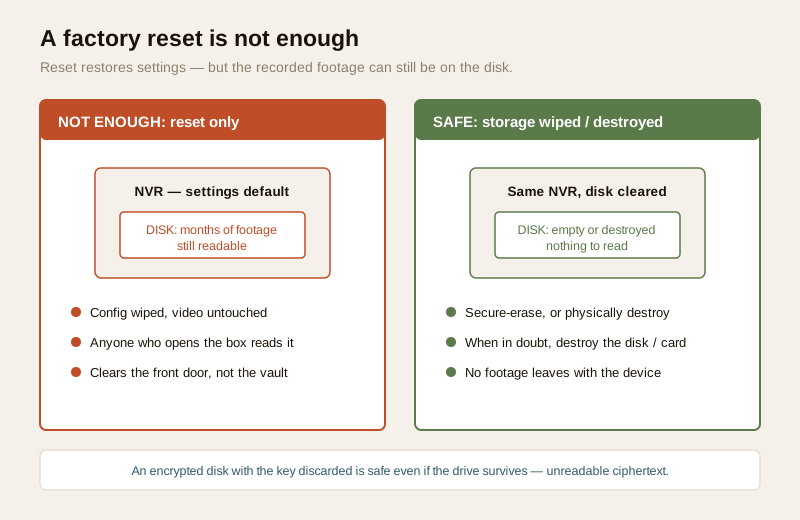
- Know that a simple reset may NOT erase recorded footage. On many NVRs and DVRs, "factory reset" restores settings but leaves the recordings on the hard disk untouched — the video is still there for anyone who reads the drive. Likewise an SD card in a camera is often left intact. Treat a reset as necessary but not sufficient: it clears the front door, not the vault. That is why the next step exists.
3. Wipe or destroy the storage — physically destroy when in doubt
This is the step that actually protects the footage, and the one most people skip.
- Securely erase the disk or SD card. Where the device or a computer offers a genuine format/erase or secure wipe of the storage (not just "delete recordings" in the UI), use it. A full format is far better than deleting files, which only hides them.
- When in doubt, physically destroy it. For any disk or card that held sensitive footage, and you are not fully sure it was securely wiped, physically destroy the drive or card — this is the only guarantee an ordinary homeowner can rely on. A drilled, snapped or shredded disk cannot be read back. Send the destroyed media to e-waste; the working device without its media can be sold or recycled far more safely.
- Encryption at rest makes this dramatically easier. If the device recorded to an encrypted disk and you dispose of it having wiped or forgotten the key, the footage is unreadable ciphertext even if the drive survives — an encrypted disk with the key gone is far safer than a plain disk you hope was erased. This is one of the strongest reasons to prefer devices that support encryption at rest; see data encryption for security systems.
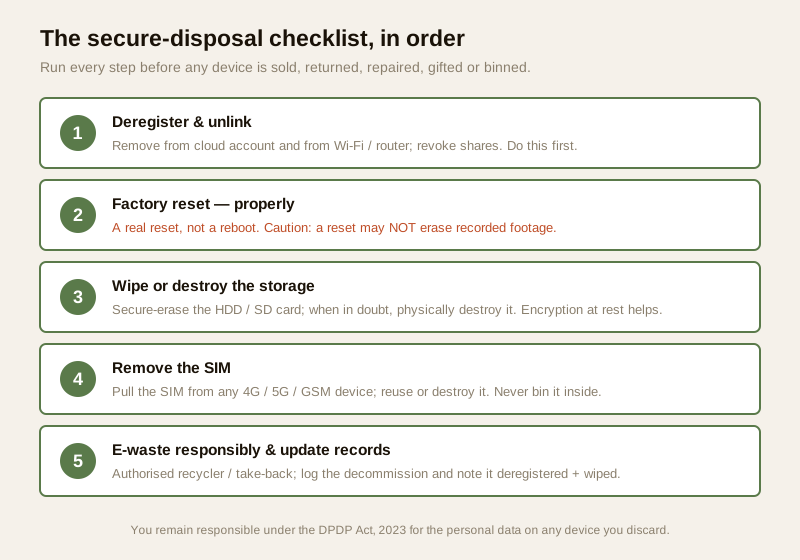
4. Remove SIM cards from cellular devices
A 4G/5G camera or GSM alarm contains a SIM that is billed to you and may carry contacts, message logs or account links. Physically remove the SIM before the device leaves your hands, and either reuse it or destroy it. Never sell or bin a cellular device with its SIM still inside.
5. If it is going for repair — wipe or remove storage first
A repair shop is a place your device sits unattended among strangers, so treat it as a disposal-grade risk even though you expect the device back.
- Remove or wipe the storage before you hand it over where you can — take out the SD card, or pull and keep the disk. If the fault allows, factory reset first so saved Wi-Fi and account credentials are gone.
- Use a trusted, reputable shop, and prefer one that will work with the device in front of you for a camera or recorder that cannot be wiped first.
- After repair, treat it as re-onboarding: change the Wi-Fi password if it was exposed, re-register the device freshly, and set new credentials. See installer and vendor evaluation and vendor cybersecurity assessment for choosing who to trust with your kit.
When end-of-life is the right call
Disposal is not always a failure — sometimes retiring a device is the responsible security decision, not a reluctant one.
If a device has reached end-of-life because the vendor stopped shipping security patches, it can no longer be kept safe: an unpatched, internet-connected security device is a standing risk to your whole network, and no amount of careful configuration fully closes that. In that case, disposing of it is the right move — retire it and replace it with a currently supported product, rather than keeping a device the maker has abandoned. The firmware-updates guide explains how to tell when a product has been left behind, and choosing a vendor with a real, long support track record is the way to avoid facing this too soon.
E-waste it responsibly, and update your records
Once the data is gone, dispose of the hardware properly — not into the general bin.
- Use authorised e-waste channels. Security devices contain electronics that must not go to landfill or the informal kabadiwala stream as-is. India's E-Waste (Management) Rules direct electronic waste to authorised recyclers and collection points; use an authorised e-waste recycler or a manufacturer/retailer take-back scheme where available. (Reference the current rules and your local authorised recyclers for the up-to-date process.)
- Send destroyed media separately where a recycler asks for it, and keep the destroyed status of any disk or card that held footage.
- Update your inventory and incident records. Mark the device as decommissioned in whatever list you keep of your security kit, noting the date, that it was deregistered and that its storage was wiped or destroyed. If a device ever left your hands without being cleared, log it and treat it as a potential data incident — see incident-response planning.
The disposal checklist table
| # | Step | What it protects | Homeowner action |
|---|---|---|---|
| 1 | Deregister & unlink | Cloud account, network access | Remove device from the app/cloud account; delete it from Wi-Fi/router; revoke shares |
| 2 | Factory reset | Saved settings & many credentials | Real reset (not reboot); know it may NOT erase footage |
| 3 | Wipe or destroy storage | Recorded footage, access logs | Secure-erase the disk/SD; when in doubt, physically destroy it (encryption at rest helps) |
| 4 | Remove SIM | Cellular account, contacts, logs | Physically pull the SIM from any 4G/5G/GSM device; reuse or destroy it |
| 5 | Repair? Wipe first | Everything, while unattended | Remove/wipe storage before handing over; use a trusted shop; re-onboard after |
| 6 | E-waste responsibly | Environment & residual data | Authorised e-waste recycler / take-back; send destroyed media as required |
| 7 | Update records | Your own accountability | Log decommission date; note deregistered + wiped/destroyed; flag any leak as an incident |
Data and the law: you are responsible for what you discard
The footage, access logs and personal details on a security device are personal data — often sensitive — under the Digital Personal Data Protection Act, 2023, and the responsibility for that data does not vanish when you sell or bin the device. If a device leaves your hands still carrying identifiable footage of your family, visitors or neighbours, that is a disposal you are accountable for. The practical takeaway is simple: minimise what a device holds, and clear it thoroughly before disposal. If footage of other people (a shared corridor, a neighbour's gate, staff) is involved, disposing carelessly is not only your own privacy at risk. Where a device has already gone with data intact, treat it as a data incident: log it, and for anything serious, follow current CERT-In guidance for reporting.
Key takeaways
- A "finished" security device is not empty. It can hold months of footage, saved Wi-Fi and account passwords, access logs and a live link to your cloud account — pulling the power erases none of it.
- Run the checklist in order: deregister from the cloud account and remove from Wi-Fi first; then a real factory reset; then wipe or destroy the storage; remove any SIM; e-waste responsibly; update your records.
- A factory reset is necessary but not sufficient — on many NVRs/DVRs it leaves the recorded footage on the disk. Securely erase the storage, and when in doubt, physically destroy the disk or card. Encryption at rest makes safe disposal far easier.
- Treat repair as a disposal-grade risk: wipe or remove storage before handing a device to a shop, use a trusted one, and re-onboard afterwards. Pull SIMs from cellular devices.
- End-of-life can be the right call, not a failure: if the vendor has stopped patching, retire the device. Then e-waste it through authorised recyclers, and remember you remain responsible under the DPDP Act for the personal data on anything you discard.
Where to go next
- Return to the security-system cybersecurity pillar and the cybersecurity sub-hub — this guide closes that section.
- Prepare devices for safe disposal with password management, data encryption and current firmware updates.
- Choose who to trust with your kit: installer and vendor evaluation and vendor cybersecurity assessment; and plan for the worst with incident-response planning.
- Gauge your overall exposure with the home-security risk scorecard, then return to the security hub.
References
- Digital Personal Data Protection Act, 2023 — footage, access logs and identifiable details on a security device are personal (often sensitive) data; you remain responsible for that data on a device you discard, so minimise and clear it before disposal.
- E-Waste (Management) Rules, India — direct electronic waste to authorised recyclers, collection points and manufacturer/retailer take-back schemes; verify the current rules and your local authorised recyclers before disposing of any device.
- CERT-In (Indian Computer Emergency Response Team) — India's national incident-response body; if a device leaves your hands with data intact or an account is compromised after disposal, follow current CERT-In guidance for reporting a cyber incident.
- NIST, OWASP IoT and CIS security best-practice frameworks — general, vendor-neutral guidance on media sanitisation, secure erasure and end-of-life handling; verify the current edition before relying on any framework.
- Manufacturer documentation — verify the correct deregister/unbind, factory-reset and secure-erase steps for your specific device, and its stated support/end-of-life status, on the maker's own guidance before disposal.
This is an educational overview, not legal advice, and it deliberately covers only how to safely retire a device you own — never how to recover data from someone else's discarded device. For destroying many drives, enterprise media or when unsure, use a qualified IT professional or a certified data-destruction service, and verify India's current E-Waste Rules and DPDP obligations before you dispose.
Export this guide
Related Guides — Deep-dive reading
Complete Guide to Security System Cybersecurity in India (2026): Protecting the Systems That Protect You
The cameras, locks, alarms and door phones you install to feel safer are internet-connected computers that can themselves be attacked, and an insecure one is worse than none. This pillar maps the whole attack surface — devices, network, accounts and data, operations — and points to every guide that hardens it.
SecurityCCTV Remote Access in India (2026): Watch From Your Phone, Safely
How to view your own cameras from anywhere without leaving the front door open to the internet — change the defaults, use strong credentials and 2FA, keep firmware current, prefer the vendor's secure cloud relay or a VPN, segment the camera network, and treat footage as personal data.
SecurityCCTV Recording Failure in India (2026): Live View Works but Nothing Was Saved
You open the recorder to pull footage of an incident and there is nothing there, even though every camera shows a crisp live picture. A calm, ordered guide to why an Indian CCTV system records live but saves nothing, and how to fix it before the next incident.
SecurityRelated Tools — Try Free
Security Vendor Evaluation Scorecard
Rate a CCTV/security installer or guarding agency across eight weighted criteria for a hire / negotiate / walk-away verdict.
Vendor ScorecardCCTV Cloud vs Local Cost Calculator
Compare cloud CCTV subscription against a local NVR + HDD — upfront, 5-year total, monthly fee and break-even.
Cloud vs LocalNVR Channel Calculator
What size recorder a system needs with room to grow, plus a check on its incoming bandwidth.
NVR Channels