
Vendor Cybersecurity Assessment in India (2026): Judging a Brand, a Cloud and an Installer Before You Buy
The cheapest quote often ships the biggest cyber liability. This professional guide shows how to judge the cyber-trustworthiness of a security-device brand, its cloud service and the installer or AMC before you commit — on track record, security features, update commitment, data practices and the installer's own hygiene — with a scorecard, the questions to ask, and the red flags that should stop a purchase.
Most people choose a security system on two numbers: the price and the megapixels. Almost nobody asks the question that decides whether the system protects them or quietly betrays them — can this vendor be trusted with a device that watches my home and a cloud that holds my footage? That question has a name. A vendor cybersecurity assessment is the discipline of judging the cyber-trustworthiness of a security-device brand, the cloud service behind it, and the installer or AMC company before you commit — because the cheapest quote very often ships the biggest cyber liability. A no-name cloud camera with a hardcoded backdoor account, an app that phones home to an unknown overseas server, an installer who reuses one password across every site he wires — none of that shows up on the spec sheet, and all of it lands on you after the invoice is paid.
This guide is written for the professional who specifies and buys — facility managers, RWA committees, consultants and serious homeowners — and it is strictly defensive. It does not tell you how to attack anything; it tells you how to choose so that what you install cannot easily be turned against you. It sits under the security-system cybersecurity pillar in the cybersecurity sub-hub, and it is the buyer's counterpart to the broader installer and vendor evaluation guide.
Scope & safety. This guide helps you assess and choose trustworthy vendors, cloud services and installers for a security system you will own or manage. It never explains how to attack, exploit or break into any product or company — every weakness named below is named so you can screen it out before you buy. Footage, access logs and biometrics captured by these systems are personal data under the Digital Personal Data Protection Act, 2023; a well-chosen vendor helps you meet that duty, a poor one becomes your liability. Treat any breach of a system you run as an incident to contain and report to India's national CERT (CERT-In) as appropriate. Life-safety always wins: no cyber term in a contract may leave a door that traps people in a fire. For procurement of any scale, involve a qualified IT/security professional. This is educational guidance, not legal advice.
Why the cheapest quote is often the most expensive
There is a specific India pattern worth naming. A brand you have never heard of sells a Wi-Fi camera or a video door phone for a fraction of the known names, with a free cloud app and a two-year "warranty". It works out of the box. What you cannot see is that thousands of identical units ship with the same built-in maintenance account, that the app sends your video to a server whose location and owner are undisclosed, that the company will publish exactly zero firmware updates over the product's life, and that if it disappears next year the cloud goes dark and your cameras become bricks. You did not buy a cheaper camera. You bought a standing liability with a lower sticker price.
The whole point of assessing a vendor before you buy is that almost every one of those problems is invisible after purchase and expensive to unwind. Changing brand means re-cabling; leaving a dead cloud means re-buying; a breach means the footage is already out. Five minutes of screening at the quotation stage is worth more than any amount of remediation later. The rest of this guide is the five things to screen on, the questions that surface them, and the red flags that should end a conversation.
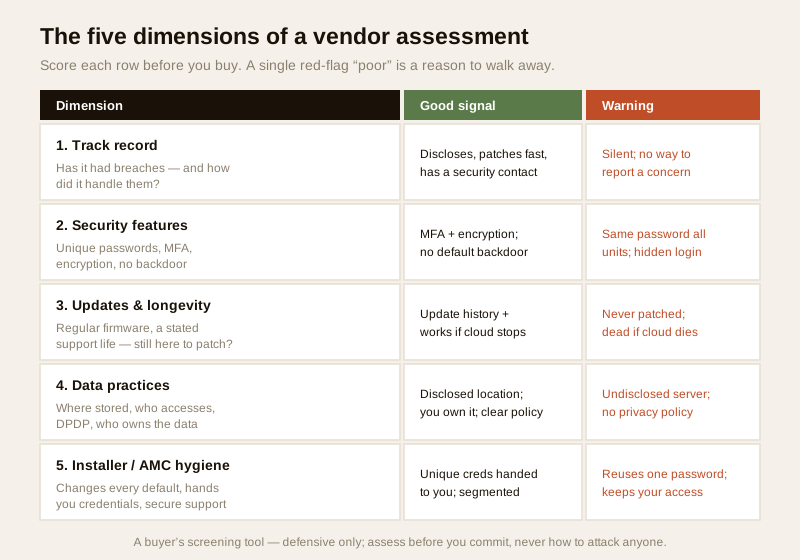
Dimension 1: track record — and how they handle trouble
Every serious technology vendor eventually has a security problem. What separates a trustworthy one is not a perfect record — it is how they behave when something goes wrong. Judge the response, not the mere existence of a past issue.
- Look for transparency and speed. A vendor who has, in the past, disclosed a vulnerability clearly, issued a fix quickly and told customers what to do is showing you exactly the behaviour you want when it is your system at risk. That is a positive signal, not a negative one.
- Silence is the bad sign. A brand that has quietly shipped devices with known weaknesses and never issued a fix, or that has no visible way to even report a security concern, is telling you how it will treat your incident: it won't.
- Check for a security-contact path. A published security or vulnerability-disclosure contact — an address or page where researchers and customers can report an issue — is a small thing that reveals a mature posture. Its absence is telling.
- Weigh reputation over marketing. Independent reviews, professional-integrator opinion and a track record of being patched (rather than abandoned) matter more than the brochure. A known name that patches is worth paying for; an unknown one that has never issued an update is a gamble with your footage.
You are not researching how anyone was breached. You are asking a simpler, defensive question: when this vendor is tested, do they respond like a company that will still be looking after me?
Dimension 2: security features the product must actually support
Some protective properties are non-negotiable in a device that watches your home or holds your keys. Screen for whether the product supports them — many cheap devices simply do not.
- Unique passwords and no default-forever. The device must force (or at least allow) a strong, unique password at setup, and must not ship every unit with the same password. Cross-check with password management.
- Multi-factor authentication on the account. The cloud account that can view your cameras or unlock your door should support MFA, so a stolen password alone is not enough. See multi-factor authentication.
- Encryption in transit and at rest. Video and data should travel over encrypted connections (TLS/HTTPS) and be stored encrypted, so it is protected on the wire and on the server. See data encryption.
- No hardcoded or backdoor accounts. The classic failure of no-name devices is a hidden maintenance login, identical across every unit, that the owner cannot change or even see. A vendor should be able to state plainly that no such account exists.
- Secure remote access. If the product offers remote viewing or control, it should do so through the vendor's secured cloud or a proper channel — not by asking you to expose the device directly to the public internet. See CCTV remote access security.
A useful test: ask the vendor to confirm these five in writing. A serious maker answers easily because their datasheet already says so. A vendor who cannot answer has just told you the answer.
Dimension 3: update commitment and longevity
A security device is software, and software needs fixing for years. Two questions decide whether you are buying a maintained product or a slowly-expiring one.
- Does the vendor issue regular firmware updates? A maker who has a visible history of shipping security updates for older models is a maker who will patch the flaw discovered next year. One who shipped a product once and never touched it again is not. See firmware updates.
- Is there a stated support lifespan? Ask how long this model will receive security updates. A vendor who can name a period is planning to support you; one who cannot has not thought about it.
- Will the vendor still exist to patch it? A device tied to a cloud is only as durable as the company. If a no-name brand folds, the cloud can go dark, taking remote access — and sometimes the whole device — with it. That cloud-shutdown and lock-in risk is a real cost of the cheap quote. Prefer vendors likely to be around, and prefer devices that keep working locally even if the cloud stops. See cloud storage security.
- Beware total cloud dependence. A product that is inert the moment the maker's server is unreachable has bound your security to someone else's business survival. A design that records and functions locally, with the cloud as a convenience, is more resilient.
Dimension 4: data practices and the law
A security system collects some of the most sensitive data a household or building has: video of people, logs of who came and went, sometimes biometrics. Where that data goes, and who can reach it, is a core part of the vendor's trustworthiness — and a legal duty under the Digital Personal Data Protection Act, 2023.
- Where is the footage stored? On the device, on a local recorder, or in a cloud — and if cloud, in which country? Data-residency matters; footage of Indian residents leaving the country to an undisclosed server is a real concern. Cross-check with privacy in smart security.
- Who can access it? Only you, or the vendor's staff too? A trustworthy vendor limits its own access and can tell you how.
- Who owns the data? The contract should make clear the footage and logs are yours, not an asset the vendor can mine or sell.
- Is there a clear privacy policy? A plain, findable privacy policy that states what is collected, where it is kept, how long, and how to get it deleted is a baseline. Its absence, or an unreadable one, is a red flag.
- DPDP alignment. Because you are the one deploying the cameras, you carry duties under the DPDP Act; a vendor whose product and policy help you meet them (retention controls, deletion, access limits) reduces your liability. One who does not, increases it.
Dimension 5: the installer's and AMC's own cyber hygiene
The best-chosen device can still be undermined by the person who installs and maintains it. The installer and the annual maintenance contractor handle your credentials and your network, and their habits become your exposure.
- Do they change every default — and hand the credentials to you? A good installer changes every default password on every device at commissioning and hands the new credentials to you, the owner. A poor one sets one password he remembers, uses it on every site, and keeps it. That means a leak at any one of his jobs can reach yours. Insist on unique credentials and a written handover.
- Do they keep your passwords, or do you? After handover, you should hold the master credentials. An installer who retains admin access indefinitely, "so it's easier for AMC visits", is a standing risk — and if his laptop or list is compromised, so are you.
- Do they use secure remote-support tools? For remote AMC support, a reputable installer uses a proper, access-controlled remote-support tool, not an exposed port or a shared password. Ask how they connect in.
- Do they segment and secure what they touch? A capable installer will put IoT security devices on their own network segment and secure the Wi-Fi — see installer and vendor evaluation and password management.
The cheapest installer is frequently the one with the worst hygiene, precisely because password discipline and secure remote tools cost him time and money. Screen the installer with the same seriousness as the device.
Certifications and standards as signals
You cannot audit a vendor's engineering, but you can read the signals. A vendor who references recognised security practices — building to established IoT-security or information-security frameworks, undergoing independent testing, or holding a relevant certification — is at least claiming a standard and inviting accountability. A vendor who references none, and cannot describe any security process at all, is offering you nothing to hold them to.
Treat certifications as a positive signal, not a guarantee: they narrow the field toward makers who take security seriously, but you still verify the concrete features (unique passwords, MFA, encryption, no backdoor, updates) yourself. General frameworks worth recognising by name — NIST, OWASP IoT and CIS best-practice guidance — describe exactly the hardening a serious vendor already follows. A vendor who can speak to them fluently is usually a safer bet than one who cannot.
The questions to ask — and the red flags to walk away from
Turn all of the above into a short conversation. Ask these before you buy, and listen as much for how they answer as for what they say. A serious vendor or installer answers easily; hesitation or evasion is itself information.
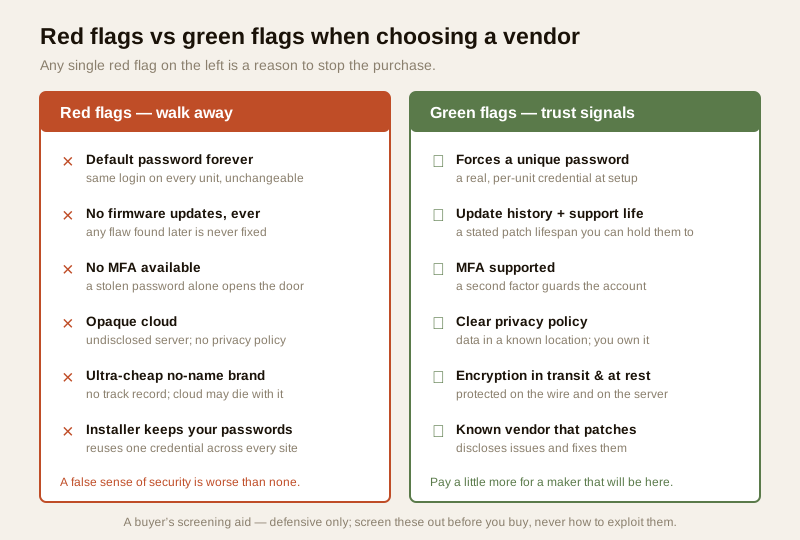
Questions for the device/cloud vendor
- Does every unit force a unique password at setup, and is there any built-in maintenance or backdoor account?
- Does the account support multi-factor authentication?
- Is data encrypted in transit and at rest?
- How long will this model receive security updates, and can you show a history of past updates?
- Where is footage stored, in which country, who can access it, and who owns it? Is there a written privacy policy?
- If your company or cloud stopped tomorrow, would the device still work locally?
Questions for the installer/AMC
- Will you change every default password and hand me the new credentials in writing?
- After handover, who holds the master passwords — me or you?
- How do you connect for remote support, and how is that access secured?
- Will you put the security devices on their own network segment and secure the Wi-Fi?
The red flags — any one of these should stop the purchase
| Red flag | Why it disqualifies |
|---|---|
| Default password forever — same login on every unit, cannot be changed | A single leaked list exposes every install, including yours |
| No firmware updates, ever | Any flaw found later is never fixed; the device only gets less safe |
| No MFA available | A stolen password alone opens your cameras or your door |
| Opaque cloud — undisclosed server, country or owner; no privacy policy | You cannot know where your footage goes or who can see it; a DPDP liability |
| Ultra-cheap no-name brand with no track record | No history of patching and a real chance the cloud dies with the company |
| Installer keeps your passwords / reuses one everywhere | His breach becomes your breach; you never truly hold your own system |
The society and RWA procurement angle
For a gated community or apartment complex, the assessment is not optional — it is a tender clause. When a society buys CCTV, a video door phone system or access control for common areas, it is deploying surveillance over hundreds of residents and holding their data, which makes DPDP duties and vendor trust a governance matter, not a personal one.
- Put cyber requirements in the tender. Require, in writing: unique credentials per device, MFA on management accounts, encryption in transit and at rest, a stated firmware-update commitment and support lifespan, disclosed data-storage location, and a full credential handover to the society. A tender that only specifies megapixels and price will buy the liability.
- Make the installer's hygiene a contract term. Require the AMC to change every default, hand over credentials, use secure remote support, and segment the network — and to confirm it in the acceptance sign-off.
- Keep ownership of the data. The contract should state the society owns the footage and logs, set retention limits, and require deletion on request, aligning with the DPDP Act. See security guide for gated communities.
A committee that scores two or three shortlisted vendors against a written checklist — rather than picking the lowest quote — is doing exactly what this guide is for.
A vendor-assessment scorecard
Use this to rate each shortlisted vendor and installer before you commit. Score each row good / partial / poor; a single poor on a red-flag row is a reason to walk away, not average out.
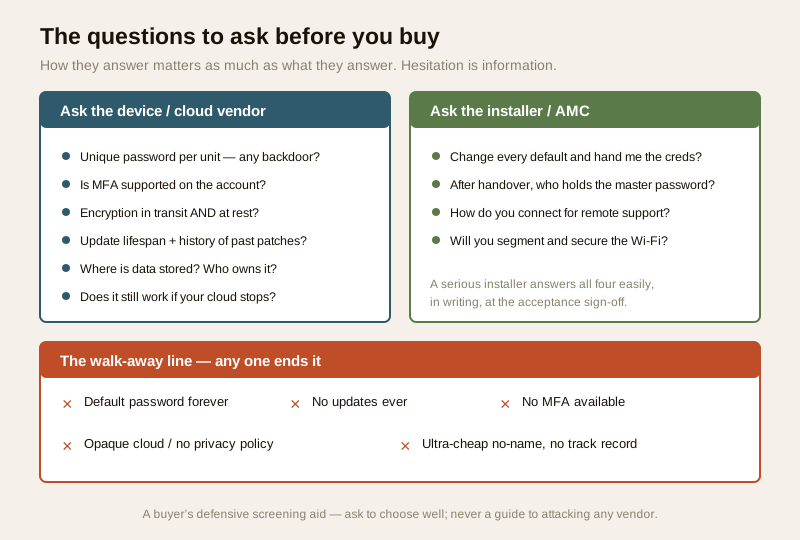
| Assessment row | Good (score well) | Poor (red flag) |
|---|---|---|
| Track record | Discloses issues, patches fast, has a security contact | Silent on past issues; no way to report a concern |
| Unique password | Forces a unique password at setup | Same default on every unit, or unchangeable |
| MFA | Supported on the account | Not available |
| Encryption | In transit and at rest | Unencrypted or unstated |
| Backdoor accounts | Vendor confirms none exist | Hidden maintenance login |
| Firmware updates | Regular; stated support lifespan | None ever; no lifespan |
| Cloud longevity | Works locally if cloud stops; vendor likely to last | Inert without cloud; unknown maker |
| Data location & ownership | Disclosed location; you own the data; clear policy | Undisclosed server; no policy |
| DPDP alignment | Retention, deletion, access controls | No controls; your liability |
| Installer hygiene | Changes all defaults; hands you credentials; secure remote support | Reuses one password; keeps your access |
You can gauge a system's overall exposure with the home-security risk scorecard, and plan the far end of the lifecycle — retiring old devices without leaking their stored footage — with the secure device disposal guide.
When to bring in a professional. Reading a datasheet, asking the questions above and scoring a shortlist are yours to drive. For a building-scale or high-value procurement — a society CCTV tender, an access-control rollout, anything holding a lot of resident data — bring in a qualified IT/security professional to review the vendor's claims, the contract's data clauses and the installer's hygiene before you sign. A short paid review at tender stage is far cheaper than the wrong vendor.
Key takeaways
- The cheapest quote often ships the biggest cyber liability. A no-name cloud camera with a hardcoded backdoor, or an installer who reuses one password everywhere, costs little upfront and a great deal later. Assess the vendor before you buy, because almost every problem is invisible afterwards.
- Judge five dimensions: track record (and how they handle trouble — transparent and fast-patching is good, silence is bad); security features (unique passwords, MFA, encryption, no backdoor accounts, secure remote access); update commitment and longevity (regular firmware, a stated support lifespan, will they exist to patch it); data practices (where footage lives, who can access it, DPDP alignment, who owns it); and the installer's own hygiene (changes every default, hands you the credentials, secure remote support).
- Read certifications and standards as signals, not guarantees — a vendor referencing recognised practices beats one referencing none, but verify the concrete features yourself.
- Walk away on any single red flag: default-password-forever, no updates ever, no MFA, an opaque cloud, or an ultra-cheap no-name brand with no track record.
- For societies and RWAs, put the cyber requirements in the tender and score shortlisted vendors against a written checklist — never buy on megapixels and price alone.
Where to go next
- Start at the security-system cybersecurity pillar and the cybersecurity sub-hub.
- Verify the concrete features: multi-factor authentication, data encryption, firmware updates, cloud storage security and password management.
- Weigh the data and privacy side: privacy in smart security and, for societies, the security guide for gated communities.
- Pair this with the broader installer and vendor evaluation guide and, at end of life, secure device disposal.
- Gauge your overall exposure with the home-security risk scorecard, then return to the security hub.
References
- Digital Personal Data Protection Act, 2023 — footage, access logs and biometrics captured by a security system are personal data; the deploying owner carries duties, so choose a vendor whose product and policy support data-residency, retention, deletion and access controls.
- CERT-In (Indian Computer Emergency Response Team) — India's national incident-response body; treat a breach of a system you run as a reportable cyber incident and follow current CERT-In guidance.
- NIST, OWASP IoT and CIS security best-practice frameworks — general, vendor-neutral guidance on device hardening, update discipline, MFA and encryption; a vendor who can speak to these is showing a mature posture. Verify the current edition of any framework before relying on it.
- Manufacturer specifications and the vendor's own security and privacy summary — verify unique-password enforcement, MFA support, encryption in transit and at rest, the absence of backdoor accounts, the firmware-update history and support lifespan, and the data-storage location and ownership, on the maker's own documentation before buying.
- Bureau of Indian Standards (BIS) catalogue — for any product standard or certification a vendor cites, verify its current status via the BIS catalogue: https://www.services.bis.gov.in/
This is an educational overview, not legal advice, and it deliberately covers only how to assess and choose trustworthy vendors, cloud services and installers for a system you own or manage — never how to attack, exploit or break into any product or company. For a building-scale or high-value procurement, engage a qualified IT/security professional; keep any security control fail-safe for life-safety; and verify any standard's current status via the BIS catalogue before relying on it.
Export this guide
Related Guides — Deep-dive reading
Complete Guide to Security System Cybersecurity in India (2026): Protecting the Systems That Protect You
The cameras, locks, alarms and door phones you install to feel safer are internet-connected computers that can themselves be attacked, and an insecure one is worse than none. This pillar maps the whole attack surface — devices, network, accounts and data, operations — and points to every guide that hardens it.
SecurityCCTV Cybersecurity in India (2026): Hardening Cameras, DVRs and NVRs Against Attack
The camera that watches your building is the most-attacked device in it. This professional guide is how to harden a CCTV system the defensive way: unique credentials, no needless internet exposure, a segmented camera network, current firmware, encrypted footage and reputable hardware.
SecurityCCTV Remote Access in India (2026): Watch From Your Phone, Safely
How to view your own cameras from anywhere without leaving the front door open to the internet — change the defaults, use strong credentials and 2FA, keep firmware current, prefer the vendor's secure cloud relay or a VPN, segment the camera network, and treat footage as personal data.
SecurityRelated Tools — Try Free
Security Vendor Evaluation Scorecard
Rate a CCTV/security installer or guarding agency across eight weighted criteria for a hire / negotiate / walk-away verdict.
Vendor ScorecardApartment Video Door System Planner
Enter flats, entrances, floors and guard desk for a first-pass building intercom plan — door stations, indoor monitors, guard station, the right architecture and an indicative cost band.
Building PlannerCCTV Commissioning & Handover Checklist
An interactive go/no-go checklist to run at handover — cameras day and night, recording, alerts, passwords and documents — before you clear the final bill.
Handover Checklist