
Network Segmentation for IoT Security Devices in India (2026): Contain the Blast Radius
The single highest-value cyber control for a home or building full of cheap IoT gadgets: a hacked device should reach NOTHING else. This professional guide covers segmentation from a guest-SSID split to VLANs, firewall rules and default-deny zones for cameras, NVR, access control and IoT.
Picture the cheapest camera in the building: a no-name Wi-Fi cam bought for a few hundred rupees, running firmware that may never be updated, quietly phoning home to a server overseas. Now picture it on the same flat network as your laptop, your bank app, the NVR that holds every camera's footage, and the access-control panel that unlocks the gate. If that one cheap camera is compromised — conscripted into a botnet, or simply left on a default password — it now sits inside your network, one hop from everything else. That is the exact problem network segmentation solves.
Network segmentation is the practice of dividing one network into separate zones so that a device in one zone cannot freely reach devices in another. It is, for a home or building full of cheap IoT security gadgets, the single highest-value cyber control you can add: it does not try to make every device secure (you cannot), it accepts that some device will eventually be compromised and makes sure that when one is, it can reach nothing else. This professional guide is strictly defensive — it helps you design and specify a segmented network, never how to move across one. It sits under the security-system cybersecurity pillar in the cybersecurity sub-hub, alongside secure Wi-Fi for security devices.
Scope & safety. This guide helps you design segmentation for a network you own or manage: a separate SSID for IoT, VLANs on a managed switch or router, firewall rules between zones, and default-deny defaults. It never explains how to move laterally, pivot or attack across a network — those ideas appear only as the thing segmentation is built to stop. Segmentation is one layer of defence in depth, not a silver bullet; pair it with strong passwords, MFA, firmware updates and encryption. Footage, access logs and any resident data crossing these networks are personal data under the Digital Personal Data Protection Act, 2023; report a serious compromise to India's national CERT (CERT-In). VLANs, firewall rules and managed switches are work for a qualified IT/network professional — engage one for anything beyond the homeowner-level SSID split. This is educational guidance, not legal advice.
Why a flat network is the core risk
A "flat" network is the default almost everywhere in India: one router, one Wi-Fi password, and everything — phones, laptops, the smart TV, the ₹-cheap camera, the DVR, the video door phone — sharing a single space where any device can talk to any other. It is convenient, and it is exactly why one weak device is so dangerous.
The logic is simple and worth stating plainly, because it drives every decision below:
- A network is only as trustworthy as its weakest device. The cheap camera with a hardcoded password, the never-updated NVR, the smart bulb from an unknown brand — any one of these can be the compromised device. On a flat network, compromising the weakest thing puts an attacker inside, alongside your strongest things.
- Once inside, a flat network offers no walls. There is nothing between the breached bulb and your laptop, your bank session, the NVR full of footage, or the other cameras. The insecure device becomes a doorway.
- An insecure security device is worse than none. A hacked camera does not just fail to protect you; it streams your home to strangers and gives an attacker a foothold. Segmentation is how you stop that foothold from becoming a whole-network compromise.
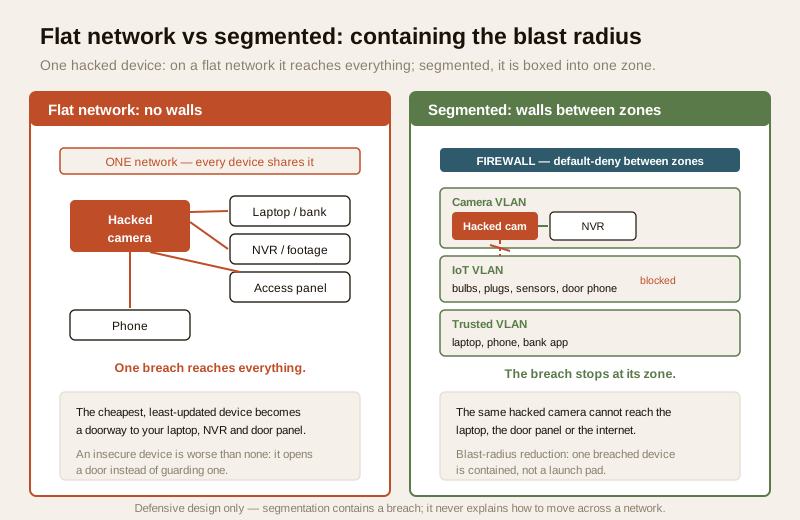
The goal is not to make the cheap camera un-hackable — you often cannot. The goal is blast-radius reduction: accept that a device may fall, and design so that when it does, the damage stops at the edge of its zone.
The homeowner level: a separate SSID for IoT
You do not need a data-centre to get most of the benefit. The single most useful step a homeowner can take is available on almost every modern router: run a separate Wi-Fi network (a second SSID) for all IoT and security devices, and keep your phones and computers on the main one.
Most home routers already offer a "guest" network. Repurpose it — or a dedicated "IoT" SSID if the router supports one — as the home for every camera, smart plug, bulb, video door phone, hub and cheap gadget. Your laptops, phones and anything holding personal or financial data stay on the primary SSID.
- Put every IoT and security device on the IoT/guest SSID. Cameras, the DVR/NVR, smart-home hubs, plugs, bulbs, the video door phone — all of it.
- Keep personal computing on the main SSID. Laptops, work machines, phones with banking apps — the things you least want a breached gadget to reach.
- Prefer a guest network with "client isolation" or "AP isolation" on. Many routers can stop devices on the guest SSID from talking to each other as well as to the main network — so a breached camera cannot even reach the other cameras. Turn this on where automations still work with it.
- Give the IoT SSID its own strong, unique password. Not the same one as your main Wi-Fi. See secure Wi-Fi for security devices and password management.
This costs nothing but a few minutes and gives you the essential win: a compromised gadget is no longer on the same network as your laptop. For many homes, that is the whole job.
The professional level: VLANs, zones and firewall rules
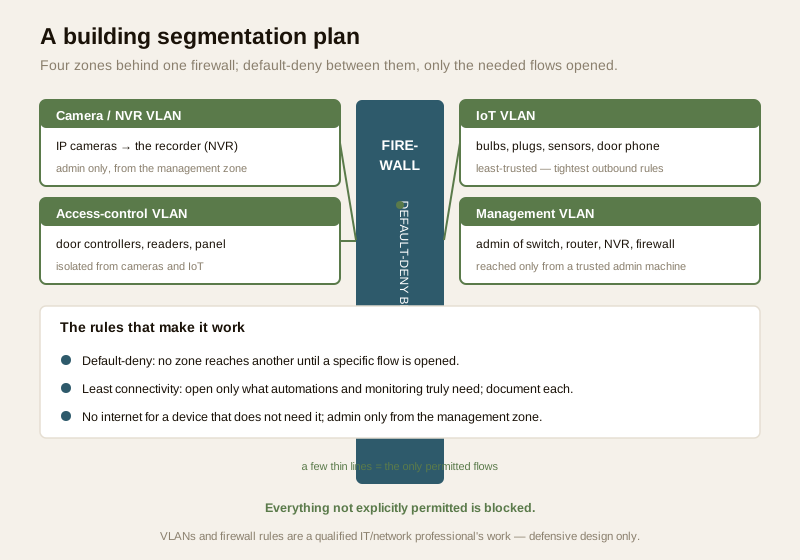
For a managed building, a serious home, or any site with a real camera system, the professional tool is the VLAN (virtual LAN) on a managed switch and a capable router or firewall. A VLAN lets one physical switch carry several logically separate networks, and the firewall between them decides — rule by rule — what traffic is allowed to cross. Described generically, a good building design uses a handful of zones:
- A camera / NVR VLAN. Every IP camera and the recorder live here, isolated from general traffic. Cameras talk to the NVR; the NVR is reached only from defined admin points. See CCTV network switch and PoE budgeting and CCTV cybersecurity.
- An access-control VLAN. Door controllers, readers and the access panel sit apart from cameras and IoT, so a problem in one system cannot reach the door hardware.
- An IoT VLAN. The bulbs, plugs, sensors, hubs and video door phones — the cheapest, least-trusted devices — get their own zone with the tightest outbound rules.
- A management VLAN. The admin interfaces of the switch, router, NVR and firewall live on a restricted management zone reachable only from specific, trusted machines — never from the IoT or guest zones.
- A trusted / user VLAN. The laptops, phones and workstations that hold personal and financial data, kept away from all of the above.
The firewall rules between these zones are where segmentation actually happens. Two principles govern them:
- Default-deny between segments. The starting posture is that no zone can reach another. You then open only the specific flows the system genuinely needs — cameras to the NVR, an admin machine to the management VLAN, and nothing more. Everything not explicitly permitted is blocked.
- Least connectivity, not maximum. Every allowed flow is a small hole in a wall; open only the ones automations and monitoring actually require, and document each. If a camera never needs to reach the internet, it should not be able to.
The containment principle: one breached device, isolated
The whole point of the design is what happens on a bad day. On a flat network, a compromised device is a launch pad; on a segmented network with default-deny, it is a prisoner. This is containment — the reduction of blast radius from "the whole network" to "one zone".
Think of a segmented network as a building with fire doors. A fire in one room is bad, but the fire doors stop it spreading to the rest of the building. Segmentation is the fire door of your network: a breach in the IoT zone stays in the IoT zone. The breached camera cannot reach the NVR on the camera VLAN, cannot reach the door controllers on the access VLAN, cannot reach your laptop on the trusted VLAN, and — because the outbound rules are tight — cannot even quietly reach the internet to be commanded.
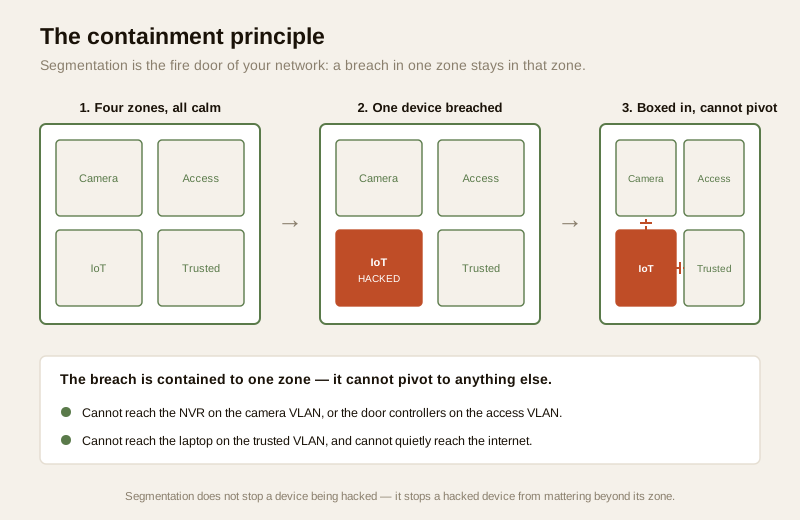
That is the value in one sentence: segmentation does not stop a device being hacked, it stops a hacked device from mattering beyond its own small zone.
A worked segmentation plan
Use this as a starting template and adapt it to the site. The right-hand column — what it may reach — is the important one, because default-deny means everything not listed is blocked.
| Segment | What is on it | What it may reach (default-deny; everything else blocked) |
|---|---|---|
| Camera / NVR VLAN | IP cameras, the recorder (NVR/DVR) | Cameras → NVR only; NVR reachable only from the admin machine on the management VLAN |
| Access-control VLAN | Door controllers, readers, access panel | The access panel → its controllers only; admin only from the management VLAN |
| IoT VLAN | Bulbs, plugs, sensors, hubs, video door phone | Only the specific cloud/app endpoints a device genuinely needs; no reach into other VLANs |
| Management VLAN | Admin interfaces of switch, router, NVR, firewall | Reached from a single trusted admin machine; not reachable from IoT or guest |
| Trusted / user VLAN | Laptops, phones, workstations with personal data | The internet and print/file services; no inbound from IoT or camera zones |
| Guest VLAN | Visitors' phones and laptops | The internet only; isolated from every other zone and from each other |
The reality check: consumer devices assume a flat network
Segmentation has a real catch, and a professional plans for it rather than being surprised. Many consumer IoT devices assume they live on a flat network: the phone app discovers the camera or the smart plug using local broadcast/discovery that does not cross VLANs, so the moment you separate the phone (trusted VLAN) from the device (IoT VLAN), the app can no longer "find" it and automations break.
Handle this the professional way:
- Test every automation and app after segmenting. Before you hand a site over, confirm the camera app still streams, the door phone still rings the right handset, the smart-home routines still fire, and the NVR is still reachable from where it needs to be. Segmentation that breaks the system it protects will simply be torn out by a frustrated user.
- Open the specific discovery flow, not the whole wall. Where an app needs to find a device across zones, the fix is a narrow, named rule (or an mDNS/discovery-reflector feature on the firewall) that permits just that flow — not collapsing the segments back into one. This is a job for the network professional.
- Prefer devices that support cloud or account-based access over ones that only work by same-network discovery, if you know segmentation is coming — they cross zones more gracefully.
- Never "solve" a broken automation by flattening the network. The temptation, when something does not work across segments, is to put everything back on one network. That throws away the entire benefit. Keep the segments and open the one flow instead.
Segmentation is one layer, not the whole wall
Be clear-eyed: segmentation is defence in depth, not a silver bullet. It contains a breach; it does not prevent one, and it does nothing about a weak password on the app account, an un-patched flaw, or unencrypted data. It earns its place alongside the other controls, not instead of them.
- Still change every default and use strong, unique passwords on every device and on the router and switch admin — see password management.
- Still turn on multi-factor authentication on the accounts that reach these systems — see multi-factor authentication.
- Still keep firmware current on cameras, NVR, hubs, router and switch — see firmware updates.
- Still run WPA2/WPA3 encryption on every Wi-Fi SSID and prefer encrypted transport (TLS/HTTPS) for management — see secure Wi-Fi for security devices.
Segmentation multiplies the value of all of these: even if one fails, the wall between zones limits how far the failure spreads.
| Rule of thumb | What it means in practice |
|---|---|
| Default-deny between segments | Start with nothing allowed to cross; open only the flows the system truly needs |
| Separate the least-trusted devices | The cheapest IoT gadgets get the tightest zone with the strictest outbound rules |
| No internet unless it must | A device that never needs the internet should not be able to reach it |
| Restrict admin access | Management interfaces reachable only from a defined trusted machine on a management VLAN |
| Test then trust | Confirm every automation and app works across segments before handover |
| Layer, do not replace | Keep passwords, MFA, updates and encryption; segmentation contains, it does not prevent |
Life-safety and data: two lines you never cross
A network control must never defeat life-safety. Where any door, gate or lockdown ties into the network, segmentation and firewall rules must never be able to trap people — a fire, a fault or a network problem must always leave a free, mechanical way out. Fail-safe egress wins over every cyber control. Any such integration is a licensed job.
The data crossing these networks is personal data. Footage on the camera VLAN, access logs on the access-control VLAN, and resident details are personal — often sensitive — data under the Digital Personal Data Protection Act, 2023. Segmentation is itself a data-protection measure: it limits who and what can reach that data. If a device or zone is compromised, treat it as an incident — contain it (the segmentation has already done much of this), preserve logs, and report to India's national CERT (CERT-In) as appropriate.
When to bring in an IT/network professional
The homeowner SSID split is genuinely DIY: repurpose the guest network, move the IoT devices onto it, turn on client isolation, and give it its own password. Everything past that — VLANs, a managed switch, firewall rules, default-deny policies and cross-zone discovery — is a network professional's work, and getting a firewall rule subtly wrong can either leave a hole open or break the system. Bring in a qualified IT/network professional to design the VLAN plan, write and test the firewall rules, and verify that every automation still works across segments before handover. See security vendor and installer evaluation and gauge your overall exposure with the home-security risk scorecard.
Key takeaways
- Segmentation is the highest-value cyber control for a network full of cheap IoT devices. It does not make devices un-hackable; it accepts that one will fall and ensures a hacked device can reach nothing else — blast-radius reduction.
- A flat network is the core risk: on it, compromising the weakest gadget puts an attacker beside your laptop, NVR and every other device. Segmentation adds the walls a flat network lacks.
- Homeowners get most of the benefit for free: run a separate IoT/guest SSID for all cameras and gadgets, keep phones and PCs on the main SSID, and turn on client isolation.
- Professionals use VLANs and default-deny: a camera/NVR VLAN, an access-control VLAN, an IoT VLAN, a management VLAN and a trusted VLAN, with the firewall blocking everything not explicitly needed.
- Test across segments, and layer it: many consumer devices assume a flat network, so confirm automations work then open only the specific flow needed; and keep passwords, MFA, firmware updates and encryption — segmentation contains, it does not prevent.
Where to go next
- Start at the security-system cybersecurity pillar and the cybersecurity sub-hub.
- Pair it with the fundamentals: secure Wi-Fi for security devices, password management, multi-factor authentication and firmware updates.
- Apply it to the systems: CCTV cybersecurity, smart security hubs, CCTV network switch and PoE budgeting and network readiness for security.
- Gauge your overall exposure with the home-security risk scorecard, then return to the security hub.
References
- Digital Personal Data Protection Act, 2023 — footage, access logs and resident data crossing these networks are personal (and often sensitive) data; segmentation limits who and what can reach it, and is itself a reasonable data-protection measure.
- CERT-In (Indian Computer Emergency Response Team) — India's national incident-response body; treat a compromised device or zone as a reportable cyber incident and follow current CERT-In guidance.
- NIST, OWASP IoT and CIS security best-practice frameworks — general, vendor-neutral guidance on network segmentation, least connectivity, default-deny and device hardening; verify the current edition of any framework before relying on it.
- Manufacturer and networking-equipment documentation — verify VLAN support on the switch, firewall-rule and inter-VLAN routing capability, guest/client-isolation features, and any cross-zone discovery (mDNS reflector) options on the vendor's own documentation before specifying.
- National Building Code of India (SP 7), Bureau of Indian Standards, and local fire and life-safety bye-laws for any network-linked door, gate or lockdown interlock; verify the current edition via the BIS catalogue: https://www.services.bis.gov.in/
This is an educational overview, not legal advice, and it deliberately covers only how to design and harden a network you own or manage — never how to move across, pivot through or attack any network. VLANs, firewall rules and managed switches are qualified professional tasks; engage a licensed IT/network professional, keep any door interlock fail-safe for egress, and verify any standard's current status via the BIS catalogue before relying on it.
Export this guide
Related Guides — Deep-dive reading
Complete Guide to Security System Cybersecurity in India (2026): Protecting the Systems That Protect You
The cameras, locks, alarms and door phones you install to feel safer are internet-connected computers that can themselves be attacked, and an insecure one is worse than none. This pillar maps the whole attack surface — devices, network, accounts and data, operations — and points to every guide that hardens it.
SecuritySmart Security Cybersecurity in India (2026): Hardening the Home That Watches Itself
Every connected security device is also a way in for an attacker, and an insecure smart camera or lock is worse than none because it gives false safety while exposing your home. This is the plain hardening checklist a homeowner can actually do: passwords, two-factor, updates, a wise buy, and a segmented network.
SecuritySmart Home Privacy & Cybersecurity in India: Locking Down Your Connected Home
Every camera, plug and speaker you add is another door into your home network — and another company holding data about your life. Here is how the attacks actually happen, and a plain-language hardening checklist that closes the doors for good.
Smart HomeRelated Tools — Try Free
Security Vendor Evaluation Scorecard
Rate a CCTV/security installer or guarding agency across eight weighted criteria for a hire / negotiate / walk-away verdict.
Vendor ScorecardBefore vs After — Cost Reality Check
Compare what you expected to pay vs what you actually paid, category by category.
Reality CheckCCTV Cloud vs Local Cost Calculator
Compare cloud CCTV subscription against a local NVR + HDD — upfront, 5-year total, monthly fee and break-even.
Cloud vs Local