
 Lesson 5.4
Lesson 5.4 · Lumion & D5 Render
Nature & Landscape Scenes
Terrain, water, and scattering vegetation at scale for believable natural context
A great building in a fake landscape looks fake. The context has to be as believable as the architecture.
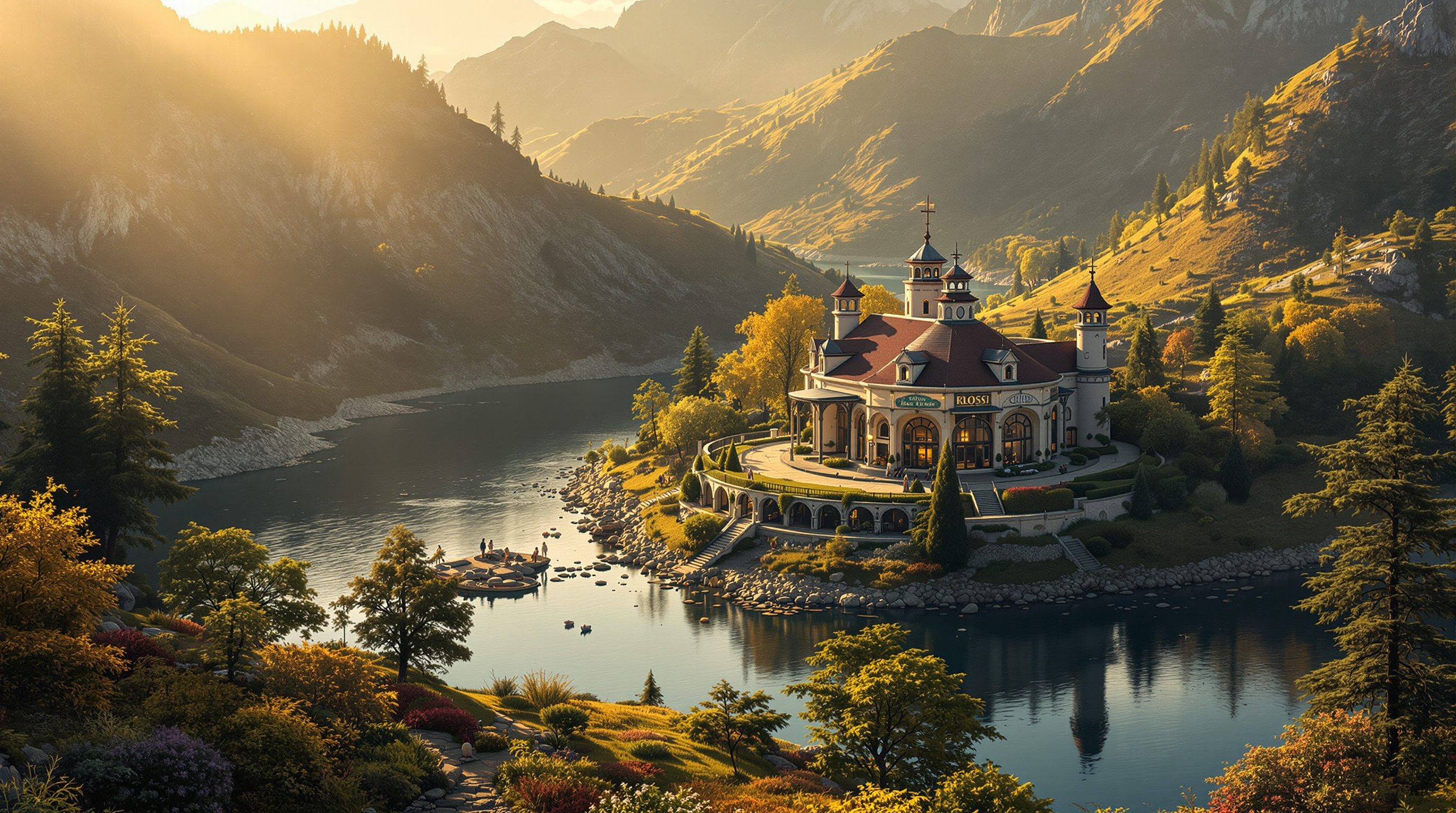
You can light a building perfectly and model it beautifully, and still lose the image if it stands on flat green plastic dotted with identical copy-paste trees. The landscape is not backdrop - it is half the believability. Our eyes know real nature intimately: how ground undulates, how planting clusters and varies, how water reflects, and they reject a fake landscape instantly.
The good news is that believable nature is not chaos - it is a stack of understandable layers built from the ground up. Get each layer right, at the right scale and with the right variation, and even thousands of trees read as a real place rather than a green carpet.
Landscape = a layer stack. Undulate the ground, vary the planting, add undergrowth, frame it. Then it belongs.
The landscape as a layer stack
The most useful way to think about a natural scene is as a stack of layers, built from the ground up, each of which must be believable on its own. At the bottom is terrain - the form of the ground itself. Real ground is almost never flat: it rolls, slopes, dips and rises, and that undulation is the first thing that separates a real place from a CGI plane. You either sculpt the terrain with the engine's tools or import real survey or heightmap data for accuracy. On top of that goes ground materials - not one flat green, but a mix of grass, soil, rock, sand and paths, blended so the surface has variety and the transitions look natural. Then comes water where the site has it: lakes, rivers, pools or sea, which bring reflection and movement. Above that, vegetation - trees, shrubs, grasses and undergrowth, scattered with variation. And finally entourage - people, vehicles and the props of human life, at correct scale to make the place feel inhabited.
The power of the layer model is diagnostic. When a landscape looks fake, it is almost always because a layer is missing or wrong: the ground is a flat plane, there is no undergrowth so trees float on bare green, the material is one uniform colour, or the water is a mirror-flat sheet. Building deliberately layer by layer - form, materials, water, planting, life - and checking each is convincing before moving up is how you make a natural context that holds together. Miss a layer and the eye finds the gap immediately.
Terrain, ground materials, water, vegetation, entourage. Build up the stack; a missing layer is what reads as fake.
Terrain and water: the ground and its reflections
The bottom two layers set the stage, and both reward a little care. For terrain, the enemy is the flat plane. Even a subtle undulation - a gentle slope to the site, a slight rise behind the building, a dip where water gathers - reads as real ground in a way a table-flat surface never will. Engines built for landscape, like Lumion, give you sculpting brushes to raise, lower and smooth the ground directly; for accuracy you can import a heightmap or survey so the terrain matches the real site. However you make it, the goal is believable form: ground that looks like it was shaped by geology and weather, not extruded from a rectangle. Blending several ground materials across that form - grass thinning to soil on a slope, rock showing on a ridge, a worn path where people walk - completes the illusion.
Water is a powerful ingredient because it does two jobs at once: it reflects, doubling the sky, the light and the architecture, and it moves, bringing life to a still. A believable water surface needs the right reflectivity, a plausible ripple or flow, and correct depth and colour - clear and shallow at the edge, deeper and darker further out. In a ray-traced engine like D5, water reflections are true and accurate; in Lumion the ocean and water tools give fast, convincing results tuned for scale. The common mistakes are water that is a perfect mirror (too still, too clean) or the wrong colour for its depth. Get terrain and water right and you have a stage that already looks like somewhere real, before a single tree goes in.
Scattering vegetation at scale, with variation
Vegetation is where landscapes are won or lost, and the single most important idea is variation. The instant giveaway of a fake planting scheme is repetition: the same tree, the same size, the same rotation, spaced on a regular grid. Real vegetation is the opposite - many species mixed together, every plant a different size and age, rotated randomly, clustered in some places and sparse in others, with a carpet of smaller undergrowth beneath the big trees. Reproducing that by hand across thousands of plants would be impossible, which is why engines provide scattering tools: you paint or define an area and the engine populates it with a randomised mix of assets, varying species, scale and rotation automatically.
Using scatter well is a craft of a few habits. Mix several species rather than one, so the planting reads as an ecosystem, not a plantation. Vary size deliberately - a real stand of trees has saplings and giants, not clones. Let density change across the scene - dense woodland here, open meadow there, a natural clustering rather than an even sprinkle - because uniform density is itself a tell. Always include the smaller layers: grass, shrubs, ground cover and undergrowth, without which big trees look like they are floating on bare soil. And thin the planting sensibly with distance and detail so the scene stays performant. Lumion's huge nature library and D5's asset browser both make this fast, but the tool only supplies the plants - the believability comes from your variation. Scatter with a designer's eye for how nature actually distributes itself, and thousands of assets become a forest rather than a pattern.
Vary species, size, rotation, density. Add undergrowth. A regular grid of identical trees is the instant tell.
Composing the whole, and keeping it performant
With the layers in place, two final concerns turn a full landscape into a finished image: composition and performance. Composition first - a landscape scene is still a photograph, so the same camera thinking applies. Use foreground elements - a branch, a rock, tall grass, a foreground tree - to frame the building and give the eye a sense of depth and scale; let the terrain and planting lead the eye toward the architecture rather than competing with it; and place the horizon and sky deliberately, since in a landscape the sky is often half the frame. The building is usually still the subject, and the landscape's job is to seat it convincingly in a place and guide the viewer to it, not to overwhelm it. A little atmosphere - the restrained haze and low light of the previous lesson - ties the layers together and adds the air that reads as real distance.
Performance is the practical reality of nature scenes: thousands of trees, grass and water are heavy, and this is exactly where Lumion's engine, built to stay responsive on large landscapes, earns its place, while ray-traced engines like D5 reward sensible density and level-of-detail management. Use the density and detail controls to keep the scene workable - full detail where the camera looks, thinned further away - rather than drowning the machine in geometry it will never resolve. The goal throughout is a natural context believable enough that the viewer never questions it: real ground, real water, varied planting, framed with a photographer's eye and set in atmospheric light. Achieve that and the building finally looks like it belongs somewhere - which, for most exterior images, is the whole point.
There is a design payoff beyond believability, too. A landscape built with real care starts to do design work: the way planting frames an approach, screens an unwanted view or opens a wanted one, the way terrain seats the building into its plot, the way water draws the eye and cools a courtyard. Treated seriously, the landscape render becomes a way to test and present the site strategy, not just to prettify the background. So build the stack with the same intent you bring to the building itself - form, materials, water, planting and life, each believable, each chosen - and the natural context stops being a chore bolted on at the end and becomes an integral, persuasive part of the image and the design story it tells.
Terrain sculpting / heightmaps
Shaping the ground form
Sculpt with brushes or import survey/heightmap data. Even subtle undulation reads as real ground; a flat plane never does.
Vegetation scattering
Populating an area with randomised planting
Vary species, size, rotation and density; always add undergrowth. Uniform grids of one tree are the classic fake tell.
Water surfaces
Lakes, rivers, pools and sea
Reflects and moves; needs right reflectivity, ripple and depth-based colour. Perfect-mirror water reads as fake.
Level of detail / density control
Managing heavy nature scenes
Full detail where the camera looks, thinned with distance, keeps thousands of assets performant - Lumion is built for this scale.
Workshop - build a believable landscape, layer by layer
You will seat one building in a natural context by building the landscape stack deliberately - terrain, ground materials, water, scattered vegetation, entourage - checking each layer is believable before the next, so the whole reads as a real place.
Lumion or D5 (free tier) and one exterior building model. Free vegetation and material assets (the engine's library, Poly Haven or ambientCG) round out the scene.
Goal: build a convincing natural context as a layer stack
Inputs: Lumion or D5 (either free tier) + one exterior building model
Time: ~75 minutes
- 1TERRAIN: place the building and give the ground gentle undulation - a slope, a rise - rather than a flat plane. Blend at least two ground materials (grass and soil or rock) across it.
- 2WATER (if the site suits it): add a lake, river or pool with believable reflectivity, a little ripple, and depth-based colour. Check the reflections read correctly.
- 3VEGETATION: scatter planting with real variation - mix several species, vary size and rotation, cluster density unevenly (dense here, open there), and add a layer of grass and undergrowth so nothing floats on bare ground.
- 4ENTOURAGE + composition: add a few people or props at correct scale, then compose the camera - use a foreground element to frame the building and lead the eye, with the sky placed deliberately.
- 5Finish with restrained low light and a touch of atmosphere from the previous lesson. Render one still, then write a few sentences naming each layer and whether it holds up - and fix the weakest one.
You’ll walk away with
One exterior render of a building seated in a believable natural landscape, built as a deliberate layer stack, with a short written check of each layer and a note on which you strengthened.
Three altitudes on the same idea
Read the band that fits you — or all three.
Your building's context is a design statement, so render the landscape as carefully as the architecture. How the ground meets the building, how planting frames approaches and views, how water and terrain shape the site - these are design decisions a believable landscape render lets you test and present. A fake, flat green context undersells even an excellent scheme; a considered one seats it in a real place.
Even interior-led work often needs the landscape beyond the glass. The garden a living room opens onto, the view a suite frames, the courtyard a room wraps around - these read through the windows and set the interior's sense of place. Build that exterior context with the same layer discipline - varied planting, real ground, believable water - so the outside earns its role in the interior story.
Landscape is where many student renders fall apart - and where you can stand out. Flat green ground and copy-paste trees are the classic tell; varied scattering, undulating terrain and real undergrowth signal that you understand context. Practise the layer stack on one project until a believable landscape is second nature. It transforms exterior images and shows a maturity examiners notice immediately.
“For a landscape I just need to drop in a lot of trees and it will look like nature.”
Do it yourself
Think it through before you build.
- 1Name the layers of the landscape stack, from the ground up.
- 2Why does a flat ground plane read as fake, and what fixes it?
- 3What is the single biggest giveaway of fake vegetation, and how do you avoid it?
- 4Name two things a believable water surface needs to get right.
- 5How do you keep a heavy nature scene performant?
The one line to carry out
Peer-reviewed journals & authoritative standards
- 01Lumion - Support & Documentation — Lumion, 2026.
- 02D5 Render - real-time ray tracing renderer — D5 Render, 2026.
- 03Poly Haven - free HDRIs, textures and models — Poly Haven, 2026.
- 04ambientCG - free PBR materials — ambientCG, 2026.
That completes the atmosphere-and-speed engines: you can now use Lumion and D5, set weather and season, and build a landscape that seats a building convincingly. When you need the absolute top of the photoreal ceiling, though, you go offline - and that is the next module: V-Ray and Corona.
The author
Amogh N P
Architect, interior designer, and creative polymath. Studio Matrx began in his notebooks — his vision of design made honest, useful, and open to everyone. Its Academy is written and taught in his memory, and free, forever.
More about Amogh →