
 Lesson 7.4
Lesson 7.4 · Iteration & the Real Design Workflow
A Consistent Visual Language
Seeds, style references and reuse - keeping a project's imagery coherent across a whole set
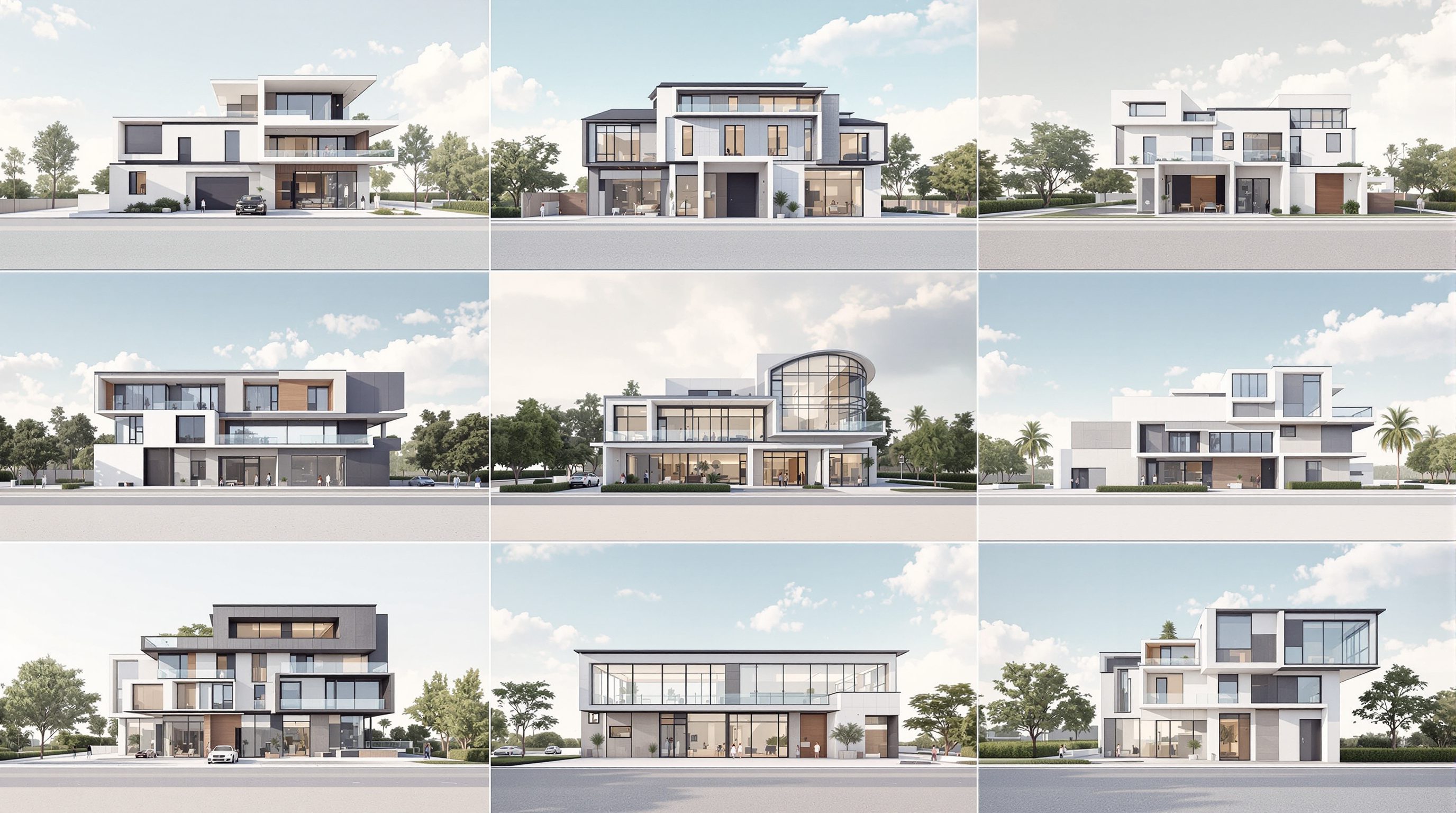
Eight images. One project - or eight?
Lay out a presentation where every render has a different light, palette, medium and mood, and it reads as noise - eight unrelated pictures, not one resolved building. Coherence is not decoration; a set that looks like one project signals that the project itself is resolved. The levers that produce it are specific and learnable: fixed seeds, style references, and trained styles. This lesson is how to make a whole set of AI images speak with one voice.
Roll, look, description - three locks. Stack them and the set speaks with one voice.
Why a set must cohere
A single beautiful render is easy. The hard, professional skill is a set - six or eight images of the same project that clearly belong together. When they do, the presentation reads as a resolved scheme seen from many angles; the viewer trusts that a single design mind is behind it. When they do not - when the entry shot is a moody dusk photograph, the interior is a bright watercolour, and the facade is a glossy noon render - the eye reads incoherence as indecision, and no amount of individual quality rescues it.
This matters because a project is almost never sold on one image. A client, a jury or a planning board sees a board, a deck, a set. The set's job is to build a single, convincing world, and consistency is the load-bearing quality. It is exactly the same instinct as a material palette or a typographic system: the discipline is in the repetition, in choosing constants and holding them, not in the flourish of any one element.
AI makes coherence harder than traditional rendering, because every generation is a fresh roll of the dice - new light, new mood, new incidental detail, unless you actively pin them down. Left to its defaults, a text-to-image tool produces a gallery of strangers. So consistency with AI is not a happy by-product; it is something you engineer, using three families of lever - seeds, references, and trained styles - that this lesson takes in turn. Master them and you can hand over a set that looks authored, not assembled.
A set that coheres reads as resolved. A gallery of strangers reads as doubt.
Seeds: the reproducibility lever
The seed is the random number that sets the model's starting noise - the initial roll before denoising begins. Same seed plus same prompt plus same settings gives you the same image every time; change the seed and you get a completely different one from the same words. This is the most fundamental consistency lever, and most beginners never touch it because tools default to a random seed on every run.
Once you can fix the seed, two powers open up. First, reproducibility: you can return to an image you liked and get it back, or hand a colleague a seed and prompt and have them see what you saw - AI stops being a slot machine you can never replay. Second, and more useful for coherence, single-variable iteration: with the seed locked, any change in the output is caused by the one thing you changed in the prompt, not by a new random roll. Swap 'morning light' for 'dusk' on a fixed seed and you see the same scene at dusk, not a different building at dusk. That is the difference between comparing and gambling - the same discipline Module 1.4 taught for prompts, now anchored by the seed.
The determinism under this is real: with a deterministic sampler (DDIM and its relatives), the seed fully pins the trajectory from noise to image, which is why the same inputs reproduce the same output. For a coherent set, you exploit it by building your images from a seed family - a small handful of seeds you know give the composition and quality you want - and reusing them across the project rather than rolling fresh each time. The seed is the quiet backbone of consistency: lock it to compare fairly and to make a set that shares a visual DNA.
Style references: carrying a look across prompts
Seeds pin the roll; style references pin the look. Modern tools let you hand the model an image and say 'make new things that look like this', independent of the seed. In Midjourney this is the --sref flag (style reference) and --cref (character/subject reference); in the Stable Diffusion world it is the IP-Adapter, which injects an image's style into generation alongside the text prompt. Either way, you are conditioning on a reference image rather than trying to describe a look in words - and a picture carries nuance no adjective list can.
For a project set, this is the workhorse. You establish one image whose mood, palette and rendering feel right - the visual key of the project - and then use it as the style reference for every subsequent generation. The entry shot, the interior, the courtyard, the facade all inherit the same atmospheric fingerprint even though their subjects differ. Where a text prompt struggles to reproduce a specific warmth or grain across ten images, a style reference just shows the model the target, and consistency follows far more reliably.
The craft is in choosing what the reference controls and how strongly. Most tools let you dial the style weight, so you can carry a strong family resemblance without every image collapsing into a clone of the reference. Combine this with a fixed seed family and locked prompt constants (medium, light, camera) and you have layered three independent consistency controls - roll, look, and description - each reinforcing the others. That stack is how a set stops looking like it was made by eight different people on eight different days.
Do not describe the look. Show the model the look.
Trained styles: LoRA, DreamBooth and textual inversion
When a project (or a studio) needs a look reused heavily and precisely - beyond what a single reference image can hold - you move up to training a style into the model. These are the fine-tuning techniques from Module 2/3, applied here in service of coherence. A LoRA (low-rank adaptation) is a small, efficient add-on you train on a set of images so the model reliably produces that style or subject on command. DreamBooth fine-tunes the model to reproduce a specific subject or look from a handful of examples. Textual inversion learns a new 'word' that summons a particular style you can then drop into any prompt.
The payoff is a style you can summon at will across an entire project, or even across every project a studio does, with far tighter consistency than references alone. Train a LoRA on your practice's preferred rendering - its palette, its light, its material sensibility - and every designer can invoke the house style with a token. For a single large project with dozens of images, a project-specific LoRA can hold the visual language rock-steady from concept board to competition panel. This is the heavy machinery of consistency, and it is how serious visualisation teams keep a signature.
The honest trade-off is effort and data. Training needs example images, some compute, and a willingness to iterate - it is overkill for a quick concept and worth it for a sustained body of work. The rule of thumb stacks cleanly: fixed seeds for reproducibility, style references for carrying a look across a set, trained styles for reusing a look across a whole project or studio. Reach for the lightest lever that achieves the coherence you need, and escalate only when the volume of images justifies it.
Building the set: a system, not a gallery
Levers are nothing without a system to deploy them. A coherent set starts with a decision, not a generation: write a short visual-language spec for the project and lock the constants before you make a single hero image. Name the medium ('architectural photograph'), the light ('soft overcast, morning'), the palette ('laterite, teak, lime plaster'), and the camera ('35mm, eye-level, f8'). These are the things that stay fixed across every image; only the subject changes shot to shot.
Then work like a photographer on a shoot, not a tourist snapping at random. Draw up a shot list - entry court, living volume, courtyard at dusk, facade from the street, one detail - so you know the set you are building before you build it. Establish your visual key image, capture its seed and set it as your style reference, and generate every subsequent shot with the constants locked and the reference carrying the look. Vary only the one thing that should vary: the subject and viewpoint. This is the practical meaning of the earlier figure - lock the constants, vary the subject - and it is what turns eight generations into one project.
Hold two habits and the whole thing compounds. First, keep a small project style sheet: the locked prompt constants, the seed family, the reference image, the LoRA token if you trained one - so anyone on the team can add a consistent image to the set months later. Second, review the set together, never image by image: lay the six out side by side and cull anything that breaks the language, however good it is alone. Consistency is a property of the set, so judge it at the level of the set. Do that, and your AI imagery stops looking like a lucky gallery and starts looking like the considered visual identity of a resolved design - which, across this whole module, is the entire point.
Lock the constants. Vary the subject. Judge the set, not the shot.
Fixed seed / seed family (deterministic sampling, e.g. DDIM)
Reproducibility and single-variable iteration
Same seed + prompt + settings reproduces the image; lock it to compare fairly and to give a set shared visual DNA.
Style references (Midjourney --sref / --cref, IP-Adapter)
Carrying one look across many prompts
Condition on a reference image rather than words; the workhorse for a coherent project set, with a dial-able style weight.
Trained styles (LoRA, DreamBooth, textual inversion)
Reusing a look across a whole project or studio
Heavier machinery: train a summonable style or subject; worth the data and compute only when image volume justifies it.
Locked prompt constants + visual-language spec
Fixing medium, light, palette and camera before generating
The system layer: decide the constants and a shot list first, vary only the subject, and judge the set as a set.
Workshop - produce a coherent five-image set
You will build a small presentation set that reads as one project, engineering consistency with seeds, a style reference and locked constants. Any tool that exposes seeds and style references works best.
A tool with seed control and style references (Midjourney with --sref, a Stable Diffusion UI with IP-Adapter, or Studio Matrx DesignAI).
Goal: five images that clearly belong to one scheme
Inputs: a project + a tool with seed control and style reference
Time: ~50 minutes
- 1Write a three-line visual-language spec: lock the medium, light, palette and camera. List a five-shot shot list (e.g. entry, living, courtyard, facade, detail).
- 2Generate your visual key image - the shot that best sets the mood. Capture its seed and save it as your style reference.
- 3Prove the seed lever: regenerate the key image on its fixed seed changing only the light word. Confirm you get the same scene relit, not a new building.
- 4Generate the other four shots with the constants locked and the key image set as style reference (--sref or IP-Adapter). Vary only the subject and viewpoint.
- 5Lay all five out together and review as a set. Cull or regenerate any image that breaks the visual language, however good it looks alone. Record your seed family and spec on a one-line style sheet.
You’ll walk away with
A five-image set that reads as one project, plus a one-line project style sheet: the locked prompt constants, the seed family, and the style-reference image used to hold the look.
Three altitudes on the same idea
Read the band that fits you — or all three.
A coherent set is what makes an AI-illustrated scheme read as resolved to a jury or a client. Lock the medium, light, palette and camera in a short visual-language spec, build from a seed family and a style reference, and reserve trained styles (a project LoRA) for large bodies of work. Judge the board as a set, not image by image - consistency is the quality that signals a single design mind behind the whole thing.
Interiors live or die on a consistent palette and light across every room shot - the same qualities you already control in a real scheme. Fix a style reference on your key image so each room inherits the same warmth and grain, lock the palette and lighting in the prompt, and vary only the room. A moodboard or client deck where every image shares one atmosphere reads as a considered scheme, not a scrapbook.
Delivering a coherent set - not just one lucky render - is exactly what turns a portfolio from a scrapbook into a project. Learn to fix seeds for reproducibility and single-variable iteration, use a style reference to carry a look, and present images as a designed set. Being able to explain how you engineered consistency (seeds, references, a locked spec) is precisely the process maturity reviewers and employers are looking for.
“If each individual render looks great, the presentation will look great.”
Do it yourself
No tool needed - reason it through.
- 1Why does a set of individually beautiful but stylistically mismatched renders read as weaker than a consistent set?
- 2What exactly does the seed control, and why does fixing it enable single-variable iteration?
- 3Name a style-reference mechanism in Midjourney and its equivalent in the Stable Diffusion world.
- 4When is training a LoRA worth it over just using a style reference?
- 5List the four constants you would lock in a visual-language spec before generating a project set.
The one line to carry out
Peer-reviewed journals & authoritative standards
- 01Ye, H., Zhang, J., Liu, S., Han, X., & Yang, W. - IP-Adapter: Text Compatible Image Prompt Adapter for Text-to-Image Diffusion Models — arXiv preprint, 2023.
- 02Hu, E. J., et al. - LoRA: Low-Rank Adaptation of Large Language Models — International Conference on Learning Representations (ICLR), 2022.
- 03Ruiz, N., Li, Y., Jampani, V., Pritch, Y., Rubinstein, M., & Aberman, K. - DreamBooth: Fine Tuning Text-to-Image Diffusion Models for Subject-Driven Generation — IEEE/CVF Conference on Computer Vision and Pattern Recognition (CVPR), 2023.
- 04Song, J., Meng, C., & Ermon, S. - Denoising Diffusion Implicit Models (DDIM, deterministic sampling) — International Conference on Learning Representations (ICLR), 2021.
- 05Midjourney - Official Documentation (seeds, style reference --sref, character reference) — Midjourney, Inc., 2026.
You can now make AI a disciplined, coherent part of real practice - placed in the right stage, kept subordinate to your intent, looped cleanly with BIM, and speaking one visual language. That completes the workflow module; the mastery check pulls the whole real-world workflow together.
The author
Amogh N P
Architect, interior designer, and creative polymath. Studio Matrx began in his notebooks — his vision of design made honest, useful, and open to everyone. Its Academy is written and taught in his memory, and free, forever.
More about Amogh →