
Video Door Phone Buying Guide (India, 2026): How to Choose and Buy the Right One
A step-by-step way to choose a video door phone in India: match it to your building, pick the class, choose only the features you will use, compare models on a spec checklist, and buy from the right channel with real after-sales.
Buying a video door phone in India is easy to get wrong. The market is a jumble of look-alike boxes at wildly different prices, glossy feature lists most people never use, and sellers who quote the device but forget that installation and after-sales are where the money and the misery actually live. This video door phone buying guide is the decision-synthesis step of Studio Matrx's video door phone hub: it pulls the whole library together into a single, repeatable way to choose and buy.
A video door phone is a two-way intercom you answer from an indoor monitor or a phone app — the visitor presses the button at the door station, you see and speak to them, and you decide whether to let them in. If you are still deciding whether you even need one, start with the complete guide to video door phones. This page assumes you have decided yes and now need to choose which one and buy it well.
Scope & safety. This guide helps you plan, choose and coordinate a purchase — comparing specs, budgets and channels. The actual install touches mains power, cabling at height and sometimes the door lock and gate hardware; route all of that to a licensed electrician or installer. A door device sees and hears your entrance, so footage and audio are personal data under the Digital Personal Data Protection Act, 2023 — point it at your own doorstep, never into a neighbour's home or a shared corridor. This is educational guidance, not legal advice.
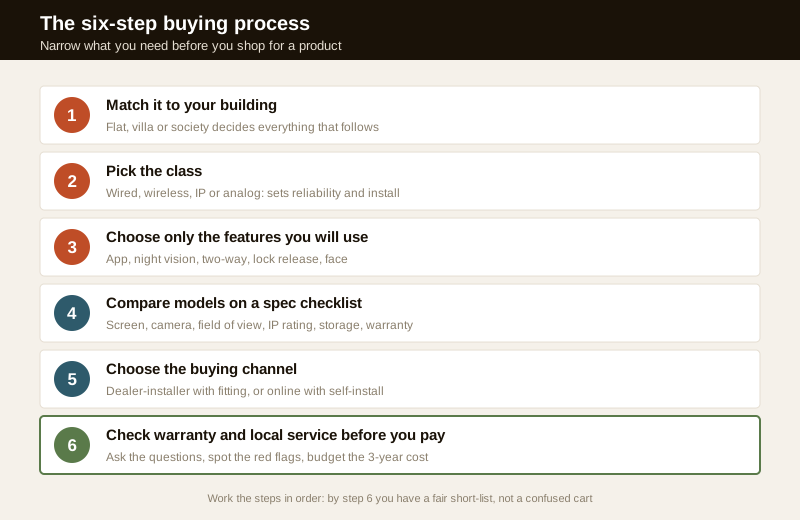
The six-step buying process
Do not start by browsing products; start by narrowing what you actually need. Work through these six steps in order and by the end you will have a short-list and a fair quote instead of a confused cart.
Step 1 — Match it to your building
The single biggest factor is not brand or price; it is what kind of home you are fitting it to. The same money buys a very different system in a flat, a villa and a society.
- Apartment / flat. You usually have a main-door station and one or two indoor monitors, and you may need to tie into the building's existing lobby or guard intercom rather than replace it. Read apartment intercom systems and, if the whole building is being wired, multi-apartment video door systems.
- Villa / independent house. You often have a compound gate and a front door, sometimes with more than one indoor monitor across floors. The villa video door phone guide covers gate-plus-door setups and longer cable runs.
- Gated community / society. This is a shared-infrastructure decision the RWA makes, linking guard posts to every flat — see guard-to-resident intercom and the wider security guide for gated communities.
- A single rented flat or a light-touch retrofit. If you cannot run cables or drill the wall, a smart video doorbell that answers on your phone may suit you better than a full wired door phone.
If you are not sure which class fits, the video door phone type selector walks you through it, and for a whole apartment building the apartment video door system planner sizes the shared parts.
Step 2 — Pick the class
Once you know the building, choose the underlying technology. This is the choice that most affects reliability, price and how the thing gets installed.
| Class | Best for | Trade-off | Guide |
|---|---|---|---|
| Wired (analog / 2-wire) | New build or renovation where you can run cable; most reliable | Needs cabling, professional install | wired, analog |
| Wireless | Retrofit where you cannot run cable | Depends on Wi-Fi/RF range and battery upkeep | wireless |
| IP / network | Bigger homes, multi-monitor, app-first, societies | Needs a home network done properly | IP |
As a rule of thumb: if walls are open (new build or renovation), wired or IP gives the most dependable result; if you cannot touch the walls, wireless or a doorbell-style unit is the honest choice. Do not let a seller push an IP system onto a home with no real network, or an analog unit onto a large multi-floor villa that needs several monitors and app access. The type selector settles most of these debates in a couple of minutes.
Step 3 — Choose only the features you will use
Feature lists are where budgets quietly balloon. Every extra capability adds cost, complexity, or a subscription — so choose deliberately. Sort each feature into must-have, nice-to-have, or skip for your home before you shop.
- Mobile app / answer on phone. Genuinely useful if you are often out; it lets you see and speak to a visitor from anywhere. Weigh app quality and privacy carefully — see mobile-app video door phones.
- Two-way audio. Almost always worth it — a door phone you cannot talk through is half a device. Read two-way audio.
- Night vision. Essential; most visitors and most incidents happen after dark. The night-vision guide explains IR versus colour night vision.
- Lock / gate release. Very convenient if you want to open the door or gate from the monitor, but it means integrating with door hardware — see access control and smart locks, and hand the lock wiring to a professional.
- Facial recognition. A premium, privacy-heavy feature that most homes do not need; understand the trade-offs in the facial recognition guide before paying for it.
For a guided sort of what matters to you, run the video door phone feature selector and take its short-list into the shop. The deeper picture of how features combine is in D3 of the hub.
Step 4 — Compare models on a spec checklist
With a class and a feature short-list, you can finally compare products — but only on the specs that matter. Do not compare on price alone; compare like for like on this checklist, and be suspicious of any listing that hides a line.
| Spec | What to look for | Why it matters |
|---|---|---|
| Indoor screen | 7 inch is the comfortable norm; note resolution | A tiny, low-res screen makes a face hard to read |
| Camera resolution | Enough to recognise a face at the door (HD or better) | The whole point is seeing who is there |
| Field of view | Wide enough to see a person head-to-toe at the door | A narrow lens shows only a chin or forehead |
| Night vision | IR as a minimum; colour if the door has some light | Most callers arrive after dark |
| Two-way audio | Clear, echo-free duplex audio | You must actually converse |
| Weather rating (IP) | An IP rating on the door station (e.g. IP54+) | The outdoor unit faces monsoon, dust and heat |
| Storage | Local SD card and/or cloud; note the subscription | Where recordings live, and what it costs ongoing |
| Monitors supported | How many indoor monitors it can drive | Villas and multi-floor homes need more than one |
| Lock / gate output | A relay/output if you want door or gate release | Enables open-from-monitor if you need it |
| App quality | Recent, well-rated, actively updated app | A dead app strands every remote feature |
| Warranty & service | Length, and whether service exists in your city | Determines what happens when it breaks |
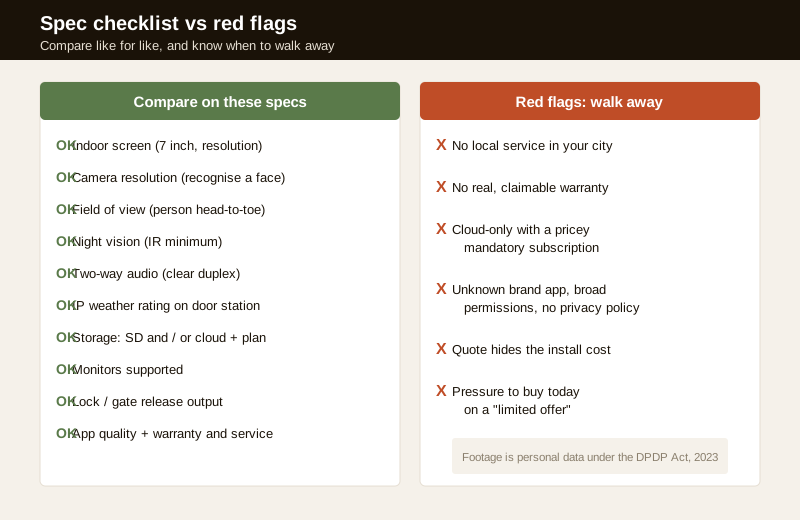
Two specs Indians under-weight and later regret: the IP weather rating of the outdoor door station, because a unit that is not sealed for monsoon and afternoon heat will fog, corrode or die within a couple of seasons; and storage plus subscription, because a cloud-only device can quietly cost more over three years than the hardware did. Confirm both on the manufacturer's own datasheet, not the marketplace bullet points.
Step 5 — Choose the buying channel
Where you buy matters as much as what you buy, because a door phone is only as good as its installation and after-sales. There are two broad routes in India, and the right one depends on how hands-on you can be.
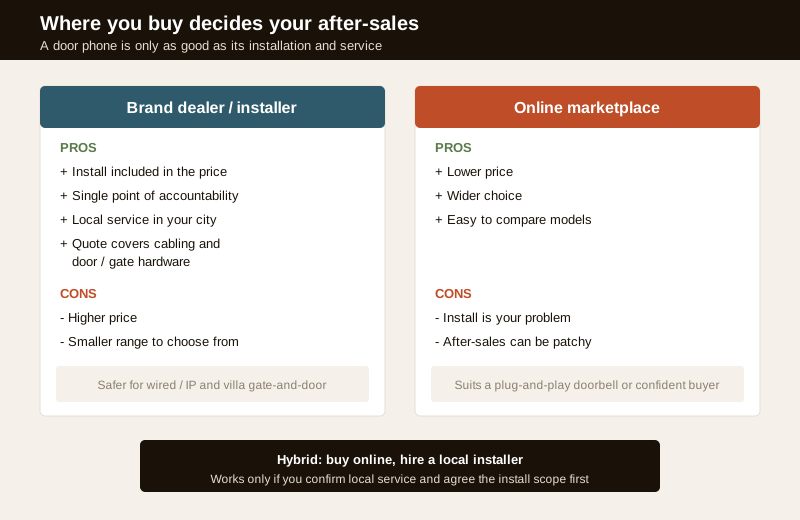
Brand dealer / authorised installer. You pay more, but the price usually includes the site visit, cabling, mounting and commissioning, and you get one point of accountability if anything fails. This is the safer route for a wired or IP system, for a villa with gate-and-door runs, or for anyone who does not want to coordinate an electrician themselves. Ask for the installer's own warranty on the workmanship, separate from the manufacturer's warranty on the device.
Online marketplace. You get a lower price and a wider range, and you can compare easily — but installation becomes your problem, after-sales can be patchy, and warranty claims on an online-bought unit are sometimes harder to service locally. This route suits a plug-and-play smart doorbell or a confident buyer who already has a trusted local electrician lined up.
The hybrid — buy the hardware online, hire a local installer to fit it — works, but only if you have confirmed local service for that brand and agreed the install scope with the electrician in advance. Coordinate cabling and any lock work with the electrical hub in mind: mains and door-hardware work is a licensed job.
Step 6 — Check warranty, service and red flags before you pay
The last step is the one people skip and regret. Before money changes hands, verify the things that decide what happens after the sale.
Questions to ask the seller or installer
Read these out; a good vendor answers them without flinching.
1. Is there authorised service for this brand in my city, and what is the turnaround for a repair?
2. What exactly does the price include — device only, or device plus cabling, mounting and commissioning?
3. What is the warranty on the device, and separately on your installation workmanship?
4. Is there a subscription for cloud storage or app features, and what does it cost per year?
5. What is the IP weather rating of the outdoor door station, on the datasheet?
6. How many indoor monitors can it support, and can I add one later?
7. If I want door or gate release, who wires the lock, and is that in the quote?
8. Where is footage stored, who can access it, and how do I delete it (a DPDP question)?
9. What happens to app access and any remote login when the installer's job is done?
10. Can you show me a working demo unit, not just a brochure?
Red flags — walk away or negotiate hard
- No local service. A great spec sheet is worthless if the nearest repair is in another state.
- No real warranty, or a warranty that exists only on paper with no way to claim it locally.
- Cloud-only storage with a pricey mandatory subscription — over three years this can dwarf the hardware cost; prefer a device that also records to a local SD card.
- An unknown brand's app asking for broad permissions, with no privacy policy and no recent updates — that app sees your doorstep.
- A quote that hides installation, so a cheap device becomes expensive once cabling and mounting are added.
- Pressure to buy today with a "limited offer" — a door device is a multi-year decision, not an impulse buy.
Budgeting the whole thing
Compare the installed, three-year cost, not the sticker price of the box. A cheap unit with a mandatory cloud plan and a paid install can cost more than a pricier all-in system. Work out realistic Indian bands with the video door phone cost guide, then price your exact choice — device, install, storage and any subscription — with the video door phone cost calculator. Bring that number to the quote so you can tell a fair price from a padded one.
You can also plan the physical side early so nothing surprises the budget: where the units go (placement), how they are wired (wiring), how they survive a power cut (power and backup), how to keep it private (privacy), and how to keep it alive (maintenance).
What to weigh, at a glance
Different buyers should weight the same factors differently. This is not a scorecard to add up blindly; it is a reminder of which trade-offs actually move the decision for your situation.
| Factor | Weighs more if... | Weighs less if... |
|---|---|---|
| Local after-sales service | You want it to just work for years | You are technical and comfortable self-servicing |
| Install included | You do not want to manage an electrician | You already have a trusted installer |
| App / remote answer | You are often away from home | Someone is usually home to answer |
| Lock / gate release | You have a compound gate or want keyless entry | You are happy opening the door yourself |
| Storage cost over time | You want to keep a record of callers | You only want live answering, no recording |
| Weather (IP) rating | The door station is fully exposed to sun and rain | It sits under a deep, sheltered porch |
| Number of monitors | Multi-floor villa or large home | Compact flat with one answering point |
| Upfront price | Budget is tight | You value reliability and service over saving a little |
When to bring in a professional. Do the choosing yourself — matching the class, sorting features, comparing specs and vetting the seller are exactly what an informed owner should own. Hand the install to a licensed professional: mains power, cabling at height, mounting, and any door-lock or gate-release wiring. For a society or a whole apartment building, this is a committee decision — use the apartment video door system planner and the security guide for apartments, and get the RWA to agree data-handling terms in writing. If your home security is a broader project, zoom out to the ultimate guide to home security.
Key takeaways
- Choose before you shop. Match the device to your building first, then pick the class, then the features — brand and price come last. The type selector and feature selector do most of the narrowing.
- Buy only the features you will use. Two-way audio and night vision are near-essential; app, lock release and facial recognition are worth it only if they fit how you actually live — each adds cost or a subscription.
- Compare on a spec checklist, not price. Screen and camera resolution, field of view, the door station's IP weather rating, storage plus subscription, monitors supported, app quality and warranty — like for like.
- The channel decides your after-sales. A dealer-installer costs more but includes fitting and one point of accountability; online is cheaper but the install and service are on you. Confirm local service either way.
- Budget the installed three-year cost with the cost guide and cost calculator, and walk away from cloud-only lock-in, no local service, and hidden installation.
References
- Digital Personal Data Protection Act, 2023 — a door phone's footage and audio are personal data; ask any seller or installer where recordings are stored, who can access them, how to delete them, and how remote access is revoked when a job ends.
- Manufacturer specifications — verify screen and camera resolution, field of view, the outdoor door station's IP weather rating, supported number of monitors and any lock-output relay on the maker's own datasheet before buying, not from marketplace bullet points.
- National Building Code of India (SP 7), Bureau of Indian Standards, and local municipal bye-laws for the electrical and cabling aspects of an install; engage a licensed electrician and verify the current edition via the BIS catalogue: https://www.services.bis.gov.in/
This is an educational overview, not legal advice. Mains power, cabling at height, mounting and any door-lock or gate wiring are qualified professional tasks — engage licensed installers and electricians, and verify any standard's current status via the BIS catalogue before relying on it.
Export this guide
Related Guides — Deep-dive reading
How to Choose a CCTV Camera (2026): The Homeowner's Decision Guide for India
Cut through the spec-sheet noise and choose the right CCTV camera for each spot around an Indian home. What actually matters — sensor and low-light performance, lens and field of view, form factor, IP and IK ratings, honest smart features — and the marketing claims to ignore.
SecurityCCTV vs Video Door Phone: Which Does Your Home Need?
They look similar and get confused constantly, but a CCTV camera and a video door phone do different jobs — one watches the whole property and records, the other answers your door and controls who comes in. This guide settles CCTV vs video door phone for Indian homes: what each is for, where they overlap, real rupee costs, apartment versus villa relevance, and why most homes end up wanting both.
Smart HomeSmart Lock Buying Guide India (2026): How to Choose and Buy the Right One
A step-by-step way to actually choose a smart lock in India: check it fits your door, pick the credential type, choose only the features you will use, tick off the safety must-haves, compare specs and spot the red flags before you pay.
SecurityRelated Tools — Try Free
Video Door Phone Feature Selector
Tick what you want the door phone to do — app, night vision, two-way audio, smart lock, access control or facial recognition — and get the features and integrations to spec, with the privacy and safety caveats.
Feature SelectorApartment Video Door System Planner
Enter flats, entrances, floors and guard desk for a first-pass building intercom plan — door stations, indoor monitors, guard station, the right architecture and an indicative cost band.
Building PlannerVideo Door Phone Type Selector
Answer a few questions about your building, cabling, budget and internet and get the right video door phone — analog / wired / wireless / IP, single-home or multi-apartment, monitor or app.
Door Phone Selector