
Wired Video Door Phones in India (2026): The Reliable Default
Why a dedicated cable from door station to indoor monitor is still the most dependable video door phone for a villa or flat, the wiring realities in new-build versus retrofit, power, distances and multi-monitor runs.
Ask any installer in India which door phone almost never generates a support call, and the answer is the same: the plain wired video door phone. No app to log in to, no Wi-Fi password that changes, no battery that dies on the coldest morning. A cable runs from the outdoor door station to the indoor monitor, carries both the video and the power, and simply works — year after year, through load-shedding and monsoon. It is the class most Indian villas and flats are still built around, and for good reason.
This guide is part of the Studio Matrx video door phone hub, sitting under the complete guide to video door phones. It explains exactly what "wired" means, why it is the reliability default, the cabling reality in a new-build versus a retrofit, how power and distance work, how to add extra indoor monitors, and the one situation where wired genuinely loses — so you can plan and coordinate the right choice with your electrician and installer.
Scope & safety. This guide helps you plan, choose and coordinate a wired video door phone. Running low-voltage door-phone cable during construction is straightforward, but the indoor monitor's mains point and its adaptor are a licensed electrician's job, and any strike-lock or door-hardware wiring belongs to the door trade. A door camera watches your own entrance — point it at your doorstep, not a neighbour's door or the shared corridor beyond your unit. Footage is personal data under the Digital Personal Data Protection Act, 2023. This is educational guidance, not legal advice.
What "wired" actually means here
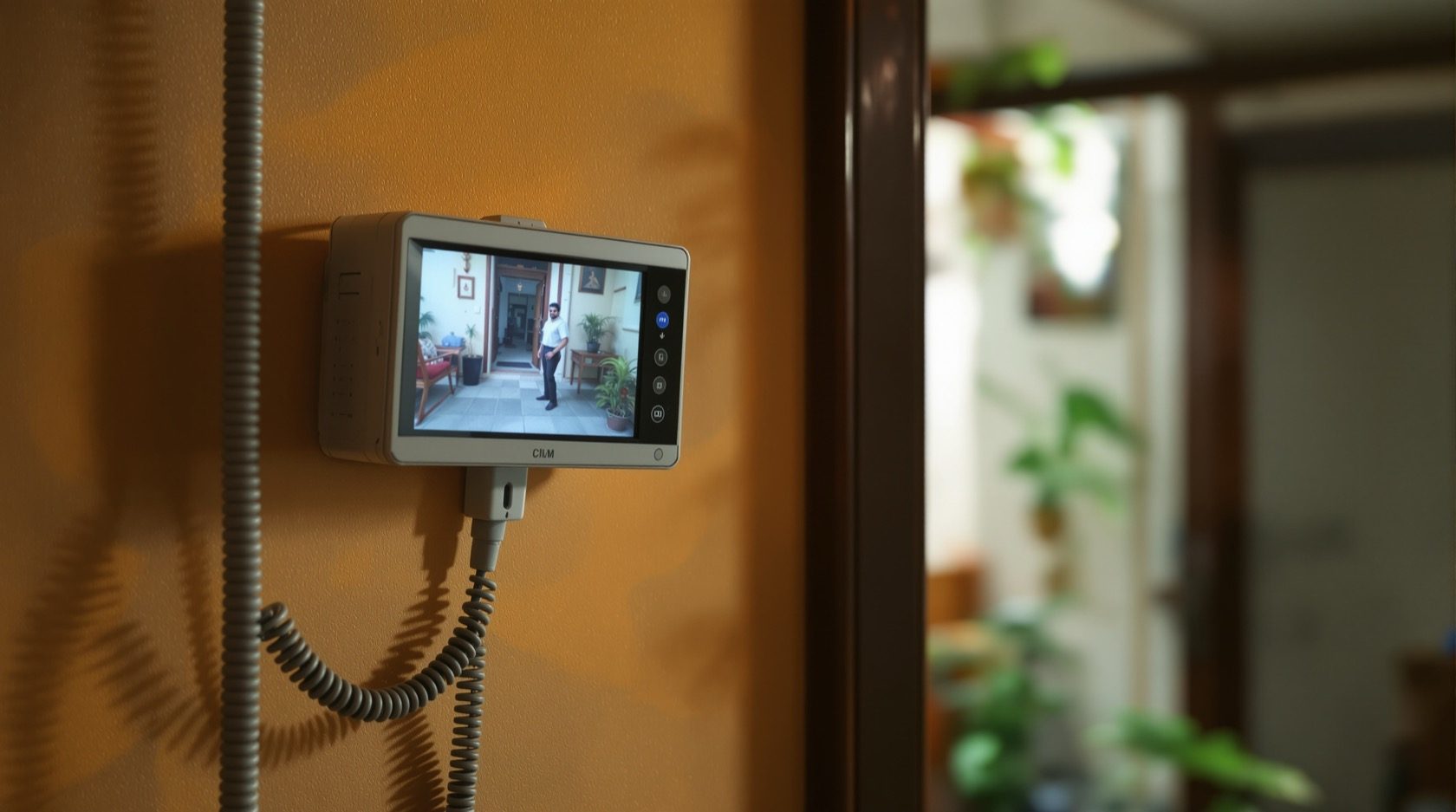
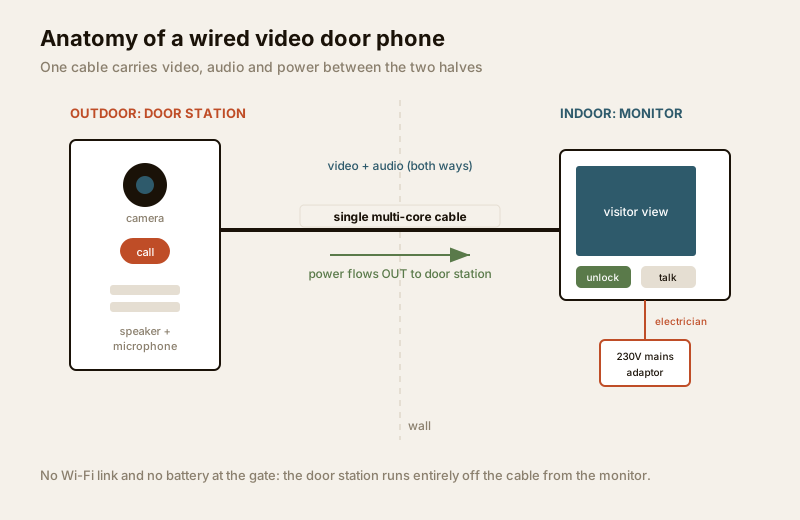
Every video door phone has two halves: an outdoor door station (the unit at your gate or door with the camera, call button and speaker) and an indoor monitor (the screen inside from which you see, talk to and let in a visitor). "Wired," in this traditional class, means a physical cable runs between the two and carries everything: the video from the camera, the two-way audio, and the power that runs the door station.
That single cable is the whole idea. It is why this class is so dependable — there is no wireless link that can be jammed, congested or dropped, and the door station never needs its own battery or power point because it draws power down the same cable from the indoor monitor.
There are three cabling styles you will meet in India:
- 4-wire (4-core): the classic and most common. Four conductors — typically one for video, one for audio, and two for power — run from monitor to door station. Simple, cheap cable, easy for any electrician to terminate. This is what most affordable Indian kits use.
- 2-wire (bus): a newer approach where just two conductors carry video, audio, power and data together, and multiple devices (extra monitors, a second door station) can "tap" the same pair. Fewer wires to run and more forgiving of existing cabling, which makes it popular for retrofits and apartments.
- Coax (older kits): some legacy and higher-end analog systems send the video down a coaxial cable (like an old TV aerial cable) with separate wires for audio and power. You will mostly meet this on older installations being serviced rather than new fits.
A quick but important distinction: an IP video door phone is also wired — but over a LAN (Ethernet) cable, and it behaves like a networked computer. When people in this guide say "wired," they mean the traditional dedicated-cable analog or 2-wire class described above, not IP. The two are different enough to deserve their own guide — see IP video door phones for that networked route. And this is a two-way intercom you answer from an indoor monitor, which is what separates it from a doorbell camera — a CCTV-style device you mainly answer from a phone app.
Why wired is the reliability default
Wireless and app-based door phones are convenient, but every convenience adds a thing that can fail. Wired removes those things:
- No Wi-Fi to drop. The video travels down copper, not over a home network that slows down when everyone is streaming, or drops when the router reboots after a power cut. A wired monitor shows the visitor instantly, every time.
- Stable power, no battery to die. The door station is powered from the monitor down the same cable. There is no separate battery at the gate to run flat in six months, no solar panel to keep clean, no "low battery" notification the week you are travelling.
- Better for a fixed home. A villa or an owned flat is not moving. Once the cable is in, the system is effectively permanent — the classic reason wired suits villas and independent houses and owned apartments so well.
- Fewer moving parts to secure. No cloud account to protect, no app login for every family member. The system lives on your wall, not on someone's server.
| What can go wrong | Wired VDP | Wireless / app VDP |
|---|---|---|
| Home Wi-Fi drops or is slow | Not affected — video is on cable | Call may lag, drop or not arrive |
| Router reboots after a power cut | Not affected | Offline until Wi-Fi returns |
| Door-station battery runs flat | No battery — powered by cable | Misses calls until recharged |
| Internet outage | Local call still works | App / cloud features lost |
| Long-term reliability | Very high once installed | Depends on signal and battery care |
| Best suited to | Fixed villa or owned flat | Rentals, no-cable situations |
This is not to say wireless is bad — it is the right answer in a rental or where no cable can be run, covered in wireless video door phones. But when you own the home and can lay a cable, wired is the dependable default. Use the video door phone type selector to sanity-check the class against your own situation.
The cabling reality: cheap in a new-build, work in a retrofit
The single biggest factor in a wired system's cost and neatness is when the cable goes in.
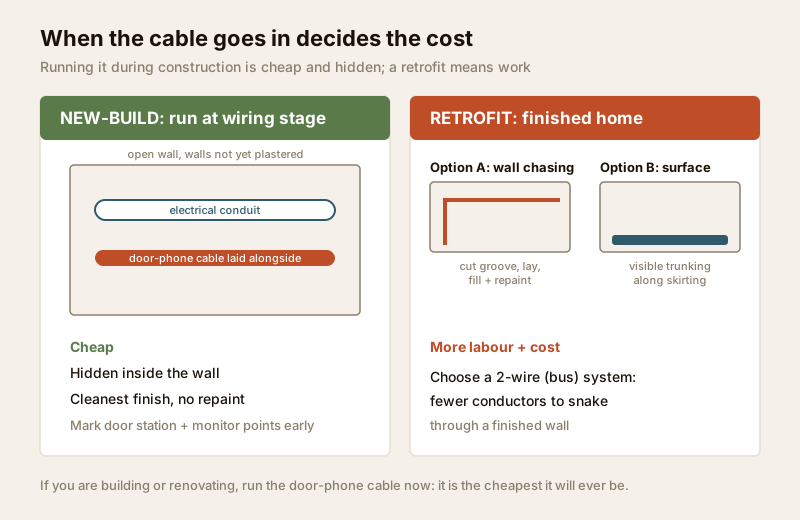
- During construction (new-build or major renovation): running the door-phone cable at the wiring stage, alongside the electrical conduits, is genuinely cheap — a length of cable and a little labour while the walls are open. The cable sits hidden inside the wall, the door station and monitor points are pre-marked, and the finish is invisible. If you are building or renovating, decide the door station and monitor locations early and get this run put in. It is the cheapest it will ever be.
- As a retrofit (finished home): now the walls are plastered and painted. Getting a hidden cable in means either chasing a groove into the wall (cutting, laying cable, filling and repainting — dusty and disruptive) or running the cable in a surface conduit (a plastic trunking along the wall or skirting — quick and cheap but visible). Neither is a disaster, but both cost more in labour and neatness than doing it at the wiring stage. This is exactly where a 2-wire system earns its keep, because fewer conductors are easier to snake through an existing route.
Choosing the cable class for your situation
| Situation | Best-fit cable style | Why |
|---|---|---|
| New villa or flat, walls open | 4-wire or 2-wire | Any cable is easy to run; pick to match the kit |
| Retrofit, no existing door-phone cable | 2-wire (bus) | Fewer conductors to snake through a finished wall |
| Retrofit, an old analog cable already there | 2-wire or reuse | Sometimes an existing pair can be reused |
| Servicing a legacy coax kit | Coax + audio/power | Match the existing system; plan replacement long-term |
| Multiple indoor monitors wanted | 2-wire (bus) | Extra monitors tap the same pair easily |
Whatever the class, use the cable the kit manufacturer specifies — the right number of cores and the right gauge for the run length. An under-spec cable is the commonest cause of a dim picture or a door station that will not power up, and it is far cheaper to run the correct cable once than to re-do it.
Power: where the two ends get their electricity
A wired system has a neat power arrangement that is worth understanding before you brief your electrician:
- The indoor monitor needs mains power. It plugs into a wall adaptor (a small transformer) that steps 230V mains down to the low voltage the monitor runs on — usually via a dedicated point behind or beside the monitor. This mains point and its adaptor are a licensed electrician's job, planned alongside the rest of your electrical work. Put it on a circuit that stays live, and ideally back it with an inverter or UPS so the door phone survives a power cut — a door phone that dies with the evening load-shedding is only half a system.
- The door station is powered down the cable. It draws its power from the indoor monitor through the same cable that carries the video and audio. That is why there is no power point at the gate — one less thing to install outdoors and one less thing to fail in the weather.
In a larger system with several monitors or a strike lock drawing more current, the kit may use a separate power supply unit rather than powering everything from one monitor — your installer will size this. Never let anyone splice the door-phone adaptor into an unprotected or overloaded circuit; treat it as the mains work it is.
Distance and cable-gauge limits
Wired is dependable, but it is not infinite. The video and power weaken over a long cable run, so every kit has a maximum monitor-to-door-station distance, and that distance depends on the cable gauge (thickness) you use — thicker copper carries power and signal further with less loss.
- Typical 4-wire kits comfortably handle the distances found in a normal home — a gate to a living-room monitor — often up to somewhere around 50 to 100 metres, but always check the specific model's datasheet.
- Thicker-gauge cable extends the reach. If the run is long (a big plot, a gate far from the house), your installer will specify a heavier cable, or a bus/2-wire system rated for longer runs, or an in-line power supply nearer the door station.
- The two limits combine. Exceed the rated distance for your cable gauge and you get a dim or rolling picture, weak audio, or a door station that browns out. The fix is the right cable from the start, sized for the actual run — measure the route (not the straight-line distance) before buying.
The practical rule: measure the real cable path, tell your installer the length, and let them specify the cable gauge and kit rated for it. Do not assume the cable in the box is long enough or thick enough for a big villa plot.
Multi-monitor wiring: screens in more than one room
Most Indian homes want more than one indoor monitor — one in the living room and one in the master bedroom or on an upper floor, so a call can be answered from wherever you are. Wired systems handle this in two ways:
- A master and slave monitors. One monitor is the "master" (often the one nearest the incoming cable and power), and additional "slave" or extension monitors connect to it. When the bell rings, all of them ring, and any of them can view the visitor and unlock the door.
- Bus (2-wire) wiring makes this easiest. Because a 2-wire bus lets devices tap the same pair, adding a second or third monitor is often just a matter of extending the pair to the new location — far simpler than pulling a fresh 4-core run to each room.
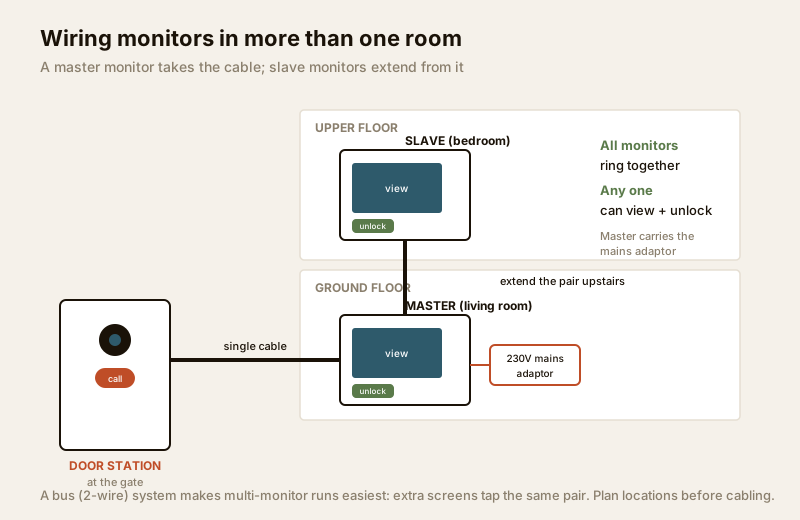
Plan the monitor locations before the cable goes in — retrofitting a second monitor to a finished wall means the same chasing-or-surface-conduit choice all over again. Decide early where the household actually needs a screen.
Where wired loses — and where to look instead
Wired is the default, but it is honestly not always the right answer:
- Rentals. Chasing a cable into a landlord's wall is rarely allowed or worth it. A tenant wants something that comes off the wall when they move — that points to wireless video door phones.
- No practical way to run a cable. A finished flat where the entrance and the living room have no shared wall or accessible route, a heritage structure you cannot chase, or a situation where surface trunking is unacceptable — again, wireless is the pragmatic answer.
- You want it purely on your phone, everywhere. If answering the door from your office across town matters more than an indoor screen, an app-first or IP system fits better — though note that an IP system is still a wired-over-LAN install, not a battery gadget.
For most owned homes, though, none of these apply, and wired remains the dependable, low-maintenance choice.
When to bring in a professional. You can plan the door station and monitor locations, choose the class, and measure the cable route yourself. Hand the mains point and adaptor for the indoor monitor to a licensed electrician — see the electrical hub — and the cable-chasing, at-height door-station mounting, monsoon sealing at the gate, and any strike-lock or door-hardware wiring to your installer and the door trade. Point the camera at your own doorstep only; footage is personal data under the DPDP Act, 2023.
India realities to build in
- Run the cable at the wiring stage. If you are building or renovating, this is the single cheapest decision — a hidden cable while the walls are open costs a fraction of a later retrofit. Mark the door station and every monitor location on the electrical drawing.
- Seal the door station against the monsoon. The outdoor unit sits in driving rain, dust and 40-plus-degree heat. Mount it under the gate's shade or a small hood, and have the installer seal the cable entry and the back of the unit so water cannot track in — a badly sealed door station is the commonest monsoon failure.
- Back the monitor's power. Put the monitor's mains point on an inverter or UPS circuit so the door phone keeps working through load-shedding.
- Use a licensed electrician for the mains and adaptor point. The low-voltage door-phone cabling is simple, but the 230V point is qualified work — coordinate it with the rest of your home's electrical scheme.
For the wider picture — how a wired unit compares with analog, IP and wireless classes and how to spec a whole entrance — see the complete video door phone guide and the broader security hub.
Key takeaways
- A wired video door phone runs a dedicated cable from the outdoor door station to the indoor monitor, carrying video, audio and power — no Wi-Fi to drop and no battery to die, which makes it the reliability default for an owned villa or flat.
- Three cabling classes: 4-wire (4-core) is the common, cheap classic; 2-wire (bus) needs fewer conductors and suits retrofits and multi-monitor runs; coax appears on older kits you are mostly servicing, not fitting.
- When the cable goes in decides the cost — running it at the wiring stage is cheap and hidden; a retrofit means chasing the wall or surface conduit, where a 2-wire system's fewer conductors help.
- Power split: the indoor monitor needs a mains adaptor point (a licensed electrician's job, ideally on a UPS), and the door station is powered down the same cable — so there is no power point at the gate.
- Respect distance and gauge limits, and plan monitors early — measure the real cable route, let your installer size the cable, and where wired cannot go (rentals, no cable route) switch to wireless or IP.
References
- Digital Personal Data Protection Act, 2023 — a door camera captures personal data; point it at your own doorstep, restrict who can view footage, and keep the system's access private.
- Manufacturer specifications — confirm the exact cable type, number of cores, gauge and maximum monitor-to-door-station distance on the specific kit's datasheet before buying or running cable; kits vary widely.
- National Building Code of India (SP 7), Bureau of Indian Standards, and local wiring regulations for the indoor monitor's mains point and adaptor — this is licensed electrical work; verify the current edition via the BIS catalogue: https://www.services.bis.gov.in/
This is an educational overview, not legal advice. The mains point and adaptor for the indoor monitor, cable-chasing, at-height mounting and any door-hardware wiring are qualified professional tasks — engage a licensed electrician and installer, and verify any standard's current status via the BIS catalogue before relying on it.
Export this guide
Related Guides — Deep-dive reading
Video Door Phone Power Backup in India (2026): Keeping the Door Alive Through Power Cuts
How to keep the indoor monitor, door station and — for app kits — the router and ONT running through India's power cuts, using a small UPS, the home inverter circuit, or a built-in battery, so you can still see and answer the door.
SecurityComplete Guide to Security System Cybersecurity in India (2026): Protecting the Systems That Protect You
The cameras, locks, alarms and door phones you install to feel safer are internet-connected computers that can themselves be attacked, and an insecure one is worse than none. This pillar maps the whole attack surface — devices, network, accounts and data, operations — and points to every guide that hardens it.
SecurityPoE vs Wi-Fi CCTV: Which Home Security Cameras Are Better?
One camera type runs power and video down a single Cat6 cable to an NVR and almost never drops out; the other clips to a wall in minutes and streams over your home Wi-Fi. This guide settles PoE vs Wi-Fi CCTV for Indian homes — reliability, video quality and bandwidth, cabling and power, retrofit versus new-build effort, NVR versus SD and cloud storage, hacking risk, real rupee costs, scalability and outdoor use — and gives a clear verdict for each kind of home.
Smart HomeRelated Tools — Try Free
Video Door Phone Type Selector
Answer a few questions about your building, cabling, budget and internet and get the right video door phone — analog / wired / wireless / IP, single-home or multi-apartment, monitor or app.
Door Phone SelectorCCTV System Type Selector
Answer five questions and get the right CCTV setup — analog / IP / hybrid, wired / wireless, local / cloud — with reasons.
CCTV SelectorApartment Video Door System Planner
Enter flats, entrances, floors and guard desk for a first-pass building intercom plan — door stations, indoor monitors, guard station, the right architecture and an indicative cost band.
Building Planner