
Video Door Phone Maintenance in India (2026): Keeping Your Door Station Working for Years
A homeowner's routine for keeping a video door phone alive in Indian weather: cleaning the outdoor lens, testing two-way audio and the door release, minding batteries and firmware, and a simple monthly, quarterly and annual calendar with Indian service costs.
A video door phone almost never dies on the day it lets you down. It fails weeks earlier, quietly, out at the gate where nobody looks: a film of monsoon grime creeps over the camera glass, a spider strings a web across the warm lens housing, the outdoor speaker crackles and cuts out, or a cracked rain-hood lets water seep into the door station over one wet fortnight. Then a courier presses the button one evening and there is a black screen, a dead line, or no chime at all.
A video door phone is the two-way intercom you answer from an indoor monitor or a phone app to see and speak to whoever is at your door before you open it. Unlike a passive CCTV camera, it has a call button, a microphone and speaker at both ends, and usually a door or gate release — more moving, weather-exposed, human-touched parts, and therefore more that needs tending. This guide, part of Studio Matrx's video door phone hub, is about video door phone maintenance: the fifteen-minutes-a-month habit that keeps a door station working for years in Indian heat, dust and rain, what you can safely do yourself, and when to call a professional.
Scope & safety. This guide helps you plan and supervise upkeep on your own doorstep. Wiping a door station you can reach from the ground, testing the button and checking the app are fine to do yourself; anything at height, near the mains, or involving the gate lock or door hardware belongs to a licensed electrician or your installer. Point the camera only at your own entrance — never into a neighbour's home or down a shared corridor beyond your unit. Video and audio of visitors is personal data under the Digital Personal Data Protection Act, 2023, so keep app access and passwords tight. This is educational guidance, not legal advice.
Why a door station needs tending at all
The outdoor unit of a video door phone lives in the harshest spot on your property: bolted to a gate post or beside the main door, in full sun at forty-plus degrees, in driving monsoon rain, in dust storms, and within easy reach of every hand, courier and curious child that passes. Left alone, a few things drift, and each one shows up as "the door phone has stopped working":
- The lens films over. A skin of dust, a monsoon water-mark, a cobweb or an insect nest on the camera glass will look almost fine in daylight and turn the night image into a useless glare-blur. This is by far the most common "it stopped working" complaint that is really just a dirty lens — and spiders and small insects genuinely love the warm housing.
- The audio drifts. The outdoor speaker and microphone take the weather full on. One direction can fail silently: you can hear the visitor but they cannot hear you, or the chime plays but the mic is dead. Nobody notices until a real caller cannot be heard.
- The seal fails. The rain-hood, gasket or shroud that keeps water out of the door station perishes in UV and heat. One breached monsoon later, moisture is inside the electronics.
- The power quietly ages. Battery doorbells, battery-backed monitors and the inverter/UPS behind a wired kit all rely on cells that lose capacity with every Indian summer, so the unit that "always worked through a power cut" one day does not.
None of this announces itself. A short, repeatable routine catches every one of them before it becomes the evening you needed to see who was at the door and could not.
The maintenance calendar
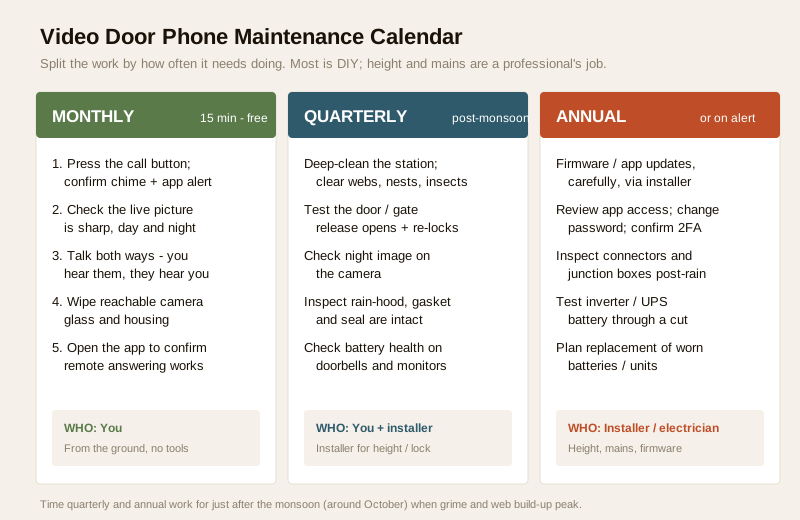
The trick is to split the work by how often it actually needs doing. Most of it you can do yourself from the ground in a few minutes; the parts that need a ladder, the mains, or the gate lock belong to a professional. The CCTV side of a combined system has its own rhythm — see the CCTV maintenance and AMC guide — but the door phone itself needs this:
| When | Task | Who | Time / cost |
|---|---|---|---|
| Monthly | Press the call button; confirm it chimes on the monitor and app | You | ~15 min, free |
| Monthly | Check the live picture is sharp, day and (if you can) night | You | included above |
| Monthly | Talk both ways — you hear them, they hear you, no crackle | You | included above |
| Monthly | Wipe the camera glass and housing you can reach from the ground | You | included above |
| Monthly | Open the app once to confirm remote answering still works | You | included above |
| Quarterly | Deep-clean the whole door station; clear webs, nests, insects | You (ground) / installer (height) | free, or part of AMC |
| Quarterly | Test the door / gate release actually opens and re-locks | You + installer for lock | free / installer visit |
| Quarterly | Check the rain-hood, gasket and seal are intact and firmly fixed | You / installer | free |
| Quarterly | Check battery health on battery doorbells and battery monitors | You | cell cost only |
| Annual | Apply firmware / app updates, ideally via the installer | Installer | part of AMC |
| Annual | Review app access, change the password, confirm 2FA is on | You | free |
| Annual | Inspect connectors, junction boxes and cabling, post-monsoon | Electrician / installer | part of AMC |
| Annual | Test the inverter / UPS battery that carries the kit through cuts | Electrician | battery ₹1,200–₹4,000+ |
Time the quarterly and annual work for just after the monsoon — roughly October across most of India. That is when grime, web build-up and water ingress peak, so one well-timed service catches the most. In an apartment, be clear on the boundary: the lobby panel, the wiring risers and the guard-station unit are usually the society's/RWA's responsibility under the apartment intercom contract, while the monitor inside your flat is yours; in a villa or independent house, all of it is yours to keep up.
The monthly self-check, in plain steps
You do not need a technician for the monthly round. Walk to the gate with your phone, and:
1. Press the button. It should chime on the indoor monitor and, if you have the app, push a notification to your phone. No chime means a dead button, a wiring fault, or no power at the station.
2. Look at the picture. It should be sharp and correctly framed on your own doorstep. Hazy, blurry or a bright halo at night usually means a dirty lens, not a dead camera.
3. Talk both ways. Answer on the monitor or app and check you can hear the person at the door and they can hear you. One-way audio is a common quiet failure — for what good two-way should sound like, see the two-way audio guide.
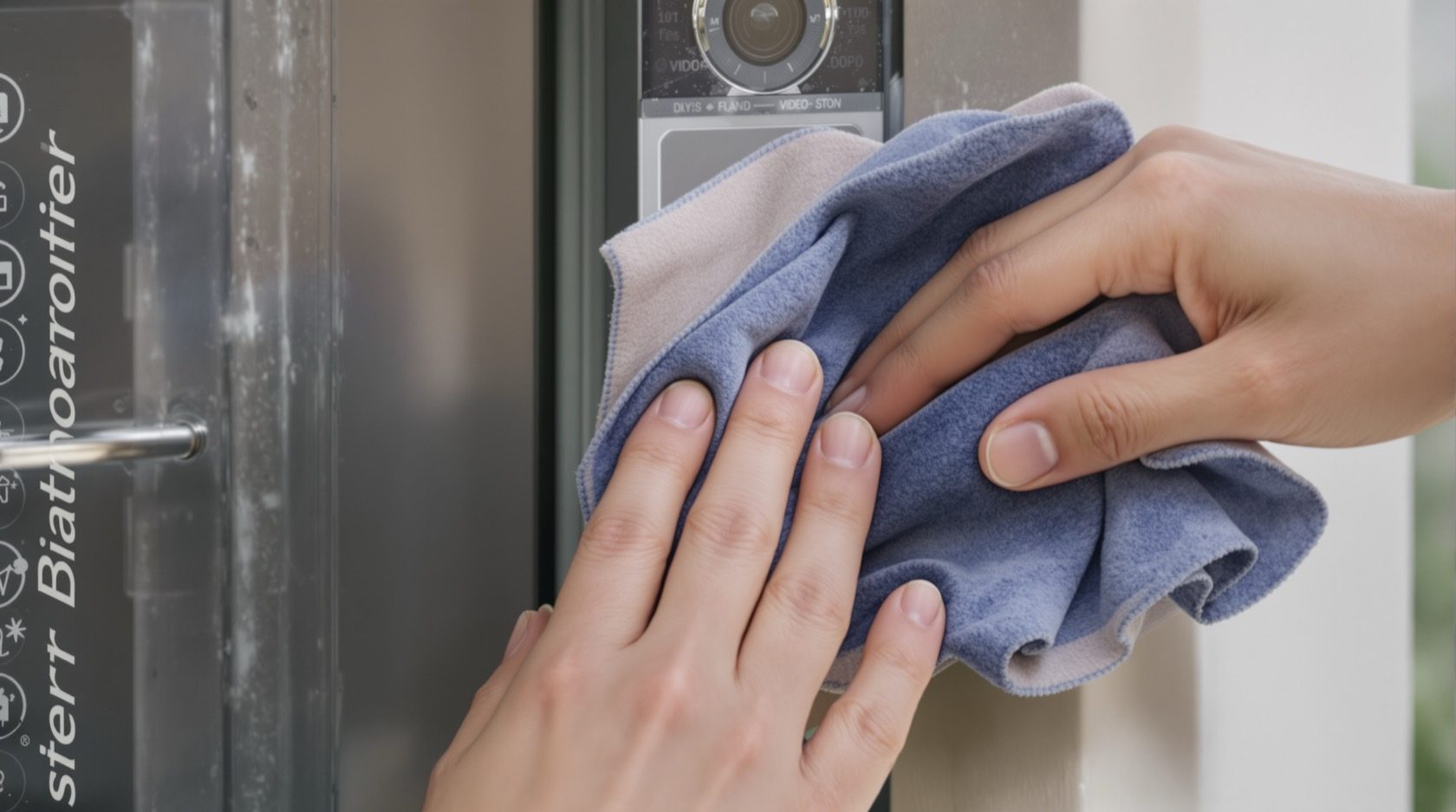
4. Wipe the glass. A quick pass with a soft, damp microfibre cloth over any camera glass you can reach.
5. Check the app. Open the mobile app once to confirm remote answering and notifications still work, since a silent app is as good as no app when you are out.
Cleaning the door station: the highest-value job
Most "the video door phone has gone bad" turns out to be a dirty lens or a fouled housing. In India the culprits are the usual three — summer dust, monsoon water-film, and insects, with spiders especially fond of the warm glow around the camera and IR LEDs, spinning webs right across the glass that then blur the night view and trip endless false alerts.
- Use a soft, slightly damp microfibre cloth — nothing dry, abrasive or solvent-heavy. A scratched lens cover is permanent, and harsh cleaners can perish the seal.
- Wipe the camera glass, the IR window, the microphone and speaker grilles, and the button — clear webs, nests and dust from the whole housing, not just the lens.
- Check the rain-hood or shroud is still firmly attached and angled to throw rain off the glass; a loose one drips straight onto the lens and lets water creep in.
- Clean only what you can safely reach from the ground. A station high on a pillar or under a first-floor eave is a ladder job, and a ladder job is a professional's job.
Testing what the CCTV camera never has to
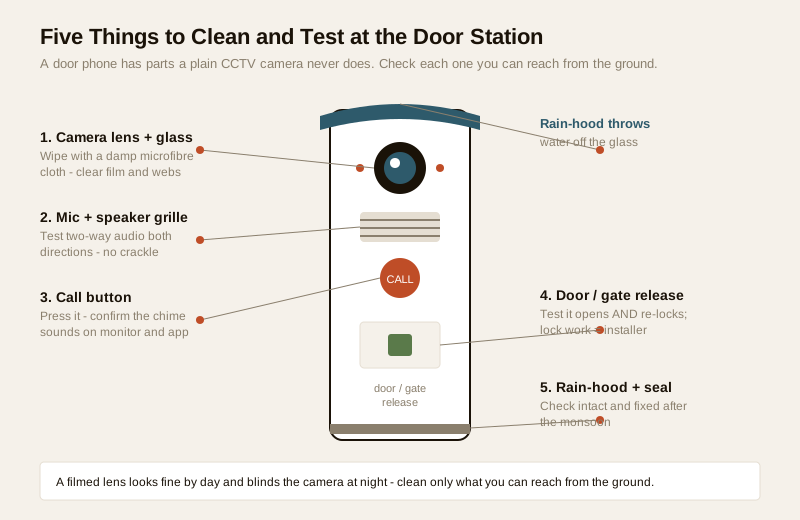
A door phone has parts a plain camera does not, and each needs its own quick test.
The call button and the chime
The button is pressed by every visitor and takes the weather too. Press it yourself each month and confirm the chime sounds on the monitor and the app. A button that has gone spongy, silent, or triggers by itself in the rain points to a worn switch or water in the station — note it for the installer. If the chime is faint or absent indoors, check the monitor volume before assuming a fault.
Two-way audio, both directions
Because audio can fail in only one direction, test both explicitly: stand at the door, have someone answer inside, and confirm each of you hears the other clearly with no crackle, echo or drop-out. Crackle after a wet spell often means water in the outdoor speaker or a corroded connector, not a setting.
The door and gate release
If your door phone drives an electric strike, gate motor or smart lock, test that the release actually opens the door or gate from the monitor and that it re-locks and re-latches afterwards — a release that opens but does not re-secure is a security hole, not a convenience. Test the button and the picture yourself; leave any work on the lock, strike or gate hardware itself to the installer, since a mis-wired release can leave a door that will not lock.
Monitor and screen care
The indoor monitor is the gentlest-lived part, but not maintenance-free. Wipe the screen with a dry or barely-damp microfibre cloth, keep it out of direct sun and away from kitchen grease and heat, do not block its ventilation, and check the mounting is still firm. If it runs off a battery pack rather than mains, treat it like any battery unit below.
Batteries, power and the Indian power cut
Power is where Indian conditions bite hardest. A video door phone that dies with the evening load-shedding is only half a system. Depending on your kit:
- Battery doorbells and battery-powered units. Watch the battery percentage in the app and recharge or replace on the maker's schedule; heat shortens cell life, so an Indian summer will drain them faster than the datasheet promises.
- Battery-backed monitors. Some indoor units hold a small backup cell that ages and swells over years — check it during the quarterly round.
- Inverter / UPS-backed wired kits. Most wired systems ride through a cut on the home inverter or a dedicated UPS. Test that the door phone genuinely stays alive when the mains drops, and have the inverter battery checked yearly. Sizing and backup choices are covered in the power backup guide — this guide's job is only to keep the battery you have healthy.
Replacing an inverter battery, or anything wired to the mains, is an electrician's task, not a homeowner's.
Firmware, the app, and the security re-check
Smart and IP-based door phones are small networked computers, and an un-patched one is both a bug risk and a security hole. Once a year, or when the maker flags a security fix:
- Apply firmware and app updates — carefully, and ideally via your installer. These patch security flaws and fix bugs, but a bad or interrupted update can brick a door station, so do not rush one on a whim over a shaky Wi-Fi link. If the installer manages your kit, let them do it.
- Re-run the security basics. Confirm every default password has been changed to a strong, unique one; that two-factor authentication is on for the app or cloud account; and, crucially, review who has app access — an old tenant, a departed help, or an installer you no longer use should not still be able to watch your door. Revoke anyone who should not be there. Footage and audio are personal data under the DPDP Act, 2023, and app access is the key to them.
- Keep the home router firmware current too, since the whole system reaches your phone through it.
Wired analog kits without an app skip the firmware step entirely — see the analog and wired class guides for what your particular type does and does not need.
Connectors, junction boxes and the monsoon check
The parts you cannot see fail too. After each monsoon, have the installer or electrician:
- Open and inspect the outdoor junction box and station back-cavity for water, corrosion, ants or a perished gasket; re-seal anything that let moisture in. A taped joint that survived one monsoon rarely survives two — the wiring guide covers how a station should be sealed and run.
- Check connectors and cable runs for rodent damage, sagging, or UV-cracked outdoor cable, and confirm the station is still firmly mounted and correctly placed on your own doorstep.
- Anything at height or connected to the mains goes to a licensed electrician — see the electrical hub. This is the line homeowners should not cross.
DIY versus a professional, and what it costs
Split the work by risk, not by how confident you feel. The ground-level, no-tools, no-mains jobs are yours; the rest is a trade.
| Task | DIY (homeowner) | Professional |
|---|---|---|
| Wipe reachable lens, grilles, button | Yes | — |
| Press-button and chime test | Yes | — |
| Two-way audio test | Yes | — |
| App check, password, access review | Yes | — |
| Battery percentage check / recharge | Yes | — |
| Cleaning a station at height | No | Installer (ladder) |
| Door / gate release hardware | No | Installer / locksmith |
| Firmware flashing | Best via installer | Installer |
| Connector / junction-box / cabling | No | Electrician |
| Inverter / UPS battery replacement | No | Electrician |
| Anything mains-connected | No | Licensed electrician |
Typical Indian service and AMC cost bands
Treat these as ballparks to sanity-check a quote, not fixed rates — they move with city, kit and whether parts are included. A door phone is often folded into the same Annual Maintenance Contract as the CCTV, so ask for it to be named as a line, not assumed.
| Item | Typical band (₹) |
|---|---|
| One-off service / call-out visit | ₹500 – ₹1,500 |
| Door-station deep clean + audio/button test | ₹500 – ₹1,200 |
| Single-home VDP AMC, labour-only | ₹1,500 – ₹4,000 / yr |
| Single-home VDP AMC, comprehensive (agreed parts) | ₹3,500 – ₹9,000 / yr |
| Apartment lobby-panel + intercom AMC (society) | negotiated per site |
| Inverter / UPS battery replacement | ₹1,200 – ₹4,000+ |
| Replacement monitor / outdoor station unit | ₹2,500 – ₹12,000+ |
A labour-only contract covers visits and workmanship but bills you for parts like a battery or a monitor; a comprehensive one folds in agreed parts. For a small home where you can reach the station and do the monthly checks yourself, pay-per-visit when something actually breaks usually works out cheaper. For a villa with a high station, or an apartment where the society system serves everyone, a contract with a named response time earns its fee. To budget a whole system rather than just its upkeep, the cost calculator is the tool; the pillar guide frames where maintenance sits in the life of a door phone.
When to bring in a professional. Do the ground-level lens wipes, button and audio tests, app and password reviews, and battery checks yourself. Hand anything at height, any work on the door strike, gate motor or lock, firmware flashing on a networked kit, connector and junction-box work, inverter-battery replacement and everything mains-connected to a licensed installer or electrician — see the electrical hub. In an apartment, hold the RWA's contractor to a written visit report and response time for the shared panel and risers. Never leave a departed tenant, contractor or installer with lingering app access to your door.
Key takeaways
- Video door phone maintenance is a habit, not an event — a fifteen-minute monthly self-check plus one well-timed post-monsoon service keeps a door station working for years in Indian weather.
- Clean the lens first: dust, monsoon film and spider webs are the number-one cause of "it stopped working," and a filmed lens looks fine by day but blinds the camera at night — a soft, damp microfibre cloth from ground level is all it takes.
- Test what a plain camera has not — press the button for the chime, confirm two-way audio works in both directions, and check the door or gate release opens and re-locks.
- Mind power and patches: keep doorbell, monitor and inverter batteries healthy through the heat, and apply firmware updates carefully — ideally via the installer — then re-check passwords, 2FA and who still has app access.
- Know the line: ground-level wipes, button, audio, app and battery checks are DIY; height, the mains, the gate lock, cabling and firmware are a licensed professional's job, and footage is personal data under the DPDP Act, 2023.
References
- Digital Personal Data Protection Act, 2023 — video and audio of visitors at your door is personal data; keep app access and passwords tight, review who can view the feed, and agree data-handling and exit terms with any service or AMC vendor in writing.
- Manufacturer specifications and installation manuals — verify the ingress-protection (IP) rating of the outdoor station, battery type and expected life, and firmware-update procedure on the maker's own datasheet before cleaning, replacing a battery, or updating.
- National Building Code of India (SP 7), Bureau of Indian Standards, and local municipal wiring rules for any electrical, mains or cabling aspect of a door-phone service; verify the current edition via the BIS catalogue: https://www.services.bis.gov.in/
This is an educational overview, not legal advice. Work at height, cabling, door-lock and gate hardware, firmware flashing and any electrical work are qualified professional tasks — engage licensed installers and electricians, and verify any standard's current status via the BIS catalogue before relying on it.
Export this guide
Related Guides — Deep-dive reading
Video Door Phone Power Backup in India (2026): Keeping the Door Alive Through Power Cuts
How to keep the indoor monitor, door station and — for app kits — the router and ONT running through India's power cuts, using a small UPS, the home inverter circuit, or a built-in battery, so you can still see and answer the door.
SecuritySmart Home Maintenance & Troubleshooting for Indian Homes
A smart home is not a one-time purchase — it is a small fleet of computers that needs firmware updates, fresh batteries, occasional reboots and a plan for the day a manufacturer switches off the cloud. This guide gives you a maintenance calendar, a troubleshooting flow for the failures Indian homes actually see, and the UPS and security hygiene that keep it all running through power cuts and voltage swings.
Smart HomeAccess Control Maintenance in India (2026): Readers, Locks and Fail-Safe Egress
How to keep a card, keypad, fingerprint or face access-control system reading reliably and locking securely — and, above everything, how to test that its doors still release on a fire alarm and on power loss, so an access-controlled door never becomes a life-safety trap.
SecurityRelated Tools — Try Free
Apartment Video Door System Planner
Enter flats, entrances, floors and guard desk for a first-pass building intercom plan — door stations, indoor monitors, guard station, the right architecture and an indicative cost band.
Building PlannerCross-Ventilation Analyzer
Estimate airflow and air changes per hour (ACH) from room size, window areas, layout, and local wind — with NBC 2016 Part 8 compliance check.
Ventilation CalculatorSecurity Backup Power Calculator
Size a UPS/inverter and battery to keep CCTV, NVR, router and alarm running through a power cut — load, Ah, VA and cost.
Backup Power